 ✕
✕
✕
✕
By Justin SabrinaUpdated on March 27, 2026
It is quite to listen to music on streaming platforms. If you subscribe to a Premium plan, you can even download your favorite music tracks and playlists for offline playback. However, due to some restrictions, you will lose access to all music downloads after subscription expires. Moreover, you are not allowed to transfer any downloaded music to a portable MP3 player, USB drive and more. So, in this case, third-party streaming music converters like TunePat Music One come into play.
What is TunePat Music One? Is TunePat Music One safe? Is it worth trying? In this in-depth review, we'll explore everything about TunePat Music One, including its features, pricing, usage, user feedback, pros and cons. Plus, you can also get its best alternative - UkeySoft MusicOne, having a second option!
CONTENTS
TunePat Music One is an all-in-one streaming music converter designed to help users download and convert songs from popular music platforms like Spotify, Apple Music, Amazon Music, YouTube Music, and more. It allows users to convert streaming music to MP3 as well as other formats including AAC, WAV, FLAC, AIFF, and ALAC.
With this tool, users can remove DRM protection and save music files locally for offline playback on any device. TunePat Music One also preserves ID3 tags such as artist, album, and genre information, making it easier to organize your music library. In a word, it is a useful tool for whose who want a flexible offline music streaming experience.
Yes, TunePat Music One is generally safe to use when downloaded from its official website. During the test, we found it has a clean and neat user interface. It does not contain malware or viruses. However, compared to other brands, the software's interface design is somewhat outdated.
Users should be aware of copyright regulations when using any streaming music converter to convert streaming music to MP3 for personal use. All converted music files are for personal listening and enjoyment only. We strongly oppose any commercial promotion, distribution, or sale of music, as this is illegal.
No, TunePat Music One is not completely free. It offers a trial version with limitations, such as restricted conversion time or number of tracks. Users can only convert the first 1 minute of each song and up to 3 files at a time. To unlock full features like unlimited downloads and full-length conversion, users must purchase a 3-month plan ($49.95), a yearly plan ($99.90), or a lifetime license ($259.90).
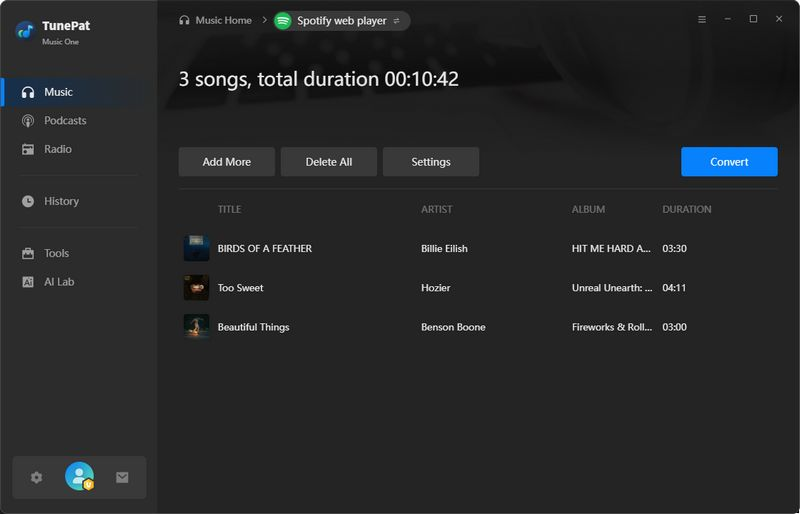
Step 1. Open TunePat Music One on your computer. Choose the streaming platform from the main interface, and sign in with your Premium account.
Step 2. Click the Settings icon in the left panel, and select your preferred output format, bitrate, sample rate, and output folder.
Step 3. Select a mode either music app or web player to add your desired songs. Once added, click the "+" button to import it into the conversion list.
Step 4. Click the "Convert" button. TunePat Music One will start processing and convert streaming music to MP3 or your selected format.
User feedback on TunePat Music One is mixed. We have collected some users review on TunePat Music One from Trustpilot.
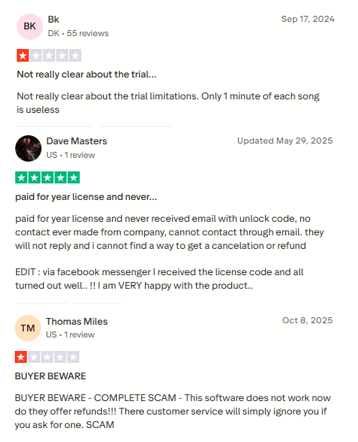
Occasional conversion failures and poor customer service can affect the overall experience. Additionally, some users feel that the pricing is slightly high and free trial is shorter and limited compared to similar tools. Overall, TunePat Music One is considered a decent streaming music converter, but it may not be the most efficient option available.
Pros of TunePat Music One
● Wide platform support - It supports multiple streaming platforms like Spotify, Apple Music, Amazon Music, Tidal, Deezer, YouTube Music, Line Music, Pandora, etc.
● Offers multiple output formats - Converts streaming music to MP3, AAC, WAV, FLAC, AIFF, and ALAC formats.
● Preserves ID3 tags and metadata - Retains song metadata including title, artist, album, and artwork for organized library management
● Built-in web player - No need to install separate streaming apps; browse and select music directly within the software
● Customizable Output Settings - Allows to customize the sample rate, bit rate, output folder, output file name, and more.
● Batch conversion supported - Download entire playlists or albums with one click, saving time and effort.
Cons of TunePat Music One
● Slow conversion speed - Although it claims up to 10X speed, actual performance can sometimes be slow, significantly dragging down efficiency.
● Low conversion stability - Unexpected errors may occur, especially when converting Apple Music tracks, leading to failed downloads.
● Pricing limitations - Unlike other brands, TunePat does not offer a flexible monthly plan, and users must pay at least $49.95 upfront for full access.
● Limited free trial features - Free version restricts conversions to short previews, making it difficult to fully test before purchasing.
● Poor customer service - Compared to competitors, support response times are slow, and technical issues often go unresolved for extended periods.
Given TunePat Music One's inconsistent performance, slow speeds, and customer service concerns, many users are seeking a more reliable best alternative to TunePat Music One. Here you meet UkeySoft MusicOne.
Similarly, UkeySoft MusicOne is an all-in-one music converter, designed to convert streaming music to MP3 from 7 major platforms: Spotify, Apple Music, Amazon Music, Deezer, YouTube Music, Tidal, and Pandora Music. Unlike TunePat, UkeySoft delivers consistently stable performance with a high success rate across all supported services. Its conversion engine operates at up to 16X faster speeds, which significantly boosts the conversion efficiency.
With a built-in web player, users can browse their streaming libraries directly within the application, select playlists, albums, or individual tracks, and initiate conversion in one program without switching between multiple music apps. The software also excels in music management, allowing you to customize output file names using ID3 tags and automatically organize tracks into folders by date, album, or artist.
UkeySoft offers 24/7 customer support, a modern, intuitive interface, and flexible pricing options ($65.95 - monthly, $99.95 - yearly, and $159.95 - lifetime). Its free trial allows to convert the first three minute of each song, so you can verify performance before committing.

As the above 2 programs are both professional all-in-one music converters. To help you decide, here's a side-by-side comparison of their standout features.
| TunePat Music One | UkeySoft MusicOne | |
| Supported Platforms | 12+ | 7+ |
| Streaming App Needed | Yes | No |
| Output Formats | MP3, AAC, WAV, FLAC, AIFF, ALAC | MP3, M4A, AAC, WAV, FLAC, AIFF |
| Output Quality | Good, up to 320kbps | Lossless, up to 640kbps |
| Download Speed | 10X | 16X faster, and 32X faster at max |
| Batch Conversion | Yes | Yes |
| ID3 Tags Preservation and Edition | Yes | Yes |
| Highlights | Toolbox | Built-in music player, music manager |
| Pricing | $49.95/3 month $99.90/year $259.90/lifetime |
$65.95/month $99.95/year $159.95/lifetime |
All in all, this article has provided you with a detailed review of TunePat Music One. TunePat Music One is a capable streaming music converter and recorder that allows users to record and convert streaming music to MP3 and other formats from multiple platforms. However, its slower speed, occasional instability, and poor customer service may not meet everyone's expectations.
For users looking for a simpler yet more efficient tool, UkeySoft MusicOne (All-in-One Music Converter) is the best alternative to TunePat Music One. It offers faster conversion, higher stability, built-in music players and music managers, and superior audio quality. You can test its performance for free right now!

Sorry the comment has been closed.

















Porducts
Solution
Copyright © 2026 UkeySoft Software Inc. All rights reserved.


 English
 Arabic
 Chinese (Simplified)
 Chinese (Traditional)
 Croatian
 Czech
Czech Danish
 Dutch
Dutch Estonian
 Finnish
 French
 German
 Greek
Greek Hebrew
 Hindi
Hindi Hungarian
 Indonesian
 Italian
 Japanese
 Kazakh
 Korean
 Malay
Malay Norwegian
 Polish
 Portuguese
 Romanian
 Russian
 Slovenian
 Spanish
 Swedish
 Thai
Thai Turkish
 Ukrainian
 Vietnamese










![7 Best FREE Apple Music Converters [2026 Updated]](https://www.ukeysoft.com/wp-content/uploads/2019/04/best-apple-music-converter.jpg)













































![Top 10 Christmas Songs to MP3 Download [Spotify]](https://www.ukeysoft.com/wp-content/uploads/2023/01/christmas-songs-to-mp3.jpg)


















































































































Comments are off!