 ✕
✕
✕
✕
By Justin SabrinaUpdated on July 27, 2026
Podcasts make it easy to enjoy news, education, interviews on the go. While most streaming platforms offer millions of podcast episodes, they often require a paid subscription or restrict offline downloads. The demand for free podcast downloaders is increasing among users. In this guide, we'll compare 5 best free podcast downloader tools and websites. We'll also show you the step-by-step guides on how to download podcasts for free, save entire podcast series to your PC, and listen anytime without an Internet connection.
CONTENTS
In this guide, we evaluated each podcast downloader tool using real-world podcast downloading scenarios. We reviewed these 5 best free podcast downloaders based on audio quality, download speed, supported sources, and overall performance to help users find a reliable podcast downloader for daily use.
This guide gives extra weight to download reliability and security, bulk downloads, audio quality, as most readers are looking for a long-term solution to download podcasts for offline listening, rather than a one-time download.
| Podcast Downloader | Supported Sources | Video Podcast Support | Audio Quality | Batch Download | Speed | Best For |
|---|---|---|---|---|---|---|
| UkeySoft All-in-One Music Converter | Spotify, Apple Music, Amazon Music, YouTube Music, Deezer, Pandora, TIDAL | ✔ | Lossless, up to 320kbps, 650kbps | ✔ | 16X | Downloading entire podcast series |
| Podbay.fm | Apple Podcasts | ✖ | 64-192kbps | ✖ | Medium | Online podcast downloads |
| PodcastMP3.com | Multiple podcast feeds | ✖ | 128-192kbps | ✖ | Normal | Podcast to MP3 downloads |
| Podcast Download RSS | RSS podcast feeds | ✖ | 128kbps or higher | ✖ | Slow | Downloading podcasts via RSS |
| gPodder | RSS, Apple Podcasts | ✔ (limited) | 64kbps to 96kbps, or 128kbps | ✔ (limited) | Normal | Open-source podcast management |
If you're looking for a professional and reliable Podcast Downloader to save podcasts permanently, UkeySoft All-in-One Music Converter is the top pick. The software works with multiple streaming platforms, including Spotify, Apple Music, Amazon Music, YouTube Music, Deezer, Pandora, and TIDAL. It allows both Free and Premium users to download podcast episodes for offline listening. With it, you can download podcast MP3 files with 320kbps bitrate, or customize other formats and audio quality freely. What's more, UkeySoft also features a a built-in music player and manager, making it easy to play and organize your favorite episodes for permanent offline playback.
More Features of UkeySoft All-in-One Music Converter:
Step 1. Log In to Your Streaming Platform Account
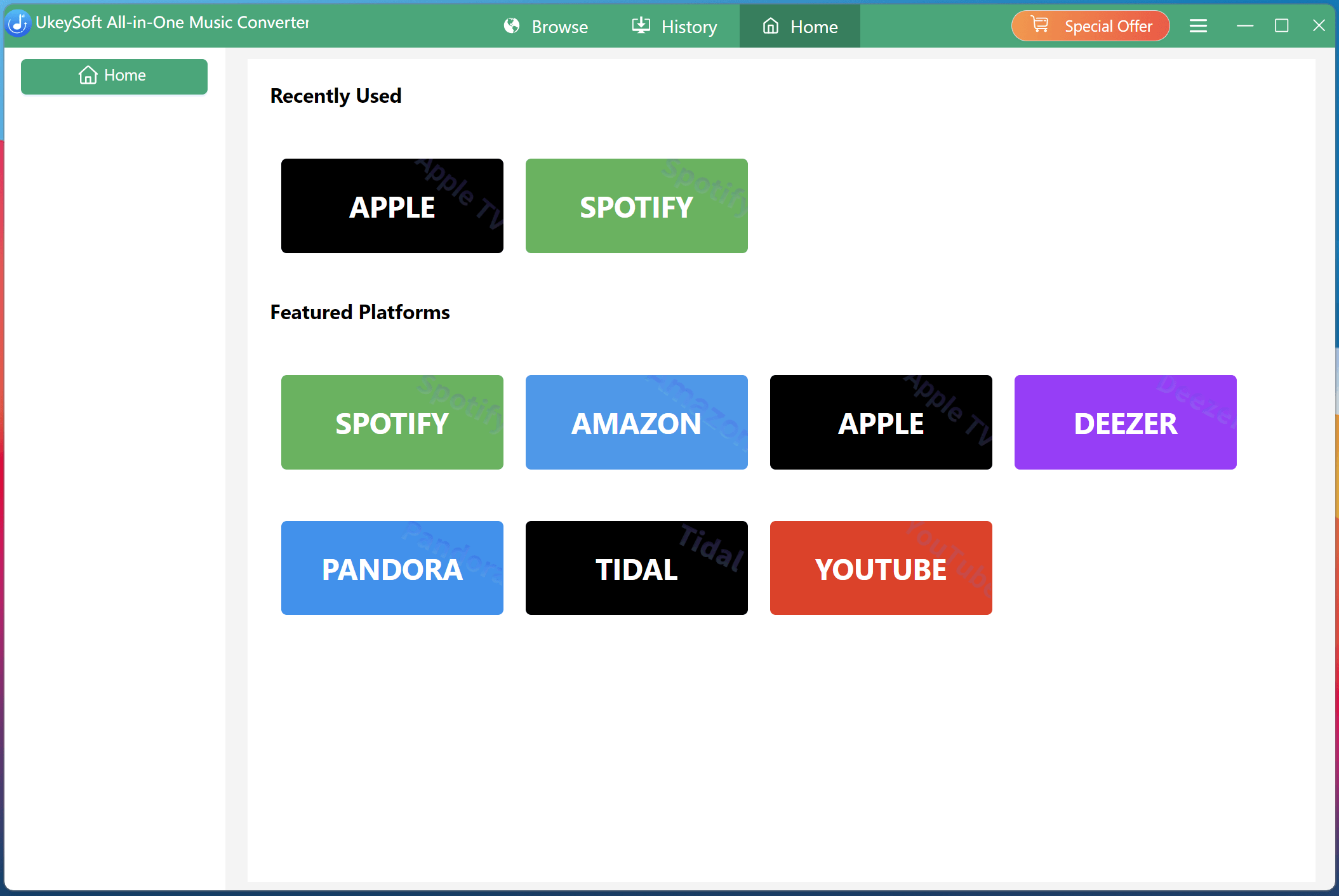
Download, install, and launch UkeySoft All-in-One Music Converter on your computer, and select your preferred streaming platform from the main interface. Spotify offers lots of podcast titles, here we choose Spotify.
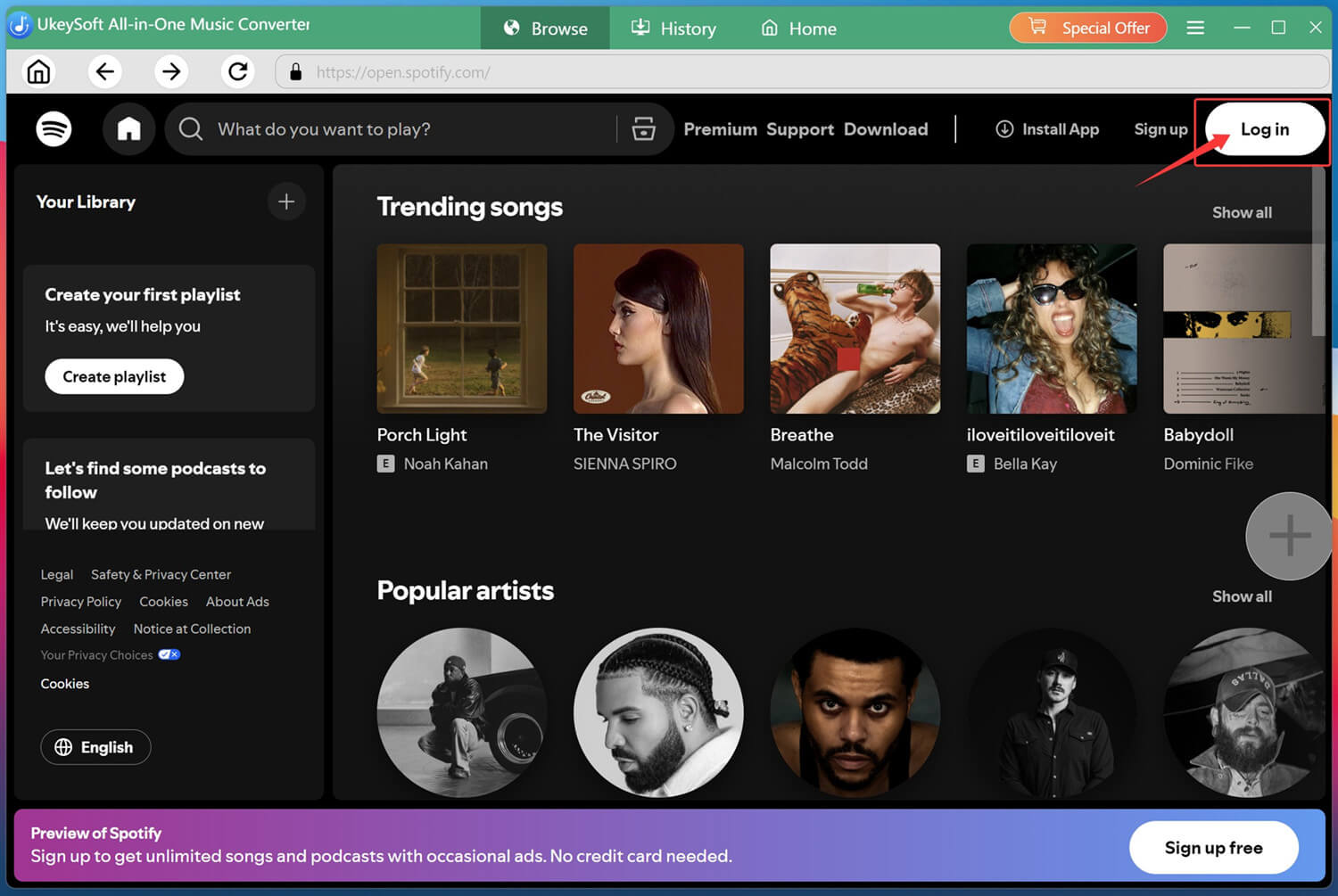
Sign in with your Spotify Free or Premium account through the built-in official Spotify web player to access your favorite podcasts directly inside the software.
Step 2. Configure Output Settings
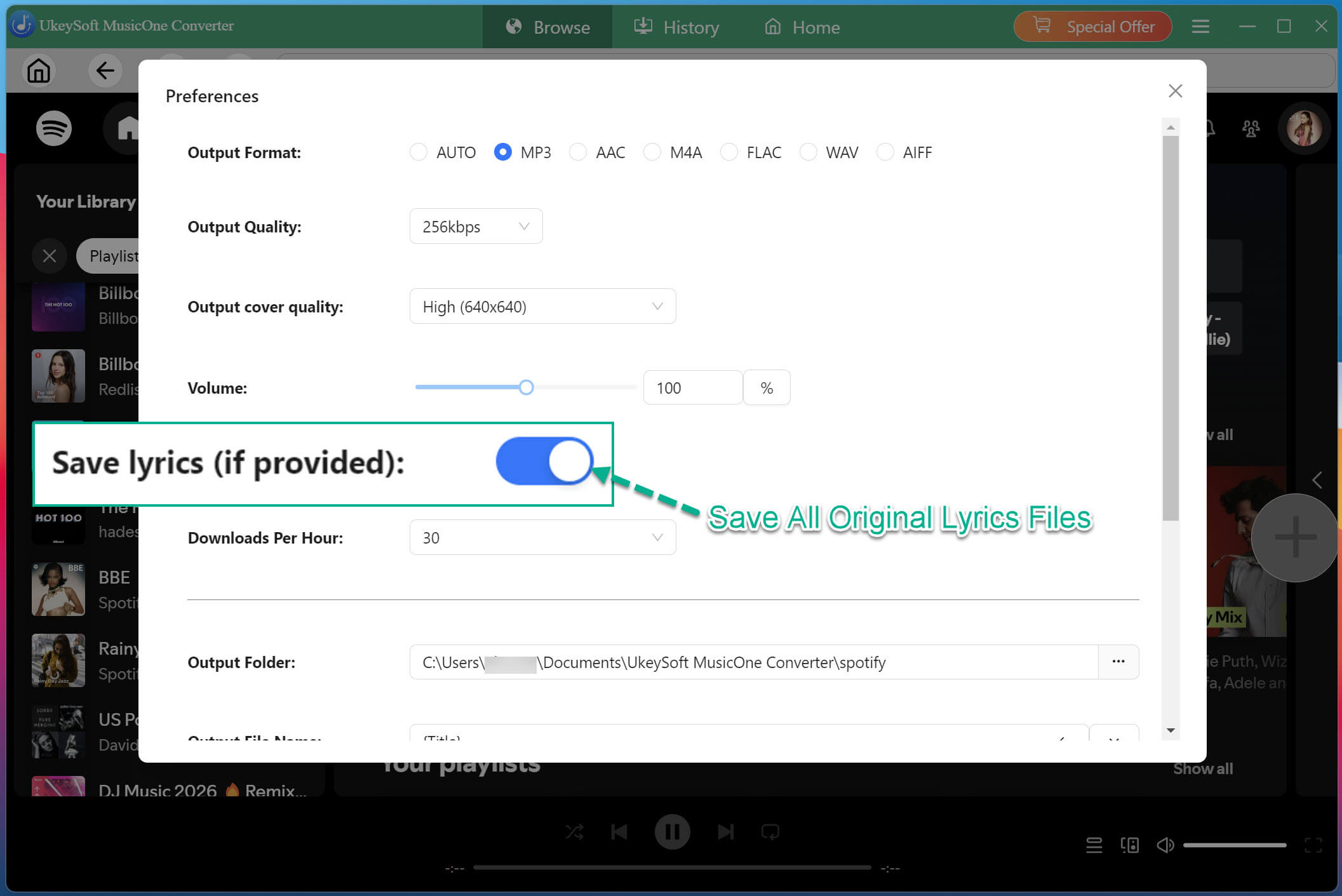
Find the "Menu" icon and click it, select "Preferences", then choose MP3 as your output format and set your preferred audio quality (up to 320kbps) and output folder location. You can also customize the output file name, enable "Save lyrics" option.
Step 3. Open and Add Spotify Podcasts
Browse the platform's podcast section, or search for your desired podcast by name.
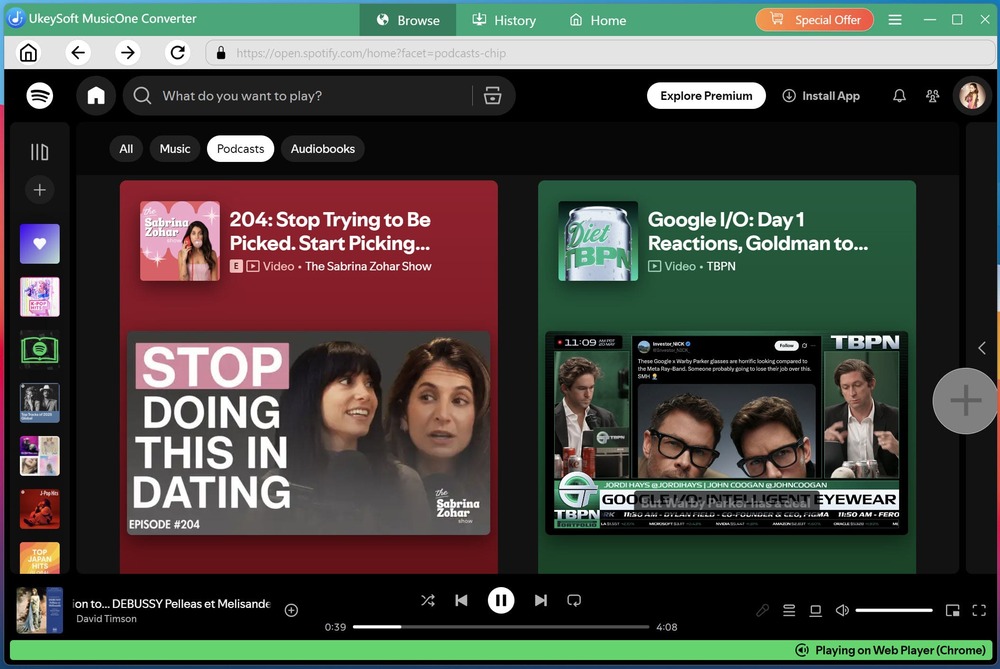
Open your desired podcast title, click the "+" icon to add the podcast to your conversion list.
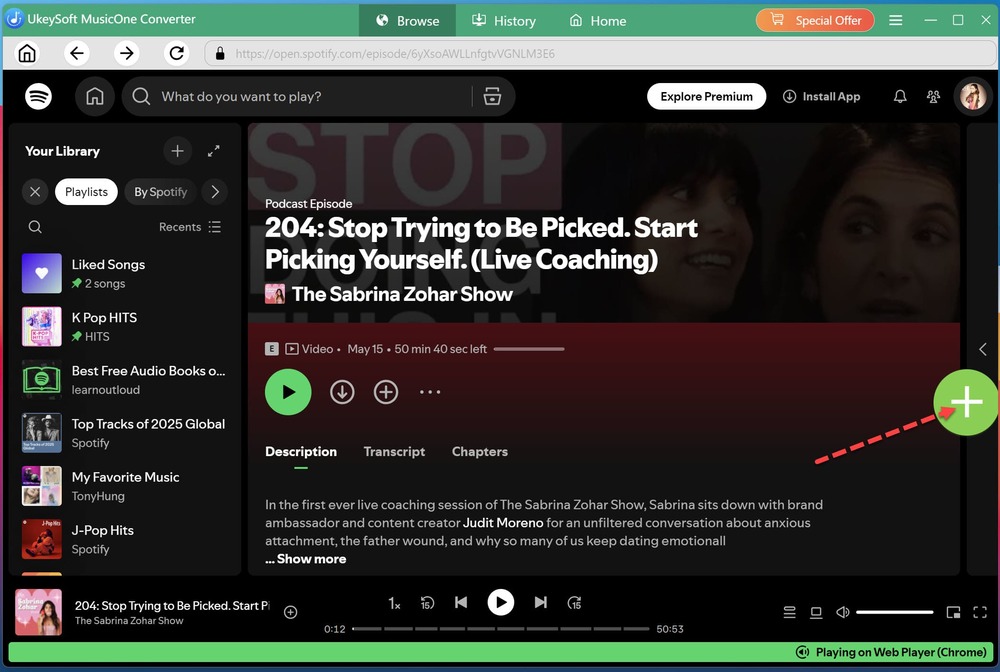
Step 4. Choose Desired Spotify Podcasts
After UkeySoft scans the podcast page, a window will appear showing all available episodes. Choose the specific episodes you wish to download.
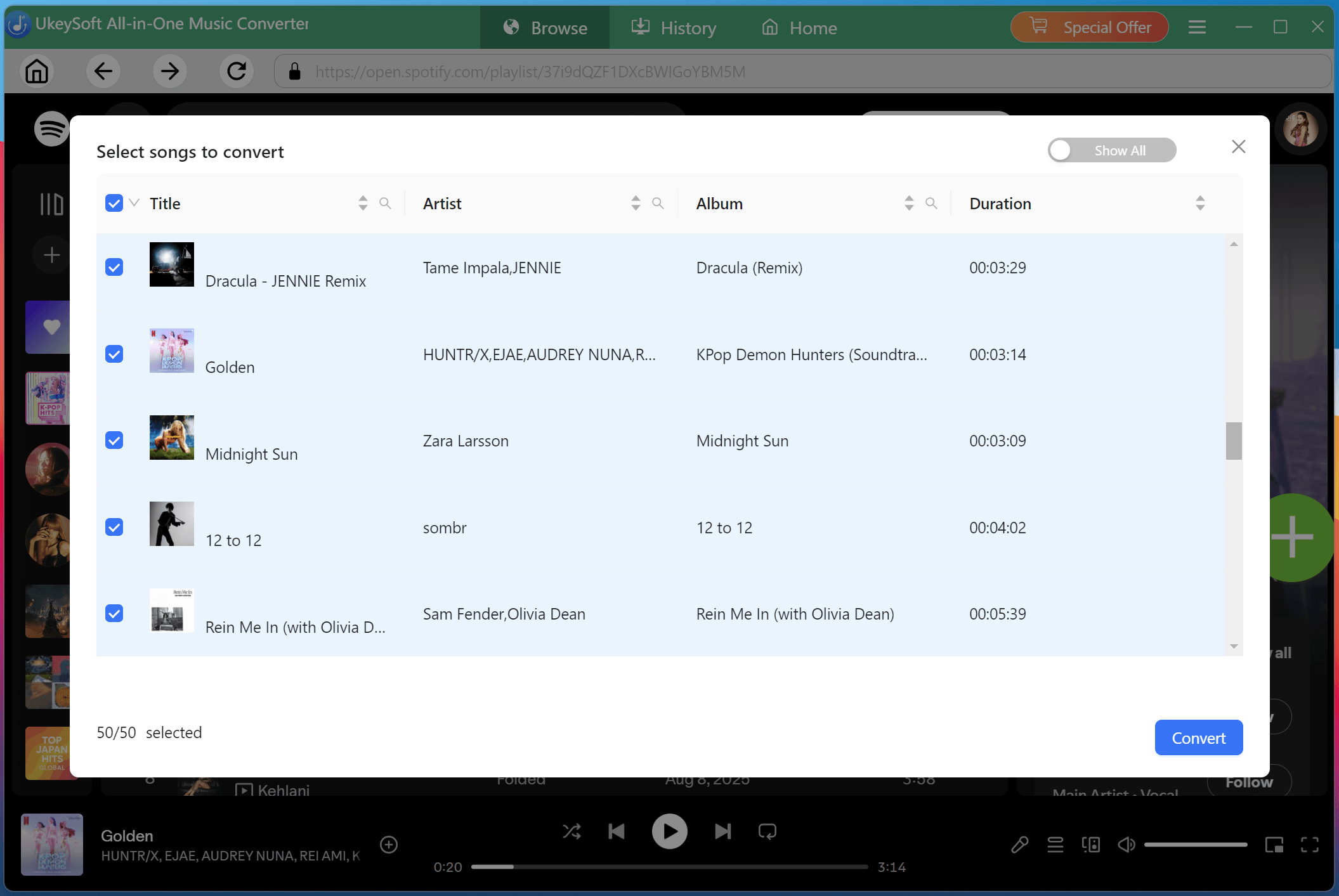
Step 5. Download Podcasts to MP3 from Spotify Free
Click the "Convert" button to start downloading. UkeySoft will begin converting your selected podcast episodes to MP3 format at high speed, preserving the original audio quality throughout the process.
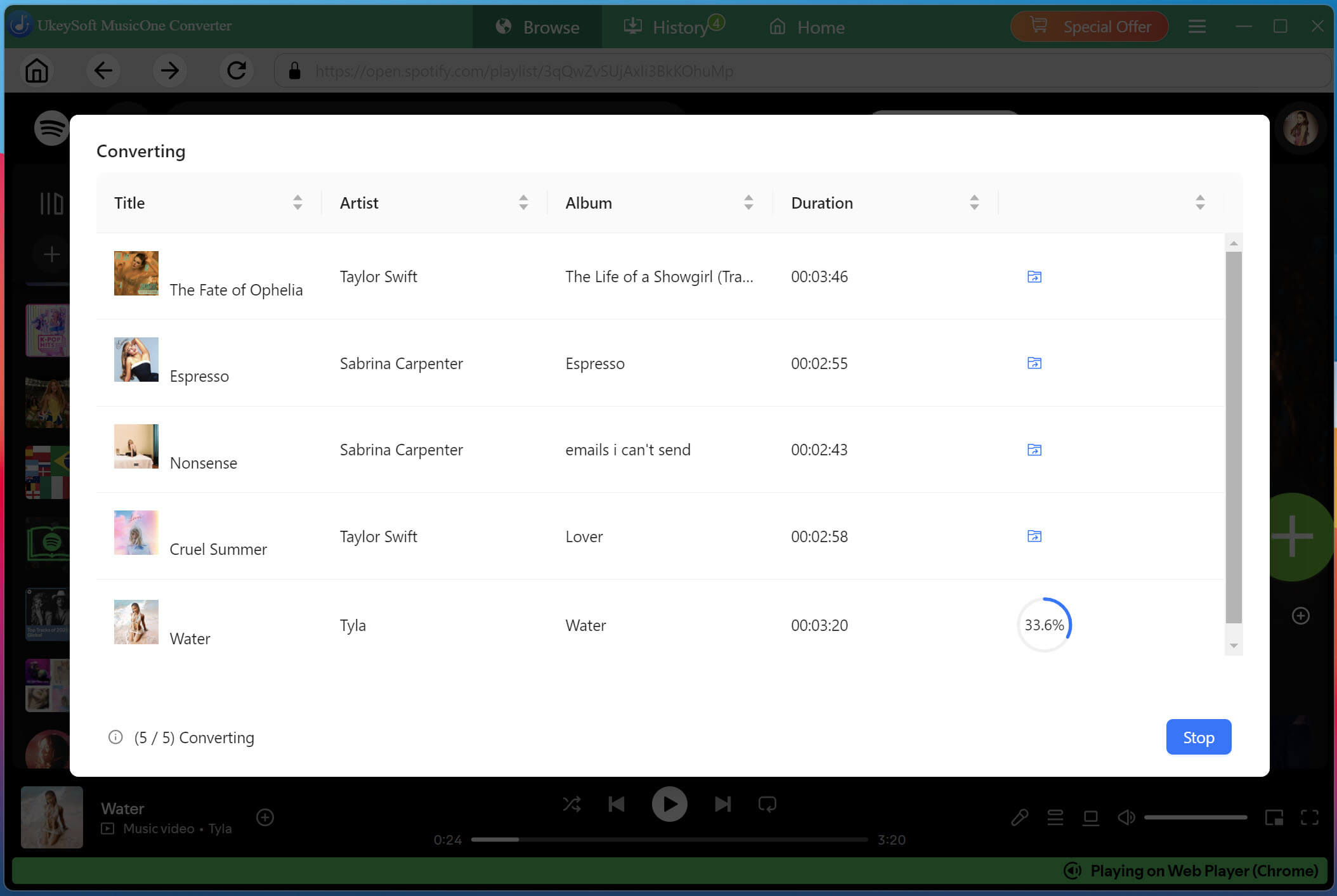
Step 6. Listen to Spotify Podcasts Offline
Once the conversion is complete, click the "History" section to listen to the downloaded Spotify podcasts offline with the built-in music player! Also, you may navigate directly to your output folder to access all your downloaded podcast episodes in high-quality MP3 format!
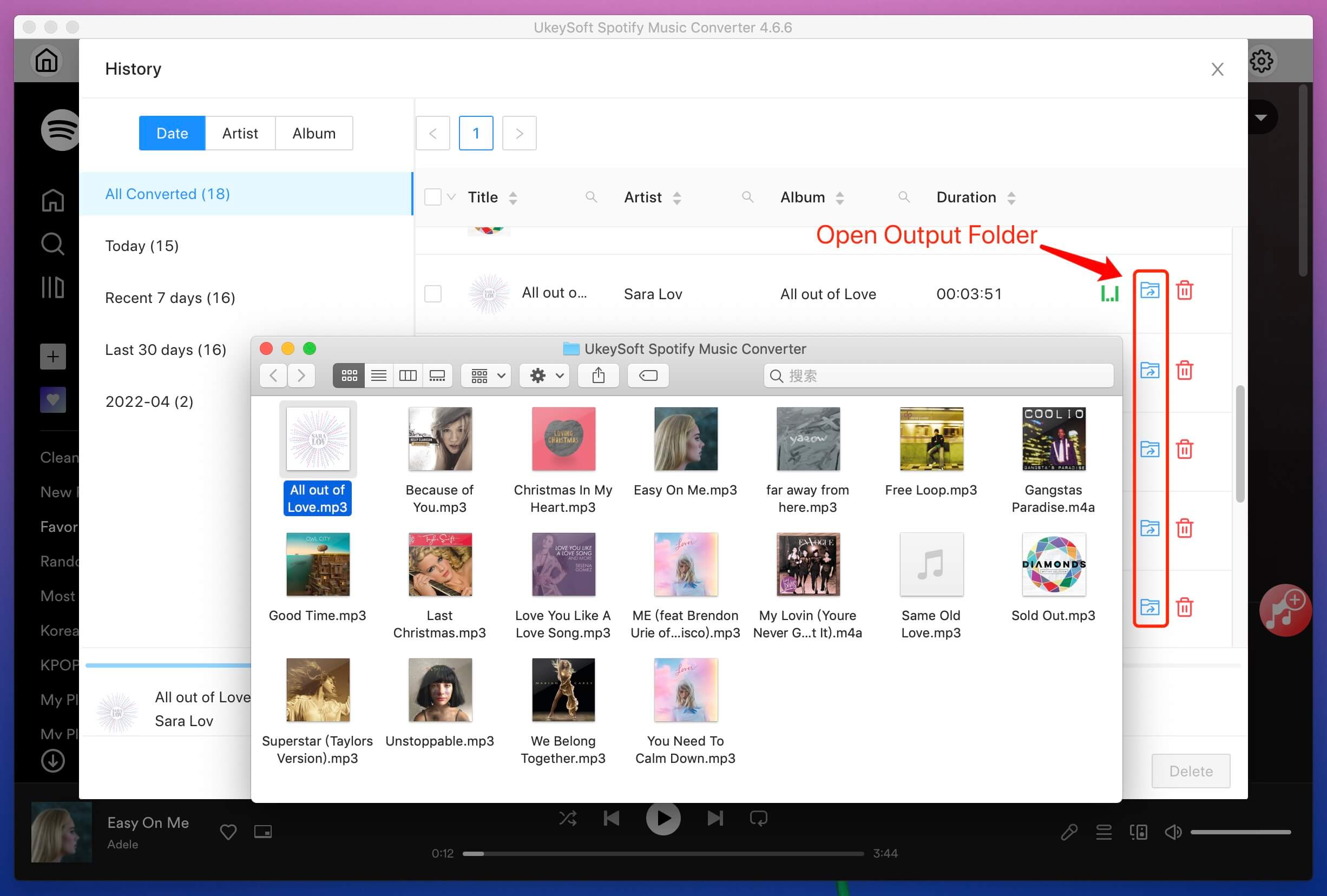
If you don't want to install any third-party software, these free web-based podcast download sites are excellent alternatives. They allow you to download free podcasts directly from your browser without any installation.
Website: https://podbay.fm/
Podbay.fm is one of the most popular free podcast downloader websites that allows you to stream and download podcast episodes online. The platform features a clean, modern interface and indexes large number of free podcast episodes from Apple Podcasts. You can listen to podcasts online or download podcasts as MP3 files directly from its browser to your device.
However, the output quality ranges from 64 kbps to 192 kbps, with no customization options, and it doesn't support batch downloads. If you want to download high-quality podcasts in bulks, it's advisable to try UkeySoft All-In-One Music Converter.
How to Download MP3 Podcasts from Podbay.fm
Step 1. Visit Podbay.fm in your web browser, create a new account and sign in, or skip sign-in.
Step 2. Browse the library or search for your favorite podcast using the search box.
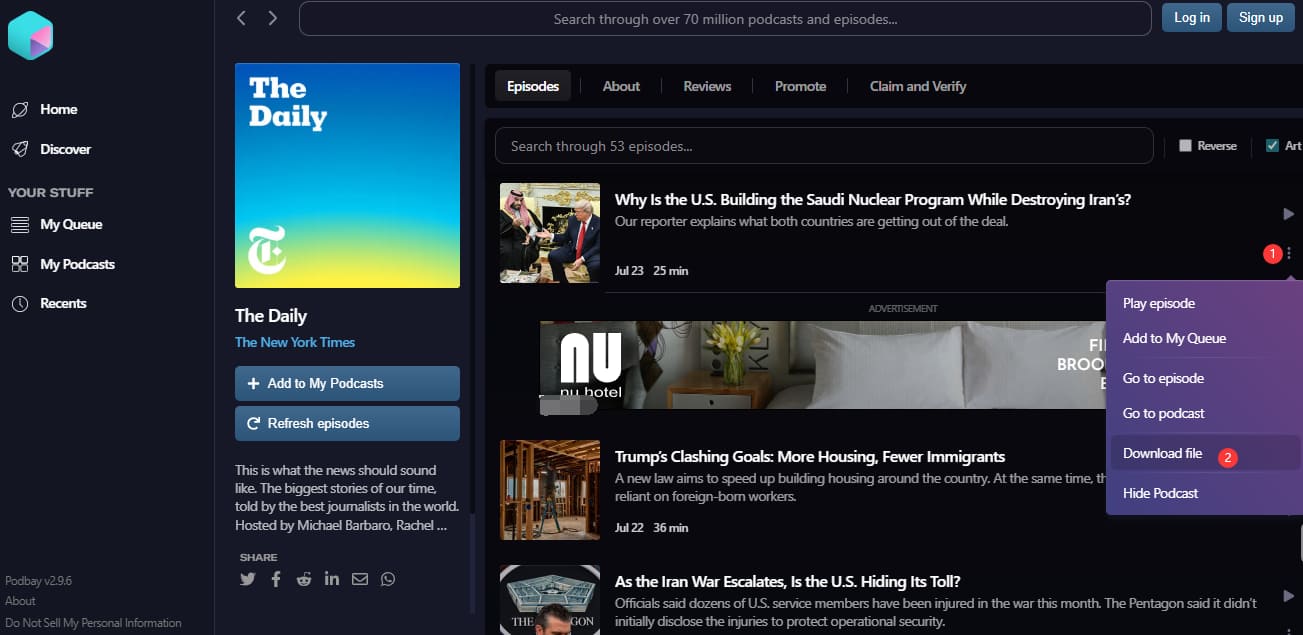
Step 3. Open the podcast and click the three dots, select "Download file".
Step 4. It will navigate to a new page. Click the three dots and select the "Download" button to save the episode as an MP3 file.
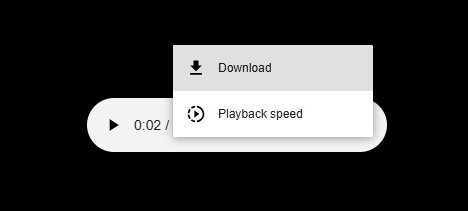
Step 4. Click the Download button to save the episode as an MP3 file.
Website: https://podcastmp3.com/
If you're looking for a simple Podcast to MP3 downloader, PodcastMP3.com is a good option. This web-based service lets users search for podcasts and download podcast episodes from popular streaming platforms like Spotify, Apple Podcasts, Pocket Casts, and Overcast. Simply paste the podcast link into the website, and it will analyze it and provide a downloadable MP3 file. The catch? Audio is capped at standard 128-192kbps MP3, no high-fidelity or format options.
How to Download Podcasts to MP3 For Free Using PodcastMP3.com
Step 1. Open the PodcastMP3.com website in your browser.
Step 2. Copy the URL of the podcast episode you want to download from your preferred platform.
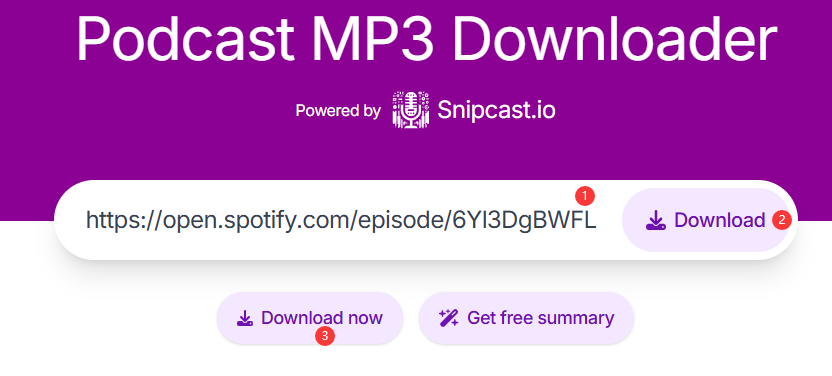
Step 3. Paste the URL into the input field on PodcastMP3.com, click "Download" button.
Step 4. Click "Download Now". In the new page, click the three dots, and choose "Download" button to save the episode as MP3 file.
Website: https://podcastdownloadrss.cn/
If you want to download podcast episodes directly from RSS feeds, please turn to Podcast Download RSS. This simple web-based tool enables you to download episodes without needing a dedicated podcast app. Instead of searching a podcast directory, simply paste a Spotify, Apple Podcasts, or RSS feed link to view all available episodes, then select and download the podcast episodes you need. It is a convenient solution for users who already follow podcasts through RSS subscriptions.
Despite its convenience, the platform's reliability could be improved. In our tests, 6 out of 10 links failed to resolve, while 3 got stuck during the download process. This is likely due to the server's occasional instability.
How to Use Podcast Download RSS
Step 1. Open your web browser and go to the website of Podcast Download RSS.
Step 2. Copy the podcast's RSS feed URL of your desired podcast.
Step 3. Paste the RSS URL into the search box of this online tool.

Step 4. Click "Load Podcast", the tool will display all available episodes from the feed.
Step 5. Scroll download, choose the podcast episode you want.
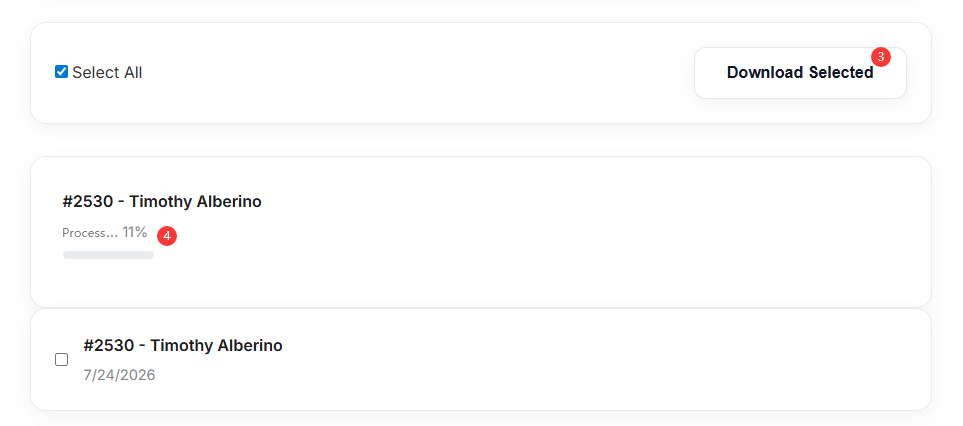
Step 6. Click "Download Selected" to save it.
Website: https://gpodder.github.io/
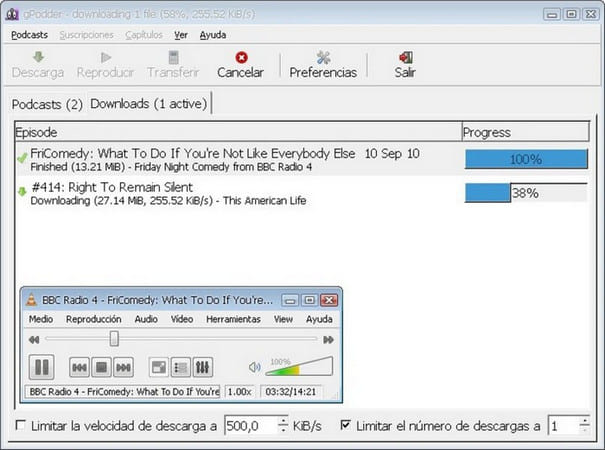
gPodder is a free, open-source podcast client, available for Windows, macOS, and Linux. This free podcast downloader allows users to subscribe to podcast feeds, automatically download new episodes, organize podcast libraries, and synchronize downloads across devices such as iPods. But unlike above browser-based tools with simple copy & paste methods, gPodder requires some technical knowledge to set up feeds. If you regularly listen to podcasts and prefer a simple yet powerful podcast downloader, UkeySoft All-In-One Music Converter is a better option.
How to Download Podcasts for Free with gPodder
Step 1. Install and launch gPodder on your computer.
Step 2. Click "Add Podcast" to add a podcast by searching or pasting its RSS feed.
Step 3. Subscribe to the podcast by clicking "Subscribe".
Step 4. gPodder will automatically check for new episodes.
Step 5. Select the episodes you want. Click "Download" next to any episode to save it locally.
Is There a Way to Download Podcasts for Free?
Yes. Some podcast platforms allow you to download free podcasts for offline listening. For example, Spotify offer limited free downloads. Also, you may choose a free online website to save podcast episodes directly from your browser. Check the best free podcast download sites listed above.
What Are the Best Sites to Download Podcasts for Free Easily?
Some of the best free podcast downloaders available in 2026 include Podbay.fm, PodcastMP3.com, Podcast Download RSS, etc. For a more powerful solution that works with streaming platforms, desktop software like UkeySoft All-in-One Music Converter is the top choice.
How Do I Download Full Podcasts (All Episodes) Offline?
Most online free podcast downloaders only let you download a podcast episode at a time. To download all podcast episodes offline, you can use a professional desktop software - UkeySoft All-in-One Music Converter. It supports to batch download all episodes from a podcast feed at once.
How Can I Download All Podcast Episodes to an External Hard Drive?
First, connect your external hard drive to your computer. Launch UkeySoft All-in-One Music Converter and sign in your account. Add the entire podcast to the conversion list. Modify MP3 as the output format and set the external hard drive as the output path. Click "Convert" button. After that, you can backup your podcast MP3 files in your external hard drive.
In short, this article looked at the 5 free podcast downloaders for downloading podcasts to listen offline. The best podcast downloader depends on your priorities. However, if you don't want to bother with ads and pop-ups, UkeySoft All-in-One Music Converter is the ultimate Podcast to MP3 downloader. It enables you to batch-download podcast episodes from multiple platforms at 16X faster speed. The downloaded podcasts will perfectly kept with original sound quality, ID3 tags, and metadata, so you can enjoy them offline anytime, anywhere!

Sorry the comment has been closed.






Porducts
Solution
Copyright © 2026 UkeySoft Software Inc. All rights reserved.


 English
 Arabic
 Chinese (Simplified)
 Chinese (Traditional)
 Croatian
 Czech
Czech Danish
 Dutch
Dutch Estonian
 Finnish
 French
 German
 Greek
Greek Hebrew
 Hindi
Hindi Hungarian
 Indonesian
 Italian
 Japanese
 Kazakh
 Korean
 Malay
Malay Norwegian
 Polish
 Portuguese
 Romanian
 Russian
 Slovenian
 Spanish
 Swedish
 Thai
Thai Turkish
 Ukrainian
 Vietnamese



![7 Best FREE Apple Music Converters [2026 Updated]](https://www.ukeysoft.com/wp-content/uploads/2019/04/best-apple-music-converter.jpg)
























![Top 10 Christmas Songs to MP3 Download [Spotify]](https://www.ukeysoft.com/wp-content/uploads/2023/01/christmas-songs-to-mp3.jpg)







































Comments are off!