 ✕
✕
✕
✕
By Li ZhangUpdated on December 25, 2025
💡 Quick Answer:
Amazon Music is one of the most popular streaming platforms worldwide, offering millions of songs, curated playlists, podcasts, and exclusive content. Similar to other streaming music services, Amazon Music also offers a free trial. If you are new to Amazon Music Unlimited, you are able to get Amazon Music Unlimited for free for 3 months. With Amazon Music free trial, users can enjoy ad-free listening, offline downloads, and high-quality audio, etc.
What will happen after Amazon Music subscription ends? Is it possible to keep Amazon Music playable after the free trial? Of course! No matter whether you are a new user to Amazon Music or have been its subscriber for a while, today's blog is going to introduce you two easy ways to download Amazon Music to MP3 and keep them offline forever.
CONTENTS
Amazon Music keeps all your songs during your free trial or subscription. But note that Amazon Music won't remove your added or downloaded songs immediately when your free trial expires. Instead, it will keep them until the end of the billing period. That is to say, you will retain full access until the trial end date.
After that, you will no longer be able to access the membership features such as download offline, ad-free streaming, etc. Your membership will automatically be downgraded to the Amazon Music Free version. This means you can only listen to ad-supported music online with an Internet connection.
Although Amazon Music subscribers are granted to download music offline, you can't keep them playable after free trial or subscription ends. These downloaded Amazon songs come with DRM protection, they are just cache files. Thankfully, there are many Amazon Music downloader tools that can help you download Amazon Music as local MP3 files for forever keeping. Here we highly recommend UkeySoft Amazon Music Converter.
Most Amazon Music converters or downloaders require an active Amazon Music subscription to unlock its download feature. However, if you are an Amazon Music Free user, you can still use our UkeySoft Amazon Music Converter, as it supports all tiers of Amazon Music accounts. This tool empowers users to download Amazon songs/playlists/albums/podcasts from Amazon Music Free and Amazon Music Unlimited and Prime Music!
It can convert Amazon Music tracks to universal audio formats such as MP3, M4A, FLAC, WAV, AAC, or AIFF, while preserving lossless output audio quality and ID3 tags. Once converted, your Amazon Music files can be stored and played permanently, even your free trial or subscription ends. You can listen to Amazon Music offline on any device and player, anytime, anywhere!
Features of UKeySoft Amazon Music Converter
Step 1. Sign in Amazon Account
Install, run UKeySoft Amazon Music Converter on the windows or Mac, sign in your Amazon account by clicking “Sign In” button.
Step 2. Setting Output Format
M4A is the default output format, here you can choose other audio format for output audio file, like MP3/AAC/WAV/FLAC/AIFF. Other parameter are also allowed to setting here, like Output Quality, Output Folder, Output File Name.
Step 3. Add Songs, Albums or Playlists
Select the songs, albums or playlists which you want to convert and download from Amazon. Open an album/playlist and tap the red Add button suspended on the right side, you would see the list of songs.
All songs in the playlist will be added by default. Remove the songs that you don't need.
Step 4. Convert Amazon Music to Local MP3 Files
Lastly, simply click “Convert” to begin converting the selected songs to local files. All output music files will be save with its lossless HD audio quality and ID3 tags. Now you can play your loved songs after free trial.
Step 5. Keep Amazon Music Forever
After conversion is complete, click the “History” icon. You can open the output folder directly from there. You will now find all your selected Amazon Music tracks as standard MP3 files. You can keep these Amazon Music files playable after free trial ends!
Another official way to keep Amazon Music playable after the free trial is to purchase Amazon Music songs or albums outright. Unlike Amazon Music Unlimited or Prime Music streaming tracks, purchased Amazon Music songs and albums are DRM-free and can be downloaded as local MP3 audio files. Once purchased, these songs belong to you permanently and remain playable even after you cancel your Amazon Music subscription.
How to Purchase and Download Amazon Music Songs Permanently
Step 1. Visit Amazon Music Store, search for the song or album you want to keep permanently.
Step 2. Click Buy Song or Buy Album. The purchase will be charged to your Amazon account, and the music will be added to your Music Library.
Step 3. After purchase, open Amazon Music Web Player or desktop app.
Step 4. Go to Library > Purchased. Select the songs or albums, click "Download" button.
Once downloaded, purchased Amazon Music files are saved locally on your computer. You can then burn Amazon Music to CD, or transfer Amazon Music to MP3 player, USB drive, and other players and devices!
How to Get a Free Trial on Amazon Music?
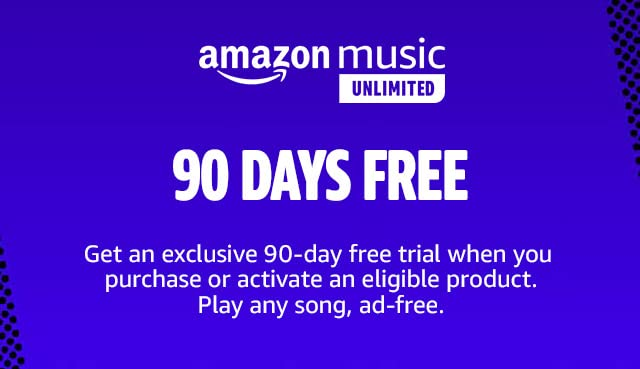
To get a free trial on Amazon Music Unlimited, you can visit its official page, click "Try it free", click "Sigh-up and pay" button, choose Individual plan. Then enter your information and confirm the payment. After 3-months free trial ends, you need to pay for $10.99 per month.
How do I Cancel Amazon Music before My Free Trial Ends?
Normally, you absolutely will be charged for Amazon Music if you don't cancel your free trial at least 24 hours before it ends. To cancel Amazon Music Unlimited subscription:
1. Go to Your Amazon Account (visit: www.amazon.com/your-account).
2. Scroll download to find the "Memberships & Subscriptions" and click "Music Unlimited".
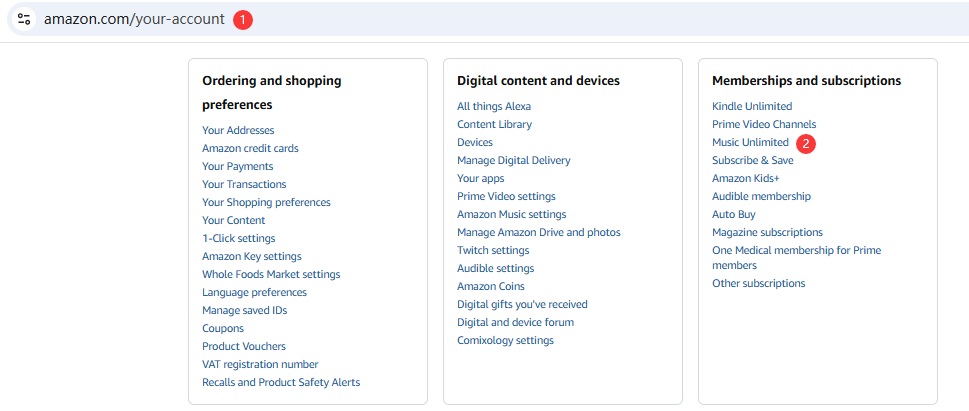
3. Click "Cancel Subscription" and follow the on-screen prompts.
Can I Keep Amazon Music after Free Trial?
Officially, no. But with the help of UkeySoft Amazon Music Converter, you still can listen to your Amazon Music library after free trial or subscription. It enables you to download and convert Amazon Music to MP3 or other formats. Thus, you can keep Amazon Music playable forever.
Above, you've got the solutions to download and keep Amazon Music playable after free trial. Using UkeySoft Amazon Music Converter enables you to keep Amazon Music playable after free trial. You can easily download Amazon Music tracks/albums/playlists/podcasts to your computer with a Free account, and convert them into MP3, WAV, FLAC or other formats in batches. Even after your free trial or subscription ends, you can also enjoy Amazon Music in more flexible ways offline! Now try the software and build your local music library!

Prompt: you need to log in before you can comment.
No account yet. Please click here to register.























Porducts
Solution
Copyright © 2026 UkeySoft Software Inc. All rights reserved.


 English
 Arabic
 Chinese (Simplified)
 Chinese (Traditional)
 Croatian
 Czech
Czech Danish
 Dutch
Dutch Estonian
 Finnish
 French
 German
 Greek
Greek Hebrew
 Hindi
Hindi Hungarian
 Indonesian
 Italian
 Japanese
 Kazakh
 Korean
 Malay
Malay Norwegian
 Polish
 Portuguese
 Romanian
 Russian
 Slovenian
 Spanish
 Swedish
 Thai
Thai Turkish
 Ukrainian
 Vietnamese










![7 Best FREE Apple Music Converters [2026 Updated]](https://www.ukeysoft.com/wp-content/uploads/2019/04/best-apple-music-converter.jpg)













































![Top 10 Christmas Songs to MP3 Download [Spotify]](https://www.ukeysoft.com/wp-content/uploads/2023/01/christmas-songs-to-mp3.jpg)












































































































No comment yet. Say something...