 ✕
✕
✕
✕
By Justin SabrinaUpdated on December 30, 2025
"How do I transfer playlists from Deezer to Spotify" - from Spotify Community
Switching music streaming platforms has become increasingly common. Both Deezer and Spotify are famous streaming music platforms with a large music library. However, many users plan to move from Deezer to Spotify because of Spotify's smarter recommendations, larger social features, better podcast ecosystem, and wider device compatibility.
Can you transfer Deezer playlists to Spotify? Of course! Switching platforms doesn't mean you will lose years of carefully curated playlists. In this guide, we will share three effective methods to help you move Deezer playlists to Spotify smoothly without losing tracks, metadata, or playback flexibility.
CONTENTS
When trying to move Deezer tracks or playlists to Spotify, you will find it a difficult task. In fact, both streaming music services come with DRM protection. Even if you can download songs from Deezer/Spotify on your mobile or computer, you are not allow to take any song out from its app. The downloaded songs are just cache files. They cannot be read by other music apps/platforms.
To transfer Deezer music to Spotify, fortunately, you can ask help from the third-party tools. Both of them allow you to upload MP3s for local media playback. To import Deezer tracks to Spotify, you need to download and save Deezer music as local MP3 files. Keep reading.
Many people are looking forward to converting Deezer playlist for Spotify. The first way we are going to introduce is to download Deezer playlists to local MP3 files on your computer first, and then import them to Spotify desktop app. UkeySoft Deezer Music Converter is born to help you download and convert Deezer songs, playlists to MP3 files.
UkeySoft Deezer Music Converter (Windows & Mac) is able to convert Deezer songs, albums, playlists, podcasts to MP3, M4A, AAC, FLAC, WAV, and AIFF popular audio formats at 10X higher speed. Meanwhile, it will preserve the original music quality as well as ID3 tags. After which, you can not only transfer Deezer songs to Spotify, but also other music platforms, such as Apple Music, iTunes, Tidal, Amazon Music, YouTube Music, Pandora, SoundCloud, etc.
Highlights: UkeySoft integrates a built-in Deezer web player, allowing you to log in securely and access your Deezer library directly inside the software. You can add entire playlists, albums, or artists with one click and convert them in batch mode, saving hours of work.
Explore More Features of UkeySoft Deezer Music Converter:
● Download All Contents: This tool supports to download music tracks, albums, podcasts and playlists from Deezer to computer.
● Built-in Deezer Web Player: It lets you search, stream, choose and convert Deezer songs without the Deezer app.
● Offers Multiple Formats: Convert Deezer songs & playlists to common MP3, M4A, AAC, WAV, FLAC and AIFF.
● Original Sound Quality: It enables users to download and convert Deezer music library witht lossless sound quality.
● Full ID3 Tags: It will keep the orginal ID3 tags info, like cover, title, album, artwork, genre, etc.
● High-efficiency Speed: It works at up to 10X faster speed and also supports batch conversion.
● Customizable Parameters: Adjust the output quality, organize output file name, etc.
● Music Management: Sort output Deezer songs by date, artist, or album.
Step 1. Install and Launch UkeySoft Deezer Music Converter
Click the "Download" button above, get the UkeySoft Deezer Music Converter downloaded on your computer. Launch the program and log in to your Deezer account.
Step 2. Customize the Output Settings
Hit the "Gear" icon at the upper right corner. A setting window will pop up, choose MP3 format for Deezer songs. By the way, you may also set the output quality, output folder, output file name, language and more freely.
Step 3. Import Deezer Music Tracks to Converting List
Once setup is complete, open the playlists you want to transfer from Deezer to Spotify. Click the "+" icon in the right side to load the items.
UkeySoft program will select all songs in the playlist automatically. Check and confirm the songs you need.
Step 4. Start Converting Deezer Songs to MP3
Click on the "Convert" button to begin to export Deezer songs as local MP3 files on your computer.
Step 5. Get the Output Deezer Songs
When finished, you can check the converted Deezer songs in MP3 format by clicking the "History" icon.
Tap on the "blue folder" icon next to the song, and you will quickly locate the output folder and get the local MP3 files.
Step 6. Import Local Deezer MP3 Files to Spotify
- Open the Spotify desktop app, and sign with your account.
- Click on your profile name and select "Settings".
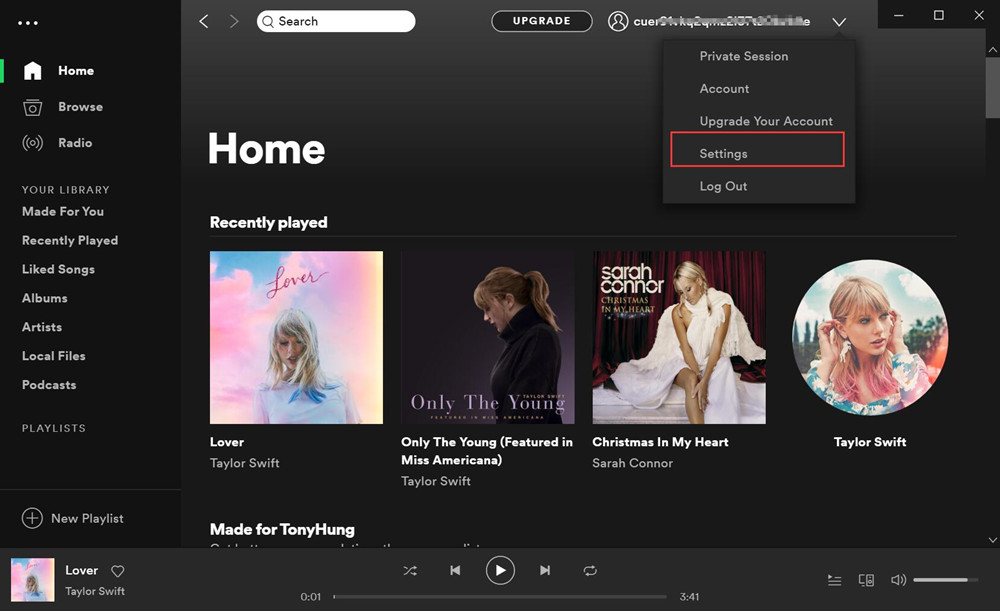
- Scroll down to "Local Files" and choose "Add Source".
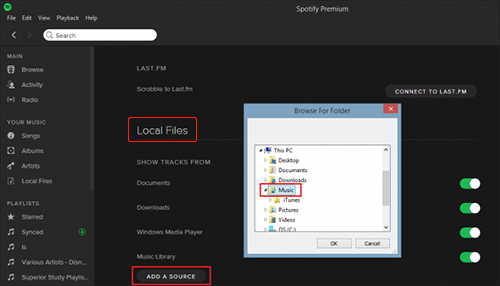
- Select the converted Deezer MP3 music files from local folder and upload it.
Now you can play Deezer music on Spotify!
To transfer playlist from Deezer to Spotify, you can also try the music transfer tools online, such as Soundiiz, TunemyMusic, etc. These online tools allows you to transfer songs, albums or playlists between various music streaming services. Here we will take Soundiiz as an example. Soundiiz is a popular web-based service that supports multiple platforms and works directly in the browser. It helps users transfer Deezer playlists to Spotify by connecting both accounts. Here's how to use it:

Step 1. Open Soundiiz on browser, click "Start Now", sign up with your Google account.
Step 2. Select the transfer tool "Platform to Platform".
Step 3. Connect your Deezer and Spotify accounts, select Deezer in the Source tab, and select Spotify as destination.
Step 4. Select all the playlists you want to move to Spotify.
Step 5. Confirm your selection and start transferring!
Cons:
● This online transfer tool is not free. A Premium license is required.
● It just helps you move Deezer playlists to Spotify, you don't actually own the songs.
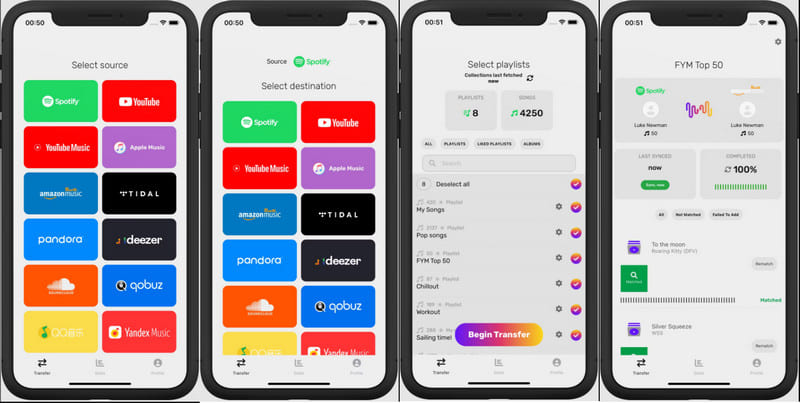
Some people prefer to listen to music with their portable smartphone. FreeYourMusic is a mobile app available on iOS and Android that helps users move Deezer playlists to Spotify directly from their phones. The app connects streaming accounts and transfers playlists using track matching. It's user-friendly and suitable for mobile users who don't want to use a computer.
However, similar to above online music transfer service, FreeYourMusic does not download audio files. It only recreates playlists using Spotify's library. To enjoy its advanced transfers, you are required a paid version, and offline listening still depends on Spotify Premium. So, using the UkeySoft Deezer Music Converter to convert Deezer playlist to MP3 for importing to Spotify would be the best option.
Step 1. Install FreeYourMusic app on your phone.
Step 2. Open FreeYourMusic app and tap "Transfer" tab.
Step 3. Select Deezer as source, and select Spotify as destination.
Step 4. Log in to both accounts. Choose playlists and click "Begin Transfer".
When it comes to Deezer and Spotify, some people prefer Spotify. And they also wish to transfer Spotify playlist to Deeezer. Here we also bring another powerful tool - UkeySoft Spotify Music Converter. It is an all-round Spotify music downloader and converter for users. With it, both Spotify Free and Premium subscribers are able to download and convert Spotify songs, playlists & podcasts to plain MP3, M4A, FLAC, AAC, WAV, AIFF audios.
This smart tool also comes with the built-in Spotify web player and music player. You can convert your Spotify music library without having the Spotify app installed. It is also famous for its lossless output quality, up to 320kbps. Only in a few steps, you can get and save high-quality Spotify MP3 music files on your local drive. Thus, you could import Spotify MP3 songs to Deezer or other music platforms with ease.
In short, this article shares you with three simple methods to transfer playlist from Deezer to Spotify. If your goal is simply to recreate playlists, online tools and mobile apps can help. However, if you want to truly transfer Deezer playlists to Spotify, keep your music permanently, and avoid subscription or matching issues, converting Deezer playlists into MP3 files is the best approach. Compared to online transfer tools and apps, UkeySoft Deezer Music Converter offers a more flexible and more awesome to download and convert Deezer playlists to MP3 files. Thus, users can transfer Deezer songs to any music platforms, apps, players and devices, including the Deezer app. Now give it a try!

Prompt: you need to log in before you can comment.
No account yet. Please click here to register.
























Porducts
Solution
Copyright © 2026 UkeySoft Software Inc. All rights reserved.


 English
 Arabic
 Chinese (Simplified)
 Chinese (Traditional)
 Croatian
 Czech
Czech Danish
 Dutch
Dutch Estonian
 Finnish
 French
 German
 Greek
Greek Hebrew
 Hindi
Hindi Hungarian
 Indonesian
 Italian
 Japanese
 Kazakh
 Korean
 Malay
Malay Norwegian
 Polish
 Portuguese
 Romanian
 Russian
 Slovenian
 Spanish
 Swedish
 Thai
Thai Turkish
 Ukrainian
 Vietnamese










![7 Best FREE Apple Music Converters [2026 Updated]](https://www.ukeysoft.com/wp-content/uploads/2019/04/best-apple-music-converter.jpg)













































![Top 10 Christmas Songs to MP3 Download [Spotify]](https://www.ukeysoft.com/wp-content/uploads/2023/01/christmas-songs-to-mp3.jpg)











































































































No comment yet. Say something...