 ✕
✕
✕
✕
By Li ZhangUpdated on June 17, 2026
Question: "How do I get Amazon Music onto an MP3 player? I'm using an old Sony Walkman MP3 player and don't have an internet connection. Any suggestion?"
Amazon Music is a fantastic streaming platform, attracted over 80 million users worldwide. With an Amazon Music Prime or Music Unlimited subscription, you can access million of songs in its catalog, or download songs for offline playback on your iOS & Android. But what if you want to download Amazon Music to a portable MP3 player? Unfortunately, most MP3 player doesn't support the Amazon Music app installation.
Fortunately, it is absolutely possible and will not be a difficult thing to play Amazon Music on MP3 player. In this article, we are going to introduce a powerful Amazon Music to MP3 downloader, which enables you to download and transfer Amazon Music to any MP3 player for a more flexible playback.
CONTENTS
There are several MP3 players come with WiFi and Bluetooth connectivity, they support the Amazon Music app installation. With a WiFi connection, you can directly open the Amazon Music app on your MP3 player and stream any music content online! For Amazon Prime members and Music Unlimited subscribers, they are allowed to download music from Amazon Music to MP3 to listen to offline.
Here is a list of Amazon Music Compatible MP3 Player:
Step 1. Power on your MP3 player, and connect it to a stable Wi-Fi network.
Step 2. Open the pre-installed Amazon Music app on your MP3 player.
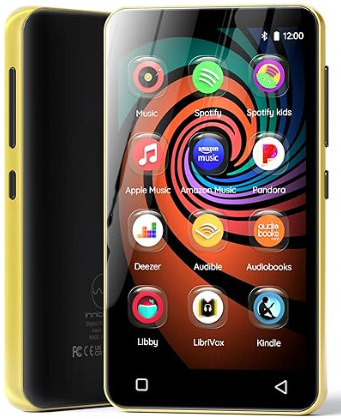
If not available, go to the Google Play Store to install the Amazon Music app.
Step 3. Log in to your Amazon account, search for any song and start listening!
Most MP3 players do not support WiFi connections and can only play common audio formats such as MP3, WAV, and AAC. Since Amazon Music songs are streamed through the Amazon Music app, you need to download and convert them into a compatible format before you can play Amazon Music on MP3 player devices. This is where UkeySoft Amazon Music Converter can help.
Available for both Windows and Mac, UkeySoft Amazon Music Converter comes with a built in Amazon Music web player. It allows you to download songs, playlists, albums, and podcasts from Amazon Music Free, Prime Music, and Music Unlimited, even with a free Amazon account. No extra apps are required. With just a few clicks, you can convert Amazon Music to MP3, M4A, AAC, WAV, FLAC, or AIFF while keeping high audio quality.
After conversion, the Amazon Music files are saved as local audio files on your computer. You can transfer them to any MP3 player, iPod, smartphone, tablet, USB drive, and more. This makes it easy to play Amazon Music on MP3 player devices anytime and anywhere without needing the Amazon Music app.
👍Main Features of UkeySoft Amazon Music Converter
Step 1. Install UkeySoft Amazon Music Converter
Download, install and launch UKeySoft Amazon Music Converter on the computer then click the "Sign In" to log in your Amazon account.
Step 2. Set MP3 as Output Format
Click on the Gear icon on the top right corner to configure the output audio parameters. Setting the output format for downloading music, six audio formats are available, including M4A(AUTO), MP3, AAC, FLAC, WAV, and AIFF. For playing music on MP3 player, you could select MP3 option.
Tips: Here you can connect your MP3 player to your computer using a USB cable. Then set the MP3 Player folder as the output path in UkeySoft Amazon Music Converter's setting window. In this way, you can directly download music from Amazon Music to your MP3 Player!
Step 3. Add Songs, Albums or Playlists
Select the songs, albums or playlists which you want to download. Open an album/playlist and tap the red Add button suspended on the right side, you would see the list of songs.
Now all songs in the playlist will be added by default. Unclick the songs that you don't want to download.
Step 4. Download Amazon Music to MP3 Player
When all the setting is done, click the "Convert" button to begin the conversion. The music converter will automatically download Amazon Music as MP3 files to the default folder on your MP3 player or computer.
When the conversion completes, you can browse all the downloaded songs as MP3 files in the history list. Now you can transfer the MP3 Amazon Music files to MP3 player for listening without limits.
You can now play Amazon Music tracks on your MP3 player anytime, anywhere, no network connection is required!
Serving as an online music streaming store, Amazon Music also allows you to purchase favorite music and download purchased music files on authorized device. The downloaded Amazon Music will be stored as MP3 file. Then you can transfer them to the MP3 player using Windows Media Player.
Step 1. Go to the Amazon Music web player or open the desktop app, and log into your Amazon account.
Step 2. Select the albums or songs you want to download, and then click "Download".
Step 3. Click No thanks, just download music files directly, if you are prompted to install the app.
Step 4. Choose Save if the browser asks whether you want to open or save one or more files.
Step 5. Move the music songs you've downloaded to Windows Media Player, then add them to your MP3 player.
When the Amazon Music download completes, it's time to connect your MP3 Player and put the MP3 Amazon Music files to it. It should be noted that many MP3 players require FAT32 formatting for macOS compatibility. Because macOS can't read and write NTFS format. So, you'd better format your MP3 player for compatibility. Just check the guide below.
○ Windows: Right-click the drive > Format > Choose FAT32 or exFAT.
○ Mac: Use Disk Utility > Erase > MS-DOS (FAT).
1) Connect your MP3 player to compupter using a USB cable, and then your MP3 player will be recognized by computer.
2) Once recognized, on Mac, click the device in the Finder sidebar, then click "Trust". For Windows, double-click the MP3 player icon in the Devices with Removable Storage panel.
3) Open the output folder where your downloaded Amazon Music MP3 files are stored.
4) Drag and drop Amazon MP3 songs to the MP3 player. When done, safely eject the MP3 player.
1) Open the Windows Media Player on your Windows computer.
2) Click "Organize" > "Manage Libraries" > "Add" to import downloaded Amazon MP3 songs to the library.
3) Connect your Sony Walkman or other common MP3 playercto your computer via a USB cable.
4) Click "Music" in the left panel, and then select "Sync" in the right side, drag & drop Amazon MP3 songs to the sync list.
1) Open iTunes, and connect your iPod Nano/Shuffle/Classic/Touch or iOS device to your computer with a USB cable.
2) Click the iPod icon in the upper left corner of the iTunes window.
3) Click "Music" > "Sync Music" > "Selected playlists, artists, albums, and genres."
4) Select "Recently added" and click "Apply" button. Then disconnect the device with computer.
Now you can play Amazon Music on iPod Nano!
It's hard to find an Amazon Music compatible MP3 player. Fortunately, Amazon Music still supports some MP3 players, including Mighty Vibe, iPod Touch 7th/8th, Astell & Kern. If you have one of these, you can directly play Amazon Music on your MP3 player with the Amazon Music app! Next, we will introduce 4 best portable MP3 players for Amazon Music, some of them even are compatible with the Amazon Music app!
1. Astell&Kern
Compared with other brands, Astell&Kern is a very high-end music player. It is famous for its expressive, expansive, decisive sound. Listening to music on Astell&Kern MP3 players will be a great pleasure. Currently, it supports most streaming audio services, including Amazon Music, Apple Music, Spotify, Tidal, Audible Audiobooks, etc. Also, it's designed for users with large music libraries, and it can even be expanded up to a 1TB micro SD card. With it, you can store as many music songs as possible.
Pros:
* Supports Amazon Music app.
* With a bright and vivid screen.
* Long battery life, claims 20-hour battery.
Cons:
* Very expensive than other brands.
2. Mighty Vibe Amazon Music Player
Mighty Vibe is a popular a streaming music player for Amazon Music and Spotify. It is tiny, portable, lightweight Spotify MP3, which lets you enjoy your favourite music content from Amazon Music/ Spotify offline. With the voice navigation, you don't need to keep the screen opening all the time. What's more, you can listen to your favourite songs, playlists and podcasts offline without having your phone nearby.
Pros:
* Lightweight and easy to carry.
* Compatible with Amazon Music Prime & Unlimited, and Spotify Premium.
* Offline playback Amazon songs.
Cons:
* It does not work with MP3s.
* Requires regular connection to WiFi to sync.
3. iPod Touch
iPod Touch is still popular in Apple fans. It's a great form of portable entertainment. Unlike the old iPod Nano, iPod Shuffle, iPod Classi, the iPod Touch (7th or above) comes with WiFi connection. It is similar to iPhone, but lack of phone calls function. You can enjoy Amazon Music streaming and play games as well on your iPod Touch (running iOS 11.0 or higher). All you have to do is download the Amazon Music app from the App Store.
Pros:
* Supports most streaming music services.
* Allows to save streaming music tracks for offline playback.
Cons:
* The old iPod Touch don't have WiFi connection. Amazon Music app only works on the iPod Touch 7th or above running iOS 11.0 or higher.
4. Sony Walkman MP3 Player
The Sony Walkman has a long history and occupies a significant position in the MP3 player market with its high sound quality, light weight and low cost. Although most of Sony's old Walkman series have no network function and can only play MP3/WAV audio, this does not reduce people's support and love. The Sony Walkman NW-A100 series and the NW-ZX500 series supports to download music on it. Therefore, you can download your purchased Amazon MP3 songs from web browser for offline playback.
Also read: How to Play Amazon Music on Sony Walkman
Pros:
* High quality.
* Expandable storage.
* Support for a wide array of audio files.
Cons:
* Most Sony Walkman series lack of Internet functionality.
* It doesn't supports the Amazon Music app.
Q1. Can I play Amazon Music directly on an MP3 player?
It depends on the MP3 player. Most traditional MP3 players do not support the Amazon Music app or internet streaming. To play Amazon Music on MP3 player devices, you usually need to download and convert the songs to a compatible audio format such as MP3 before transferring them to the device.
Q2. Which MP3 players are compatible with Amazon Music?
Some smart MP3 players based on Android can install the Amazon Music app and stream music online. However, standard MP3 players from brands like Sony, SanDisk, and AGPTEK generally only support local audio files, so you need to transfer downloaded Amazon Music tracks to them.
Q3. What audio formats do MP3 players support?
Most MP3 players support common audio formats, including MP3, WAV, AAC, WMA, and sometimes FLAC. MP3 is the most widely compatible format and works on almost all MP3 player models.
Q4. Can I transfer Amazon Music downloads to an MP3 player?
No. Songs downloaded through the Amazon Music app are only available within the app and cannot be copied directly to an MP3 player. To move Amazon Music to an MP3 player, you need to convert the songs into standard audio files first.
Q5. What is the easiest way to put Amazon Music on an MP3 player?
The easiest way is to use a tool like UkeySoft Amazon Music Converter. It can save Amazon Music songs as MP3, M4A, AAC, WAV, FLAC, or AIFF files. After conversion, simply connect your MP3 player to your computer and transfer the music files for offline playback.
There are the three methods to get Amazon Music onto MP3 player. If you have a compatible MP3 player, you can directly play Amazon Music on MP3 player through the official app. For generic MP3 players without Amazon Music app, you need to use a professional software UkeySoft Amazon Music Converter. It helps you easily download Amazon Music tracks, albums, podcasts and playlists to common MP3 files. Thus, you can simply put these Amazon Music files to any MP3 player for offline listening. Alternatively, you may download your purchased Amazon Music to your MP3 player! Now pick the solution you like and enjoy your favorite Amazon Music tracks offline on any MP3 player!

Prompt: you need to log in before you can comment.
No account yet. Please click here to register.























Porducts
Solution
Copyright © 2026 UkeySoft Software Inc. All rights reserved.


 English
 Arabic
 Chinese (Simplified)
 Chinese (Traditional)
 Croatian
 Czech
Czech Danish
 Dutch
Dutch Estonian
 Finnish
 French
 German
 Greek
Greek Hebrew
 Hindi
Hindi Hungarian
 Indonesian
 Italian
 Japanese
 Kazakh
 Korean
 Malay
Malay Norwegian
 Polish
 Portuguese
 Romanian
 Russian
 Slovenian
 Spanish
 Swedish
 Thai
Thai Turkish
 Ukrainian
 Vietnamese










![7 Best FREE Apple Music Converters [2026 Updated]](https://www.ukeysoft.com/wp-content/uploads/2019/04/best-apple-music-converter.jpg)













































![Top 10 Christmas Songs to MP3 Download [Spotify]](https://www.ukeysoft.com/wp-content/uploads/2023/01/christmas-songs-to-mp3.jpg)












































































































No comment yet. Say something...