 ✕
✕
✕
✕
By Justin SabrinaUpdated on March 05, 2026
BLACKPINK is not just a K-pop group - it's a global phenomenon. From explosive debut tracks like "BOOMBAYAH" to chart-dominating hits such as "DDU-DU DDU-DU", "How You Like That", and "Pink Venom", "Shut Down", and "Kill This Love". BLACKPINK's music continues to dominate streaming platforms worldwide. BLACKPINK also regularly kick off concerts around the world as a way of giving back to their fans. For Blinks want to enjoy their beautiful songs on repeat, then downloading BlackPink's music to MP3 is a great option.
Well, now, we'll walk you through three proven methods to download BlackPink's songs to MP3 with album cover kept. Read this article and we will also introduce the 100% worked Streaming Music Converter for converting BlackPink's songs to MP3 at 320kbps high quality, even without a subscription account.
CONTENTS
Stream BlackPink Hit Songs on Spotify For Free!
If you want to really own the BlackPink songs without an active streaming music subscription, the most straightforward method is to get BlackPink MP3s. Fortunately, Amazon sells BlackPink songs and albums, and lets you download BlackPink's songs as MP3 files after purchasing.
Step 1. Go to Amazon website, search for "BlackPink Song MP3" in the search field.
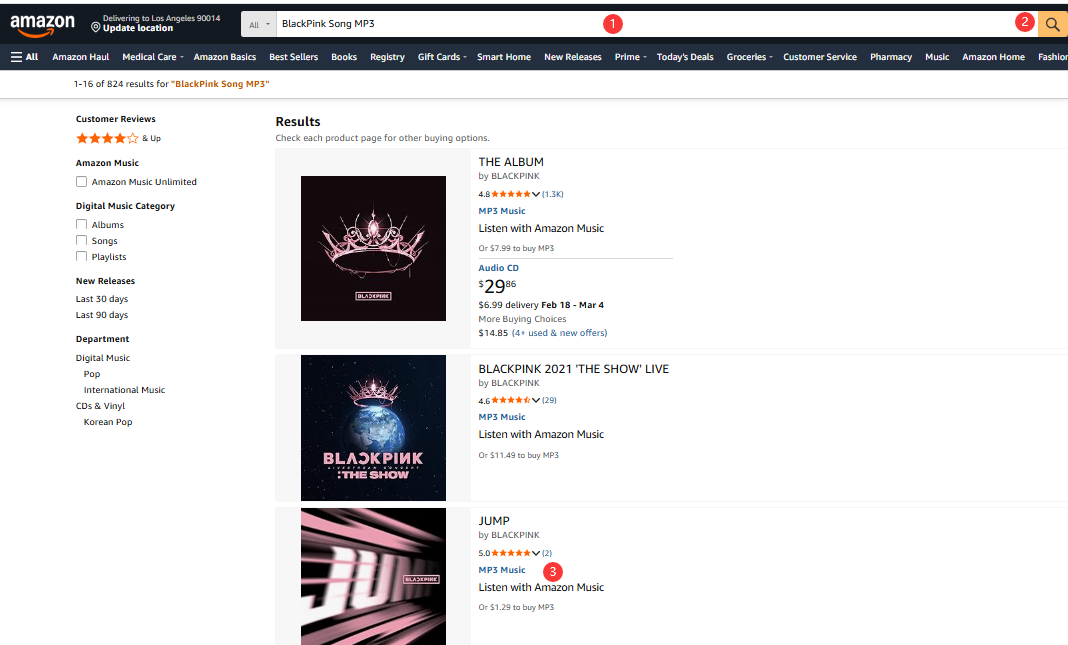
Step 2. Choose an individual song or album, and open its link for purchasing.
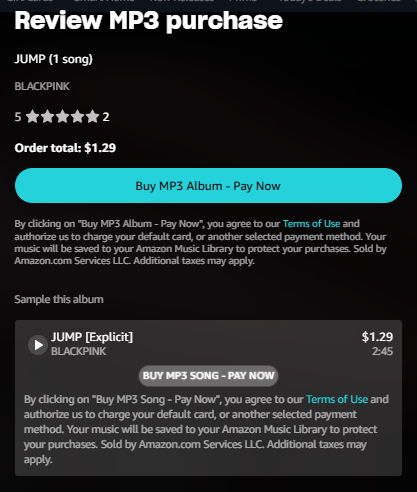
Step 3. For example, here I open the page of "JUMP" song. Click "Purchase Options" and select "MP3 Music".
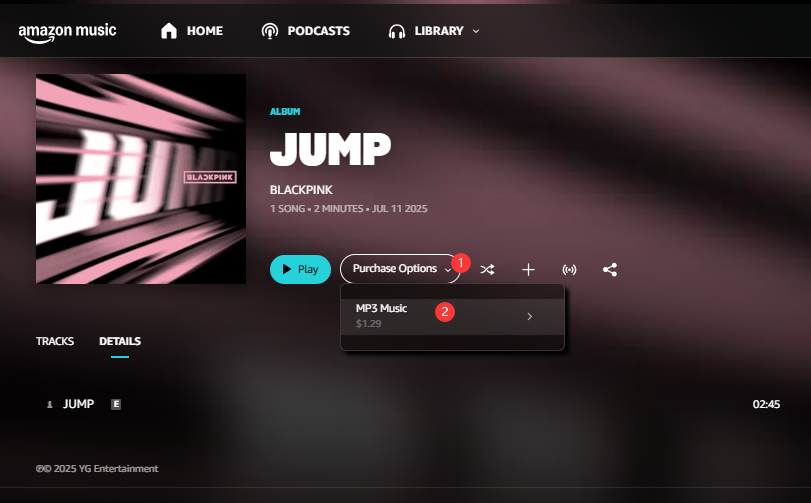
Step 4. Choose either "BUY MP3 Album - PAY NOW" or "BUY MP3 SONG - PAY NOW" option, and then sign in with your Amazon account, complete the payment.
Step 5. Then, open the Amazon Music app or web player, sign in with your Amazon account.
Step 6. Tap "Library" at the top, choose "Music". Tap "SONGS" tab and click "Purchased".
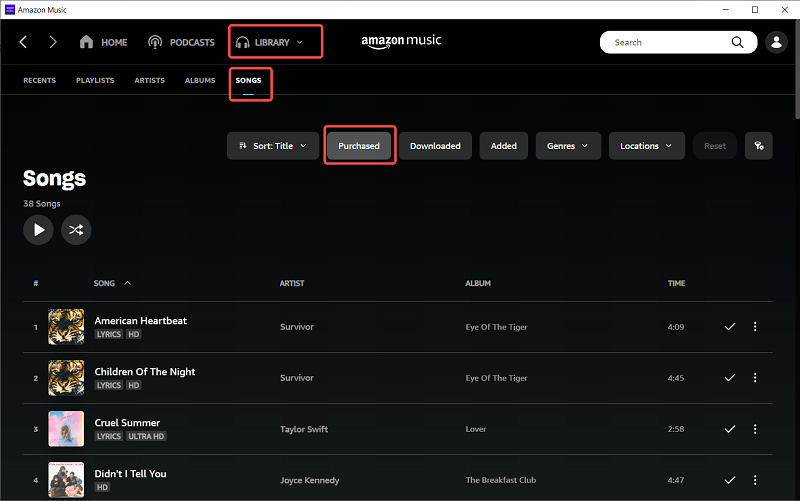
Step 7. Select the purchased BlackPink songs, click on the "Download" button to export an MP3 file.
If you already use Apple's ecosystem, you can also buy BlackPink's songs or albums from iTunes Store. Typically, the iTunes Store allows you to download the purchased music directly to your computer, and save the downloads as DRM-free M4A (AAC) files to your library. If you need the universal MP3 format, you can then convert the M4A (AAC) files to MP3 directly within the iTunes or Apple Music app for compatibility with all devices.
Here's how to download and BlackPink songs to MP3 in iTunes.
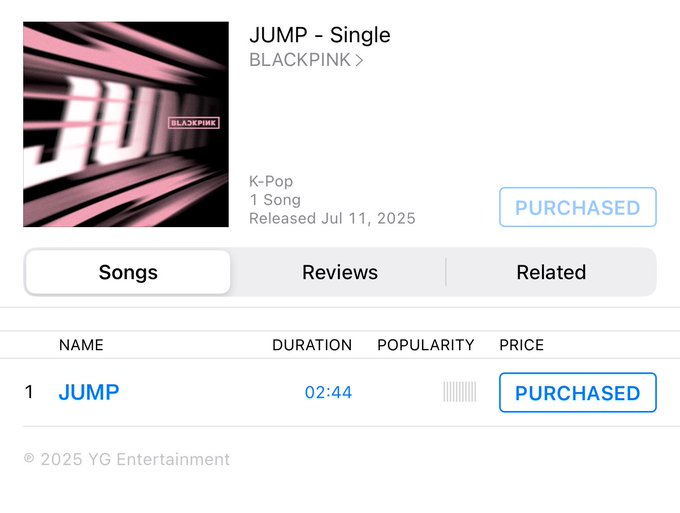
Step 1. Purchase BlackPink Songs on iTunes Store
Open the iTunes app on your Mac or PC. Navigate to the iTunes Store, search for BlackPink, and purchase the desired albums or singles.
Step 2. Download BlackPink Songs on iTunes
After purchase, go to your main music library within iTunes or Apple Music. Locate the purchased BlackPink songs, and click the "Download" button. Then, the downloaded songs will be stored as M4A (AAC) files.
Step 3. Select MP3 Encoder
On Windows (iTunes):
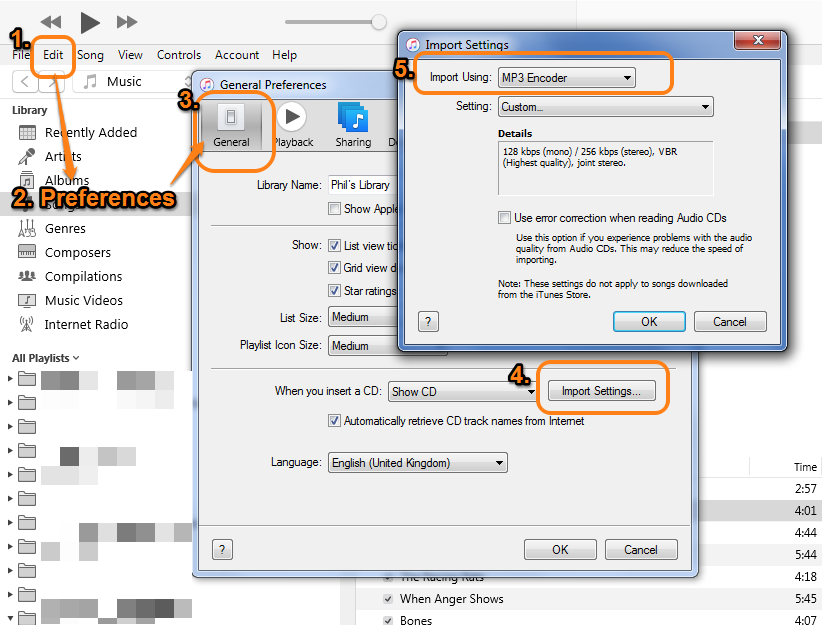
● Go to Edit > Preferences. Click the "General" tab, then click "Import Settings".
● Choose "MP3 Encoder" and select your desired quality (like "High Quality (192 to 320 kbps)").
On Mac (Apple Music App):
● Go to the menu bar and select Music > Settings... (or Preferences...).
● Click the "Files" tab. Under "Import Settings", click the "Import Settings" button.
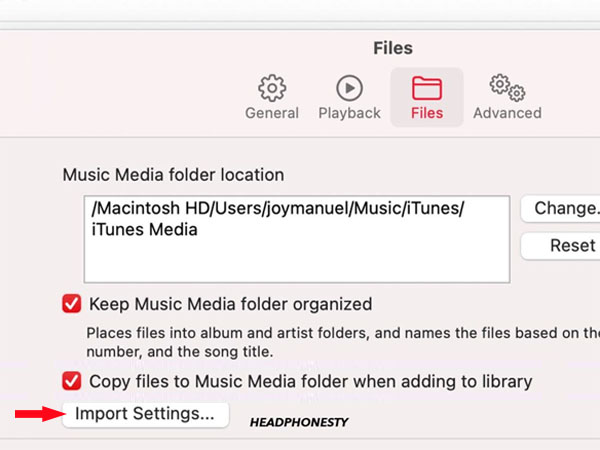
● In the window that appears, set "Import Using" to "MP3 Encoder" and set the "Setting" to "Higher Quality" or customarily up to 320kbps if available.
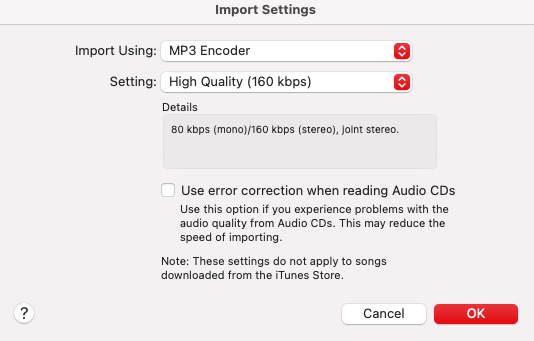
● Click "OK" to save your settings.
Step 4. Convert BlackPink Songs to MP3
Select the purchased BlackPink songs in your library. Go to "File", and choose "Convert" > "Create MP3 Version".
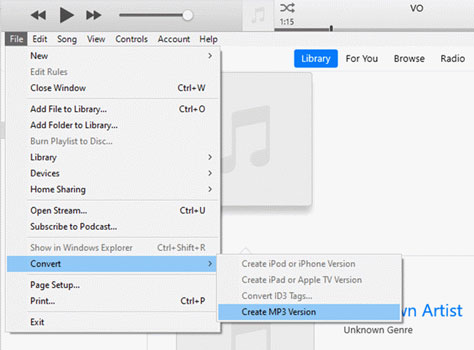
iTunes/Apple Music will create new MP3 copies of the songs alongside your original M4A files.
Verdict: Purchasing Is Costly
While these two methods are legal and reliable to get BlackPink MP3s, buying BlackPink songs or albums from Amazon or iTunes can be expensive, especially if you want full albums or all releases. For fans looking for a more affordable and flexible option, downloading BlackPink's songs to MP3 from streaming music platforms is often the better choice.
If you stream BlackPink's music on Spotify, Apple Music, or Amazon Music, TIDAL, SoundCloud, or other streaming platforms, you can even download BlackPink songs to listen to offline with a Premium subscription. However, these streaming platforms' encrypted music content has limited the freedom to save or play it anywhere you desire. Instead, you can only access the music content within the official streaming music app. Ever dreamed of enjoying BlackPink's powerful music on your portable MP3 player or other devices? Ever wanted to set your favorite BlackPink's single as your ringtone? Would it be possible to download BlackPink song to MP3 from streaming platforms?
To accomplish these tasks, you can ask help from third-party streaming music converters that can help users convert streaming music to MP3 or other common formats. Here we highly recommend the UkeySoft All-in-One Music Converter.
What is UkeySoft All-in-One Music Converter?
UkeySoft All-in-One Music Converter is a one-stop music downloader, music converter, music player, as well as music manager. The software integrates 8+ mainstream music platforms, including Apple Music, Spotify, TIDAL, Deezer, Amazon Music, Pandora Music, YouTube Music, Audible, etc. With it, users can easily download BlackPink songs and albums from these major platforms, even without a Premium account. It enables you to download and convert BLACKPINK songs, albums or playlists to MP3, M4A, AAC, FALC, WAV, or AIFF formats. Another standout feature is its ability to preserve album covers, artist info, release year, and track numbers.
Unlike online music downloaders and recorders, UkeySoft uses advanced decoding technology to extract music directly from streaming sources at up to 16X faster speed, while ensuring a stable 320kbps MP3 output.
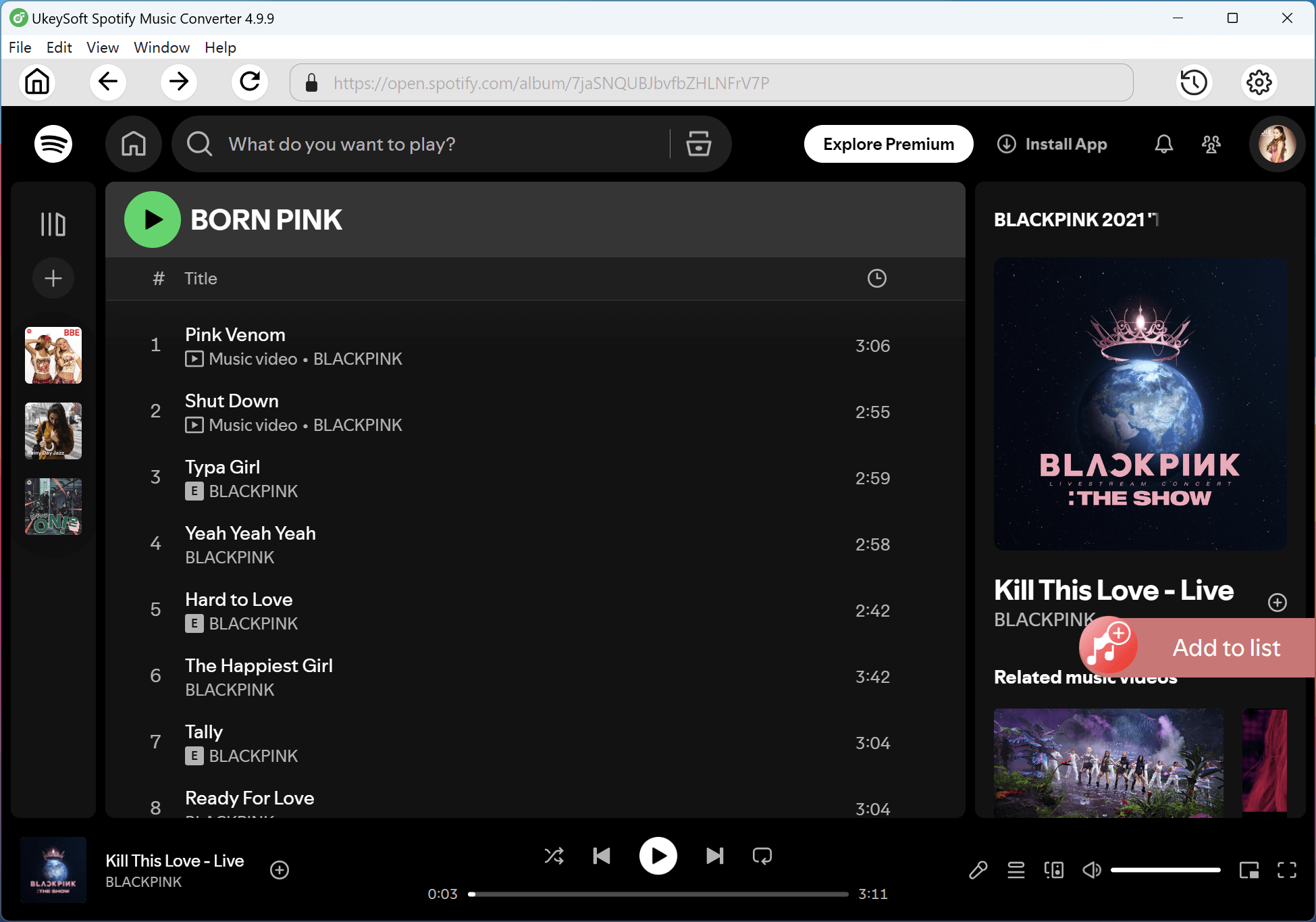
With a built-in web player, you can log in to your streaming account inside the software, and browse BlackPink's singles and albums exactly as you would on Spotify or Apple Music or other platforms. No extra streaming apps are required.
Key Features of UkeySoft All-in-One Music Converter:
Verdict: UkeySoft All-in-One Music Converter delivers the most reliable and user-friendly way to download BlackPink's songs to MP3 at 320kbps with album artwork kept.
Let's how to use the standalone software UkeySoft Spotify Music Converter to download BlackPink's songs on Spotify to MP3 320kbps files without a Premium. You can download and install the software on your computer in advance.
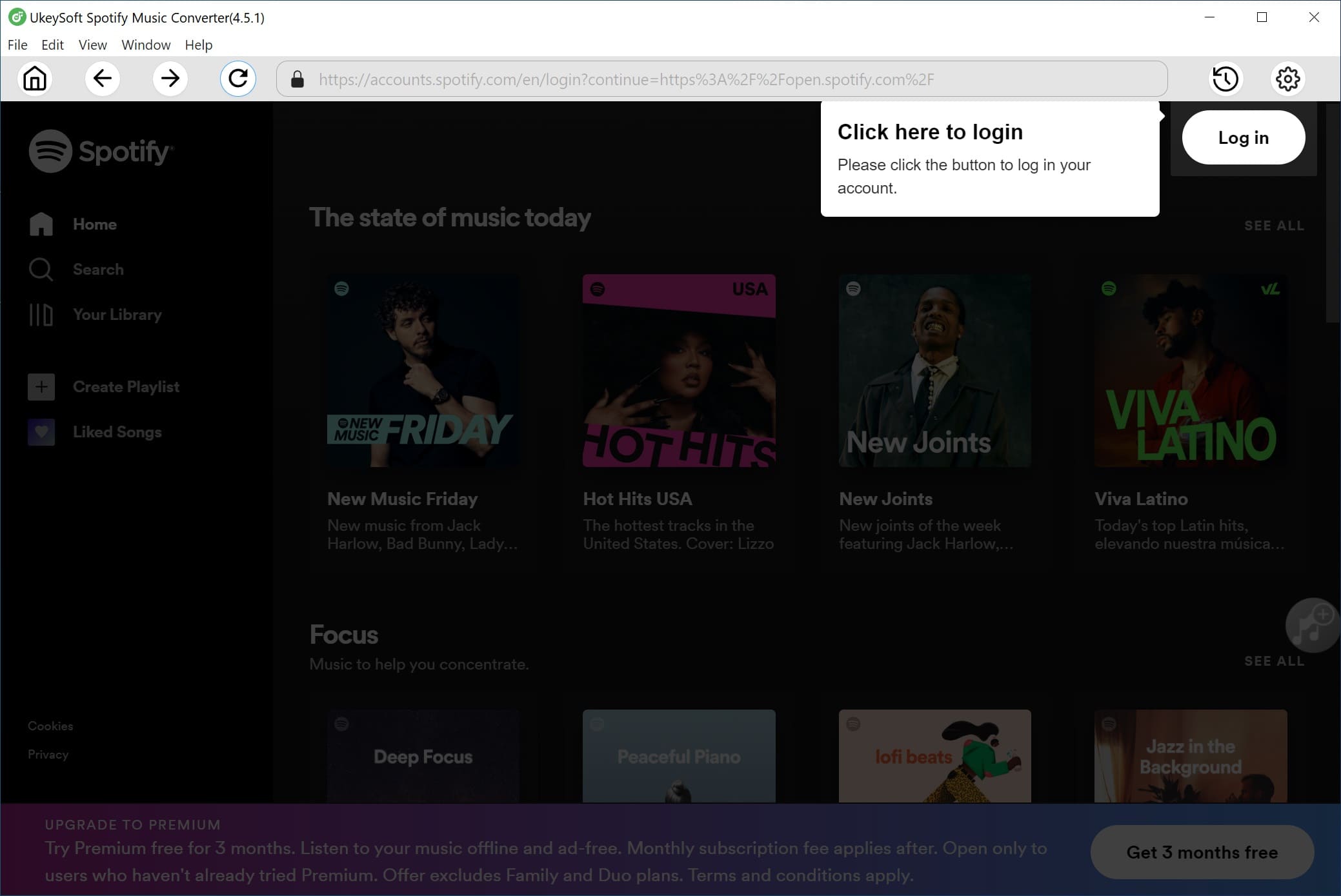
Step 1. Log In to Spotify Account
Open UkeySoft Spotify Music Converter on desktop or laptop. Log in to your Spotify account (Free or Premium) directly within the built-in web player to access BLACKPINK's full music library.
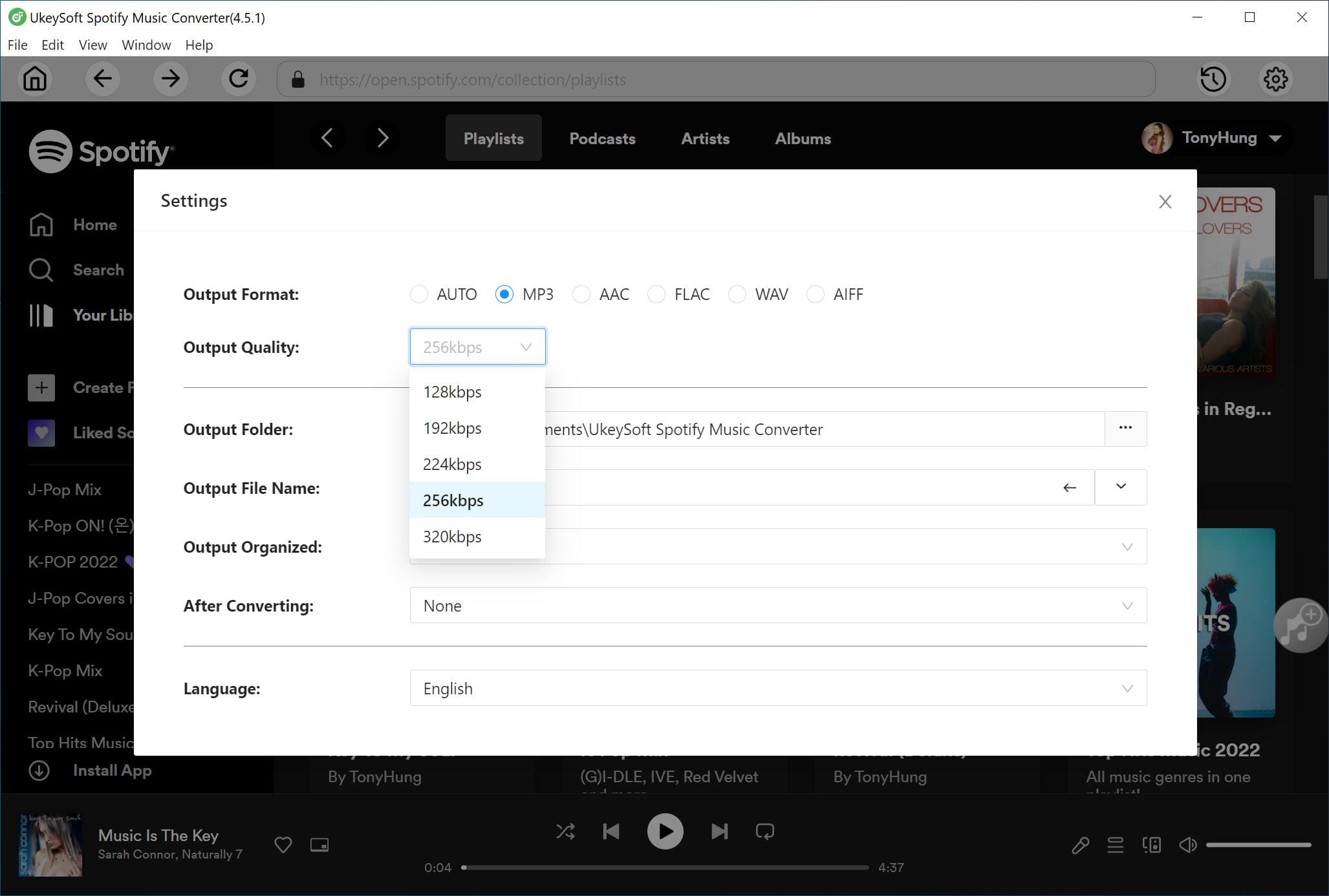
Step 2. Choose MP3 320kbps Format
Go to the output settings by clicking the "Gear" icon, and select MP3 as the output format. Set the output quality to 320kbps to ensure the highest audio quality when downloading BLACKPINK songs.
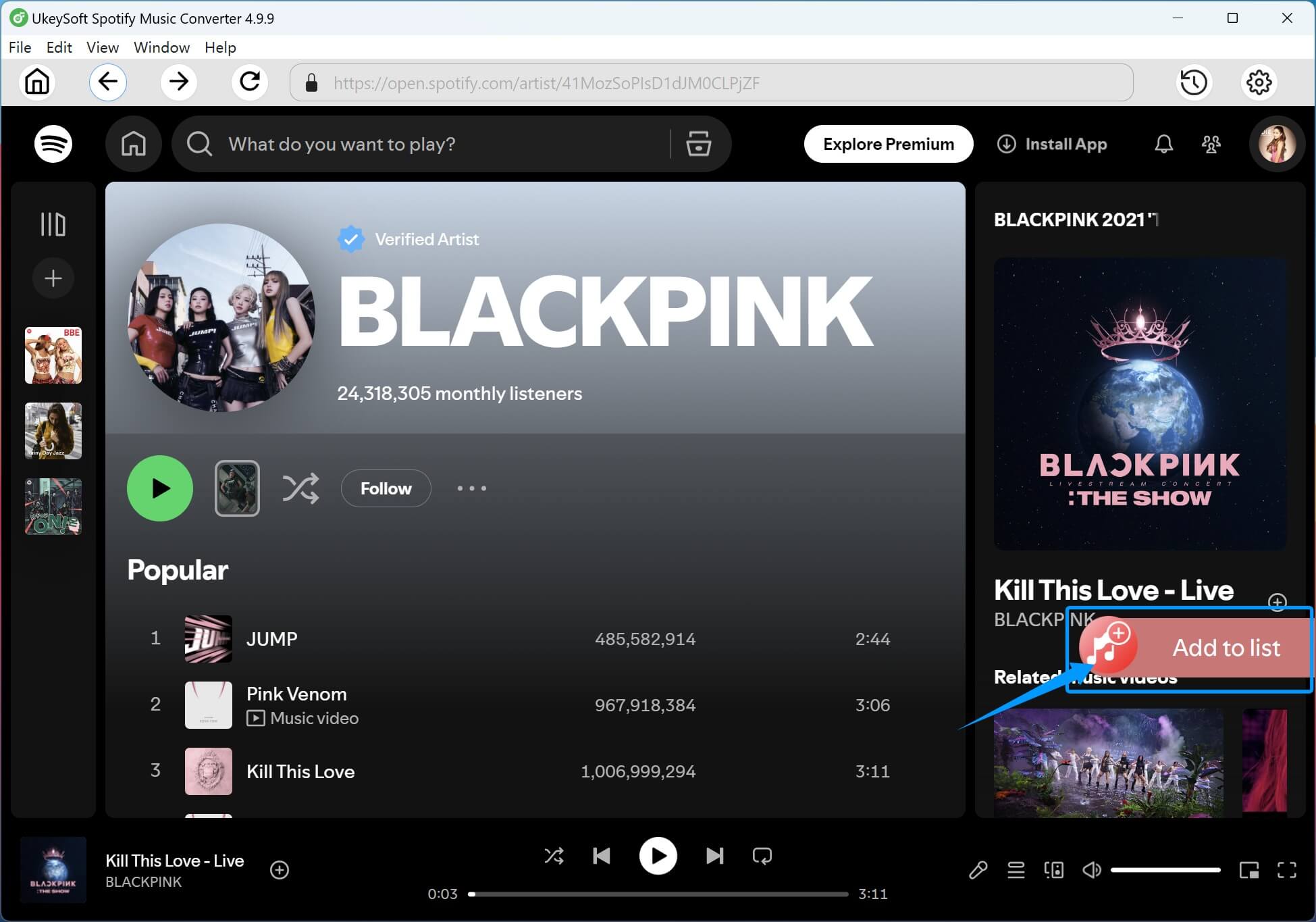
Step 3. Add BlackPink Songs
Type "BLACKPINK" into the search bar and open their artist page. Select individual songs, full albums, or curated playlists, and click the red "+" icon to add them to the conversion list.
The software will instantly load all tracks if you add an album or playlist. Confirm and choose your desired BlackPink songs for conversion.
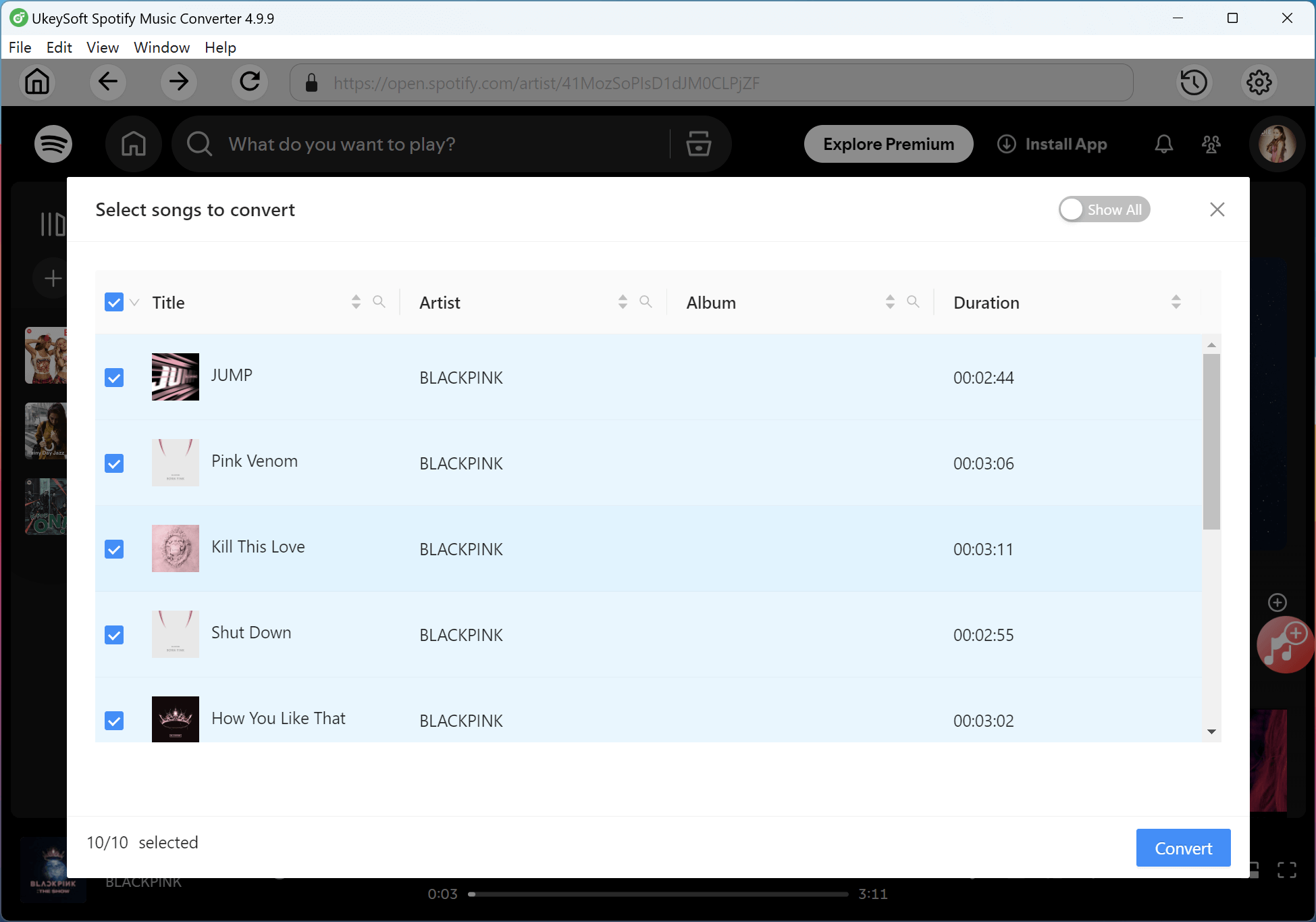
Step 4. Start to Convert BlackPink Songs to MP3
Click the "Convert" button to begin downloading BLACKPINK songs to MP3. UkeySoft Spotify Music Converter will processes multiple tracks simultaneously while maintaining album artwork and metadata.
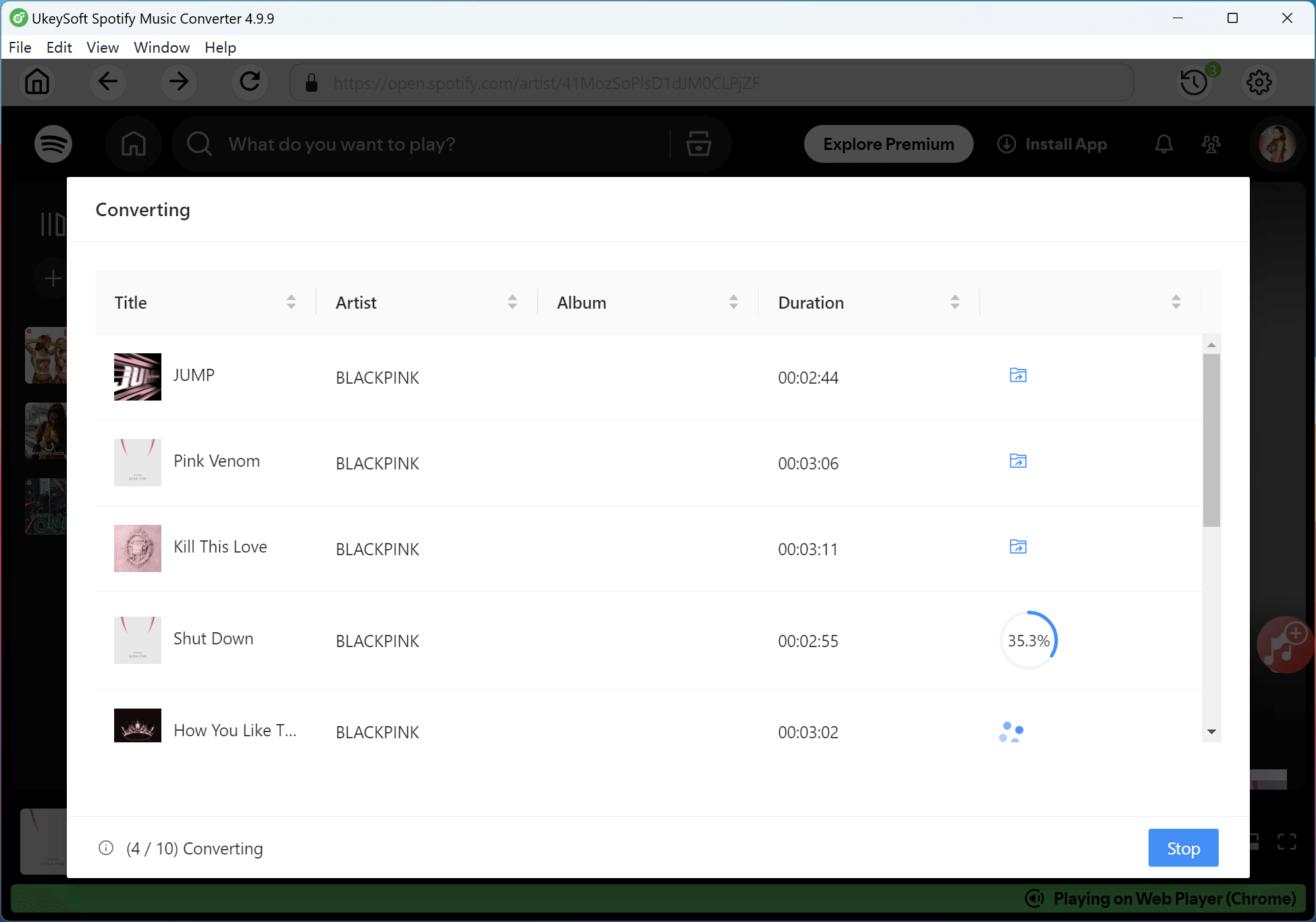
Step 5. Get BlackPink MP3 Songs
Once completed, click on "Clock" icon to check the conversion history. You can listen to these high-quality BlackPink songs with the built-in music player directly!
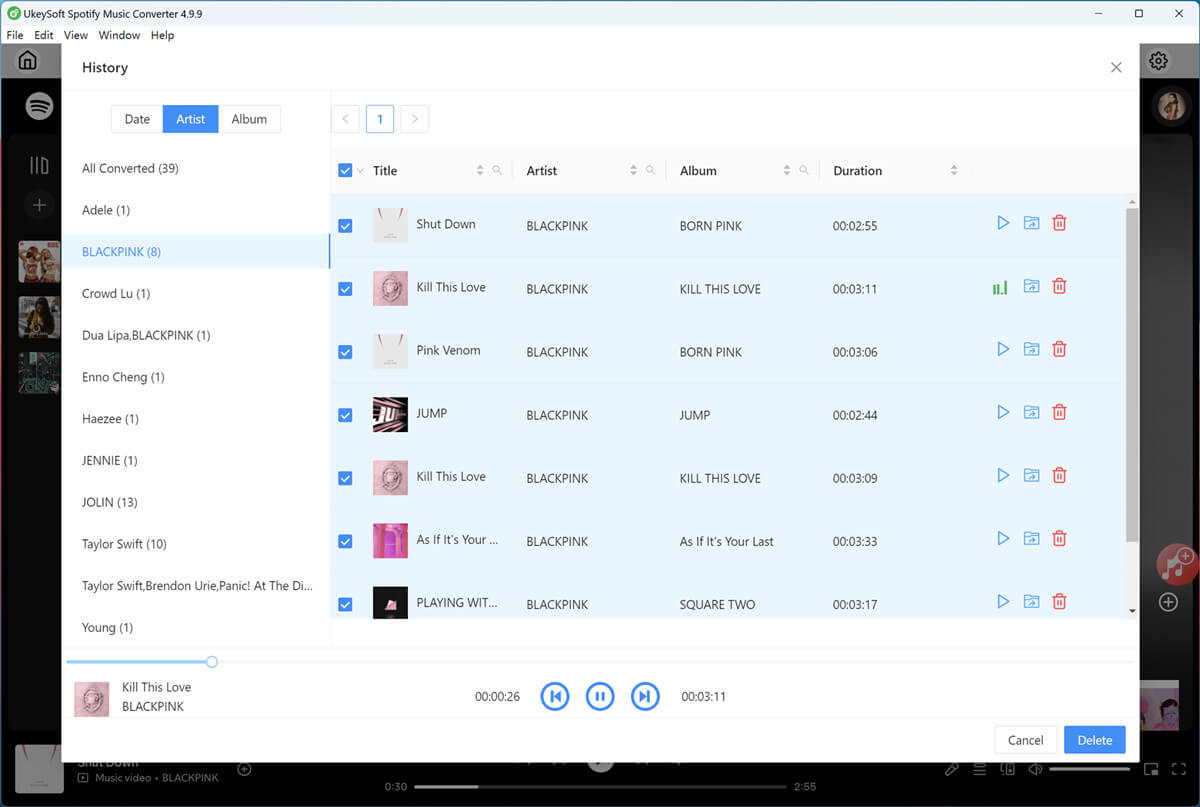
Tips: Click on the "Blue Folder" icon to open the output folder to find your BLACKPINK MP3 files. All songs are stored locally and can be transferred to any device for offline playback.
As the article has showed three methods to download BlackPink's songs to MP3. While purchasing tracks works for casual listeners, it quickly becomes expensive. You can take your BlackPink appreciation to the next level with UkeySoft All-in-One Music Converter. It empowers you to download BlackPink songs to MP3 offline, retains the lyrics and ensures a high-quality bitrate at 320kbps. You can easily get BlackPink MP3s at 320kbps, keep album covers, and enjoy permanent offline access anywhere, no subscriptions, no restrictions. Download the software right now and get the ultimate BLACKPINK music collection offline!

Sorry the comment has been closed.


















![Top 10 Christmas Songs to MP3 Download [Spotify]](https://www.ukeysoft.com/wp-content/uploads/2023/01/christmas-songs-to-mp3.jpg)

Porducts
Solution
Copyright © 2026 UkeySoft Software Inc. All rights reserved.


 English
 Arabic
 Chinese (Simplified)
 Chinese (Traditional)
 Croatian
 Czech
Czech Danish
 Dutch
Dutch Estonian
 Finnish
 French
 German
 Greek
Greek Hebrew
 Hindi
Hindi Hungarian
 Indonesian
 Italian
 Japanese
 Kazakh
 Korean
 Malay
Malay Norwegian
 Polish
 Portuguese
 Romanian
 Russian
 Slovenian
 Spanish
 Swedish
 Thai
Thai Turkish
 Ukrainian
 Vietnamese










![7 Best FREE Apple Music Converters [2026 Updated]](https://www.ukeysoft.com/wp-content/uploads/2019/04/best-apple-music-converter.jpg)





























































































































































Comments are off!