 ✕
✕
✕
✕
By Justin SabrinaUpdated on December 18, 2025
When seeking for a way to download Tidal music to MP3 without Premium, among so many recommendations, TuneCable Tidal Music Converter is the most frequently mentioned option. But is it the right choice for you? Is it safe to use? Is this Tidal music downloader worthy of trying? How does it work?
In this TuneCable Tidal Music Converter comprehensive review, you will get all answers for above questions. Here we will explore its key features, highlights and drawbacks, pricing plans, user guide, and the best alternative. Now, let's move on to the following introduction.
CONTENTS
TuneCable Tidal Music Converter is a desktop application, compatible with Windows and Mac. When using a third-party software, many users worry about the safety. As for the safety of TuneCable Tidal Music Converter, you don't need to worry about. It use a recording technology to rip music from Tidal music. With software installation, users can use it to easily download and convert Tidal music to different formats to enjoy their favorite music anywhere.
However, it is not free to use. The 3-month subscription starts at $29.5, and 1-year subscription costs $59.95, while the lifetime license is available at US$129.9. Before purchasing, you can get its free trial version to have a test. But you can only download the first three minute of each song. Compared with other brands, TuneCable is a bit pricey.
TuneCable Tidal Music Converter aims to help users download and convert Tidal music to MP3 for offline playback. Let's break down its core features and user guide.
Convert Tidal Music to Common Formats (Rating: 4/5)
TuneCable Tidal Music Converter allows users to convert Tidal music to MP3, AAC, WAV, FLAC, AIFF, and ALAC formats. This ensures that the downloaded Tidal music tracks can be played on media players, smartphones, car systems, and other devices without the Tidal app.
Download Tidal Music at High Speed (Rating: 3/5)
The software claims to support batch downloads with up to 10X conversion speed. Users can download playlists, albums, or multiple tracks from Tidal at once. However, in practice, the speed may fluctuate depending on system performance, internet stability, and software updates, making the experience inconsistent for some users. In my tests, it took 12 minutes to convert three 5-minute songs. This is not as efficient as it claimed, it only reached 1X.
Remain ID3 Tags and Metadata Info (Rating: 3.5/5)
TuneCable Tidal Music Converter can retain essential ID3 tags such as song title, artist, album, artwork, and track number. This feature is useful for organizing downloaded music libraries. However, metadata accuracy is sometimes inconsistent, especially when converting large playlists in bulk.
Offers Other Free Tools for Convenience (Rating: 3.5/5)
One of the highlight of TuneCable is its built-in free tools like CD burner, ID3 tag editor, and local audio file transformer. In addition to converting Tidal music, you can also use it to burn Tidal music to CD after conversion. While these extras sound appealing, they are very basic and lack advanced customization.
Besides above main features, TuneCable Tidal Music Converter also has a user-friendly interface, delivering two modes to download and convert your Tidal music. It works with either Tidal app or built-in Tidal web player. Follow below steps to convert Tidal music to MP3 with TuneCable Tidal Music Converter.
Step 1. Launch Software
Download and install TuneCable Tidal Music Converter on your computer. Launch the software and select a downloading mode to get started. Here we choose "Tidal App" mode, then the Tidal app will start immediately.
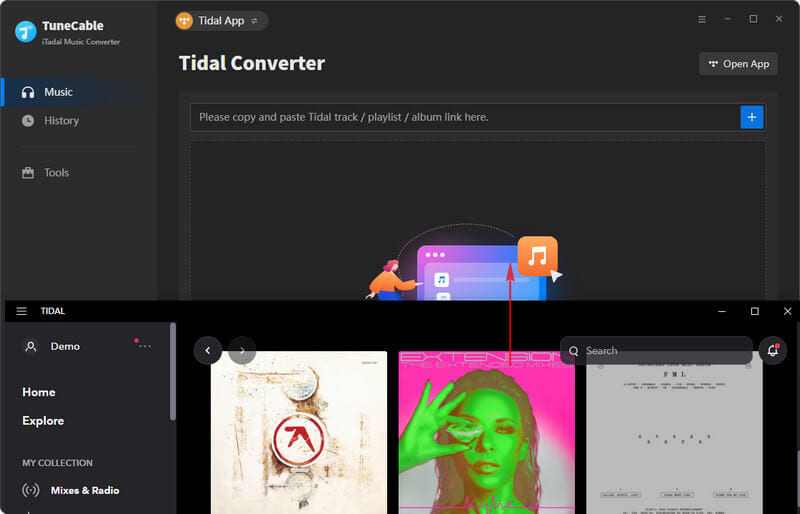
Step 2. Import Tidal Songs
Then log in to your Tidal account. And select the songs, albums, or playlists you want to download, drag them into to TuneCable's interface for loading.
Step 3. Adjust Output Settings
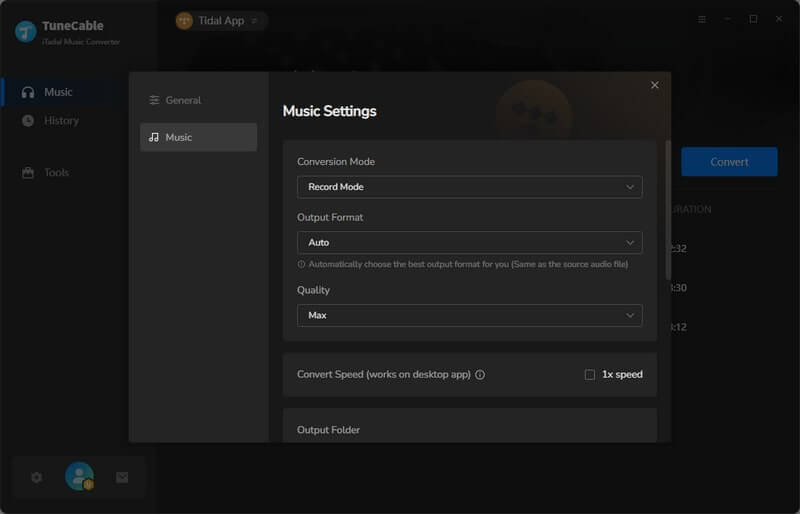
Tap "Settings" in the left panel. In "General", choose your preferred output format (MP3, FLAC, WAV, etc.), bitrate, sample rate, and output folder.
Step 4. Begin Converting Tidal Songs to MP3
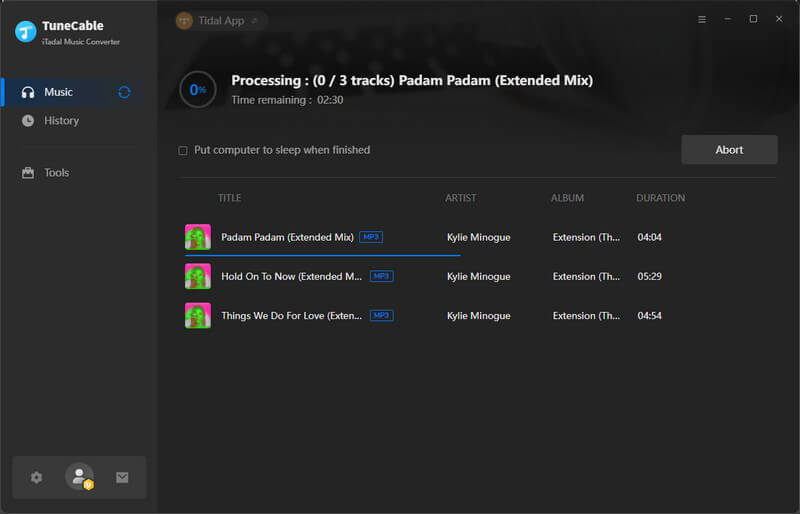
Click the "Convert" button to start downloading Tidal music to MP3 or other format you set.
Based on our testings and users feedback, here is a balanced look at the potential strengths and weaknesses of the TuneCable Tidal Music Converter.
As a Tidal to MP3 converter, TuneCable Tidal Music Converter generally does a good job. It offers two modes to download and extract music from Tidal to your computer with or without Tidal app. But it falls short in terms of stability, speed, and user support. It is worth mentioning that TuneCable cannot download Tidal HiRes tracks, as its highest birtate only reach 320kbps. For users seeking a smoother and more reliable Tidal Music Converter, exploring better alternatives is highly recommended.
UkeySoft Tidal Music Converter is a reliable alternative to TuneBoto Tidal Music Converter you should not miss. As a more independent and powerful Tidal music converter, UkeySoft has embedded Tidal Music Web Player inside the program, so you don't need to install Tidal App or any other software. All you need to do is log in to your Tidal account (all account tiers supported), then you can effortlessly browse and access the whole library, search, and add your desired songs, playlists, and albums to conversion in bulk.
This software offers a variety of selectable formats, including MP3, M4A, AAC, WAV, FLAC, and AIFF. Plus, its output audio quality can be set the highest 320kbps MP3, 640Kbps M4A/AAC, or lossless FLAC for downloading Tidal songs, ensuring the best offline streaming experience. More than these basic features, it offers up to 16X faster speed, a more stable engine, and excellent compatibility with Tidal updates.
Unlike TuneCable Tidal Music Converter, UkeySoft Tidal Music Converter does not require the Tidal App installed. The process is streamlined for efficiency:
Step 1. Run UkeySoft Tidal Music Converter
Install and Launch UkeySoft Tidal Music Converter on your computer. Log In to your Tidal account with its built-in web player.
Step 2. Choose Output Settings
Click on "Gear" icon to access the settings window. Select your preferred output format, output quality, output folder and output file name, etc.
Step 3. Add Tidal Songs
Browse and select song/album/artist/playlist/podcast directly from your Tidal library within the app. Add the music items into the converting list by clicking "Add to list" button.
Once added successfully, check and confirm your target Tidal songs in the window.
Step 4. Start Conversion
Click "Convert" button and let the software download and save Tidal music to MP3 instantly.
Step 5. Get Output Tidal Music Files
Click "History" icon to access the converted Tidal music tracks. Enjoy these high-quality Tidal music with its built-in music player!
As the above two software are useful Tidal music converters for desktop users, you can evaluate them separately based on their unique features. Below is a comparison table:
| TuneCable Tidal Music Converter | UkeySoft Tidal Music Converter | |
|---|---|---|
| Tidal App Needed | Yes | No |
| Music Quality | Great quality | Original lossless quality, 640kbps at max |
| Output Formats | MP3, AAC, WAV, FLAC, AIFF, ALAC |
MP3, M4A, AAC, WAV, FLAC, AIFF |
| Speed | 1X | 16X |
| Highlights | Free tools like CD burner, ID3 editor, audio file transformer. | Built-in music player, music manager and music classification. |
| Price | ● $29.5 for 3 months ● $59.95 for 1 year ● US$129.9 for single lifetime |
● $14.95 for 1 months ● $49.95 for 1 year ● US$89.95 for single lifetime |
| Supported OS | Windows, Mac | Windows, Mac |
| Rating | 3.5/5 | 4.5/5 |
While TuneCable Tidal Music Converter can meet basic needs, its instability, slower speed, and pricing make it less competitive. With a more stable and efficient performance and affordable price, UkeySoft Tidal Music Converter is the better long-term choice for converting and downloading Tidal music to MP3 without frustration. Many users also praise its responsive customer support and positive feedback across forums and social media platforms, making it a trusted Tidal Music downloader.

Sorry the comment has been closed.

















Porducts
Solution
Copyright © 2026 UkeySoft Software Inc. All rights reserved.


 English
 Arabic
 Chinese (Simplified)
 Chinese (Traditional)
 Croatian
 Czech
Czech Danish
 Dutch
Dutch Estonian
 Finnish
 French
 German
 Greek
Greek Hebrew
 Hindi
Hindi Hungarian
 Indonesian
 Italian
 Japanese
 Kazakh
 Korean
 Malay
Malay Norwegian
 Polish
 Portuguese
 Romanian
 Russian
 Slovenian
 Spanish
 Swedish
 Thai
Thai Turkish
 Ukrainian
 Vietnamese










![7 Best FREE Apple Music Converters [2026 Updated]](https://www.ukeysoft.com/wp-content/uploads/2019/04/best-apple-music-converter.jpg)













































![Top 10 Christmas Songs to MP3 Download [Spotify]](https://www.ukeysoft.com/wp-content/uploads/2023/01/christmas-songs-to-mp3.jpg)


















































































































Comments are off!