 ✕
✕
✕
✕
By Justin SabrinaUpdated on April 29, 2026
More and more Audible users plan to cancel the Audible membership. Some people are trying to cut costs, some maybe have accumulated enough credits and want to take a break, and others switch to another audiobook service like Libro.fm, iTunes, or Spotify. However, many users find the cancellation process confusing, especially since you cannot cancel Audible subscription through the Audible app.
No worry! In this guide, we will show you exactly how to cancel Audible subscription on any device: browser, phone, or even via email. In addition, we'll also cover how to keep your audiobooks forever even after you unsubscribe to Audible membership, so you don't lose access to your purchased content.
CONTENTS
Before you proceed to cancel Audible membership, there are several important factors you should understand. These considerations can help you avoid losing benefits or wasting unused credits.
# Use Your Remaining Credits First
When you cancel your Audible subscription, any unused credits in your account will be lost. Therefore, it is highly recommended to use all your credits before canceling.
# Access to Purchased Books
After you cancel Audible membership, you can still access audiobooks you've already purchased. A good idea is to download your purchased audiobooks in advance.
# Membership Benefits End
Once you cancel Audible subscription, you will lose access to member-exclusive benefits such as discounted audiobook prices and free monthly credits.
# Billing Cycle Still Applies
If you unsubscribe to Audible membership, your account will remain active until the end of the current billing period. So, you can continue using benefits until that date.
The easiest and most reliable way to cancel Audible subscription is through the Audible website. You can do is on a computer or mobile browser. Follow these steps:
Step 1. Go to the official Audible website and log in to your account.
Step 2. Hover over your profile name and click on "Account Details".
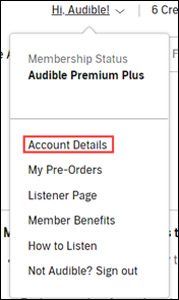
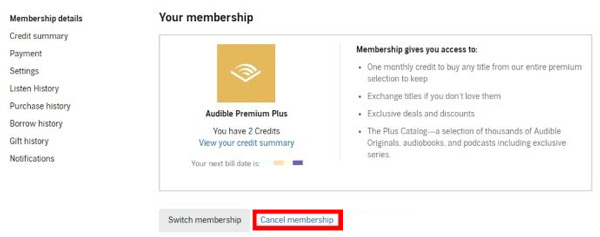
Step 3. Find the "Membership details" section where your plan information is displayed.
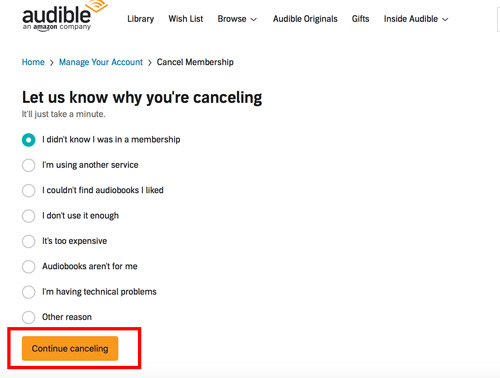
Step 4. Click "Cancel membership", and select a reason why you're canceling.
Step 5. Tap "Continue canceling" and confirm cacellation again.
Once completed, you will receive a confirmation email indicating that you have successfully canceled your Audible subscription.
In most cases, mobile subscriptions are linked to your device's billing system, such as Apple ID on iPhone or Google Play on Android. Although you cannot directly cancel your Audible membership inside the Audible app, you can still use your phone's settings or app store to unsubscribe to Audible membership properly. Here's how to do it:
On iPhone/iPad:
Step 1. Go to the Settings app on your iPhone or iPad.
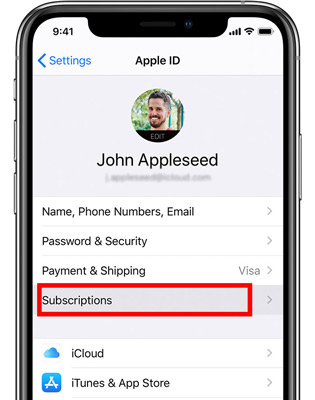
Step 2. Tap your name at the top to access Apple ID settings.
Step 3. Select "Subscriptions" to view all active subscriptions. Locate and tap on Audible in the list.
Step 4. Tap "Cancel Subscription" and confirm to cancel Audible membership.
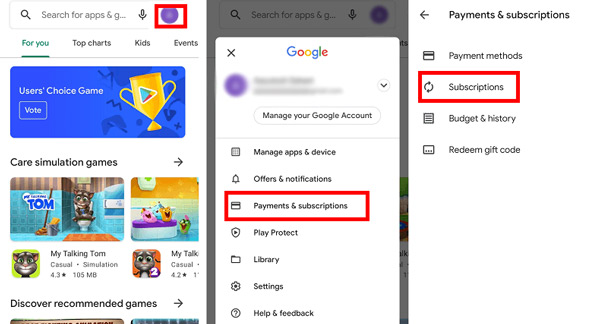
On Android:
Step 1. Open Google Play Store app on your Android device.
Step 2. Tap your profile icon in the top-right corner.
Step 3. Select "Payments & subscriptions", then tap "Subscriptions".
Step 4. Choose Audible, tap "Cancel subscription" and follow the prompts to confirm.
If you cannot access the website or encounter issues,you can request to cancel your Audible membership by email. Simply send a request to [email protected] using the email address linked to your account. In your message, clearly state that you want to cancel your Audible subscription and include basic account details such as your registered email and username. After submitting your request, Audible's support team will review and process your cancellation.
While purchased audiobooks remain in your library, they are saved in DRM-protected AA or AAX formats. These Audible files can only be played on authorized devices using the Audible app or iTunes. To truly keep your audiobooks forever and play them anywhere, you need to remove DRM restrictions and convert Audible audiobooks to common MP3, M4A, AAC or other formats. The best tool for this is UkeySoft Audible Converter.
UkeySoft Audible Converter is a powerful tool designed to help users unlock Audible DRM and convert Audible AA and AAX files into common audio formats. It supports multiple output formats, including MP3, M4B, M4A, AAC, FLAC, WAV, OGG, and AIFF, giving you full flexibility to play your audiobooks on any device or player without restrictions.
It retains all chapter information and ID3 tags like title, author, narrator, cover art. Another highlight is high-quality output. UkeySoft exports 320kbps MP3 or lossless FLAC audiobooks. This means you can enjoy the best offline listening experience of your audiobooks! Additionally, the software allows you to split large audiobooks into smaller segments by chapter, time or average, making it easier to put Audible audiobooks onto MP3 player!
More Features of UkeySoft Audible Converter:
Step 1. Launch UkeySoft Audible Converter
Download and install UkeySoft Audible Converter by clicking the above Download button. After installation, launch the software.
Step 2. Add Audible AA/AAX Audiobooks
Drag and drop the downloaded .aax or .aa files from your computer into UkeySoft. or click "Add" button and navigate to your Audible download folder to manually add your downloaded Audible books.
Step 3. Choose Output Settings
Click the "Options" button, select MP3 output format. For bitrate, choose 320kbps for best quality. Click the "General" tab and split by chapter or euqal parts if desired.
Step 4. Convert Audible Audiobooks to MP3
Click on the "Convert" button. UkeySoft will process all added audiobooks at 700X speed. A 10‑hour book takes about 5 minutes. Just wait a few minutes.
Step 5. Get Output MP3 Audible Files
After conversion, click the "History" button to access the converted files. You can now copy these MP3 files to any device like smartphone, MP3 player, car USB, or external hard drive, and play them forever, even after you cancel your Audible subscription.
Can I cancel my Audible membership through the Audible app?
No. You cannot cancel Audible subscription through the Audible app. The Audible app is designed for listening audiobooks only. You must use the Audible website on a browser (desktop or mobile) or contact customer service via email or phone.
Can I cancel Audible at any time?
Yes. You can cancel your Audible membership anytime. There are no long‑term contracts. However, your benefits remain active until the end of the billing cycle.
Do I get to keep my Audible books if I cancel my membership?
Yes. Any audiobooks you purchased with cash or credits remain in your library permanently, even after you cancel Audible subscription. However, you lose access to the Plus Catalog (free streaming titles) and any unused credits. Moreover, all Audible audiobooks are DRM-protected AA or AAX files. To keep your purchased books playable on any device, use UkeySoft Audible Converter to convert Audible books to MP3 or other universal formats.
How do I cancel my Audible membership without losing all my credits?
Before you unsubscribe to Audible membership, use all your credits first. Credits are non-refundable and non-transferable. Unused credits will be lost after cancellation.
Canceling an Audible subscription does not have to be a headache. By following the steps in this guide, you can easily cancel Audible subscription, whether on a browser, phone, or via email. Before you cancel your Audible membership, make sure to use your credits. You can consider UkeySoft Audible Converter as an advanced option. It enables you to convert AA and AAX Audible books to MP3 320kbps in batches with only one click! Thus, you can keep your Audible audiobooks forever and listen to them offline anytime, anywhere, even if your Audible subscription ends!

Sorry the comment has been closed.






















Porducts
Solution
Copyright © 2026 UkeySoft Software Inc. All rights reserved.


 English
 Arabic
 Chinese (Simplified)
 Chinese (Traditional)
 Croatian
 Czech
Czech Danish
 Dutch
Dutch Estonian
 Finnish
 French
 German
 Greek
Greek Hebrew
 Hindi
Hindi Hungarian
 Indonesian
 Italian
 Japanese
 Kazakh
 Korean
 Malay
Malay Norwegian
 Polish
 Portuguese
 Romanian
 Russian
 Slovenian
 Spanish
 Swedish
 Thai
Thai Turkish
 Ukrainian
 Vietnamese











![7 Best FREE Apple Music Converters [2026 Updated]](https://www.ukeysoft.com/wp-content/uploads/2019/04/best-apple-music-converter.jpg)












































![Top 10 Christmas Songs to MP3 Download [Spotify]](https://www.ukeysoft.com/wp-content/uploads/2023/01/christmas-songs-to-mp3.jpg)













































































































Comments are off!