 ✕
✕
✕
✕
By Justin SabrinaUpdated on December 23, 2025
Apple Music is the most popular streaming music service, which is not a music downloader. There are more that 100 million songs on Apple Music store, all Apple Music subscribers can stream Apple Music songs on iPhone, iPad,the new iPod Touch, the new Apple Watch, Apple TV, Mac, HomePod, CarPlay, PC, some Android phone, Sonos and Amazon Echo or download any songs for offline listening with the Music app or iTunes.
You May Like:
Apple Music tracks are DRM protected and can only be played with authorized iTunes and Apple Music app, after you download Apple Music songs to iTunes library(Path: Music - iTunes - iTunes Media - Apple Music.), you will find they are in .m4p format, you can't transfer them to your MP3 players such as Sony Walkman, iPod nano, iPod shuffle, SanDisk, mobile phone, etc.
CONTENTS
Since Apple Music songs are added DRM(Digital rights management) protection. If you want to play Apple Music on MP3 player, you need an Apple Music converter to convert Apple Music songs to MP3 first, then you can keep Apple Music forever and playing them on any devices freely.
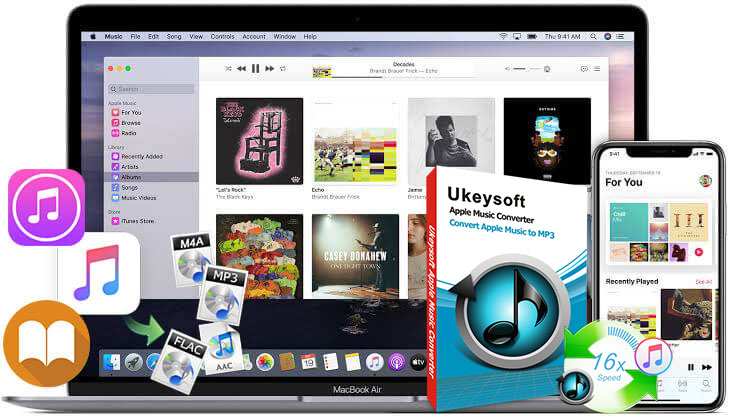
If you looking for the best Apple Music converter and Apple Music drm removal, here I highly recommend UkeySoft Apple Music Converter. It is a reliable Apple Music drm remover which can remove Apple's Fairplay DRM protection and convert Apple Music to MP3 efficiently.
In fact, it is legal to remove DRM from Apple Music for personal entertainment, for example: Listen to Apple Music songs on iPod Nano or other generic MP3 player; Burn Apple Music to CD for enjoying when you driving a car...
In this UkeySoft Apple Music Converter Review, I'll cover all build-in features of this software as well as its strengths and weaknesses. What's more, I will show you how to convert Apple Music to MP3 with UkeySoft step by step tutorial.
UkeySoft Apple Music Converter is the best Apple Music downloader for Windows and Mac, there is a built-in Apple Music Web Player in the program, users can access, browse and play music library online after login Apple ID. This handy tool lets you convert Apple Music songs, albums, artists, playlists & radios without having the iTunes/Music app installed.
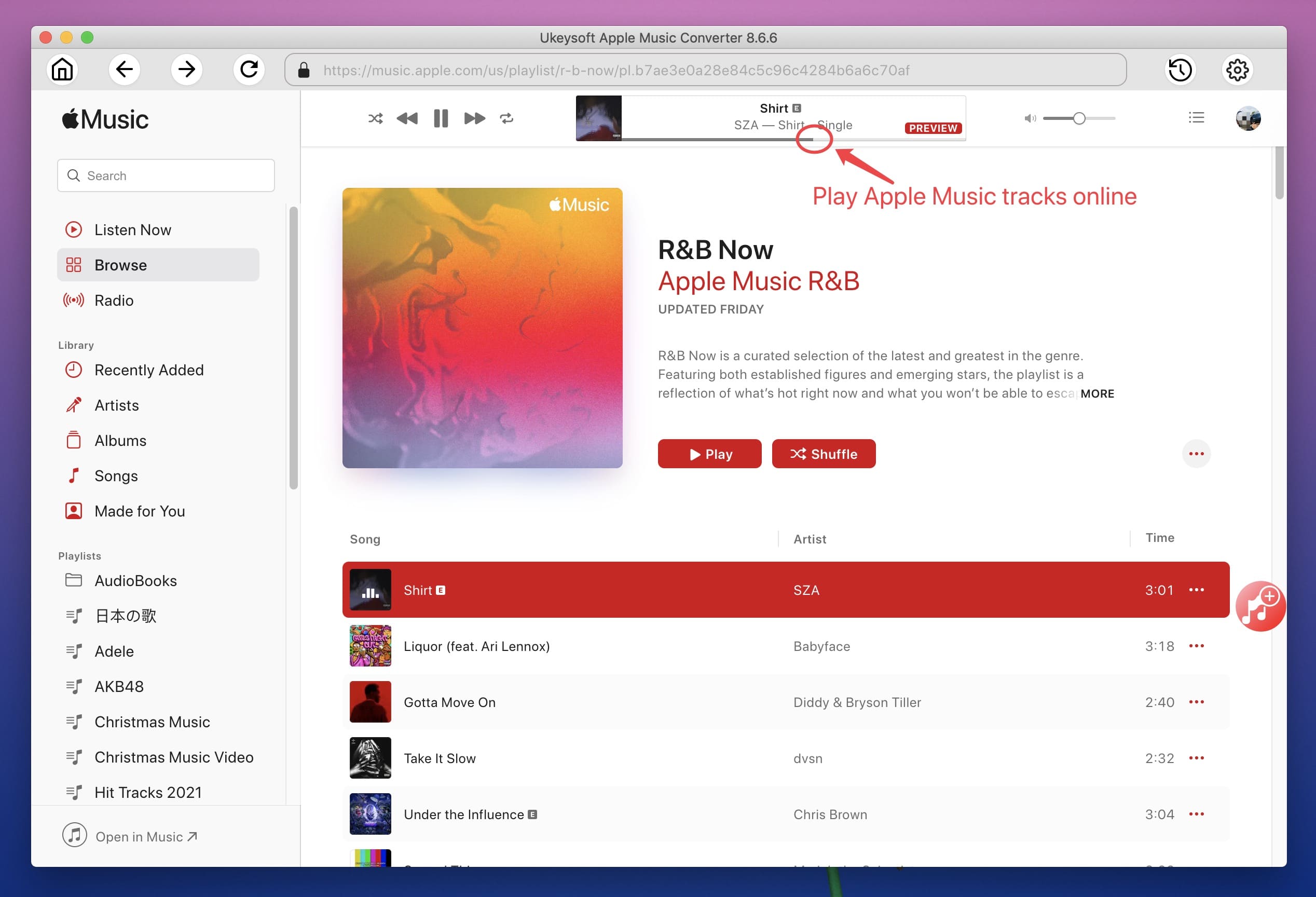
Since released of this UkeySoft product, only two years, over 2,129,659 (global) download this Apple Music Converter. I'm not sure if you have try it, but I think it's worth a try.
Let's take about the pros and cons of this software!
# Pros
# Cons
Editor's Note
Any product has its advantages and disadvantages, the most important thing is whether it can help you solve the problem. Although UkeySoft Apple Music Converter still has a little disadvantage, which is trivial, but its advantages outweigh its disadvantages, the important thing is that it can help users convert Apple Music songs, protected iTunes AAC songs, iTunes audiobooks and Audible AA/AAX audiobooks, helping users listen to songs and audiobooks on any devices.
This tutorial will show you how to convert Apple Music songs to MP3 on Mac. If you subscribe to Apple Music on a Windows PC, check this tutorial about how to convert Apple Music to MP3 on Windows 11/10/8/7.
Step 1. Download and Install UkeySoft Apple Music Converter
First of all, please download and install UkeySoft Apple Music Converter on your Mac computer.
Step 2.Run UkeySoft Apple Music Converter
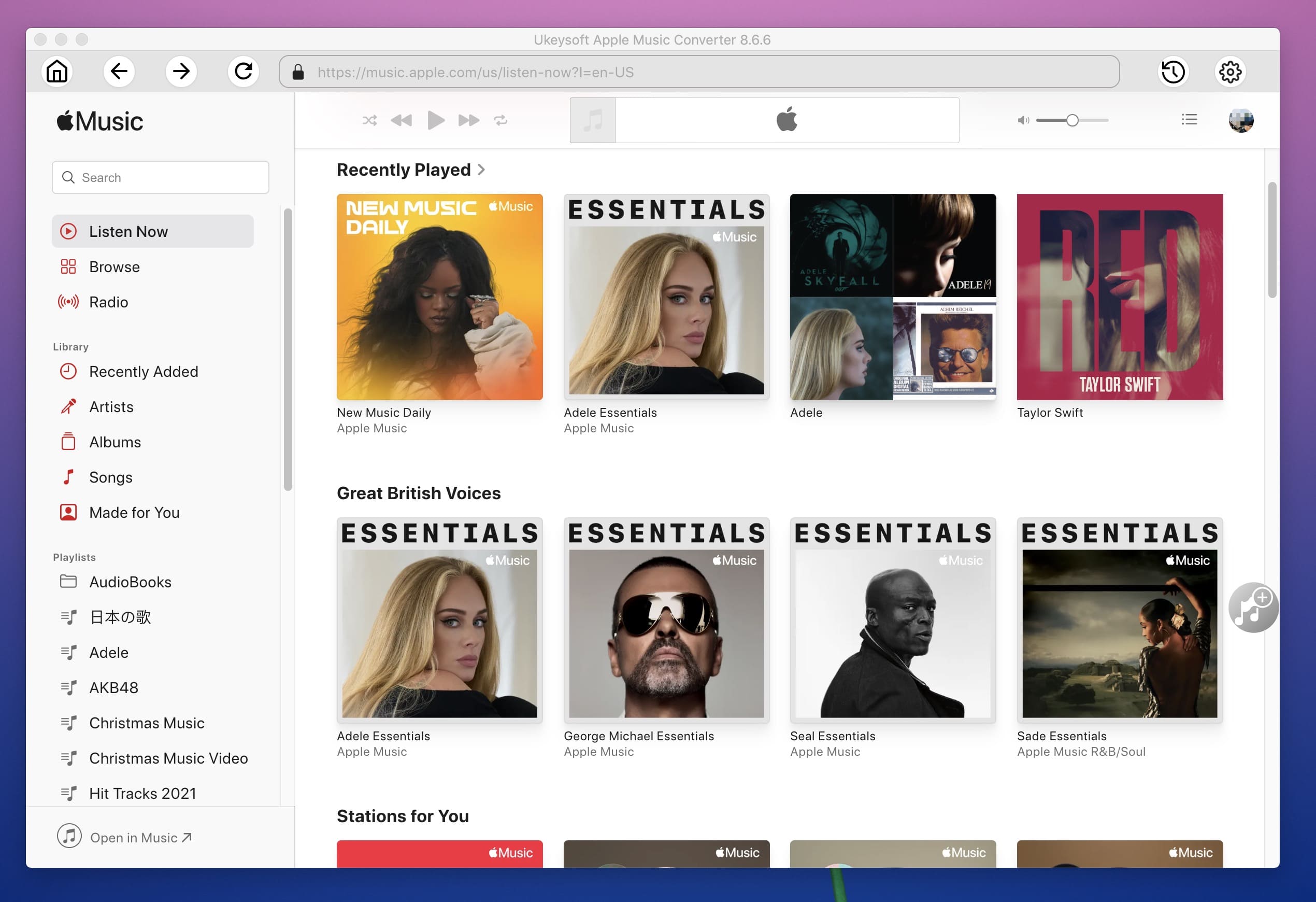
Then, run UkeySoft Apple Music Converter on Mac desktop, login to your Apple ID to access your music library.
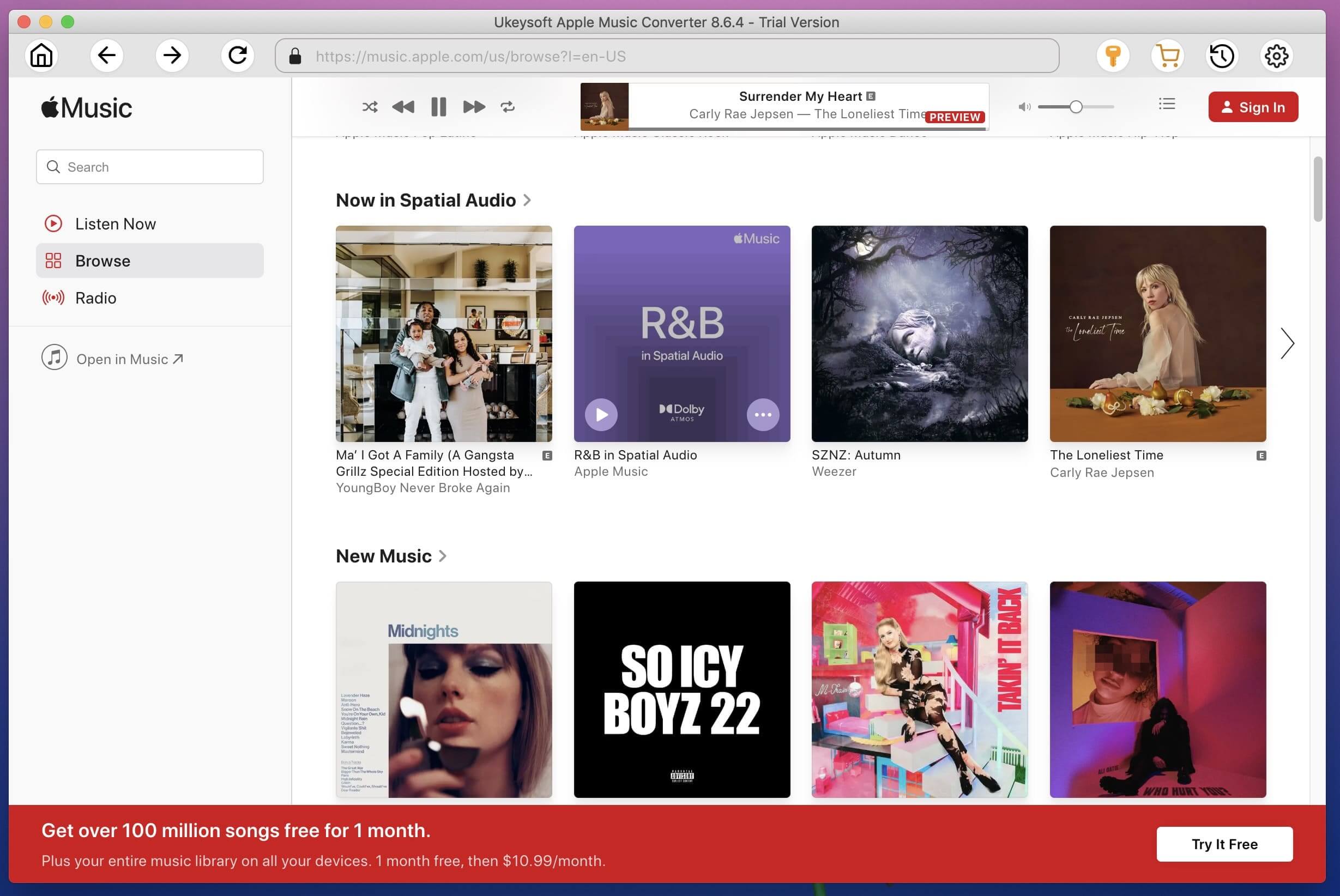
After successful login, you will search, listen to any music on the converter.
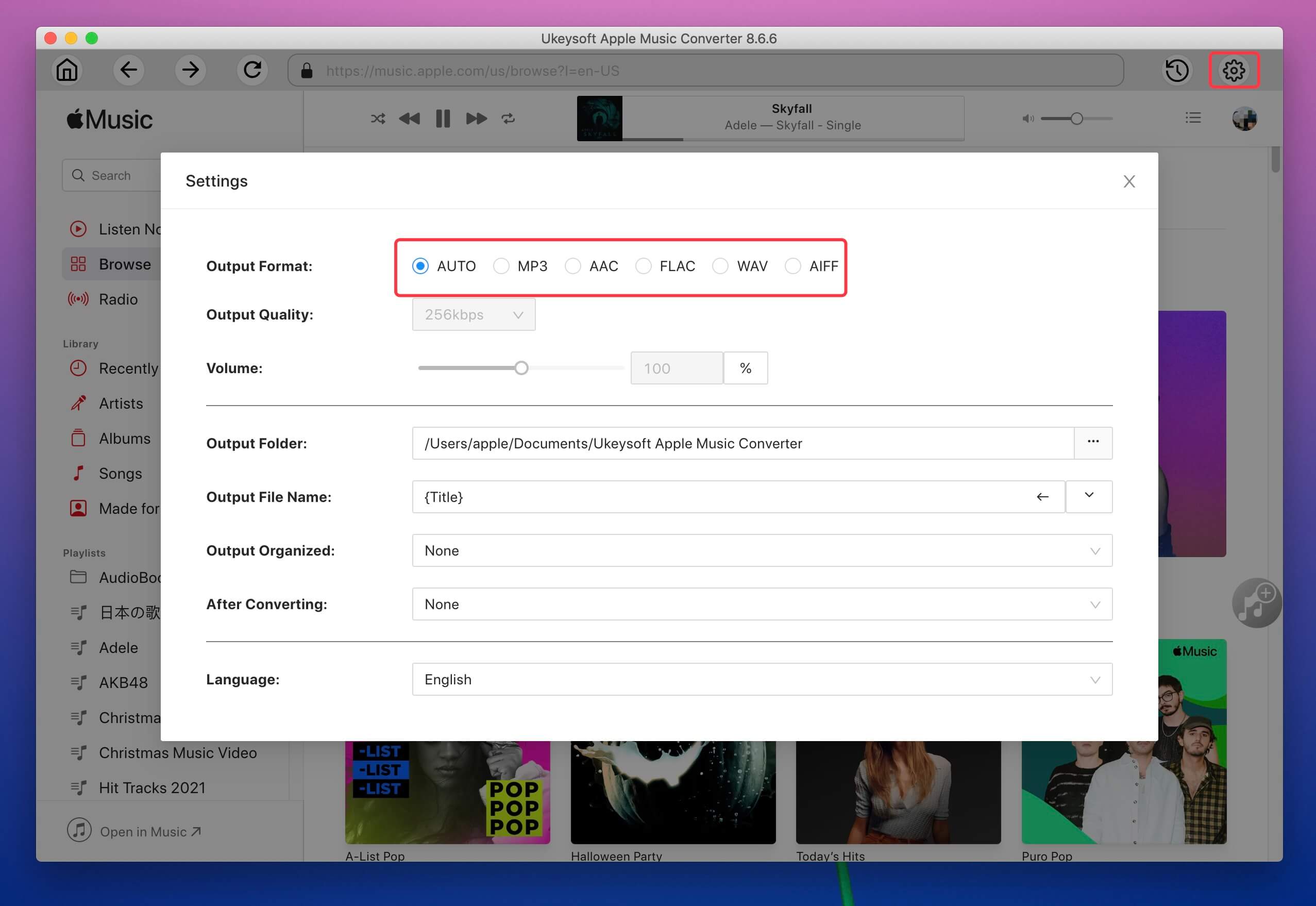
Step 3. Set Output Format and Output Profile
M4A is the default output format, you also can configure the output format such as MP3, AAC, FLAC, WAV, AIFF, etc. Here we pick MP3 format as example.
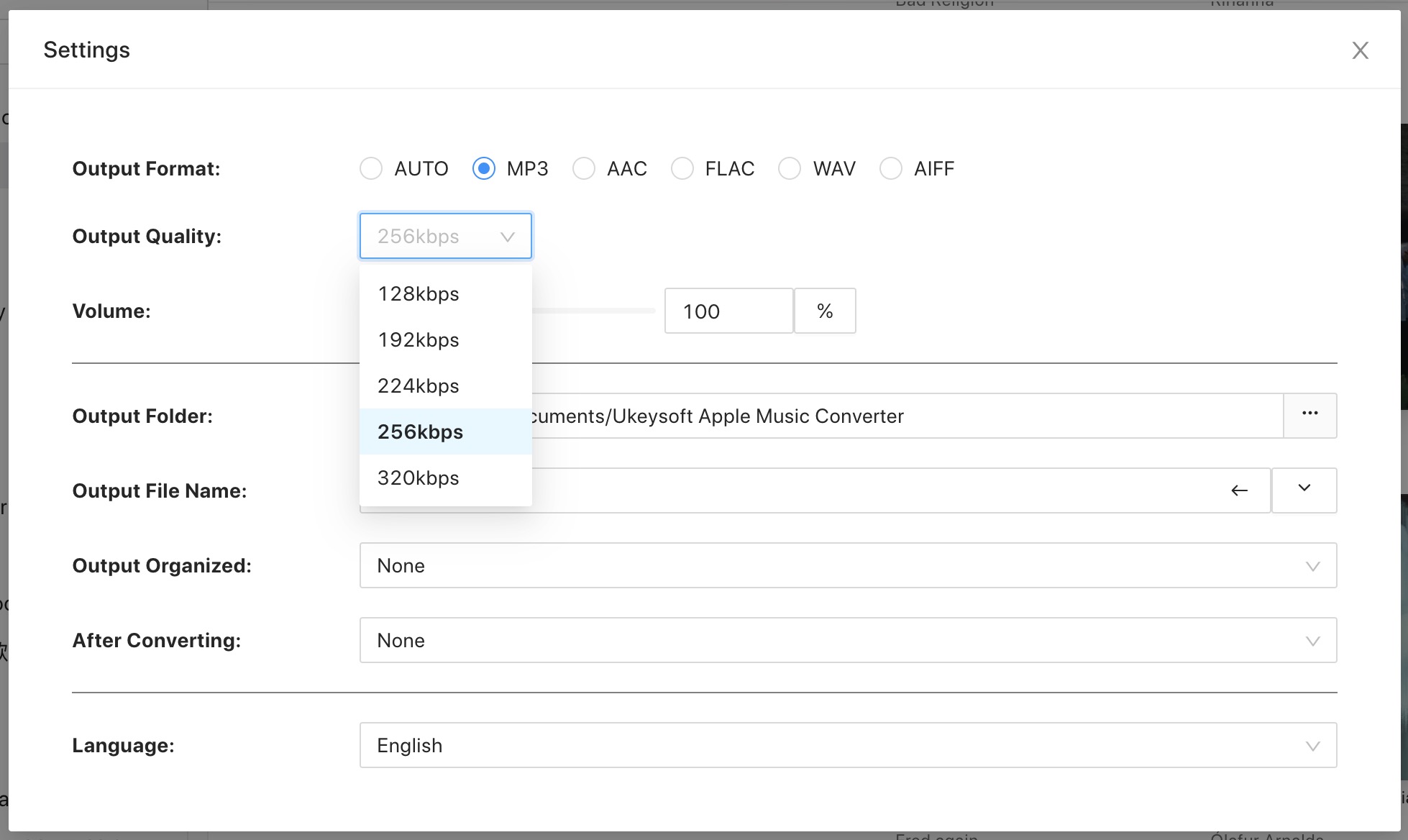
For each output format, Apple Music to MP3 converter provides different profile settings. You also can customize the value as you like.
Customize output file name: You also can change the output metadata data, including its Title, Artist, Album, Track Number and Disk Number.
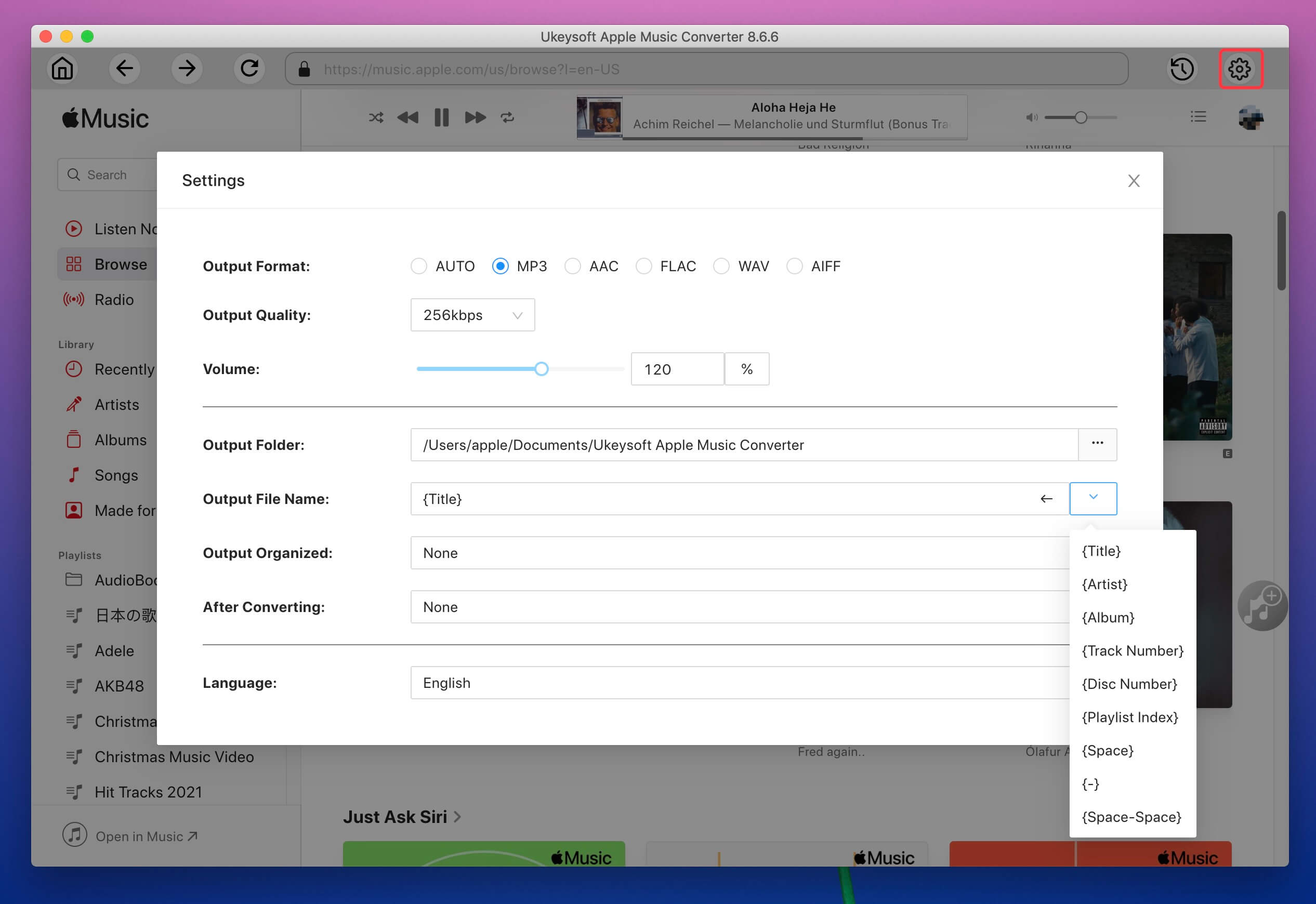
Output Organize: To better manage your music library, you can sort output of songs by artist or album.
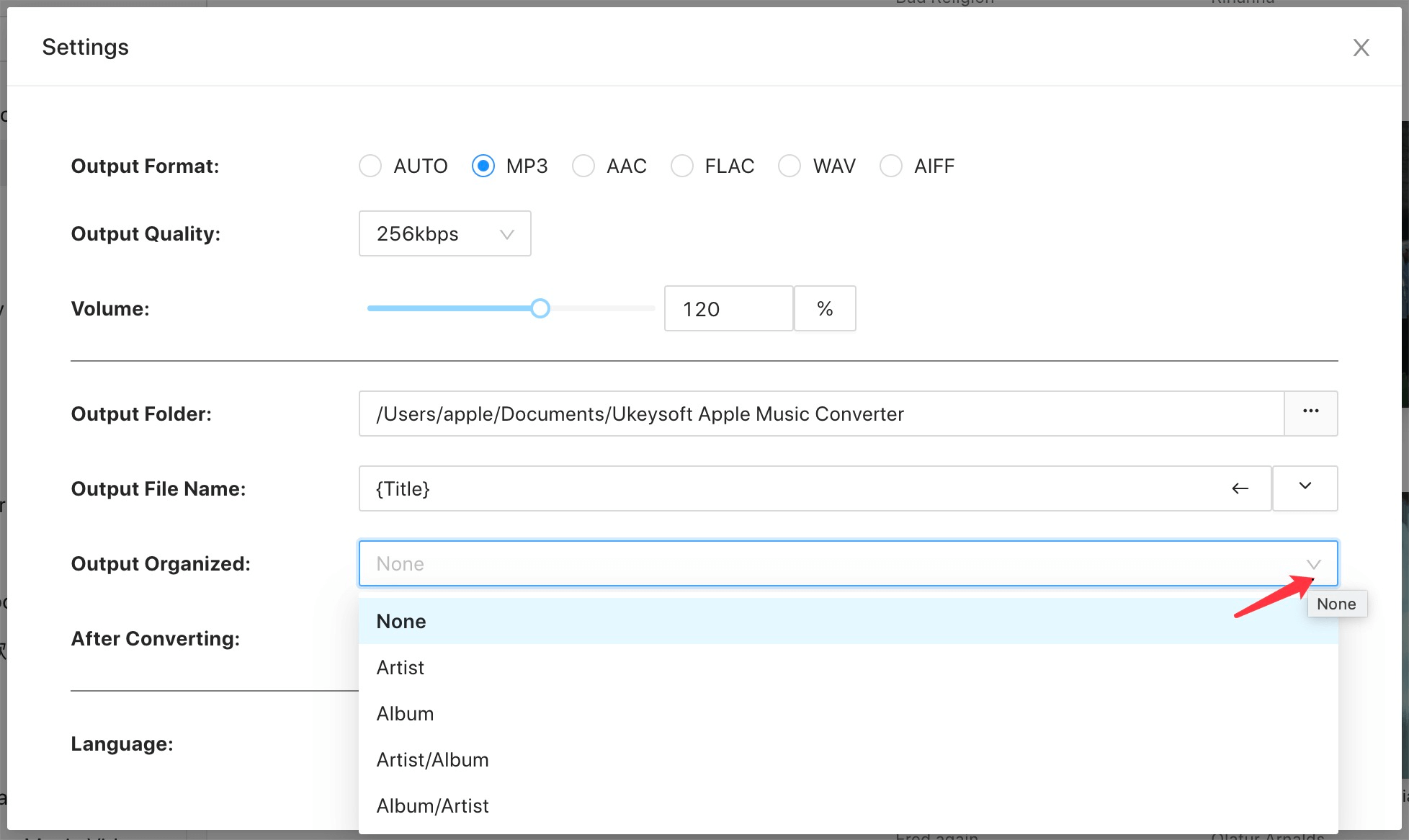
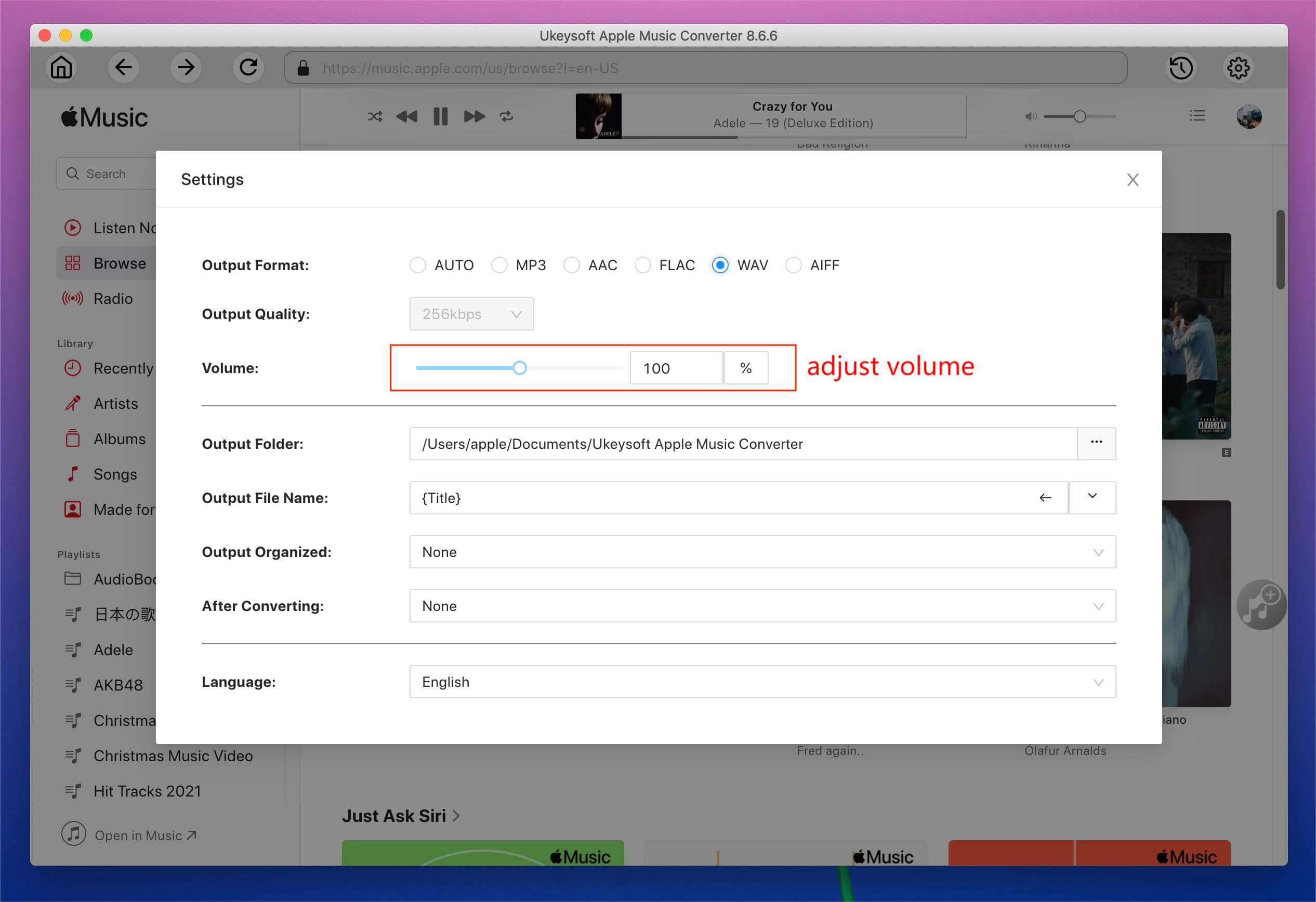
Adjust audio volum: In the "Volum" option, you are allow to adjust the volum for your preferences.
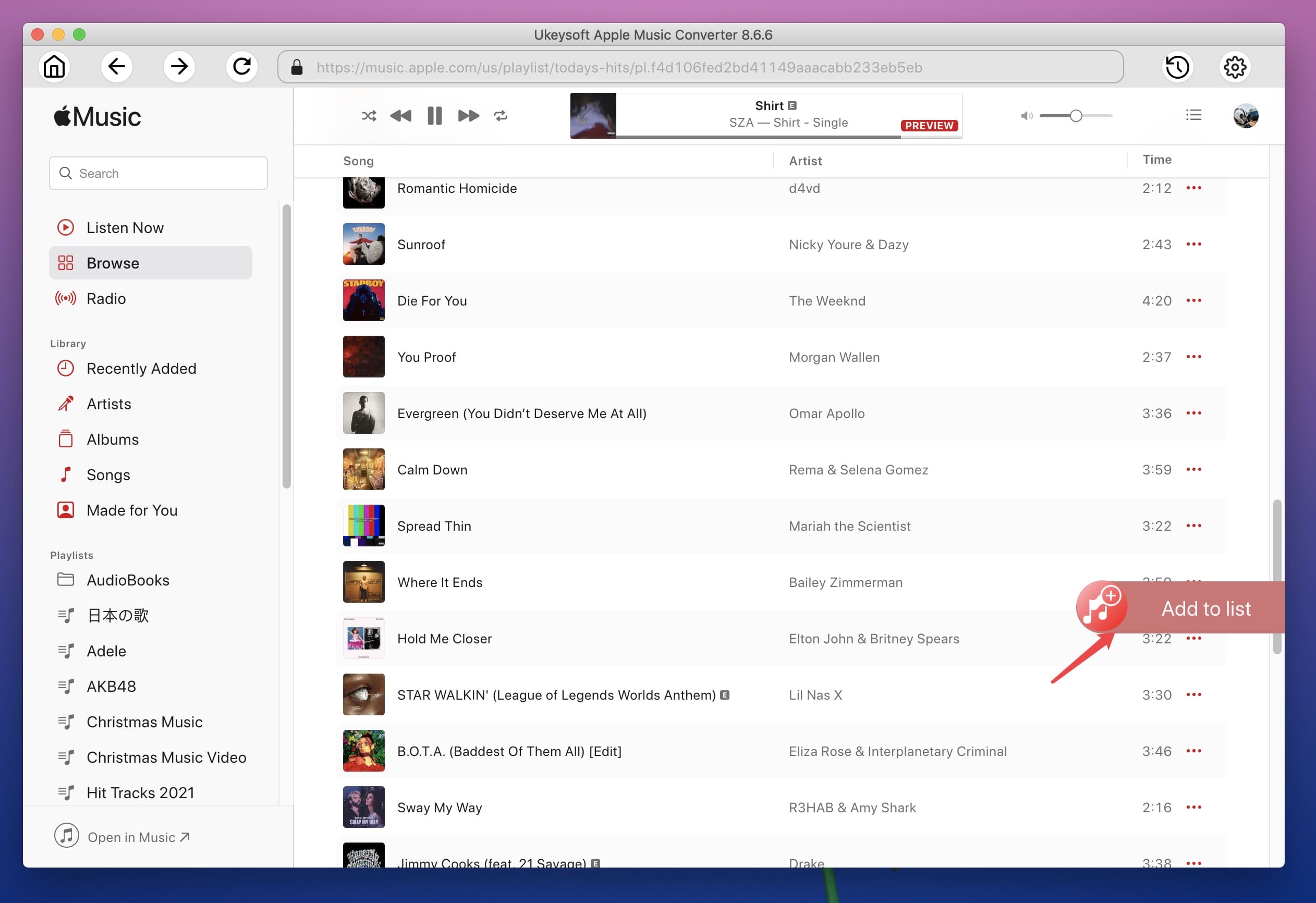
Step 4. Add Songs or Playlist to Converting List
Open a playlist in the left side and all songs in the playlist will be shown on the right side,and click the red "+" icon. You can also search songs you want by entering song title, artist name, album name.
Check all of them or any one you want to convert. This converter allows you to batch convert as many Apple Music tracks or an entire album as you like at a time.
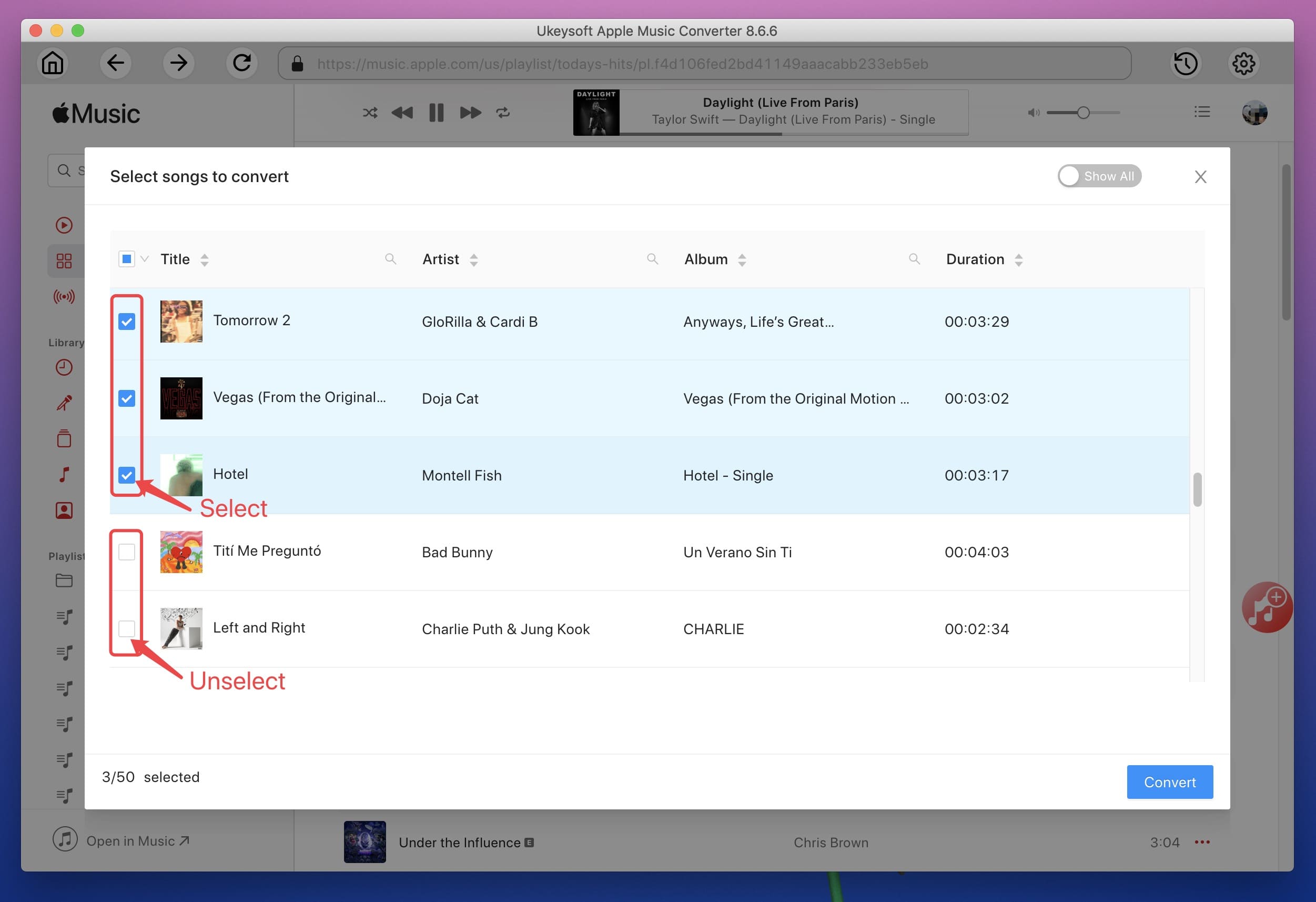
Step 5. Start Download Apple Music to MP3
Then, click on the "Convert" button and the software will start converting selected Apple Music M4P songs to MP3. The conversion time will depend on factors like the total number of songs, song length, the converting speed and the computer you use, etc.
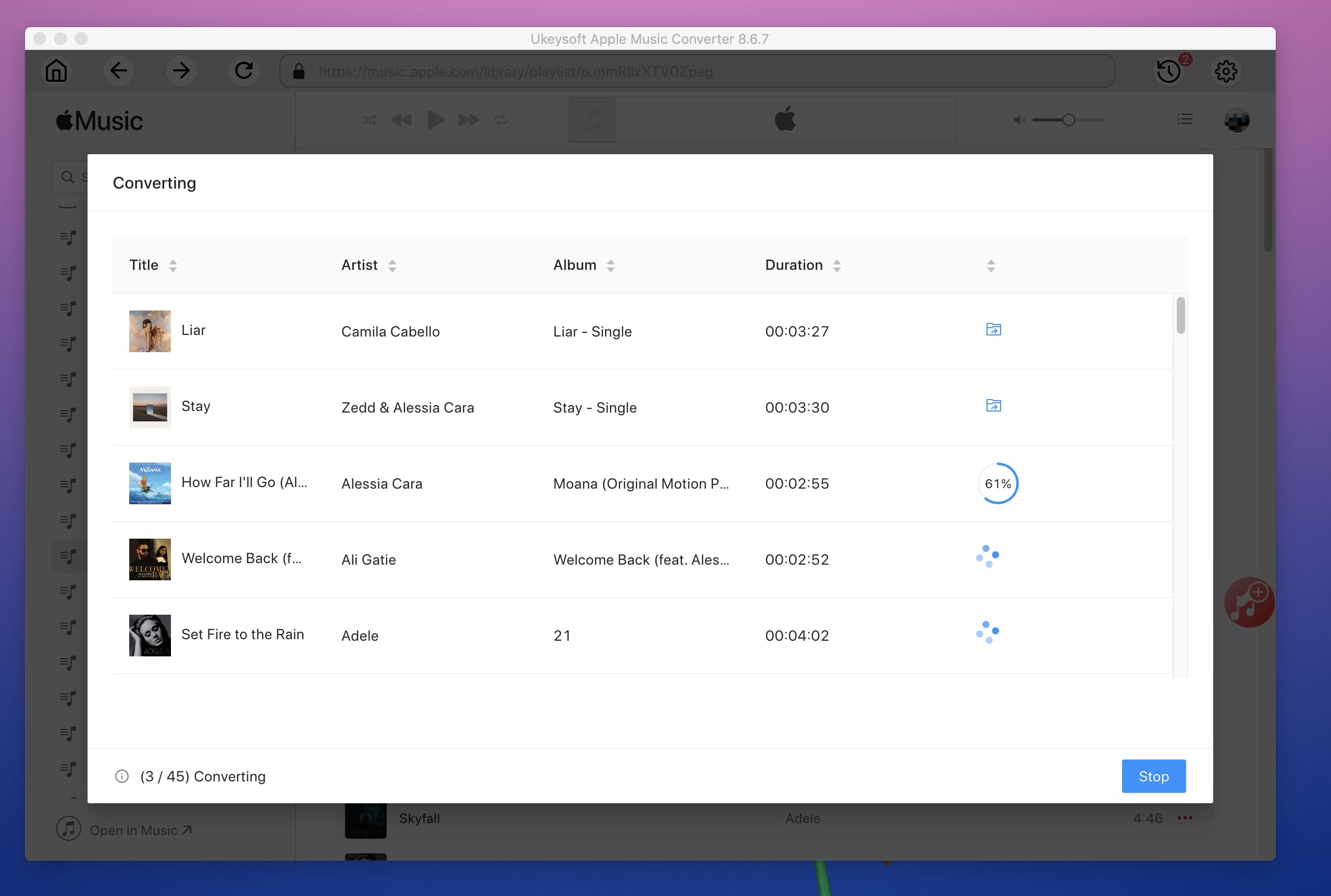
Step 6. Get Converted Apple Music Files
After converting process fished, please click "History" > "blue folder" icon to open the output folder quickly.
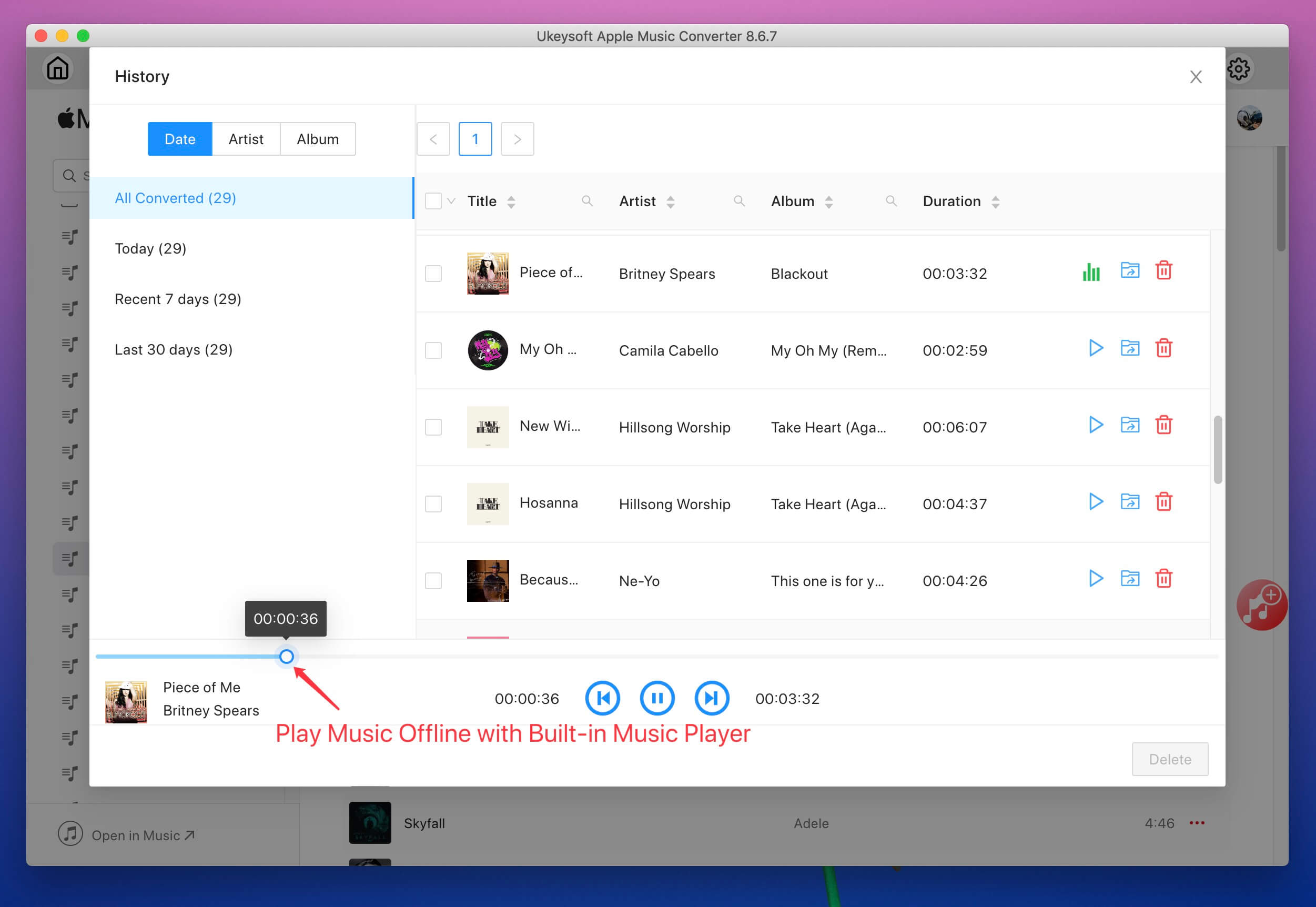
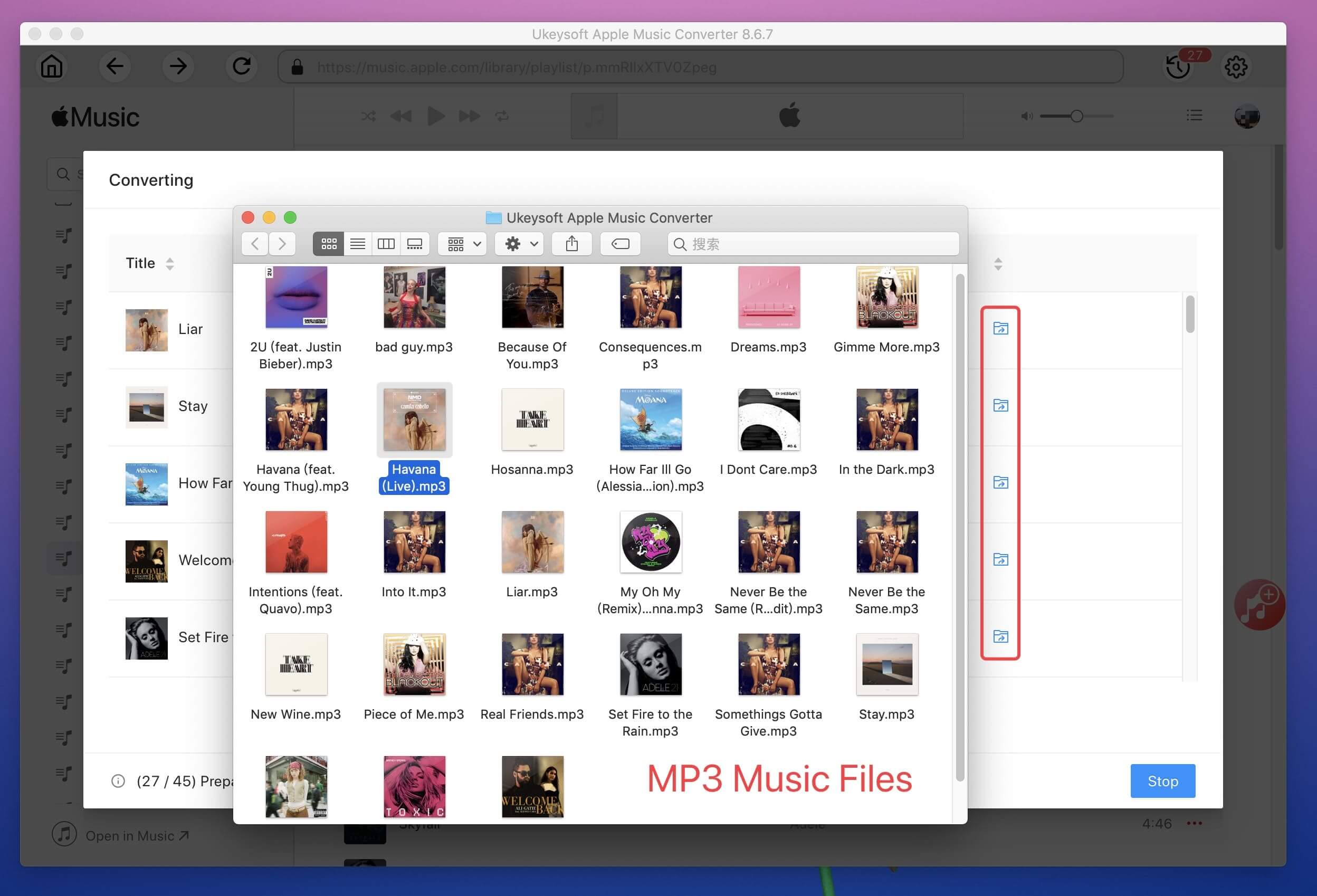
Then, you will find the high quality MP3 songs from the output folder on your Mac, you will see music metadata be preserved into the output MP3 songs, including song title, artist name, album name, genre or album artwork.
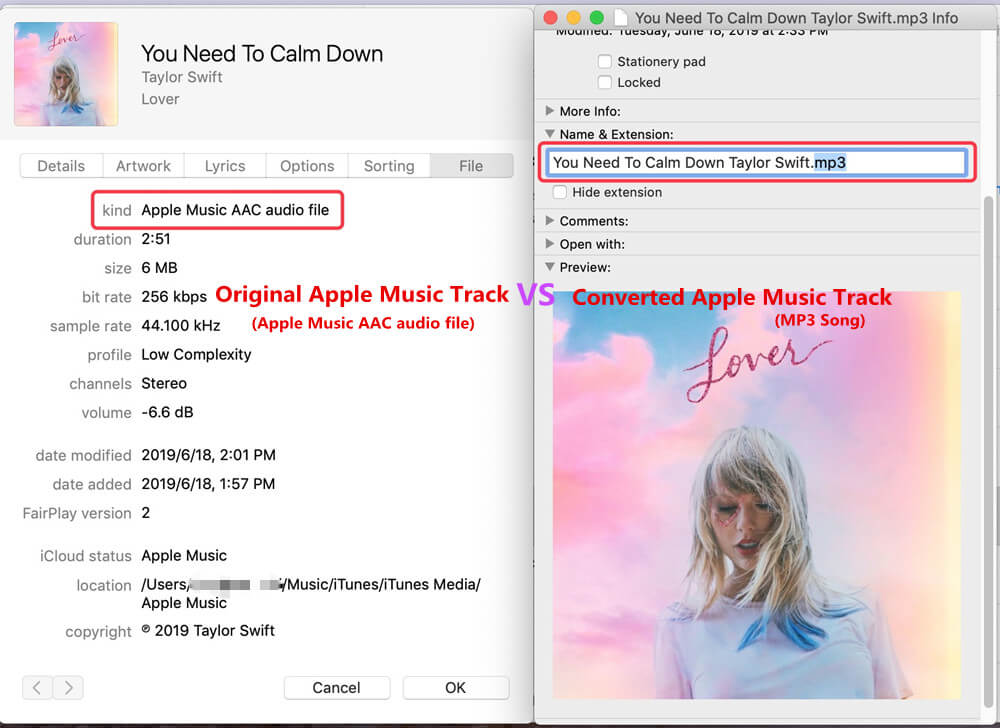
Compared with "Original Apple Music Tracks" and "Converted Apple Music Tracks by UkeySoft", you will find the the original Apple Music songs is Apple Music AAC audio file, and the converted songs is MP3 format, the converted songs can be played on any devices.
Now, you can play the converted Apple Music songs without iTunes or Apple Music app on Mac computer, burn them to CD, or sync them iPod nano, iPod shuffle, SanDisk, Sony Walkman, PSP, Xbox, Android phone/tablet/TV, iPhone, iPad, etc.
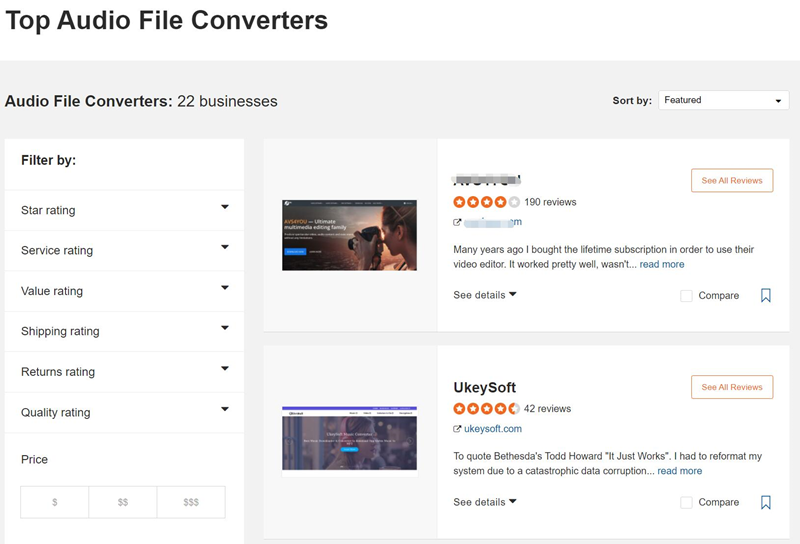
UkeySoft Overview Review in SiteJabber
UkeySoft has a consumer rating of 4.72 stars from 42 reviews indicating that most customers are generally satisfied with their purchases. Consumers satisfied with UkeySoft most frequently mention music converter.UkeySoft ranks 2nd among Audio Converter sites.
Trusted Reviews from Our Customer
Responsive and helpful
"Ukeysoft Apple Music Converter fills the need I had to be able to download songs from Apple Music to my iPod Classic which Apple doesn't support any more:-/ Beside this, thumbs up to Ukeysoft crew which is responsive and helpful to solve problems." - Eric G.
Great support
"Due to a hard drive crash I had to reinstall my computer. After the installation, my Apple Music Converter from UkeySoft claimed that my key had already been used up. After a brief contact with UkeySoft support, my key was reset and the installation worked again. This is how support should work." - Matthias B

Simple to use Apple Music converter
"This converter is simple-to-use, just tick the songs you want to copy and the program will make the copies. It has various formats that you can save the files in, and I'd recommend going to Preferences > Advanced and setting it up the way you want it. I also recently changed computers and they quickly helped me with that transition." - Barrie R.
Download the latest version of Ukeysoft Apple Music Converter:
Trial Version:: Free to try in 30 days, lifetime free updates.
Free Version Limitations: Trial version allow users convert the first three minutes of each music files.
Price:
1-Month Subscription: - Price: $14.95, License for 1 computer, 1-month access to full features, 5-days money-back guarantee, lifetime free updates.
1-Year Subscription: - Price: $59.95, License for 1 computer, 1-year access to full features, 5-days money-back guarantee, lifetime free updates.
Single Lifetime License: - Price: $89.95, License for 1 computer, Lifetime access to full features, 30-days money-back guarantee, lifetime free updates.
After reading this review article about UkeySoft Apple Music Converter, is it worth to buying one? In my opinion, this software is worth that all Apple Music subscribers need to own one, you not only can use this software to convert Apple Music track, but also enable you convert iTunes purchased songs and audiobooks to other formats, then you can keep songs and audiobooks forever or playing them offline on any devices.
If you want to try before purchasing, you can download the free trial version to experience all performance, the free trial version allows you convert first 3 minutes of each songs/audiobooks. To unlock the limitation, you only need to costs $14.95 to buy the license code and activate the software(one-off purchases for lifetime using), since UkeySoft Apple Music Converter can help you keep your favorite songs/albums forever, is it worth it?.
If you like this review, share it to your friends and family now! Please click the share button on the left to share this review article to your social networks, such as Facebook, Twitter, linkedin, etc., and share this software with your friends, colleagues or family now!

Prompt: you need to log in before you can comment.
No account yet. Please click here to register.










![7 Best FREE Apple Music Converters [2026 Updated]](https://www.ukeysoft.com/wp-content/uploads/2019/04/best-apple-music-converter.jpg)



















Porducts
Solution
Copyright © 2026 UkeySoft Software Inc. All rights reserved.


 English
 Arabic
 Chinese (Simplified)
 Chinese (Traditional)
 Croatian
 Czech
Czech Danish
 Dutch
Dutch Estonian
 Finnish
 French
 German
 Greek
Greek Hebrew
 Hindi
Hindi Hungarian
 Indonesian
 Italian
 Japanese
 Kazakh
 Korean
 Malay
Malay Norwegian
 Polish
 Portuguese
 Romanian
 Russian
 Slovenian
 Spanish
 Swedish
 Thai
Thai Turkish
 Ukrainian
 Vietnamese



























![Top 10 Christmas Songs to MP3 Download [Spotify]](https://www.ukeysoft.com/wp-content/uploads/2023/01/christmas-songs-to-mp3.jpg)


































































































































No comment yet. Say something...