 ✕
✕
✕
✕
By Justin SabrinaUpdated on April 07, 2026
Question: "Is there a third party app (Android) that allows me to listen to my audible books? How to play AAX files on my Android without Audible app?" - from Reddit
For years, Audible has expanded its compatibility across multiple devices, including Android, iOS, Windows, Fire TV, Sonos, and Echo devices and more. For Android users, it's convenient to listen to Audible audiobooks on Android if you have subscribed to Audible. However, downloaded Audible files are typically saved in AAX format.
Due to DRM protection, AAX audiobooks can only be played within the Audible app, which can be frustrating and makes you wonder "How do I play AAX files on my Android with other Android apps?" Don't worry. In this guide, we'll introduce two easy ways to play AAX Audible books on Android with or without Audible app.
CONTENTS
While the Audible app is officially authorized for Android devices, it becomes possible for Android users to directly add Audible to Android and stream the content from the Audible library without hassle. This method is safe, legal, and requires no technical setup.
What You Need:
● An Android phone or tablet running OS 9 or higher
● The Android device with the network connected
● Your Audible account with active subscription or purchased audiobooks
Step 1. Go to Google Play Store and install the Audible app on your Android device.
Step 2. Open the Audible app, log in using your Audible or Amazon account to access your purchased audiobooks.
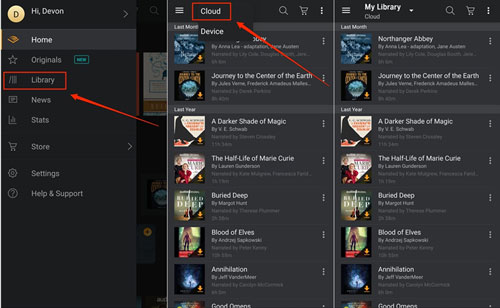
Step 3. Go to "My Library" section, then tap "Cloud" at the top, and switch it to "Device".
Step 4. Browse your library and tap the "Download" button to save books on Android for offline playback.
Similar to other streaming platforms, Audible's audiobooks are also protected by DRM. This limits you can only play DRM-protected AAX Audiobooks on Android within the Audible app. If you want more flexibility to play AAX files or audiobooks on Android with other media players, you need to remove Audible DRM and convert AAX files to MP3 or other audio formats. To do this, UkeySoft Audible Converter is absolutely what you need.
UkeySoft Audible Converter is a professional Audible Audiobook Converter for Windows and Mac. It helps users remove DRM from Audible audiobooks, and convert AAX and AA audiobooks to DRM-free MP3, WAV, M4B, M4A, AAC, FLAC, OGG, AC3, or AIFF formats. This allows you to transfer audiobooks to your Android, iPhone, MP3 player, or any portable devices for offline playback using other apps!
With advanced technology, the software delivers up to 700X faster conversion speed while maintaining lossless audio quality at up to 320kbps bitrate. In addition, it preserves full metadata such as ID3 tags and chapter information. Thanks to its built-in audiobook splitter, you can also split large audiobooks into smaller clips, making it easier to manage and play AAX files on Android in sections!
Great Features of UkeySoft Audible Converter:
Step 1. Add Audible AAX Files to UkeySoft
Download and launch UkeySoft Audible Converter on your Windows PC, laptop, iMac or MacBook. Click "Add" button to add your downloaded AAX audiobooks to the program. Or, directly drag and drop the downloaded AAX files to its interface.
Tips: You need to download Audible books to computer in advance.
Step 2. Define Output Parameters
Click the "Options" button at the top of the screen. It will pop up a small window. Tap "Advanced" tab, select MP3 or another compatible format to ensure you can play AAX files on Android easily.
You can also customize bitrate (320kbps), sample rate (48000Hz), and output folder for optimal audio quality.
For long-hour audiobooks, you can cut it into smaller clips by time, part, or chapter. Please tap "General" tab for more settings.
Step 3. Convert AAX Audible Books to MP3
After finishing above settings, press on the "Convert" button to remove DRM and convert your AAX files to MP3 or other format you set.
Step 4. Get Output MP3 Audible Files
Finally, click on the "History" button to get the well converted audiobooks. Click on the blue folder icon to open the output folder and get your DRM-free MP3 files!
Step 1. Connect your Android phone to your computer using a USB cable.
Step 2. On your Android device, select "File Transfer (MTP)" mode from the USB options.
Step 3. Open File Explorer (Windows) or Finder (Mac) and locate your Android device. Navigate to the "Music" folder (or create one).
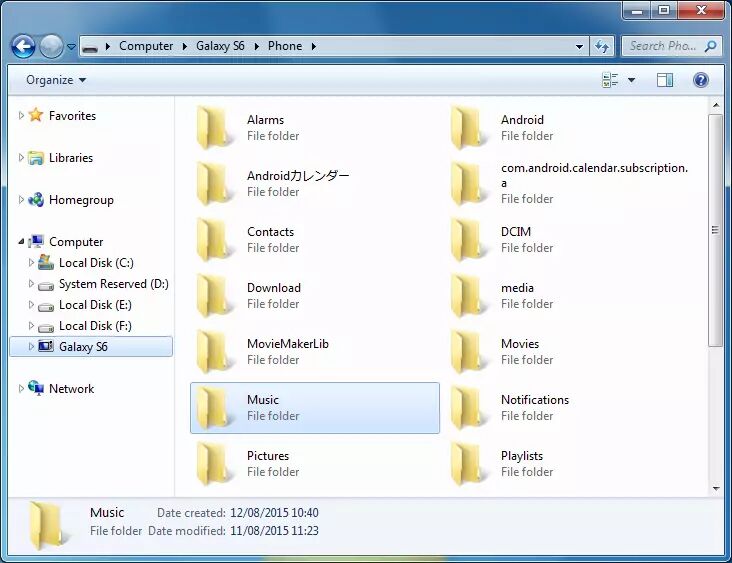
Step 4. Drag and drop your converted MP3 audiobooks from your computer into the "Music" folder.
Step 5. When finished, safely eject your Android device.
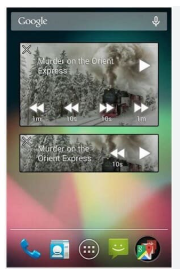
Now, open your built-in music player, VLC, Music Bee, or other players on your Android device. Access the imported MP3 audiobooks, select any audiobook and play it right now!
After reading this post, you have learned 2 effective methods to play Audible books on Android without hassle. If you want to play AAX files or audiobooks on Android or other devices without the Audible app, you can use UkeySoft Audible Converter to convert AAX or AA audiobooks to MP3 format. Now, download the free trial version and free up your audiobooks!

Sorry the comment has been closed.






















Porducts
Solution
Copyright © 2026 UkeySoft Software Inc. All rights reserved.


 English
 Arabic
 Chinese (Simplified)
 Chinese (Traditional)
 Croatian
 Czech
Czech Danish
 Dutch
Dutch Estonian
 Finnish
 French
 German
 Greek
Greek Hebrew
 Hindi
Hindi Hungarian
 Indonesian
 Italian
 Japanese
 Kazakh
 Korean
 Malay
Malay Norwegian
 Polish
 Portuguese
 Romanian
 Russian
 Slovenian
 Spanish
 Swedish
 Thai
Thai Turkish
 Ukrainian
 Vietnamese











![7 Best FREE Apple Music Converters [2026 Updated]](https://www.ukeysoft.com/wp-content/uploads/2019/04/best-apple-music-converter.jpg)












































![Top 10 Christmas Songs to MP3 Download [Spotify]](https://www.ukeysoft.com/wp-content/uploads/2023/01/christmas-songs-to-mp3.jpg)













































































































Comments are off!