 ✕
✕
✕
✕
By Justin SabrinaUpdated on May 12, 2026
Audible has revolutionized how we enjoy audiobooks. Sometimes you may want to enjoy a thrilling novel with your spouse, share a self-development book with a colleague, or let your child listen to a story while you listen to another. Here comes the question: Can two people listen to Audible at the same time?
The answer is positive. Once you've purchased an Audible title using a credit or cash, you legally own the right to listen to it, or even share it with a partner, family member, or friend. In this comprehensive guide, we'll explore four proven methods allow two people listen to Audible at the same time, from official sharing features to a powerful conversion solution. Let's dive in!
CONTENTS
Generally, Audible audiobooks are downloaded as AA or AAX files, which are protected by DRM. These Audible files can only be played through the Audible app or iTunes on authorized devices linked to your Amazon account. You cannot simply share these Audible AA/AAX files with others or transfer them to other devices for simultaneous playback.
To completely overcome these limits and play Audible books on multiple devices simultaneously (including smart speakers, car USB ports, or old MP3 players), the best solution is to convert Audible books to MP3, M4A, M4B, or other universal formats. Here UkeySoft Audible Converter is a good helper.
UkeySoft Audible Converter is a professional tool designed to help users remove DRM from Audible books and convert Audible AA/AAX files into widely supported formats like MP3, M4B, WAV, AC3, AAC, FLAC, OGG, or AIFF. By applying an advanced technology, it works at up to 700X faster speed while preserving 100% of the original sound quality, including lossless 320kbps MP3 output.
What's more, it supports batch conversion, so you can convert entire Audible libraries with one click! This great tool also retains original chapter information and ID3 tags like title, author, narrator, cover art, etc. The built-in audiobook splitter lets you split audiobooks into smaller parts by time, chapter, or segments, perfect for organizing long books or burning to CDs. After conversion, you can easily share Audible books freely and listen to Audible books offline on multiple devices at the same time!
Key Features of UkeySoft Audible Converter:
Step 1. Fire up UkeySoft Audible Converter
Download and install UkeySoft Audible Converter on your Windows PC or Mac. Launch the program – you'll see a clean, intuitive interface ready to import Audible files.
Step 2. Add Audible AA/AAX Files in Two Ways
Drag & Drop: Simply locate your downloaded Audible AA or AAX files in File Explorer (Windows) or Finder (Mac). Drag them directly into UkeySoft's main window. The files appear instantly.
Manually Add: Click the "Add" button at the top left. Navigate to your Audible content folder, and manually select Audible audiobooks for conversion.
Step 3. Modify Output Settings
Hit on the "Options" button to open the settings window. Choose your desired output format (recommended: MP3), bitrate (320kbps for best quality), sample rate (48,000 Hz), to ensure optimal playback quality across different devices.
Tap "General" tab, divide long audiobooks into smaller parts by chapter, time length, or equal parts, making it easier for multiple users to listen independently.
Step 4. Start to Convert Audible Books to MP3
Click the "Convert" button. UkeySoft will start processing at up to 700X speed while maintaining original audio quality and structure. You'll see a progress bar for each audiobook.
Step 5. Find Output Audible Files and Enjoy Freely
After conversion completes, click the "History" button or navigate to the output folder to access your DRM-free audiobooks, ready to be shared and played on any device simultaneously!
Another official way to share Audible books is through the gifting feature. Audible allows you to purchase and send specific audiobooks as gifts to another person's Audible account. While this method doesn't allow simultaneous streaming from one purchase, it enables both users to enjoy Audible at the same time independently. Here's how to perform it:
Step 1. Open the Audible app on your phone/tablet, or visit the Audible website on your computer browser.
Step 2. Navigate to the audiobook you want to share.
Step 3. Under the "Play" button, find the "More options" and click it, select the "Give as a Gift" option.
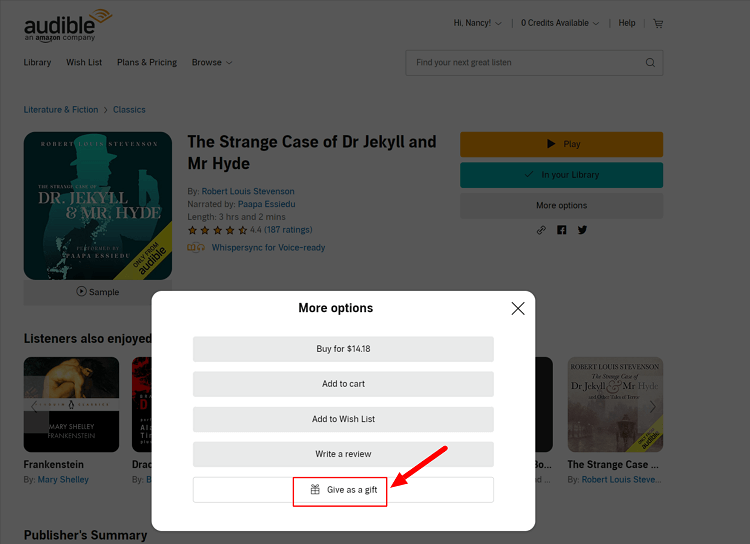
Step 4. Choose the delivery method: via email (to the recipient's email address) or print-at-home (physical gift card).
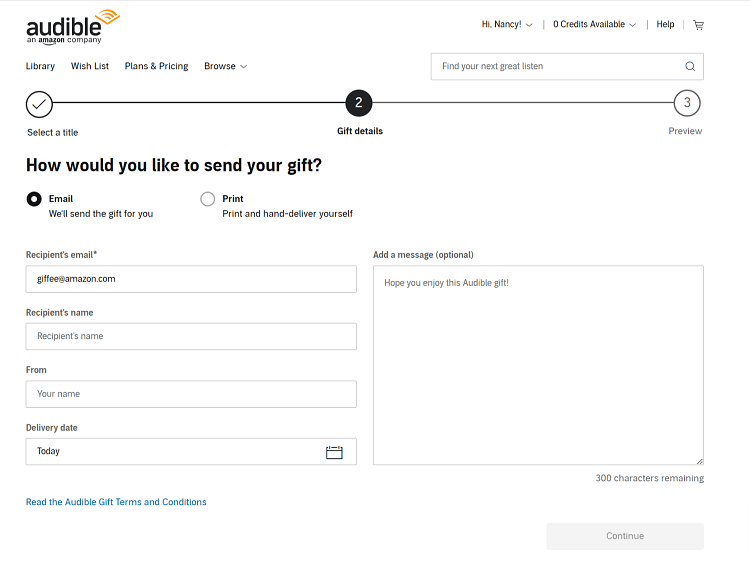
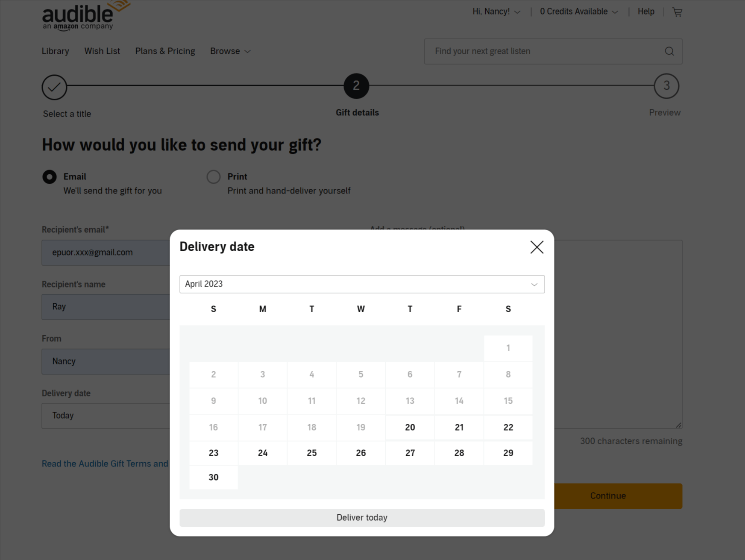
Step 5. Select the delivery date and confirm your action. Once redeemed, the recipient owns the audiobook and can listen freely.
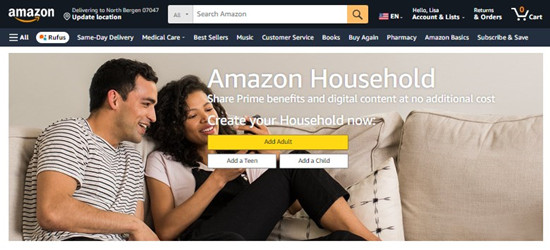
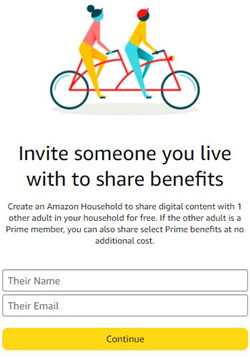
Amazon offers a feature called Amazon Household (or Amazon Family). With this feature, up to two adult accounts (plus up to four child profiles) to share digital content, including Amazon Prime benefits, Audible audiobooks, and Kindle books. When you set up an Amazon Household, both adults can listen to Audible at the same time using their own Amazon accounts, on their own devices, without sharing passwords.
Here's How to to Set Up Amazon Household and Share Audible Books:
Step 1. Go to Amazon.com and log into your primary account. Hover over "Account & Lists" and click "Your Content and Devices".
Step 2. Go to "Amazon Household" settings, click "Add Adult" or "Add a Teen".
Step 3. Enter the other person's name and email address. Amazon will send an invitation.
Step 4. The second person accepts the invitation by logging into their own Amazon account.
Step 5. You'll both need to verify your address.
Step 6. Once linked, go back to "Your Content and Devices". For each Audible book, click "Share with Household" if it's not already shared.
Step 7. Another person can now find shared books in his Audible app under "Library" > "Shared with Me" or directly in his account.
Both of you can now enjoy Audible at the same time on separate devices using your own credentials!
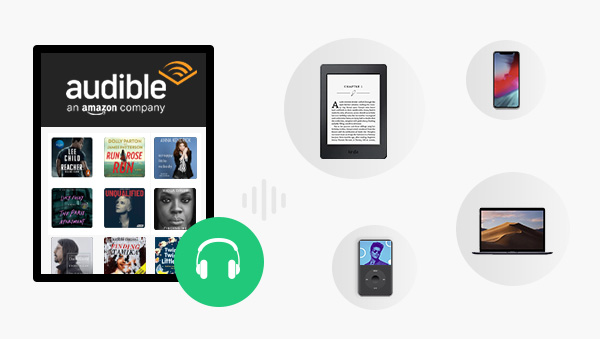
Audible allows a single account to be used on multiple devices (smartphones, tablets, computers, smart speakers). You can also share your Audible account with your friends/partners/family members if they do not wish to become members if they don't want to join the membership. This way, two persons can listen to Audible at two devices simultaneously.
However, this method comes with limitations. Audible may pause playback if multiple streams are detected, and syncing issues can occur. It is unsafe to to share your Audible account and payment with others.
Verdict: Not ideal for long-term sharing.
Can two people share an Audible account?
Yes, two people can share a single Audible account by using the same login credentials, but it's not officially recommended. While you can log in on multiple devices, Audible may restrict simultaneous streaming. For a cleaner approach, converting Audible books to MP3 with UkeySoft Audible Converter, then share the MP3 books with others freely.
How many devices can listen to Audible at once?
Audible supports multiple devices, but simultaneous playback is limited. If you exceed 5-6 concurrent streams, Audible may temporarily restrict playback. For stable performance, alternative methods like Audible to MP3 conversion or Household sharing are better.
Can family members listen to my Audible books?
Yes, using Amazon Household Sharing (Method 3), you can share your entire Audible library with one other adult and up to four child profiles legally. Children do not need separate Audible accounts; they can listen through the parent's account or a child profile on Fire tablets.
Is there an official way to share content without sharing passwords?
Yes. Amazon Household is the official method that allows two adults to share digital content (including Audible books) without sharing passwords. For more details, refer to Method 3.
In short, two people can listen to Audible at the same time through various methods. You can send your purchased Audible audiobooks as gift, set up Amazon Household, or even share your Audible account with others. For the best, safest, most flexible, and permanent solution, you'd better convert Audible books to DRM-free MP3 using UkeySoft Audible Converter. Thus, you can share Audible books with families and friends via email or USB drive, transfer Audible on multiple devices, and enjoy Audible offline at the same time! You'll never worry about account limits, sync issues, or platform restrictions again.

Sorry the comment has been closed.






















Porducts
Solution
Copyright © 2026 UkeySoft Software Inc. All rights reserved.


 English
 Arabic
 Chinese (Simplified)
 Chinese (Traditional)
 Croatian
 Czech
Czech Danish
 Dutch
Dutch Estonian
 Finnish
 French
 German
 Greek
Greek Hebrew
 Hindi
Hindi Hungarian
 Indonesian
 Italian
 Japanese
 Kazakh
 Korean
 Malay
Malay Norwegian
 Polish
 Portuguese
 Romanian
 Russian
 Slovenian
 Spanish
 Swedish
 Thai
Thai Turkish
 Ukrainian
 Vietnamese











![7 Best FREE Apple Music Converters [2026 Updated]](https://www.ukeysoft.com/wp-content/uploads/2019/04/best-apple-music-converter.jpg)












































![Top 10 Christmas Songs to MP3 Download [Spotify]](https://www.ukeysoft.com/wp-content/uploads/2023/01/christmas-songs-to-mp3.jpg)













































































































Comments are off!