 ✕
✕
✕
✕
By Justin SabrinaUpdated on August 31, 2021
"I want to cancel my Apple Music subscription. Can I still listen to the downloaded Apple Music after canceling the subscription? If not, how can I keep Apple Music forever? Thank you."
In order to attract users to pay, Apple inc provides users with a free trial period of 3 months. After the trial period ends, you need to pay $9.9 per month to keep subscription active. After subscribing to Apple Music, you can listen to about 60 million ads-free songs in iTunes and download Apple Music for offline playback on Apple authorized devices.
Can you still listen to downloaded Apple music without subscribing?
If you unsubscribe from Apple Music, you will no longer have access to any music or playlists added from Apple Music. In addition, you can't play the downloaded Apple Music offline after canceling subscription. In other words, if you decide to stop subscribing, all Apple Music tracks will disappear even you have downloaded it and back up to computer.
Why can’t We Play Downloaded Apple music after Unsubscribed?
Like other competitor Spotify Music, Apple Inc. has also added DRM restrictions to its Apple Music songs to prevent them from being copied and transferred to non-Apple devices. We can only play Apple music played on authorized device, including iPhone, iPad, iPod touch, Apple Watch, Apple TV, Mac, PC, Apple HomePod, Apple CarPlay, Android phone, Sonos and Amazon Echo device.
Therefore, to keep downloaded Apple Music songs playable after unsubscribed, you should remove DRM from Apple Music and convert Apple Music to MP3 format with which I highly recommend an Apple Music to MP3 Converter, it called UkeySoft Apple Music Converter.
UkeySoft Apple Music Converter supports both Apple Music Free and Subscriber to completely decrypt DRM lock from downloaded Apple Music songs and convert Apple Music M4P songs to MP3 and other common formats with ID3 tags and metadata info preserved. After conversion, you can save Apple music on your computer forever, then you can listen to Apple Music offline on any device anytime without subscription.
Main Features of UkeySoft Apple Music Converter:
The following part will guide you how to remove DRM from Apple Music and convert it to lossless MP3 with using UkeySoft Apple Music Converter, then you can freely enjoy downloaded Apple Music after canceling subscription without limits. Please make sure that you have add all Apple Music tracks to your iTunes library before starting using this software.
Step 1. Launch UkeySoft Apple Music Converter
Click Download button above, then install and launch the software on your computer. At the same time, iTunes app will run automatically.
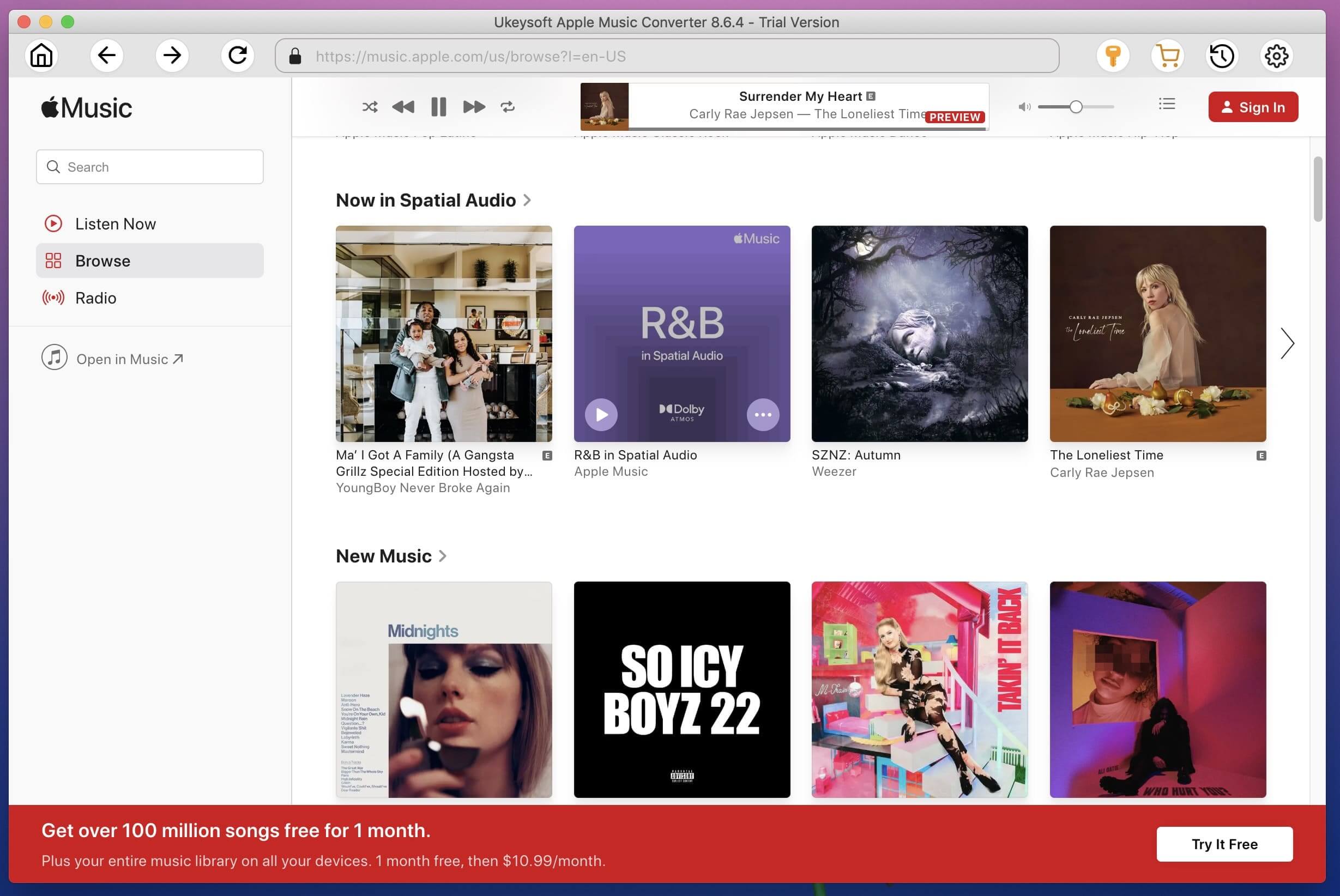
Step 2. Add Apple Music Songs to Converter
Click the Music in the left panel, then tick the checkbox to select the songs you want to play after canceling subscription.
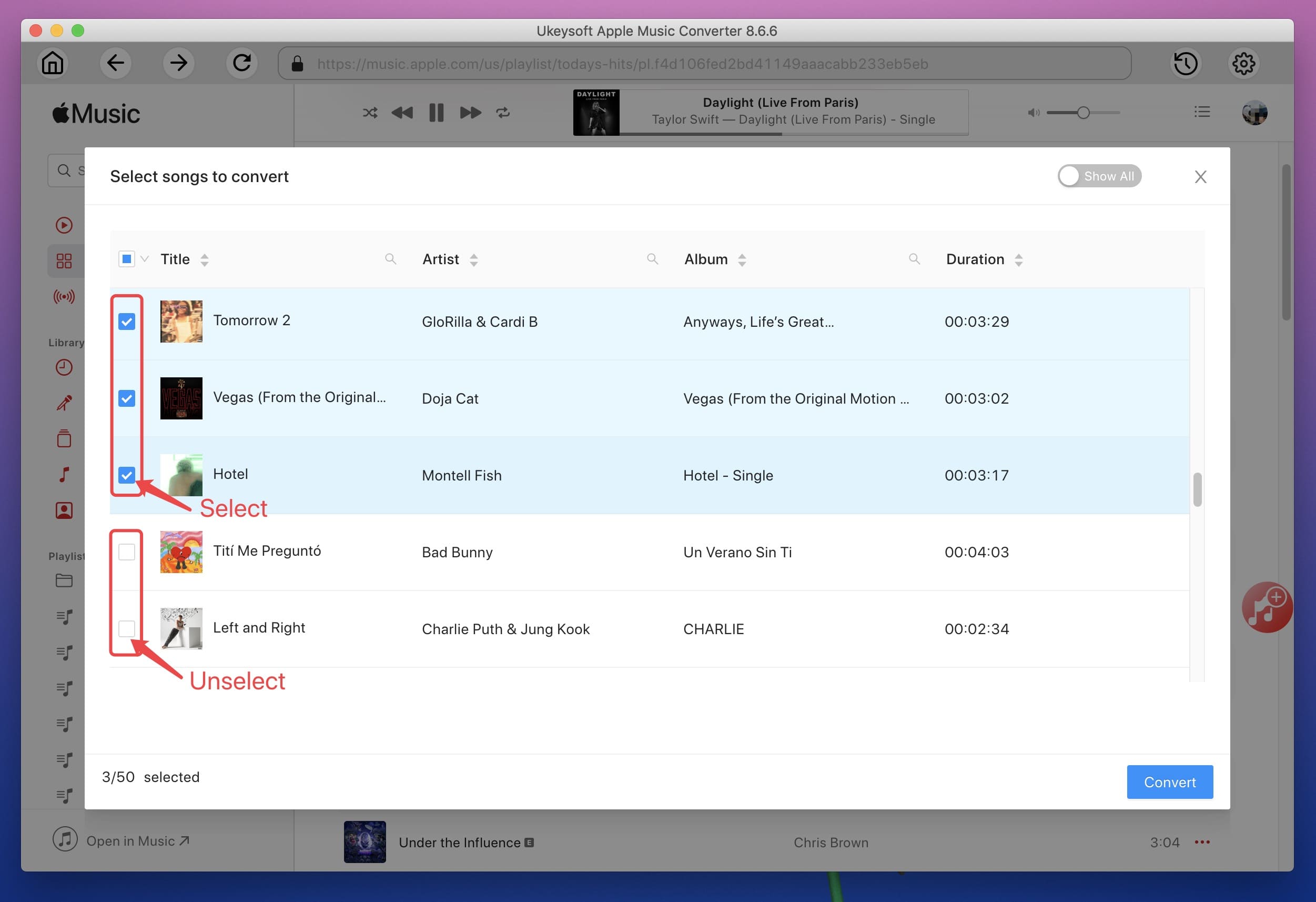
Step 3. Set the Output Format as MP3
After the above settings, set MP3 as the output format. By the way, UkeySoft also supports you to change the Bitrate, SimpleRate, Output path, etc.
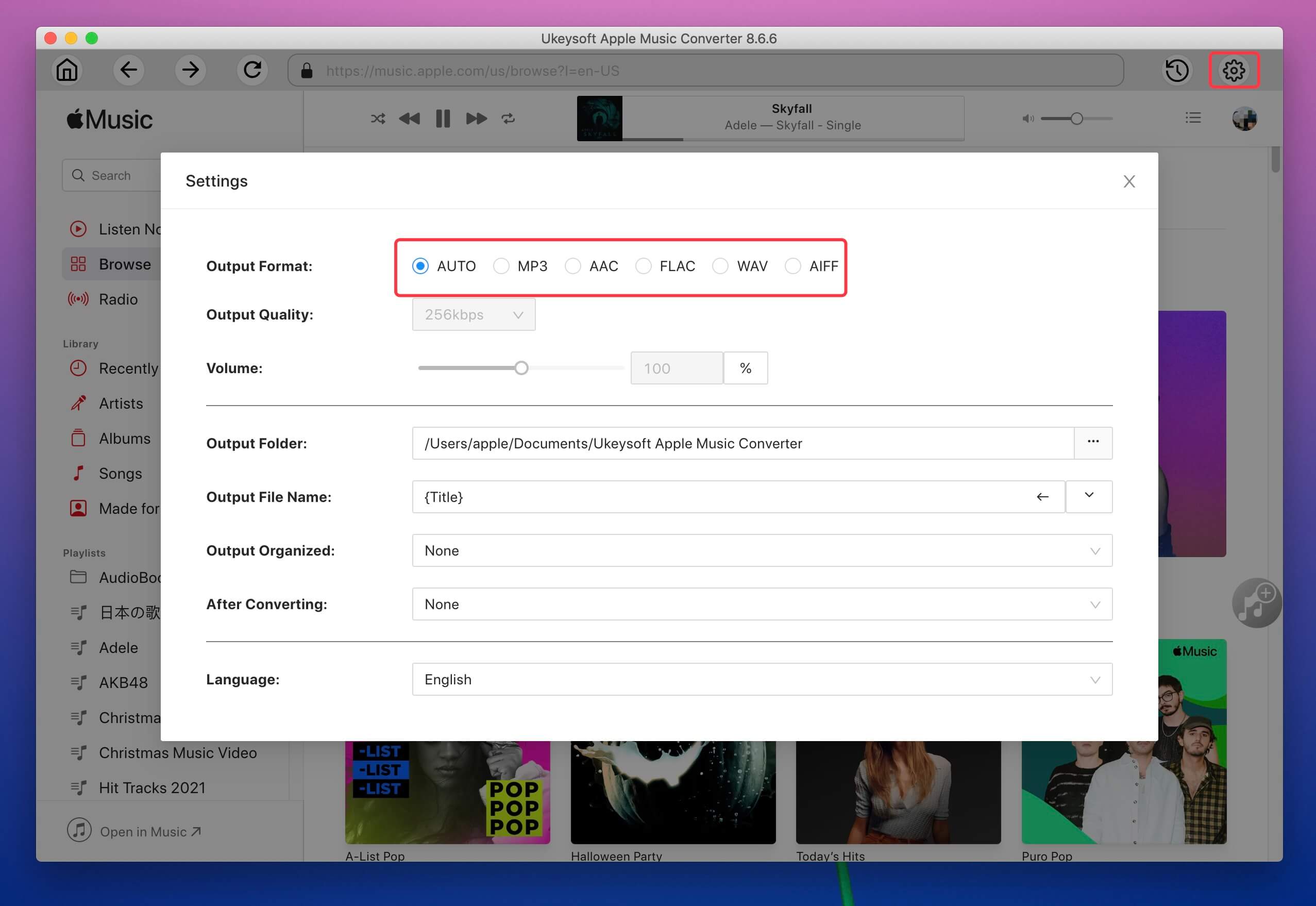
Step 4. Start Downloading Apple Music as MP3
Click “Convert” button to start downloading Apple Music songs as MP3 format with losing original quality.
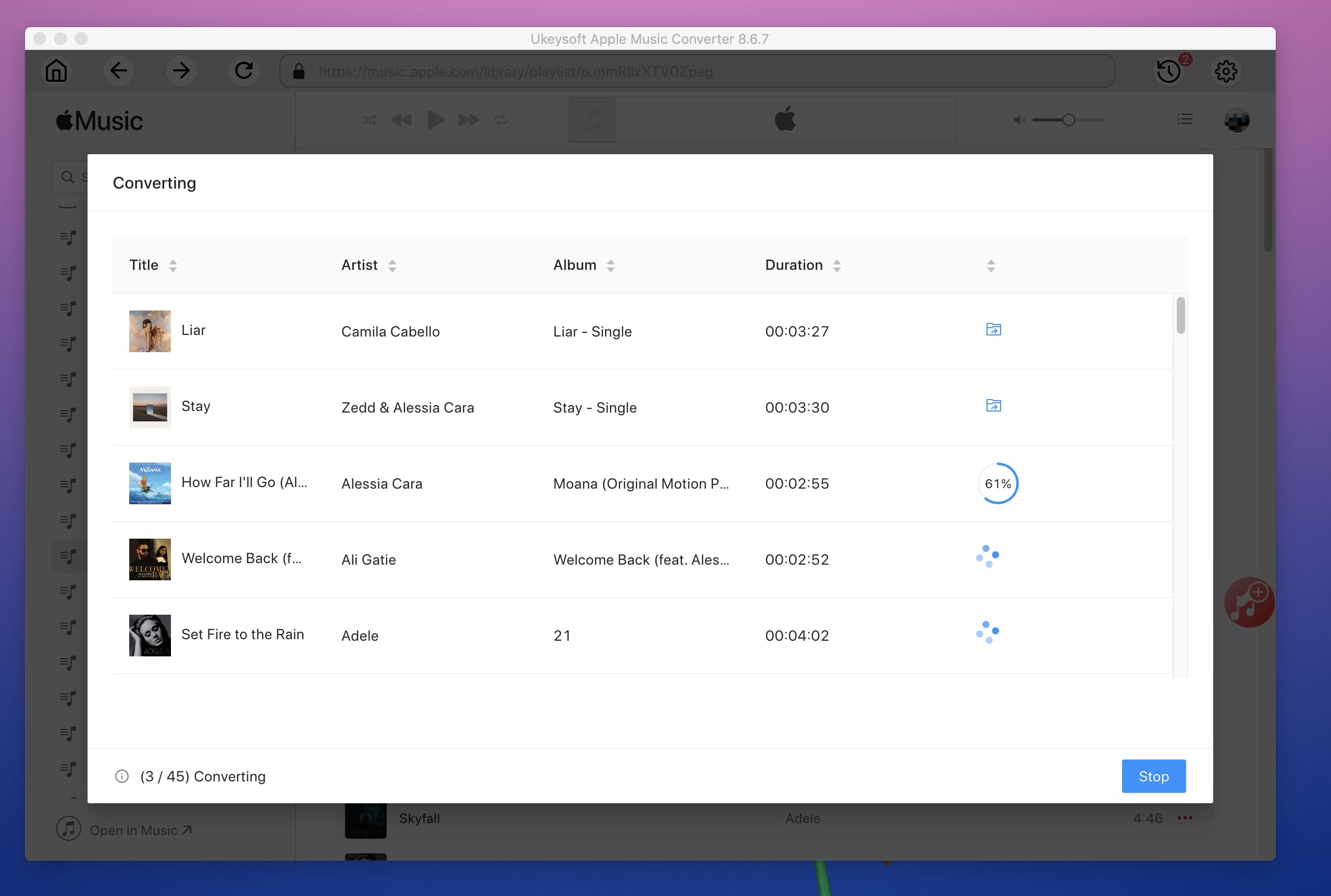
Step 5. Play Downloaded Apple Music without Subscription
Now all the Apple Music MP3 songs have been saved on your computer forever, click the "Explore Output File" button to locate the converted MP3 files, then you can transfer the converted Apple Music files to any device, it’s easy to play downloaded Apple Music after canceling subscription.
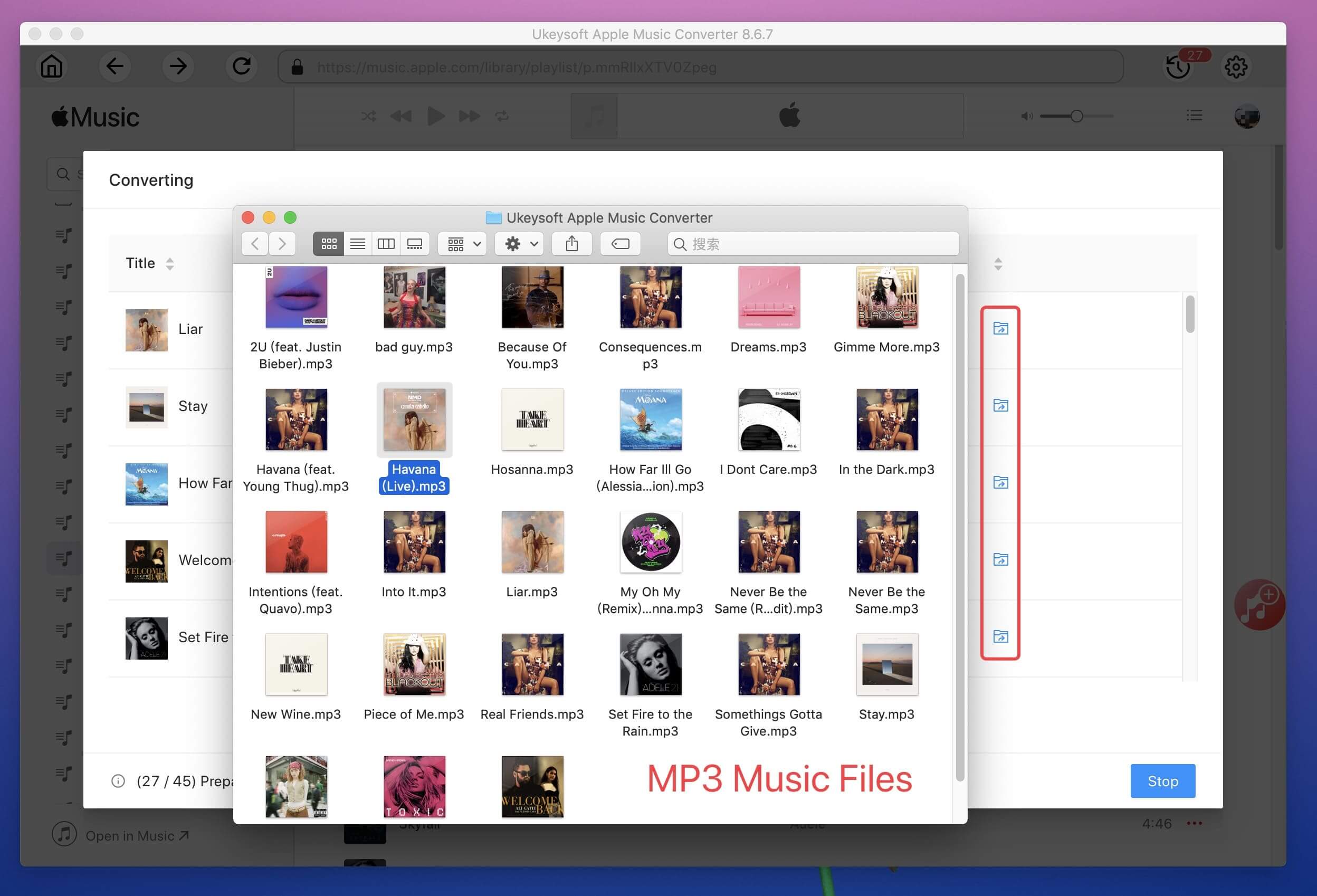
No need to subscribed Apple Music, you can easily enjoy Apple Music songs on any device and tablets with using UkeySoft Apple Music Converter, such as iPhone, iPad, Samsung phone, Android phone and tablet, MP3 players, iPod Touch, iPod Shuffle, iPod Nano, iPod Classic, Sony Walkman, SanDisk MP3 player, Activo CT10, FiiO M11/M15, Activo CT10,PS4, Zune, PSP, etc.

Prompt: you need to log in before you can comment.
No account yet. Please click here to register.










![7 Best FREE Apple Music Converters [2026 Updated]](https://www.ukeysoft.com/wp-content/uploads/2019/04/best-apple-music-converter.jpg)



















Porducts
Solution
Copyright © 2026 UkeySoft Software Inc. All rights reserved.


 English
 Arabic
 Chinese (Simplified)
 Chinese (Traditional)
 Croatian
 Czech
Czech Danish
 Dutch
Dutch Estonian
 Finnish
 French
 German
 Greek
Greek Hebrew
 Hindi
Hindi Hungarian
 Indonesian
 Italian
 Japanese
 Kazakh
 Korean
 Malay
Malay Norwegian
 Polish
 Portuguese
 Romanian
 Russian
 Slovenian
 Spanish
 Swedish
 Thai
Thai Turkish
 Ukrainian
 Vietnamese



























![Top 10 Christmas Songs to MP3 Download [Spotify]](https://www.ukeysoft.com/wp-content/uploads/2023/01/christmas-songs-to-mp3.jpg)


































































































































No comment yet. Say something...