 ✕
✕
✕
✕
By Justin SabrinaUpdated on April 23, 2026
LINE MUSIC is a popular music streaming platform, offering on-demand access to over 100 million tracks, including extensive J-pop and K-pop catalogs. It is not a free music service. It has integrated with the popular LINE Messenger App, allowing users to share, stream, and listen to music directly. However, it is not a free music service. You need a subscription plan to access all of the features in LINE MUSIC, starting at ¥1,080 per month.
Once subscribed, you are able to download LINE Music for offline listening. It is very convenient to enjoy your LINE Music when you go to somewhere where doesn't offer WiFi. In this complete guide, we'll show you the best ways to download Line Music on any device, including mobile devices and computers, even after canceling your subscription.
CONTENTS
For iPhone and Android subscribers seeking a way to download LINE Music, the entire process is straightforward. You can install the official LINE MUSIC mobile app for iOS and Android, and then find the songs, albums, or playlists you want to download. Follow the detailed steps below to learn how to download Line Music on mobile phone.
Step 1. Download the LINE MUSIC app from the App Store or Google Play. Open the LINE MUSIC app and log in to your subscription account.
Tips: Only users who have registered a LINE account in Japan can register for LINE MUSIC.
Step 2. Find your favorite songs, albums, or playlists within the app.
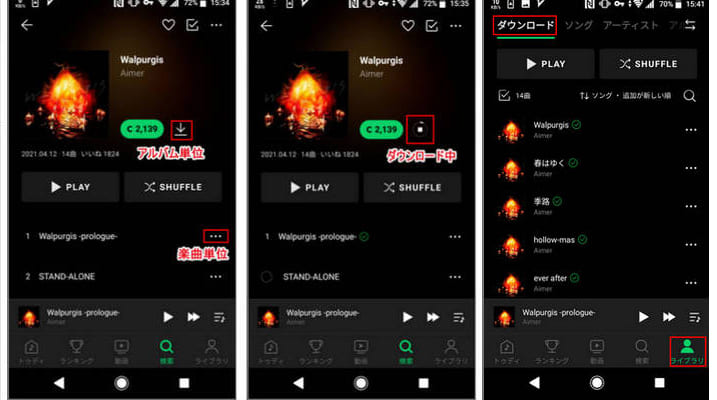
Step 4. Click the "Download" icon next to the song or playlist to start downloading.
Step 5. After downloading, go to your library and switch to offline mode to listen to LINE Music offline without an internet connection.
Limits of the Official Method:
While this method allows you to download LINE Music on your phone, it comes with several restrictions:
Since there is no official LINE MUSIC desktop app, you cannot directly download songs from LINE MUSIC to your computer. And the downloaded songs disappear in LINE MUSIC app after your subscription ends. To keep Line Music permanently and enjoy flexible playback, you need to use a third-party tool to download or record LINE Music to MP3 format.
The best tool for this job is UkeySoft Screen Recorder, also named UkeySoft Audio Recorder. This powerful software records everything playing on your computer, including streaming music, audios, videos, movies, online meetings, microphone input, system sounds, webcam footage, and more.
For users who want to download LINE Music for permanent offline listening, it provides a practical way to record and save LINE Music as local MP3, WAV, or M4A audio files with up to 320kbps high-quality output. Unlike online audio recording websites, UkeySoft records audio without lag or distortion, ensuring a high-quality listening experience when you listen to LINE Music offline across your devices.
Highlights: It also includes built-in tools: a video editor, an audio converter, a screenshot capture, and a trimming tool, allowing you to customize your recordings easily.
More Features of UkeySoft Screen Recorder:
Step 1. Launch UkeySoft Screen Recorder
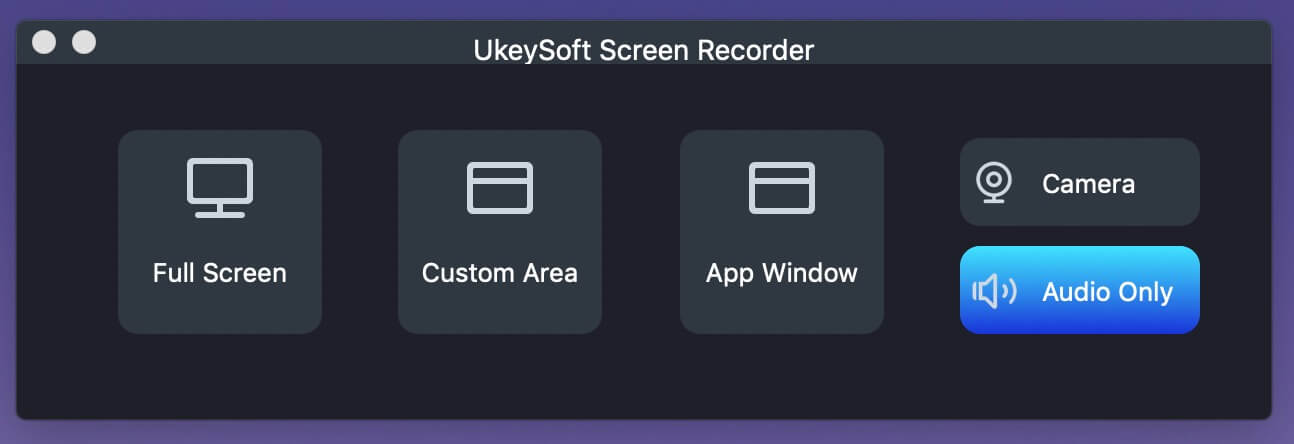
Download the latest version of UkeySoft Screen Recorder for Windows or macOS. Install the software, and launch it. Here we take its Mac version as an example, select "Audio Only" mode for recording Line Music.
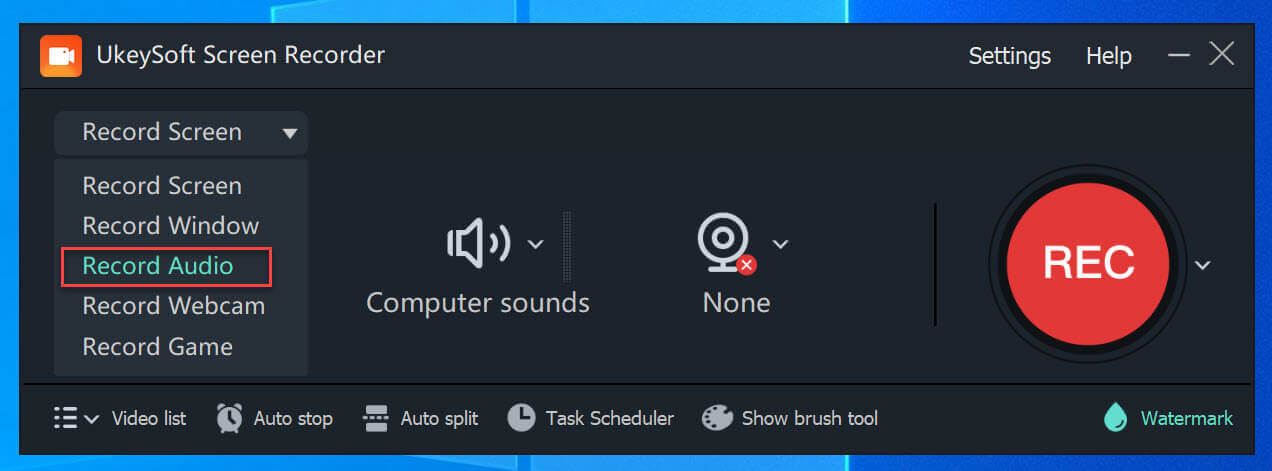
For Windows user, please choose "Screen Recorder" mode, then click "Record Audio" function.
Step 2. Set Input Audio
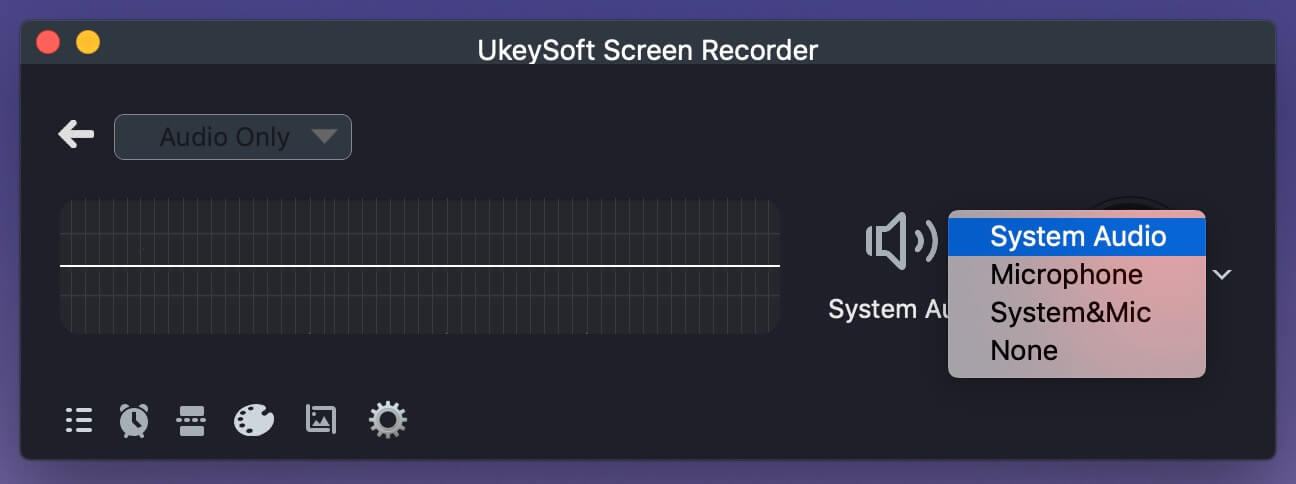
Under the "Audio" icon, select "System Audio" as the input source. This ensures to capture the music playing from LINE MUSIC.
Step 3. Set Output Format to MP3
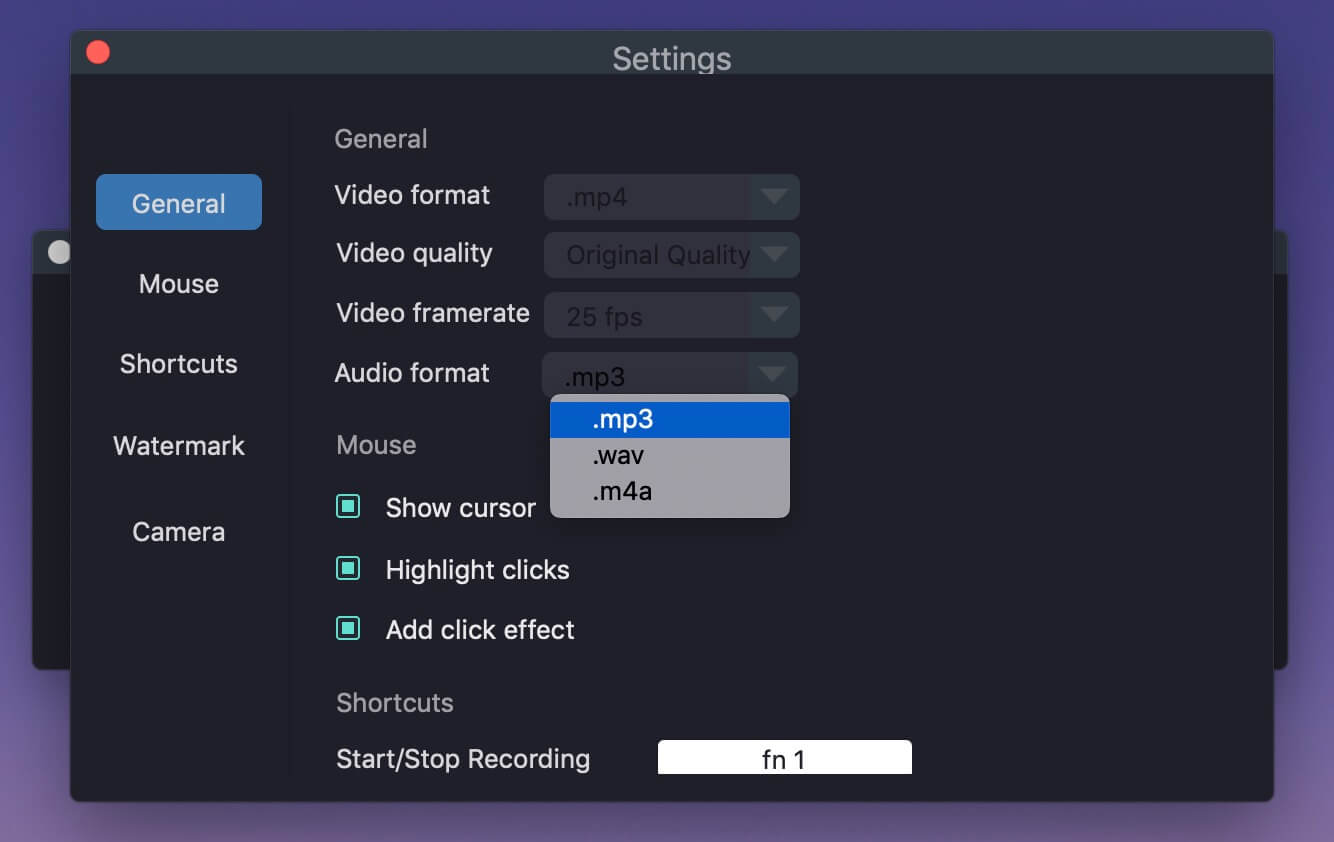
Click the "Gear" icon. Navigate to "General" tab, under "Audio format", select MP3. Choose "High" in the "Audio quality" for best quality.
Step 4. Open LINE MUSIC Web Player
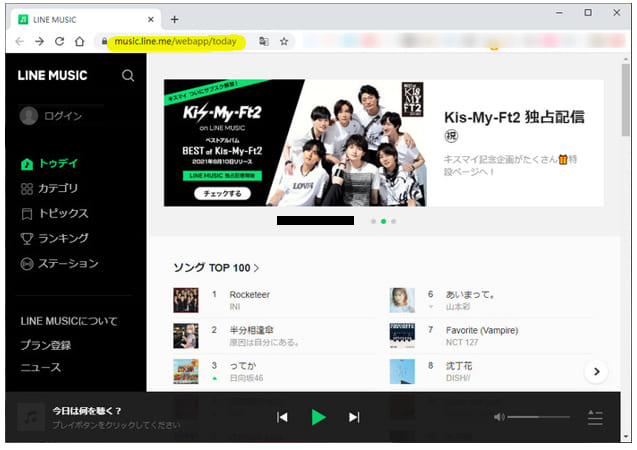
Open your web browser, go to the LINE MUSIC website. Log in to your LINE account. Ensure you have an active subscription (Premium or Standard) to play full tracks without ads.
Step 5. Start Recording Line Music to MP3
Click the "REC" button (red circle). A 3‑second countdown begins. Then immediately play the song or playlist on LINE MUSIC web player. The recorder will record every note in real time.
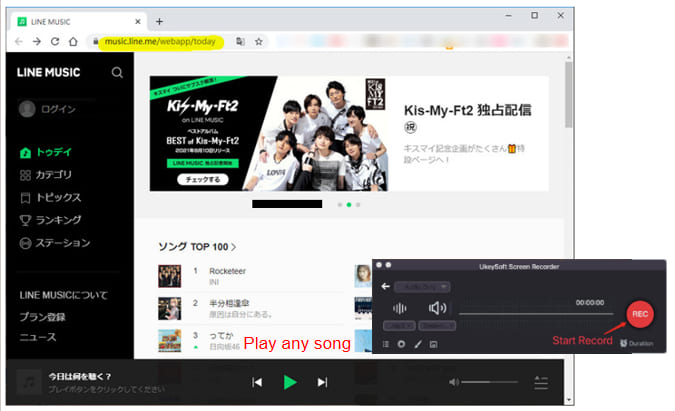
To download Line Music for offline listening, let the song play all the way through. You can record entire playlists by queuing them in the web player.
Step 6. Stop and Save Line Music as MP3 File
When the song finishes on Line Music web player, click the "Stop" button (square icon) on the recorder. Then click "Save" to export the music file as an MP3.
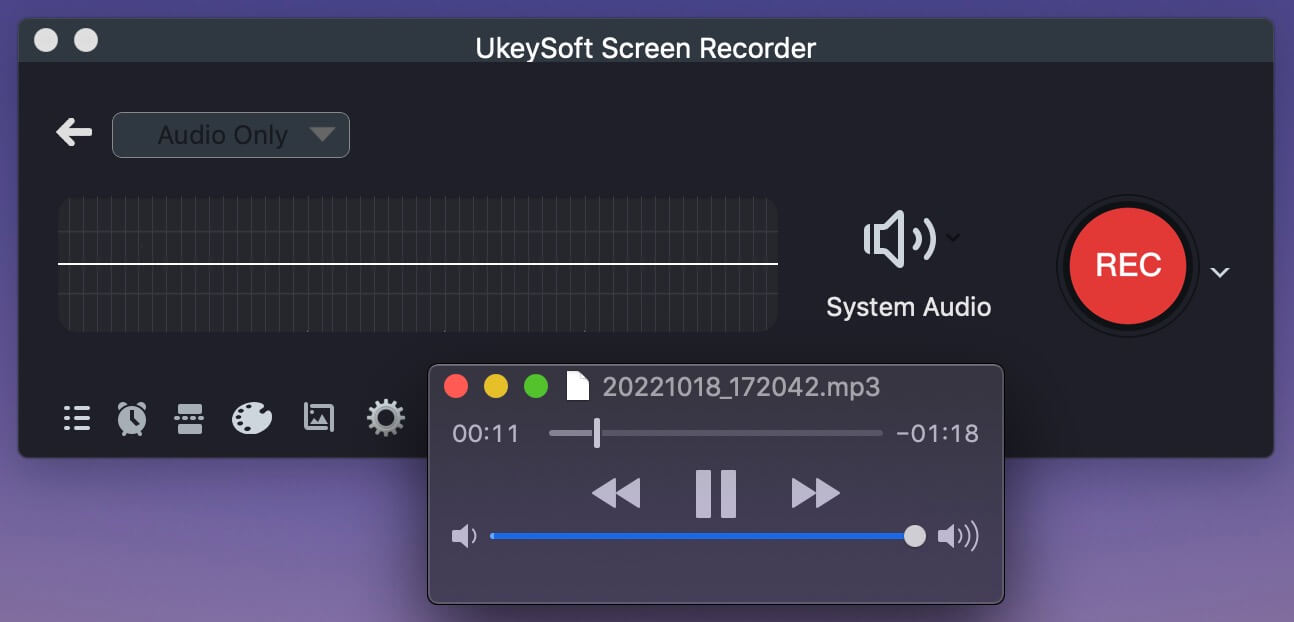
Hit on the "History" to preview the MP3 music files and play the Line Music files with the built-in player! You can now listen to Line Music offline forever, even after canceling your subscription.
How to use Line Music outside of Japan?
LINE MUSIC is officially available only in Japan, Thailand, Taiwan, and a few other Asian countries. To use it outside these regions, you typically need a VPN, but it is unsafe. For a safe and region‑free experience, you can record your Line Music tracks and playlists via UkeySoft Screen Recorder as described in Way 2. This way, you can keep, use, transfer, and enjoy your Line Music anywhere, anytime!
Can I play downloaded Line Music songs without using the app?
If you use the official LINE MUSIC app's download feature, the songs are DRM-protected and can only be played inside the LINE MUSIC app itself. You cannot move them to another music player, burn them to a CD, or transfer them to a USB drive. However, when you use a third-party recording tool like UkeySoft Screen Recorder to save them as standard MP3 files, those MP3s will play on any music player like VLC, Windows Media Player, iTunes, etc. and any device.
How long can I keep Line Music downloads?
Normally, your downloaded songs remain playable as long as you have an active LINE MUSIC subscription. Once your subscription expires, all offline downloads become inaccessible. In contrast, when you record LINE MUSIC to MP3 using UkeySoft Screen Recorder, you keep those files forever - no expiration, no subscription required after recording.
You now have two ways to download Line Music for offline listening. The official mobile app method is quick and easy, but it comes with limitations like DRM protection, expiring downloads and app-only playback. If you want to listen to Line Music offline on any device, forever, recording LINE MUSIC to MP3 using UkeySoft Screen Recorder is the superior choice. Now, download its free trial and enjoy your favorite tracks anytime, anywhere!

Sorry the comment has been closed.










![7 Best FREE Apple Music Converters [2026 Updated]](https://www.ukeysoft.com/wp-content/uploads/2019/04/best-apple-music-converter.jpg)



















Porducts
Solution
Copyright © 2026 UkeySoft Software Inc. All rights reserved.


 English
 Arabic
 Chinese (Simplified)
 Chinese (Traditional)
 Croatian
 Czech
Czech Danish
 Dutch
Dutch Estonian
 Finnish
 French
 German
 Greek
Greek Hebrew
 Hindi
Hindi Hungarian
 Indonesian
 Italian
 Japanese
 Kazakh
 Korean
 Malay
Malay Norwegian
 Polish
 Portuguese
 Romanian
 Russian
 Slovenian
 Spanish
 Swedish
 Thai
Thai Turkish
 Ukrainian
 Vietnamese



























![Top 10 Christmas Songs to MP3 Download [Spotify]](https://www.ukeysoft.com/wp-content/uploads/2023/01/christmas-songs-to-mp3.jpg)


































































































































Comments are off!