 ✕
✕
✕
✕
By Justin SabrinaUpdated on January 04, 2026
YouTube Music has rapidly become one of the most popular platforms for streaming official music videos, live performances, remixes, and exclusive visual content. With a Free account, you can stream HD music videos on YouTube Music across your streaming devices. However, one major limitation frustrates many users: YouTube Music does not allow permanent downloads of music videos. Even with a Premium subscription, downloaded content is restricted to the YouTube Music app. When you cancel your subscription, all YouTube Music downloads will be removed from your devices. If you need to download YouTube Music videos, it would be more helpful turn to a third-party tool.
There are many YouTube music downloader tools available on the market, such as the UkeySoft, TunesBank, 4kFinder, TuneFab, TunePat, Noteburner, etc. Among all available tools, 4kFinder YouTube Music Converter stands out as the most professional, stable, and high-converting solution for downloading YouTube Music videos to MP3 and other formats. Here we will walk you how to download music videos from YouTube Music safely and efficiently.
Tutorial
Step 1. Launch 4kFinder YouTube Music Converter.
Step 2. Select MP3 as the Output Format.
Step 3. Add YouTube Music Videos to 4kFinder.
Step 4. Download YouTube Music Videos to MP3.
Step 5. Get the Output MP3 Files on Local Folder.
| YouTube Music Contents | Track | Playlist | Album | Music Video | Podcast | Radio | Lyrics |
|
4kFinder YouTube Music Converter |
✔ |
✔ |
✔ |
✔ |
✔ |
✔ |
✔ |
4kFinder YouTube Music Converter is a desktop application designed specifically to help users download YouTube Music videos and songs without restrictions. Unlike online YouTube music downloaders that rely on unstable servers and limited parsing technology, 4kFinder integrates a built-in YouTube Music web player, ensuring high success rates and lossless output quality. With it, users can easily download music videos, tracks, albums, and playlists from YouTube Music to computer without Premium.
Besides, it can convert YouTube Music videos to MP3, M4A, FLAC, WAV, AAC and AIFF audio formats, the output audio files can be transferred to any device and player. Say goodbye to YouTube Music app! Another advantage is its lossless audio preservation. When downloading music videos from YouTube Music, 4kFinder retains the original audio bitrate and sample rate. Better still, you can even adjust the output quality to higher 320kbps, 512kbps, or highest 640kbps to get studio-quality sound.
Key Features of 4kFinder YouTube Music Converter
Below is a detailed, beginner-friendly tutorial showing how to download YouTube Music videos on PC using 4kFinder YouTube Music Converter. Whether you are using a YouTube Music Free or Premium account, you can use this software to get YouTube Music videos downloaded locally.
First, download and install 4kFinder YouTube Music Converter on your Windows or Mac computer. Once installed, launch the program. You’ll see a clean interface with an embedded YouTube Music web player. Log in to your YouTube Music account to access your playlists, albums, and music videos securely.
This login step allows the software to load your library and ensures smooth access to all YouTube Music video content. Of course, you can also skip the login step and access the music library directly online!
Before downloading, go to the settings panel by clicking the "Gear" icon. And choose MP3 as the output format. MP3 is widely compatible and ideal if you want to download YouTube Music videos to MP3 for offline playback elsewhere.
You can also customize output quality, output file name, and preset output songs by folder (Artist, Album, Artist/Album, or Album/Artist).
Now search for the music video you want to download directly within the built-in YouTube Music player. You can search for the music videos by name, or browse your playlists and albums directly. Once you find the music video you want to download, click the "Add to list" icon in the right side.
If you add a playlist or album, all items in it will be selected by default. Double check and confirm, unselect the ones you won't to download.
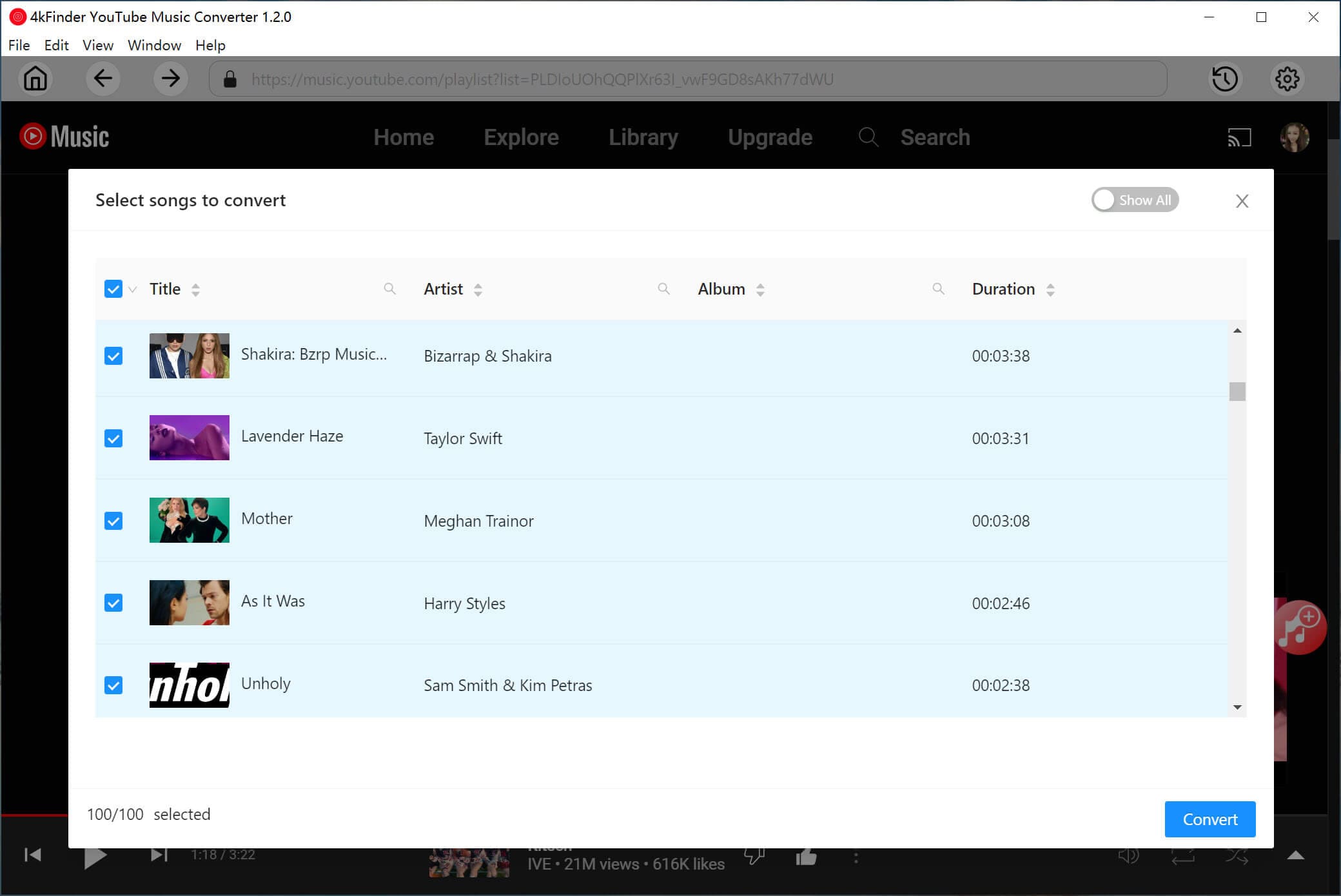
After adding all desired videos to the download list, click "Convert" button. The software will start converting YouTube Music videos to MP3 or other format you set.
Once the download process is complete, click the "History" icon to find all your downloaded YouTube Music videos. Play these high-quality YouTube music with its built-in music player!
To get all your downloaded MP3 files saved locally on your computer, you can click the "Blue Folder" icon next to the song title, or navigate directly to the output folder you set in Step 2.
From this article, you've learned an easy way to download YouTube Music videos. While YouTube Music limits offline access within its app, professional tools like 4kFinder YouTube Music Converter gives you full control over your favorite content. It makes it easy to download YouTube Music videos to computer even without a Premium. With this tool, users can quickly download music videos, songs, albums, and playlists from YouTube Music, and convert them to MP3 or other formats for unlimited offline playback. No ads, no expiration, no restrictions - just pure music freedom. Hit the Download button below, and build your local music library!

Sorry the comment has been closed.

















Porducts
Solution
Copyright © 2026 UkeySoft Software Inc. All rights reserved.


 English
 Arabic
 Chinese (Simplified)
 Chinese (Traditional)
 Croatian
 Czech
Czech Danish
 Dutch
Dutch Estonian
 Finnish
 French
 German
 Greek
Greek Hebrew
 Hindi
Hindi Hungarian
 Indonesian
 Italian
 Japanese
 Kazakh
 Korean
 Malay
Malay Norwegian
 Polish
 Portuguese
 Romanian
 Russian
 Slovenian
 Spanish
 Swedish
 Thai
Thai Turkish
 Ukrainian
 Vietnamese










![7 Best FREE Apple Music Converters [2026 Updated]](https://www.ukeysoft.com/wp-content/uploads/2019/04/best-apple-music-converter.jpg)













































![Top 10 Christmas Songs to MP3 Download [Spotify]](https://www.ukeysoft.com/wp-content/uploads/2023/01/christmas-songs-to-mp3.jpg)


















































































































Comments are off!