 ✕
✕
✕
✕
By ChesterUpdated on January 15, 2026
AAC, short for Advanced Audio Coding, is an audio compression format made especially for sound files. Compared with MP3, AAC uses a more advanced encoding method, which offers better efficiency and higher value for file size and sound quality. With AAC, audio files are smaller while the sound quality stays nearly the same. This format is widely used on Apple devices such as iPhone, iPad, and iPod.
Because of these advantages, many users want to convert Spotify music to AAC format for better playback and storage. If you are looking for a way to save Spotify music to AAC format at 640kbps or 320kbps but do not know where to begin, this guide is here to help. In this article, we will show you how to convert Spotify music to AAC step by step. Now, let us get started with the tutorial.
CONTENTS
In general, Spotify Premium allows users to download songs for offline listening. However, these downloaded tracks are not saved in common formats like MP3 or AAC. Instead, Spotify uses an encrypted Ogg format, which cannot be accessed or converted directly within the Spotify app. This means you cannot get AAC files straight from Spotify.
That said, with the help of the right software, it is still possible to convert Spotify muisc to AAC format without difficulty. If you are looking for a reliable solution, UkeySoft Spotify Music Converter is worth checking out.
UkeySoft Spotify Music Converter is a powerful and reliable tool designed to help both Spotify Premium and Spotify Free users permanently save Spotify songs in unencrypted formats. With this software, you can download and convert Spotify tracks, albums, playlists, and podcasts without being limited by Spotify's playback restrictions.
The program supports multiple popular output formats, including AAC, MP3, M4A, FLAC, WAV, and AIFF, making it easy to play your Spotify music on different devices and media players. It features a high speed conversion engine that can convert Spotify music at up to 16X faster speed, allowing you to save large playlists in a short time.
In addition, UkeySoft Spotify Music Converter keeps the original audio quality after conversion, so you can enjoy clear and high quality sound. It also preserves complete ID3 tags, such as song title, artist, album, artwork, and track number, helping you manage your music library neatly after conversion. Overall, it is an excellent choice for anyone who wants to keep Spotify music permanently and enjoy it offline without limitations.
👍 More Features of UkeySoft Spotify Music Converter
Step 1. Open the Spotify Converter and Sign In
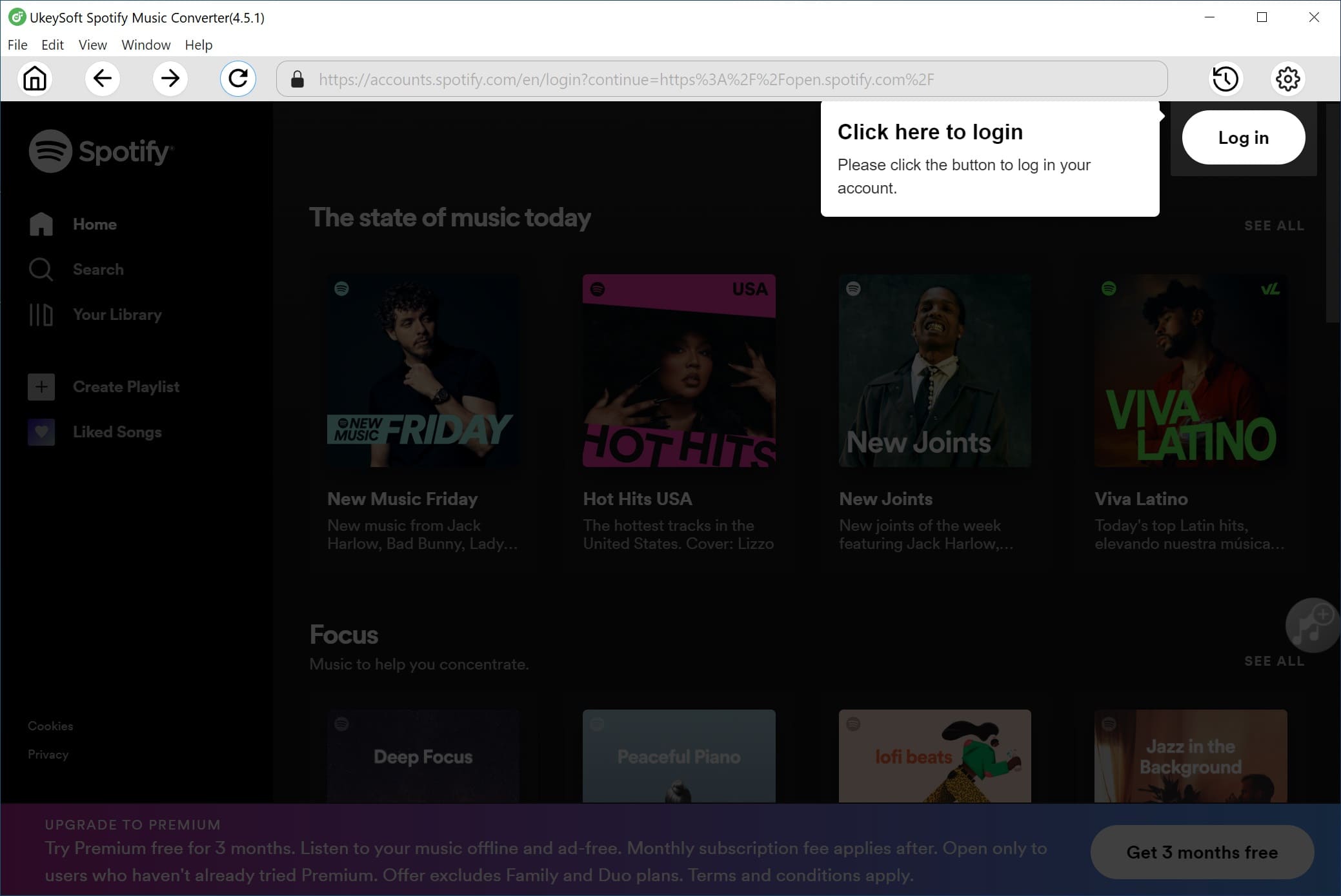
UkeySoft Spotify Music Converter works on both Windows and Mac. Download the correct version for your system and complete the installation. After launching the program, sign in to your Spotify account.
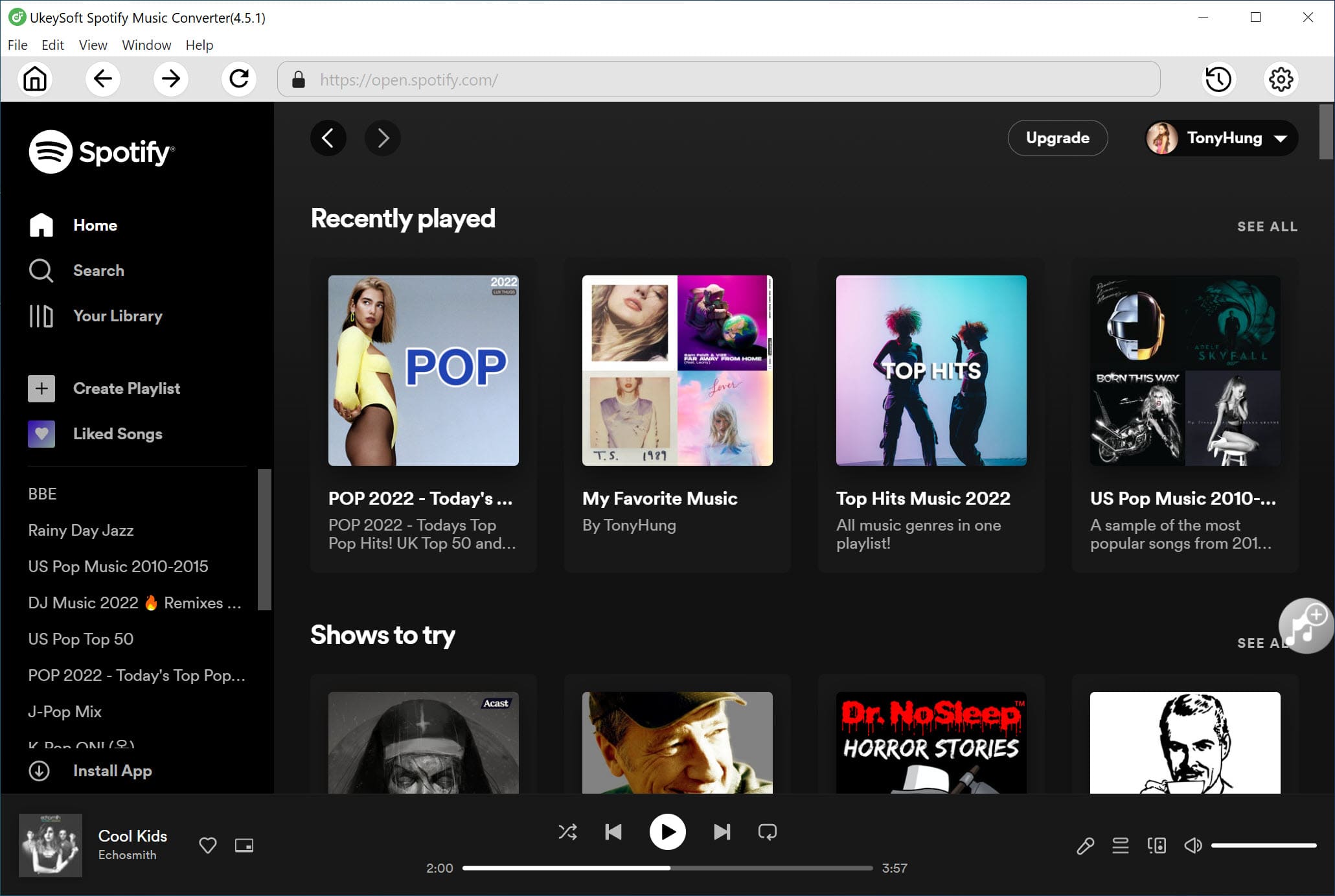
Once logged in, you can search, browse, and play your favorite songs directly using the built in Spotify web player.
Step 2. Set AAC as the Output Format
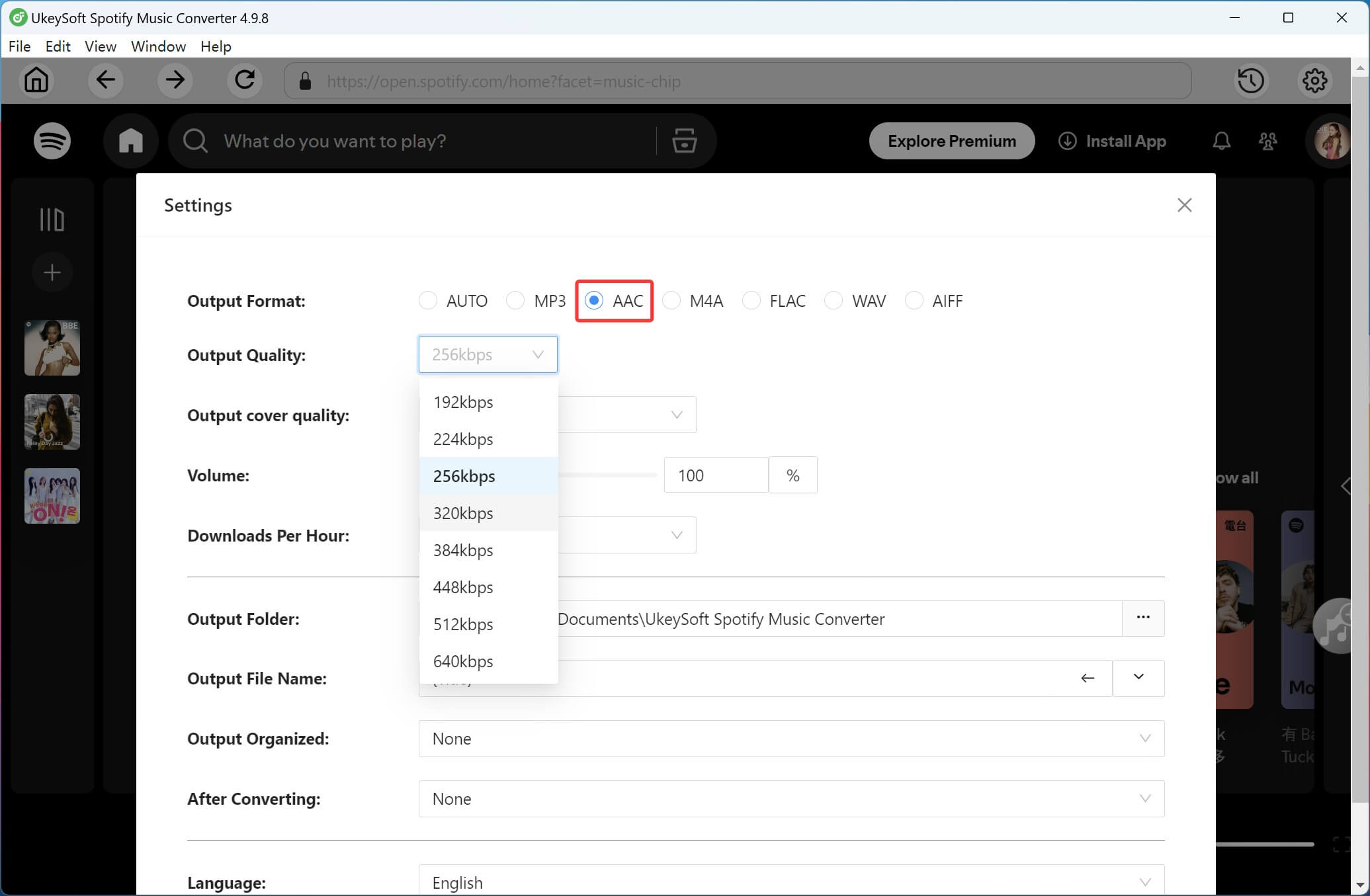
Click the Settings icon in the top right corner of the interface. The program provides six output formats, including MP3, M4A, AAC, WAV, FLAC, and AIFF. Choose AAC as the output format, then select your preferred audio quality, such as 320kbps or 640kbps.
Step 3. Add Spotify Songs, Albums, or Playlists
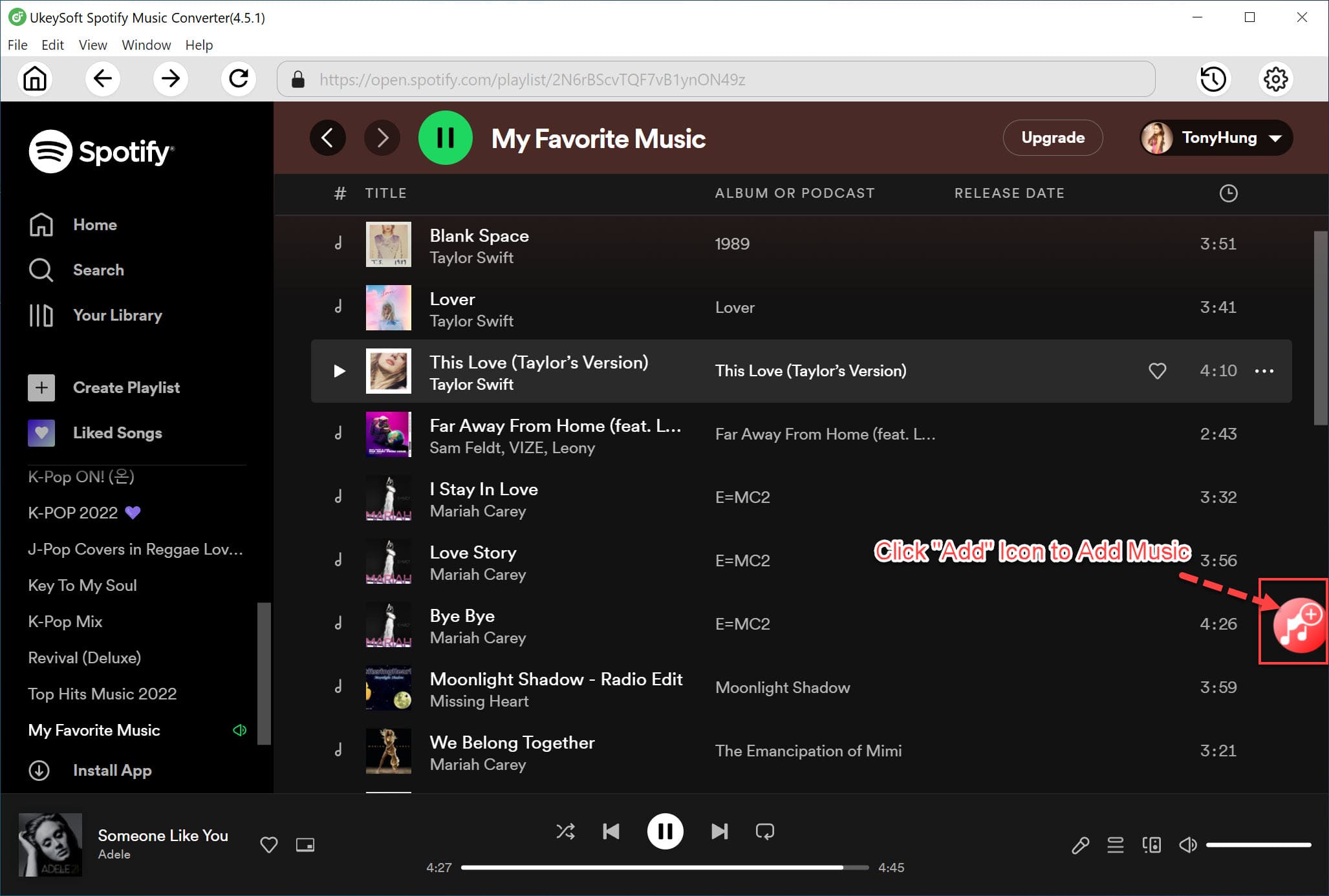
Using the built in Spotify web player, open the album or playlist you want to convert. Click the plus icon to add the content to the conversion list. The software will automatically analyze the selected playlist and load all tracks into the pending conversion list.
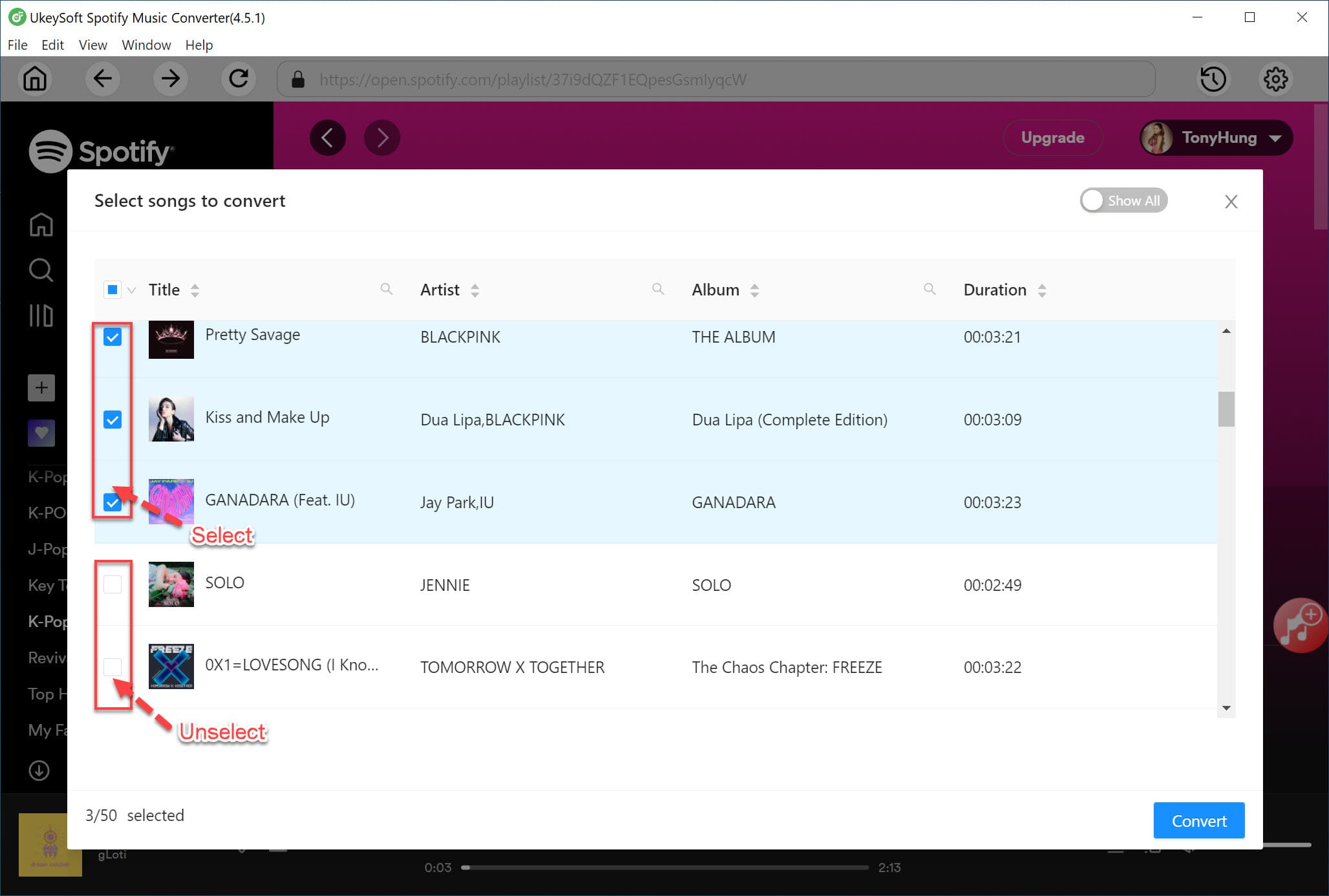
All songs are selected by default, and you can remove any tracks you do not want to convert.
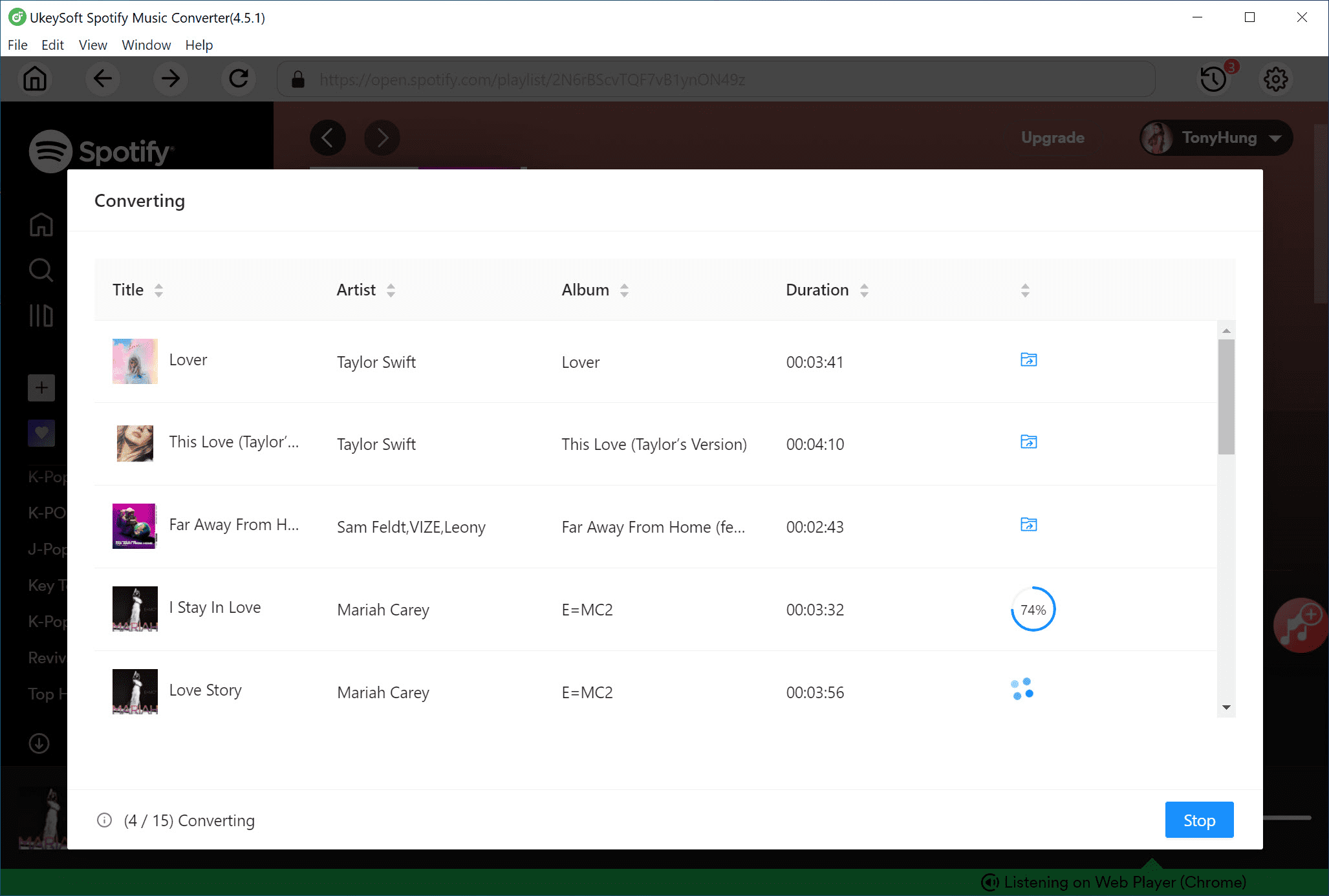
Step 4. Convert Spotify Music to AAC
Click the Convert button to begin converting Spotify songs or playlists to AAC format. UkeySoft Spotify Music Converter supports conversion speeds of up to 16 times faster, saving you time when processing large playlists.
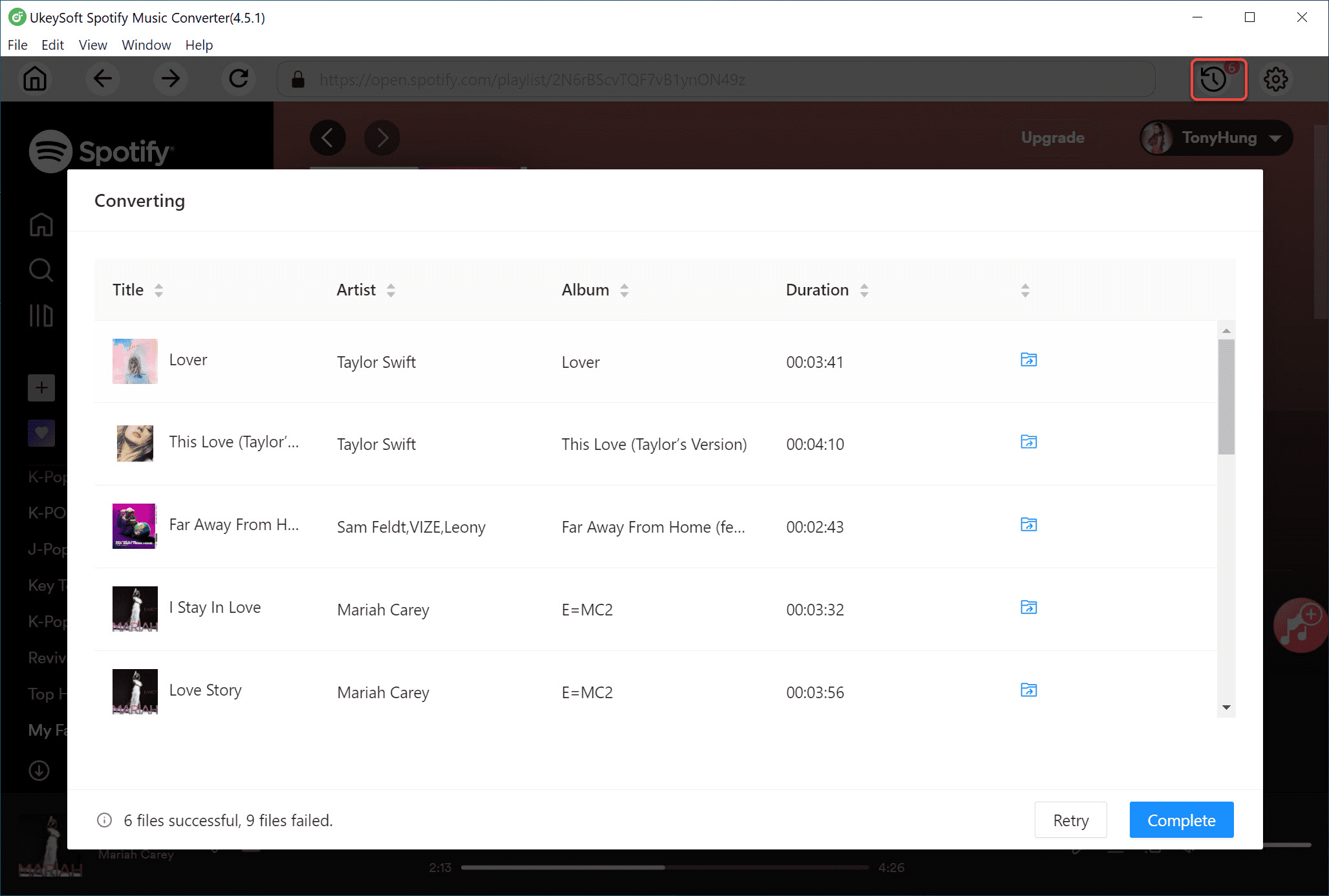
Step 5. Check the Converted AAC Files
After the conversion is complete, click the Output Folder button to open the destination folder. You will find all your Spotify songs saved in AAC format. Now you can transfer and play these files freely on other devices without restrictions.
Q1. Do Spotify songs downloaded with UkeySoft expire?
No. Spotify tracks downloaded using UkeySoft are saved directly to your computer, so they will not expire and can be played anytime.
Q2. Does UkeySoft Spotify Music Converter support other music platforms?
UkeySoft Spotify Music Converter is designed only for Spotify content. If you want to download music from Apple Music or other music platforms, you need to use UkeySoft Apple Music Converter or UkeySoft All-in-One Music Converter instead.
Q3. Can UkeySoft convert my local audio files to other formats?
Yes. UkeySoft allows you to convert local audio files to MP3, M4A, AAC, FLAC, WAV, or AIFF. You can click the settings icon to select the output format, adjust the audio quality, and choose the output folder.
Q4. How can I play the converted AAC files?
AAC files can be played on many popular media players, such as Apple Music on Mac, Microsoft Groove Music on Windows, Winamp, VLC Media Player, Adobe Audition, and MPlayer across different platforms.
With UkeySoft Spotify Music Converter, you can convert Spotify muisc to AAC in a simple and effective way. This powerful tool allows you to permanently save Spotify protected tracks as high quality AAC files, including the option to convert Spotify muisc to AAC at 640kbps or 320kbps. After the conversion is complete, you can freely transfer the downloaded AAC files to other devices and enjoy your music without limits.
UkeySoft Spotify Music Converter offers a free trial for new users. You can download the software at no cost and convert the first minute of each song to test its features. If the program fits your needs, you can purchase a license to remove the time restriction and unlock full conversion access.

Sorry the comment has been closed.










![7 Best FREE Apple Music Converters [2026 Updated]](https://www.ukeysoft.com/wp-content/uploads/2019/04/best-apple-music-converter.jpg)



















Porducts
Solution
Copyright © 2026 UkeySoft Software Inc. All rights reserved.


 English
 Arabic
 Chinese (Simplified)
 Chinese (Traditional)
 Croatian
 Czech
Czech Danish
 Dutch
Dutch Estonian
 Finnish
 French
 German
 Greek
Greek Hebrew
 Hindi
Hindi Hungarian
 Indonesian
 Italian
 Japanese
 Kazakh
 Korean
 Malay
Malay Norwegian
 Polish
 Portuguese
 Romanian
 Russian
 Slovenian
 Spanish
 Swedish
 Thai
Thai Turkish
 Ukrainian
 Vietnamese



























![Top 10 Christmas Songs to MP3 Download [Spotify]](https://www.ukeysoft.com/wp-content/uploads/2023/01/christmas-songs-to-mp3.jpg)


































































































































Comments are off!