 ✕
✕
✕
✕
By Justin SabrinaUpdated on December 30, 2025
Quick Solutions:
Podcasts have become an essential part of daily life, whether you're commuting, working out, or relaxing at home. Deezer, as one of the world's music and podcast streaming platform, offers a vast library of more than 160000 podcasts across multiple categories. Compare to streaming Deezer podcasts online, downloading Deezer podcasts is a better choice for ensuring uninterrupted playback.
This guide is here to break down everything about how to download podcasts on Deezer. You'll learn two effective ways to download Deezer podcasts for offline listening, including the official app method and a professional tool that lets you convert Deezer Podcasts to MP3 for permanent offline playback.
CONTENTS
Yes, you can download podcasts on Deezer, but with limitations.
Deezer officially allows podcast downloads only for Deezer Premium subscribers. For Deezer Free users, you can only streaming podcasts episodes online with internet connection. If you've upgraded to Deezer Premium ($11.99/month), you can download Deezer Podcasts for offline playback directly within the Deezer app.
Is it possible to download Deezer podcasts with Deezer Free account? The answer is yes. You can also turn to a third-party Deezer downloader that supports downloading podcasts from Deezer. Next, we'll walk you through both of these useful methods step by step.
As mentioned above, Deezer provides an offline download feature for Premium users, allowing them to download Deezer Podcasts on mobile devices and computers. Here's how to download Deezer podcasts episodes in the Deezer app.
Step 1. Open the Deezer app on your Android or iOS device
Step 2. Log in with your Deezer Premium account
Step 3. Go to "Favorites", select "Podcasts".
Step 4. Open a podcast episode or podcast series.
Step 5. Toggle the "Download" button. The podcasts will be downloaded immediately.

Step 6. After that, go to "Settings" > "PREFERENCES", select "Offline Mode" to listen to the downloaded podcasts without internet.
The above method is convenient for short-term use but is limited to in-app playback only. This means you can transfer the downloaded podcasts to your MP3 player, USB drive, or other devices. When you cancel your Deezer subscription, you will lose all Premium features, including the downloaded podcasts episodes. To get rid of these restrictions, it is advisable to download Deezer podcasts to MP3. So, using a professional Deezer podcast downloader is helpful.
Tool You'll Need - UkeySoft Deezer Music Converter
As one of the best Deezer music downloaders, UkeySoft Deezer Music Converter is capale of downloading songs, podcasts, playlists, and albums from Deezer with a Free account. It can convert Deezer podcasts to MP3, FLAC, AAC, M4A, WAV, or AIFF formats, making them playable across different devices and players. With an innovative encoding method, UkeySoft allows you to batch add multiple podcasts to the converting list at once and convert them at up to 16X lightning speed.
More importantly, you're not even required to install the Deezer app to download Deezer podcasts and another music content, as UkeySoft has embedded the official Deezer web player. Simply log in a free account, choose podcasts, modify output settings, and start downloading. That's it!
Key Features of UkeySoft Deezer Music Converter
Unlike subscription-based downloads, podcasts downloaded via UkeySoft Deezer Music Converter remain accessible forever, even if your Deezer subscription expires. This makes UkeySoft the ideal solution for users who frequently listen to Deezer Podcasts offline across multiple devices without a Premium.
Step 1. Launch UkeySoft Deezer Music Converter
After installation, launch the UkeySoft Deezer Music Converter on your Mac or Windows PC. Click the "Log In" button and sign in with your Deezer Free or Premium account. This grants the software access to the podcast content.
Step 2. Define Output Preferences
Navigate to the settings window by clicking the "Gear" icon. Here, select MP3 as your output format. Choose 320kbps high quality, and set your desired output folder for the saved files. Meanwhile, you may also set the output file name by ID3 tags.
Step 3. Find and Add Deezer Podcasts
Use the built-in browser to navigate to the Deezer podcast you want to download. You can search in the "Podcasts & Shows" section. Once on the podcast's main page, click the red "+" icon to load the items.
Once added successfully, UkeySoft will list all available episodes in its conversion panel. You can uncheck the unwanted ones.
Step 4. Start Converting Deezer Songs to MP3
When everything is ready, press on the "Convert" button. The converter will now begin processing, downloading, and converting each Deezer episode into an MP3 file at 16X high speed.
Step 5. Listen to Deezer Podcasts Offline
When finished, tap the "History" icon at the upper right corner. You will see all your successfully downloaded episodes. You can listen to these Deezer podcasts with the built-in Music Player directly!
Step 6. Get Output Deezer Podcasts
To open the output folder, you can click the "blue folder" icon next to the title to locate the output folder. Get these MP3 Deezer podcasts locally. And you can transfer them to any device and play them with any media player for permanent offline access!
Many users on Reddit and in the Deezer community have reported issues such as being unable to download podcasts. If you're having trouble downloading podcasts on Deezer, the issue may be related to app settings, storage, or account status. Below are some basic and structured fixes to resolve the problem.
● Restart the App or Device
Close the Deezer app completely, including background processes, then reopen it.
● Check Deezer Premium Status
Confirm that your Deezer Premium subscription is active. Podcast downloads are unavailable on free plans.
● Verify Network Connection
Make sure your are connected to a smooth and stable network. Otherwise, switch between Wi-Fi and mobile data.
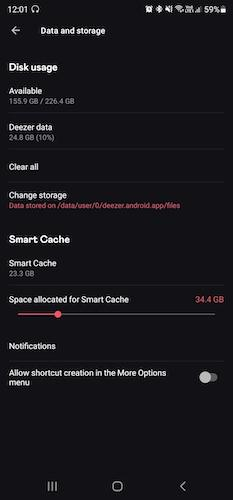
● Clear Deezer Cache
Go to Deezer settings or your phone's app management section and clear cached data to fix corrupted files.
● Update the Deezer App
Ensure you're using the latest version to avoid compatibility bugs.
● Reinstall the App
Uninstall and reinstall Deezer to reset all app configurations.
● Exit Beta Program
If you're using a beta version of Deezer, leave the program and install the stable release.
● Check Storage Space
Deezer will fail to save your podcasts and songs if you don't have enough space on your device. Check and free up the storage space on your devices.
● Test Other Podcasts
Try downloading a different podcast to see if the issue is content-specific.
If problems persist, using a professional tool to download Deezer Podcasts for offline playback is the most dependable solution. By downloading Deezer podcasts to MP3 with UkeySoft Deezer Music Converter, you are able to listen to Deezer podcasts offline outside the Deezer app. For instance, you can enjoy downloaded Deezer podcasts on UkeySoft directly, or import them into iTunes, VLC, MusicBee, WMP, QuickTime, etc.
This article explores two effective methods for downloading Deezer podcasts. The first method is downloading podcasts from Deezer with a Premium account. But it has limitations such as in-app playback only, and short-term access. The second method is more flexible and useful. It works for all tiers of Deezer users, including free and premium. That is, to download and convert Deezer podcasts to MP3 with UkeySoft Deezer Music Converter. This excellent Deezer downloader makes makes it easy to download Deezer Podcasts to high-quality MP3, WAV, FLAC, AAC, M4A and AIFF files with full ID3 tags kept.
Whether you're commuting, traveling, or building a personal podcast library, this guide gives you all the tools you need to enjoy Deezer Podcasts anytime, anywhere.

Sorry the comment has been closed.
























Porducts
Solution
Copyright © 2026 UkeySoft Software Inc. All rights reserved.


 English
 Arabic
 Chinese (Simplified)
 Chinese (Traditional)
 Croatian
 Czech
Czech Danish
 Dutch
Dutch Estonian
 Finnish
 French
 German
 Greek
Greek Hebrew
 Hindi
Hindi Hungarian
 Indonesian
 Italian
 Japanese
 Kazakh
 Korean
 Malay
Malay Norwegian
 Polish
 Portuguese
 Romanian
 Russian
 Slovenian
 Spanish
 Swedish
 Thai
Thai Turkish
 Ukrainian
 Vietnamese










![7 Best FREE Apple Music Converters [2026 Updated]](https://www.ukeysoft.com/wp-content/uploads/2019/04/best-apple-music-converter.jpg)













































![Top 10 Christmas Songs to MP3 Download [Spotify]](https://www.ukeysoft.com/wp-content/uploads/2023/01/christmas-songs-to-mp3.jpg)











































































































Comments are off!