 ✕
✕
✕
✕
By Justin SabrinaUpdated on January 06, 2026
As one of the world's most widely used music streaming platforms, YouTube Music offers millions of tracks across genres, moods, and languages for free. Technically, YouTube Music uses modern audio codecs such as AAC and Opus, delivering audio quality of up to 256 kbps for YouTube Music Premium subscribers under High or Always High settings, while free users are limited to 128 kbps streaming quality. However, you cannot transfer music that you download from YouTube Music to other devices or players, as all your downloaded music tracks are stored as cache files. Therefore, you may want to convert YouTube Music to unprotected AAC format.
Fortunately, with the right tools, it is possible to convert YouTube Music to AAC for unlimited playback and flexible transferring. To help you enjoy YouTube Music in AAC, we will share with you two methods to convert YouTube Music songs to AAC losslessly: using 4kFinder YouTube Music Converter and YouTube Music app.
CONTENTS
As mentioned earlier, YouTube Music allows Premium to download music content for offline listening. If you have an active Premium account, you can easily download YouTube Music as AAC track files on mobile devices. If you are a new user, you can get YouTube Music Premium for free for 1 month. Follow below steps to download AAC-format premium YouTube Music offline.
Step 1. Install and open the YouTube Music app on Android or iPhone.
Step 2. Sign in with a YouTube or YouTube Music Premium account.
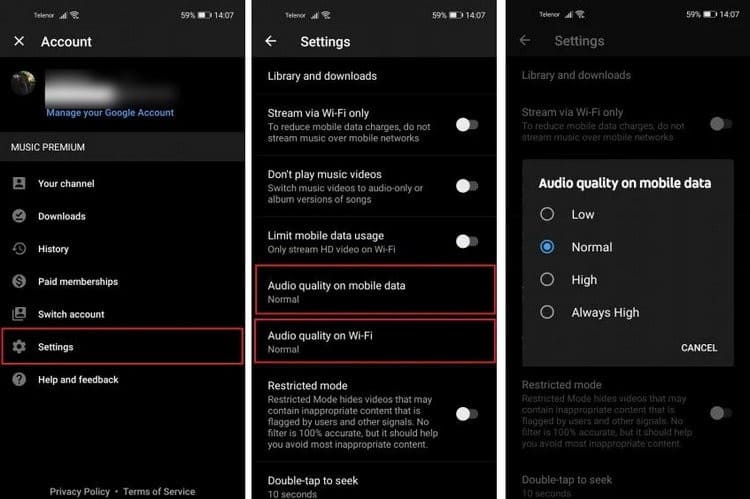
Step 3. Tap on your Profile, go to Settings. Tap "Audio quality on mobile data" or "Audio quality on Wi-Fi".
Step 4. Set Audio quality to "High" or "Always High".
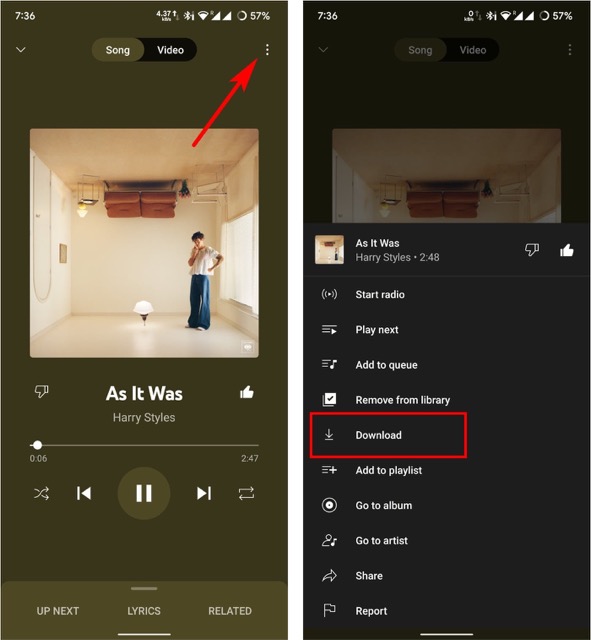
Step 5. Navigate to the song, album, or playlist you wish to download.
Step 6. Tap the "Download" button.
Although YouTube Music internally uses the AAC codec for streaming and downloading, all downloaded tracks are protected by DRM copyright restrictions. It only allows offline playback within the YouTube Music app itself. Once your YouTube Music subscription expires or you log out, downloaded content becomes inaccessible. To get unlocked AAC YouTube Music songs, keep reading.
YouTube Music encrypted downloaded songs with copyright. If you want full control over your music library, you can adopt a professional YouTube Music to AAC converter to convert YouTube Music to AAC losslessly.
4kFinder YouTube Music Converter is an intelligent and effective YouTube Music converter, available on both Windows and Mac computers. It integrates a built-in YouTube Music web player, capable of converting songs from the 100 million music library to AAC format losslessly. Even without a Premium subscription, you can use it to download songs, music videos, albums, playlists and podcasts from YouTube Music to local computer.
It can convert YouTube Music to lossless AAC files up to 640 kbps, which is significantly higher than standard streaming quality. Unlike the online YouTube music converters with very basic functions, 4kFinder supports 10X faster conversion speed, batch downloads of playlists and albums, and intelligent file organization. The converted YouTube Music AAC files can be automatically classified into folders by artist, album, or date, making it easy to manage and organize your large music library.
More Features of 4kFinder YouTube Music Converter
Step 1. Launch 4kFinder YouTube Music Converter
After installation, open the 4kFinder YouTube Music Converter on your Windows or Mac computer. In the built-in browser window, click "Sign In" and log into your YouTube Music/Google account.
Don't want to log in to your account. It's OK! You can directly access the library online!
Step 2. Choose AAC as the Output Format
Click the menu (Gear icon) and open "Settings" window. Navigate to the "Output Format" section. From the format dropdown, select AAC option. Choose your desired audio quality (320 kbps for excellent quality, 640 kbps for maximum). Set your preferred output folder, output file name and more settings.
Step 3. Add Songs/Albums/MVs/Playlists
Browse and find the YouTube Music songs, album, music videos, or playlist you want convert. On the content page, click the "Add to list" icon to include them in the conversion list.
The software will list all available tracks. Select the ones you want and confirm.
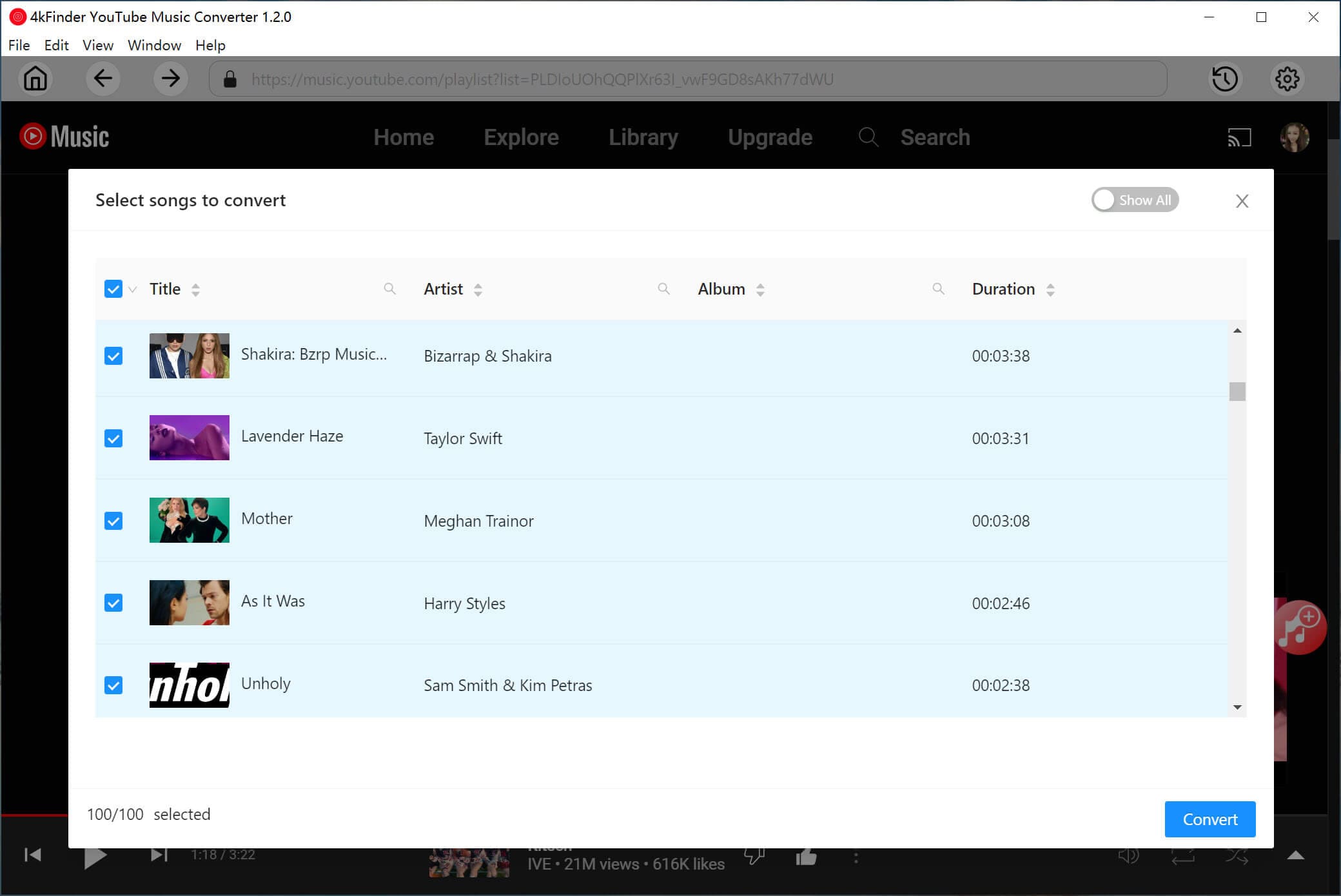
Step 4. Start Converting YouTube Music to AAC Losslessly
Once added your desired songs, simply press on the "Convert" button. 4kFinder YouTube Music Converter will now begin to download and convert YouTube Music to AAC with lossless audio quality.
Step 5. Listen to YouTube Music in AAC Format
When the YouTube Music to AAC conversion is finished, click the "History" icon at the upper right corner. Use 4kFinder's built-in music player to play and verify your converted AAC tracks instantly!
Step 6. Find the Output AAC YouTube Music Files
Click "Blue Folder" next to the song title, or navigate manually to the folder you set in Step 2. Access your permanent AAC YouTube Music files, ready for transfer to phones, players, or editing software!
Does YouTube Music Support AAC?
Yes. YouTube Music uses AAC and Opus codecs for streaming. However, AAC files downloaded through the YouTube Music app are DRM-protected and cannot be accessed directly without conversion.
How to Convert YouTube Music to AAC Online?
Most online YouTube music converters can only convert YouTube music videos to MP3 by pasting URLs, no AAC format option. And they often offer lossy quality, low success rates, no batch downloads, and potential security risks. For stable, lossless and successful YouTube Music to AAC conversion, a professional tool like 4kFinder YouTube Music Converter is recommended.
How to Convert YouTube Music to AAC on iPhone?
There is no a dedicated YouTube Music to AAC converter for mobile. The recommended method is to convert YouTube Music to AAC on a computer by using 4kFinder YouTube Music Converter, then transfer the converted AAC files to your iPhone via iTunes or Finder.
To sum up, AAC is popular for its efficient compression, high audio quality, and wide support across streaming platforms. Using the professional 4kFinder YouTube Music Converter is the most efficient and comprehensive solution to get AAC files from YouTube Music. It lets you download and convert YouTube Music to AAC without the need for a YouTube Music Premium subscription. With 10X high speed, 640 kbps AAC quality, full ID3 preservation, 4kFinder ensures that you can get permanent offline access, and listen to YouTube Music in AAC format across different devices and players!

Sorry the comment has been closed.

















Porducts
Solution
Copyright © 2026 UkeySoft Software Inc. All rights reserved.


 English
 Arabic
 Chinese (Simplified)
 Chinese (Traditional)
 Croatian
 Czech
Czech Danish
 Dutch
Dutch Estonian
 Finnish
 French
 German
 Greek
Greek Hebrew
 Hindi
Hindi Hungarian
 Indonesian
 Italian
 Japanese
 Kazakh
 Korean
 Malay
Malay Norwegian
 Polish
 Portuguese
 Romanian
 Russian
 Slovenian
 Spanish
 Swedish
 Thai
Thai Turkish
 Ukrainian
 Vietnamese










![7 Best FREE Apple Music Converters [2026 Updated]](https://www.ukeysoft.com/wp-content/uploads/2019/04/best-apple-music-converter.jpg)













































![Top 10 Christmas Songs to MP3 Download [Spotify]](https://www.ukeysoft.com/wp-content/uploads/2023/01/christmas-songs-to-mp3.jpg)


















































































































Comments are off!