By
Justin SabrinaUpdated on July 24, 2026
Summary
This full review of AudFree Deezer Music Converter will introduce the program from all aspects including its features, operations, pricing information, best alternative and so on, telling you whether it is the best Deezer music converter.
Although Deezer allows its paid subscribers to download songs to listen to offline, it still contains restrictions in accessing, playing, managing or using these Deezer music downloads. That's also why most users look for a reliable Deezer music downloader or converter to convert Deezer music to MP3 and save them as local audio files. AudFree Deezer Music Converter is one name that often pops up in this niche.
In this comprehensive AudFree Deezer Music Converter review, we'll dive into everything you need to know: how it works, its features, ease of use, its best alternative, and evaluate whether to select it or not. Scroll down to learn more!
CONTENTS
Overall Introduction of AudFree Deezer Music Converter
AudFree Deezer Music Converter is a dedicated tool for Deezer users who want to bypass restrictions and enjoy their favorite songs without limitations. It enables users to download and convert Deezer music into common audio formats like MP3, FLAC, WAV, AAC, and more. After conversion, your converted Deezer songs can be transferred to other music players or devices for offline enjoying.
Currently, AudFree Deezer Music Converter is compatible with Windows OS and macOS systems. It offers a change for a free trial, allowing users to test its features before purchasing. With the free trial versio, you can downlaod the first three minute of each song. To convert a full song from Deezer, you'll need to subscribe to its monthly plan, at a cost of US$14.95. To learn more advantages of the program, keep reading.
AudFree Deezer Music Converter Features
Let's take a look at the main features of AudFree Deezer Music Converter:
# Support All Deezer Contents
AudFree allows you to download songs, albums, playlists, and podcasts from Deezer. It works with the help of Deezer desktop app. When you open the program, it will automatically connect with Deezer servers. To download and convert music from Deezer, you'll need to log in to your Deezer account on the program. It will resolve all Deezer URLs and help you grab the content locally.
# Customized Output Parameters
To ensure the output Deezer files are accessible on your own device, the program provides options to adjust output format (MP3, FLAC, WAV, AAC, M4A, and M4B), bitrate, sample rate, and channels. For instance, users can choose MP3 at 320kbps for compatibility, or opt for FLAC/WAV if they want lossless quality.
# Retain ID3 Information
While dealing with the Deezer music conversion process, AudFree Deezer Music Converter will detect and keep the original ID3 tags like title, artist, album, track number, and cover art, making your local library organized and easy to navigate after conversion.
# Support Batch Conversion
AudFree Deezer Music Converter is also equipped with batch mode, allowing you to queue up multiple Deezer tracks and convert them simultaneously. And the conversion speed is much faster than the official Deezer app, it works at up to 5X when connected to a stable network.
How to Use AudFree Deezer Music Converter?
Step 1.
First, you need to download and install AudFree Deezer Music Converter on your Windows or Mac computer. When you launch the program, it will launch Deezer app at the same time. You'll need to log in with your Deezer account.
Step 2.
In the Deezer app, browse and select songs/playlists you want to convert, and copy its URL. Then paste the URL into AudFree's search bar, and click the "+" icon to load the songs.
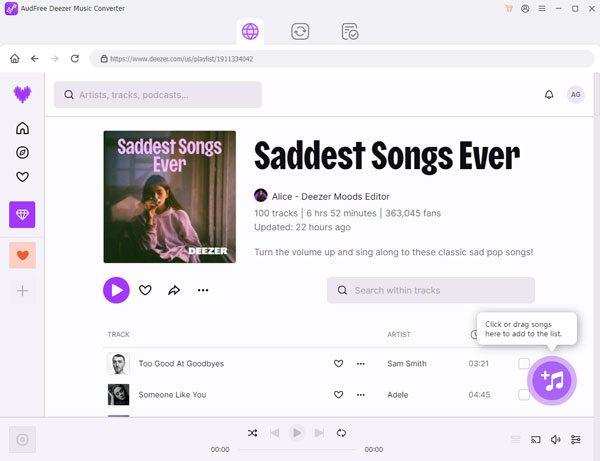
Step 3.
Go to the Menu bar and select Preference option. In the pop-up window, tap "Conversion" in the left panel, and choose output format and adjust settings like bitrate and sample rate.
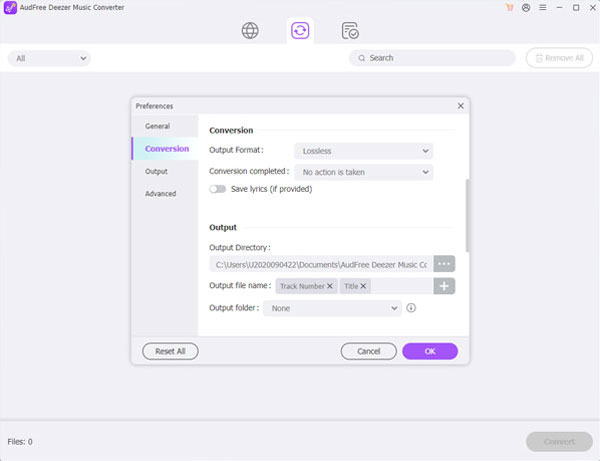
Step 4.
Click "Convert" to start convert Deezer songs to your selected audio format. Once done, locate the converted Deezer music files on your computer.
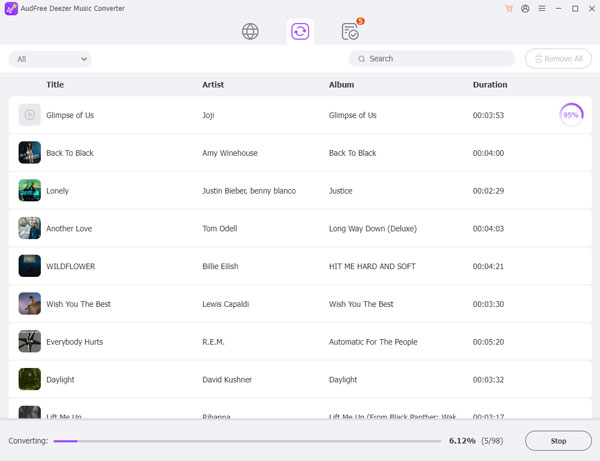
Verdict of AudFree Deezer Music Converter
After testing and evaluating AudFree Deezer Music Converter in stability, speed, features, and user guide, here's our honest verdict: AudFree Deezer Music Converter is not the best option, but it is a decent choice for certain users. However, it does have some drawbacks:
During my testing, I need to install the Deezer app on my desktop in advance, as AudFree need to work with the help of Deezer app.
Moreover, the conversion speed is not as far as it claimed. When I pasted a Deezer playlist URL to AudFree program, it took nearly hours to finish the conversion. If you connect to a slow Internet, AudFree Deezer Music Converter may get stuck in converting Deezer music.
And the output audio quality may be slightly reduced compared to the original Deezer music resources.
To get a better user experience, next, we'll also recommend a better alternative - UkeySoft Deezer Music Converter.
Best Alternative to AudFree Deezer Music Converter
If you are looking for a much more stable and efficient downloader to convert your Deezer music library, then UkeySoft Deezer Music Converter is by far the best alternative. Compared to AudFree Deezer Music Converter, UkeySoft Deezer Music Converter is more stable, faster, and feature-rich.
Unlike AudFree Deezer Music Converter which needs to work with Deezer, UkeySoft Deezer Music Converter has been integrated with the official Deezer web player, it does not require you to install the Deezer app or copy any URL to add songs. The built-in Deezer web player in the UkeySoft program simplifies the process, increases the success rate of music downloads, and avoids unstable software connections!
More than being the best Deezer music downloader, UkeySoft Deezer Music Converter also lets you download Deezer music to Lossless FLAC, delivering the best streaming offline experience! Another major advantage is speed, UkeySoft uses advanced hardware acceleration technologies that supports to batch convert Deezer music up to 16X faster, much faster than AudFree Music Converter! Better yet, UkeySoft makes it much convenience to organize and manage your music library. Using it, you can edit output music titles by tags and automatically sort downloads by folders according to artist, album, artist/album, or album/artist tags.
More Outstanding Features of UkeySoft Deezer Music Converter:
- Built-in Web Player: No need for the Deezer desktop app, you simply log in, search for your favorite songs, albums, playlists, or podcasts, and download them directly.
- High-Quality Output: Decrypts DRM and converts Deezer music to MP3, FLAC, WAV, M4A, AAC, and AIFF with lossless quality (selectable 320kbps, 640kbps, lossless).
- Complete ID3 Tag Preservation: Keeps all ID3 tags metadata such as artist, album, track number, and artwork, ensuring a perfectly organized music library.
- Advanced Customization: Edit output music titles by tags and automatically sort downloads into folders by artist, album, etc.
- Blazing-Fast Batch Conversion: Acceleration technology enables downloading entire playlists at 16X faster speed, ensuring quick, stable and efficient downloads.
- Batch Download: Batch download and convert entire playlists or albums from Deezer web player at once in only minutes!
UkeySoft Deezer Music Converter doesn't require to install the Deezer app on your device in advance. It has a built-in Deezer web player which boost the efficiency and simplifies the process. Here are the simple steps to use it.
Step 1.
Download and install UkeySoft Deezer Music Converter on your computer.
Step 2.
Open the program and log in to your Deezer account via the built-in web player.
![login deezer account]()
Step 3.
Click "Gear" icon to customize output settings like output format, output quality, output file name, etc.
![choose output format]()
Step 4.
Browse and select tracks, albums, or playlists you want to download.
![add deezer music]()
Step 5.
Click "Convert" button, UkeySoft will download your selected Deezer tracks to common audio formats at up to 16X faster speed.
![convert deezer music]()
Comparison: AudFree Deezer Music Converter vs. UkeySoft Deezer Music Converter
|
|
AudFree Deezer Music Converter |
UkeySoft Deezer Music Converter |
Winner |
|
Deezer App Neeed |
Yes |
No |
UkeySoft |
|
Supported Conent |
Songs, albums, playlists, podcasts |
Songs, albums, playlists, podcasts, audiobooks, radios |
UkeySoft |
|
Music Quality |
Highest 320kbps |
Highest 640kbps |
UkeySoft |
|
Speed |
5X |
16X |
UkeySoft |
|
Batch Conversion |
Yes |
Yes |
Draw |
|
Music Classification |
No |
Yes |
UkeySoft |
|
Customizable Settings |
Yes |
Yes |
Draw |
|
Keep ID3 Tags |
Yes |
Yes |
Draw |
|
Price |
Free trial and $14.95 for month plan |
Free trial and $14.95 for month plan |
Draw |
|
Ease of Use |
Yes |
Yes |
Draw |
|
Rating |
4.1 |
4.8 |
UkeySoft |
Conclusion
While the AudFree Deezer Music Converter can be a functional music downloader for Deezer, its instability and performance issues are significant weaknesses such as stability issues, inconsistent speed, and lossy output. For those who want a more reliable, efficient, and user-friendly experience, UkeySoft Deezer Music Converter is the superior choice. With its built-in Deezer web player, lossless quality, and superior speed, UkeySoft makes it much easier to download Deezer music to MP3 and enjoy Deezer offline without restrictions. You can download its free trial to test it by yourself!
AudFree Deezer Music Converter Review

Justin Sabrina has always had great enthusiasm for writing, programming and web development. He likes writing about software and technology, his works are featured on some tech blogs or forums like Tom's Hardware, CNET, etc.
 English
 Arabic
 Chinese (Simplified)
 Chinese (Traditional)
 Croatian
 Czech
Czech Danish
 Dutch
Dutch Estonian
 Finnish
 French
 German
 Greek
Greek Hebrew
 Hindi
Hindi Hungarian
 Indonesian
 Italian
 Japanese
 Kazakh
 Korean
 Malay
Malay Norwegian
 Polish
 Portuguese
 Romanian
 Russian
 Slovenian
 Spanish
 Swedish
 Thai
Thai Turkish
 Ukrainian
 Vietnamese







Comments are off!