 ✕
✕
✕
✕
By Justin SabrinaUpdated on June 18, 2026
Apple Music is a subscription-based streaming audio platform where users stream music and download music by logging in to their subscription accounts. If you are a new subscriber, you are able to get Apple Music 1 month free. Afterwards, you need to pay for $10.99/month to keep the account active. With an active Apple Music subscription, you can listen to Apple Music Lossless Audio, download songs for offline listening, and sync your library across devices.
However, many users plan to cancel Apple Music membership due to free trial period ends, rising subscription costs, or switching to another music platform. What happens if you cancel Apple Music membership? Will you lose everything if you cancel your subscription? Generally speaking, if you cancel your Apple Music subscription, the Apple Music downloads will no longer be playable. But no worry, this article will show you a method to keep Apple Music forever after canceling Apple Music subscription.
CONTENTS
As mentioned early, Apple Music is a subscription-based music streaming service, which means you don't actually own the songs available in its catalog. Once you cancel Apple Music membership, you'll lose access to to the entire Apple Music catalog, personalized recommendations, and cloud-based features such as Sync Library.
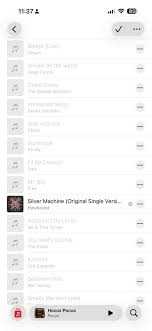
In addition, all Apple Music tracks are protected by Apple's FairPlay DRM technology. After your subscription expires, these downloaded Apple Music songs will become grayed out and offline playback will no longer be available. Your custom playlists, saved albums, and music library may also be removed over time if you don't renew your subscription.
No worry, canceling doesn't immediately terminate your service. You'll continue enjoying all Apple Music features until your current billing period expires. For example, if your subscription renews on June 30 and you cancel on June 06, you can still use Apple Music until June 30. So, you have time to back up your Apple Music library before your subscription ends.
To keep your Apple Music tracks after unsubscribing, the best solution is to download Apple Music to MP3. All you need is a versatile third-party downloader - UkeySoft Apple Music Converter.
UkeySoft Apple Music Converter is a full-fledged desktop app designed to help users download and convert Apple Music songs, albums, playlists, and podcasts into DRM-free MP3 files for permanent offline listening. In addition to MP3, it also supports other popular formats like M4A, WAV, AAC, AIFF, or FLAC, while preserving original audio quality and ID3 tags. Featuring a built-in Apple Music web player, the software allows you to access your music library directly without installing the Apple Music app or iTunes.
With up to 16X faster conversion speed, batch processing, users can quickly save Apple Music locally. The built-in music manager also makes it easy to organize and manage downloaded Apple Music songs for long-term storage. With this tool, you can still enjoy Apple Music offline across your own devices or players, even if you no longer subscribe to Apple Music.
More Features of UkeySoft Apple Music Converter:
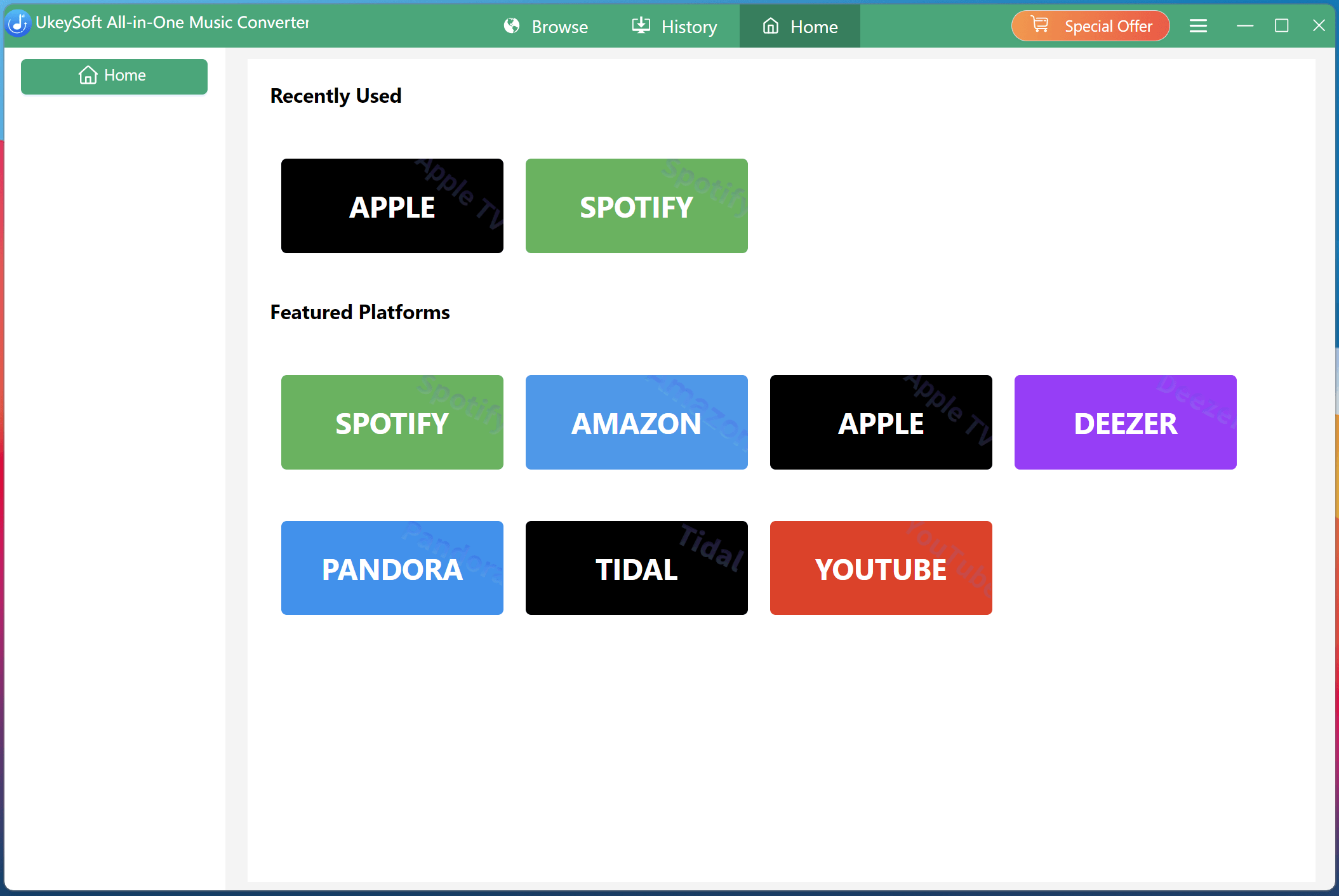
Step 1. Select Apple Music
Download and launch UkeySoft MusicOne Converter on your computer. Select Apple Music service from the main page.
Step 2. Log in to Your Apple Music Account
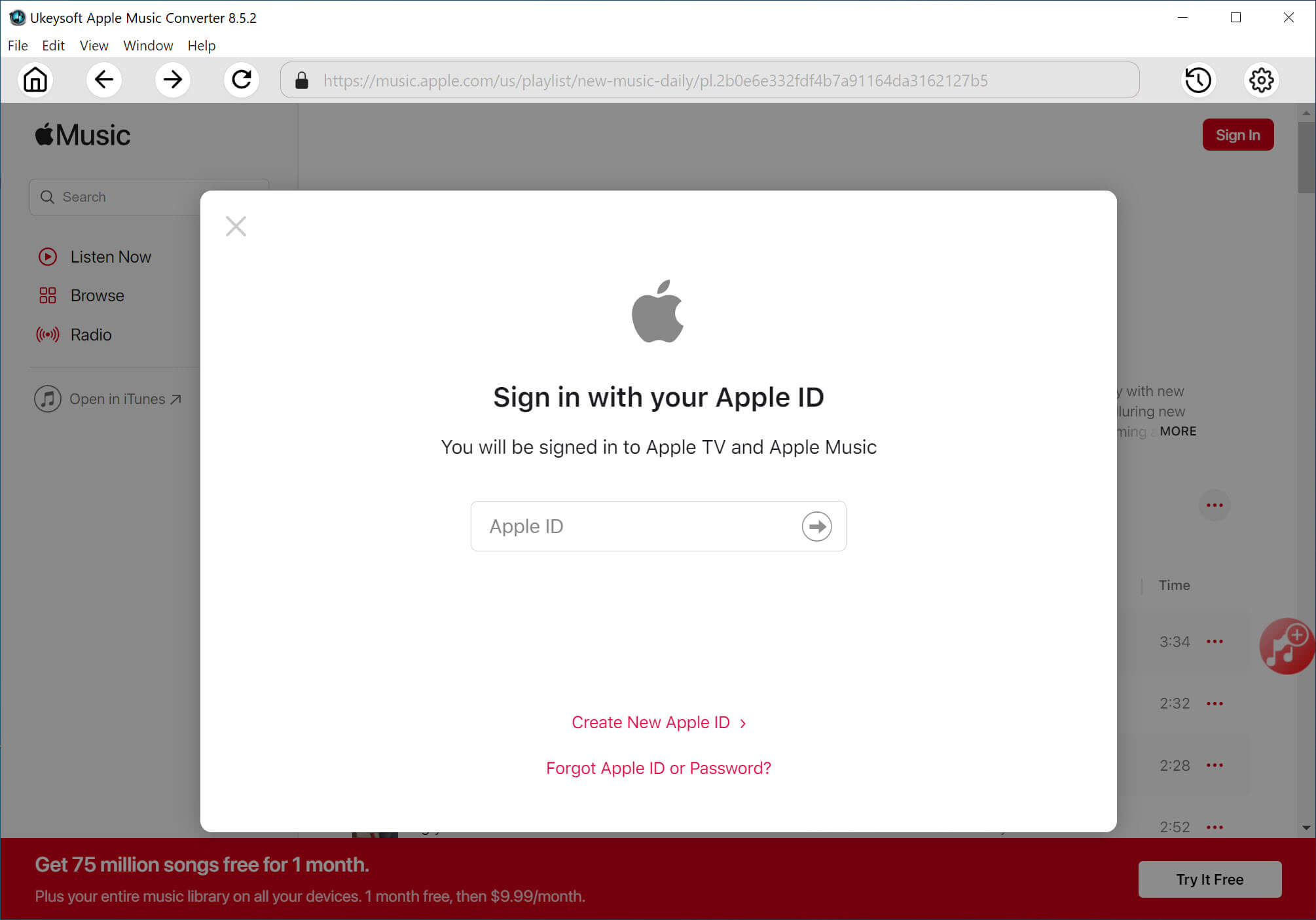
You will then enter the UkeySoft Apple Music Converter. Sign in with your Apple ID to access your entire music library, including songs, playlists, albums, and favorite tracks.
Step 3. Configure Output Settings
Once logged in, click the hamburger Menu (three horizontal lines) in the upper right corner of the interface, then select "Preferences". Here you'll find the output settings panel where you can customize your conversion preferences. Here we select MP3 format and 320kbps otpion.
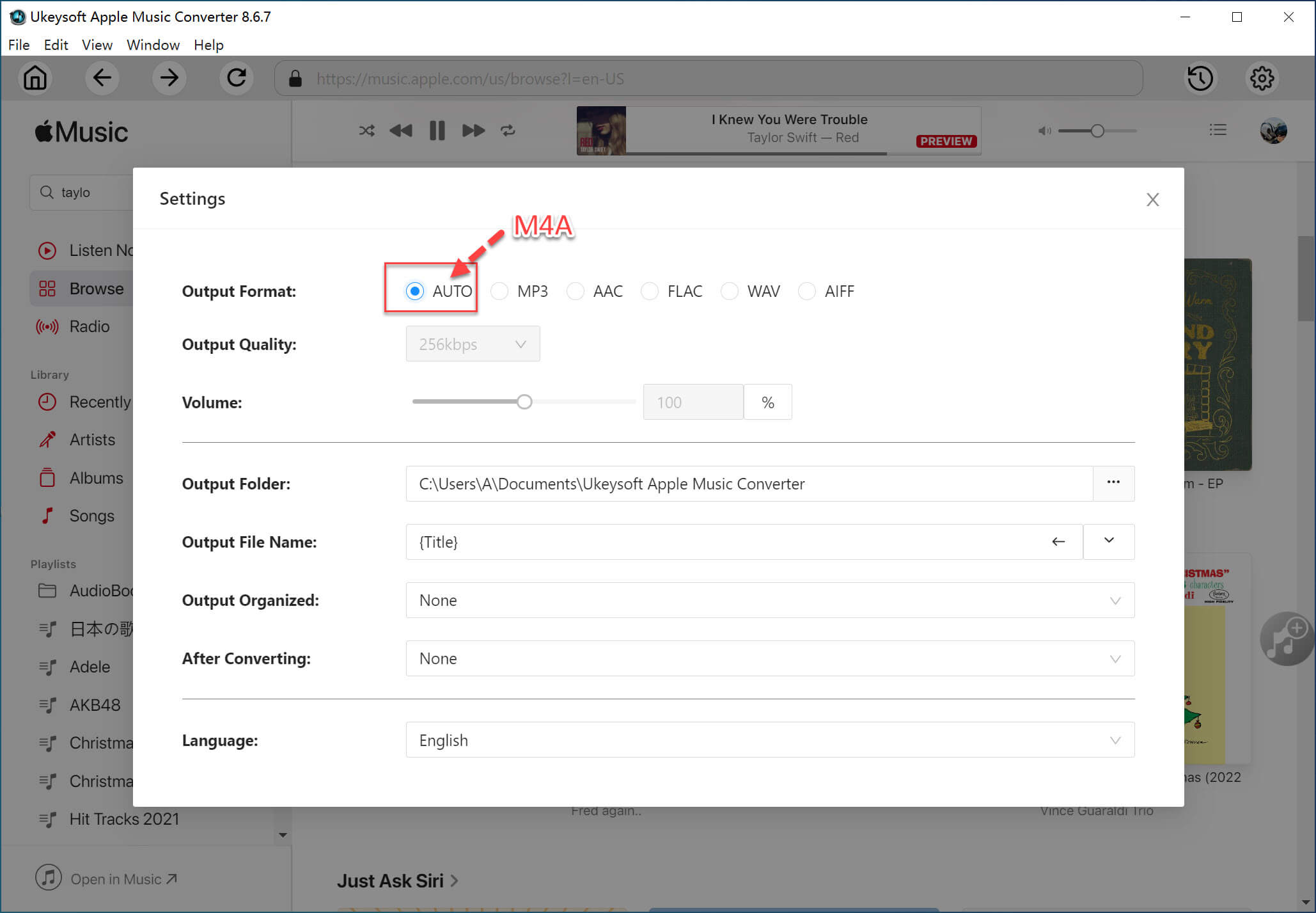
You can also adjust output folder, output file name and other audio parameters.
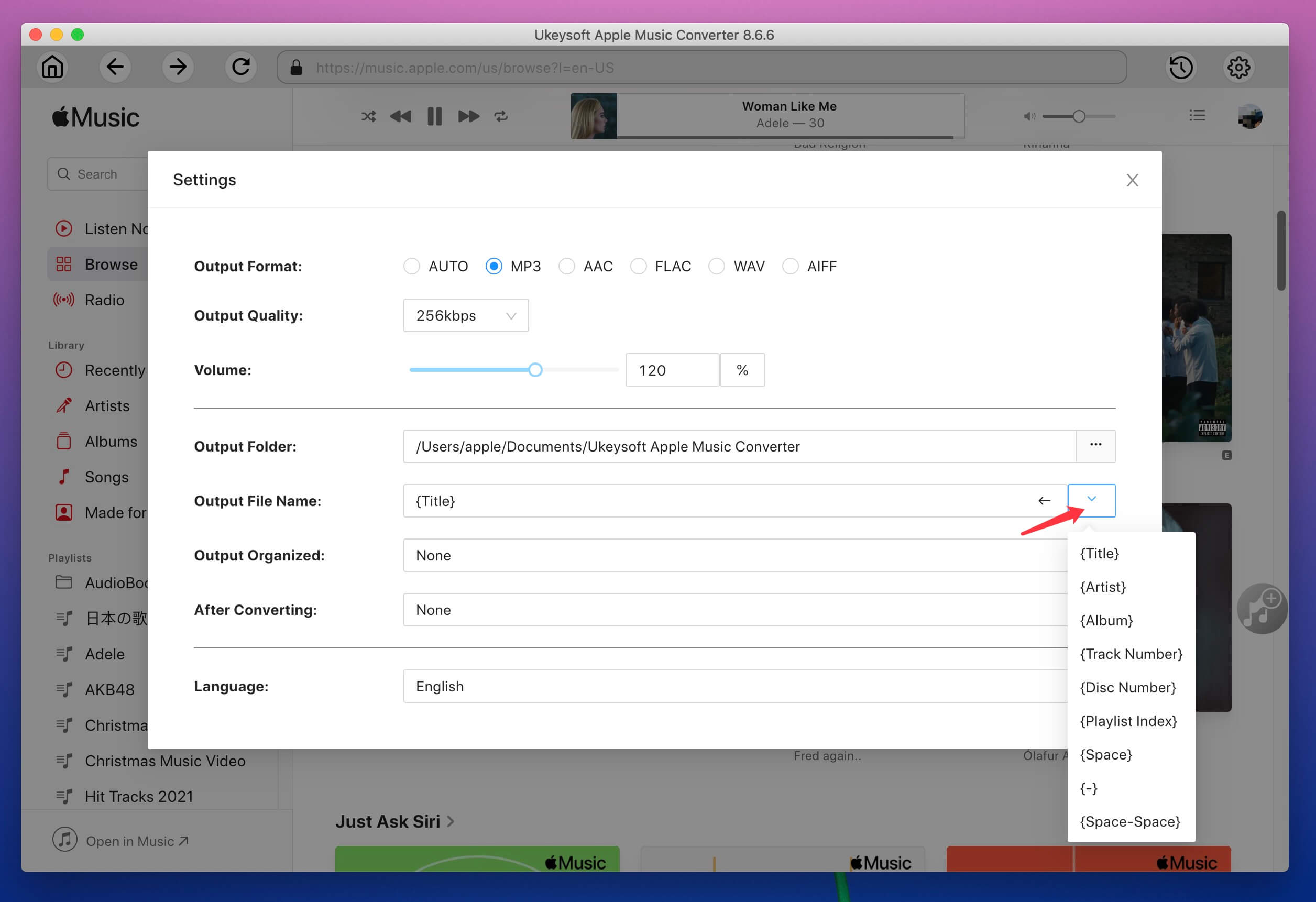
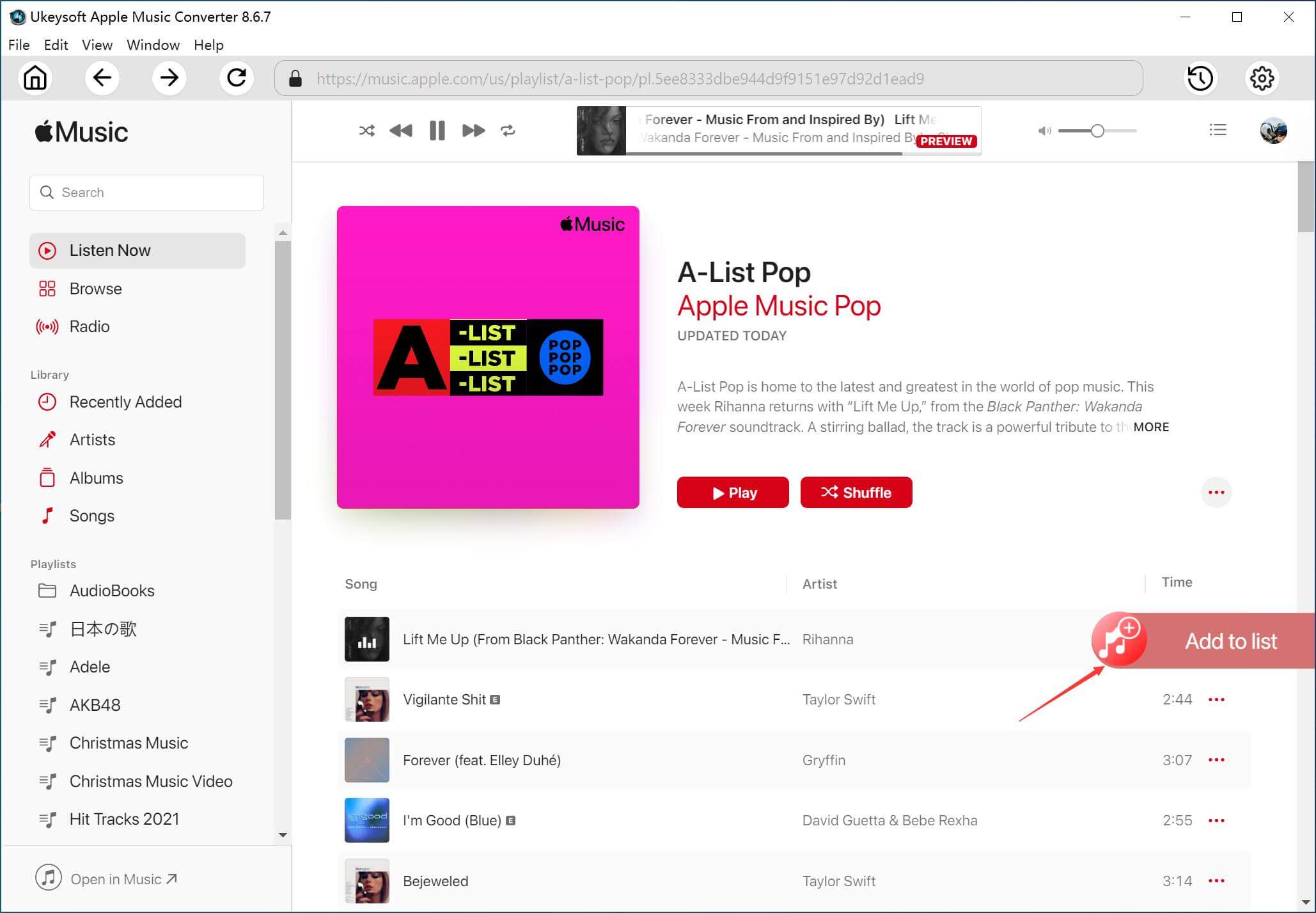
Step 4. Add Apple Music Tracks to the Software
Return to the home page, browse your music library online. Open any playlist, album, or song collection and add the content to the conversion list by clicking the green "+" icon.
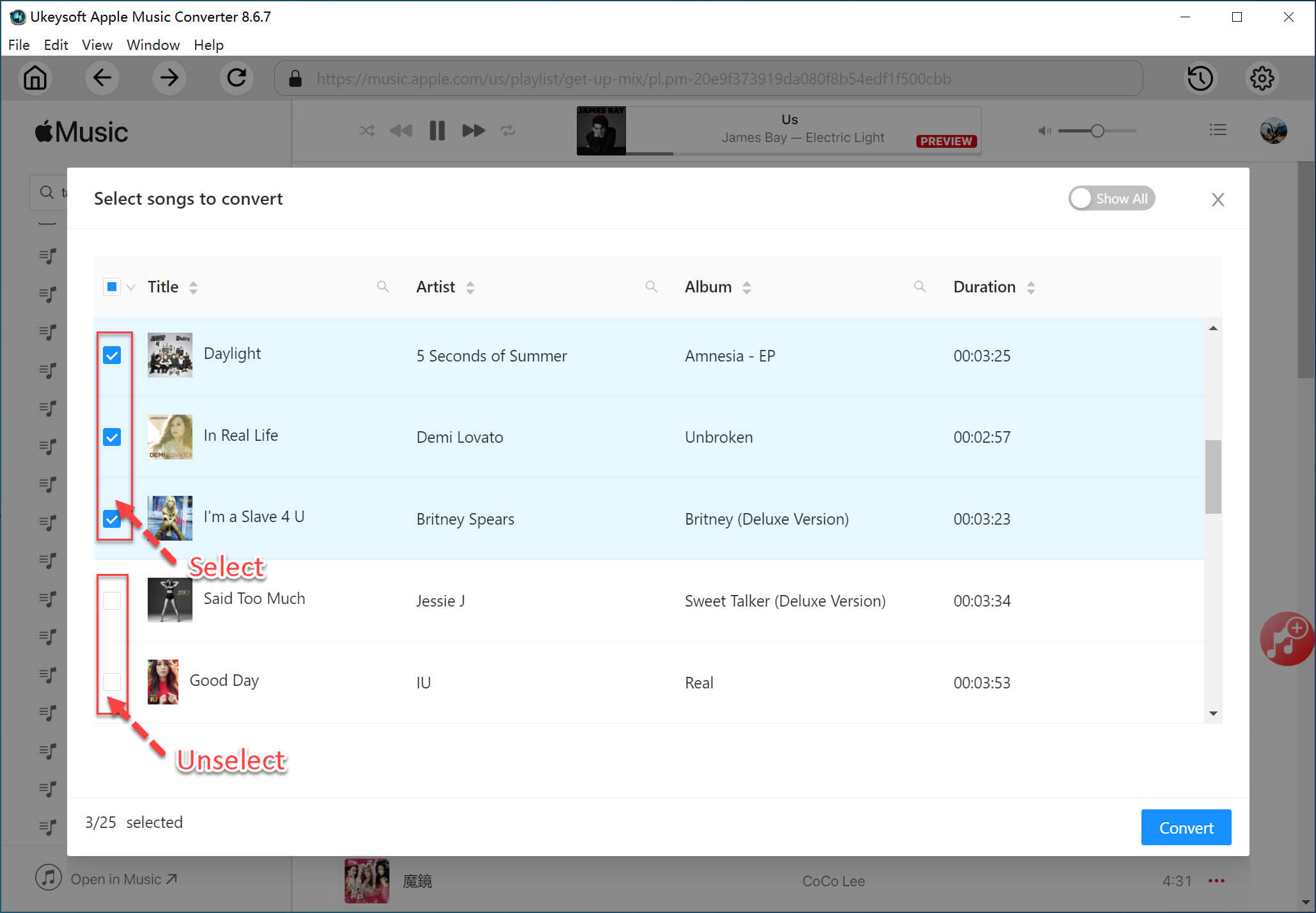
The software displays a checklist of all added songs, allowing you to review your selection before conversion. You can remove songs you don't want to download.
Step 5. Download Apple Music to MP3
Click on the "Convert" button to begin downloading and converting Apple Music tracks to MP3 or other format you set. A progress bar shows the status of each song, and you can monitor the overall conversion progress in real-time.
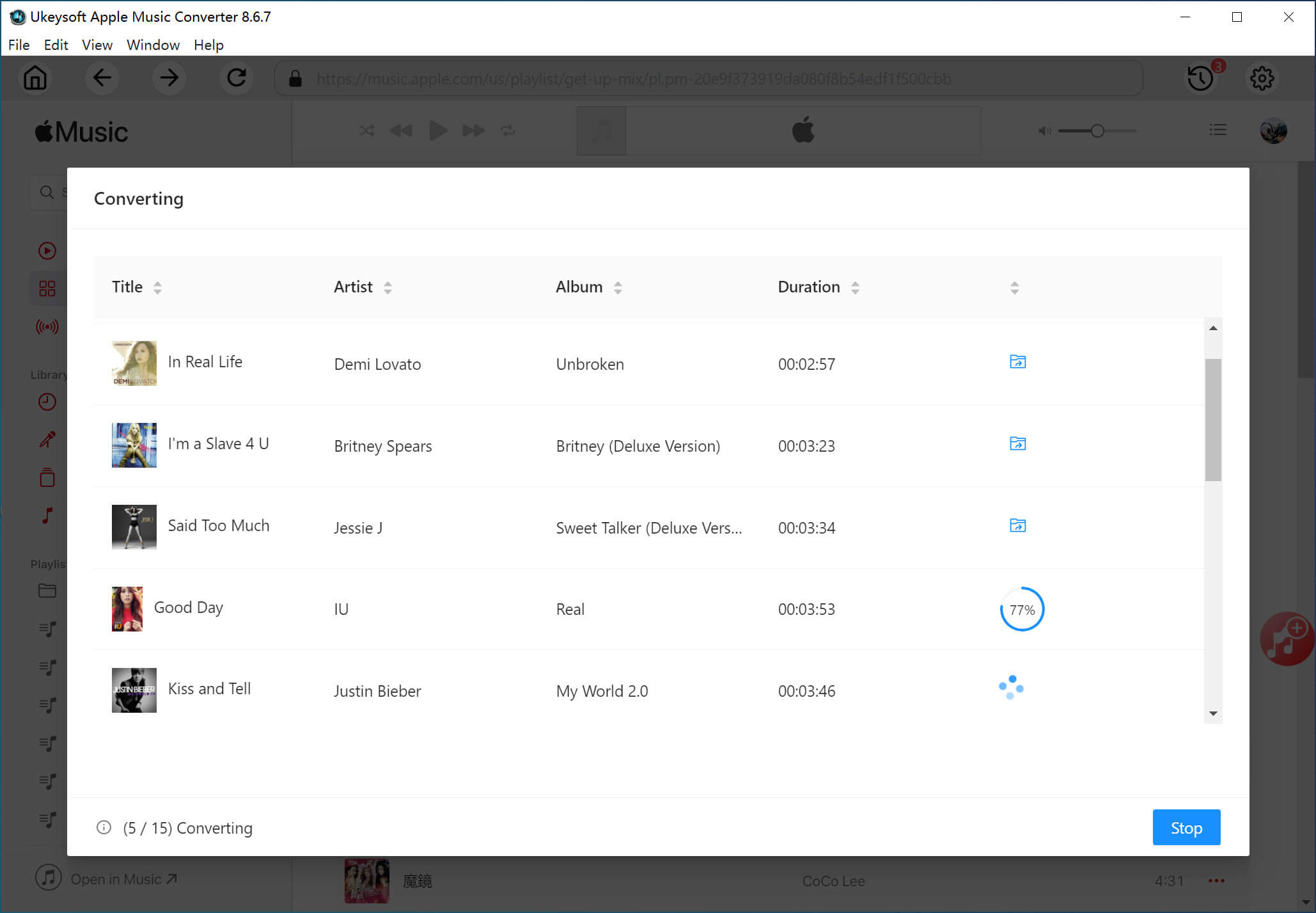
Step 6. Find Output Apple Music MP3 Files
After conversion finishes, open the "History" section to locate your downloaded Apple Music files. You can now play these Apple Music songs with the built-in music player offline.
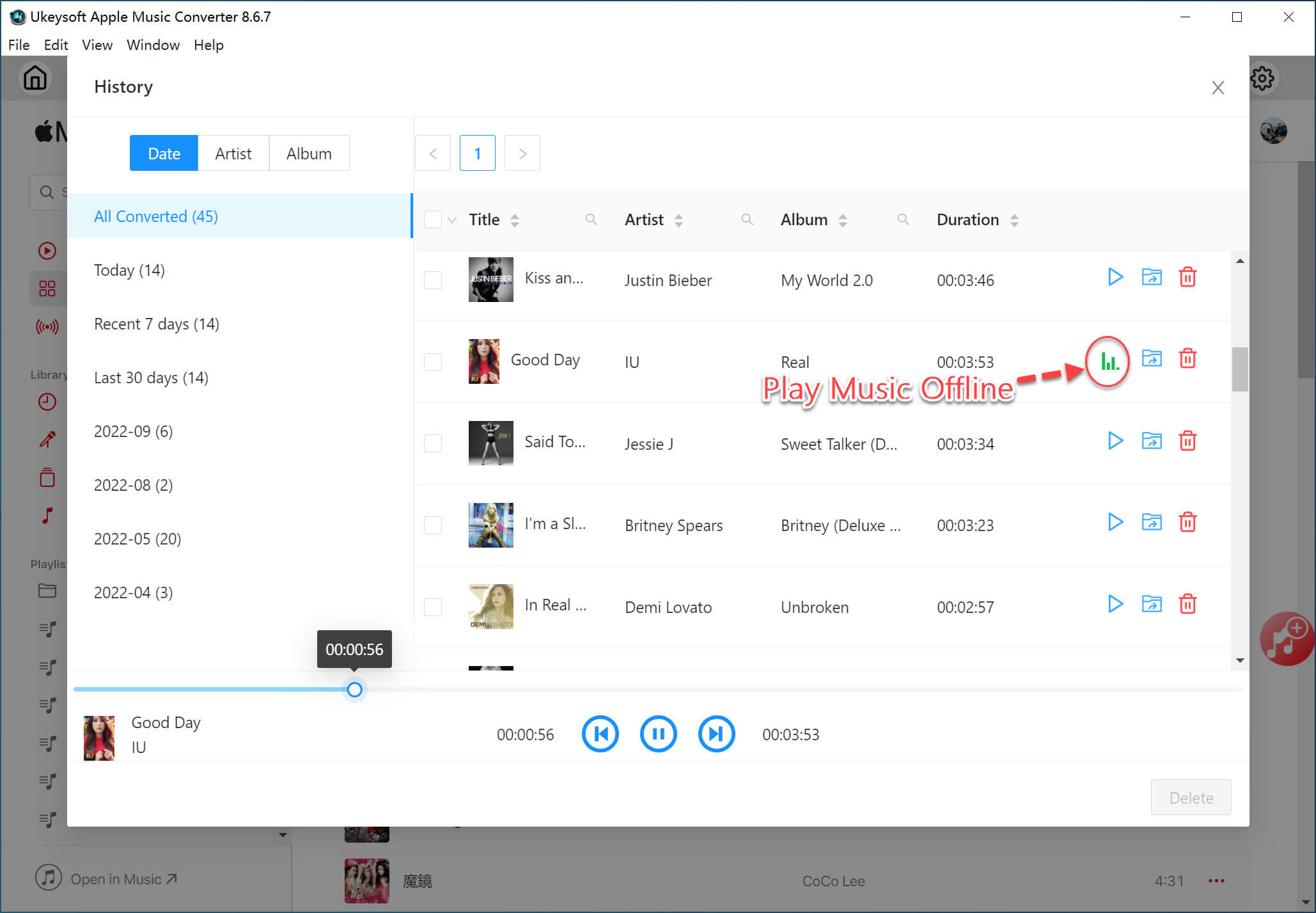
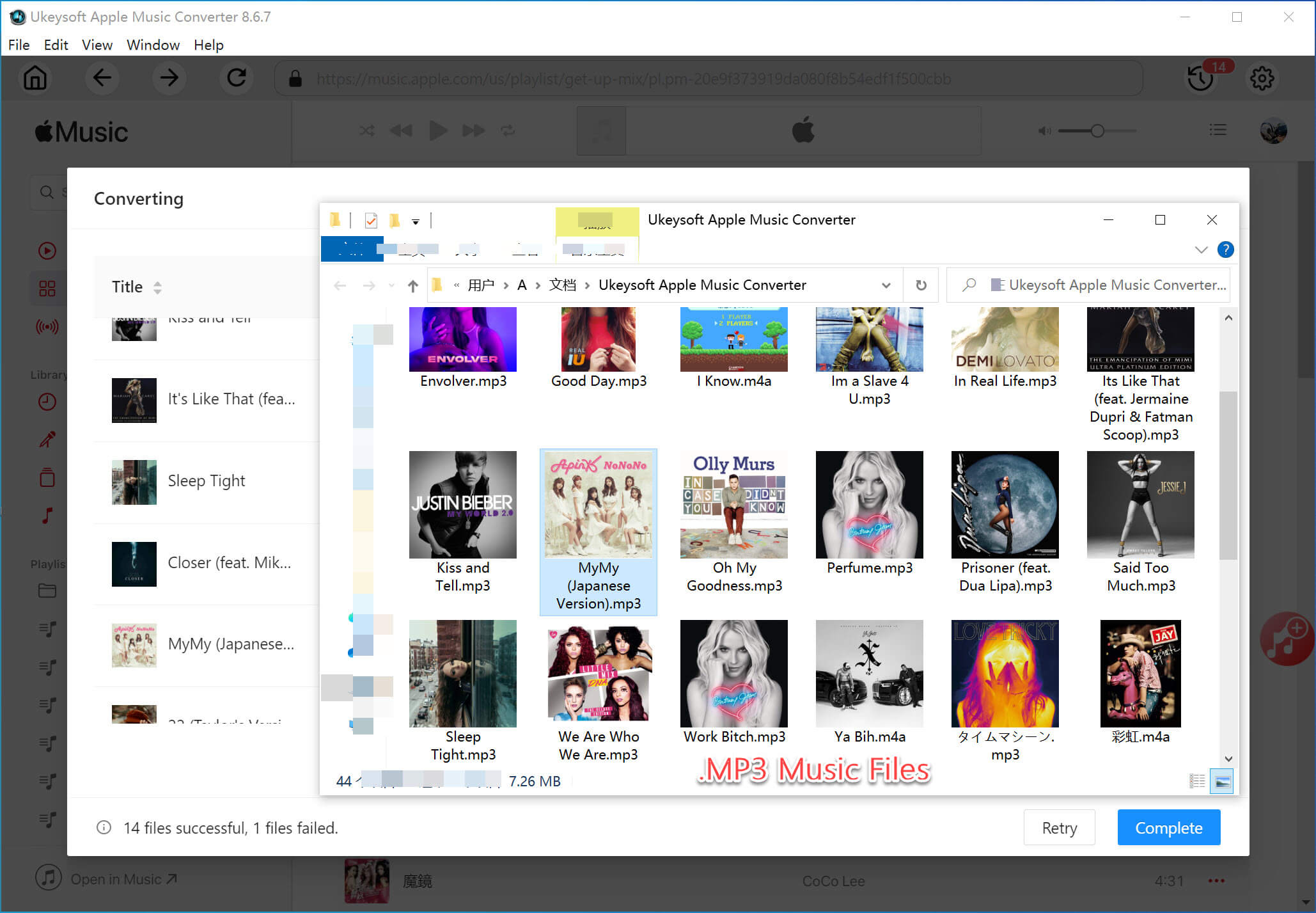
Click the "Blue Folder" to locate the output Apple Music MP3 files. These files are yours to keep forever, even after you cancel Apple Music subscription.
If you're new to Apple Music or planning to return after cancellation, joining an Apple Music subscription is quick and straightforward. Apple offers several subscription plans, including Individual, Student, Family, and Voice options in some regions. If you're new to Apple Music, you can get 1-month free trial.
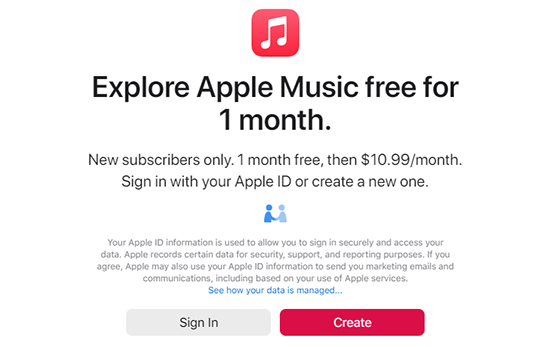
To subscribe, simply open the Apple Music app on any Apple device, navigate to the subscription section, and follow the prompts. You can also subscribe through Apple's website or via the Settings app on iOS devices.
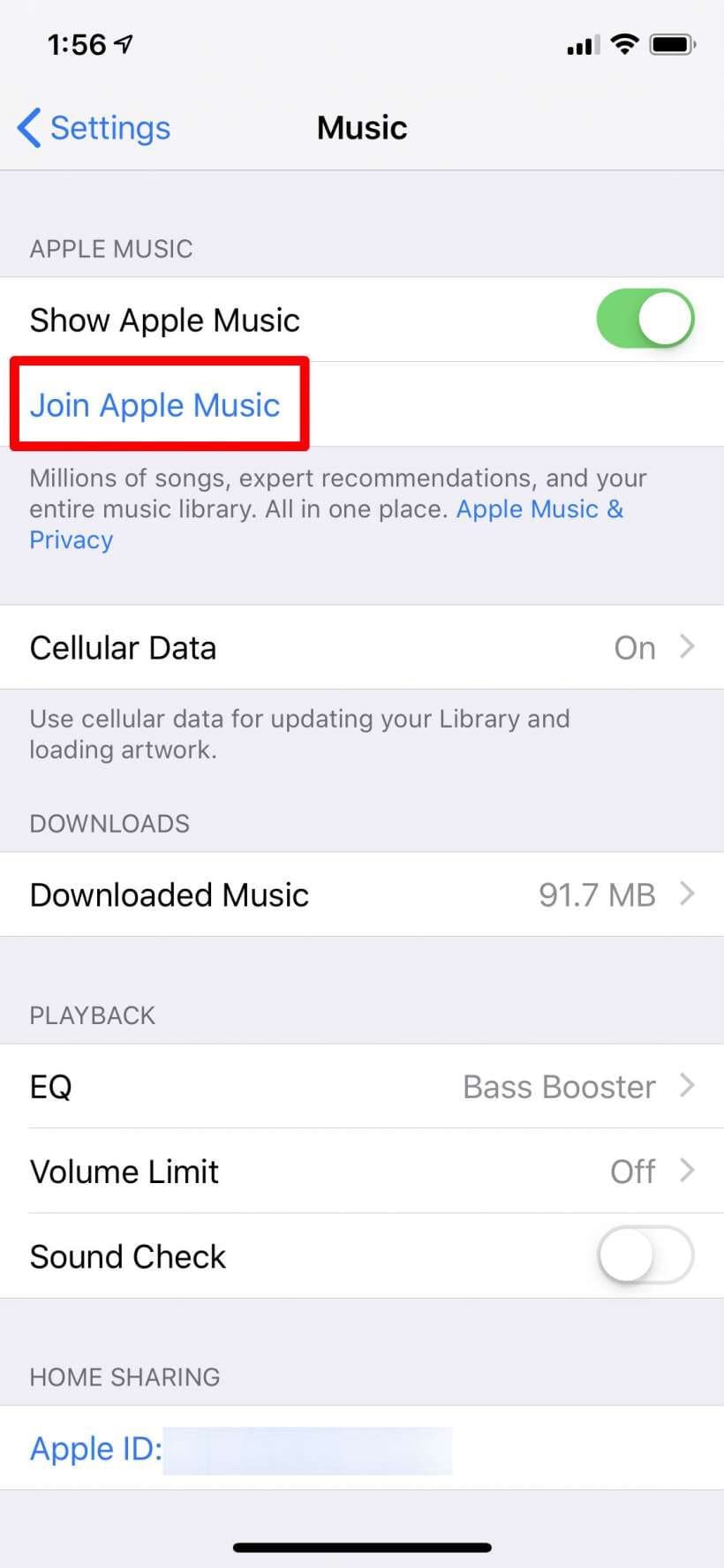
Once subscribed, you'll gain access to millions of songs, personalized recommendations, offline downloads, and seamless music syncing across Apple devices.
Whether you're switching to another streaming service or simply reducing monthly expenses, it's easy to cancel Apple Music membership from your Apple Music app, website, iTunes, or iOS settings. Remember that after you cancel Apple Music subscription, your service remains active until the end of the current billing cycle. To back up your Apple Music library before you cancel the membership, please utilize UkeySoft Apple Music Converter to download your Apple Music library as MP3 files.
Cancel Apple Music Membership on iPhone, iPad, or iPod Touch
Step 1. Open the App Store, click your profile picture.
Step 2. Select "Account Settings". Navigate to "Subscriptions".
Step 3. Find Apple Music, click "Cancel Subscription", and click "Confirm".
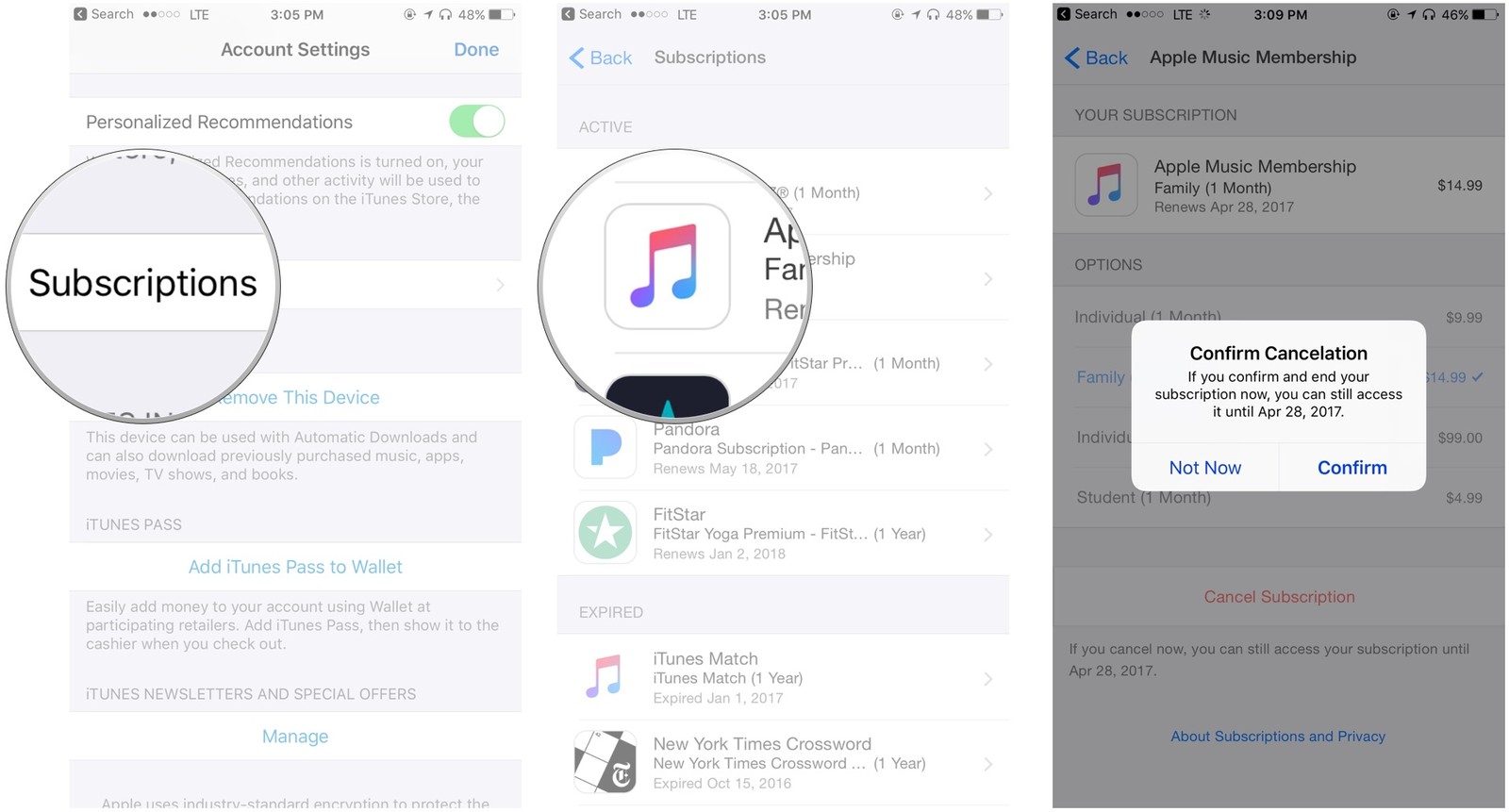
Cancel Apple Music Membership on Mac or PC
Step 1. Open the Apple Music app (macOS Catalina or later) or iTunes (older versions).
Step 2. For iTunes: Click "Account" in the menu bar, choose "View My Account", scroll to "Settings", and click "Manage" next to "Subscriptions".
For Apple Music app: Click "Account" in the menu bar, then select "Subscriptions".
Step 3. Find Apple Music and click "Edit Subscription".
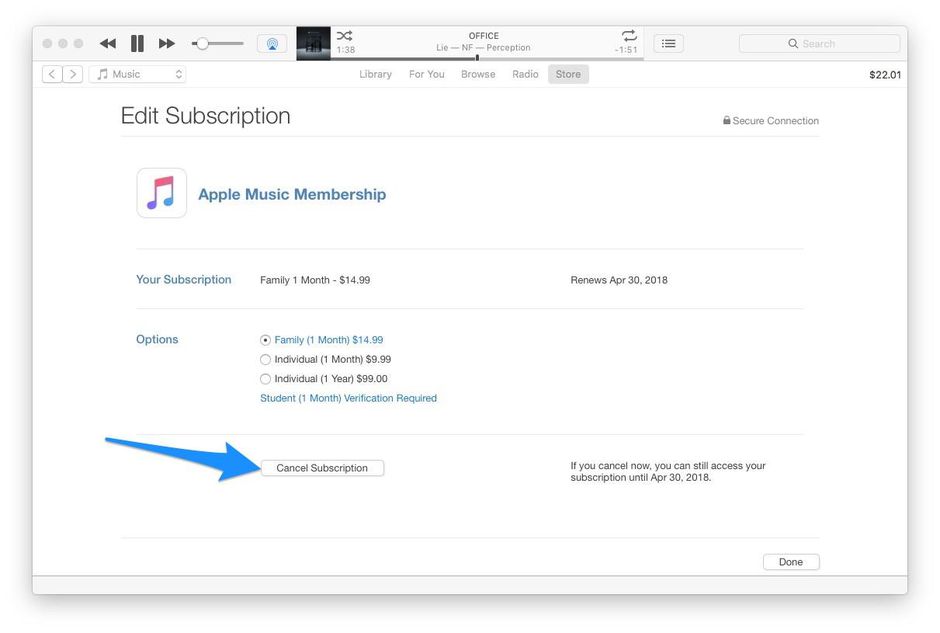
Step 4. Click "Cancel Subscription" and confirm.
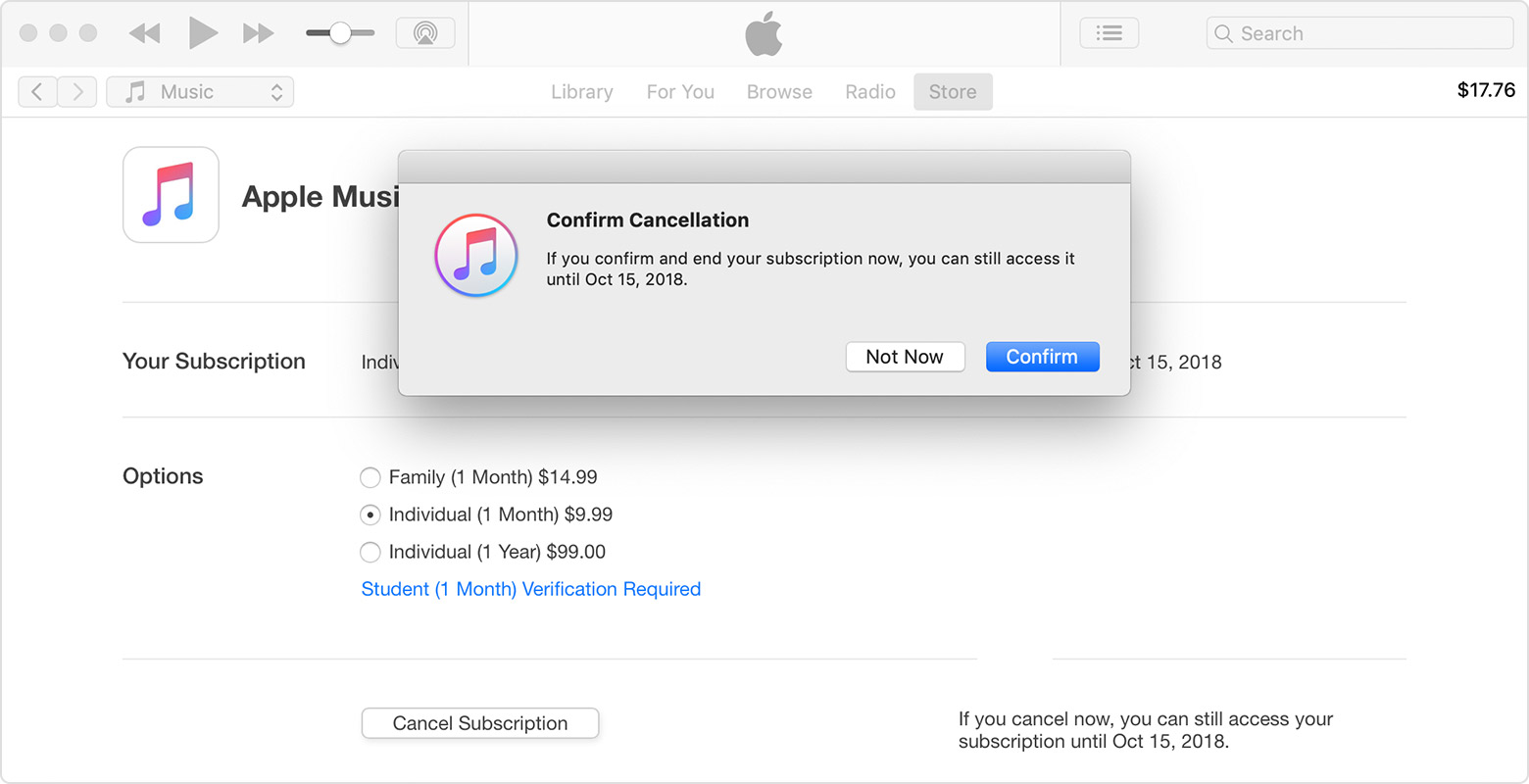
Step 5. Turn Auto Renewal to Off. Then, you need to disable apple music automatic renewal on iTunes.
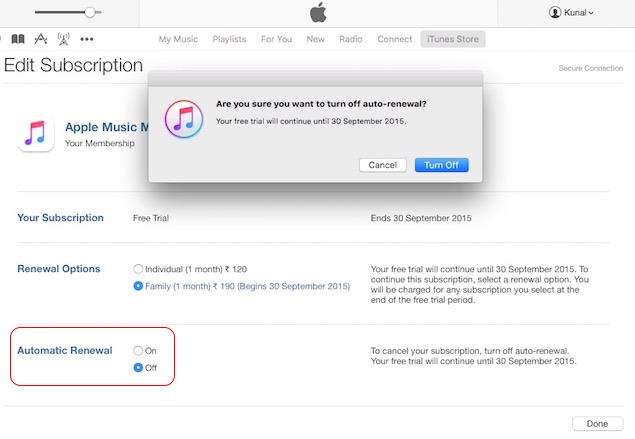
Step 6. Tap "Done" to return to your Account Information page. Tap "Done" to return to the iTunes Store.
Will I lose all my music if I cancel my Apple Music subscription?
Yes. All downloaded Apple Music tracks, custom playlists, synced libraries, and other subscription-based content will become unavailable once your Apple Music subscription expires. However, music you've purchased from the iTunes Store remains yours permanently, you can still stream, download and use them without a subscription.
Does Apple Music delete your library if you don't pay?
Yes. When you stop paying for Apple Music, Sync Library is disabled and access to streaming content is removed. Apple may retain your library information for a short period, but if the subscription remains inactive for an extended time, your playlists, library data, and saved content may be permanently deleted.
Can I get my music back if I resubscribe to Apple Music?
If you resubscribe within a relatively short period—often around 30 days - your playlists, saved songs, and library data may reappear when Sync Library is enabled again. However, if your subscription remains inactive for several months, Apple may permanently remove your cloud library. In such case, you need to rebuild your collection from scratch. To keep your Apple Music permanently, we recommend UkeySoft Apple Music Converter.
Can I cancel my Apple Music subscription and get my money back?
Apple does not provide an automatic refund when you cancel an Apple Music subscription. However, you can submit a refund request through Apple Support. If approved, Apple may issue a refund depending on the circumstances. Even after you cancel Apple Music subscription, you'll continue to have full access to Apple Music until the end of your current billing period.
When you cancel your Apple Music membership, you'll lose access to the streaming catalog. But you can still use Apple Music and enjoy all benefits until the billing cycle ends. For those who want to keep all downloaded songs before Apple Music subscription expires. Try the UkeySoft Apple Music Converter to backup and unlock your Apple Music library before canceling your Apple Music subscription. It helps you download and convert Apple Music to MP3 or other formats while keeping original audio quality. Easily build you offline library!

Prompt: you need to log in before you can comment.
No account yet. Please click here to register.










![7 Best FREE Apple Music Converters [2026 Updated]](https://www.ukeysoft.com/wp-content/uploads/2019/04/best-apple-music-converter.jpg)



















Porducts
Solution
Copyright © 2026 UkeySoft Software Inc. All rights reserved.


 English
 Arabic
 Chinese (Simplified)
 Chinese (Traditional)
 Croatian
 Czech
Czech Danish
 Dutch
Dutch Estonian
 Finnish
 French
 German
 Greek
Greek Hebrew
 Hindi
Hindi Hungarian
 Indonesian
 Italian
 Japanese
 Kazakh
 Korean
 Malay
Malay Norwegian
 Polish
 Portuguese
 Romanian
 Russian
 Slovenian
 Spanish
 Swedish
 Thai
Thai Turkish
 Ukrainian
 Vietnamese



























![Top 10 Christmas Songs to MP3 Download [Spotify]](https://www.ukeysoft.com/wp-content/uploads/2023/01/christmas-songs-to-mp3.jpg)


































































































































No comment yet. Say something...