 ✕
✕
✕
✕
By Justin SabrinaUpdated on January 07, 2026
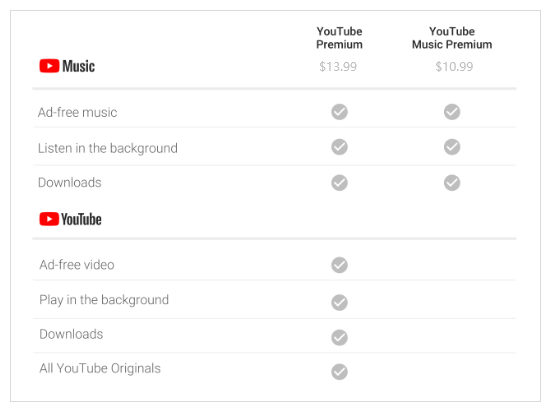
Listening to YouTube Music is convenient, but many users still struggle with one key limitation - frequent ads interruption. When you are streaming your favorite tracks on YouTube Music, sudden ads can break the mood instantly. These YouTube Music ads often last 15 to 20 seconds, appear between songs. At anytime, you can subscribe to YouTube Music Premium or YouTube Premium when you want to stop ads on YouTube Music.
It would be better if people can listen to ad-free music on YouTube Music without upgrading to subscriptions. In this article, we will explore the 3 methods to remove ads from YouTube Music with or without Premium, including the best YouTube Music Ad blocker - 4kFinder YouTube Music Converter. Let's explore!
CONTENTS
The most direct way to remove ads from YouTube Music is by subscribing to YouTube Music Premium or YouTube Premium. If you are a new user, you can even get 1-month free trial of Premium from its website or app. With a Premium subscription, users can enjoy completely ad-free YouTube Music, unlimited skips, background playback, and offline downloads within the app.
Don't have a Premium subscription? Is it possible to remove ads from YouTube Music without Premium? The answer is YES! For free users, you can turn to this professional tool - 4kFinder YouTube Music Converter.
Available on both Windows and Mac, 4kFinder YouTube Music Converter boasts a built-in web player, music player, and music manager inside the program. By using advanced technology, it helps you block ads on YouTube Music without a Premium subscription. As for music downloading, it can download high-quality tracks, MVs, playlists and albums from YouTube Music to computer folder without the YouTube Music app. Besides, it is capable of converting YouTube Music to MP3, FLAC, AAC, M4A, WAV and AIFF formats, and the conversion speed can be boosted to 10X higher. After that, you can save the output YouTube Music files permanently, and enjoy ad-free tracks offline on any device or player without restrictions.
More Features of 4kFinder YouTube Music Converter
Step 1. Run 4kFinder YouTube Music Converter
Fire up 4kFinder YouTube Music Converter on your computer running Windows OS or Mac OS. Then log into your YouTube Music free or premium account to access the library online.
Step 2. Choose MP3 as Output Format
Click the "Settings" or gear icon. Here, choose MP3 as your output format and select your desired audio quality (e.g., 320 kbps for excellent quality). Choose the universal MP3 as the output format. You may also select your desired audio quality and change the output folder.
Step 3. Select YouTube Music Songs
Choose any song, music video, album, or playlist, and click the "Add to list" icon in the right side.
The software will list all available tracks, select the ones you want and confirm.
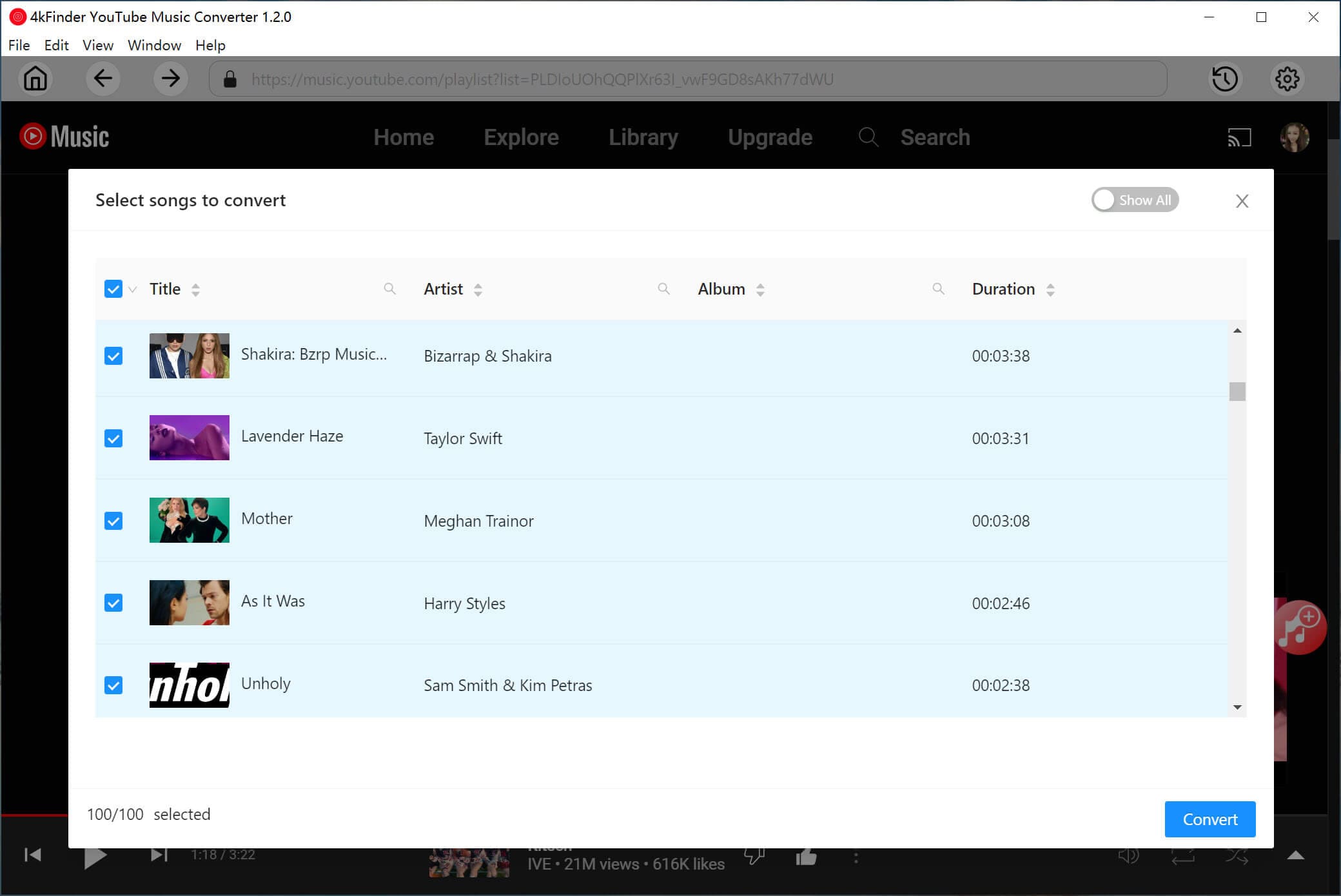
Step 4. Download Ad-free YouTube Music Songs
Click the "Convert" button. 4kFinder YouTube Music Converter will now begin downloading and converting your selected YouTube Music content into standalone MP3 files while removing the ads from each song.
Step 5. Get Ad-free YouTube Music Songs
Once the conversion is complete, click the "History" icon, and then click "Blue Folder" icon to access your ad-free YouTube Music files and play them anywhere.
Step 6. Listen to Ad-free YouTube Music Offline
4kFinder YouTube Music Converter comes with a free music player. After converting, you can listen to these ad-free YouTube music by pressing on the "Play" icon!
Another way to remove ads from YouTube Music free is by using an ad-blocker app or extensiton. If you prefer to stream music on YouTube Music web palyer, you can use these third-party extensions such as JadSkip, uBlock Origin, AdBlock, and AdGuard. These extensions can help stop ads during YouTube Music web playback. Here we take the JadSkip as an example to show you the steps.
Step 1. Open a Chrome browser and go to Chrome Store.
Step 2. Search for "JadSkip" and install the extension.
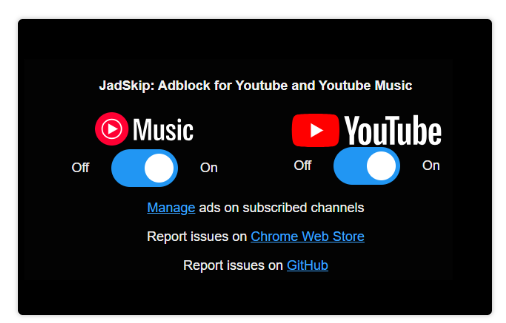
Step 3. After installation, enable the JadSkip extension in your browser.
Step 4. Go to YouTube Music web player in the browser, and start streaming ad-free music online!
While these Ad-blocking extensions work temporarily but they all rely on online streaming. You will need a stable and fast network connection to get a smooth ad-free playback experience. As YouTube intensifies its efforts to detect and block these ad-blocker extensions and apps, this method has become increasingly unreliable. When this method failed, you can turn to the professional desktop software - 4kFinder YouTube Music Converter. It is 100% safe and reliable.
Ads are always annoying to all YouTube Music free users. And it is possible to get uninterrupted ad-free listening experience without Premium. Above, we shared 3 ways to stop ads on YouTube music. To sum up:
By downloading YouTube Music to local MP3 files, 4kFinder YouTube Music Converter allows you to enjoy ad-free YouTube Music without Premium, no matter where or how you listen. It offers a free trial, download it right now to get ad-free music downloaded from YouTube Music free!

Sorry the comment has been closed.

















Porducts
Solution
Copyright © 2026 UkeySoft Software Inc. All rights reserved.


 English
 Arabic
 Chinese (Simplified)
 Chinese (Traditional)
 Croatian
 Czech
Czech Danish
 Dutch
Dutch Estonian
 Finnish
 French
 German
 Greek
Greek Hebrew
 Hindi
Hindi Hungarian
 Indonesian
 Italian
 Japanese
 Kazakh
 Korean
 Malay
Malay Norwegian
 Polish
 Portuguese
 Romanian
 Russian
 Slovenian
 Spanish
 Swedish
 Thai
Thai Turkish
 Ukrainian
 Vietnamese










![7 Best FREE Apple Music Converters [2026 Updated]](https://www.ukeysoft.com/wp-content/uploads/2019/04/best-apple-music-converter.jpg)













































![Top 10 Christmas Songs to MP3 Download [Spotify]](https://www.ukeysoft.com/wp-content/uploads/2023/01/christmas-songs-to-mp3.jpg)


















































































































Comments are off!