 ✕
✕
✕
✕
By Justin SabrinaUpdated on September 05, 2025
HEVC (for High Efficiency Video Coding) or H.265 is an updated, better codec. Its high compression efficiency gives you the ability to export GoPro 4K video, which is at least 50% smaller than H.264 while maintaining the same high quality. However, it is not as universally compatible as the older H.264 codec which is suitable for computer, TV or mobile devices. If you're using Windows 10 or higher or Mac OS X High Sierra, HEVC (H.265) makes it available for video editing applications running on these platforms, such as Final Cut Pro X and Premiere Pro. However, if you receive an error message on your computer when you are trying to open a video on GoPro HERO7 and HERO6 Black, it might be because it uses the HEVC (H.265) codec incompatible video mode.
Convert GoPro HEVC/H.265 Video for Editing or Playing
"GoPro Hero 6 footage can't be viewed. Is there a way to convert GoPro 4K HEVC to H.264 for playback?"
Compared to HEVC video, H.264 video is more compatible with devices and players, you can also choose other popular videos, such as MP4, AVI, WMV and so on. After transcoding GoPro HEVC /H.265 footage, you can play or make any edits or modifications as you wish. After transcoding, it can be played on Xbox, Samsung TV, etc. instead of HEVC compatible.
Pay attention: Converting GoPro 4K HEVC/H.265 videos to H.264 is easily once you get a video converter software on hand. UkeySoft Video Converter/ UkeySoft Video Converter for Mac will be a great helper to convert H.265 video to any video format including AVI, MP4, MOV, MPEG, 3GP, ASF, FLV, etc. Firstly, it can be used to convert HEVC/H.265 to H.264/MP4 and vice versa. Its high quality engine & optimized algorithm ensures a lossless 4K x265 to x264 conversion. Also, output parameters are classified and can be adjusted freely: video codec, video size, bit rate, frame rate, audio codec, channels, etc. You are allowed to convert several video files simultaneously in batches to save time and do more by using this UkeySoft Video Converter.
Step 1. Install UkeySoft Video Converter Software
To start with, free download the software from the download icon. Then install and run this program on your computer
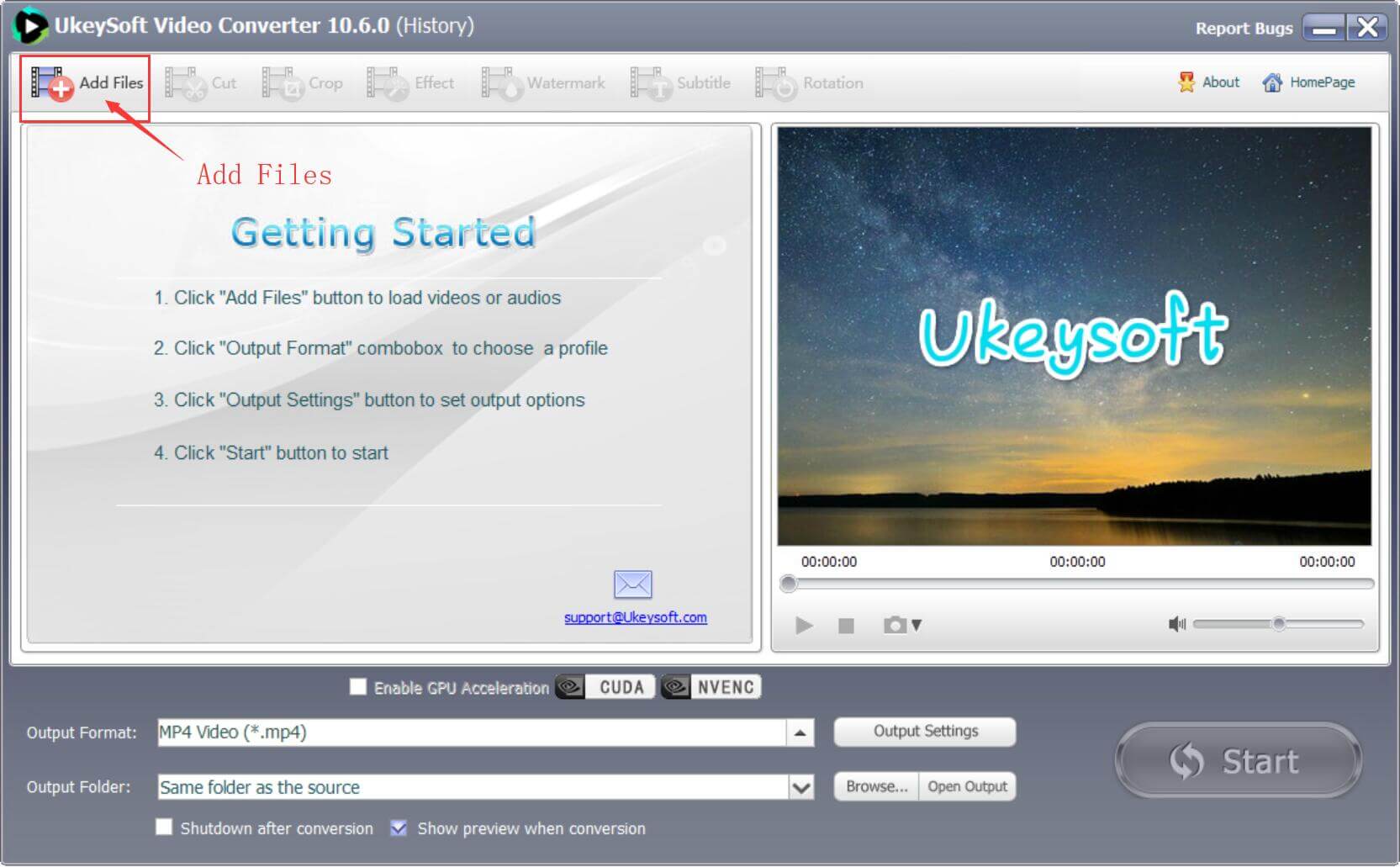
Step 2. Add GoPro 4K HEVC Video Files
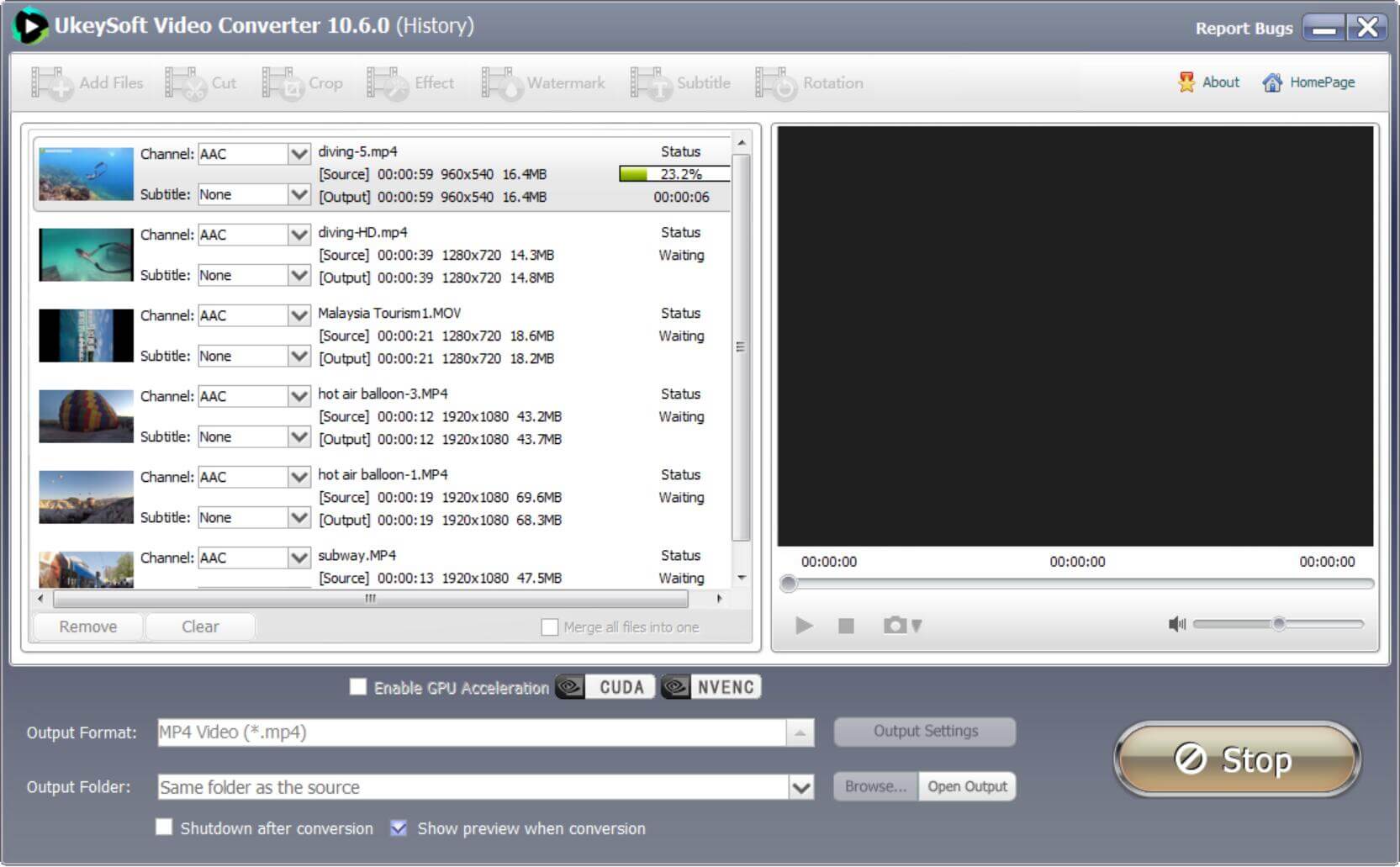
You can click Add Files option to add the GoPro 4K HEVC Video files or directly drag-drop files to this program. Batch import and batch conversion are supported, as well.
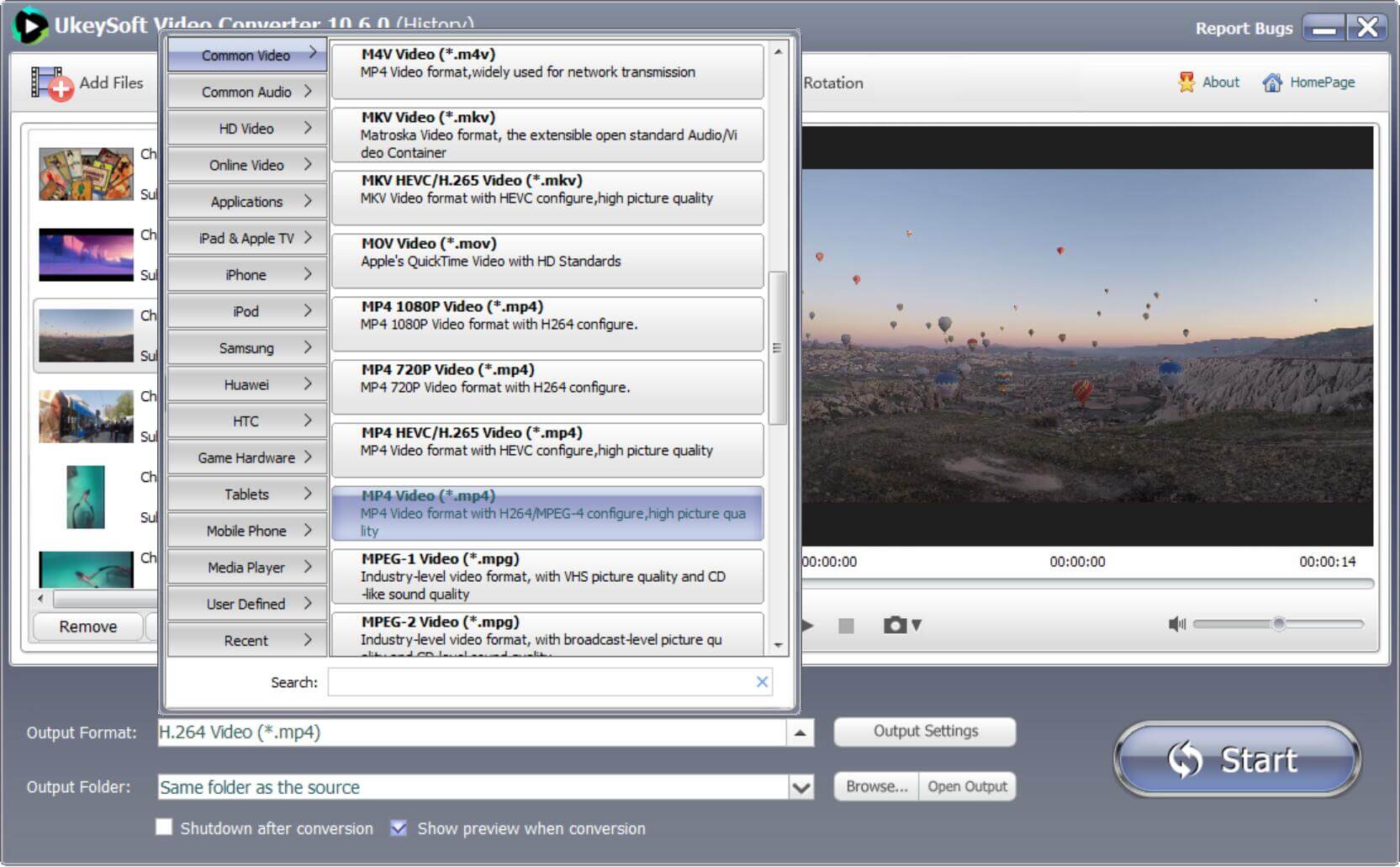
Step 3. Choose H.264 as Output Format
Click the "Format" button to select the output video formats like MP4 video, MKV video, WMV video, AVI video, you also can choose the video from the device preset, like the iPhone, iPad, Android devices, NLE software, TVs, Game console: PS4 Pro, Xbox One, etc. In this case, you can choose ‘HD H.264/MPEG-4 AVC Video (*.mp4)’ as target format under ‘HD Video’ column.
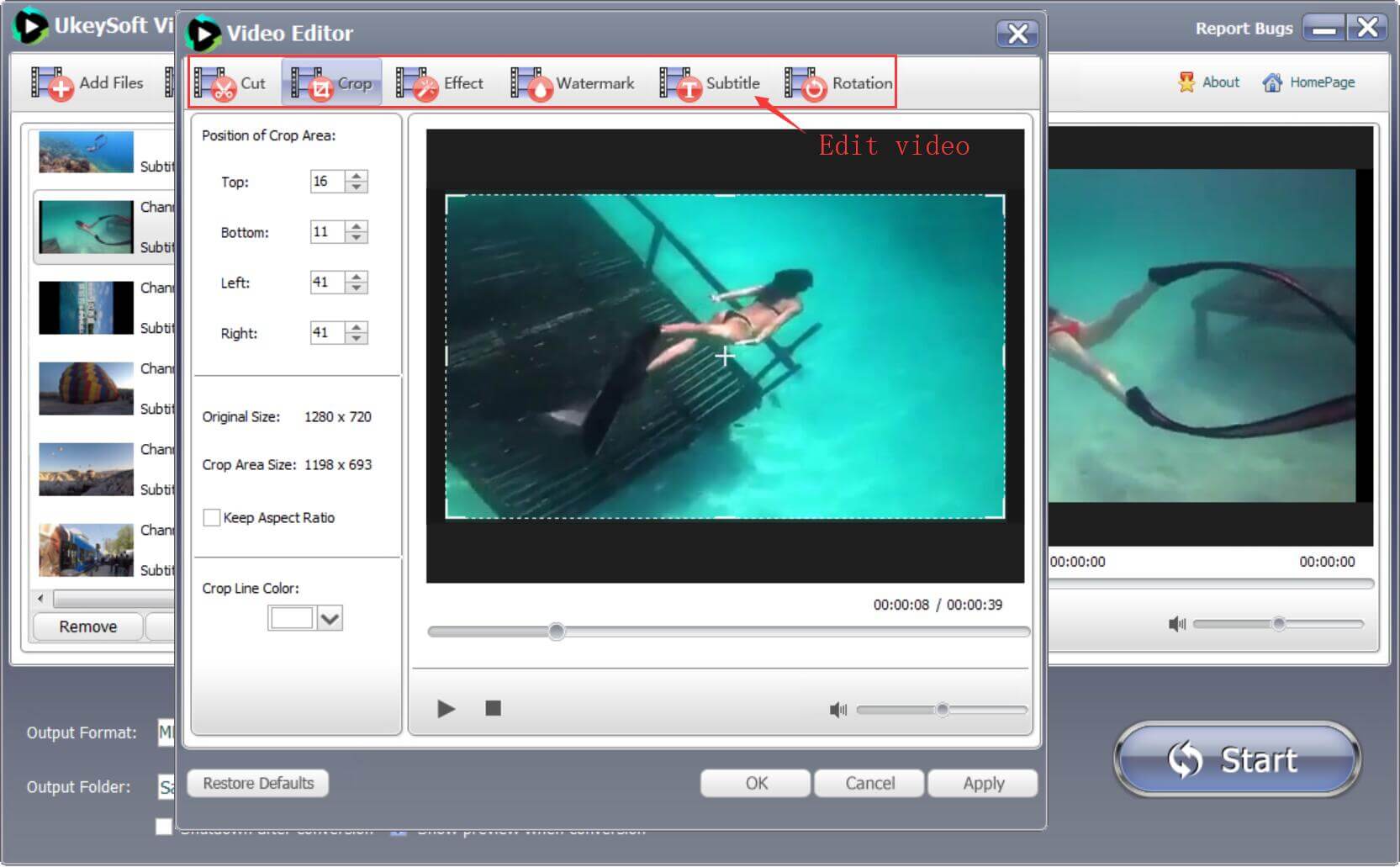
Step 4. Custom Video and Audio Settings - Optional
Bying clicking on the "Edit" button, you can custom video and audio settings if necessary: Trim to decide the video length, Crop to remove the unwanted edges, Subitiles to add some extra explanations.
Step 5. Convert GoPro 4K HEVC/H.265 to H.264 Now
Click "Start" button after you've already selected the output folder to start to convert HEVC/H.265 to H.264/AVC on Windows or Mac. As soon as the conversion is complete, you can click ‘Open Folder’ button to get the converted video files for editing or playing with very good quality.

Justin Sabrina has over 10 years of content writing experience. She specializes in product reviews, how-to guides, tips and tricks, top lists, etc. on data encryption, multi-media conversion, screen recording and iOS unlocking. At UkeySoft, she performs in-depth research SEO copywriting and collaborates with our R & D team to offer effective software solution, most of her articles on software are helpful and easy to read, helping our reader easily solve problems through using software or apps.

Li Zhang is a sophisticated editor for UkeySoft in tech blog writing, as well as a SEO and content marketing expert. She has been writing related article about multimedia conversion, streaming music and streaming video since 2018. Also, she's starting to write article about data security, including articles about file lock, USB encryption, DVD encryption, etc. Each helpful tutorial and solution is based on her practical tests, she is aways energetic and trustworthy in this field.

Chester is an experienced editor for UkeySoft focused on tech article writing, software & hardware produce review and tutorial. He specializes in composing posts about music conversion, video downloading, video conversion, screen recording and other tech knowledge tips. He always understands user needs and pain points and familiar with all kinds of multimedia conversion software and streaming music downloader on the market. So far, he has published 400+ helpful tech articles of software reviews, how-to guides to help reader in need.
Prompt: you need to log in before you can comment.
No account yet. Please click here to register.










![7 Best FREE Apple Music Converters [2026 Updated]](https://www.ukeysoft.com/wp-content/uploads/2019/04/best-apple-music-converter.jpg)




















Convert Apple Music, iTunes M4P Songs, and Audiobook to MP3, M4A, AAC, WAV, FLAC, etc.

















![Top 10 Christmas Songs to MP3 Download [Spotify]](https://www.ukeysoft.com/wp-content/uploads/2023/01/christmas-songs-to-mp3.jpg)








































Convert songs, podcasts from Amazon Prime Music, Music Unlimited, and HD into MP3, M4A, AAC, WAV, FLAC, etc.























Download Tidal HiFi, high-quality songs to computer, convert Tidal music to MP3, FLAC, WAV, AAC, etc. at 10X faster.
























Download songs, albums, playlists, and podcasts from Deezer to MP3, M4A, etc. in original quality.






Batch download Pandora songs, albums, playlists and podcasts to your computer, convert Pandora Music to MP3, M4A, etc.

Download and convert songs, albums, playlists from YouTube Music Free & Premium to MP3, M4A, AAC, FLAC, WAV, AIFF.






















Convert Audible AA/AAX audiobooks to MP3, M4A, M4B, etc. for easily playback everywhere.

Convert iTunes M4V movies, TV shows and music videos to MP4 video format.



Convert incompatible video/audio files,edit video and enhance video quality.

Rip DVD to any main stream audio & video formats for playback on portable and mobile devices.


Password protect and hide files & folders located on your computer, USB devices.

Password protect and encrypt USB disk, memory stick and more USB flash drive.


Cut, merge, crop, trim and rotate video; Add BGM to video and enhance video effect.

Free download music from Spotify to get free songs for adding to your created videos.

Porducts
Solution
Copyright © 2026 UkeySoft Software Inc. All rights reserved.


 English
 Arabic
 Chinese (Simplified)
 Chinese (Traditional)
 Croatian
 Czech
Czech Danish
 Dutch
Dutch Estonian
 Finnish
 French
 German
 Greek
Greek Hebrew
 Hindi
Hindi Hungarian
 Indonesian
 Italian
 Japanese
 Kazakh
 Korean
 Malay
Malay Norwegian
 Polish
 Portuguese
 Romanian
 Russian
 Slovenian
 Spanish
 Swedish
 Thai
Thai Turkish
 Ukrainian
 Vietnamese









No comment yet. Say something...