 ✕
✕
✕
✕
By Justin SabrinaUpdated on June 30, 2026
TIDAL is known for its HiFi music streaming, delivering a great listening experience. But beyond its impressive music catalog, Tidal is also a good place where you can find exclusive interviews, talk shows, and podcast-style content. If you're wondering how to download Tidal podcasts for offline listening, you've come to the right place.
In this guide, you'll learn how to download Tidal podcasts on computers and mobile devices in two methods. You can find and download podcasts on Tidal mobile app, or download and save your favorite episodes forever on your Mac or PC as MP3 audios with a powerful Tidal music converter. Keep reading to get Tidal podcasts for unlimited offline listening.
CONTENTS
As of 2025, TIDAL has gradually removed its general podcast directory. Today, many podcast episodes are categorized as Videos, Albums, or Playlists, making them slightly harder to discover. Fortunately, Tidal still hosts Tidal Originals and exclusive music journalism series (such as Rap Radar and Tidal Check In). You can search for the name of the show directly and enjoy it directly within the TIDAL app or web player. Follow below steps to find Tidal Originals and music shows:
Step 1. Launch the TIDAL app or visit the TIDAL web player.
Step 2. Enter the podcast or show name in the search bar. For example, here we type "Drink Champs".
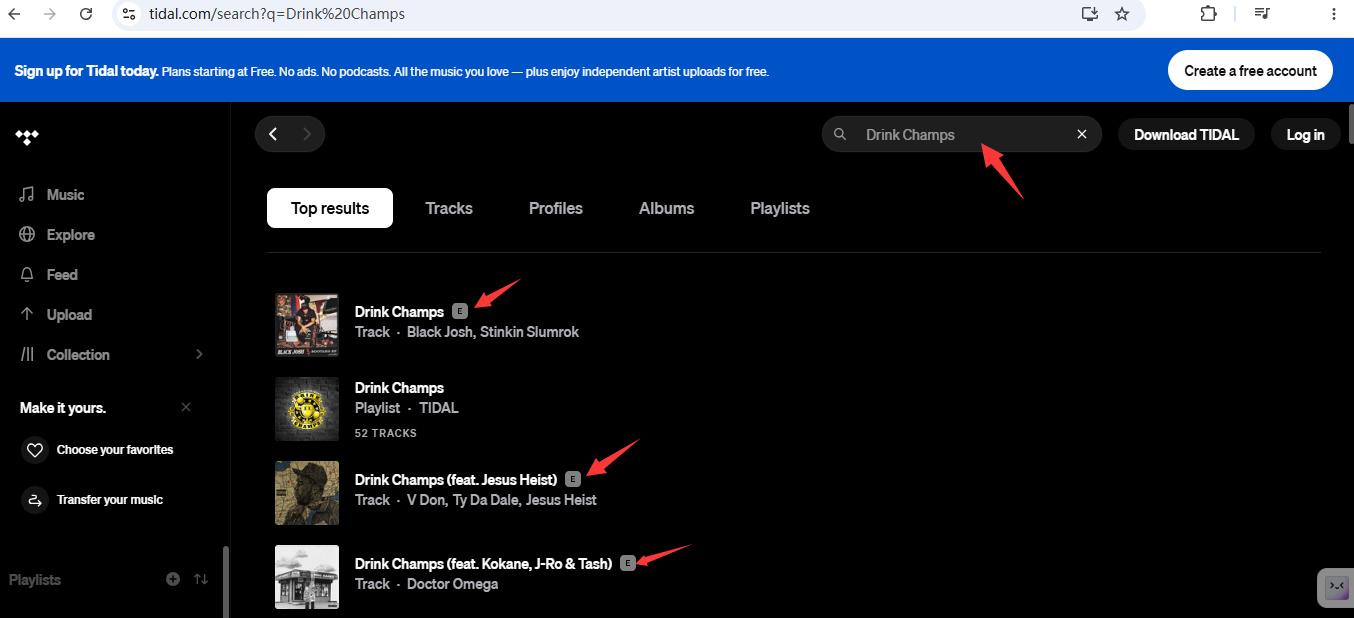
Step 3. Look at the "Videos" or "Playlists" filter tabs in the search results. You'll notice dedicated episode icons (marked with an "E") that indicate podcast content.
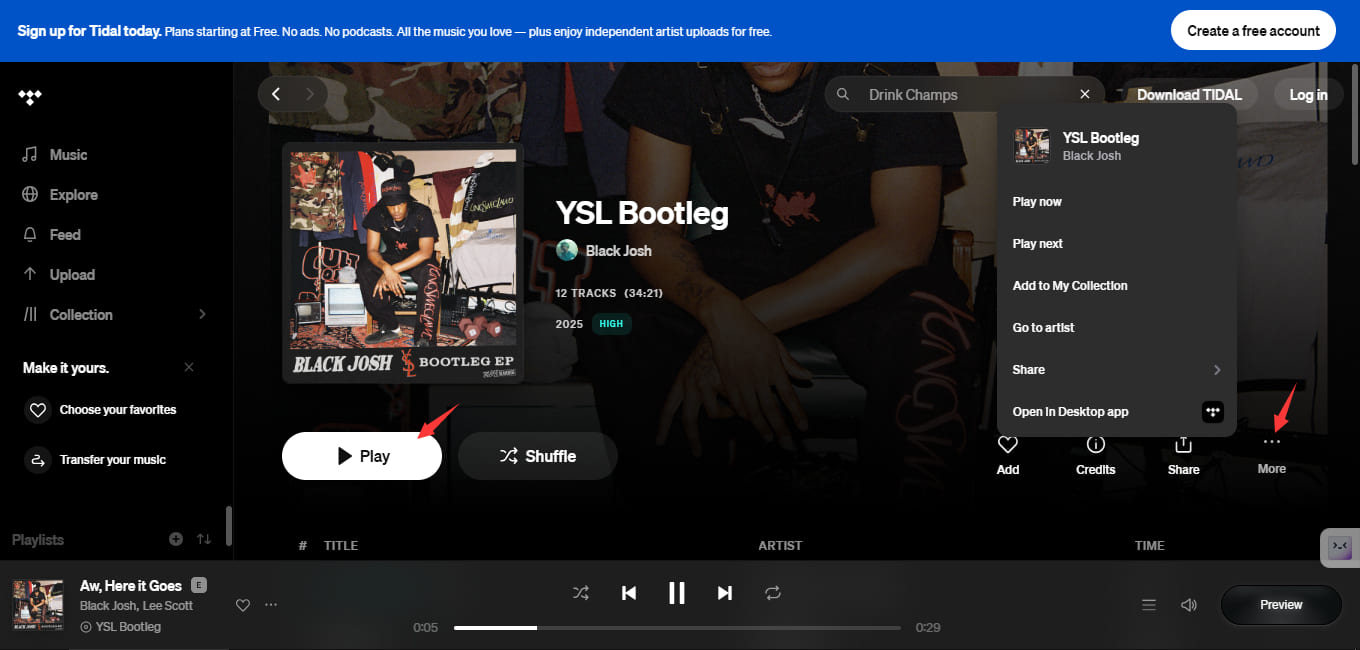
Step 4. Once you've located the podcast or episode you want, click on the title to listen online or add it to your collection.
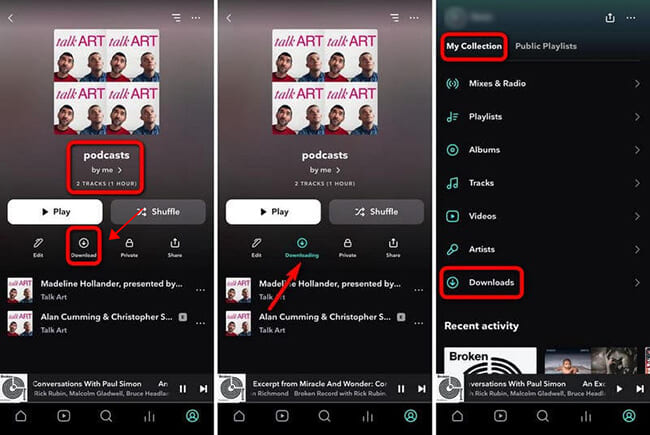
If you have a TIDAL Individual, Family, or Student subscription, you can officially download Tidal podcasts for offline listening using the Tidal mobile app. The downloaded episodes remain inside the TIDAL app, allowing you to listen without an internet connection. However, these downloads are protected by DRM and cannot be transferred or played with other media players. To get full control, scroll down to Part 3.
Step 1. Install and open the latest TIDAL app on your Android phone or iPhone.
Step 2. Sign in using your TIDAL subscription account.
Step 3. Search for the podcast or episode you'd like to save.
Step 4. Open the podcast and click the three dots, select "Add to My Collection" option or add it to your created playlist.
Step 5. Go to the playlist that lists all your podcasts. Tap the Download button beside the podcast or playlist.
Step 6. When finished, go to "My Collection", select "Downloads" to enjoy your podcasts offline.
Unlike the mobile app, the official TIDAL desktop application does not support offline downloads. Whether you're using Windows or macOS, you can only stream podcasts online. If you want to download Tidal podcasts on desktop, you'll need a professional TIDAL music downloader.
UkeySoft Tidal Music Converter is an all-in-one Tidal music downloader, Tidal podcast downloader, Tidal to MP3 converter, Tidal music player, and Tidal music manager. It is able to download Tidal podcast episodes, songs, albums, and playlists to computer without the Tidal app. In addition, this tool supports multiple audio formats such as MP3, M4A, AAC, WAV, FLAC, and AIFF, so you can easily download Tidal podcasts as MP3 or other audio files.
Even better, it works at up to 16X faster while preserving original audio quality. With batch mode, you can batch-download podcasts from Tidal in one go, saving you much time and effort compared to official method on mobile. It's an excellent choice for building a permanent offline podcast library that can be played on any computer, smartphone, smart speakers, car stereo, or MP3 player.
👍 Key Features of UkeySoft Tidal Music Converter:
Step 1. Select Tidal and Log In
Download and install UkeySoft MusicOne Converter on your Windows PC or Mac. Launch the software, select the Tidal platform from the available options, and log in to your Tidal account.
Once logged in, you'll have full access to the entire Tidal library, including all podcasts, songs, albums, and playlists.
Step 2. Customize Output Settings
Click the "Menu" icon in the top-right corner of the interface and select "Preference" from the dropdown menu. In the settings window, choose your preferred output format (such as MP3), adjust the output quality, output file name, and specify where you want your downloaded podcasts to be saved on your computer.
Step 3. Search, Open, Add Podcasts
With your Tidal account logged in, use the built-in search function to find the podcasts you want to download. You can search by podcast name, episode title, or open the podcast in you created playlist. Then click the "+" icon to add them to your download queue.
Choose the podcast episodes you'd like to save. You can select individual episodes or entire podcast series for batch downloading.
Step 4. Start Downloading Tidal Podcast to PC
Click the "Convert" button. The software will quickly batch-download podcasts from Tidal while preserving the original audio quality and metadata.
Step 5. Get Downloaded Tidal Podcasts
When the download is complete, open the "History" or "Output Folder" to find your saved MP3 podcasts. You can now listen to these Tidal podcasts offline on your computer with its built-in music player!
Does TIDAL Have Podcasts?
Yes. Although TIDAL has removed its dedicated podcast directory, podcast-style content is still available on the platform. Many shows are now listed under Videos, Albums, or Playlists, and you can find them by searching the podcast title directly.
How to Download TIDAL Podcast for PC?
The official TIDAL desktop app doesn't support offline downloads. If you want to download Tidal podcasts on Windows PC, you'll need a third-party tool like UkeySoft Tidal Music Converter. It can download and save podcasts as MP3 and other popular audio formats for permanent offline playback.
How to Download TIDAL Podcast for Free?
TIDAL does not offer a free tier, so you'll need an active subscription to access its podcast and music library. If you are new to Tidal, you can get Tidal free for 1 month. During the free trial, you can log into your account in the Tidal mobile app, download your favorite Tidal podcasts for free, without payment. But if your free trial expires, you need to pay for it to keep your account active.
Above, we have showed you how to download Tidal podcasts with two methods. The official Tidal mobile app offers direct offline listening, but includes playback restrictions. For a hassle-free experience, UkeySoft Tidal Music Converter is the best ideal. It offers a simple and effective way to batch download Tidal podcasts on computer in MP3 directly, making it easy to building your offline podcast library locally! The software offers a free trial, get it right now!

Sorry the comment has been closed.
























Porducts
Solution
Copyright © 2026 UkeySoft Software Inc. All rights reserved.


 English
 Arabic
 Chinese (Simplified)
 Chinese (Traditional)
 Croatian
 Czech
Czech Danish
 Dutch
Dutch Estonian
 Finnish
 French
 German
 Greek
Greek Hebrew
 Hindi
Hindi Hungarian
 Indonesian
 Italian
 Japanese
 Kazakh
 Korean
 Malay
Malay Norwegian
 Polish
 Portuguese
 Romanian
 Russian
 Slovenian
 Spanish
 Swedish
 Thai
Thai Turkish
 Ukrainian
 Vietnamese










![7 Best FREE Apple Music Converters [2026 Updated]](https://www.ukeysoft.com/wp-content/uploads/2019/04/best-apple-music-converter.jpg)












































![Top 10 Christmas Songs to MP3 Download [Spotify]](https://www.ukeysoft.com/wp-content/uploads/2023/01/christmas-songs-to-mp3.jpg)












































































































Comments are off!