 ✕
✕
✕
✕
By Justin SabrinaUpdated on September 01, 2021
Spotify is perfect for its large music library, amazing playlists and world-class music discovery. Spotify allows you to access music streams for free with a free account, but there are many limitations. Instead, a $9.99 monthly paid subscription gives you too much flexibility. You can play your favorite songs freely; the forward/backward function works; the offline mode allows you to download your favorite tracks, so that you can enjoy the music stream even if you enter an area where the internet signal is weak or our packets are exhausted. Moreover, a premium account allows up to 10,000 songs to be downloaded on each of up to 5 different devices. You can download Spotify tracks as much as possible.
Now, many users are trying to figure out how to extract MP3 files from Spotify Music. As Spotify songs can't be played off the app. These songs are stored in an encrypted format that other players cannot detect and play. So if you want to rip a Spotify song to MP3, you will need to remove DRM protection from the Spotify songs and convert the audio files to MP3. To do this, you need a reliable Spotify to MP3 extractor, and UkeySoft Spotify Music Converter is such a perfect program. This is one of the most popular solutions for Spotify's free and Premium users to download and extract songs, playlists and albums from Spotify to MP3 and other popular formats while maintaining the original music quality.
The UkeySoft Spotify Music Converter is designed to download and rip Spotify songs to MP3 on your Mac or Windows. It guarantees that you will get 100% of the original quality of all songs and the same ID3 tags as Spotify. With it, you are able to download Spotify music, playlist, podcast etc offline forever even without a Spotify premium account. The UkeySoft Spotify Music Converter allows you to convert multiple playlists at the same time, you just need to drag & drop the desired songs into the program.
Pros of UkeySoft Spotify Music Converter
Step 1. Install and Register the App
After downloading the program, install and run UkeySoft Spotify Music Converter app on your computer. We recommend that you register and purchase the full version before you start the conversion. As the free version can only convert a portion of each song for free. Click "Buy now" and enter the registration code you received.
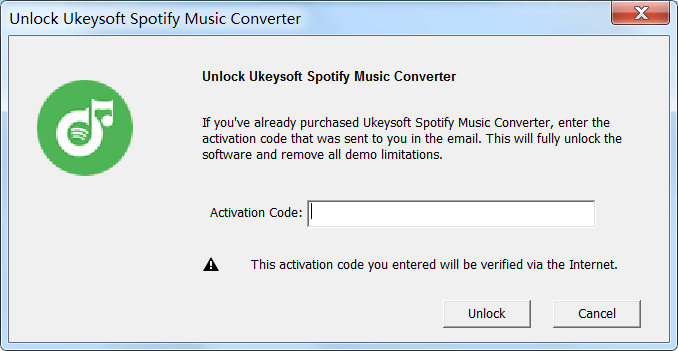
Step 2. Launch UkeySoft Spotify Music Converter
Run the program after registration, and you will see Spotify desktop app being loaded automatically.
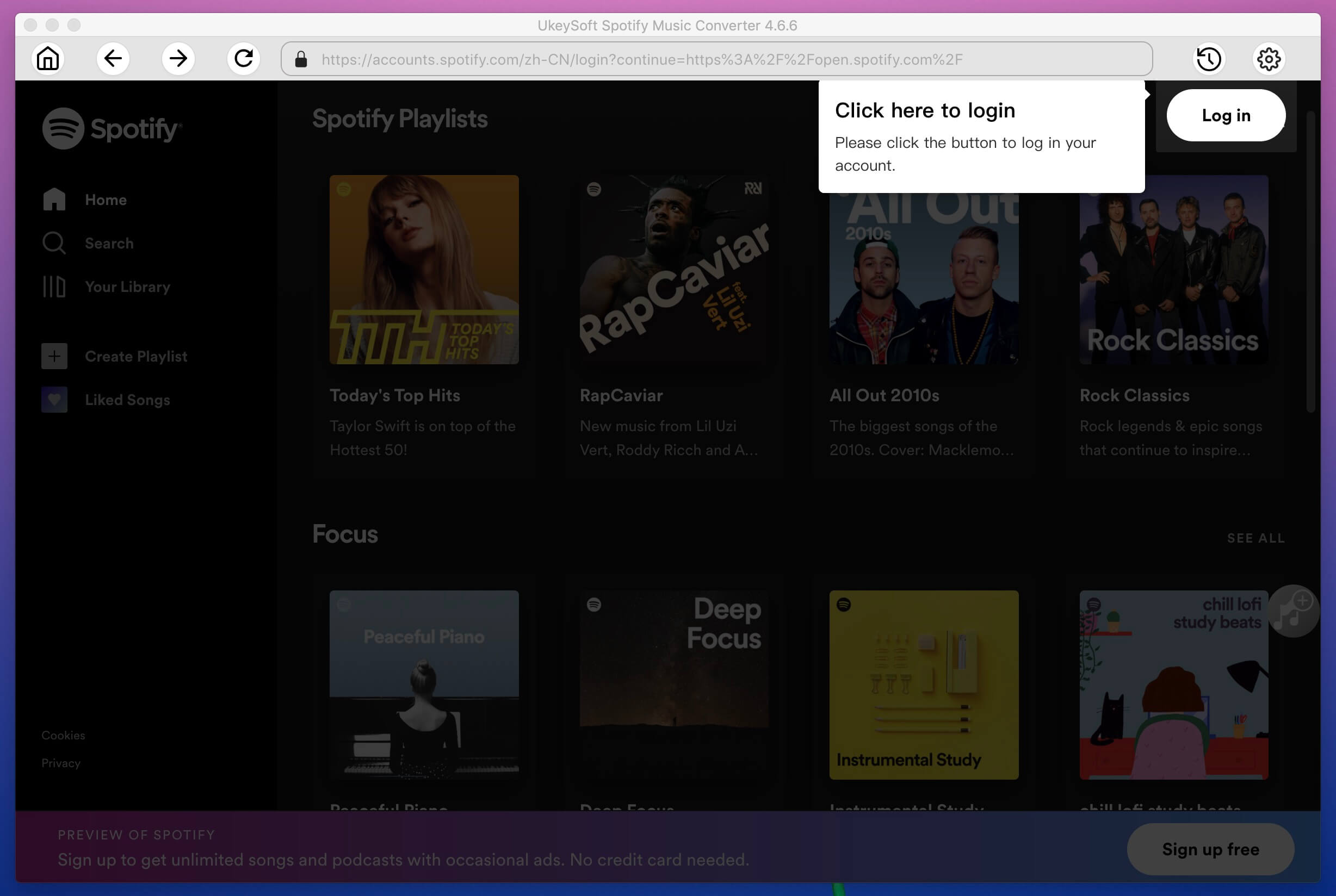
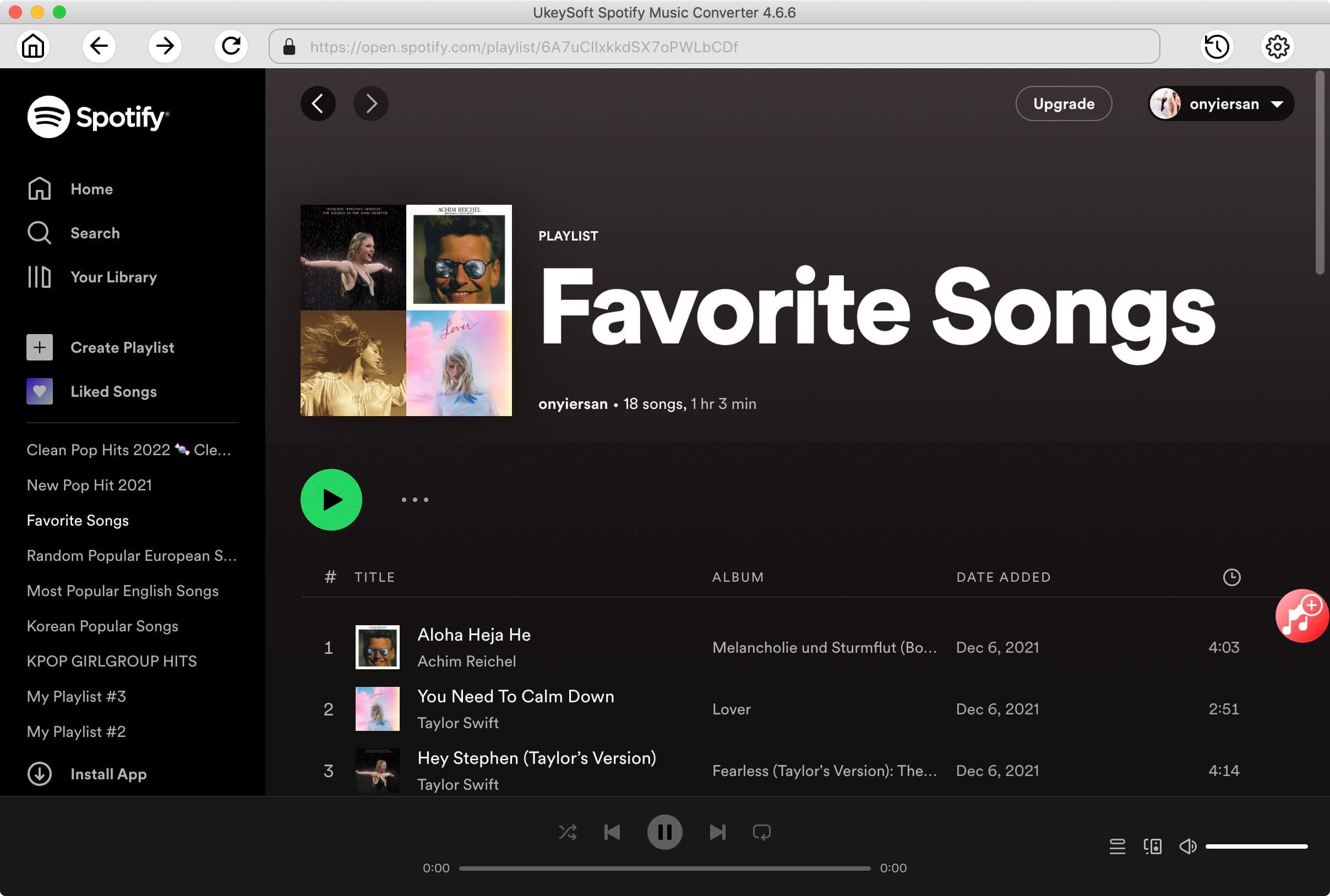
Step 3. Add Spotify Music
Click on "Add Files" button and drag songs, playlists, albums or tracks from Spotify to the program directly. Alternatively, you can copy and paste the URL of the music to search box in UkeySoft in order to add the songs. Click on "Add".
After that, select the songs you want to convert in the list and then click "Add" button again.
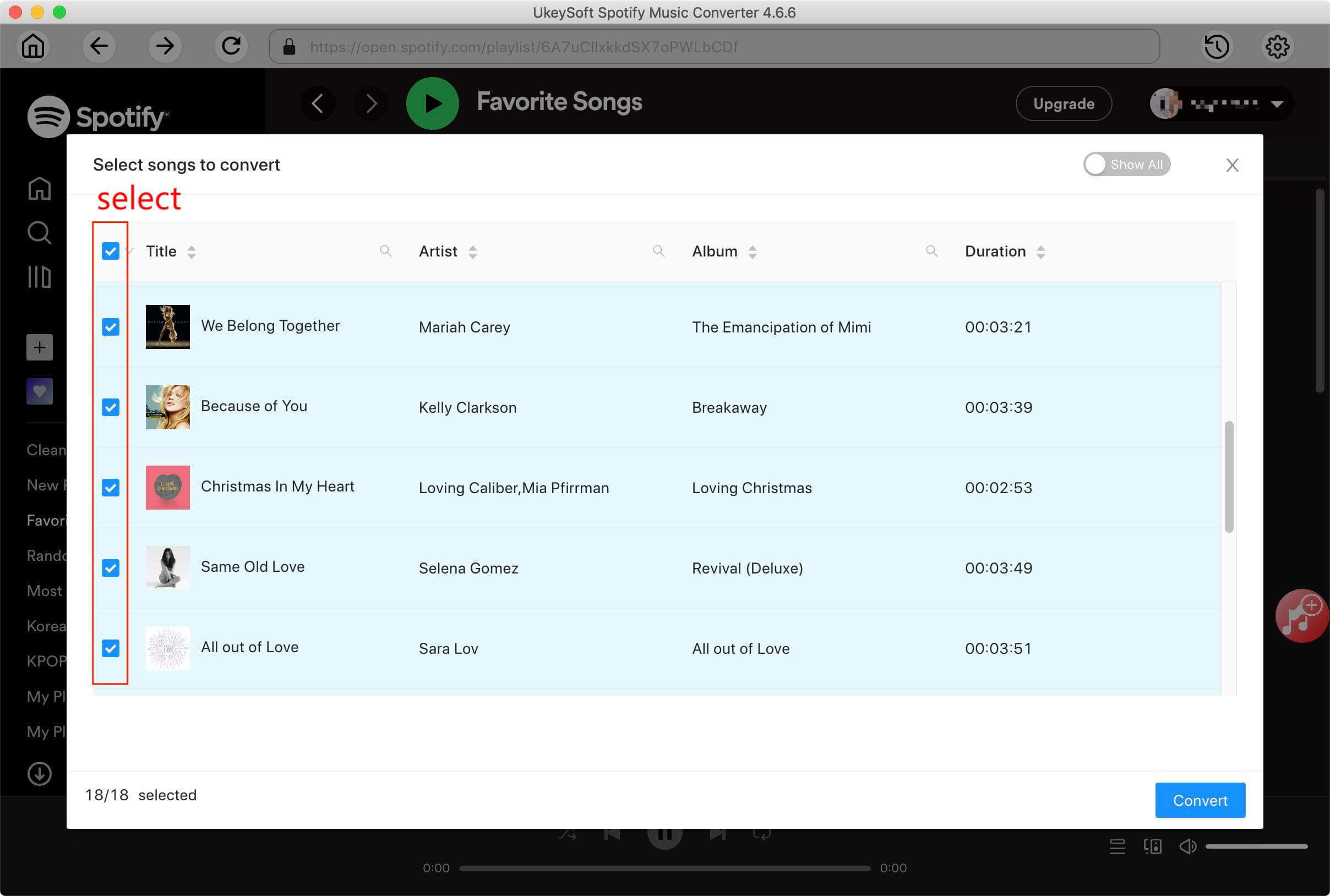
Step 4. Set Output Format as MP3
It provides MP3, M4A, WAV and FLAC as output formats. By default, 320kbps MP3 will be used. Besides, you are allowed to set the output audio codec, bit rate, sample rate, conversion speed, etc.
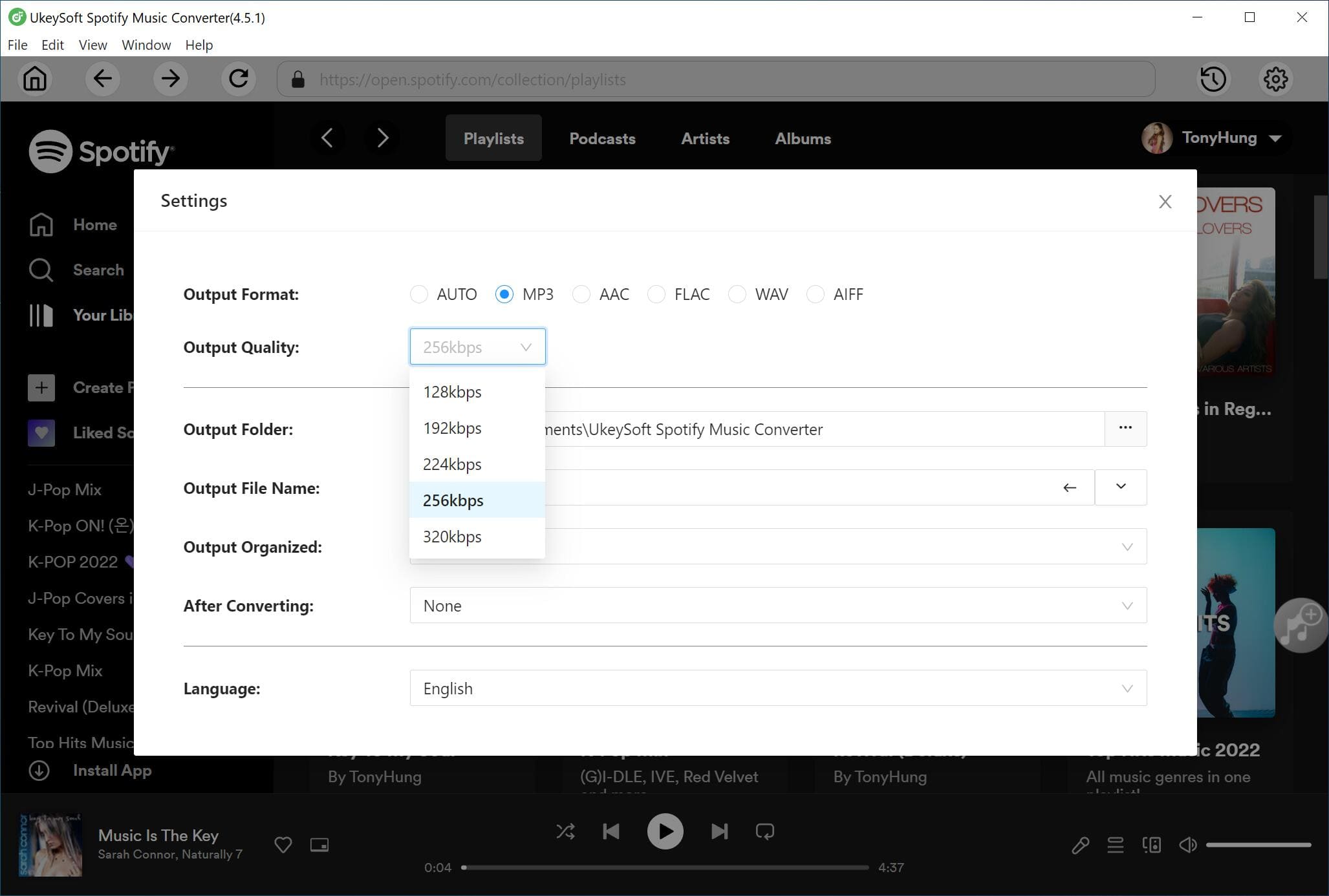
Step 5. Start Extracting MP3 from Spotify Songs
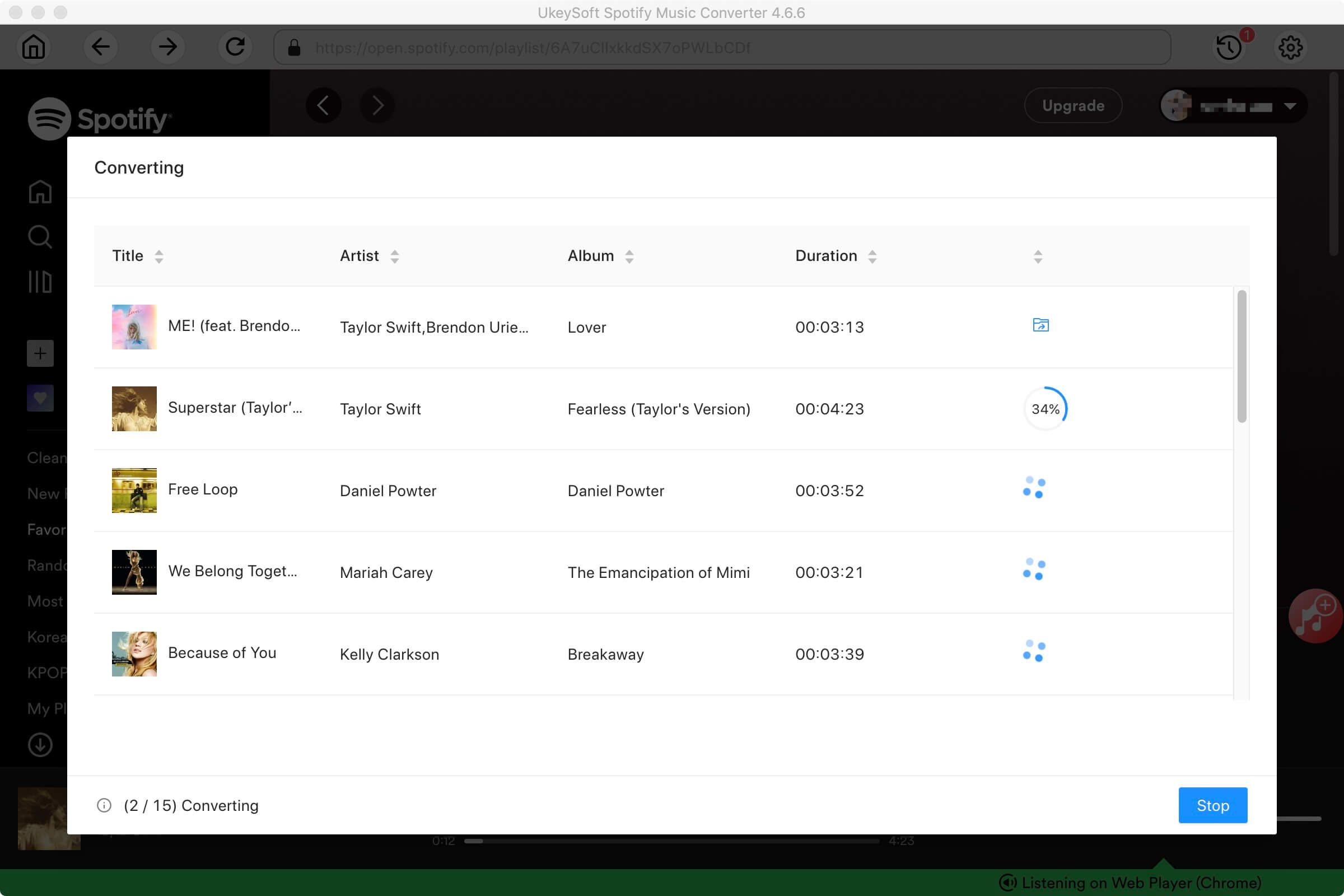
Click "Convert" button to start converting Spotify music to MP3 format. When the conversion process is completed, you can find the MP3 files which are extracted from Spotify by clicking the "History" folder.

Justin Sabrina has over 10 years of content writing experience. She specializes in product reviews, how-to guides, tips and tricks, top lists, etc. on data encryption, multi-media conversion, screen recording and iOS unlocking. At UkeySoft, she performs in-depth research SEO copywriting and collaborates with our R & D team to offer effective software solution, most of her articles on software are helpful and easy to read, helping our reader easily solve problems through using software or apps.

Li Zhang is a sophisticated editor for UkeySoft in tech blog writing, as well as a SEO and content marketing expert. She has been writing related article about multimedia conversion, streaming music and streaming video since 2018. Also, she's starting to write article about data security, including articles about file lock, USB encryption, DVD encryption, etc. Each helpful tutorial and solution is based on her practical tests, she is aways energetic and trustworthy in this field.

Chester is an experienced editor for UkeySoft focused on tech article writing, software & hardware produce review and tutorial. He specializes in composing posts about music conversion, video downloading, video conversion, screen recording and other tech knowledge tips. He always understands user needs and pain points and familiar with all kinds of multimedia conversion software and streaming music downloader on the market. So far, he has published 400+ helpful tech articles of software reviews, how-to guides to help reader in need.
Prompt: you need to log in before you can comment.
No account yet. Please click here to register.










![7 Best FREE Apple Music Converters [2026 Updated]](https://www.ukeysoft.com/wp-content/uploads/2019/04/best-apple-music-converter.jpg)




















Convert Apple Music, iTunes M4P Songs, and Audiobook to MP3, M4A, AAC, WAV, FLAC, etc.

















![Top 10 Christmas Songs to MP3 Download [Spotify]](https://www.ukeysoft.com/wp-content/uploads/2023/01/christmas-songs-to-mp3.jpg)








































Convert songs, podcasts from Amazon Prime Music, Music Unlimited, and HD into MP3, M4A, AAC, WAV, FLAC, etc.























Download Tidal HiFi, high-quality songs to computer, convert Tidal music to MP3, FLAC, WAV, AAC, etc. at 10X faster.
























Download songs, albums, playlists, and podcasts from Deezer to MP3, M4A, etc. in original quality.






Batch download Pandora songs, albums, playlists and podcasts to your computer, convert Pandora Music to MP3, M4A, etc.

Download and convert songs, albums, playlists from YouTube Music Free & Premium to MP3, M4A, AAC, FLAC, WAV, AIFF.






















Convert Audible AA/AAX audiobooks to MP3, M4A, M4B, etc. for easily playback everywhere.

Convert iTunes M4V movies, TV shows and music videos to MP4 video format.



Convert incompatible video/audio files,edit video and enhance video quality.

Rip DVD to any main stream audio & video formats for playback on portable and mobile devices.


Password protect and hide files & folders located on your computer, USB devices.

Password protect and encrypt USB disk, memory stick and more USB flash drive.


Cut, merge, crop, trim and rotate video; Add BGM to video and enhance video effect.

Free download music from Spotify to get free songs for adding to your created videos.

Porducts
Solution
Copyright © 2026 UkeySoft Software Inc. All rights reserved.


 English
 Arabic
 Chinese (Simplified)
 Chinese (Traditional)
 Croatian
 Czech
Czech Danish
 Dutch
Dutch Estonian
 Finnish
 French
 German
 Greek
Greek Hebrew
 Hindi
Hindi Hungarian
 Indonesian
 Italian
 Japanese
 Kazakh
 Korean
 Malay
Malay Norwegian
 Polish
 Portuguese
 Romanian
 Russian
 Slovenian
 Spanish
 Swedish
 Thai
Thai Turkish
 Ukrainian
 Vietnamese









No comment yet. Say something...