To download music from YouTube Music as MP3 files:
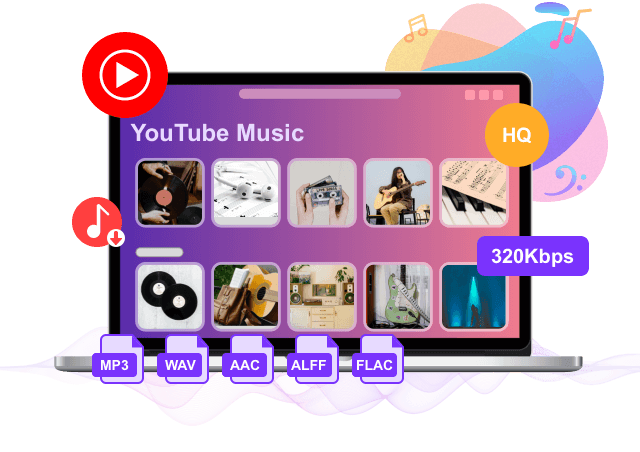
● Best High-Speed Method: Use UkeySoft YouTube Music Converter to batch-download full playlists or albums, tracks, or MVs to MP3 320kbps audios at up to 16X speed with preserved ID3 tags. No Premium subscription account!
● Real-time Recording Method: Use UkeySoft Screen Recorder to record music tracks or capture live streaming audio, select System Sound as input, and export as MP3 at 256kbps or 320kbps bitrate.
● Free Alternative: Use online service for single-track conversion without software installation.
YouTube Music is one of the most popular music streaming platforms, offering millions of songs, playlists, and official music videos. However, even if you upgrade to YouTube Music Premium, all downloaded tracks are protected by DRM (Digital Rights Management) in an encrypted format. This means you cannot transfer your favorite songs to MP3 players, car stereos, SD cards, or play them offline after canceling your subscription.
If you want to listen to YouTube Music offline anywhere, downloading YouTube Music to MP3 is the best solution. In this comprehensive guide, we will walk you through 3 proven methods to record, download, or convert YouTube Music to high-quality MP3s without Premium. Let's get started!
Method 1: Best Way to Download YouTube Music to MP3 (16X Speed)
At a glance:
● Supported OS: Windows 11/10/8.1/8/7, Mac OS X 10.9 or higher
● Audio Formats: MP3, M4A, AAC, WAV, FLAC, AIFF
● Audio Parameters: Bitrate (up to 320kbps), Sample Rate (44.1kHz / 48kHz)
● Tagging: Lyrics and ID3 Metadata preservation (Title, Artist, Album, Cover Art)
● Speed: 16X Batch Speed
The best YouTube Music Downloader here we want to share with you called UkeySoft YouTube Music Converter. As its name suggests, this tool is developed for downloading & converting YouTube Music to MP3 with ease. Except MP3, it also converts YouTube Music tracks to other general audio formats, like M4A, AAC, WAV, FLAC, and AIFF. It works for all YouTube users including YouTube Music Free and Premium users. After 16X faster music download, you will get YouTube Music as local MP3 files with 320kbps high audio quality. In this way, you are able to play YouTube Music offline on any devices without limits, use YouTube Music conveniently even without YouTube subscription.
Highlights: Unlike other YouTube Music to MP3 downloaders, our UkeySoft YouTube Music Converter has integrated with the official web player. This allows you to stream, choose, download and play any YouTube Music streaming content without YouTube Music app, no log-in, no Premium required!
Work for all users: YouTube Music free and premium
Export YouTube Music with its lossless audio quality
Play YouTube Music offline on any devices
Use YouTube Music without YouTube subscription
Batch ownload YouTube Music to MP3 at 16X faster speed
Check out this video guide for an easy, step-by-step walkthrough on downloading YouTube Music tracks to MP3 with UkeySoft YouTube Music Converter, no Premium needed.
Steps on How to Convert YouTube Music to MP3 without Premium?
Run UkeySoft and Log in YouTube Account
Download, install and run UkeySoft YouTube Music Converter on the computer, then log in your free YouTube account in its built-in YouTube Music web player. Alternatively, you can directly access the library and download any YouTube Music content without loggin.
Set MP3 320KBPS Output
Click the setting button to change the output format for downloaded YouTube Music. M4A is the default option, there are other five formats options: MP3, AAC, FLAC, WAV, AIFF. In this case, tap “MP3” option. You can also change output folder, output quality (choose 320kbps), output file name and more depend on your need.
Add YouTube Music
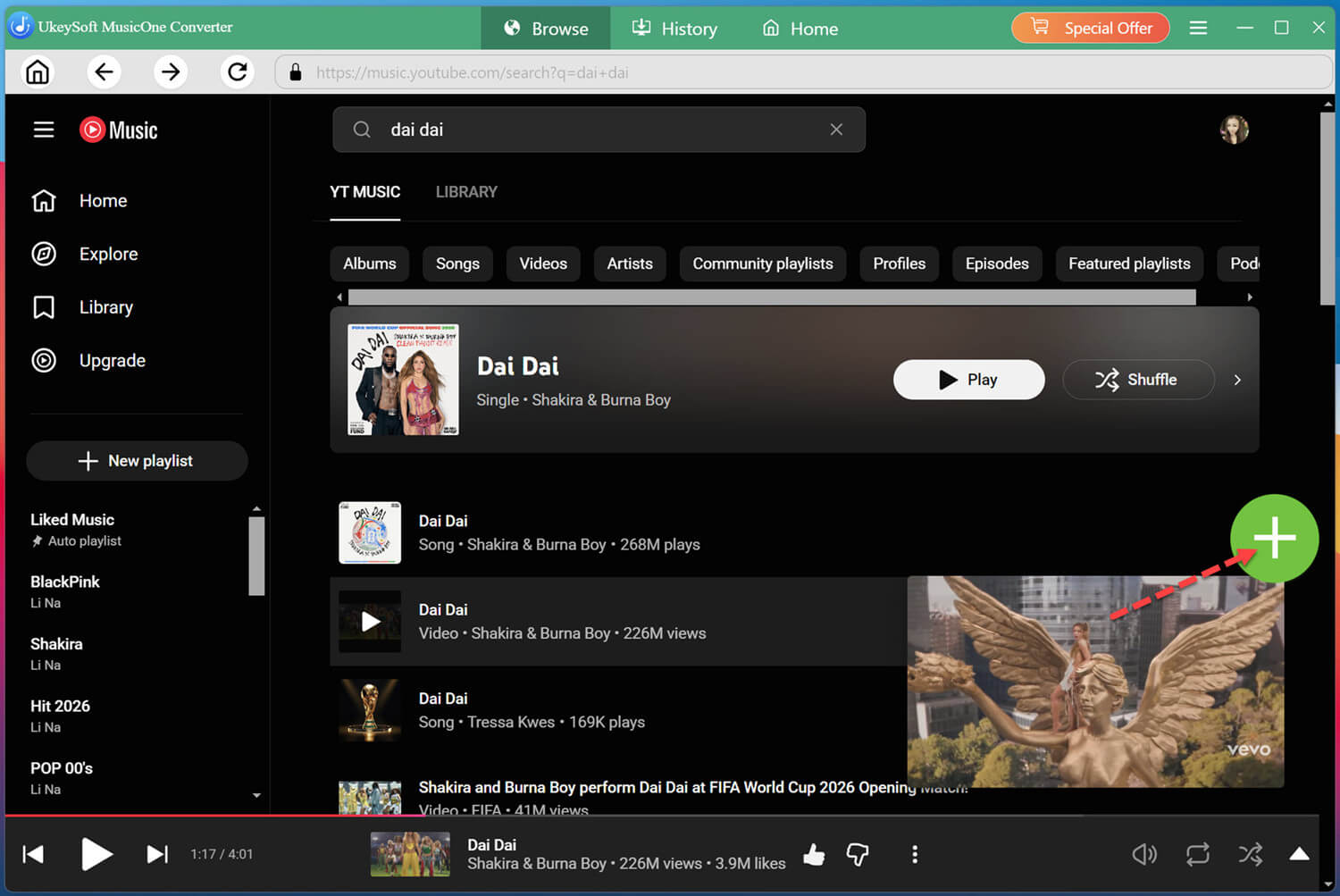
In its YouTube web player, you can browse, search or play any songs/albums/playlist you want to download. Click the album or playlist, then click the red icon, it will load all items in it.
When you click an album or a playlist, all songs in it will be selected by default. Just cull some you don't want in the tickbox.
Download YouTube Music to MP3 in 320Kbps
Finally, click "Convert" button to begin downloading YouTube Music to MP3 with 16X fast download speed.
Preview YouTube Music in MP3 Format
Once the music download process ends, click the folder icon to preview the YouTube Music songs in MP3, all music files will be keep with its lossless audio quality and ID3 tags.
Method 2: Record YouTube Music to MP3 via Audio Recorder
At a glance:
● Supported OS: Windows 11/10/8.1/8/7 (32 & 64bits) and Windows Vista/XP, macOS 10.12 or above
● Audio Formats: MP3, M4A, WAV
● Audio Parameters: Bitrate (up to 320kbps), Sample Rate (44.1kHz / 48kHz)
● Tagging: ID3 Metadata missing (requires manual editing and tagging)
● Speed: 1:1 real time recording
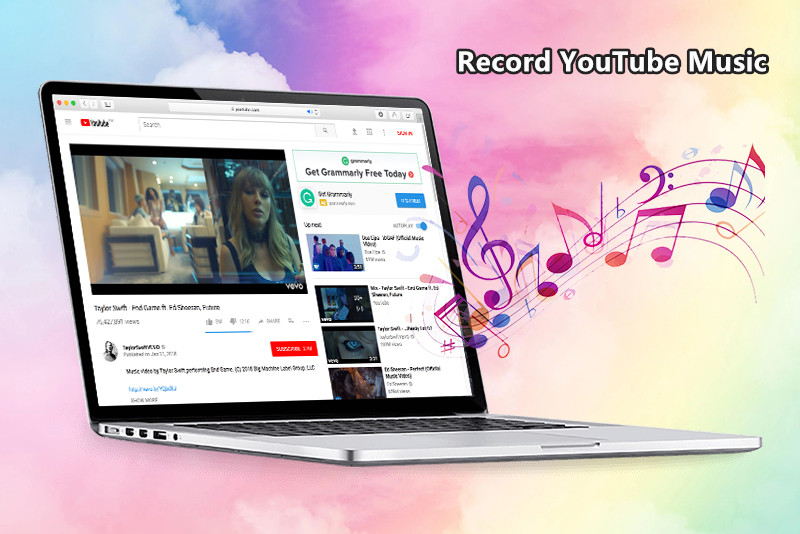
UkeySoft Screen Recorder is one such YouTube Music Recorder that can rip and record YouTube Music, Apple Music tracks, Spotify Music tracks, iTunes music and Amazon Music Unlimited into other formats, such as MP3, M4A, WAV. When it comes to audio recorder, speed and quality are the most important factors. Not only as a Streaming Audio Recorder, but also as a Streaming Video Recorder and Online Video Recorder, it can help you record YouTube movies, iTunes video, Yahoo video, from more video website.
Simple Steps to Record YouTube Music to MP3 Files Without Premium
Launch YouTube Music Recorder on PC/Mac
Download and run the YouTube Music Premium desktop recorder and on YouTube Music Premium desktop app/web player Windows PC or Mac.
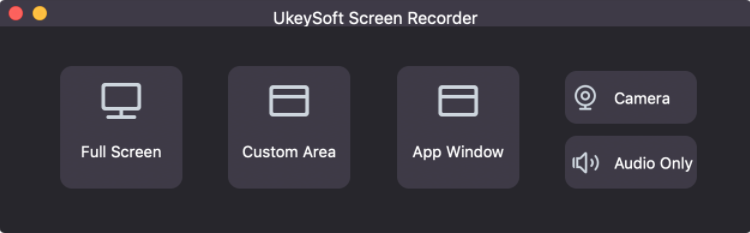
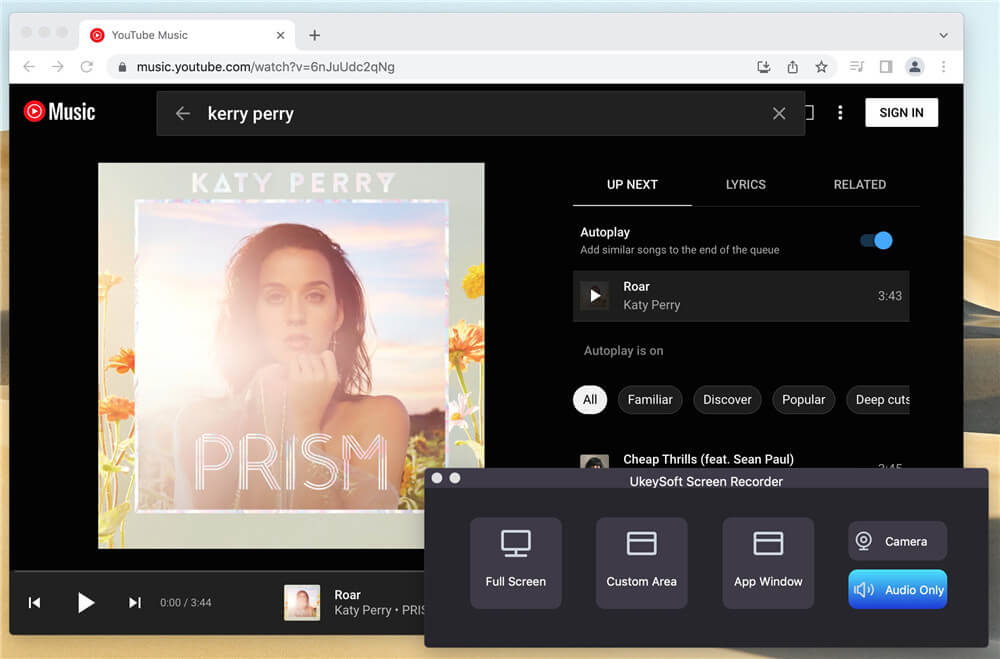
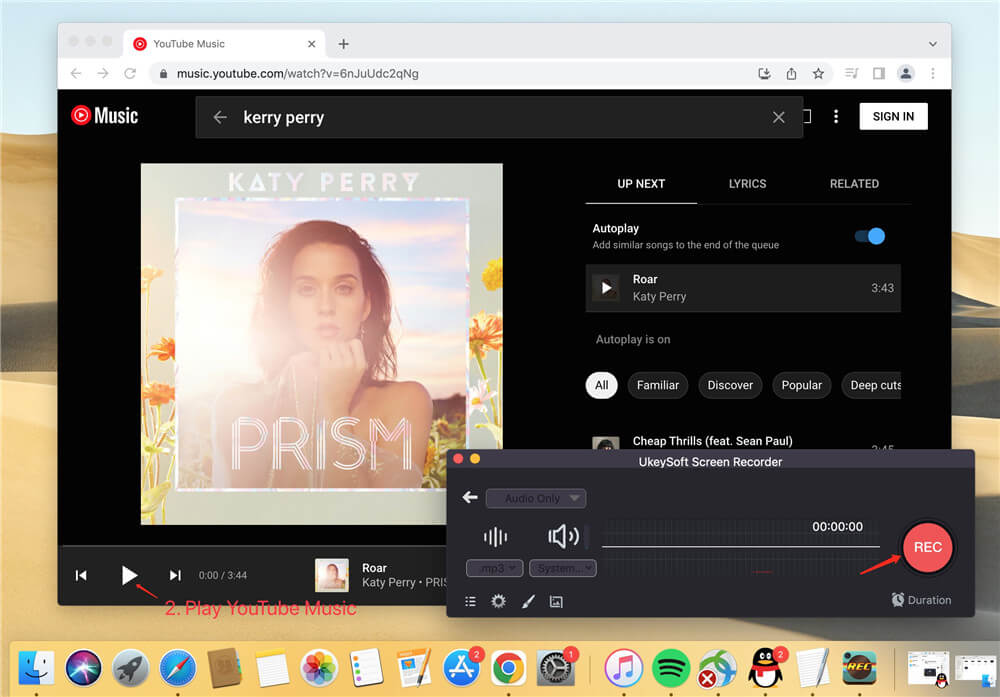
You'll find five function: Full Screen, Custom Aera, App Window, Camera and Audio Only. To record audio from YouTube Music Premium, please click “Audio Only”.
Then, run the YouTube Music Premium App/web player. Open YouTube Music Premium with a browser or YouTube Music Premium app. Then sign in with your YouTube Music Premium account or YouTube Premium account.
Setting Audio Recording Method
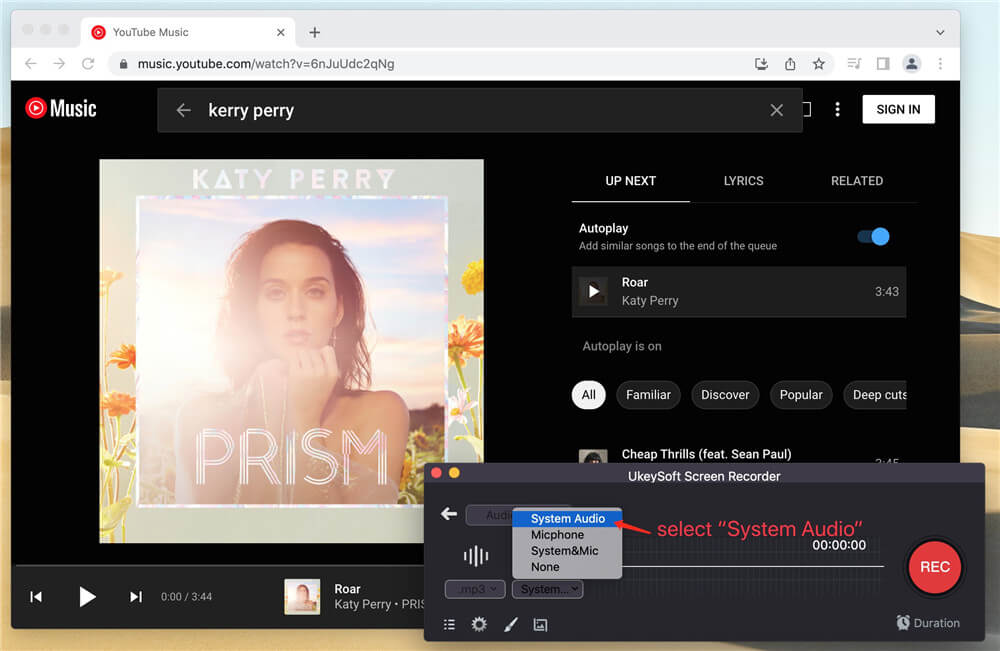
To record songs from YouTube Music Premium with high quality sound quality, In here, you can choose "System Audio", "Microphone", "System & Mic" or "None". To record YouTub Music in the computer, we choose System Audio.
Choose to Record YouTube Music to MP3 or Others
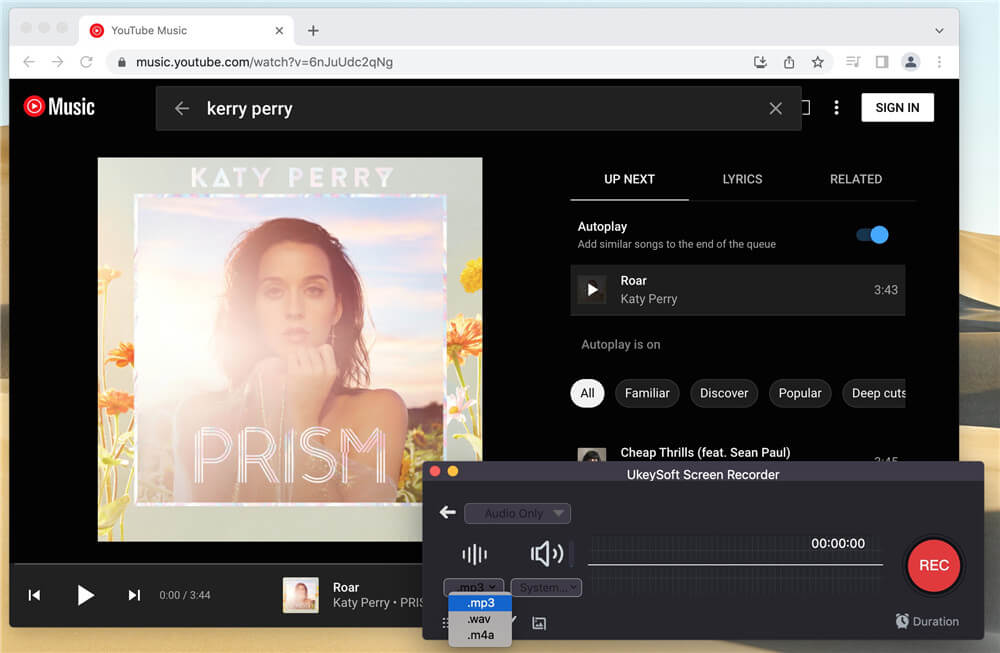
You can set the output format of the Youtube music as MP3, WAV, M4A. Choose MP3 in here.
Record Songs from YouTube Music Without Premium
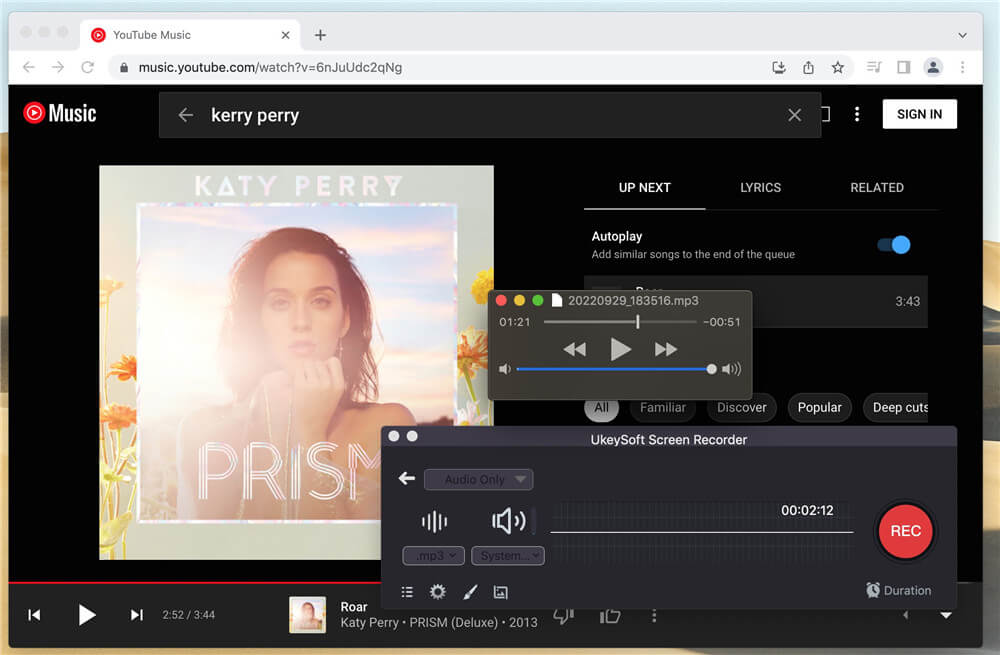
Find any track you want to record. When you are ready, click the “REC” button to start recording and play the song. When an ads is played, you can pause the recording until the advertisement finishes playing.
Save the Recorded YouTube Music as MP3 Files
To stop the recording, simply click the rectangle icon. Now, the YouTube Music is recorded. The recorded YouTube music is automatically saved on your computer and you can then listen to them offline on any devices.
This Screen Recorder is more than just a YouTube Music recorder. It can also record screen activities, record YouTube video, record Amazon Prime video, record Spotify music/Apple Music/Amazon music and more streaming audio, as well as capture screenshots on the PC or Mac easily. However, the drawback is that the recorder doesn't allow for batch recording. It takes a long time to record YouTube Music to MP3 in real time. So, the UkeySoft YouTube Music Converter is a better alternative for its high efficiency and lossless output quality. But if you only want to rip a short part audio of YouTube Music song, then this recorder is also worth trying.
Method 3: Free Online Tool to Convert YouTube Music to MP3
At a glance:
● Supported OS: Cross-platform (Chrome, Safari, Edge, Firefox on Windows, Mac, iOS, Android)
● Audio Formats: MP3
● Audio Parameters: Standard quality (128kbps - 256kbps), Sample Rate (44.1kHz)
● Tagging: Very basic ID3 tags
● Speed: Slow, limited by browser buffer
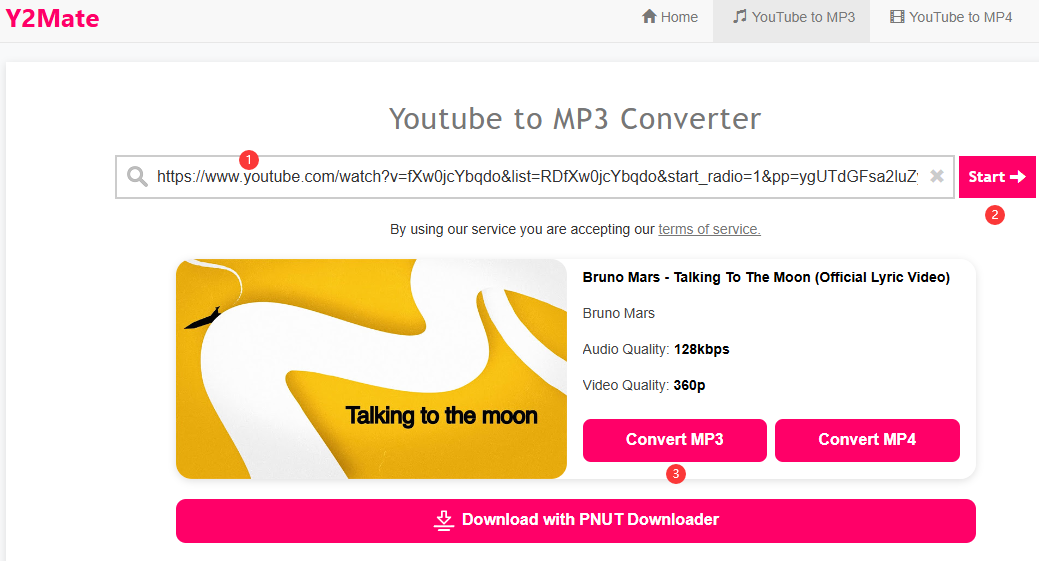
Is there any way to download or convert YouTube music to MP3 for free? YES! Y2Mate is a web-based service that lets you convert YouTube music video to MP3 without Premium. This online tool requires no software installtion and no account registration. All you need to do is copy the YouTube music video link, paste it into the Y2Mate website. It can quickly convert YouTube music video to 128kbps MP3 and download it directly to your computer or mobile device. It also supports basic ID3 tag preservation, such as song title, artist, and artwork,and album info.
Note: This online YouTube to MP3 converter may have limitations such as ads, unstable performance, and potential quality loss. Moreover, it cannot help you download albums or playlists from YouTube/YouTube Music. To convert YouTube Music playlists or albums in bulk with high-quality 320kbps bitrate, I recommend you use UkeySoft YouTube Music Converter, which works at 16X speed and can perform batch conversion.
Step-by-Step: Convert YouTube Music Video to MP3 Online
First, go to the YouTube web player using your browser. Search for the music video you want to convert, and copy its URL from address bar.
Open a new browser tab and go to the Y2Mate homepage. Paste the copied YouTube Music video URL, click "Start" button.
After the analysis is complete, click "Convert MP3" button.
Comparison: Desktop YouTube Music Downloader vs. Audio Recorder vs. Online Tool
To shortlist the best YouTube Music to MP3 download methods, we compared each method based on system availability, audio quality, metadata preservation, speed, and efficiency. The table below gives you a quick side-by-side comparison of these 3 methods platforms, take a look.
Features
UkeySoft YouTube Music Converter
UkeySoft Screen Recorder
Free Online Service
Supported Content
Tracks, albums, playlists, music videos
Tracks, music videos, and others
Single track
Speed
16X Batch Speed
1:1 Real-time
1X
Output Audio Formats
MP3, AAC, WAV, FLAC, AIFF, M4A
MP3, M4A, WAV
MP3, WAV
Highest Audio Quality
Up to 320kbps lossless
Up to 320kbps
128kbps - 256kbps (lossy)
ID3 Tag Preservation
Full ID3 tags (Title, Artist, Cover, Album, Genre, etc.)
Manual editing required
Very basic
Batch Mode
Yes, supported entire Playlists & Albums
Not supported
Not supported
Background Download/Recording
Yes (Direct web player conversion)
No (Computer sounds must play)
No (Requires active browser window)
Best For
Full album/playlist downloads in bulk
Music Videos, singles, live streams
Free single-track conversion
Verdict:
In contrast, UkeySoft YouTube Music Converter stands out as the clear winner in downloading YouTube Music to MP3. It supports 16X faster batch conversion, delivers lossless 320kbps audio in multiple formats (MP3, FLAC, WAV, AAC, and more), and automatically preserves ID3 tags. The built-in web player, music player, and music manager, delivers a convenient and premium user experience!
Here are the benefits to download and save YouTube Music songs to MP3 files.
- Transfer YouTube Music songs to any devices for streaming, such as MP3 player, Android phone/tablet, iPod shuffle/nano, PS4/PS3, Sony Walkman, Xbox, etc,.
- Burn YouTube Music songs to a CD or transfer to USB drive for playing in the car.
- Keep YouTube Music songs playable after canceling subscription.
- Set YouTube Music songs as iPhone ringtone or Android phone’s ringtone, or alarm.
- Use YouTube Music songs as a created video background music.
- Keep YouTube Music tracks forever without Premium.
- More.
FAQs About Recording YouTube Music Premium
Is It Legal to Download YouTube Music to MP3?
It depends on how you use the downloaded music files. Personal listening may be legally permissible in some jurisdictions, but copyright rules vary. It is 100% illegal to use the music for selling, redistributing, or commercially purpose, please think twice.
Will Recording YouTube Music Result in Audio Quality Loss?
Real-time audio recorders capture the sound passing through your system sound card, which can introduce minor quality drop or background system alerts. To get lossless YouTube music, you can utilize a dedicated YouTube Music Converter. UkeySoft YouTube Music Converter enables to convert YouTube Music to MP3 at original 256kbps or higher 320kbps audio quality.
Can I Transfer the Downloaded YouTube Music to MP3 Player?
Yes. Once you've recorded or downloaded the YouTube Music tracks as MP3 files, you can transfer them to a MP3 player using a USB cable. Thus, you can enjoy YouTube Music on your MP3 player anytime, anywhere.
Conclusion
Now, you already know the tricks to convert and download YouTube music to MP3 without Premium. If you are a music enthusiast, then UkeySoft YouTube Music Converter should be the best choice. It supports unlimited downloads, and you can continuously enrich your music collection. After downloading YouTube Music as MP3s, you can import the converted MP3 files to an MP3 player, USB drive, smartphone, tablet, and any device for offline playback. Plus, you may also burn YouTube music files to CD or set it as your video BGM, phone ringtone, etc. Just download the software to get YouTube Music as MP3 files for flexible usuage right now!
Justin Sabrina has always had great enthusiasm for writing, programming and web development. He likes writing about software and technology, his works are featured on some tech blogs or forums like Tom's Hardware, CNET, etc.
 English
 Arabic
 Chinese (Simplified)
 Chinese (Traditional)
 Croatian
 Czech
Czech Danish
 Dutch
Dutch Estonian
 Finnish
 French
 German
 Greek
Greek Hebrew
 Hindi
Hindi Hungarian
 Indonesian
 Italian
 Japanese
 Kazakh
 Korean
 Malay
Malay Norwegian
 Polish
 Portuguese
 Romanian
 Russian
 Slovenian
 Spanish
 Swedish
 Thai
Thai Turkish
 Ukrainian
 Vietnamese










No comment yet. Say something...