By
ChesterUpdated on August 04, 2026
Summary
In this review, we will explore TuneFab All-in-One Music Converter in detail, covering its main features, performance, strengths, and weaknesses. We will then introduce UkeySoft All-in-One Music Converter as a powerful alternative and explain why it may be a better choice for many users.
Music streaming services have changed the way people listen to music. Platforms like Spotify, Apple Music, Amazon Music, and YouTube Music give users instant access to millions of songs. However, streaming still depends on subscriptions, compatible devices, and app restrictions. Because of this, many users look for tools that can save music locally for more flexible playback on different devices.
TuneFab All-in-One Music Converter is a popular desktop tool created for this purpose. It allows users to download and convert songs from multiple streaming platforms into common audio formats for offline listening. But is it really worth trying? How does it perform in everyday use? And is there a better alternative to consider?
In this review, we will take a detailed look at TuneFab All-in-One Music Converter, including its features, performance, advantages, and limitations. After that, we will introduce a stronger alternative solution, UkeySoft All-in-One Music Converter, and explain why many users may prefer it.
![tunefab all in one music converter]()
CONTENTS
Part 1. Overview of TuneFab All-in-One Music Converter
TuneFab All-in-One Music Converter is a desktop music conversion tool available for both Windows and macOS. It is designed for users who want to save streaming songs as local audio files, allowing them to listen to music without depending on streaming apps or an internet connection.
Unlike converters that only work with one platform, this software brings multiple music services together in a single program. It supports popular platforms such as Spotify, Apple Music, Amazon Music, Deezer, Pandora, YouTube Music, SoundCloud, and Audible. The software focuses on convenience by letting users manage everything in one place. With its built-in web player, you can log into your account, browse your music library, and select songs directly within the application.
![tunefab music service]()
Part 2. Key Features of TuneFab All-in-One Music Converter
Multiple Streaming Services in One Tool
One of TuneFab's key features is its support for multiple music platforms in one program. Users can switch between services without leaving the app, making it convenient for those using more than one streaming service. For example, you can download music from Spotify and then move to Apple Music or YouTube Music right away.
Built-in Web Player
TuneFab includes a built in web player that looks like the original streaming app after login. Users can browse music and add songs, albums, or playlists for conversion with just a few clicks, making it easy to use even for beginners.
Multiple Output Formats
TuneFab lets users convert music into common audio formats such as MP3, WAV, FLAC, AIFF, and M4A. These formats work well with many devices, including MP3 players, car audio systems, smart TVs, and USB drives. Users can also adjust audio quality settings before starting the conversion to match their listening needs.
Batch Conversion
Batch downloading lets users convert entire playlists or albums at the same time instead of one song at a time. After starting the process, the program finishes everything automatically, saving time and effort. This feature is very helpful for users with large music libraries.
Metadata Preservation
TuneFab keeps important song details such as artist name, album title, cover artwork, and track number during conversion. Preserving this information helps users organize and manage their music collections more easily after the files are saved.
Part 3. Pricing and Availability
TuneFab All-in-One Music Converter is not free software. It provides a trial version with limitations, while full features require a paid license.
Typical pricing options include:
- Monthly Subscription: $79.95
- Annual Subscription: $139.95
- Lifetime Plan: $169.95
The lifetime option may appeal to long term users, although pricing is slightly higher compared to some competitors.
Part 4. Pros and Cons
✅Pros
- Supports many streaming platforms in one program
- Built in web player simplifies operation
- Batch conversion available
- Multiple output formats supported
- Metadata retained automatically
- Beginner friendly interface
❌Cons
- Desktop only solution
- Trial version has limitations
- Some users report occasional syncing or loading issues
Part 5. Who Should Use TuneFab All-in-One Music Converter
TuneFab is suitable for users who:
- Listen to music from different streaming services
- Keep all music in one place
- Easy to use without complicated setup
- Save songs for offline listening
But users who need more reliable performance, quicker updates, or advanced music management features might want to try other options.
Part 6. Best Alternative: UkeySoft All-in-One Music Converter
While TuneFab provides solid functionality, many users look for software with smoother workflow and more consistent performance. One strong alternative is UkeySoft All in One Music Converter.
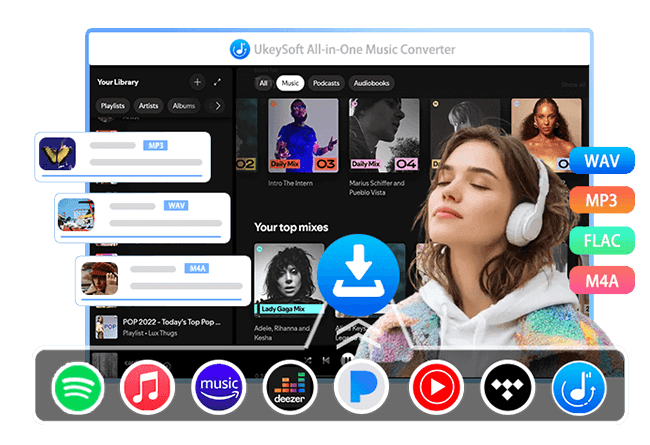
UkeySoft All-in-One Music Converter is a desktop software designed to help users save streaming music as local audio files for offline listening. It supports multiple popular music platforms, including Spotify, Apple Music, Amazon Music, Tidal, YouTube Music, Pandora, and Deezer, all in a single program.
UkeySoft All-in-One Music Converter has a built-in web player that lets users browse music, pick songs, albums, or playlists, and convert them without copying links or using extra tools. It supports popular formats like MP3, M4A, AAC, WAV, FLAC, and AIFF, and keeps important song details like artist, album, cover art, and track number. With batch conversion and a built-in music manager, UkeySoft makes it easy to download music and organize collections. Its simple interface is beginner-friendly, and its fast, stable performance makes it a reliable choice for anyone who wants more control over their music.
![ukeysoft musicone converter]()
👍Why Choose UkeySoft All-in-One Music Converter
Supports Multiple Music Streaming Platforms
UkeySoft All-in-One Music Converter works with popular services such as Apple Music, Spotify, Amazon Music, YouTube Music, Pandora, Deezer, and Tidal, allowing users to convert songs from different platforms in one program.
Multiple Output Audio Formats
The software converts music into widely used formats, including MP3, M4A, AAC, FLAC, WAV, and AIFF, making playback compatible with various devices and media players.
Built-in Web Player
With the built-in web player, users can browse music libraries, search for songs, and start conversions directly inside the software without copying and pasting links.
Batch Conversion at High Speed
UkeySoft supports batch downloading and conversion, enabling users to process entire playlists or albums at once while maintaining fast conversion performance.
Preserve Original Audio Quality & Metadata
Important song details such as artist, album, title, genre, and cover art are kept after conversion, helping maintain a well-organized music library.
Built-in Music Manager
The included music management feature automatically organizes downloaded songs by artist, album, or date for easier browsing and playback.
Simple and User-Friendly Interface
Its clean design makes the software easy to use for beginners while still providing efficient performance for advanced users.
Guide: How to Use iMovieTool All-in-One Music Converter
Using iMovieTool All-in-One Music Converter is straightforward. Follow these simple steps to download and convert streaming music for offline listening.
Step 1. Launch the Program and Select a Music Service
Install and open iMovieTool All-in-One Music Converter on your Windows or Mac computer. On the main screen, choose your preferred music streaming platform, such as Spotify, Apple Music, Amazon Music, or YouTube Music.
![select music service]()
Step 2. Log in to Your Music Account
Sign in to your music account through the built in web player. After logging in, you can browse your library just like using the official streaming app.
![log in music account]()
Step 3. Select Output Format and Audio Quality
Go to the settings menu and choose your preferred output format, such as MP3, M4A, FLAC, WAV, or AAC. You can also adjust audio quality and output folder location.
![choose output settings]()
Step 4. Choose Songs, Albums, or Playlists
Search for the music you want to download. Open a playlist or album, then click the Add button to import songs into the conversion list. Then
![add music playlist]()
By default, all songs are selected. You can uncheck all songs and then select any songs you want to download.
![select songs]()
Step 5. Start Conversion
Click the Convert button to begin downloading and converting the selected songs. The software will process all tracks automatically using batch conversion.
![start conversion]()
Step 6. Access Converted Music Files
Once finished, open the output folder to find your converted songs. You can now play them offline on any compatible device or media player.
![access converted music files]()
Part 7. TuneFab vs UkeySoft Comparison
| |
TuneFab All-in-One
|
UkeySoft All-in-One
|
|
Supported Platforms
|
Multiple |
Multiple |
|
Ouptut Format
|
MP3, WAV, FLAC, AIFF, and M4A |
MP3, M4A, AAC, FLAC, WAV, AIFF |
|
Batch Conversion
|
Yes |
Yes |
|
Music Management
|
Basic |
Advanced |
|
Download Speed
|
35X |
50X |
|
Output Quality
|
High |
High |
|
Stability
|
Good |
More consistent |
|
Library Organization
|
Manual |
Automatic |
Both tools are capable solutions, but UkeySoft provides a more refined experience for users who manage large music collections regularly.
Part 8. Final Verdict
TuneFab All-in-One Music Converter is a helpful tool for users who want to save streaming music as local files and listen on different devices. Its main advantage is combining multiple music services into one program with a simple and easy workflow. The built in web player, batch conversion, and support for common audio formats make it easy for beginners and suitable for daily use, providing reliable results for most users.
However, the software also has some drawbacks. It only works on desktop computers, and occasional syncing problems or streaming platform updates may affect long term use. If you want a smoother and better organized music conversion experience, UkeySoft All-in-One Music Converter can be a good alternative. It offers more stable performance, better music management features, and an easy learning process, making it a strong choice for users with large music libraries.
TuneFab All-in-One Music Converter Review

Chester has always had great enthusiasm for writing, programming and web development. He likes writing about software and technology, his works are featured on some tech blogs or forums like Tom's Hardware, CNET, etc.
 English
 Arabic
 Chinese (Simplified)
 Chinese (Traditional)
 Croatian
 Czech
Czech Danish
 Dutch
Dutch Estonian
 Finnish
 French
 German
 Greek
Greek Hebrew
 Hindi
Hindi Hungarian
 Indonesian
 Italian
 Japanese
 Kazakh
 Korean
 Malay
Malay Norwegian
 Polish
 Portuguese
 Romanian
 Russian
 Slovenian
 Spanish
 Swedish
 Thai
Thai Turkish
 Ukrainian
 Vietnamese






Comments are off!