Q:"Is there a way to play SoundCloud on TV? How can I play SoundCloud on my Samsung TV?"
A: Yes. Although SoundCloud is primarily designed for mobile devices and computers, there are several ways to play SoundCloud music on TV. Whether you own a Samsung, LG, Sony, TCL, Roku, or Apple TV, you can find a suitable solution. You can connect SoundCloud to your TV using the native app on Android/Google TV or by casting directly from your phone. Plus, you may enjoy SoundCloud music on your TV via USB drive, third-party app, Fire stick, and HDMI connections. Let's get started!
Method 1. Play SoundCloud on Android TV & Google TV via App
The easiest way to play SoundCloud music on TV is through its official Android TV app. SoundCloud provides a native TV application for compatible Android TV and Google TV devices. The app lets you browse music, access your playlists, and play your favorite tracks directly on your television. If you own a supported model from brands such as Sony, Philips, TCL, Hisense, or Xiaomi, you can install the app and enjoy SoundCloud without needing a phone or computer.
Steps to Play SoundCloud on Android TV:
Turn on your Android TV or Google TV and connect it to a stable Wi-Fi network.
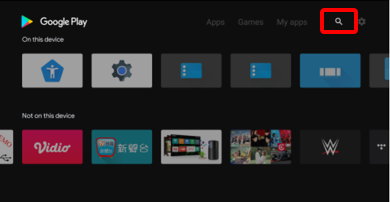
Navigate to the Google Play Store from your TV's home screen by using your TV remote.
Use the search function and type "SoundCloud." Select the SoundCloud app and click "Install".
Once installed, open the SoundCloud app. You will be presented with a login screen.
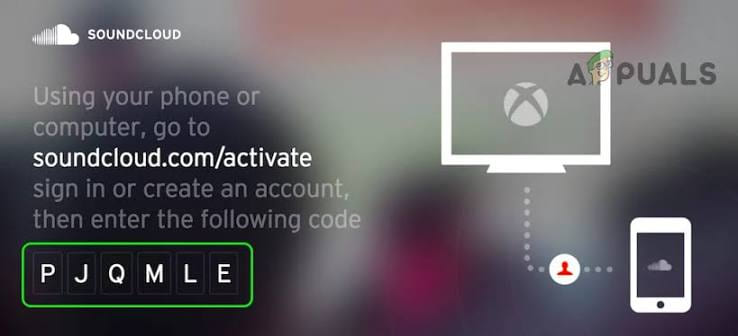
Enter your SoundCloud credentials. To make this easier, you can use the activation code method: the TV will display a code, and you can visit soundcloud.com/activate on your phone or computer to enter the code and link your account instantly .
After logging in, you can browse your library, search for artists, or open your favorite playlists. Select a track to start playback.
Method 2. Cast SoundCloud Music to Smart TV from Phone
Some popular Smart TVs, including Samsung models running Tizen OS and LG models running webOS, may not offer the official Android TV app. When your smart TV doesn't support the native SoundCloud app, you can use the built-in casting features on your mobile device. This method requires your smartphone (iOS or Android) and smart TV to be on the same Wi-Fi network.
Steps to Cast SoundCloud to Your TV from Phone:
Download and open the official SoundCloud app on your Android phone or iPhone.
Sign in to your SoundCloud account and find the track, album, or playlist you want to play.
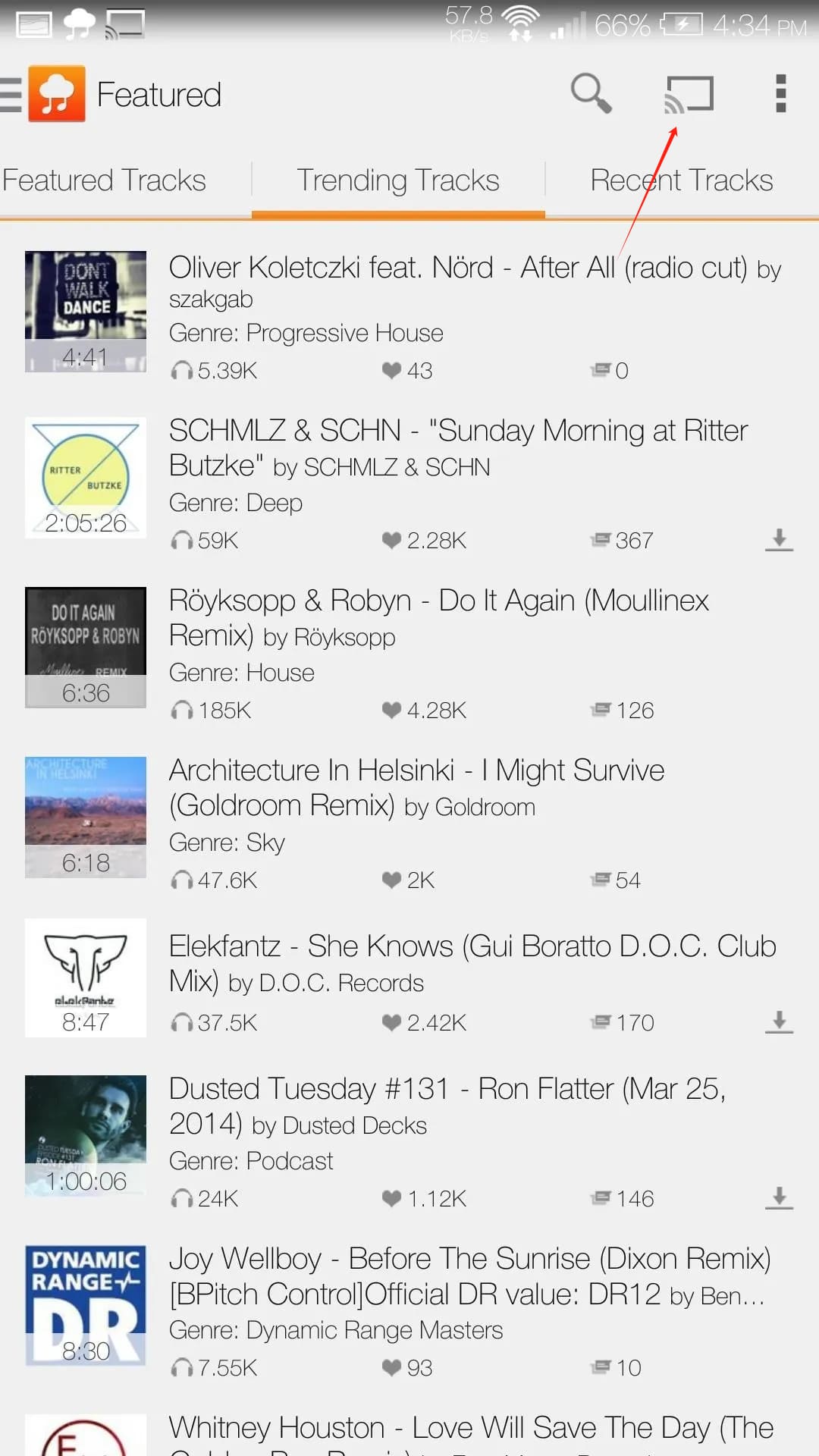
Start playing a track and look for the "Cast" icon in the playback interface.
Tap the "Cast" icon. A list of available devices will appear.
Select your Smart TV or connected streaming device from the list.
Tips: For Samsung and LG TVs, this often uses the DLNA or AirPlay protocol depending on your phone.
Wait for the connection to complete. Your selected SoundCloud music will begin playing through your TV speakers.
You can control playback, pause songs, skip tracks, and switch playlists directly from your phone.
Method 3. Get SoundCloud on Apple TV via Apple AirPlay
Although there is no official SoundCloud app for Apple TV, you can listen to SoundCloud Music on TV using Apple AirPlay on your iPhone, iPad, iMac, or MacBook. This wireless solution lets you send audio, video and images from an Apple device to your Apple TV without installing additional software or using any extra cables.
Here's How to Play SoundCloud Music on Apple TV via AirPlay:
Connect your iPhone, iPad, or Mac to the same Wi-Fi network as your Apple TV.
Open the SoundCloud app on your iPhone or iPad, or visit its official website on your Mac, and sign in to your SoundCloud account.
Browse SoundCloud libyrary, select a song or playlist and begin playback.
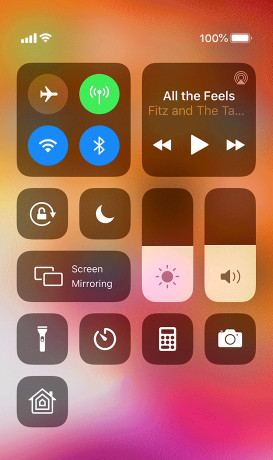
Tap the "AirPlay" icon located in the playback controls (or open the "Control Center" and tap the "AirPlay" icon). Select your Apple TV from the available devices.
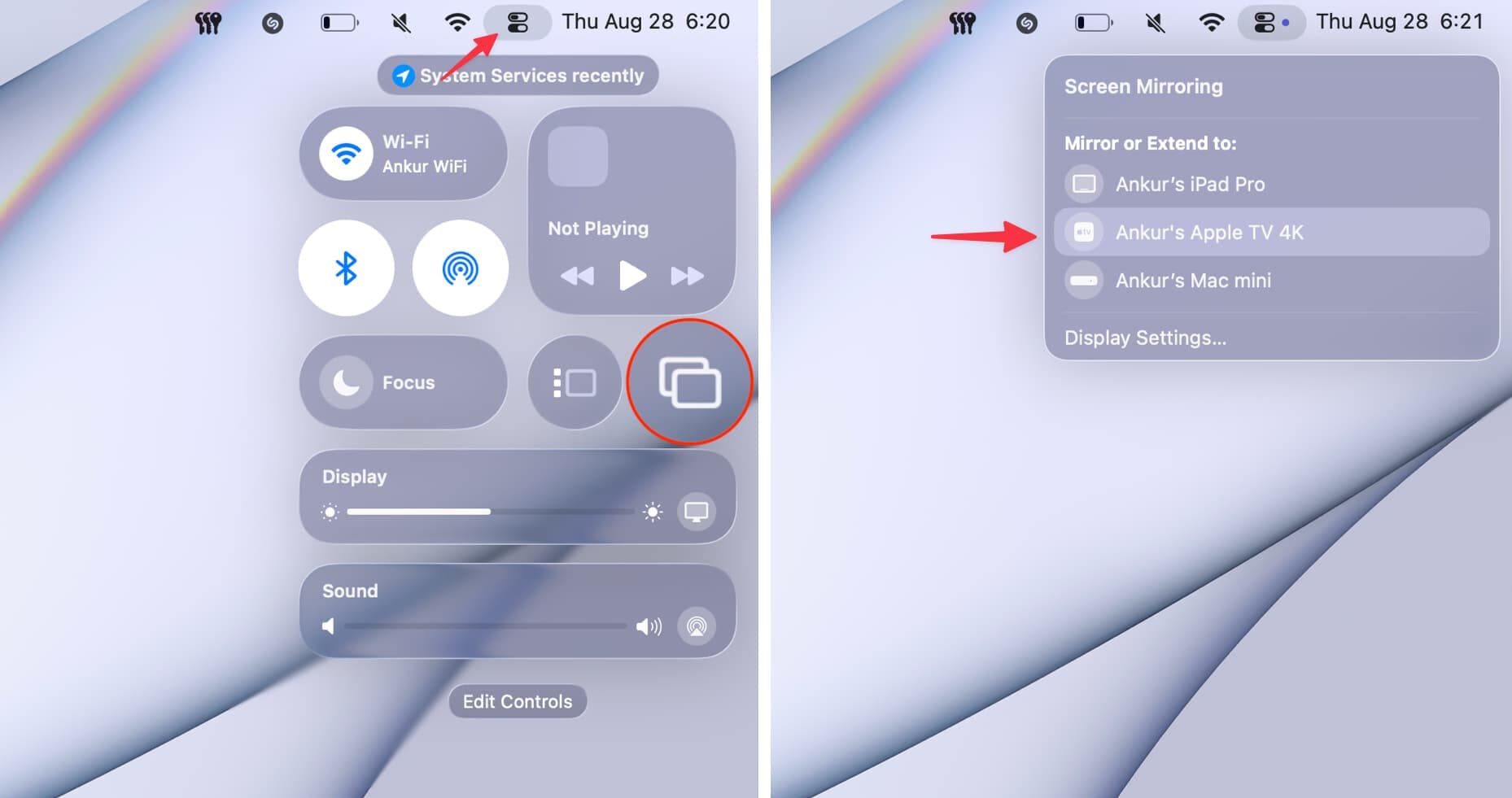
For Mac, click the "Control Center" icon in the menu bar, choose "Screen Mirroring", and select your Apple TV from the list.
Once connected, your SoundCloud audio will play through your Apple TV. You can control volume and playback directly on the lock screen of your iPhone, iPad, or Mac.
Method 4. Enjoy SoundCloud Offline on Any Smart TV via USB Drive
Whether you use SoundCloud Free or a paid plan, the methods above and below require an internet connection to stream SoundCloud music to your TV. Free users may also encounter ads, while offline downloads are limited to the mobile app. To enjoy SoundCloud music offline on your TV without buffering or connection issues, you can use a third-party tool to convert SoundCloud music to MP3 files and transfer them to a USB drive.
UkeySoft SoundCloud Music Converter is well designed for all types of SoundCloud plans. It can help you download SoundCloud tracks, albums, and playlists to your computer and convert them into MP3 files. You can customize the audio bitrate up to 320kbps, preserve ID3 tags, and organize your music collection. Once converted, you can build a local library of your favorite SoundCloud content, transfer the SoundCloud music files to a USB drive, MP3 player, phone, tablet, SD card and more devices for permanent offline playback.
Steps to Convert SoundCloud Music to MP3 to Play on TV via USB Drive
Log in to SoundCloud Account in UkeySoft
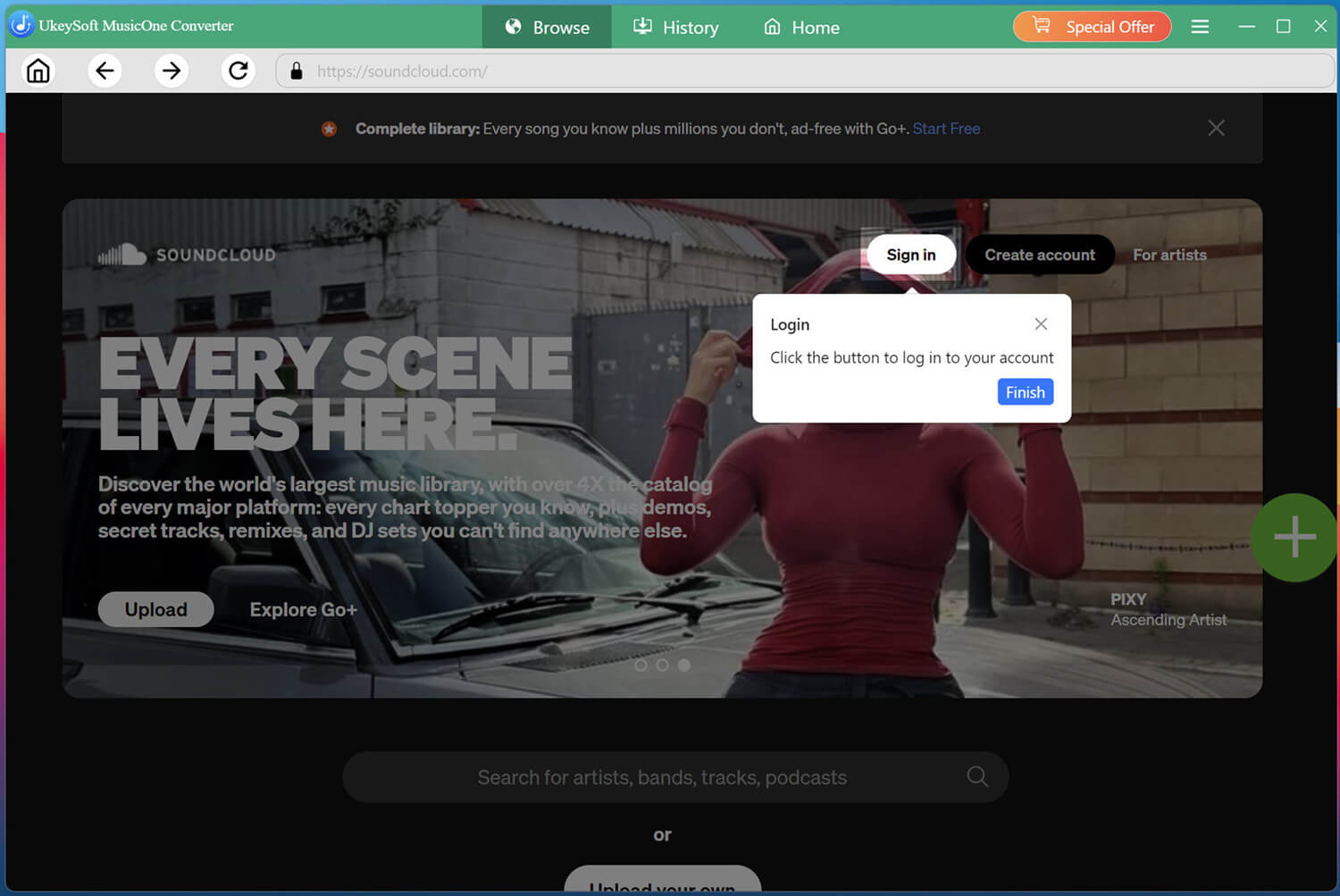
Download and launch UkeySoft SoundCloud Music Converter on your computer. Click the "Sign In" button and enter your SoundCloud account (either free or paid) to access the platform’s library directly within the software.
Adjust the Output Settings
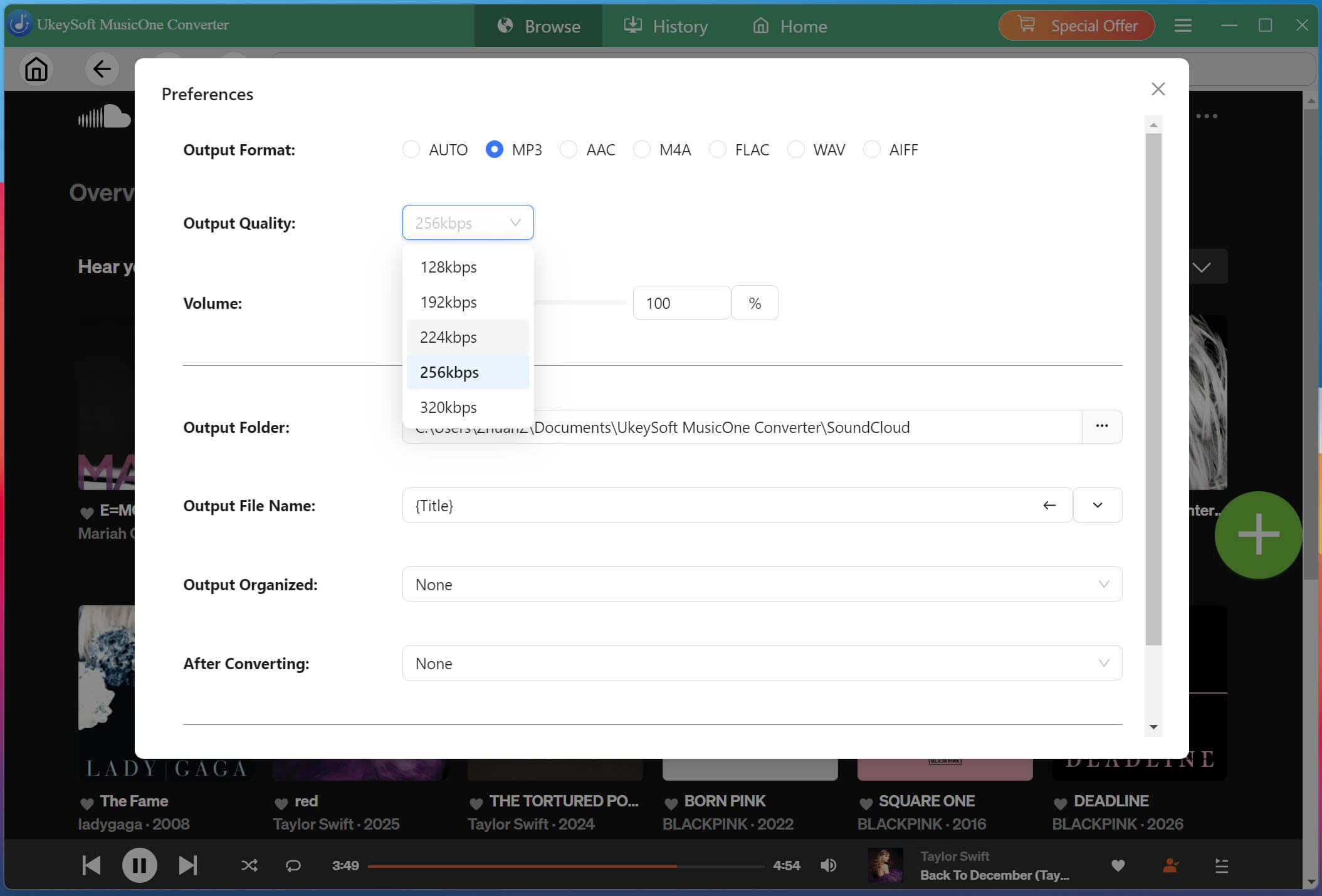
Click "Menu" in the upper-right corner and select "Preferences". Here, you can customize the output format, output quality, output file name, and output folder. For high-quality MP3 downloads, choose 320kbps option.
Find the Menu icon in the top right corner, click it and select "Preferences". In the pop-up window, choose MP3 as the output format and adjust the output quality to 320 kbps for the best listening experience.
Open and Add Any Song/Album/Playlist
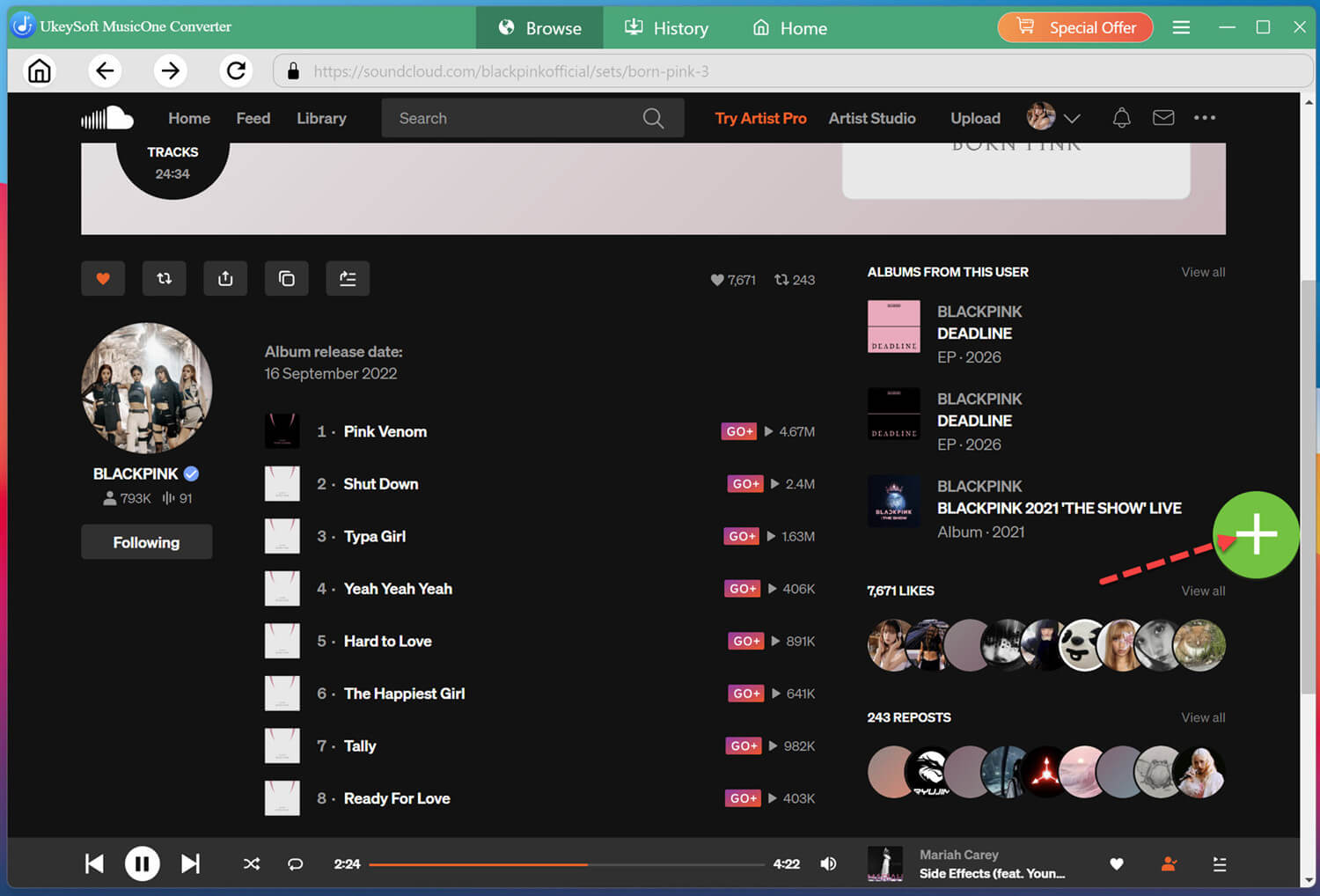
You can browse, access and search for any music content in the home page. For example, search for "BlackPink" and open a album. Click the "+" button to load the entire album into the conversion list.
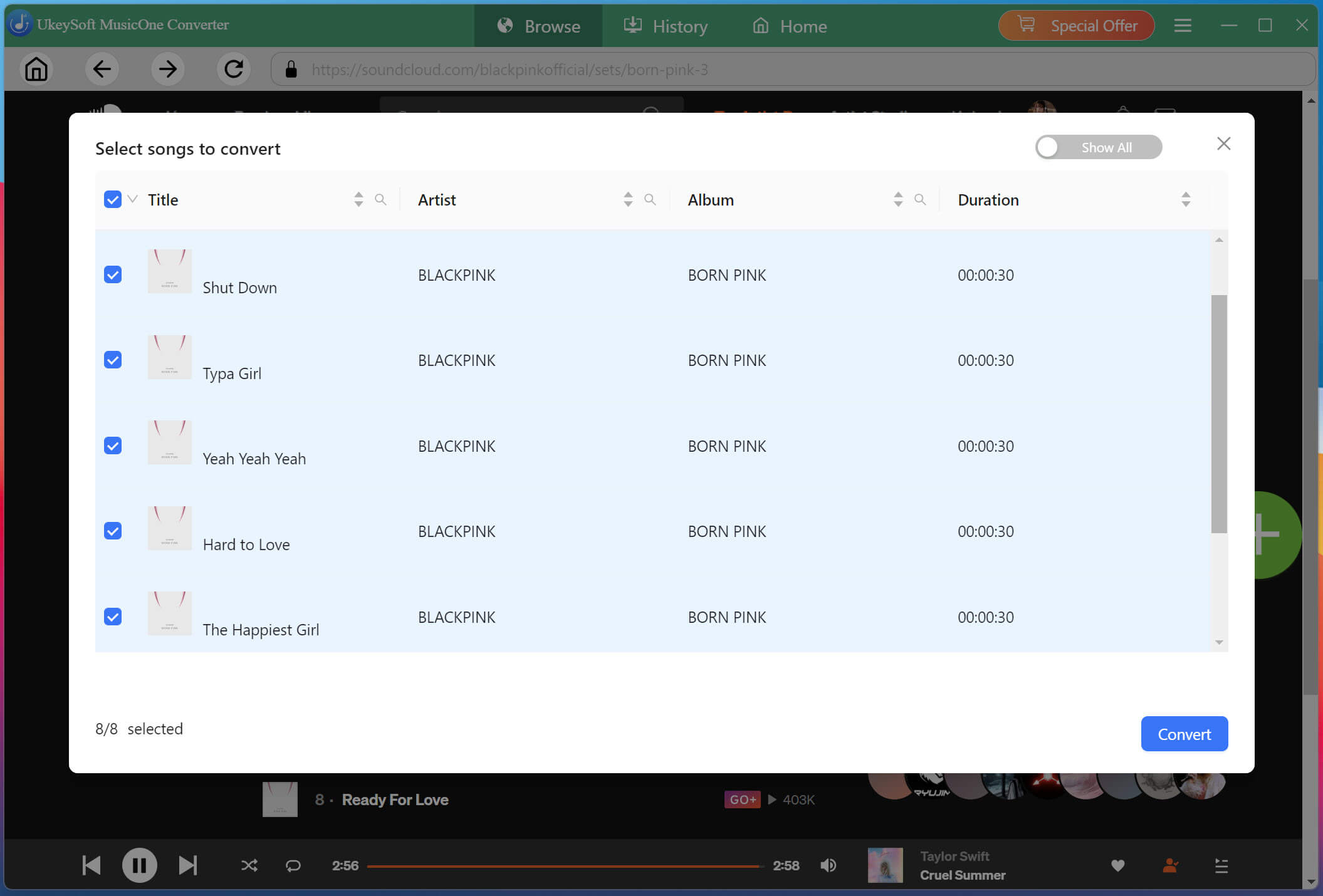
In the conversion list window, check the boxes next to the specific tracks you want to download, or select all songs from the album for batch processing.
Start to Convert SoundCloud Music to MP3
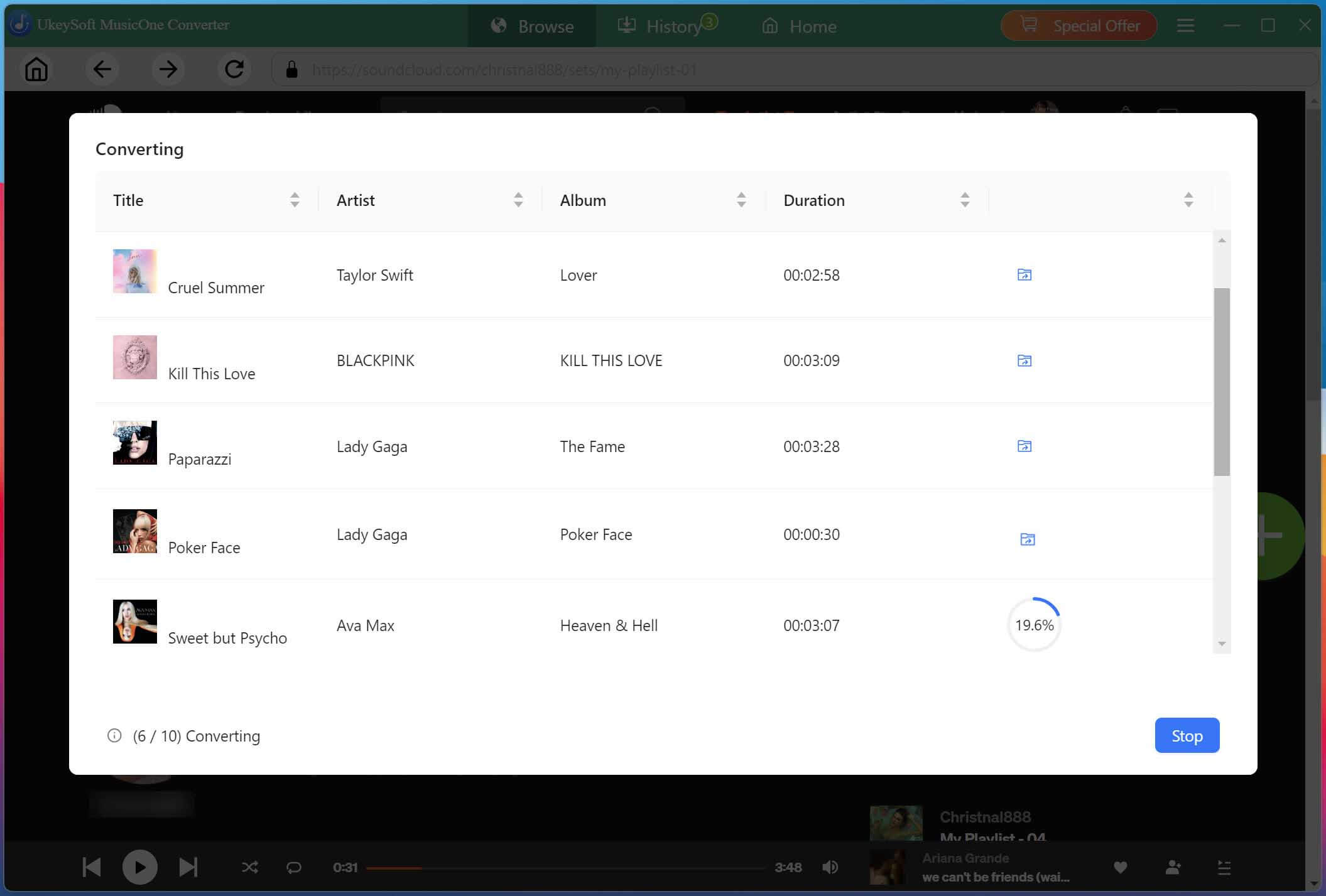
Simply press on the "Convert" button at the bottom right. The software will begin downloading and converting the selected SoundCloud tracks to MP3 files with 320kbps bitrate at a high speed.
Locate the Converted SoundCloud Music Files
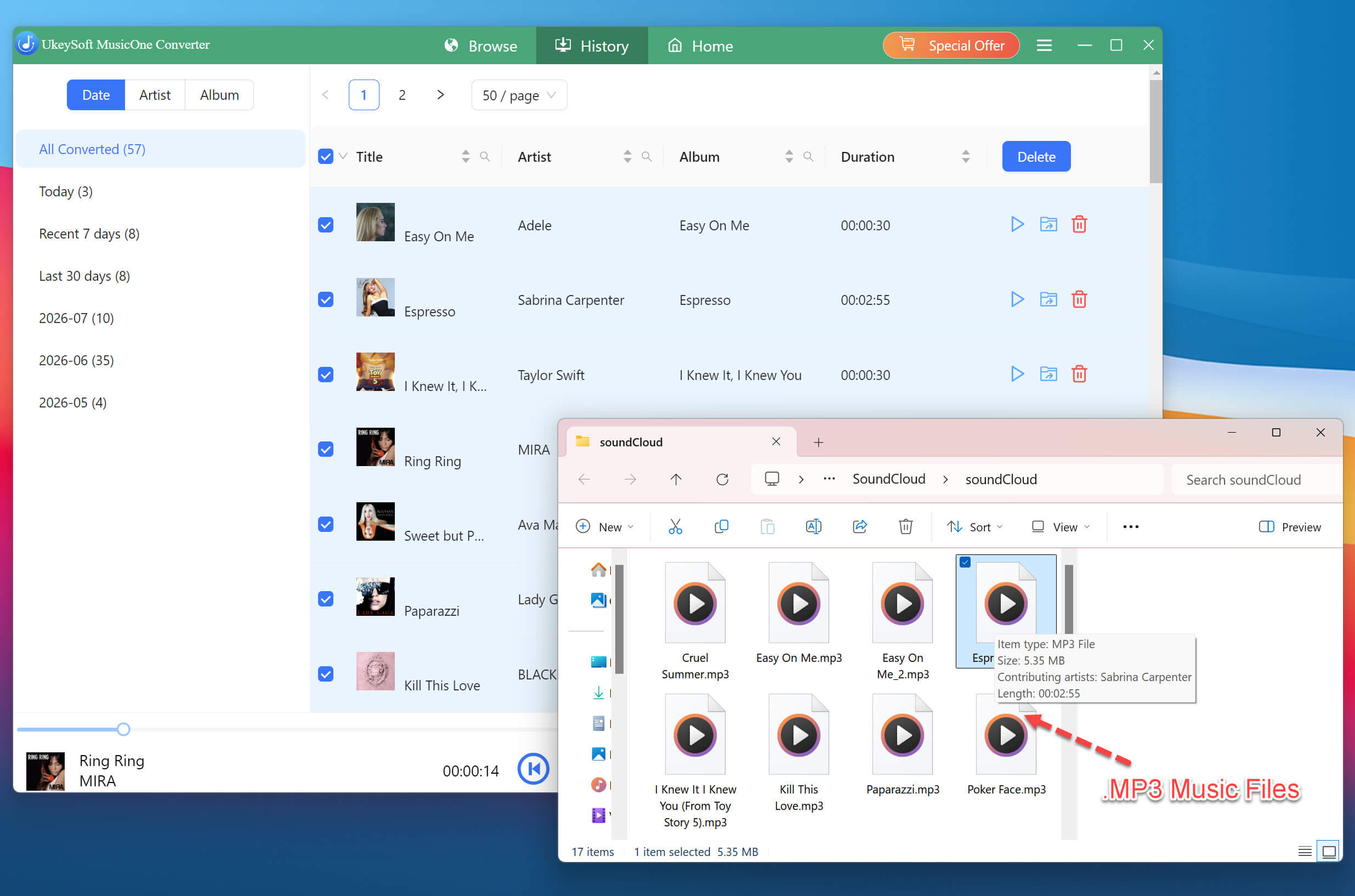
Once the conversion finishes, turn to the "History" section. Click the folder icon beside the completed files to locate your MP3 music collection on your computer.
Transfer Downloaded SoundCloud Songs to USB Drive
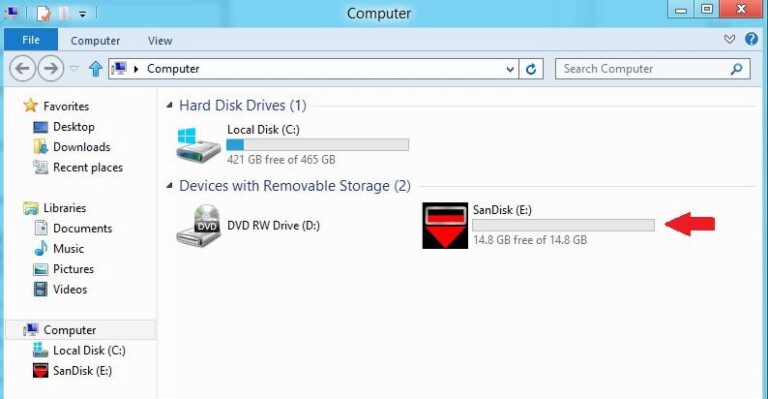
Insert a USB flash drive into your computer. Copy the converted MP3 SoundCloud music files from the output folder and paste them into a folder on your USB drive's folder. Once done, safely eject the USB drive.
Play SoundCloud Songs on Smart TV from USB Drive
Now, plug the USB drive into your Smart TV's USB port. Using your TV remote, open the TV's media player or source menu, select the USB storage device, and choose any MP3 SoundCloud music track to start playback.
Method 5. Stream SoundCloud Music on Roku TV via Third-Party App
If you own a Roku TV or streaming stick, you can connect your SoundCloud account to your Smart TV using third-party apps. For instance, apps like "SoundCloud Music for TV on Roku" and "Play SoundCloud Music" are available in the Roku Channel Stored. These apps are designed to bring a seamless and immersive SoundCloud experience to the Roku interface. Once installed, you can access your SoundCloud history, playlists, and favorites on your Roku TV.
Turn on your Roku TV or Roku streaming device and connect it to the internet.
Navigate to the Roku Home screen and open the "Streaming Channels" or the "Channel Store".
Search for "SoundCloud Music for TV", select the app and click "Add Channel" or "Add App".
Check the app description, developer, compatibility, privacy information, and any additional fees before installing it.
Select the application and choose Add App or Add Channel.
Once installed, open the channel. You may need to sign in using your SoundCloud account.
Browse available tracks and playlists, select your favorite music, and start playing SoundCloud music through your Roku-connected TV.
Method 6. Play SoundCloud Music on Fire TV
If you have an Amazon Fire TV Stick, you can access SoundCloud through the Amazon Silk web browser or compatible third-party apps. This workaround is ideal for TVs that lack a native SoundCloud app, giving you a convenient way to stream your favorite tracks directly on the big screen. Below, we'll walk you through the steps using the Silk Browser as an example.
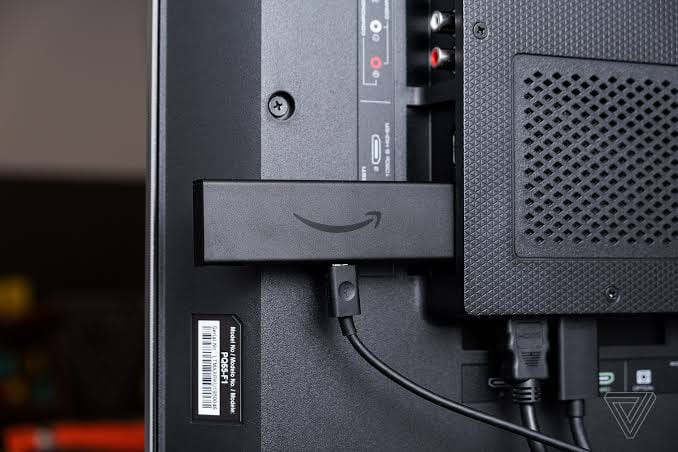
Connect your Amazon Fire TV Stick to an available HDMI port on your TV and power it on.
Follow the on-screen instructions to connect the Fire Stick to your Wi-Fi network.
From the Fire TV home screen, open the Amazon Appstore and search for Amazon Silk Browser.
Download and install the browser, then launch it.
Enter the official SoundCloud website (https://soundcloud.com/) in the browser's address bar.
Sign in to your SoundCloud account and browse for the music you want to stream.
Select a track or playlist and start playback. Your music should now play through the TV speakers.
Method 7. Play SoundCloud Music on TV via HDMI Cable
To stream SoundCloud music on smart TV, you may also connect your laptop to the TV with an HDMI cable. This wired method is reliable and doesn't require a separate streaming application. Once connected, you can play SoundCloud through a desktop browser and send both audio and video to the TV. Here's how:
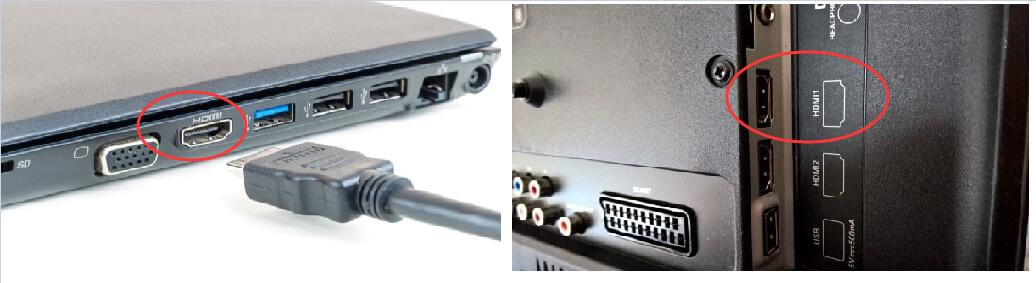
Plug one end of an HDMI cable into your laptop and the other into an available HDMI port on your TV.
Turn on your television and use the remote to change the Input Source to the corresponding HDMI port.
Open your laptop and launch a web browser, such as Chrome, Edge, or Safari. Go to SoundCloud's official website and sign in to your account.
Find your favorite track, album, or playlist and start playing it.
Ensure your laptop's sound output is set to the TV. The SoundCloud music will now play through your TV speakers.
Conclusion
In conclusion, there are seven workable ways to play SoundCloud music on TV. Android TV users can install the official app, while other Smart TVs can use wireless casting, AirPlay, Roku applications, or a Fire TV Stick. To enjoy a smooth, ad-free, offline experience without a Go/Go+ subscription, you can use the third-party tool - UkeySoft SoundCloud Music Converter to convert SoundCloud music to MP3, save SoundCloud music to a USB drive and play them offline on your TV without network! Whether you are SoundCloud Free, free trial, Go, or Go Plus users, UkeySoft works smoothly for you!
Justin Sabrina has always had great enthusiasm for writing, programming and web development. He likes writing about software and technology, his works are featured on some tech blogs or forums like Tom's Hardware, CNET, etc.
 English
 Arabic
 Chinese (Simplified)
 Chinese (Traditional)
 Croatian
 Czech
 Danish
 Dutch
 Estonian
 Finnish
 French
 German
 Greek
 Hebrew
 Hindi
 Hungarian
 Indonesian
 Italian
 Japanese
 Kazakh
 Korean
 Malay
 Norwegian
 Polish
 Portuguese
 Romanian
 Russian
 Slovenian
 Spanish
 Swedish
 Thai
 Turkish
 Ukrainian
 Vietnamese












Comments are off!