-- Get SoundCloud Go and Go+ for free from official website or app, and keep SoundCloud music forever after trial with UkeySoft SoundCloud Music Converter.
You can get SoundCloud Go for free with a 7-day free trial or SoundCloud Go+ with an eligible 30-day free trial. Simply sign in to SoundCloud, select a subscription plan, and activate the available trial offer. If you want to keep SoundCloud music as local MP3 files after your subscription expires, you can also utilize the UkeySoft SoundCloud Music Converter.
Many of you may be familiar with SoundCloud music, a popular music platform for independent artists, DJ sets, and remixes that you simply can't find anywhere else. You can access its music library for free through the official app on your device or a web player. To enjoy an ad-free and offline listening experience, you have to subscriber to a Go or Go Plus plan. The good news is that SoundCloud music offers a 7-day or 30-day free trial for every new user, allowing you to experience its premium features before paying.
Do you know how to get a SoundCloud free trial? If not, you are in the right place! This guide covers legitimate method to get SoundCloud free trial access, compares the plans, and even shows you how to keep SoundCloud music forever using a third-party SoundCloud music converter. Let's get started!
Officially, SoundCloud Music offers three main plans for music fans, including SoundCloud Free, SoundCloud Go, and SoundCloud Go+. Here's a quick comparison:
Features
SoundCloud Free
SoundCloud Go
SoundCloud Go+
Ad-free Streaming
No
Yes
Yes
Full Music Catalog
Limited
Expanded access
Full access
Offline Listening
No
Yes
Yes
Audio Quality
Standard (~128 kbps)
Standard (~160 kbps)
High Quality (up to 256 kbps AAC)
DJ Integration
No
No
Yes (Serato, Rekordbox, etc.)
Free Trial
No standard trial
7 days
30 days
Monthly Subscription
Free
$4.99
$11.99
SoundCloud offers free trials for new users. Specifically, you can access a 7-day free trial for SoundCloud Go and a 30-day free trial for SoundCloud Go+. During the free trial period, you can enjoy all premium features for free. After the free trial period for SoundCloud Go or Go Plus ends, you will need to pay $4.99 or $11.99 per month to continue using it. Keep in mind that SoundCloud's standard Artist and Artist Pro plans are designed for music creators rather than listeners.
How to Get SoundCloud Go/Go+ Free Trial for 7-30 Days
SoundCloud Music's free trial varies from 7 days to 30 days according to different subscription plans. In this section, we will show you the detailed guide to get free SoundCloud Go or Go+ subscriptions in web browser and mobile app.
1.1 Get SoundCloud Free Trial in Web Browser
Open the SoundCloud website in your browser and sign in to your account (or create a new one).
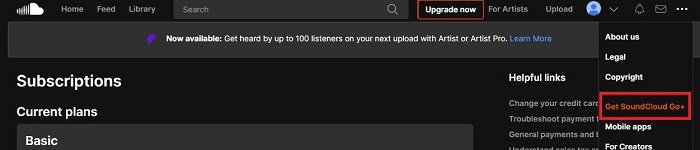
Once you're logged in, click the three-dot icon in the upper right corner and pick "Get SoundCloud Go+" from the dropdown.
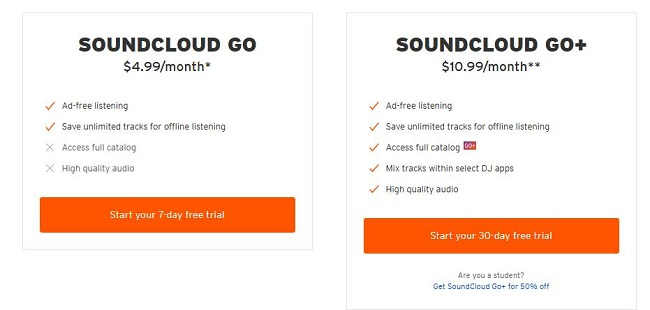
You will see the options for SoundCloud Go and SoundCloud Go+. Click on the free trial button for the plan you wish to test.
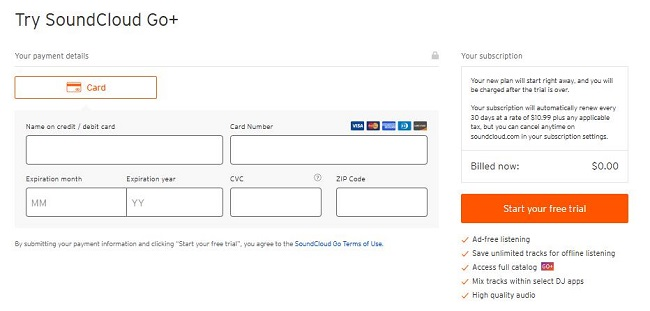
Enter your payment information if requested and confirm your subscription.
Then, click the "Start your free trial" button to activate your free trial of SoundCloud subscription.
That's it! You can now enjoy all premium features of SoundCloud on your computer or other supported devices using the same account. To avoid being charged, remember to cancel the subscription before free trial expires.
1.2 Get SoundCloud Free Trial in Mobile App
Download and install the latest SoundCloud app from the Apple App Store or Google Play Store to your iPhone or Android device.
Open the SoundCloud app and sign in to your existing account. New users can register for a free account.
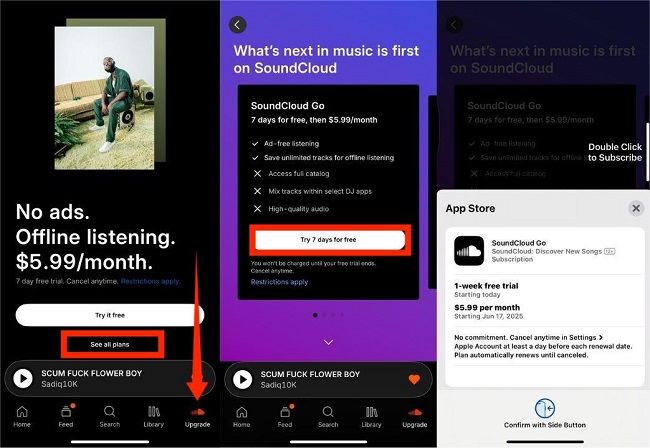
Tap "Upgrade" tab and then tap "See all plans".
Select "Try 7 days for free" for Go, or "Try 30 days for free"option for Go+.
Review the trial terms and confirm the subscription through Apple, Google Play, or the applicable payment process.
After successful activation, you can enjoy the premium features included in your selected plan.
Note: Remember to check the renewal date and cancel before the trial expires if you don't want to be charged. If you subscribe through Apple or Google Play, you may need to cancel through their subscription management settings.
How to Get SoundCloud Go/Go+ Subscriptions Free Forever
When your SoundCloud free trial or subscription ends, you will lose access to all premium features and be downgraded to ad-supported free tier. Furthermore, even with a free trial or paid subscription, the downloaded SoundCloud music is locked inside the SoundCloud mobile app. You cannot transfer those music to your computer, an MP3 player, or another device for permanent offline listening.
Fortunately, we have a solution that allows you to enjoy all the premium features for free and keeping SoundCloud music forever, even after a free trial or subscription ends. You can utilize a professional third-party tool like UkeySoft SoundCloud Music Converter.
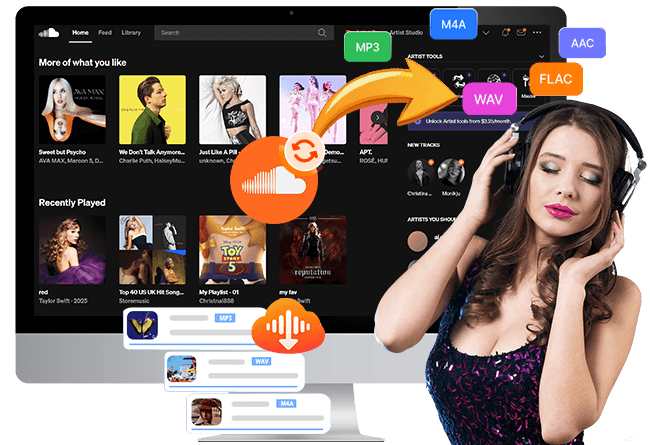
UkeySoft SoundCloud Music Converter can help you remove ads and enables you to download SoundCloud tracks, albums, and playlists on your computer with a free account. In addition, it has the ability to convert SoundCloud music to MP3, AAC, WAV, FLAC, M4A, or AIFF formats for permanent and flexible offline listening without any restrictions. You can enjoy your favorite SoundCloud music on any device, such as iPhone, Android, MP3 player, smart speaker, smart watch, smart TV, or car stereo - without the SoundCloud app.
Steps to Download SoundCloud Music with Free Account Using UkeySoft
Log in to Your SoundCloud Account
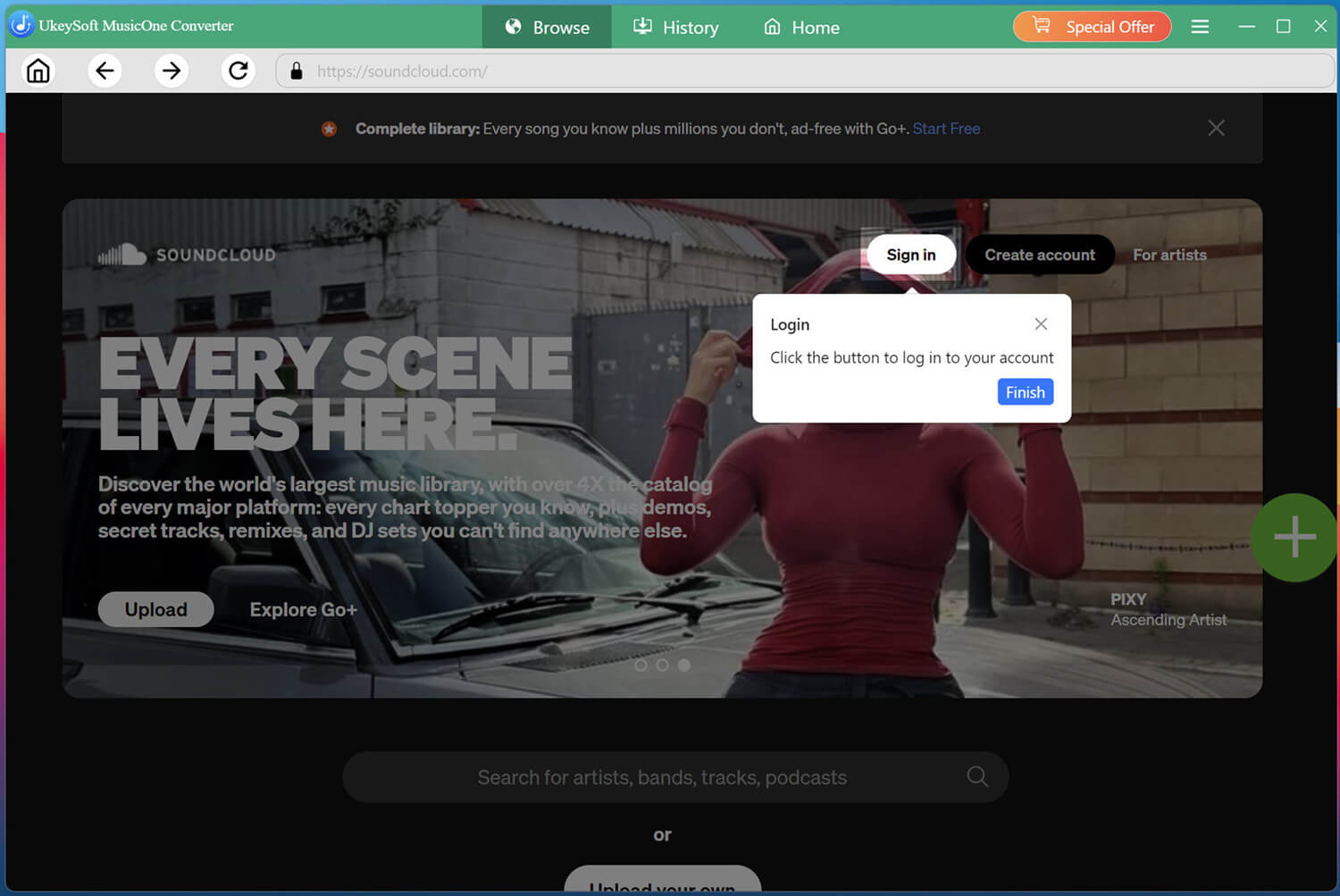
Download and install UkeySoft SoundCloud Music Converter on your Windows PC or Mac. Launch the program and access its built-in SoundCloud player. Sign in with your free SoundCloud account to browse available music.
Adjust the Output Settings
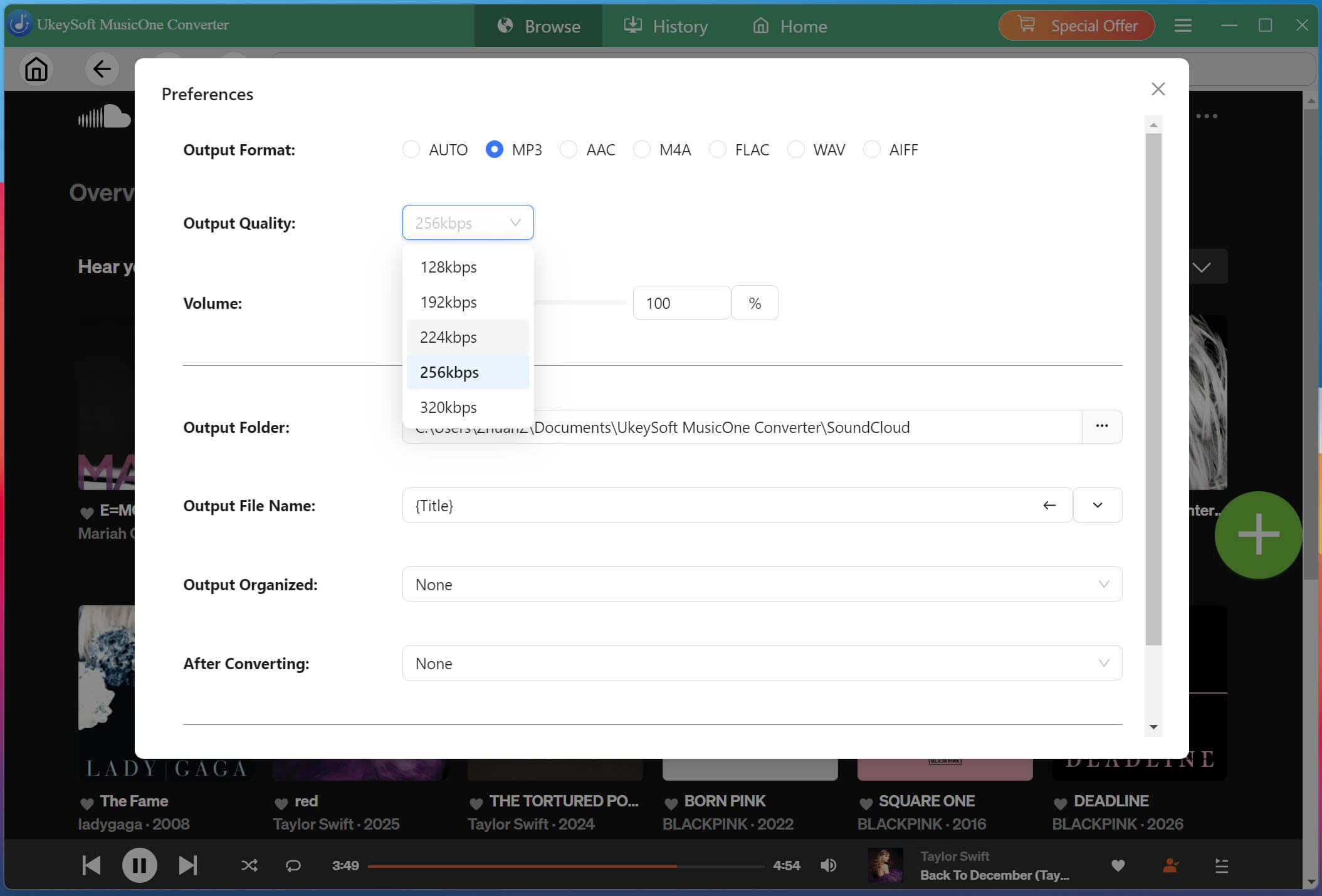
Click "Menu" in the upper-right corner and select "Preferences". Here, you can customize the output format, output quality, output file name, and output folder. For high-quality MP3 downloads, choose 320kbps option.
Open and Add Songs, Albums, or Playlists
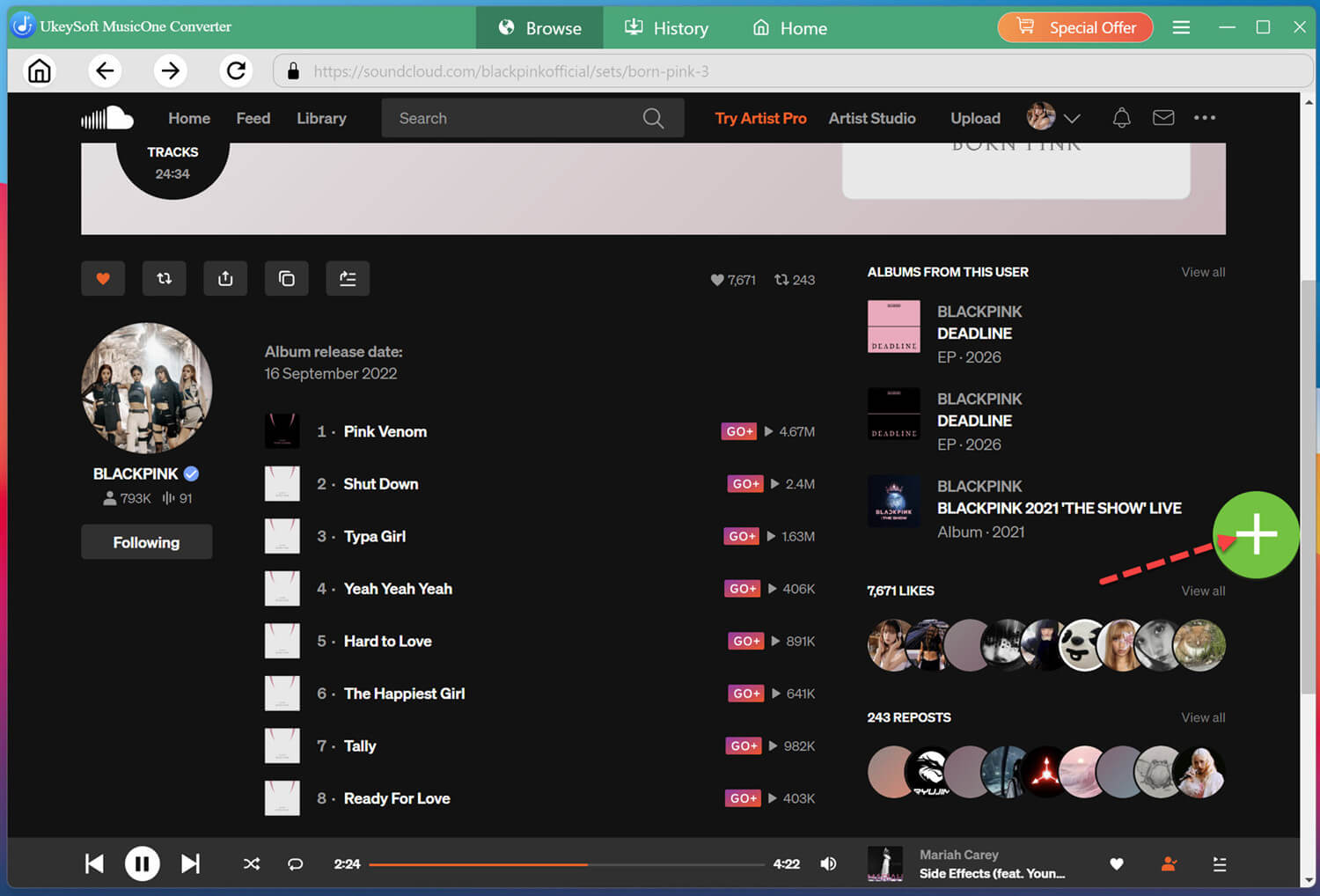
On the home page, search for your favorite music. You can browse individual tracks, open albums, or explore playlists. Once you find the content you want, open it and click "+" button in the right side.
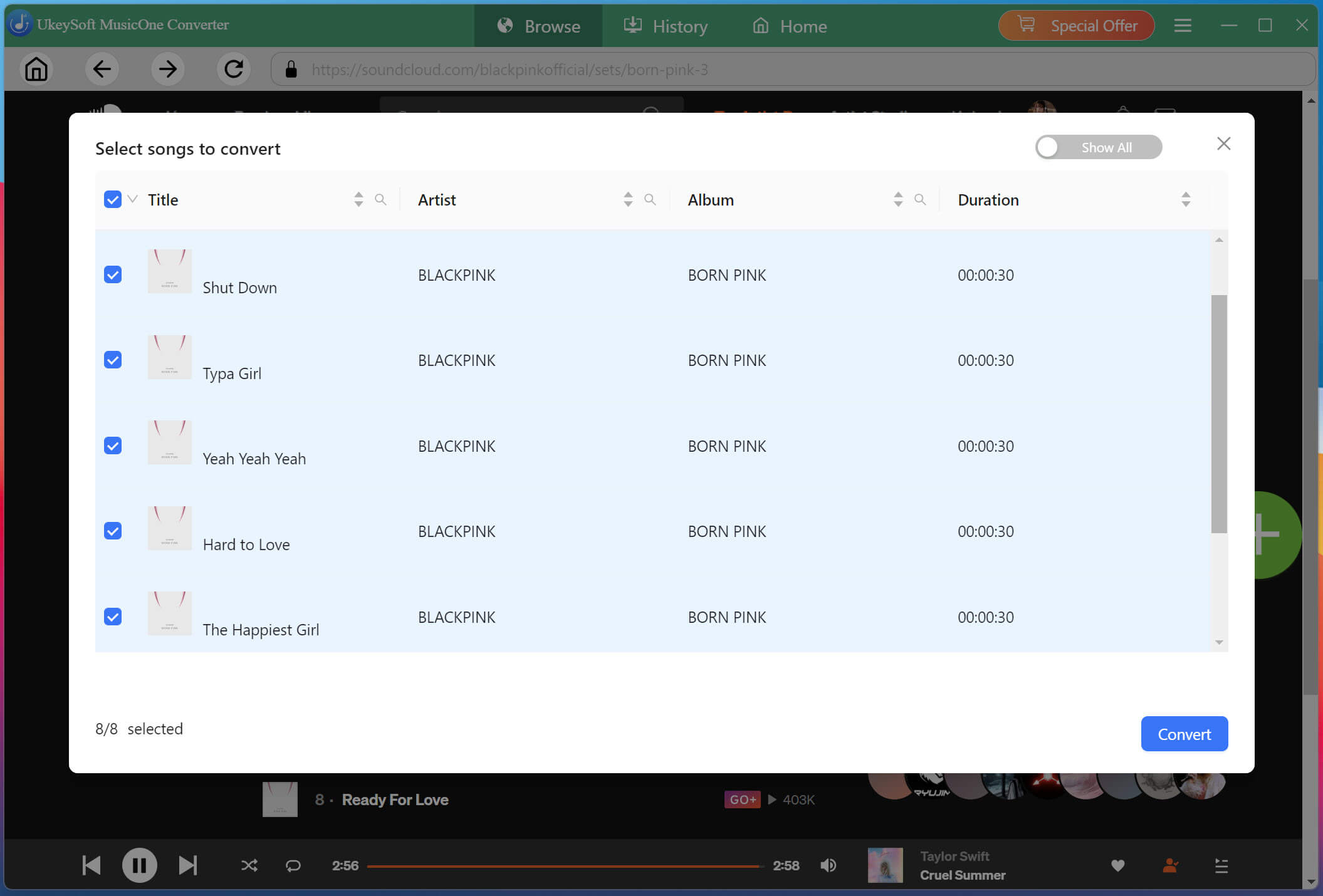
Once added, browse the available songs and check the boxes beside the tracks you want to save. You can select individual songs or multiple tracks at once.
Begin Downloading SoundCloud Music to MP3
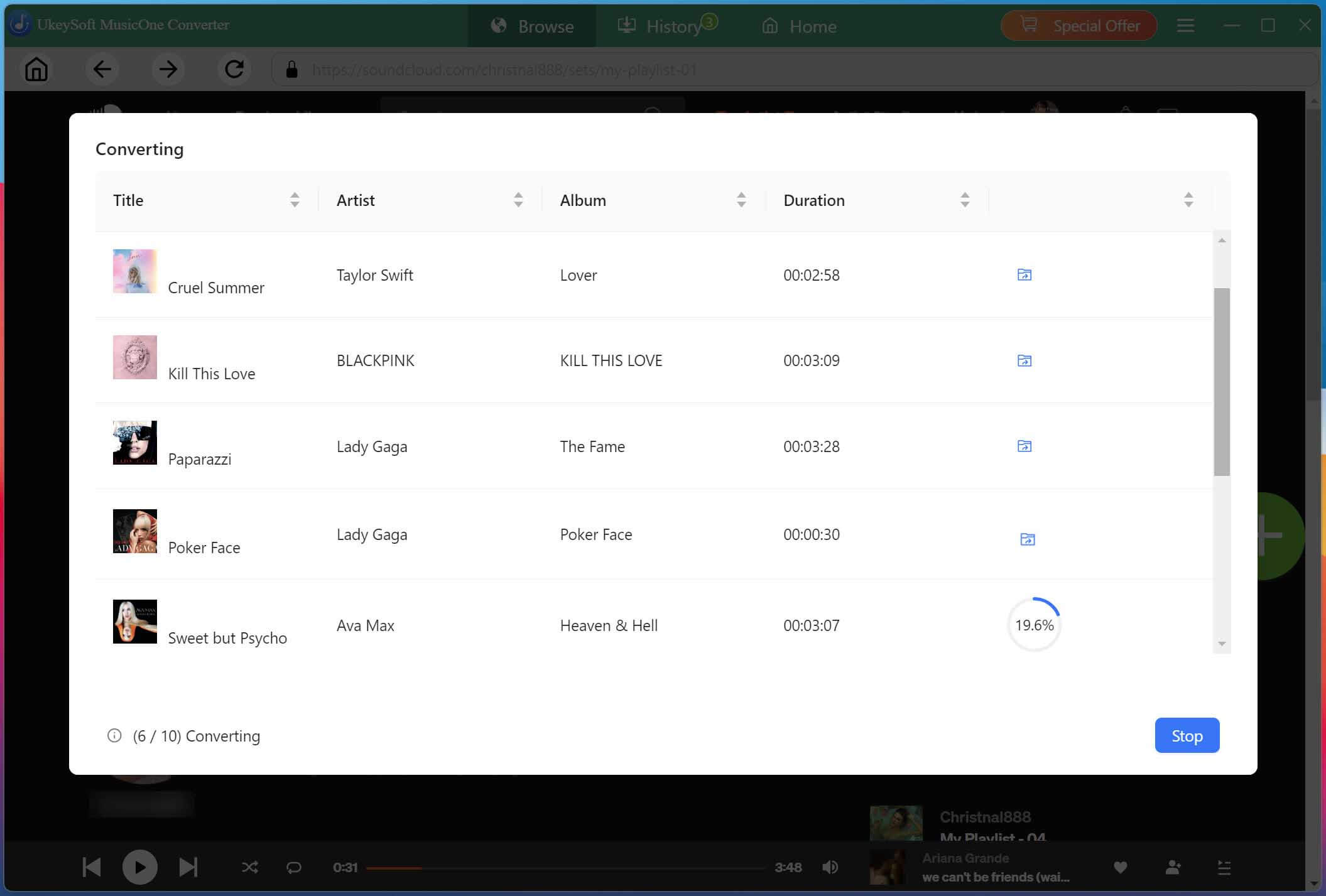
After selecting your desired songs, click the "Convert" button to start the process. UkeySoft will export the high-quality MP3 SoundCloud music to your local folder.
Access Downloaded SoundCloud Music Files
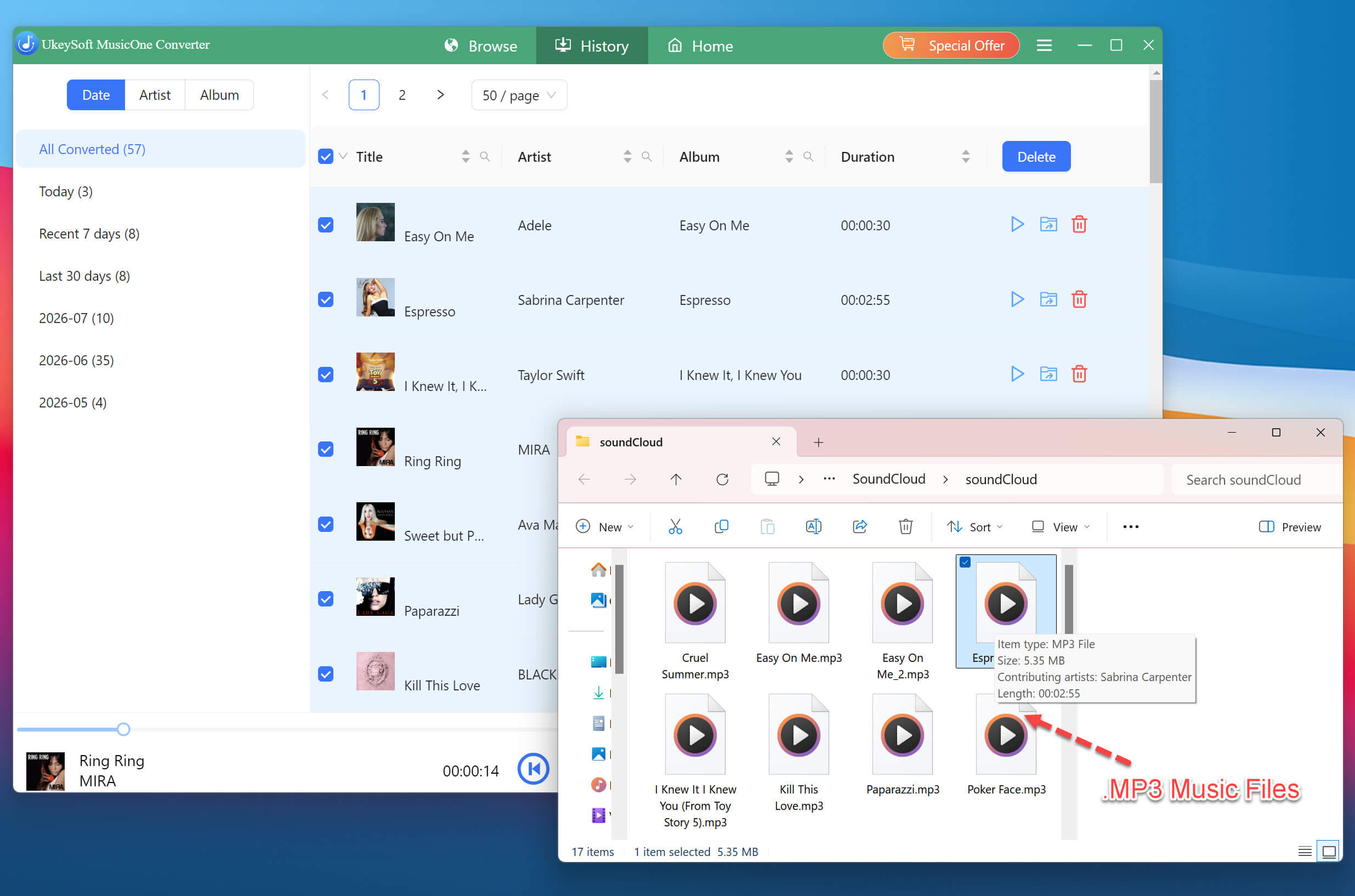
When the conversion is complete, open the "History" section. Click the folder icon to access the output folder. You can now transfer these MP3 SoundCloud music files to any device and listen to them forever, completely free.
How to Cancel Your SoundCloud Subscription or Free Trial?
You can cancel your SoundCloud subscription before the next billing date to avoid automatic renewal. The cancellation process depends on where you signed up:
On Computer Web Browser:
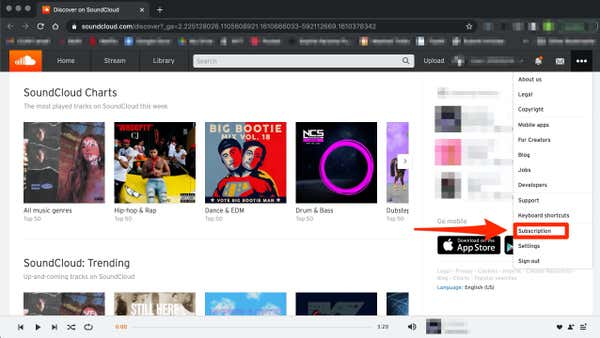
Go to SoundCloud.com and click the three-dot icon in the upper right corner. Select "Subscription" option.
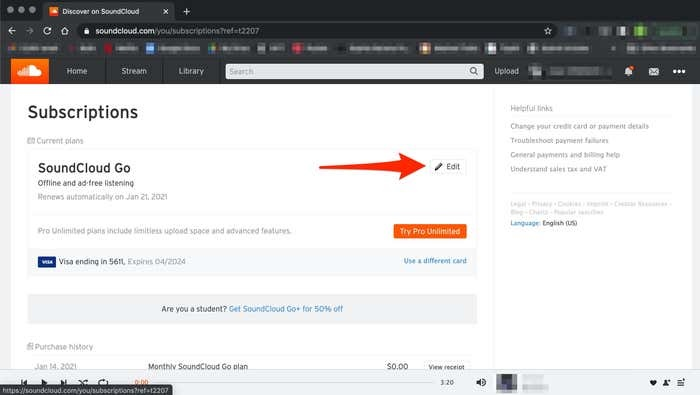
Click "Edit" next to your plan, and select "Opt-out of your subscription renewal."
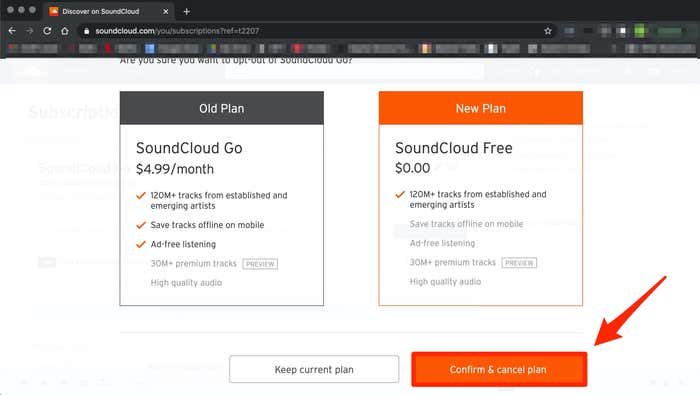
Then click "Confirm & cancel plan". Afterward, you can go back to view your plan status and confirm that it shows "Expires on [date]".
On iPhone/iPad:
Go to "Settings", tap your Apple Name, select "Subscriptions".
Scroll down to find SoundCloud and tap it, then tap "Cancel Subscription."
On Android Devices:
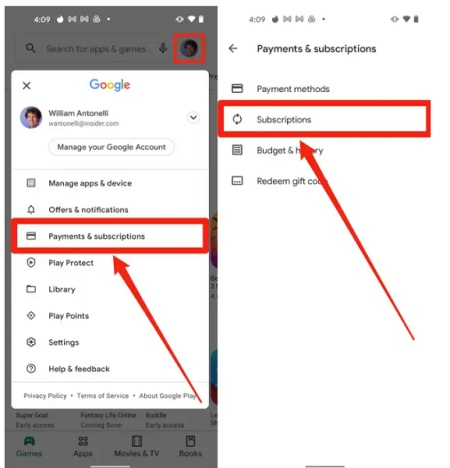
Open the Google Play Store app, and tap your Profile icon, tap "Payments & subscriptions".
Select "Subscriptions" find SoundCloud, and tap "Cancel Subscription."
FAQs About SoundCloud Subscription or Free Trial
Can I Use SoundCloud Without Paying?
Yes! SoundCloud offers a free account that allows you to discover artists, stream available tracks, create playlists, and follow creators without a subscription. However, free listening includes advertisements and certain playback restrictions. If you want ad-free listening, high-quality streaming, offline downloads, and full catalog access, you can try the free trial of SoundCloud Go or Go+, or upgrade to a paid subscription.
How Much Does SoundCloud Cost Per Month?
SoundCloud subscription prices depend on your location, plan, and billing platform. In the US, SoundCloud Go typically costs around $4.99 per month, while SoundCloud Go+ is priced around $11.99 per month (or $5.49 per month for eligible students).
What Happens When I Cancel My Go Subscription or Free Trial Ends?
When you cancel SoundCloud Go or Go+ or your free trial expires, you generally retain premium access until the end of your current billing period or free-trial period. After that date, your account will automatically revert to the free, ad-supported tier. To enjoy SoundClound Premium features for free all the time, you can turn to the best alternative - UkeySoft SoundCloud Music Converter. It can help you bypass ads interruption, download high-quality 320kbps MP3 music from SoundCloud without Go/Go+ account, and keep your music forever.
Conclusion
This article has shown you how to get a free trial of SoundCloud Go or Go+ subscriptions and keep your downloaded SoundCloud music forever even after the trial expires. With the help of UkeySoft SoundCloud Music Converter, you can easily download SoundCloud songs, playlists, albums, or podcasts from a free account in high quality and keep them permanently. This powerful tool works for all types of SoundCloud accounts, including free trial, ad-supported, Go and Go Plus! Start it right now and build a local music collection!
Justin Sabrina has always had great enthusiasm for writing, programming and web development. He likes writing about software and technology, his works are featured on some tech blogs or forums like Tom's Hardware, CNET, etc.
 English
 Arabic
 Chinese (Simplified)
 Chinese (Traditional)
 Croatian
 Czech
 Danish
 Dutch
 Estonian
 Finnish
 French
 German
 Greek
 Hebrew
 Hindi
 Hungarian
 Indonesian
 Italian
 Japanese
 Kazakh
 Korean
 Malay
 Norwegian
 Polish
 Portuguese
 Romanian
 Russian
 Slovenian
 Spanish
 Swedish
 Thai
 Turkish
 Ukrainian
 Vietnamese










Comments are off!