Downloading SoundCloud music to an MP3 player isn't hard. This article will show you how to download songs from SoundCloud as MP3 files and transfer them to any MP3 player for offline playback.
SoundCloud is a popular music streaming platform, offering rare tracks, independent artists, and exclusive content. Users can easily access its music content through the official website or mobile app. However, traditional MP3 players usually do not support Wi-Fi connections or app installation, making it difficult to directly access SoundCloud music on a lightweight MP3 player. Since SoundCloud music is designed primarily for online streaming and its streaming music content are DRM-protected, so you cannot simply copy songs from SoundCloud and play SoundCloud music on MP3 player.
So, how to download songs from SoundCloud to MP3 player? In other words, how to download SoundCloud music to MP3 or other formats for traditional MP3 players? In this guide, we will show you how to download SoundCloud music to MP3 player using a professional SoundCloud music downloader. Wether you need to build an offline music collection or simply listen to SoundCloud music on MP3 player, this guide covers all you need.
The answer is yes and no. A few artists or uploaders enable download buttons, allowing users to download music in MP3, WAV, AAC, or other formats. However, most SoundCloud streaming music content is encrypted AAC (with DRM) format. Even if you've downloaded music in the SoundCloud mobile app, you cannot freely copy them to an MP3 player.
Part 2. Download SoundCloud Music to MP3 via Third-Party Tool
To play SoundCloud music on MP3 player, you generally need to convert or download SoundCloud songs to MP3 files.
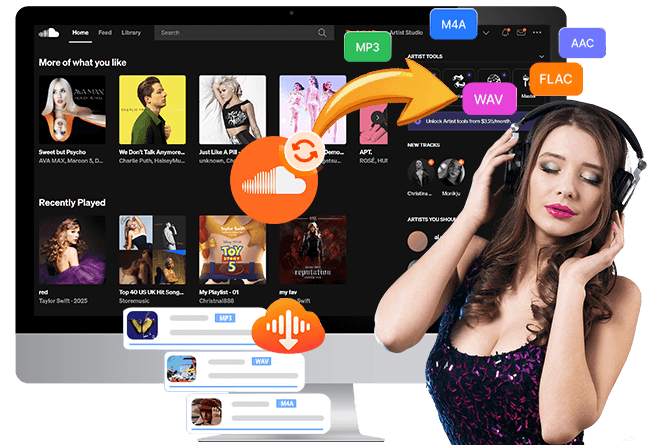
UkeySoft SoundCloud Music Converter provides a convenient desktop solution. It can download SoundCloud tracks, playlists, and albums and convert them into regular MP3, M4A, AAC, FLAC, WAV, or AIFF audio files for local storage. This makes it possible to transfer SoundCloud songs to any MP3 player, smartphone, tablet, and devices.
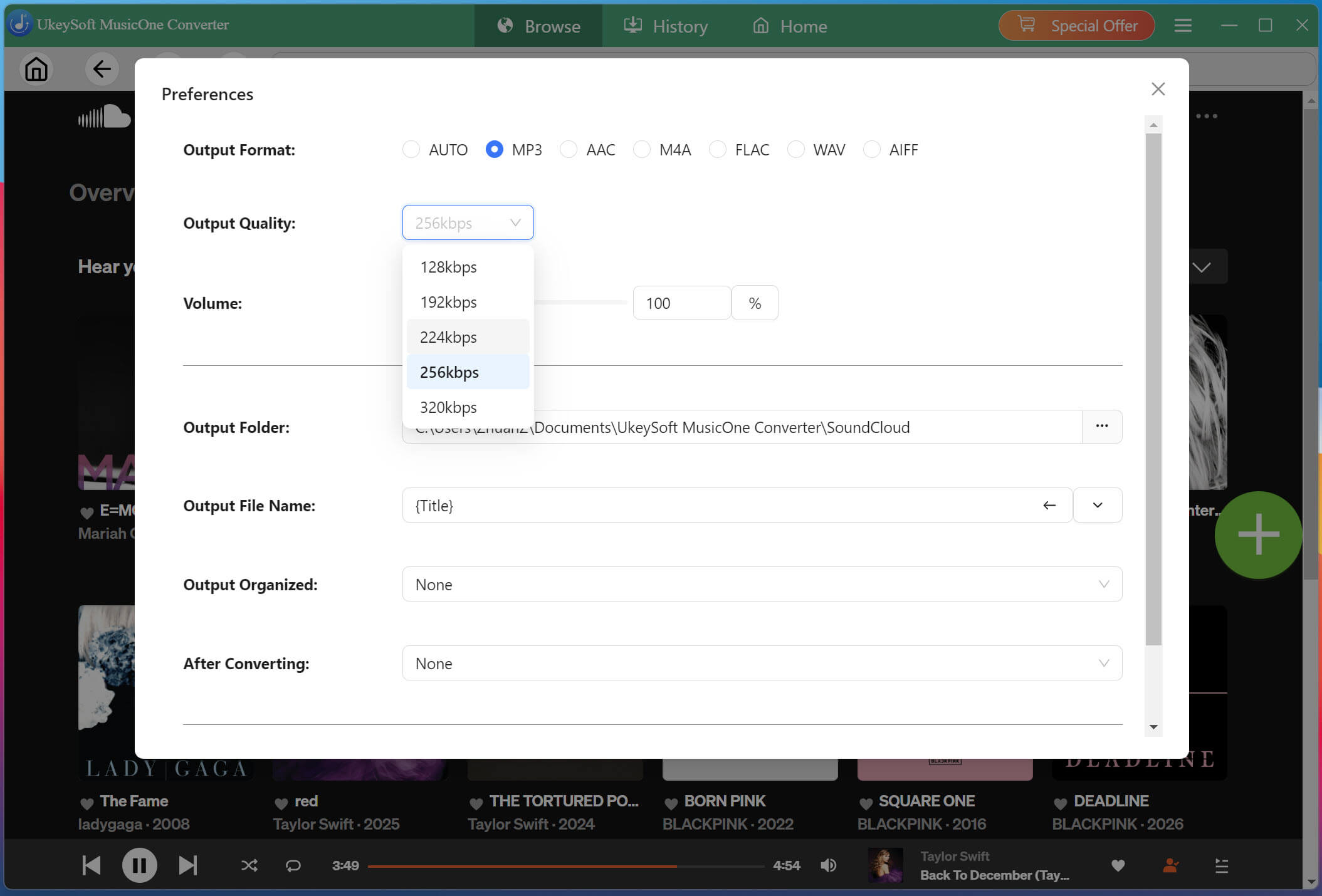
As one of the best SoundCloud MP3 downloaders, UkeySoft also offers customizable audio settings, allowing you to freely adjust the output format and output quality. Even for the SoundCloud free users, you can download music from SoundCloud to MP3 at 320kbps to get the excellent listening experience.
Key Features of UkeySoft SoundCloud Music Converter
Download music with SoundCloud free and paid accounts.
Built-in web player, music player and music manager.
Download SoundCloud tracks, playlists, albums, and podcasts.
Export SoundCloud music to MP3, AAC, WAV, M4A, FLAC, AIFF.
Convert SoundCloud music to MP3 up to 320 kbps.
Batch download multiple SoundCloud songs, full albums and playlists.
Preserve original ID3 tags like cover artwork, title, genre, etc.
Process downloads at speeds up to 16X faster with simple operation.
Transfer and play SoundCloud music on any MP3 player and device.
How to Download and Convert SoundCloud Music to MP3 with UkeySoft?
Open UkeySoft SoundCloud Music Converter
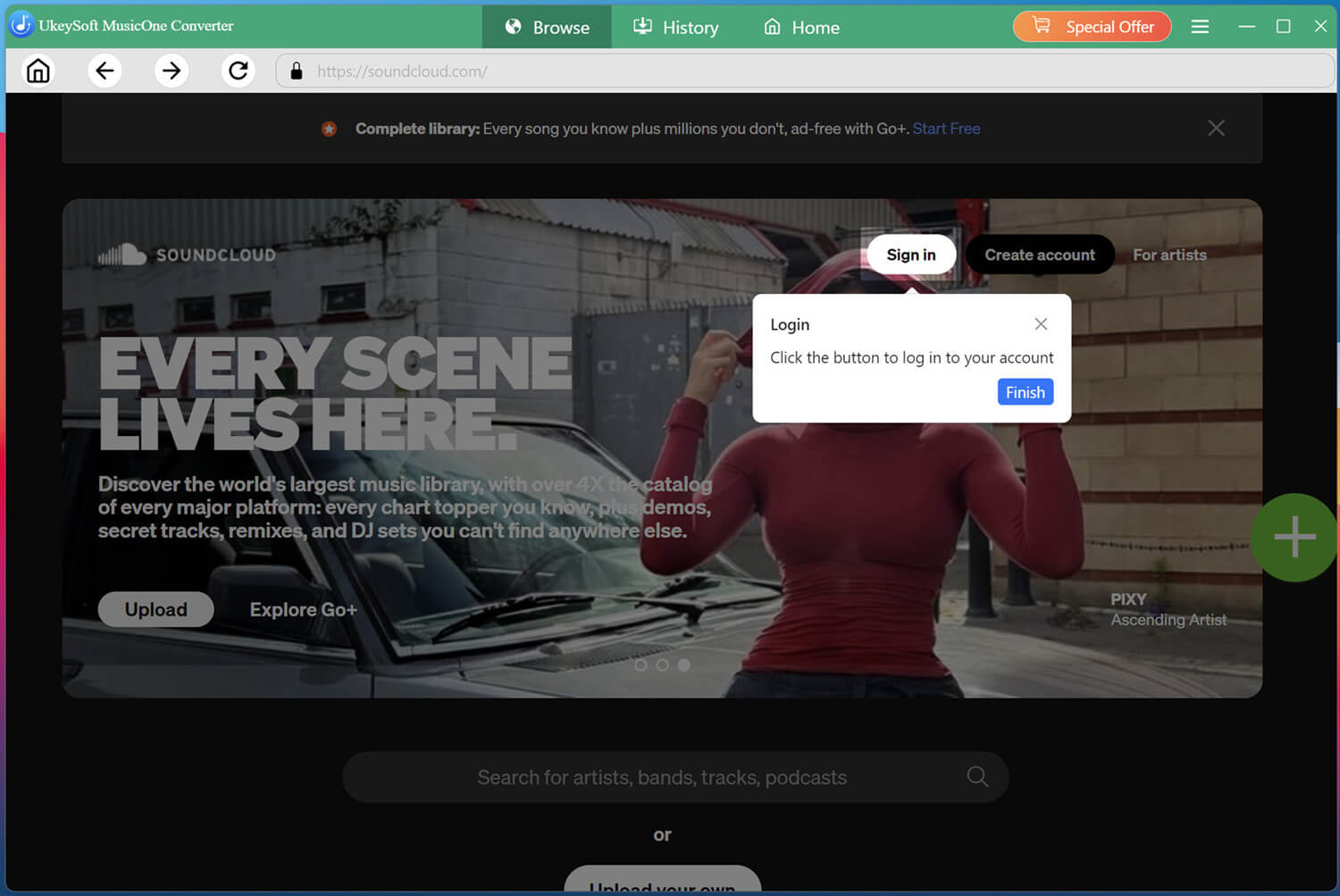
Download and install UkeySoft SoundCloud Music Converter on your Windows PC or Mac. Launch the program, select SoundCloud from the available services, and enter its built-in web player.
Log in to your SoundCloud free account through the built-in web player. Once signed in, you can access your preferred tracks, playlists, and albums and prepare them for conversion.
Set Output Settings
Click "Menu" and choose "Preferences" to configure the default output settings before downloading. For most MP3 players, MP3 at 320 kbps and 44.1 kHz is a practical choice.
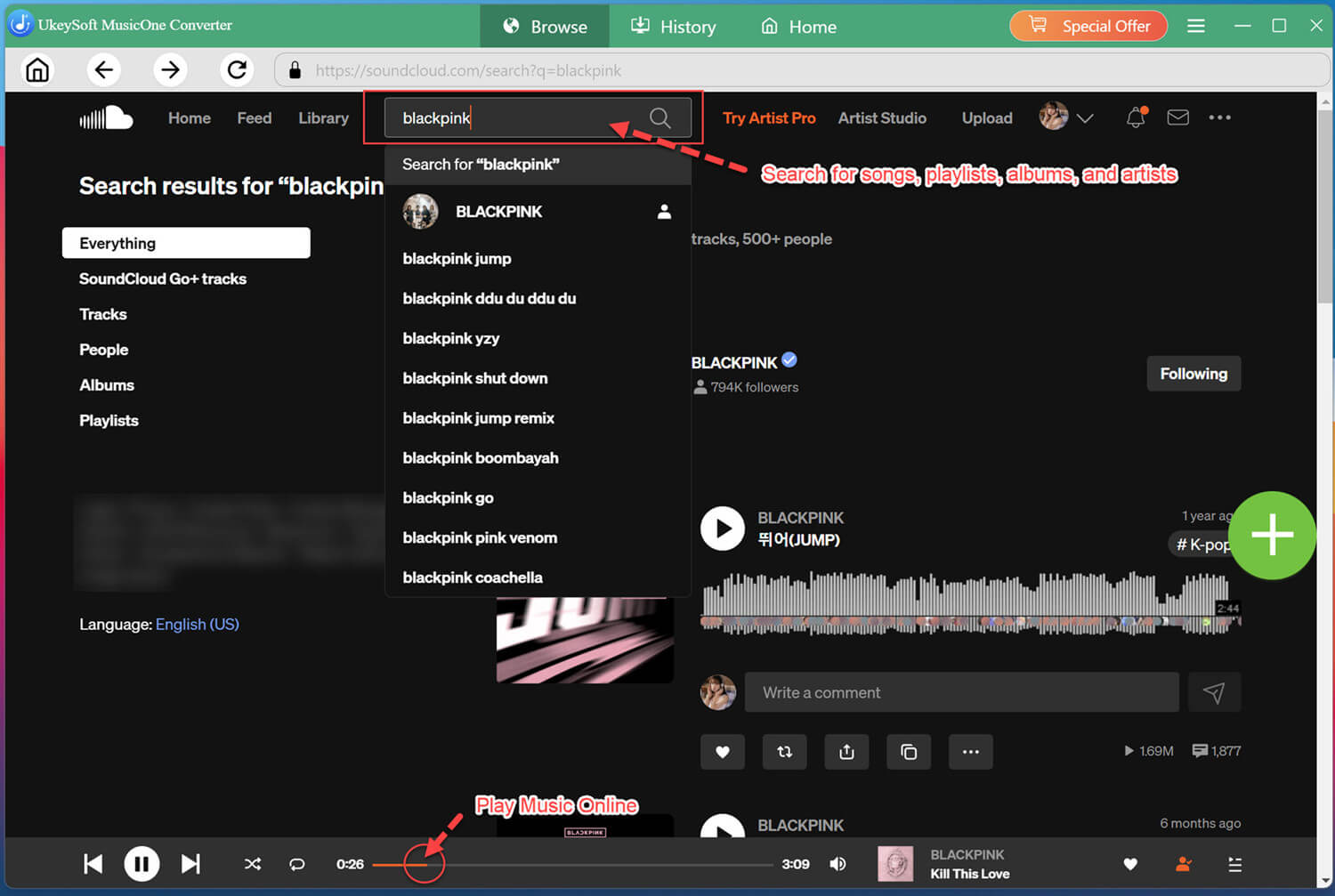
Search and Add SoundCloud Songs
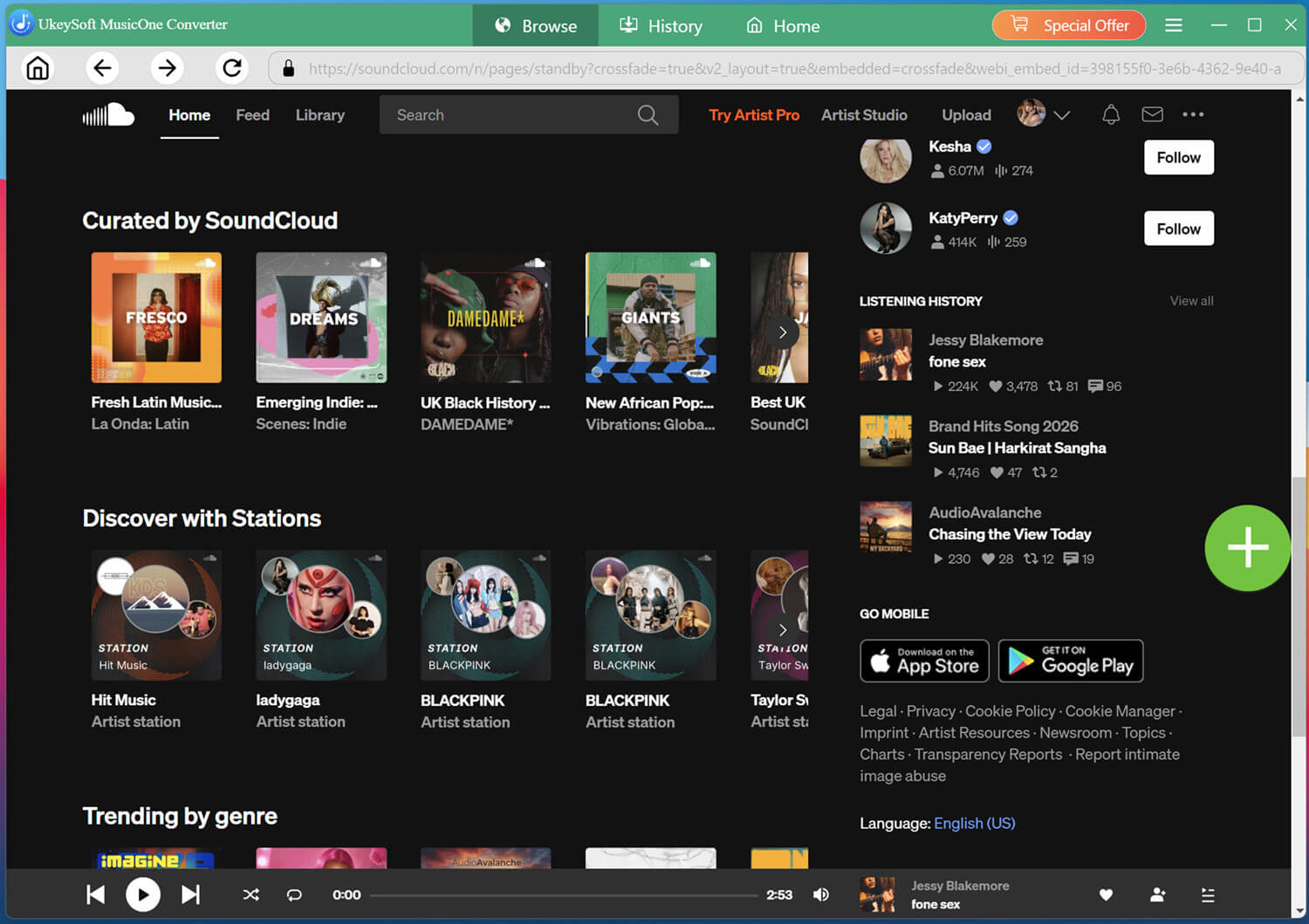
You can search using keywords or names, which makes locating specific SoundCloud content more convenient. For playlists or albums, simply open the relevant page and add the collection to your conversion list.
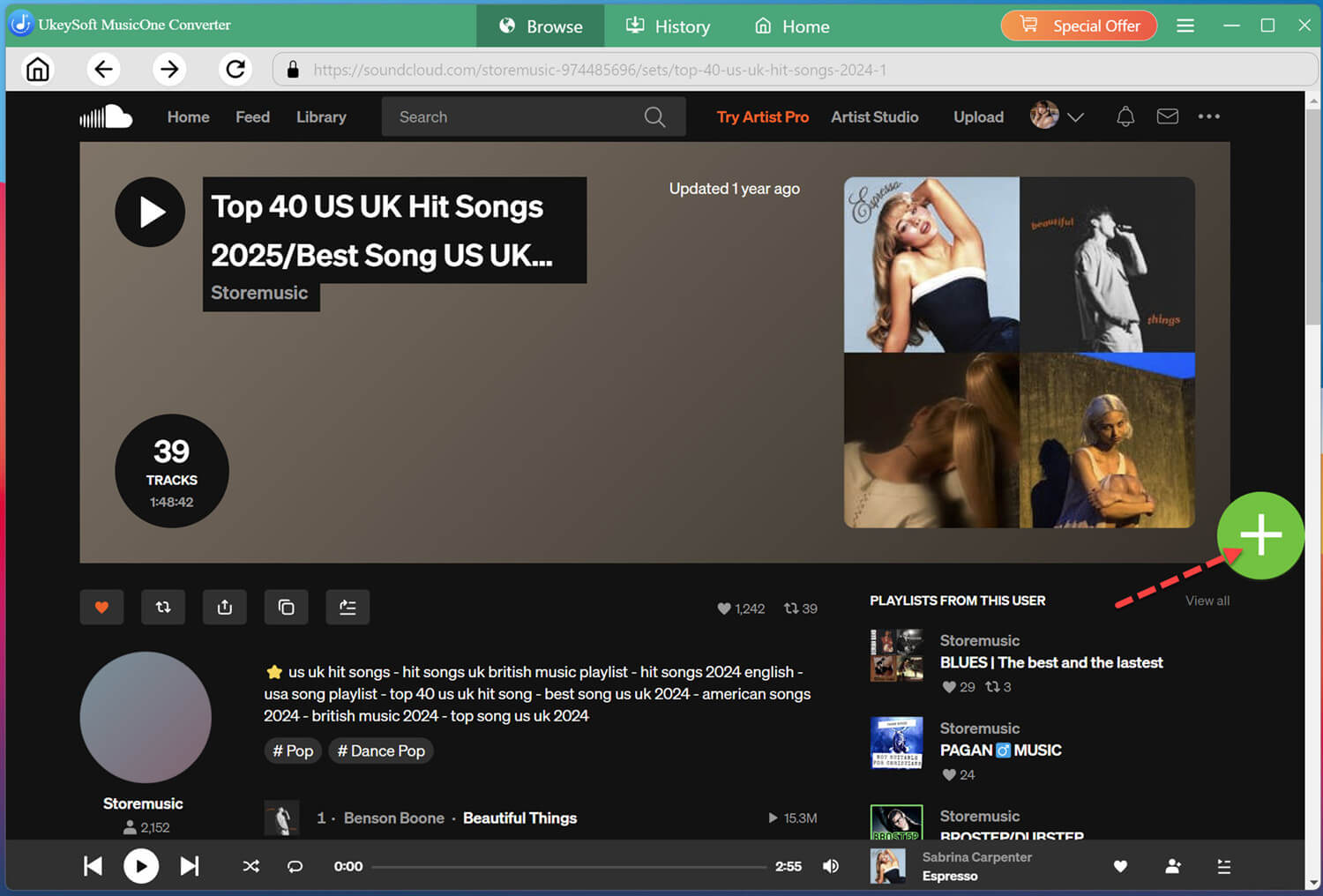
Open a track, playlist, or album, then click the + icon to add it to the conversion list.
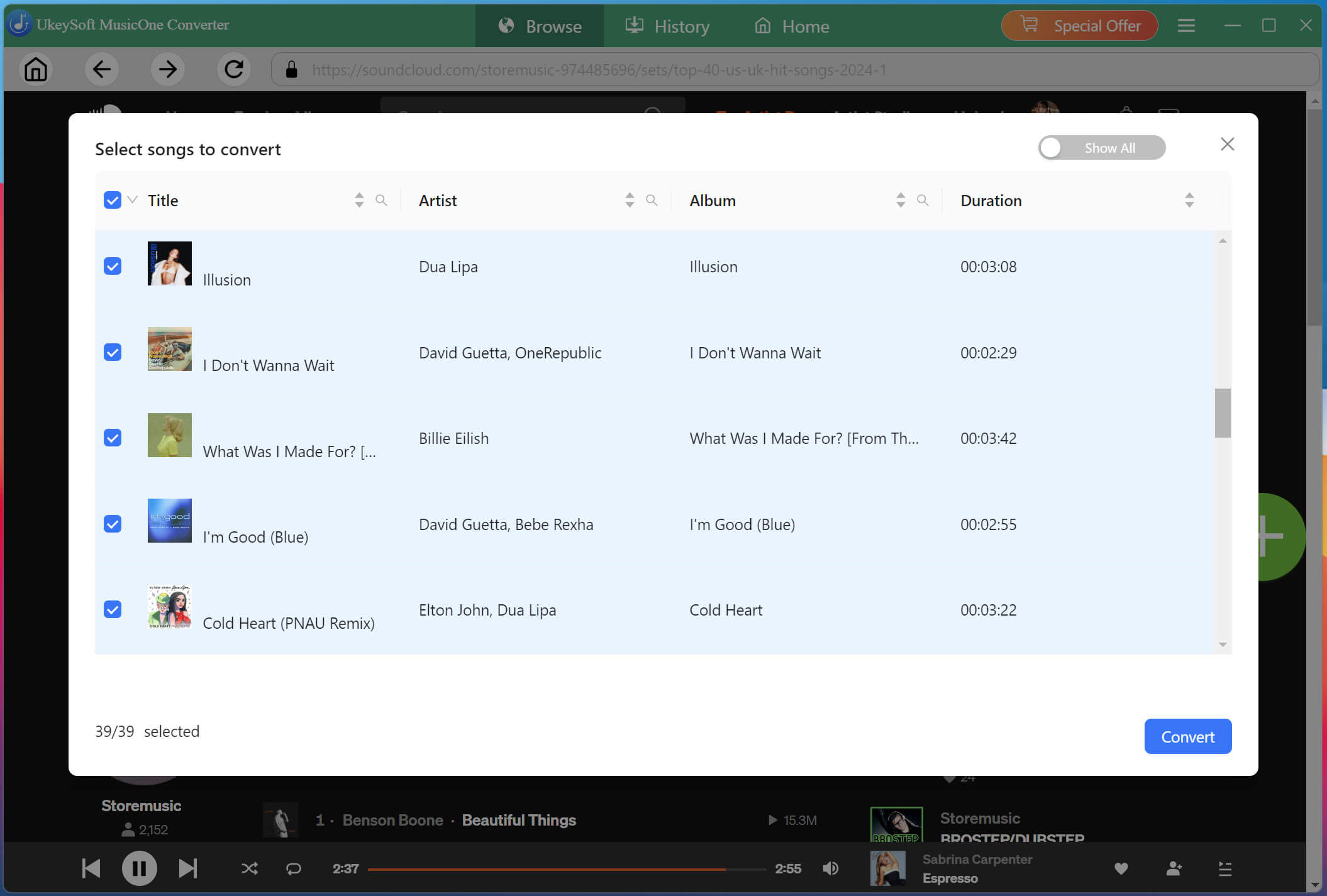
Select Desired SoundCloud Songs
Check the conversion list and select the individual SoundCloud songs you want to download. You can also select an entire playlist or album if you want to transfer a larger music collection to your MP3 player.
If you only need a few tracks, selecting individual songs can also help reduce storage consumption on your computer and MP3 player.
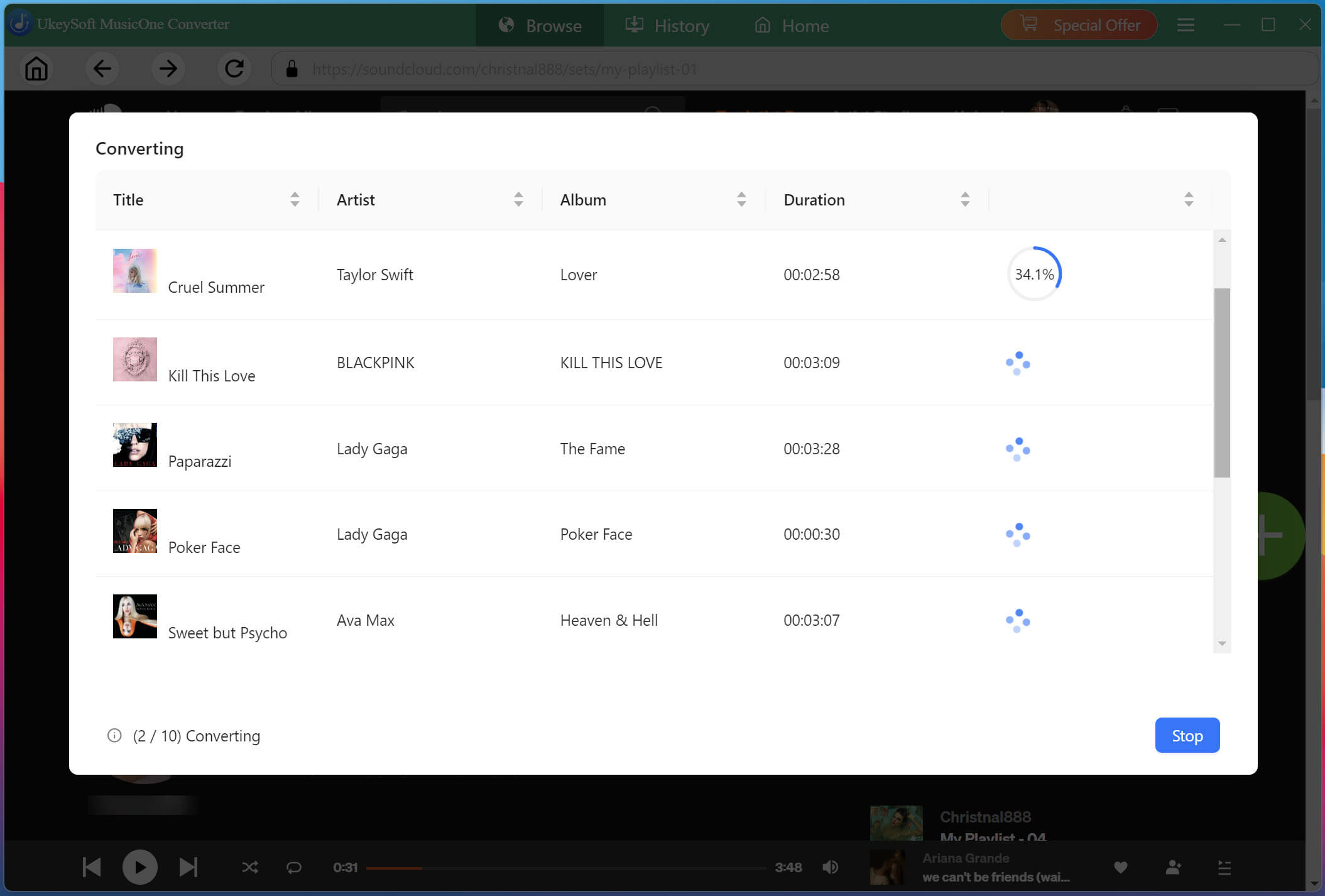
Begin Download SoundCloud Songs to MP3
After selecting your songs and confirming the output settings, click "Convert" button. UkeySoft SoundCloud Music Converter will download and convert the selected SoundCloud tracks into MP3 files based on your configured settings. Its batch conversion and high-speed processing can make larger playlists faster to process.
Get Downloaded SoundCloud Songs
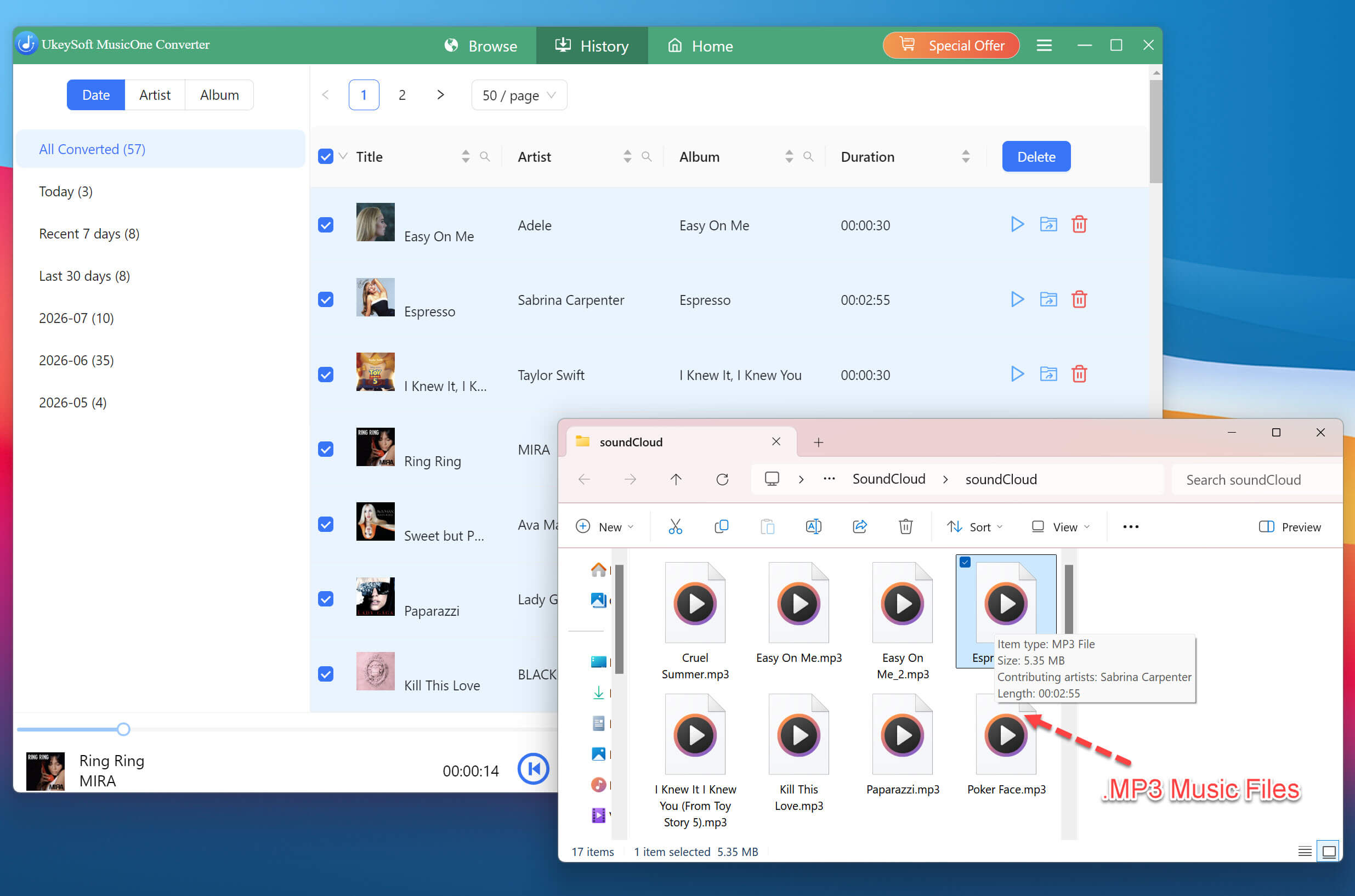
When conversion is complete, open the "History" section and click the folder icon to locate your downloaded SoundCloud MP3 files. From there, you can check the files and prepare them for transfer.
Video Guide: How to Download SoundCloud Songs to 320kbps MP3s with UkeySoft
Part 3. How to Transfer SoundCloud Songs to MP3 Player?
Once you have downloaded SoundCloud songs as MP3 files with UkeySoft SoundCloud Music Converter, you can easily transferr them to any MP3 player, including Sony Walkman MP3 player, SanDisk MP3 player, Zune, Activo CT10, FiiO M11/M15, PSP, PS3, PS4, PS5, iPod Nano, iPod Shuffle, iPod Classic, iPod Touch, etc.
For Traditional MP3 Players: Use File Explorer on Windows
If you use Windows, File Explorer is the easiest way to transfer your downloaded SoundCloud music to your MP3 player.
Connect your MP3 player to the Windows computer using a compatible USB cable.
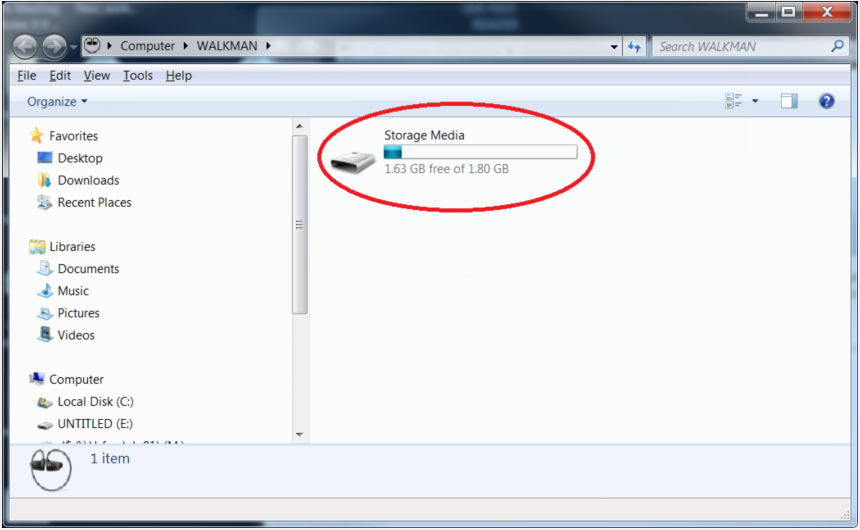
Wait for Windows to recognize the device. Open File Explorer and select "This PC" from the left navigation panel.
Locate your connected MP3 player under the list of available drives. Open it to view its folders.
Open the folder containing your downloaded SoundCloud MP3 files in another File Explorer window.
Select the downloaded SoundCloud songs you want to transfer. Drag and drop them into the MP3 player's Music folder.
You can also right-click the selected SoundCloud MP3 music files, choose "Copy", open the destination folder, and select "Paste".
Wait for the transfer to finish. Then safely eject the MP3 player before disconnecting the USB cable.
For Traditional MP3 Players: Use Finder App on Mac
On newer versions of macOS, you can generally use Finder to access compatible external MP3 players that appear as connected storage devices.
Connect the MP3 player to your Mac using its USB cable.
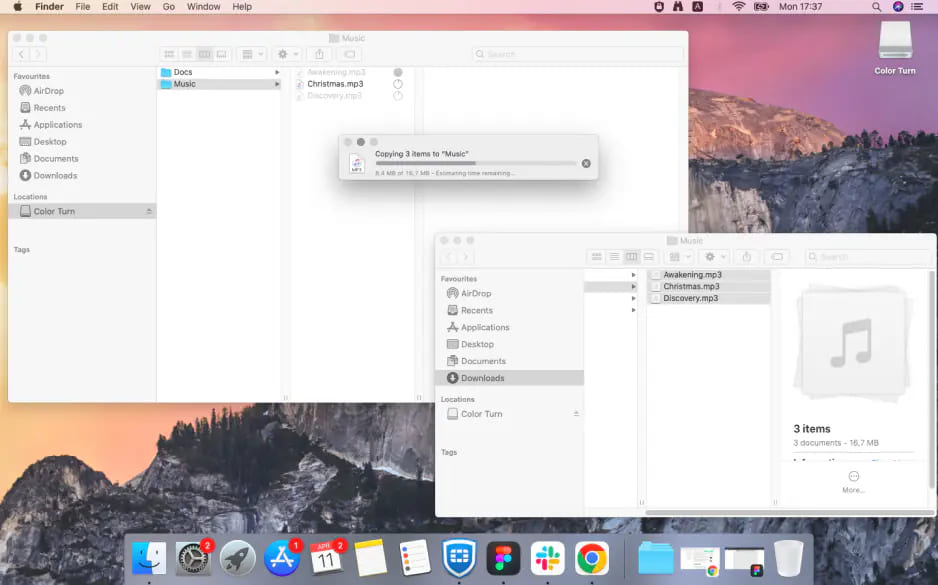
Open Finder and check the sidebar under Locations for the connected device.
Open the MP3 player's storage and locate its Music folder or another appropriate destination.
Open the output folder containing the SoundCloud MP3 music files downloaded with UkeySoft.
Drag the selected SoundCloud MP3 files into the MP3 player's music folder and wait for the transfer to complete. Eject the device from Finder safely.
For iPod Devices: Use iTunes or Music App
For iPod devices, you can use iTunes on Windows or the Music app on Mac to transfer your downloaded SoundCloud MP3 files to your iPod Nano/Shuffle/Classic/Touch.
Add Downloaded SoundCloud MP3 Files to iTunes/Music
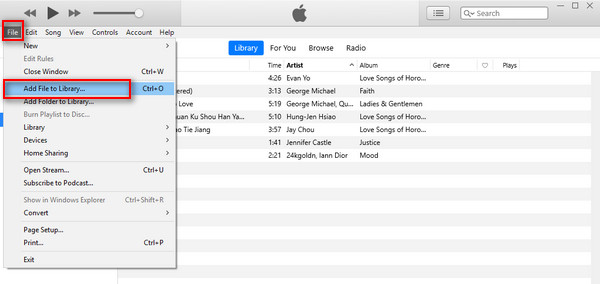
Open iTunes on your Windows computer. Click "File", select "Add File to Library...", then click "Import" to add downloaded SoundCloud MP3 files to your iTunes library.
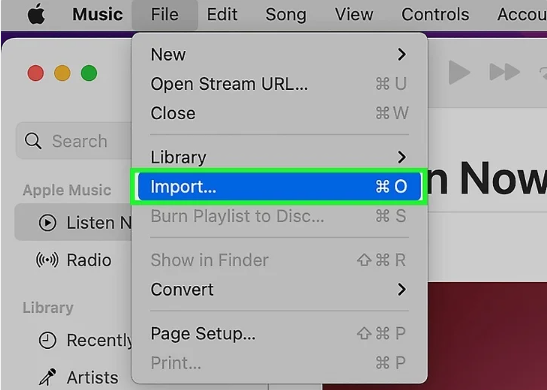
For Mac users, open Music app, click "File" in the top menu bar, select "Import...". Choose your downloaded SoundCloud MP3 files or folder and click "Open".
Connect iPod to Computer
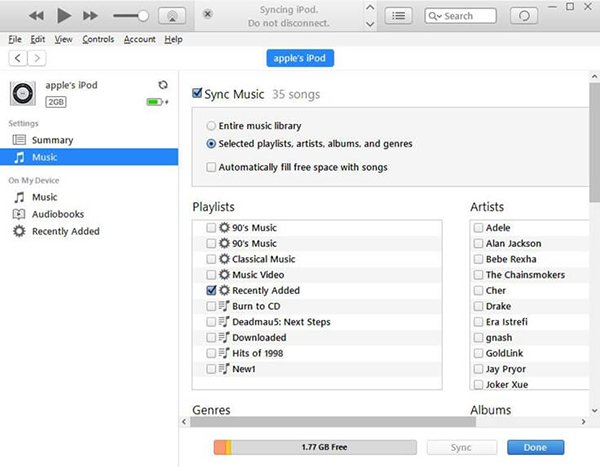
Connect your iPod Nano, Shuffle, Classic, Touch to your computer using a USB cable. Wait for iTunes or Music to recognize your device. Select your iPod from the device list.
Sync SoundCloud MP3 Files to your iPod
In iTunes, open the Music section under your iPod settings. Enable "Sync Music", choose the songs or playlists you want to transfer, and click "Apply" or "Sync".
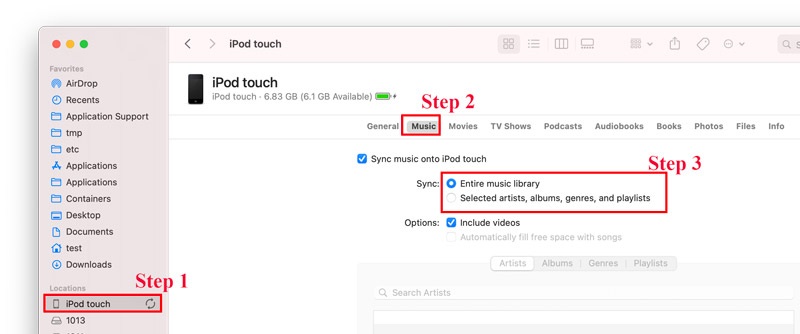
On Mac, use Finder to select your iPod, choose the "Music" tab, and sync the selected tracks.
Safely Disconnect Your iPod
After the synchronization process finishes, eject your iPod from iTunes, Finder, or the Music app.
Part 4. Conclusion
Now that you know how to download songs from SoundCloud to MP3 player for playback, it's necessary to use a third-party SoundCloud music downloader. UkeySoft SoundCloud Music Converter is probably the best tool you can rely on. Its powerful functionality makes it easy to download high-quality 320kbps MP3 music from SoundCloud on your MP3 player with a Free account. Hit on the Download button to build your music collection offline and transfer SoundCloud songs to MP3 player easily!
Justin Sabrina has always had great enthusiasm for writing, programming and web development. He likes writing about software and technology, his works are featured on some tech blogs or forums like Tom's Hardware, CNET, etc.
 English
 Arabic
 Chinese (Simplified)
 Chinese (Traditional)
 Croatian
 Czech
Czech Danish
 Dutch
Dutch Estonian
 Finnish
 French
 German
 Greek
Greek Hebrew
 Hindi
Hindi Hungarian
 Indonesian
 Italian
 Japanese
 Kazakh
 Korean
 Malay
Malay Norwegian
 Polish
 Portuguese
 Romanian
 Russian
 Slovenian
 Spanish
 Swedish
 Thai
Thai Turkish
 Ukrainian
 Vietnamese








Comments are off!