To download SoundCloud music to your computer, you have several options, including SoundCloud's official download feature, online SoundCloud downloaders, browser extensions, and desktop downloaders.
Among these methods, UkeySoft SoundCloud Music Converter is a flexible choice for downloading SoundCloud music in batches. It supports playlists, albums, and individual tracks, with multiple output formats, up to 320kbps MP3 quality, and ID3 tags preserved.
SoundCloud is the ultimate platform for underground artists, exclusive remixes, DJ sets, and podcasts. As a SoundCloud music lover, you may want to download music from SoundCloud to computer locally. This gives you more freedom to build a permanent library of your favorite tracks and enjoy offline playback anytime.
However, SoundCloud only allows its Go and Go Plus subscribers to download music in the mobile app. But this is no longer an issue! In this guide, we'll show you 4 ways to download songs from SoundCloud to computer, even without a subscription account. Now, let's get started!
Way 1. Download SoundCloud Music to Computer Officially
You may have noticed that on some SoundCloud song pages come with a built-in download feature. In fact, some artists and uploaders choose to enable the download option for their tracks, allowing even free users to save the song as local MP3, AAC, or WAV files. When available, you can directly download a song from SoundCloud web player to PC or Mac for free. See how it works:
Visit SoundCloud in your web browser and sign in to your account.
Find the song you want to download to your computer.
Open the song's page and click the "More" button.
Look for "Download file" option. If available, click it to save the SoundCloud song to your computer.
✅ Pros
● Official and straightforward method.
● No third-party software required.
● Free when the artist enables downloads.
● Downloads the file provided by the uploader.
❌ Cons
● Not available for every SoundCloud song.
● Usually limited to individual tracks.
● You cannot use it to download an entire playlist.
● Available output format depends on the uploaded file.
Way 2. Download SoundCloud Music to Computer as MP3 320kbps
If you are looking for a reliable and efficient way to download SoundCloud music on computer, UkeySoft SoundCloud Music Converter is your go-to option! It has delivered a powerful download functionality to unlock all music content in SoundCloud library. It supports Windows 7/8/8.1/10/11 and Mac OS X 10.9 or higher, and provides multiple output formats (including MP3, M4A, FLAC, WAV, AAC, AIFF) so you can transfer and enjoy your SoundCloud downloads in more flexible ways.
Whether you are a SoundCloud Free user or subscribed to Go or Go Plus, you can use it to download SoundCloud tracks, playlists, albums and podcasts to your computer and convert them as MP3 320kbps files, while ID3 tags and cover information can be retained for easier library management.
Main Features of UkeySoft SoundCloud Music Converter:
Download music from SoundCloud Free and Go/Go+ accounts to PC/Mac.
Convert SoundCloud tracks to MP3, FLAC, WAV, M4A, AAC, and AIFF.
Save SoundCloud music to computer in up to 320kbps MP3.
Download multiple SoundCloud tracks, playlists, and albums simultaneously.
Preserve ID3 tags like titles, artists, albums, and cover artwork intact.
Export SoundCloud music files to computer folder at 16X ultra-fast speed.
Built-in Web Player to browse, search, and select music directly.
Classify output SoundCloud songs by artist, album or date.
How to Download SoundCloud Playlist to Computer with UkeySoft
Log In to SoundCloud Account in UkeySoft
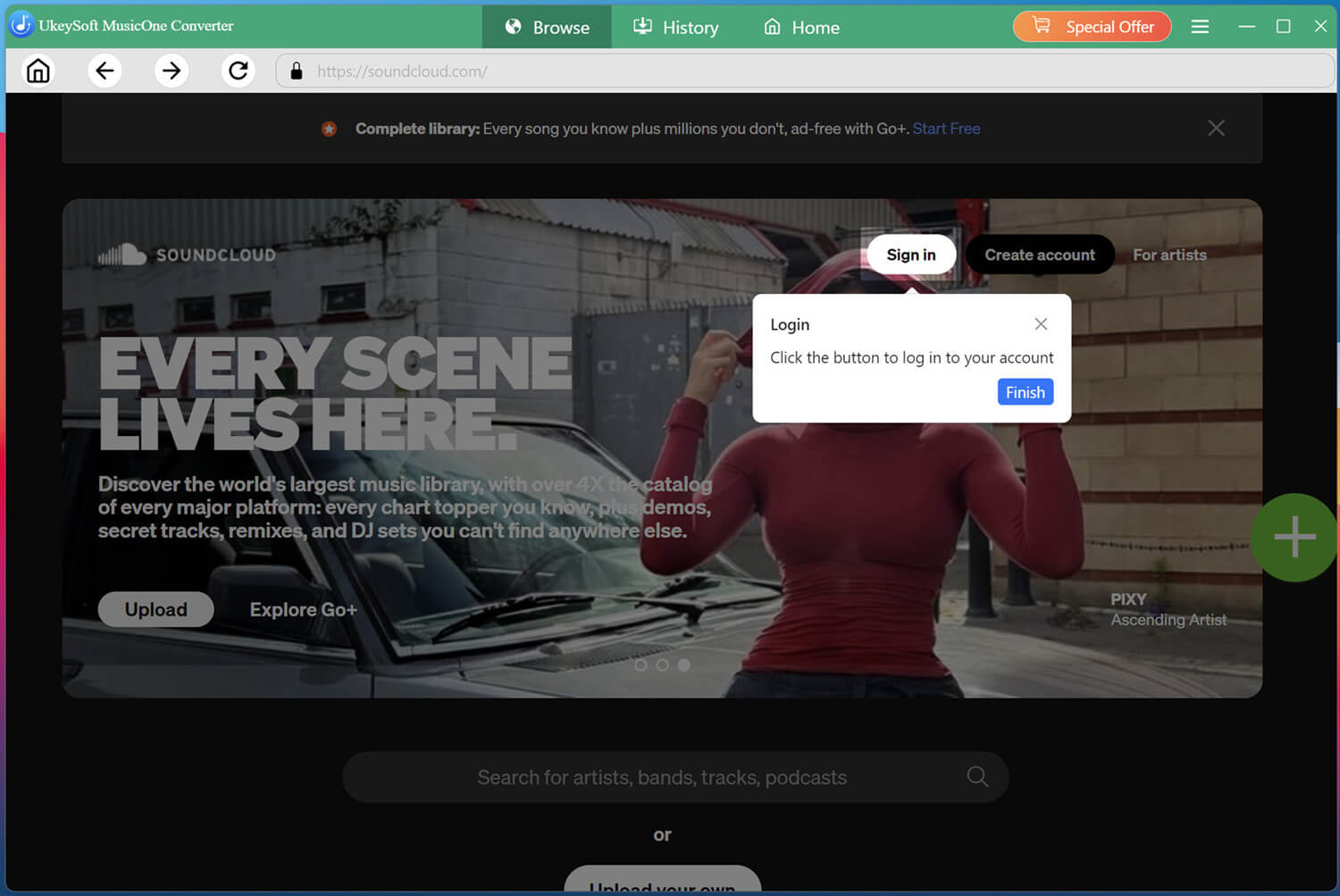
Install and launch UkeySoft SoundCloud Music Converter on your computer and sign in to your SoundCloud account through the built-in player.
Logging in allows the software to access your available SoundCloud music and playlists.
Configure the Output Settings
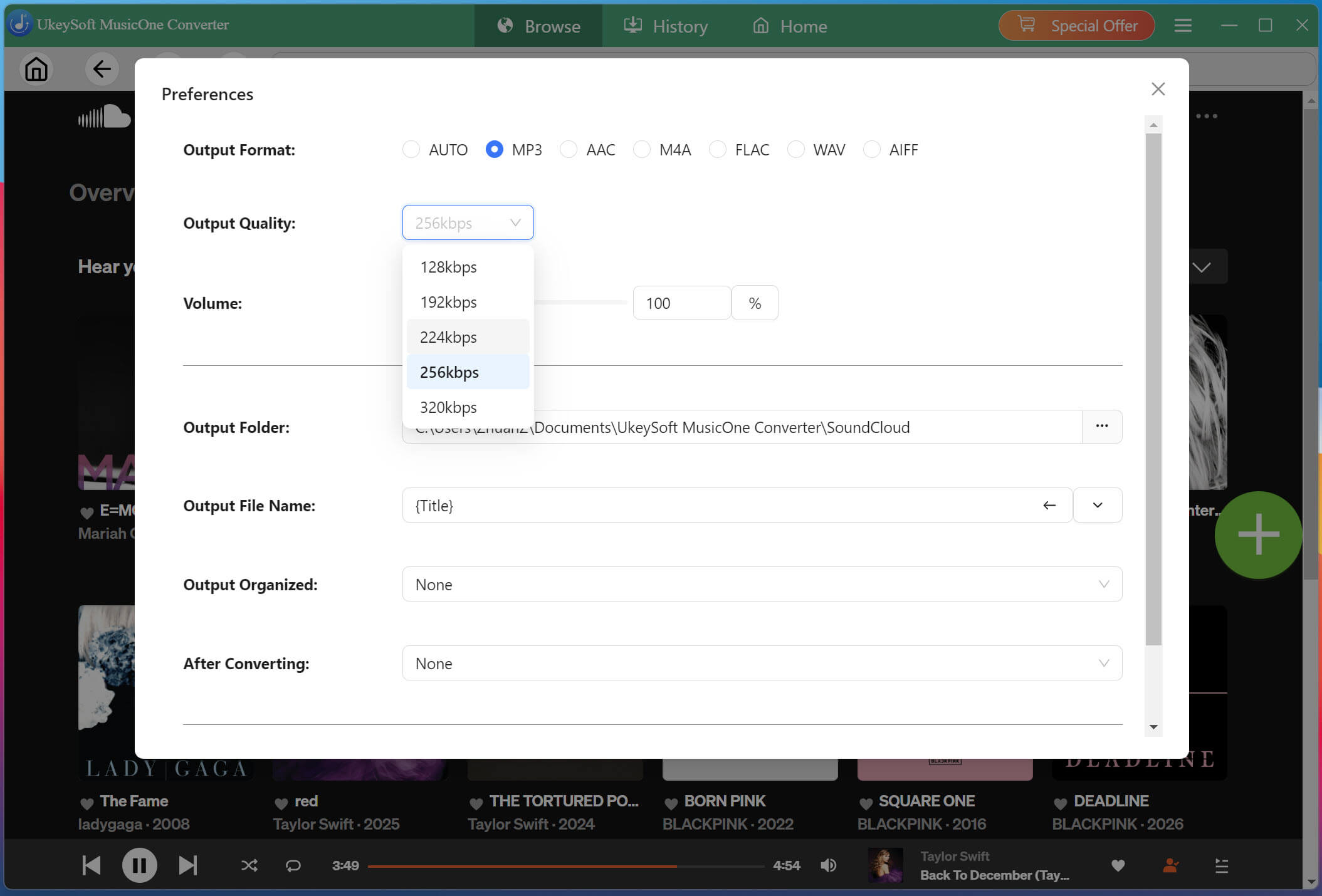
Click Menu, then select Preferences to configure your output format (MP3, FLAC, WAV, AAC, etc.), adjust the audio quality (320kbps), select the output folder, and configure other download preferences.
Browse, Open, and Add Music
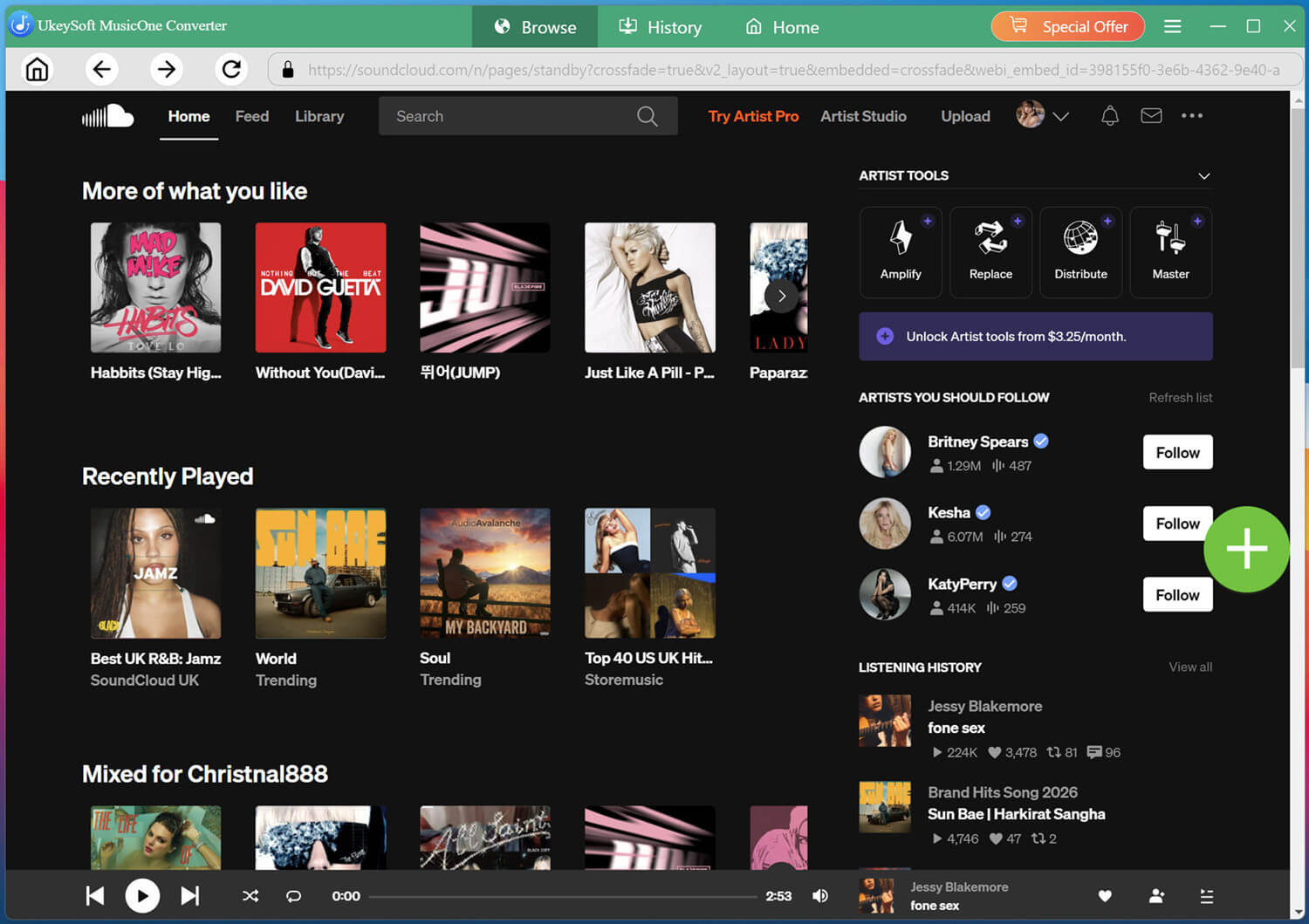
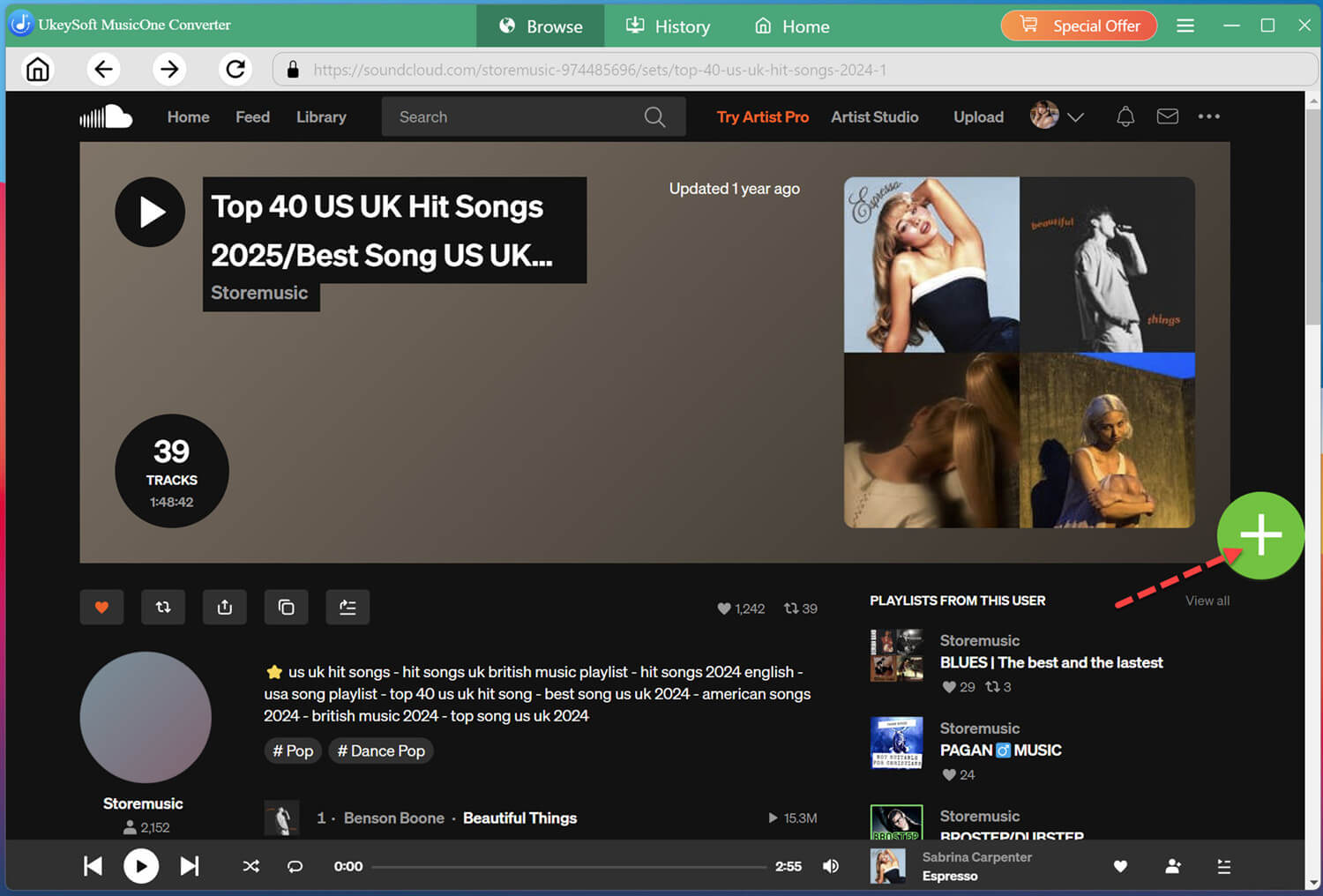
Use the built-in SoundCloud player to search for the song, playlist, album, or podcast you want to download. Open the desired content such as a hot playlist and click the "+" icon to load it.
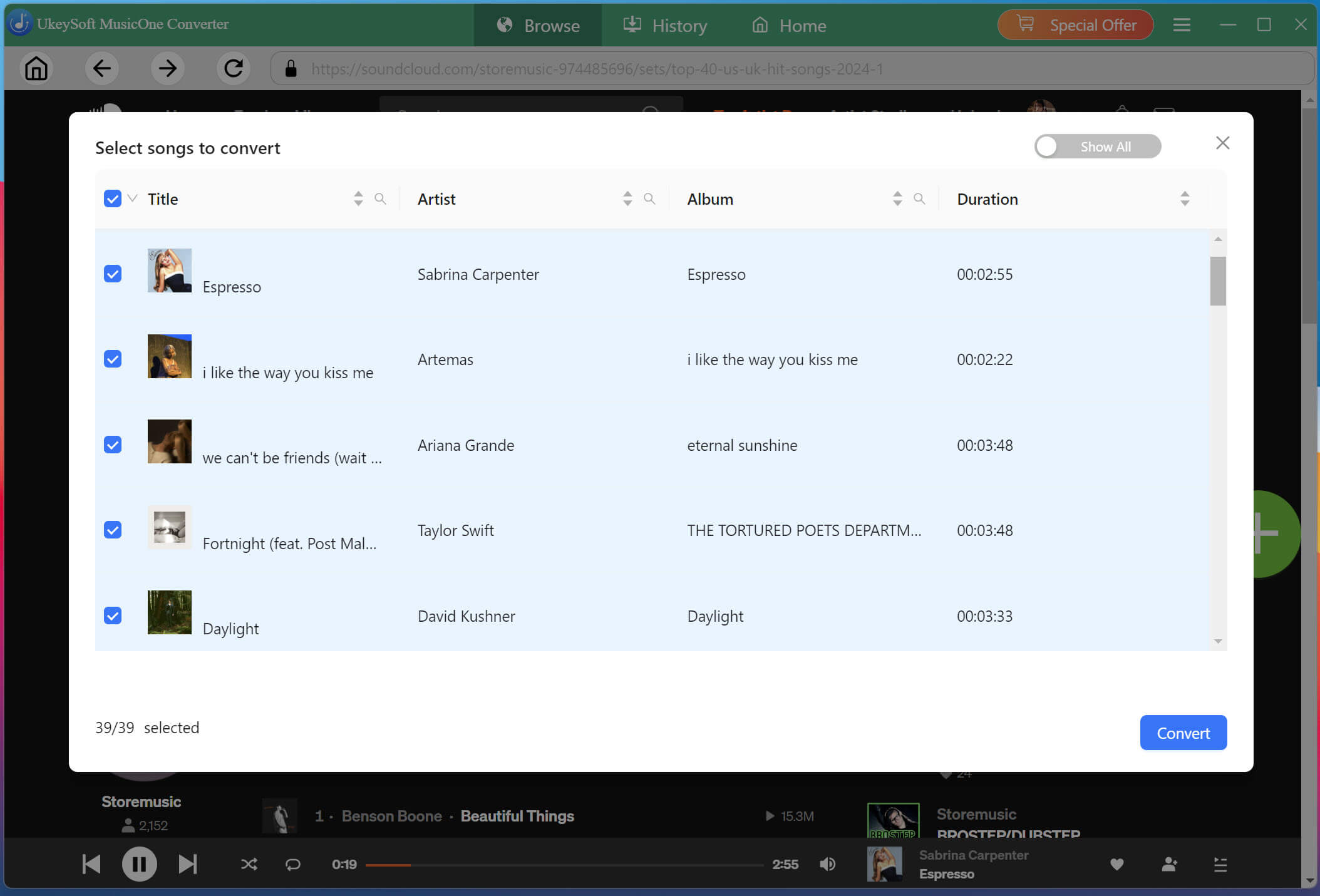
UkeySoft will display the available tracks in the selected playlist or album. Check the songs you want to save, or select multiple tracks at once for batch downloading.
Start Downloading SoundCloud Songs to MP3
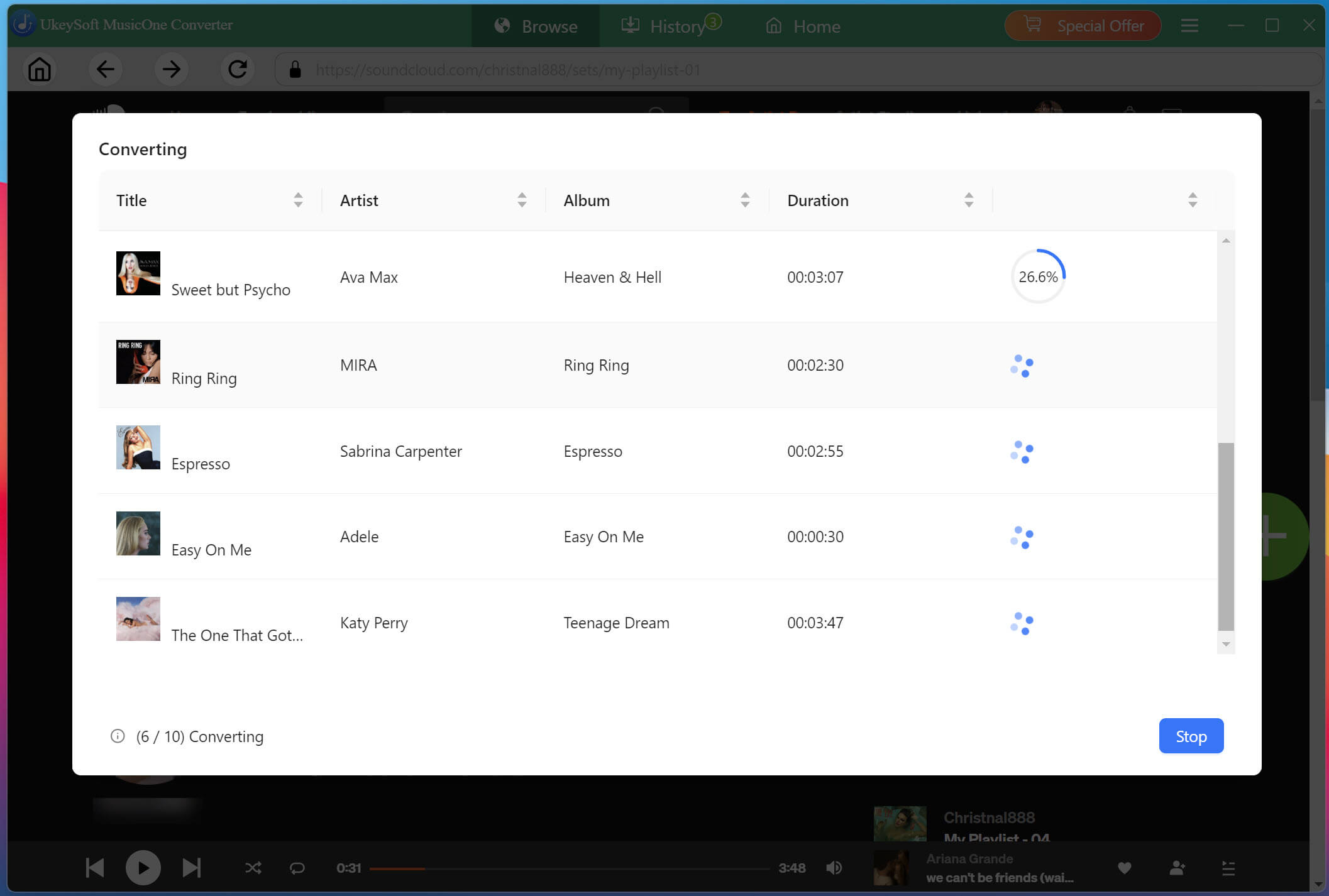
If ready, click "Convert" button to start the process. UkeySoft will download and convert all selected SoundCloud tracks simultaneously to MP3 or other formats at 16X faster speeds with lossless audio quality.
Get the Downloaded SoundCloud Songs
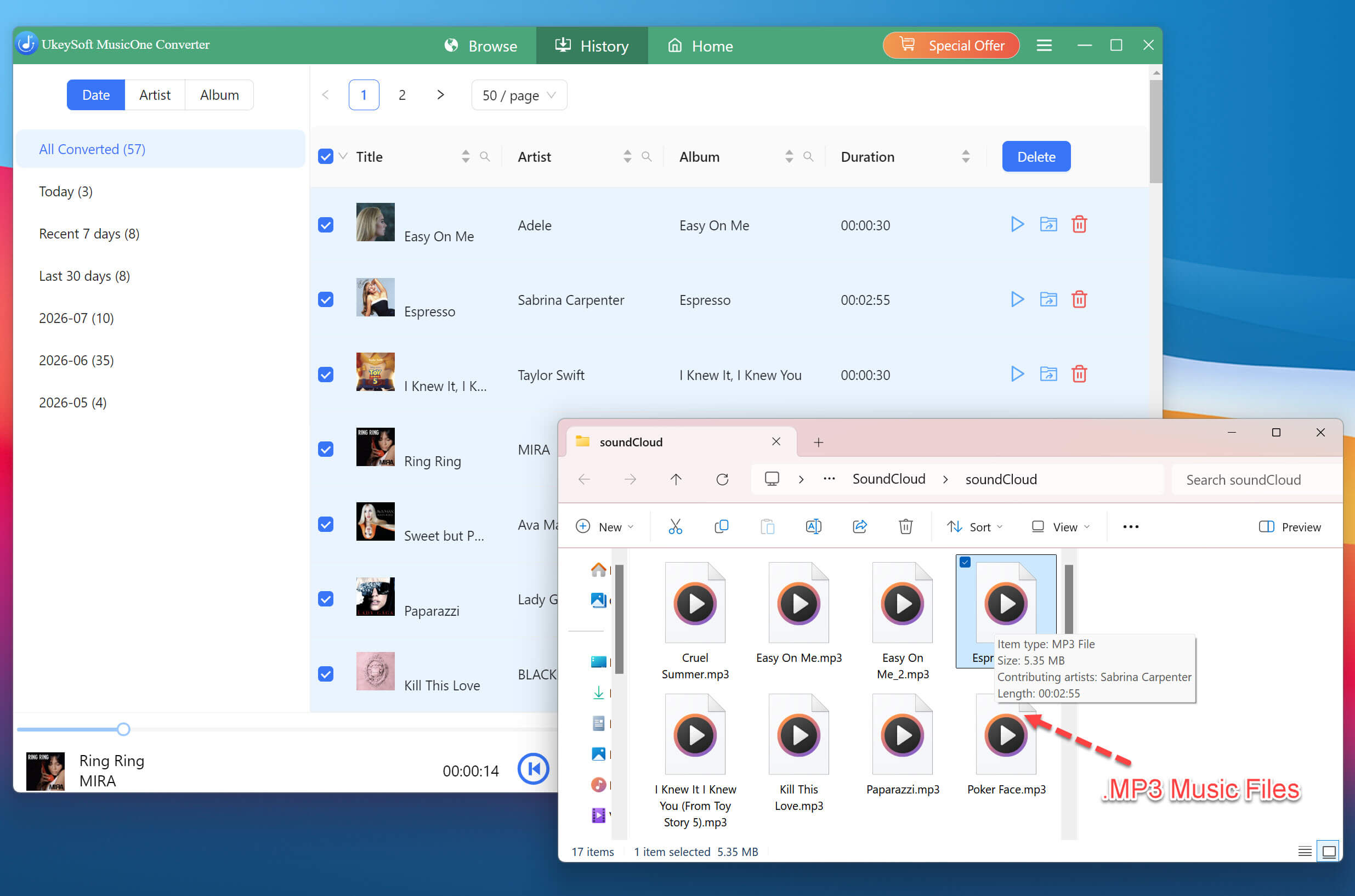
Once conversion completes, navigate to the "History" section and click the folder icon. You can then find your downloaded SoundCloud tracks, along with their preserved metadata where available.
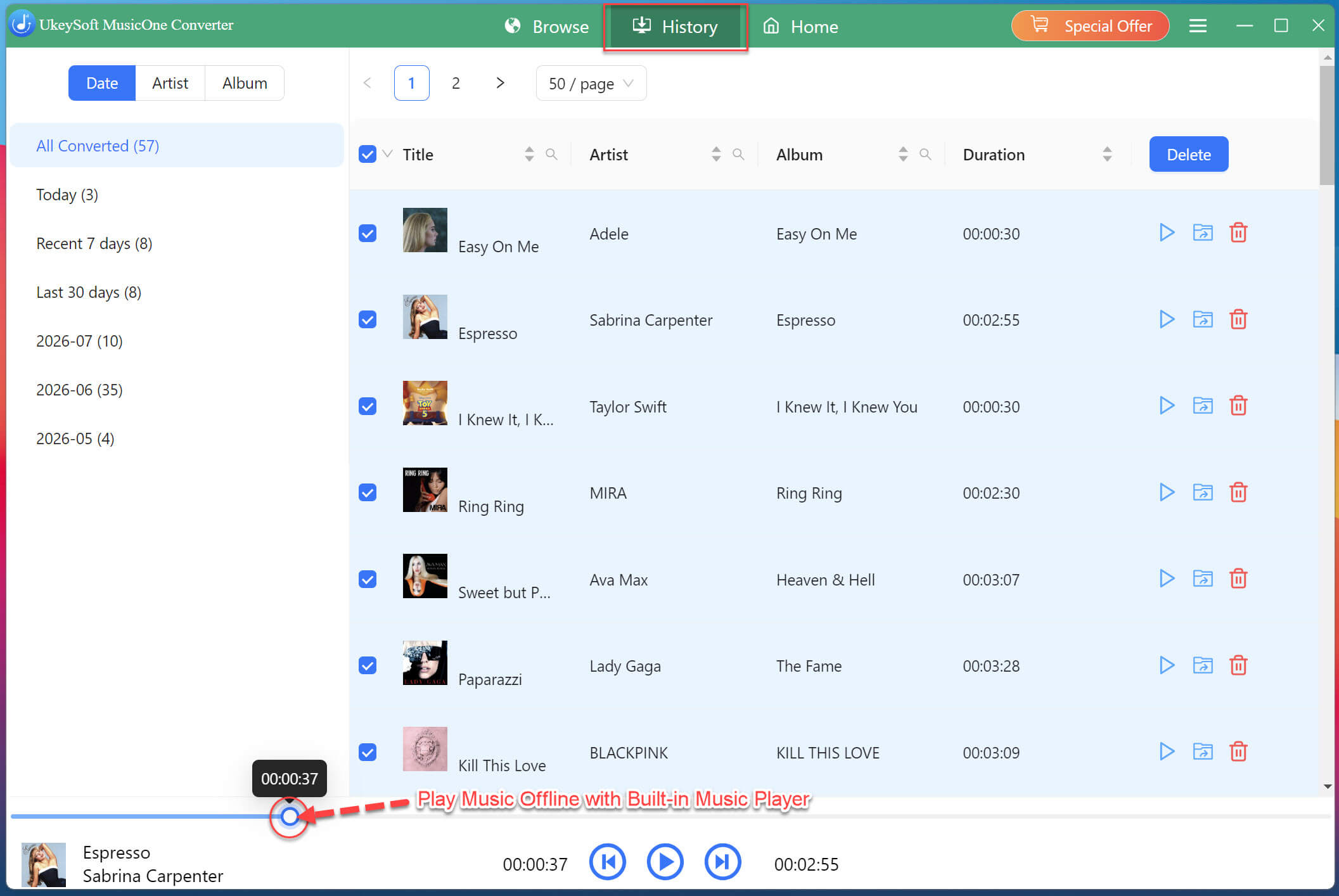
By the way, you may also use UkeySoft's built-in music player to play these high-quality SoundCloud music on your computer directly.
✅ Pros
● Supports SoundCloud Free and Go/Go+ accounts.
● Download tracks, playlists, albums, and podcasts.
● Up to 320kbps MP3 output.
● Supports multiple audio formats.
● Batch downloading saves time.
● Preserves ID3 tags and cover information.
● Works on both Windows and Mac.
❌ Cons
● Requires desktop software installation.
● Full functionality requires a paid license.
● Audio quality ultimately depends on the available source quality.
Way 3. Download SoundCloud Music to Computer via Online Downloader
Another quick way to download SoundCloud music to computer and even smartphone can be using an online SoundCloud music downloader. Online tools like KlickAud SoundCloud Downloader don't require installing any third-party software. This browser-based tool allows you to paste the SoundCloud song URL and download SoundCloud song to MP3 for free.
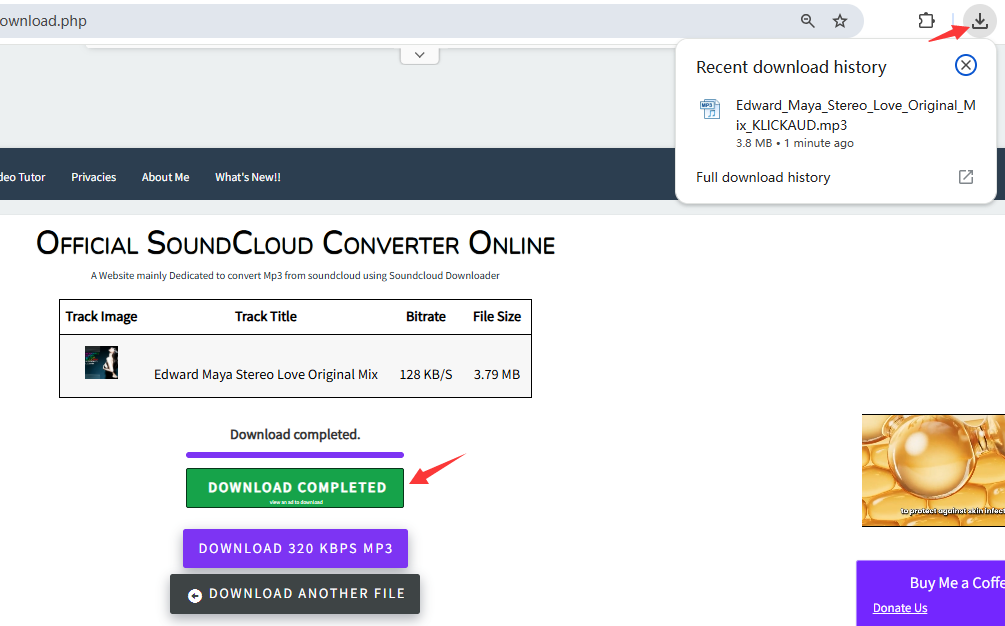
However, the experience is far from premium. The page has heavy advertisements, and you often need to watch ads to remove ads for just one hour. More importantly, our testing found that the output quality was only 128kbps MP3, which is considerably lower than a dedicated desktop software.
Open your browser and navigate to KlickAud SoundCloud downloader website.
Go to SoundCloud and copy the URL of the song you want to download.
Paste the URL into the input field on Klickaud and click "CONVERT" button.
Wait for the site to process the link and present download options. Click "DOWNLOAD THE SONG" option to save the generated MP3 file to your computer browser.
NOTE:
Don't click the "DOWNLOAD 320 KBPS MP3" button, it is fake. When you click it, it will redirect you to a paid third-party software page.
✅ Pros
● Free to use.
● No software installation.
● Works directly in a web browser.
● Simple URL-based workflow.
❌ Cons
● Heavy advertising and pop-ups.
● Output quality limited to 128kbps (lossy).
● Cannot download playlists or multiple tracks at once.
● Less control over output settings.
Way 4. Download SoundCloud Songs to Computer with a Browser Extension
SoundCloud Enhanced Pro is a popular extension for Google Chrome and Firefox that that adds download functionality directly to the SoundCloud interface. You can use it to download music from SoundCloud to Windows or Mac and save it in common MP3 format. The downloaded SoundCloud MP3 song will be kept with based ID3 tags and cover art.
This extension is suitable for occasional single-track downloads. However, it cannot download an entire playlist or album from SoundCloud, and some users have reported issues with tracks not appearing in their download folders.
Find SoundCloud Enhanced Pro in the Chrome Web Store or Firefox Add-ons Store and add the extension to your browser.
Visit SoundCloud and open the track you want to download. Make sure the extension is enabled in your browser.
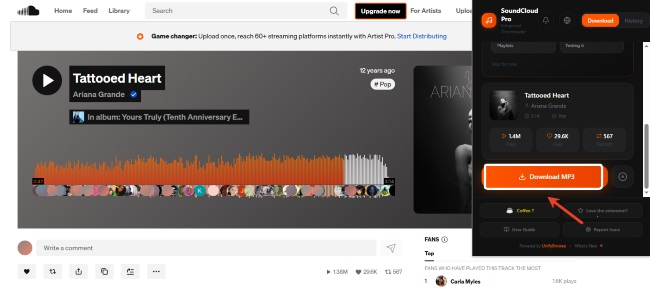
Look for the download option provided by the extension on the SoundCloud page. Click it to start saving the available track to your computer.
After the download finishes, open your browser's Downloads folder to find the saved MP3 audio file.
✅ Pros
● Integrated directly into the SoundCloud interface.
● No separate desktop downloader required.
● Suitable for individual tracks.
● Supports ID3 tagging and cover art.
❌ Cons
● Requires browser extension installation.
● Cannot download playlists and albums from SoundCloud.
● Not as flexible as dedicated desktop software.
● Some users report download destination issues.
FAQs About Downloading SoundCloud Music to Computer
Can I download SoundCloud songs to my computer for free?
Yes! If an artist enables SoundCloud's official Download file option, you can download the track for free directly from SoundCloud. For songs without an official download option, you can try free online SoundCloud downloaders or browser extensions to download the SoundClound song to your computer for free.
Where are SoundCloud songs stored on my computer?
It depends on the method you use. When you download music from the official SoundCloud website, an online tool, or a browser extension, the output music files are typically saved to your browser's default Downloads folder. For third-party desktop software like UkeySoft SoundCloud Music Converter, the location depends on your selected output folder. You can specify the output folder in the UkeySoft's Preferences before starting the download process.
Is it possible to download an entire SoundCloud playlist on PC/Mac?
Yes. You need to use a dedicated SoundCloud Playlist downloader such as UkeySoft SoundCloud Music Converter, it provides a one-click way to save an entire playlist from SoundCloud web player to your computer as local 320kbps MP3 files.
Conclusion
There are several ways to download SoundCloud music to computer, including official webpage and third-party tools such as desktop software, online SoundCloud downloaders and browser extensions, but the best choice depends on what you need.
Among them, UkeySoft SoundCloud Music Converter will provide an excellent solution to download SoundCloud music to computer in 320kbps MP3 without Premium. Its ad-free interface, batch downloads, 16X high speed, multiple audio formats, lossless music quality, and ID3 metadata preservation make it the best choice. Hit the Download button below, and build your offline music library!
Justin Sabrina has always had great enthusiasm for writing, programming and web development. He likes writing about software and technology, his works are featured on some tech blogs or forums like Tom's Hardware, CNET, etc.
 English
 Arabic
 Chinese (Simplified)
 Chinese (Traditional)
 Croatian
 Czech
Czech Danish
 Dutch
Dutch Estonian
 Finnish
 French
 German
 Greek
Greek Hebrew
 Hindi
Hindi Hungarian
 Indonesian
 Italian
 Japanese
 Kazakh
 Korean
 Malay
Malay Norwegian
 Polish
 Portuguese
 Romanian
 Russian
 Slovenian
 Spanish
 Swedish
 Thai
Thai Turkish
 Ukrainian
 Vietnamese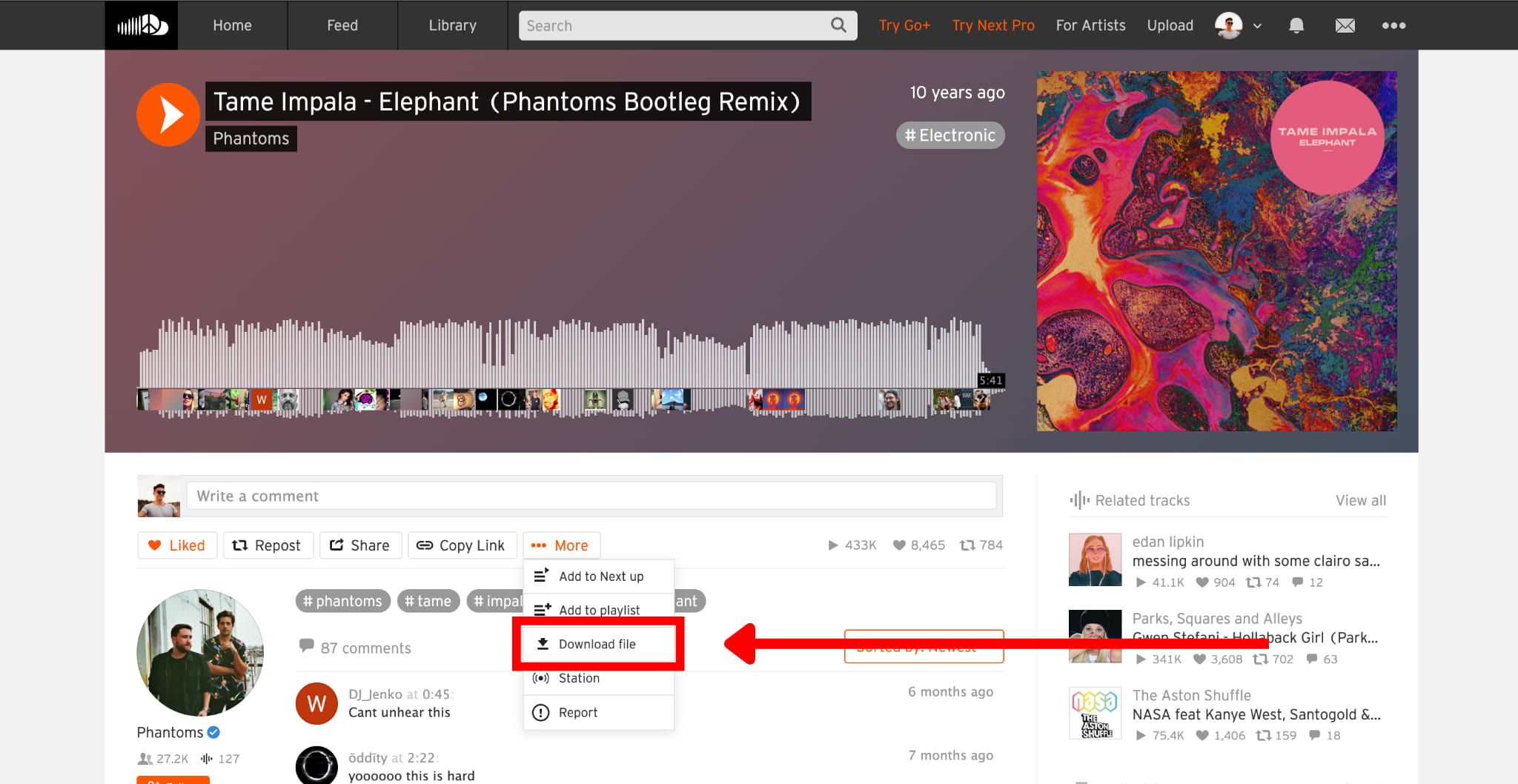








Comments are off!