How to Download SoundCloud Songs to Android (Ultimate Guide)
-- Read this ultimate guide. Learn how to download download SoundCloud music to Android devices effortlessly and enjoy your favorite tracks anytime, anywhere.
Downloading SoundCloud music on Android depends on your subscription.
With SoundCloud Go/Go+, you can download tracks, albums and playlists for offline playback, but playback is limited to SoundCloud app and requires an active subscription.
Without SoundCloud Go/Go+, you can use UkeySoft SoundCloud Music Converter, an online downloader, or a modded Android APK to save SoundCloud tracks to your Android device as local MP3 files. This approach gives you flexible, long-term access and lets you play your music across any device you choose.
SoundCloud music has become the go-to platform for independent artists, remixes, DJ sets, and trending tracks. While it's convenient to stream SoundCloud music online, it can be frustrating when your mobile signal is weak or Wi-Fi is unavailable. A frequently asked question is how to download SoundCloud songs to Android.
Fortunately, SoundCloud offers an official Android app, making it easy to browse music and access supported offline features. In this ultimate guide, we'll walk you through four practical ways to download music from SoundCloud on Android, covering official offline downloads, desktop software, online tools, and Android APK downloader.
Way 1. Download SoundCloud Songs to Android with Subscription
If you have subscriptions to the two SoundCloud plans: SoundCloud Go and SoundCloud Go Plus, the most straightforward way to download SoundCloud songs on Android is through the official SoundCloud app. New users can even get a free trial on SoundCloud page: 7 days for SoundCloud Go and 30 days for SoundCloud Go+.
Plans
SoundCloud Free
SoundCloud Go
SoundCloud+
Price
Free
$4.99 per month
$10.99 per month
Offline Downloads
No
Yes
Yes
How to Download SoundCloud Songs on Android with Go or Go+
Install the SoundCloud app from Google Play to your Android phone or tablet.
Open SoundCloud app, and sign in to your SoundCloud Go, Go+, or free trial account.
Search for the track, album, or playlist you want to save.
Add the music to your library. Like the track or add it to a playlist if necessary.
Return to any track, playlist, or album and tap the three-dot menu on it. Tap "Download" button to save it for offline listening.
How to Automatically Download SoundCloud Music
In addition, you may also set the app to automatically download new playlists and albums added to your library. This can reduce the need to download tracks manually.
Open the SoundCloud app on Android device and sign in to your subscription account.
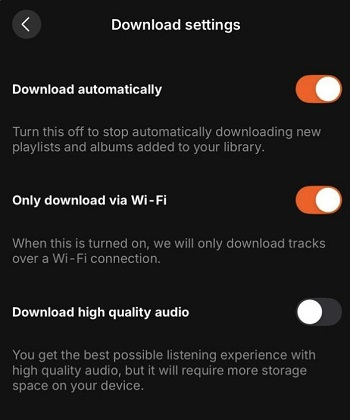
Go to your Library and open the app's Download settings
Enable "Download automatically" option. You may also enable the "Only download via Wi-Fi" and "Download high quality audio" options.
✅ Pros
● Completely official and fully legal.
● No third-party software required.
● High-quality streaming with no ads.
● Works on all Android devices.
❌ Cons
● Files are locked inside the SoundCloud app - you cannot export them.
● Offline content disappears if you log out or uninstall the app, or cancel the subscription.
● Limited availability - SoundCloud Go/Go+ is only available in select countries.
Way 2. Download SoundCloud Songs on Computer and Transfer to Android
Although the official method is convenient, its offline downloads remain accessible only within the SoundCloud app and may become unavailable when your subscription or free trial expires or content is removed. For more flexibility, downloading SoundCloud music to MP3 files is the best solution.
UkeySoft SoundCloud Music Converter is a desktop tool designed to download and convert supported SoundCloud content on Windows and Mac. It offers a built-in SoundCloud player, batch processing, multiple output formats, and ID3 metadata retention. You can download individual tracks, entire playlists or albums, or podcasts to computer as 320kbps MP3 files, and then transfer the them to your Android or other devices for permanent offline playback with compatible music apps.
Main Features of UkeySoft SoundCloud Music Converter:
Download SoundCloud songs, albums, playlists to PC/Mac at 16X speed.
Convert SoundCloud music to MP3, M4A, WAV, FLAC, AAC, or AIFF.
Download SoundCloud music as MP3 at 320kbps for premium listening experience.
Batch download entire SoundCloud playlists and albums at once.
Keep ID3 tags: track titles, artists, albums, and cover artwork.
Built-In SoundCloud web player to search for and select music directly.
Organize output songs for better management before transferring it to Android.
Transfer SoundCloud songs to Android, iPhone, USB drive, SD card and more.
How to Download SoundCloud Songs to Computer and Transfer to Android?
Log In to SoundCloud Account in UkeySoft
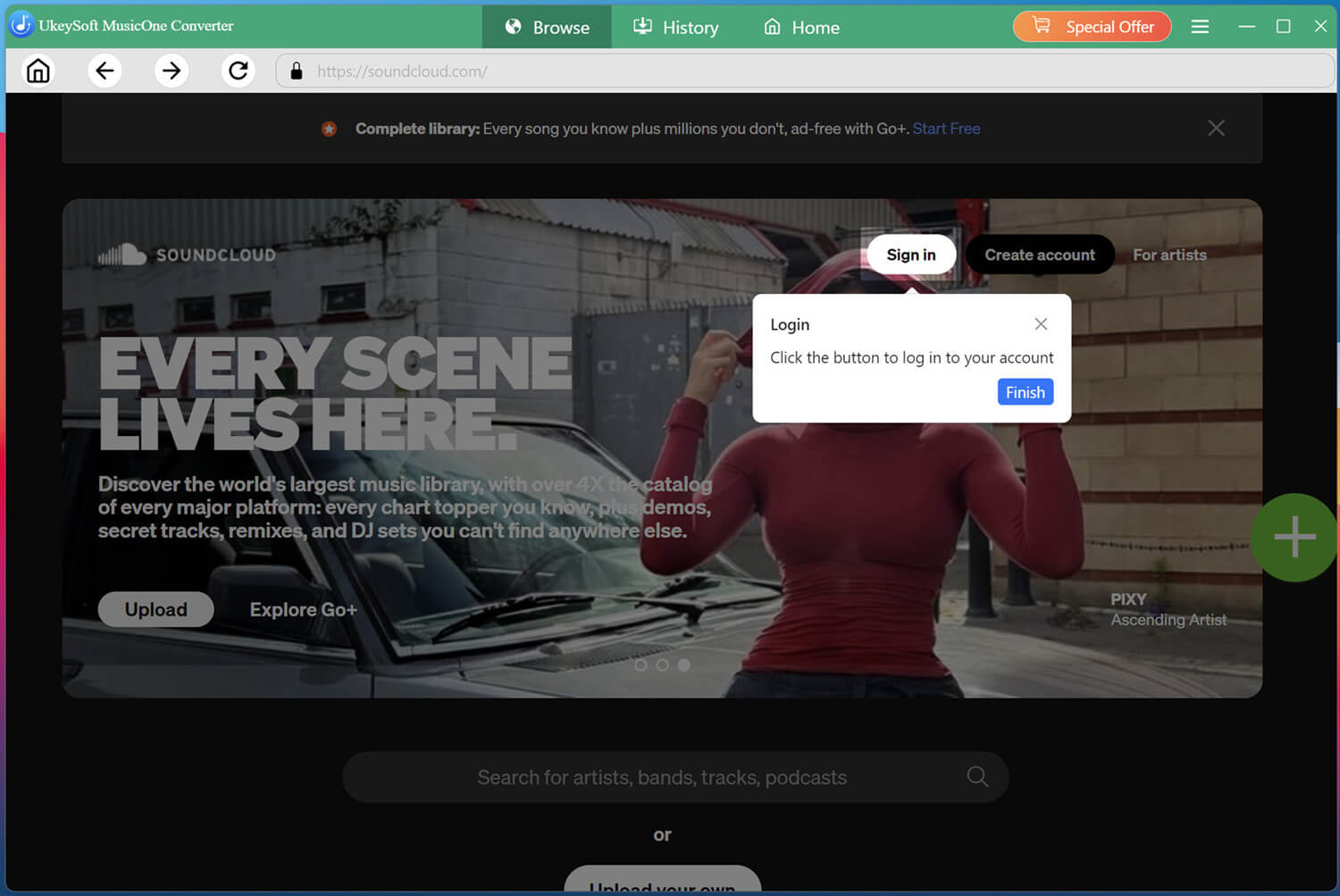
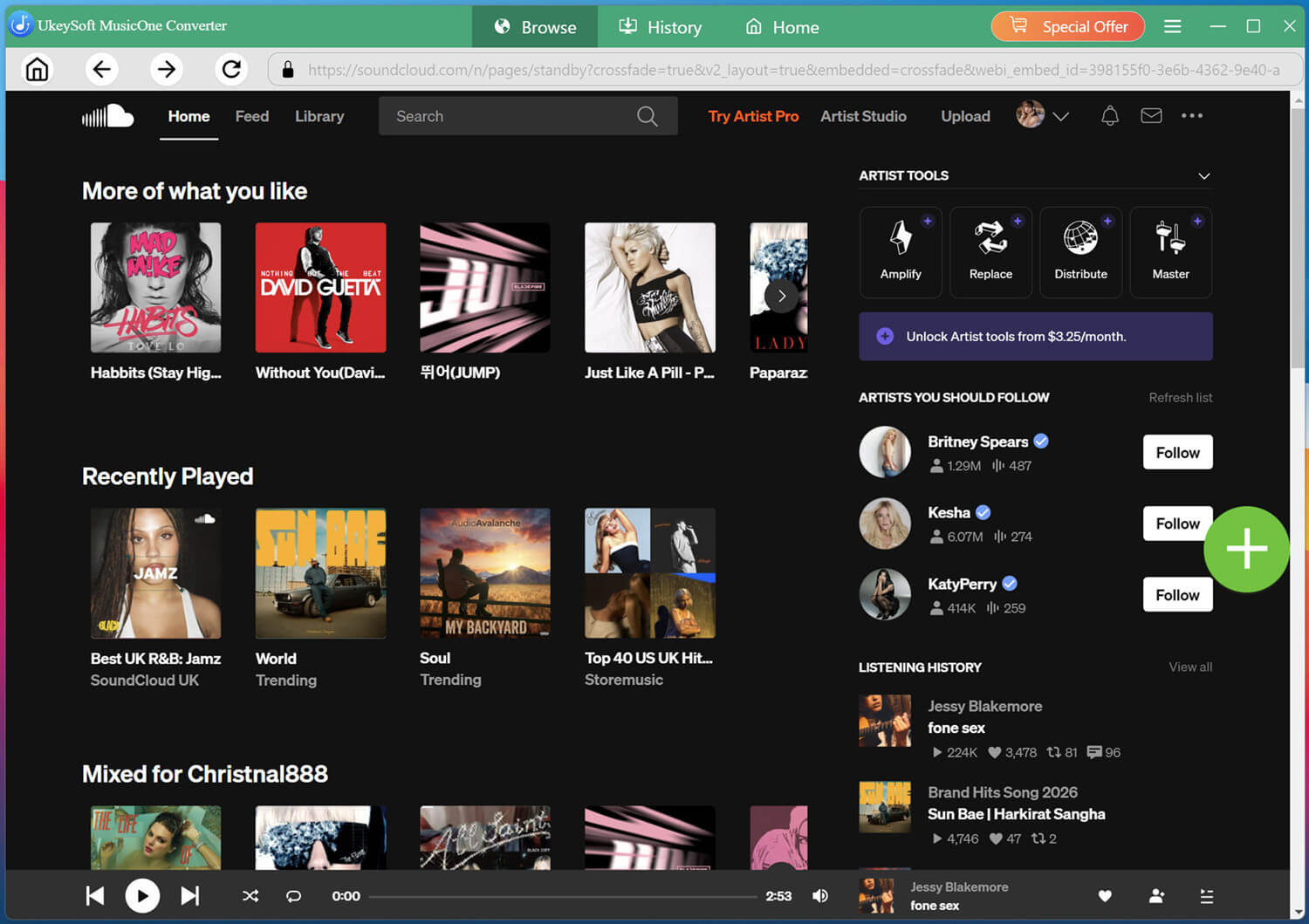
Download and launch UkeySoft SoundCloud Music Converter on your Windows PC or Mac. Open its built-in SoundCloud player and sign in to your free or paid account if prompted.
Browse your music library and find the tracks you want to download. Make sure you have permission to save the selected content.
Customize Output Settings
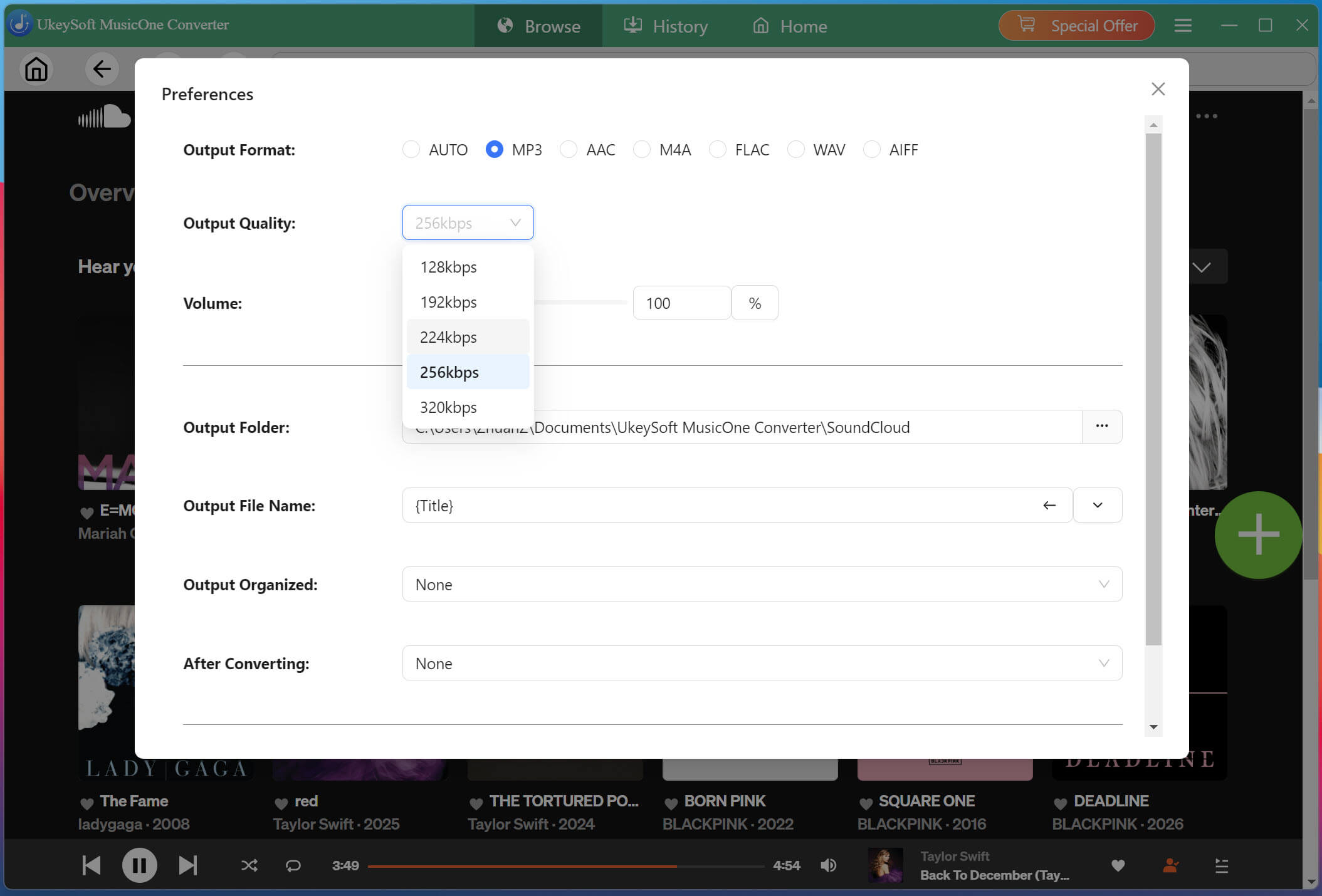
Click Menu and select Preferences to configure your output settings. Choose MP3 if you want broad compatibility with Android music players, or select another supported format that meets your needs. You can also adjust the output folder and available quality settings before adding songs to the download queue.
Add SoundCloud Songs
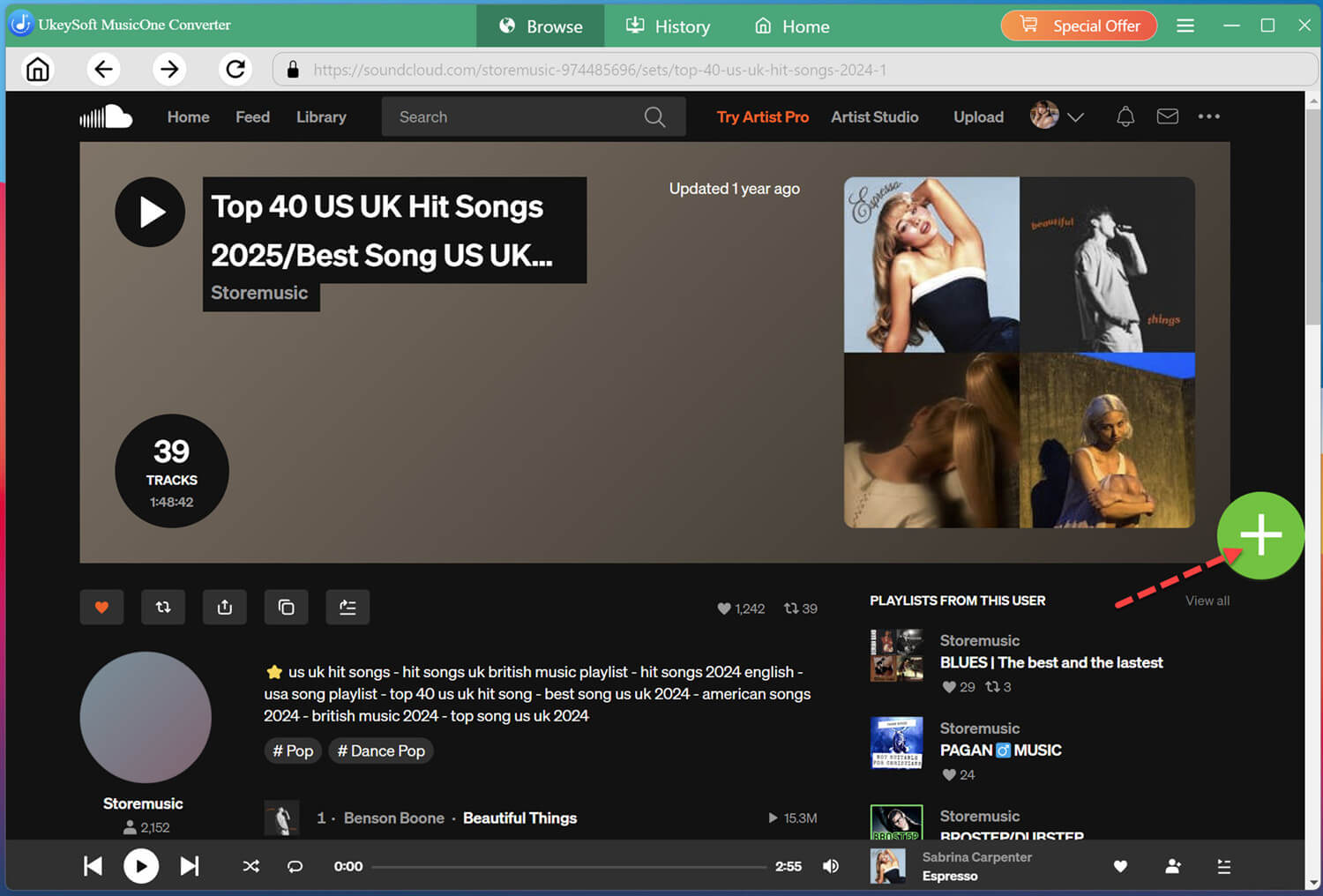
Open an individual track, or navigate to an album or playlist. Then click the "+" icon to add the content you want to process to the conversion list.
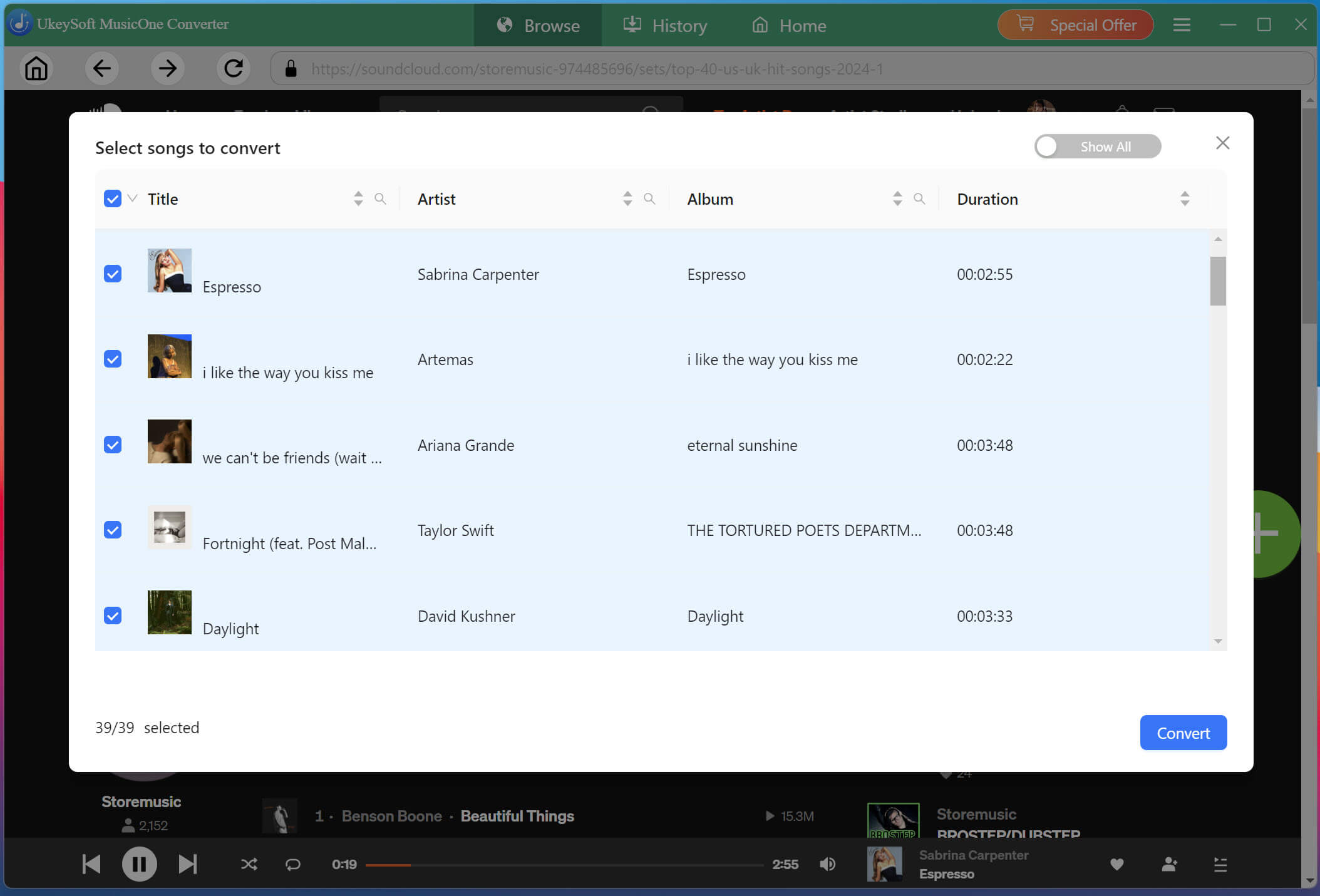
Review the tracks in your download list and select the songs you want to save. For a playlist, check the track selection carefully to avoid adding unwanted content.
Begin Downloading SoundCloud Songs to MP3
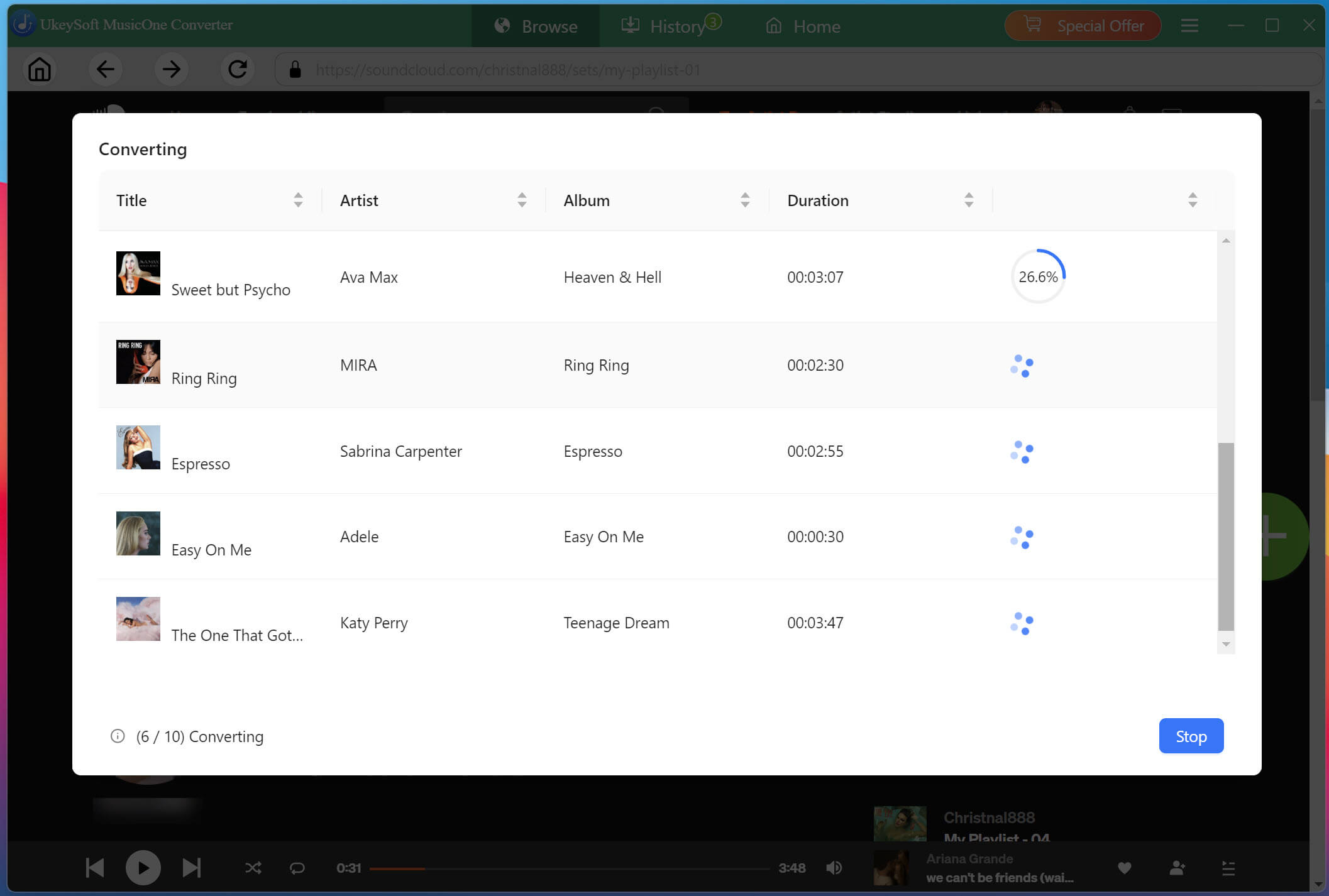
Simply click on the "Convert" button. UkeySoft will download and convert all selected tracks simultaneously at 16X accelerated speeds while preserving original audio quality.
Find Your Downloaded SoundCloud MP3 Files
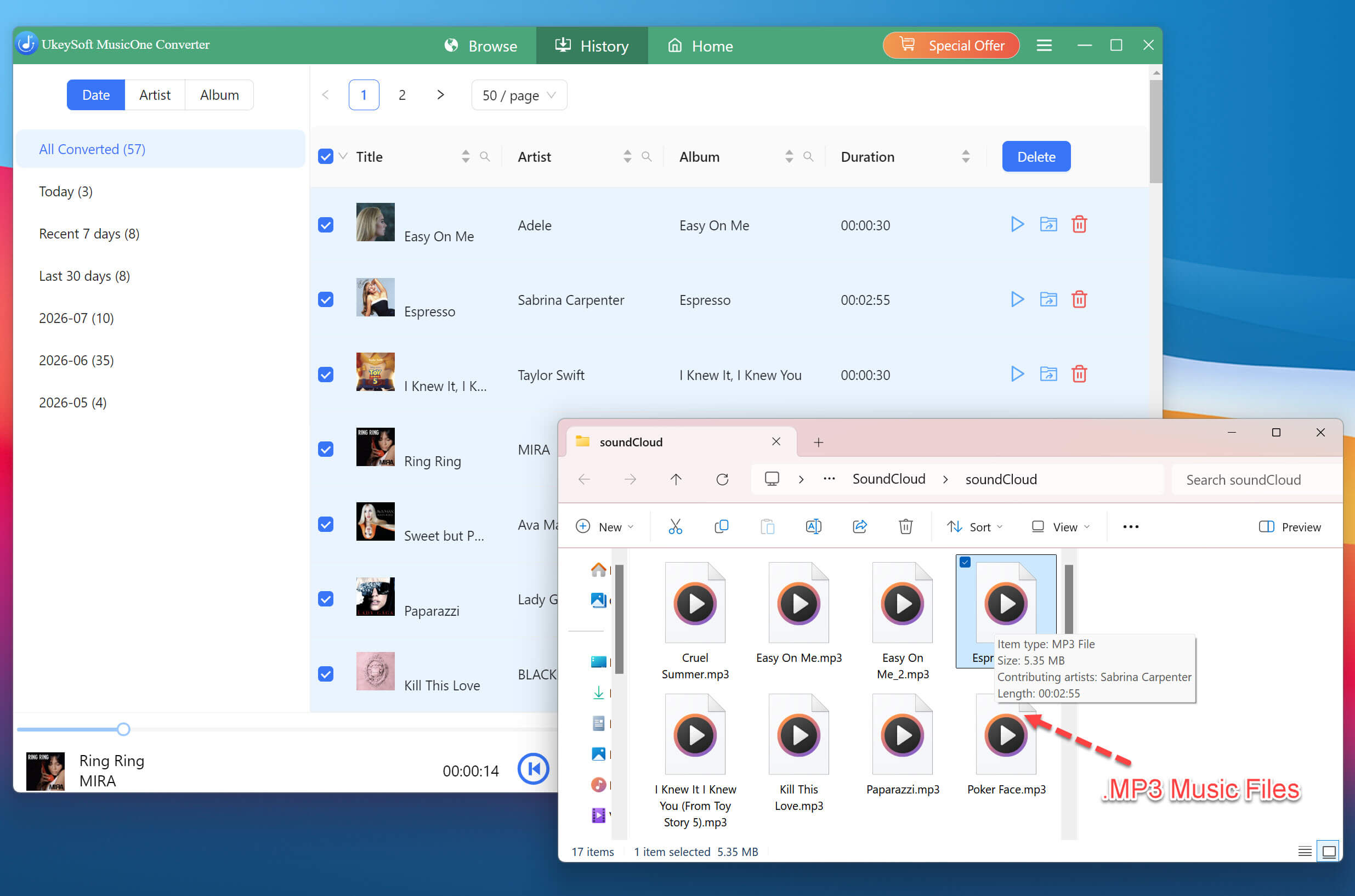
When the SoundCloud music conversion completes, go to the "History" tab and click the folder icon to open the output folder and access your SoundCloud MP3 music files. Check that your downloaded songs play correctly and that their filenames and metadata are organized as expected.
Transfer Downloaded SoundCloud Songs to Android
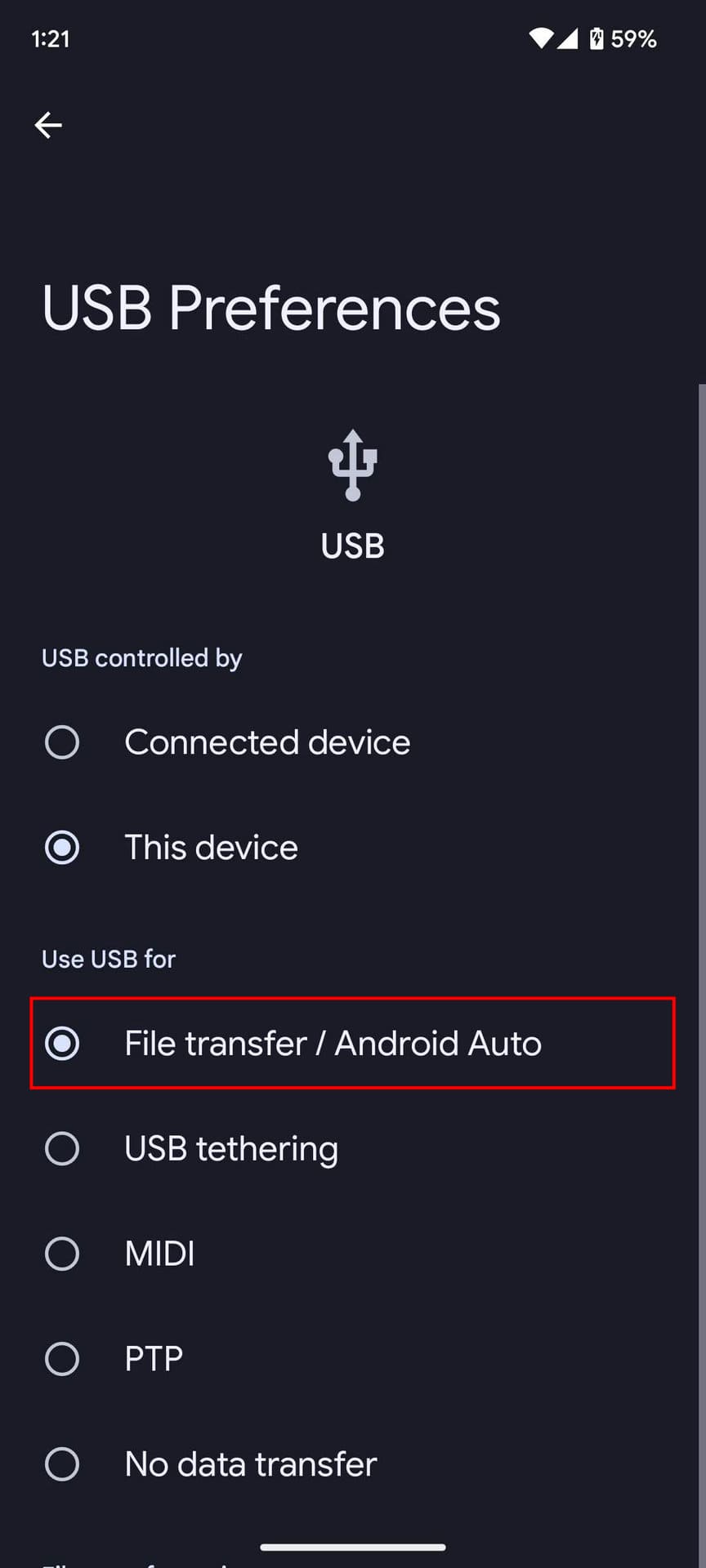
Connect your Android phone or tablet to the computer using a USB cable. Unlock your Android device and choose File Transfer / Android Auto if prompted.
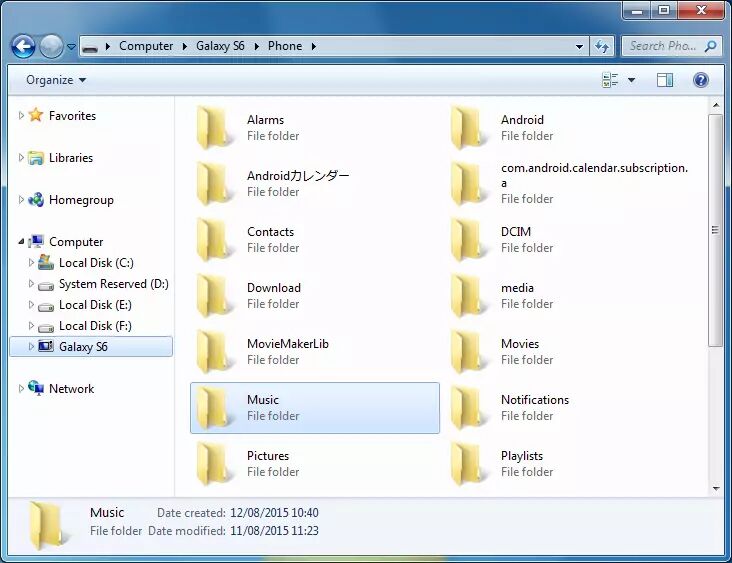
On the computer, open the Android's internal storage and copy the downloaded SoundCloud MP3 music files into a folder such as Music.
Safely disconnect your Android device, then open a music player to scan and play the transferred SoundCloud music files.
Tips: If USB transfer is inconvenient, you can also use a trusted wireless file-transfer method or cloud storage to move the files to your Android phone or tablet.
✅ Pros
● Supports SoundCloud Free, Go, and Go+ users.
● Works with any SoundCloud track, regardless of uploader settings.
● High-quality MP3 320kbps output and lossless format options.
● Batch downloading for playlists and albums.
● Retains ID3 tags and metadata.
● Files are truly yours - no subscription needed after downloading.
❌ Cons
● Requires a computer for the conversion step.
● Paid software (free trial available with limitations - only first 3 minutes of each song).
● Additional transfer step to get files onto Android.
Way 3. Download SoundCloud Songs to Android via Online Tool
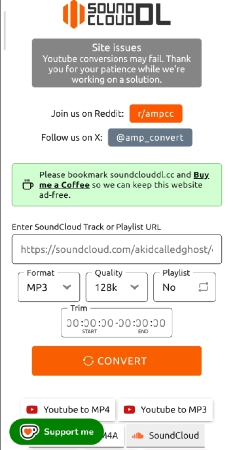
Some free online SoundCloud downloaders allow you to download SoundCloud music on Android, iPhone, PC, and Mac without installing extra app or software. SoundCloudDL.cc is one such browser-based tool that supports links to individual SoundCloud tracks. It offers MP3, FLAC and M4A output options, with available quality settings depending on the content.
Note: Most online websites (SoundCloudDL.cc included) do not support downloading SoundCloud playlists. These sites are often filled with advertisements, and output quality is typically limited to 128kbps. To get the best offline listening experience, return to above methods.
Launch the SoundCloud app or visit its website in your Android browser.
Find the song you want, tap the share option, and select copy the Link.
Visit SoundCloudDL.cc in your Android browser and paste the copied URL into the input box.
Choose MP3 or other formats and choose a suitable quality setting.
Click "CONVERT" button to save the SoundCloud song to your Android device.
✅ Pros
● Free to use.
● No app installation required.
● Works on any Android device with a browser.
● Can download single tracks quickly.
❌ Cons
● Download success and available quality can vary.
● Can't download playlists and albums, and some tracks.
● Online services may change or become unavailable.
● Some sites may contain malware or phishing attempts.
Way 4. Download SoundCloud Songs to Android with SoundCloud APK
Besides methods we introduced above, you can also install free APK to download music from SoundCloud on Android. Popular options include SoundLoadMate Downloader, SoundLoader MP3 Downloader, and Arsound (a ReVanced-based mod)
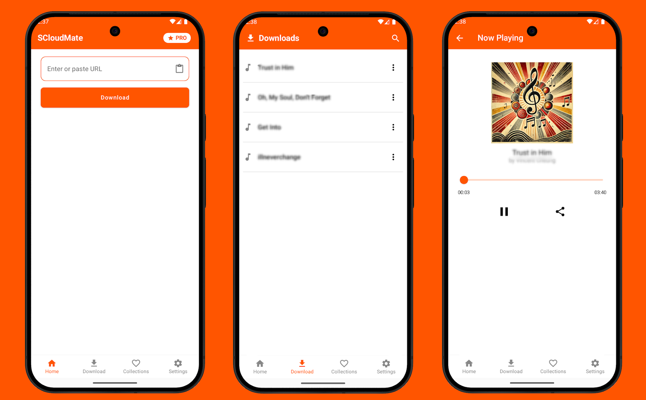
SoundLoadMate Downloader, for example, is listed on Google Play and describes a workflow that involves copying a track link, pasting it into the app, and downloading an MP3. You can follow below guide to see how it works.
First, install the SoundLoadMate Downloader from Google Play to your Android device.
Go to SoundCloud app, open the track you want to save and use the share menu to copy its URL.
Open the SoundLoadMate Downloader app, and paste the copied link into its input field.
Tap "Download" button to start downloading.
Access downloaded files from the Downloads section within the app. You can now play the SoundCloud track offline within the app!
✅ Pros
● Download SoundCloud songs on Android for free.
● Often includes ad-blocking and other enhancements.
● Lets you manage the process directly on Android.
● May save supported SoundCloud tracks as local audio files.
❌ Cons
● App reliability and features can vary.
● Updates may break functionality.
● Some apps contain advertisements or request unnecessary permissions.
● Some tracks (premium-only, DRM-protected) cannot be downloaded.
FAQs About Downloading SoundCloud Songs on Android
Is it possible to download SoundCloud songs as MP3 files on Android?
Yes, but not through the official SoundCloud app. Some third-party software, online tools and Android apps offer MP3 downloads for supported links. For more details, refer to Way 2-4 above.
Can I download SoundCloud tracks on Android with a free account?
Yes, but with limitations. The official SoundCloud app does not allow downloads with a Free account. However, third-party tools like UkeySoft SoundCloud Music Converter and online tools work with SoundCloud Free accounts, and free APK also support downloading without a subscription.
Is it safe to download SoundCloud songs to Android via online tools?
It depends on the tool. A few online SoundCloud downloaders offer an ad-free and cliean interface, while most online downloaders are riddled with pop-up ads, redirects, and potentially malicious scripts. Always use a reputable ad blocker, avoid clicking suspicious download buttons, and never enter personal information on these sites.
Conclusion
There are several ways to download SoundCloud songs on Android. If you have a paid subscription to SoundCloud music, you can directly download and listen to it using the official app. For SoundCloud Free users, you can use third-party tools, online services or free APK to save SoundCloud songs to your Android as MP3 files. Among these options, desktop software UkeySoft SoundCloud Music Converter offers the best balance of high speed, lossless music quality, and long-term flexibility for Android users. Don't hesitate to install it now and enhance your music listening experience!
Justin Sabrina has always had great enthusiasm for writing, programming and web development. He likes writing about software and technology, his works are featured on some tech blogs or forums like Tom's Hardware, CNET, etc.
 English
 Arabic
 Chinese (Simplified)
 Chinese (Traditional)
 Croatian
 Czech
Czech Danish
 Dutch
Dutch Estonian
 Finnish
 French
 German
 Greek
Greek Hebrew
 Hindi
Hindi Hungarian
 Indonesian
 Italian
 Japanese
 Kazakh
 Korean
 Malay
Malay Norwegian
 Polish
 Portuguese
 Romanian
 Russian
 Slovenian
 Spanish
 Swedish
 Thai
Thai Turkish
 Ukrainian
 Vietnamese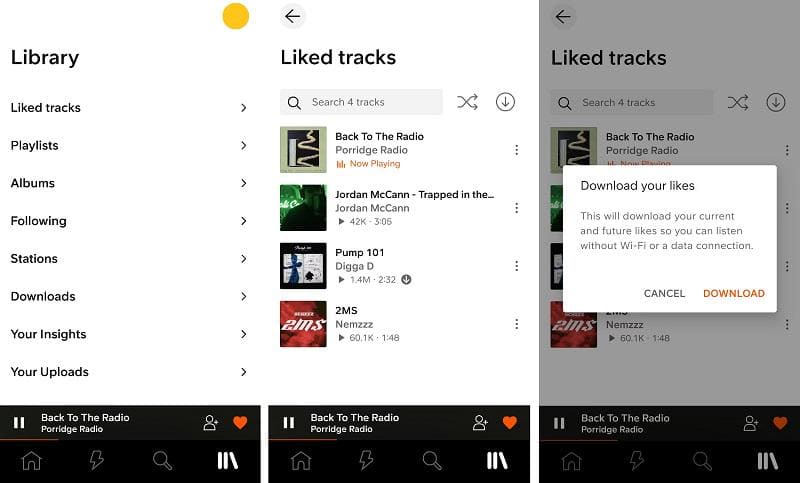








Comments are off!