● Best official method: SoundCloud Go/Go+ for offline listening in the app.
● Best for permanent AAC/M4A/MP3 files:UkeySoft SoundCloud Music Converter - Download SoundCloud songs/playlists/albums to your computer as 640kbps AAC/M4A files, and transfer them to your iPhone.
● Best for quick downloads: Online SoundCloud downloaders for individual tracks.
● Best phone-only option: iOS Shortcuts for saving SoundCloud audio directly to Files app.
SoundCloud has been one of the most popular platforms that offering a huge collection of audio content that you may not find anywhere else. However, when you are traveling, have limited mobile data, or in areas with poor connectivity, you may want to download SoundCloud music to iPhone for offline listening.
In this guide, we will introduce four practical methods to download music from SoundCloud on iPhone, by using the official app, online tool, dedicated SoundCloud music converter, or Shortcut app. Whether you have a SoundCloud subscription or not, you can follow this guide to enjoy your favorite SoundCloud tracks offline on your iPhone without an Internet connenction.
Way 1. Download SoundCloud Music on iPhone via Official App
In the official SoundCloud mobile app, SoundCloud provides a download button for SoundCloud Go or Go+ subscribers. Once you tap it, the songs are cached to your local storage so you can listen to SoundCloud offline on your iPhone without an internet connection.
However, it is important to understand that this is not a traditional download. The songs are stored as offline cache files inside the SoundCloud app rather than accessible MP3 or AAC files in your iPhone storage. If you cancel your SoundCloud subscription or delete the app, your offline content will be lost.
Here's how to download SoundCloud songs on iPhone:
Open the SoundCloud app on your iPhone and sign in to your SoundCloud Go or Go+ account.
Find the track, album, or playlist you want to save. You can add individual songs to Your Likes or create a playlist containing your favorite SoundCloud tracks.
Open your Library and select Your Likes, playlist, or saved tracks. Tap the download button to save the content for offline listening.
Once the download process finishes, you can listen to the saved SoundCloud music on your iPhone without an internet connection.
✅ Pros
● Official and secure method.
● No additional tools required.
● Supports playlists and libraries.
● Works directly on iPhone.
❌ Cons
● Requires SoundCloud Go/Go+ subscription.
● Cannot save songs as regular MP3 files.
● Music can only be played inside SoundCloud.
Way 2. Download SoundCloud Music to iPhone via Online Tool
As mentioned, the official SoundCloud app offers a download feature for SoundCloud Go and Go+ subscribers to download songs from SoundCloud to iPhone directly. To download SoundCloud music with a Free account, you can use a free online SoundCloud downloader.
KlickAud SoundCloud Downloader is such a popular online service among both mobile and computer users. It is easy to use, allowing you to paste a SoundCloud track URL and convert it into an MP3 audio file that can be saved on your device. Since it works entirely through a web browser, there is no need to install extra software, or worry about compatibility with iOS.
However, it is worth noting that it does not provide customizable output settings. Therefore, SoundCloud music might not be saved with high quality—often varying between 128kbps and 256kbps. Also, the batch-download entire playlists feature is not available. For better experience, scroll download to Way 3.
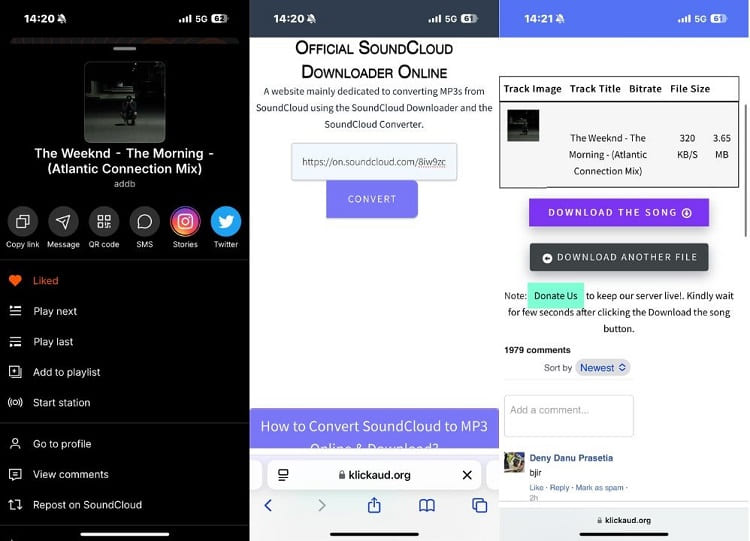
Open the SoundCloud app or website on your iPhone. Find the song you want to download, tap the Share button, and copy its link.
Launch Safari on your iPhone and visit KlickAud SoundCloud Downloader website.
Paste the copied track URL into the search box. Tap on Convert button and wait for the tool to process the link.
A Safari prompt will appear asking whether you want to download the file. Simply tap Download, and the MP3 file will be saved automatically to your iPhone's Files app - usually in the "Downloads" folder.
✅ Pros
● Free to use.
● No software installation required.
● Works directly on iPhone.
● Works without a SoundCloud login.
❌ Cons
● Online tools have pop-ups, ads.
● Audio quality may be limited.
● Usually cannot download playlists in batches.
● Some tools may stop working over time.
Way 3. Download MP3 Music from SoundCloud and Transfer to iPhone 👍
SoundCloud's DRM protection limits offline downloads to Go/Go+ subscribers, and downloaded tracks can only be played within the SoundCloud app. This means you can't freely access them with other music players, and once your subscription ends, your offline downloads will no longer be available. To keep SoundCloud songs forever on your iPhone or other devices, you'll need a third-party software to bypass the restrictions.
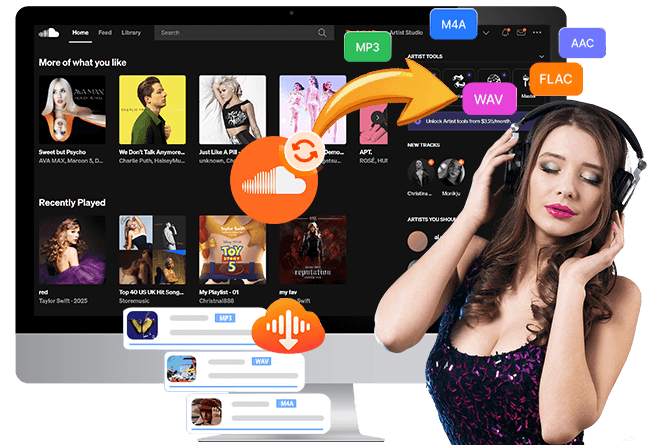
For this purpose, UkeySoft SoundCloud Music Converter is a practical option. With its integrated SoundCloud web player, both Free and Premium users can download SoundCloud tracks, albums, and playlists to computer directly. It is capable of downloading and converting SoundCloud tracks into widely supported formats such as AAC, WAV, MP3, WAV, FLAC, or AIFF.
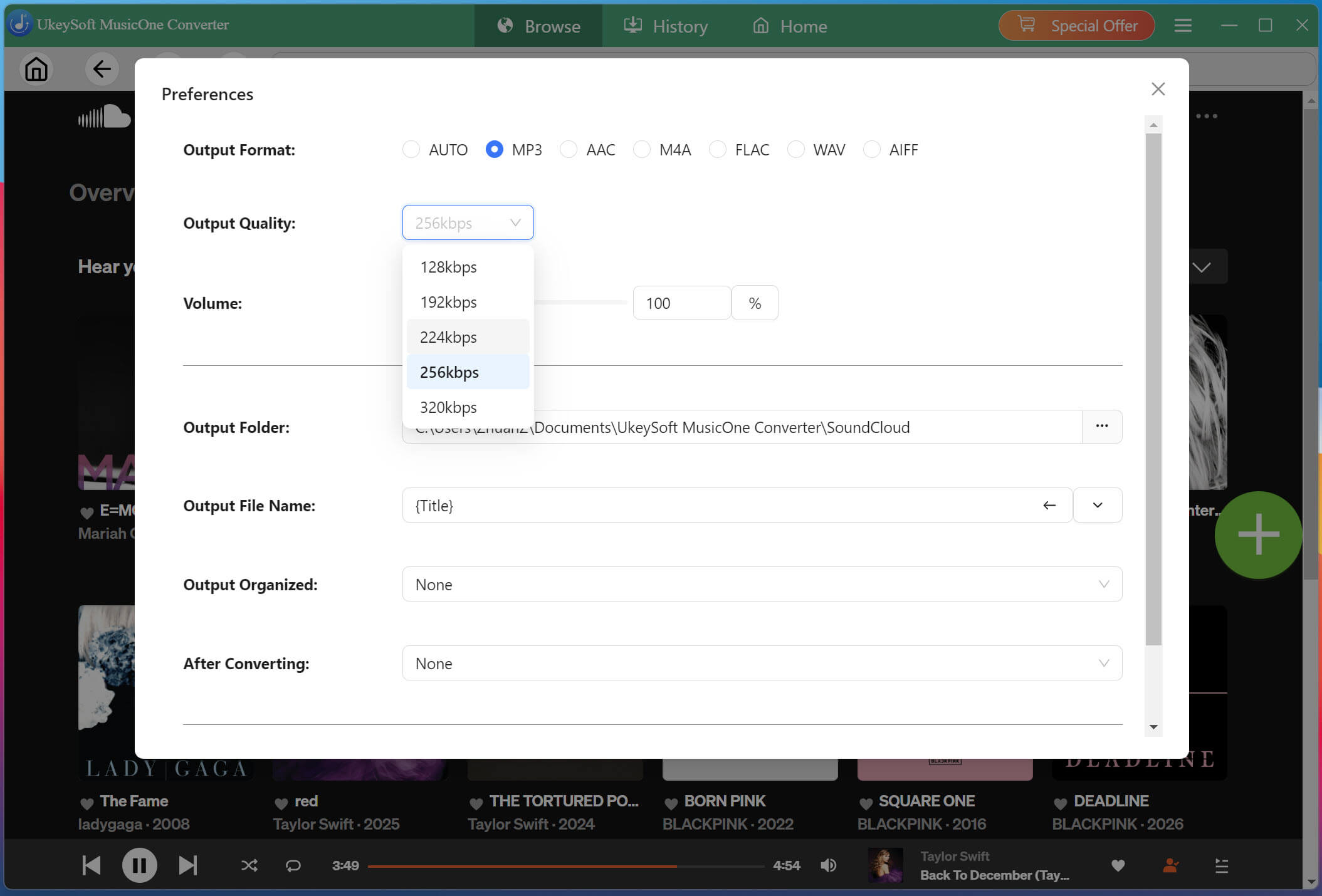
The software also offers customizable output settings, letting you choose 640kbps AAC/M4A or 320kbps MP3 for the best listening experience.When you grasp them, it is possible to transfer the SoundCloud downloads to your iPhone, iPad, iPod, Android, MP3 player, USB drive, SD card and any device or player for flexible offline playback.
Key Features of UkeySoft SoundCloud Music Converter
Built-in SoundCloud web player for seamless browsing.
Download SoundCloud songs, playlists, albums, artists.
Convert SoundCloud music to MP3, WAV, FLAC, M4A, AAC, AIFF.
Customizable output: 640kbps AAC/M4A or 320kbps MP3.
Preserves ID3 tags like title, artist, album, and cover info.
Supports batch download SoundCloud playlists and albums.
16X faster conversion speed for batch processing.
Transfer SoundCloud music any device, player, app.
Compatible with both Windows and Mac computers.
Steps to Download SoundCloud Music to iPhone with UkeySoft
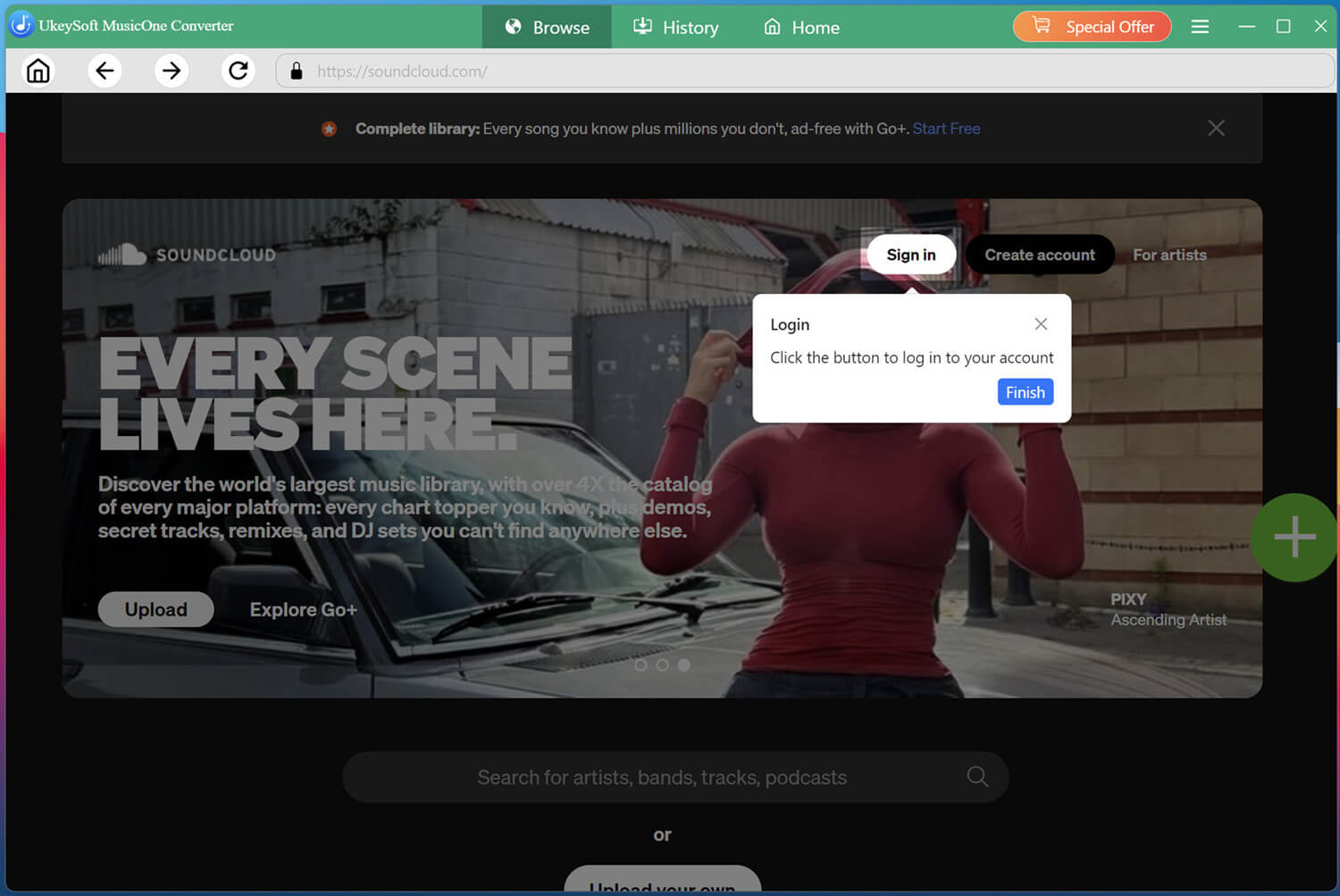
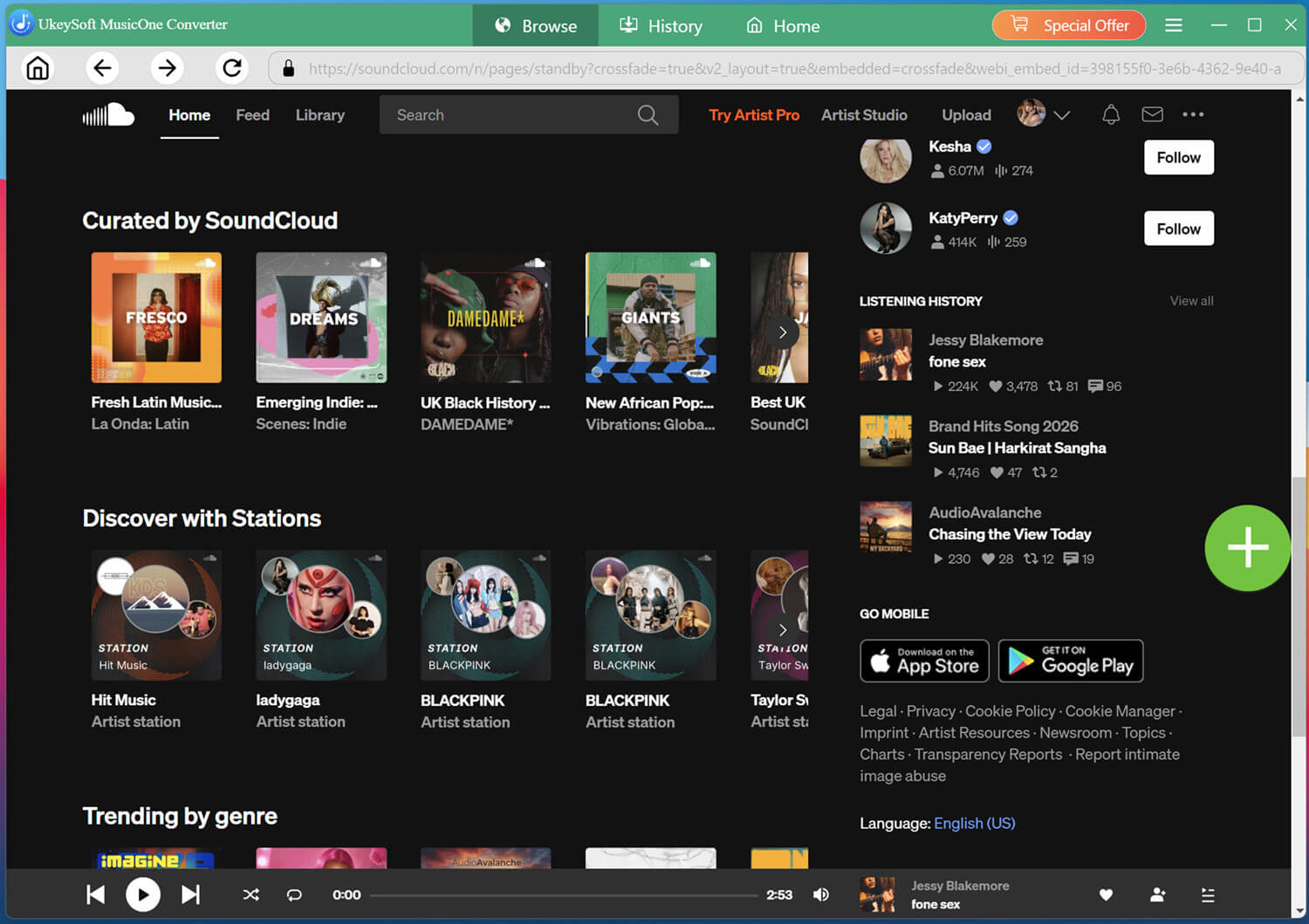
Open UkeySoft Download and launch UkeySoft SoundCloud Music Converter on your computer. From the home screen, select the "SoundCloud" option and access the built-in SoundCloud web player.
Log in with your SoundCloud free account to browse available music, playlists, artists, and albums directly inside the program.
Customize Output Settings
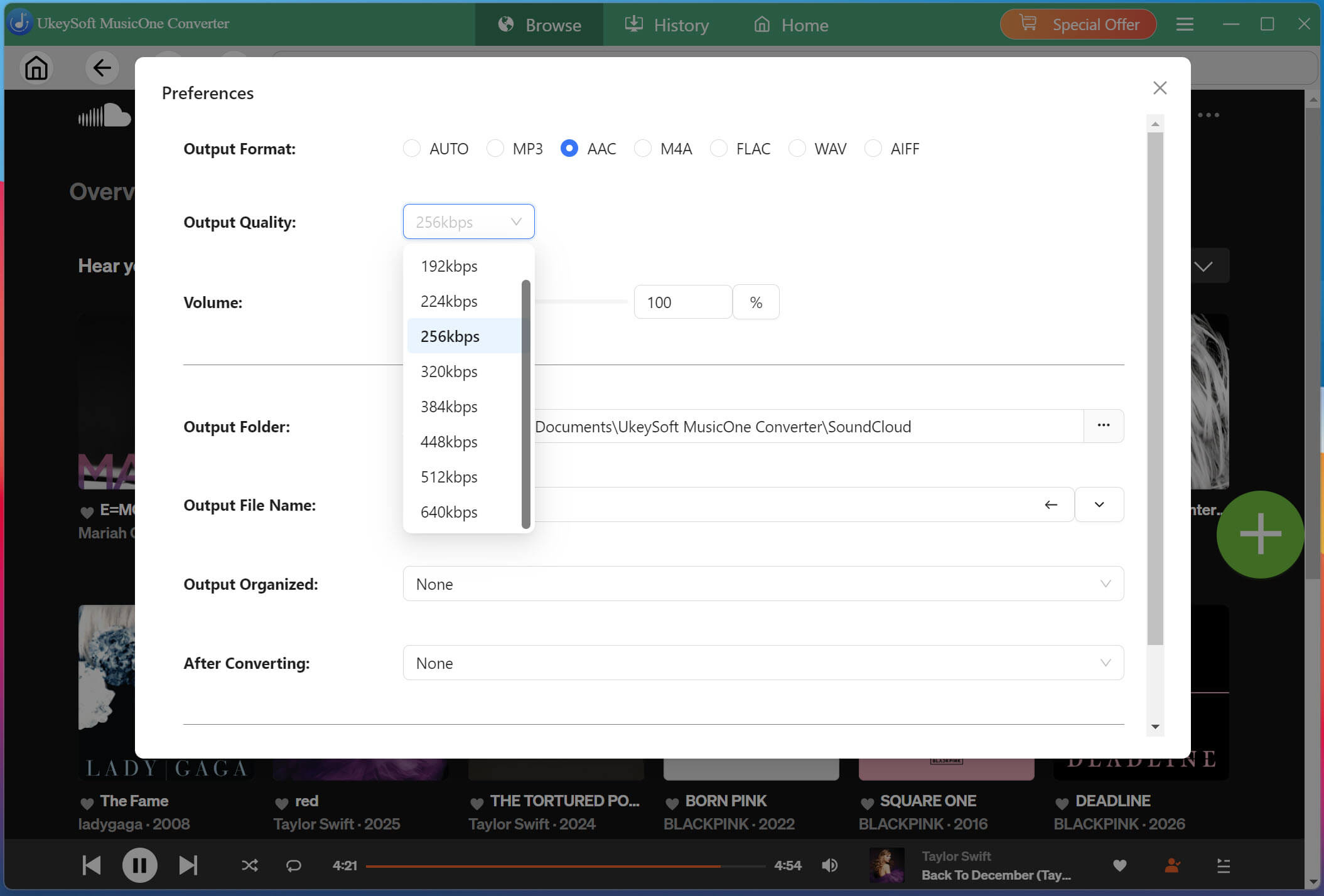
Click the "Menu" button and open "Preferences". Here, you can choose the output format, output quality, output folder, and other settings before downloading SoundCloud music to your computer.
M4A, AAC, and MP3 formats are supported by iOS devices. To get the best listening experience, here you can pick AAC format and 640kbps option.
Browse and Add Songs
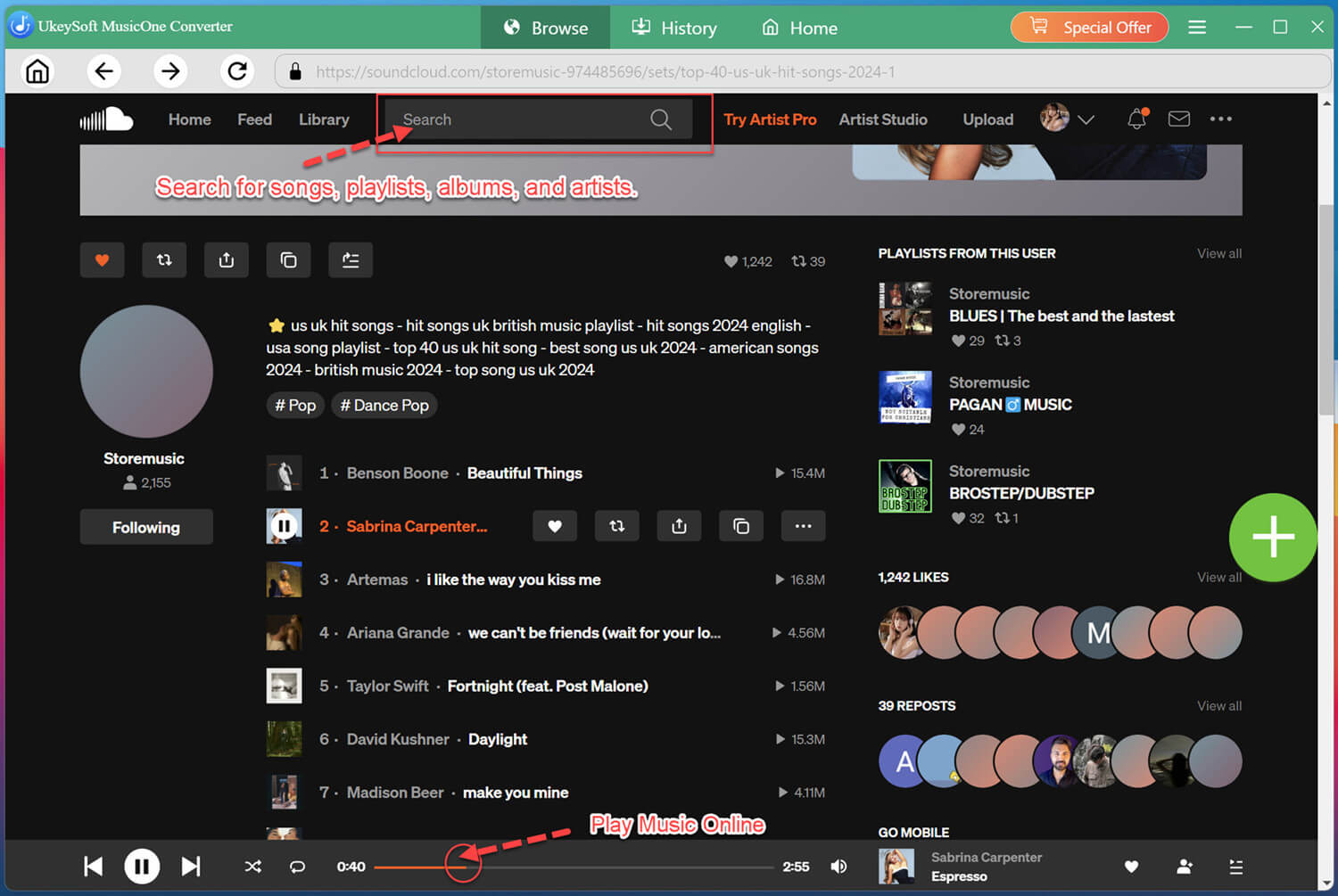
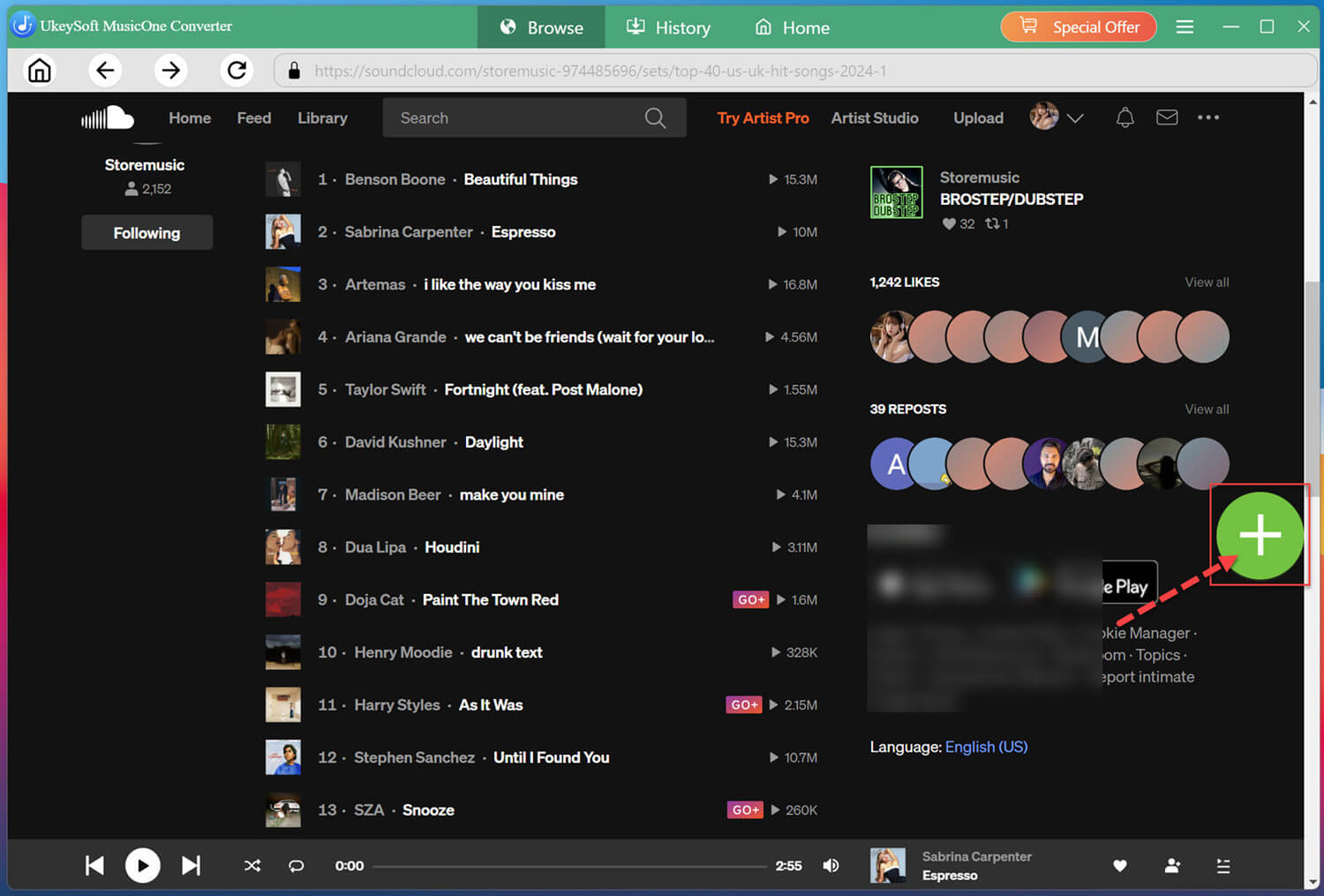
You can browse by genre, trending tracks, or search for your favorite songs, artists, playlists, or albums directly.
Open any song, playlist, artist, or album and add the content you want to download to the conversion list by clicking the "+" button.
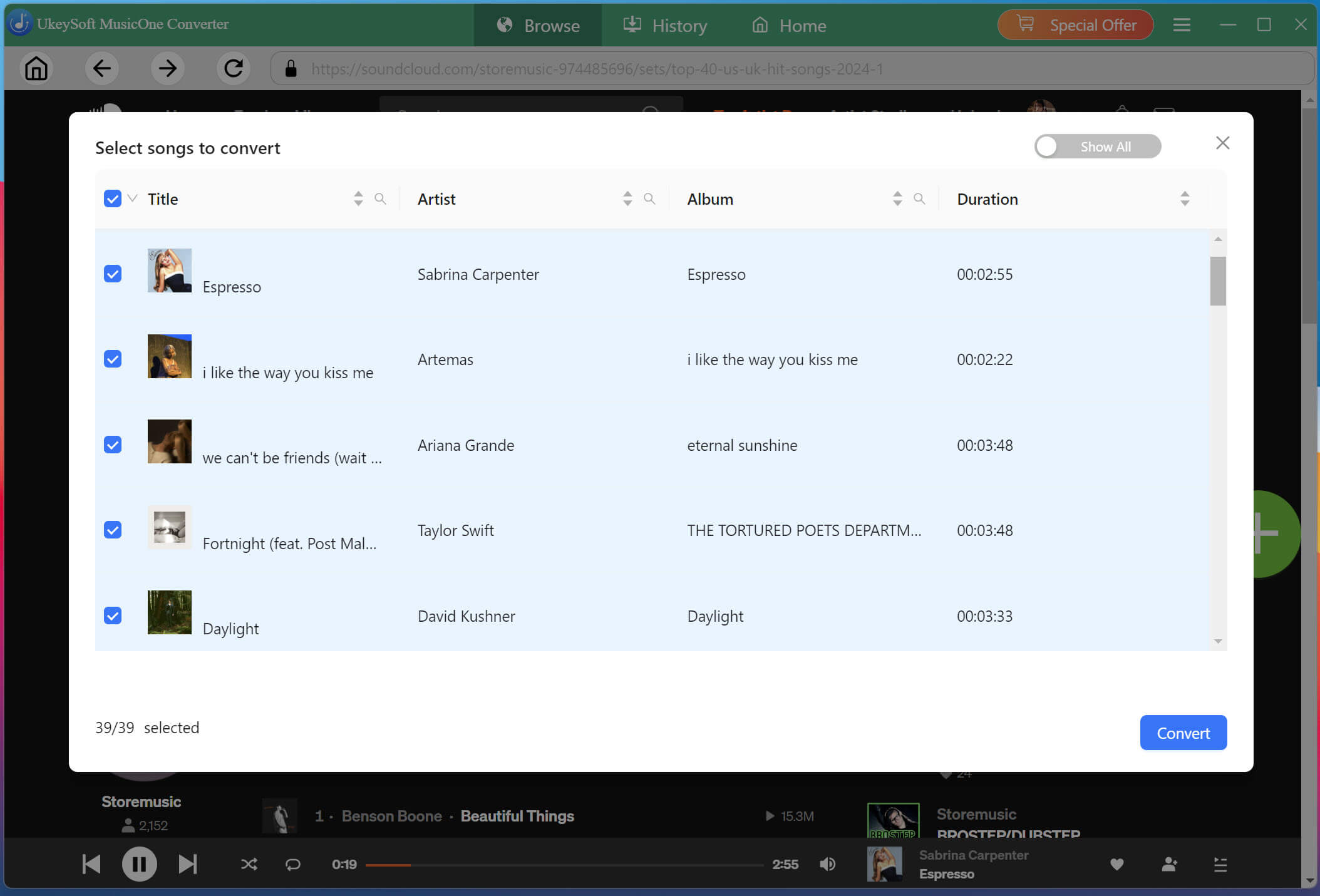
Choose Desired SoundCloud Songs
Review the selected tracks and choose the SoundCloud songs you want to download. You can select individual songs or multiple tracks from a playlist to save time.
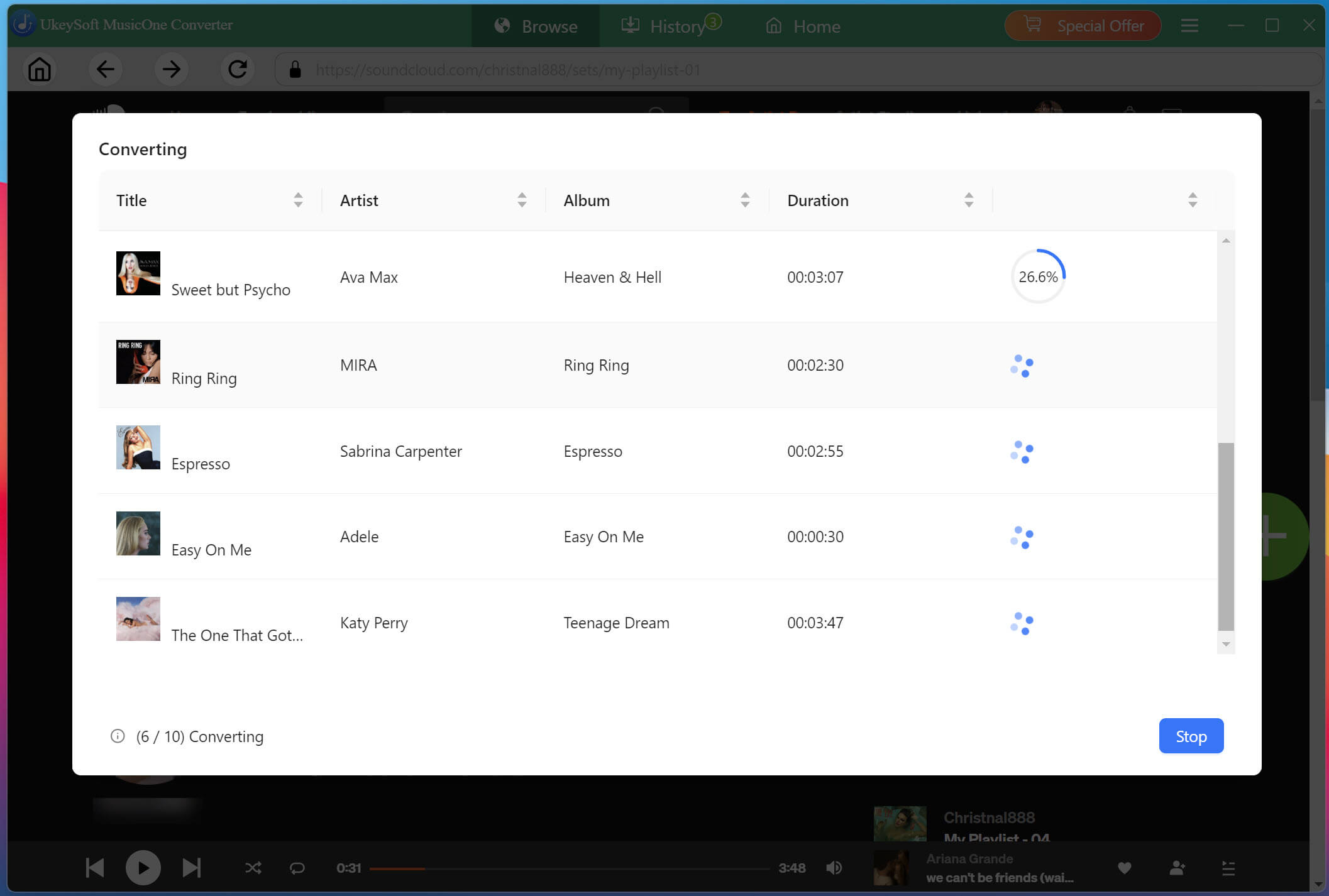
Begin Download SoundCloud Songs to AAC/MP3
Press the "Convert" button to start the download process. The software will extract and convert each track according to your output settings at 16X high speed.
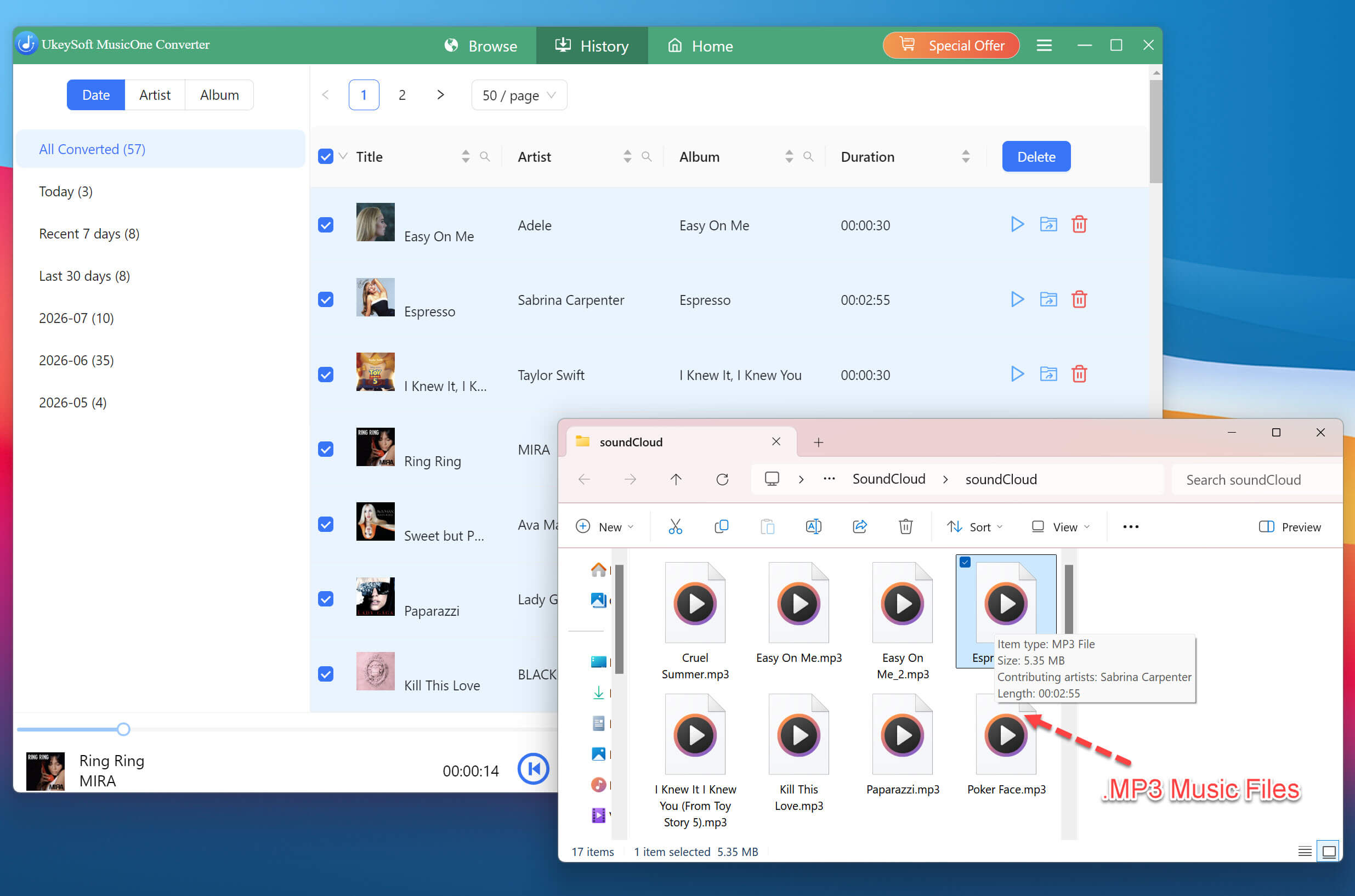
Get Downloaded SoundCloud Songs
Once the conversion is complete, open the "History" section and click the output folder to view your downloaded SoundCloud music. The SoundCloud music files are saved in the selected AAC, M4A, or MP3 format and ready for transfer.
Transfer Downloaded SoundClouds to iPhone via iTunes or Finder
For iTunes (Windows or macOS Mojave and earlier):
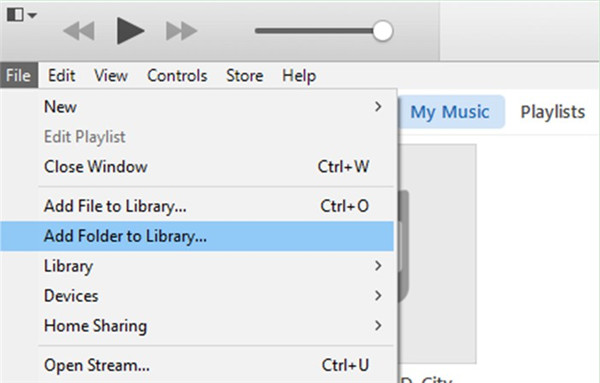
Open iTunes. Go to "File", select "Add Folder to Library". Browse to the output folder where UkeySoft saved your MP3 files, select them, and click "Open".
Connect your iPhone to the computer using a USB cable. If prompted, tap "Trust" on your iPhone and enter your passcode.
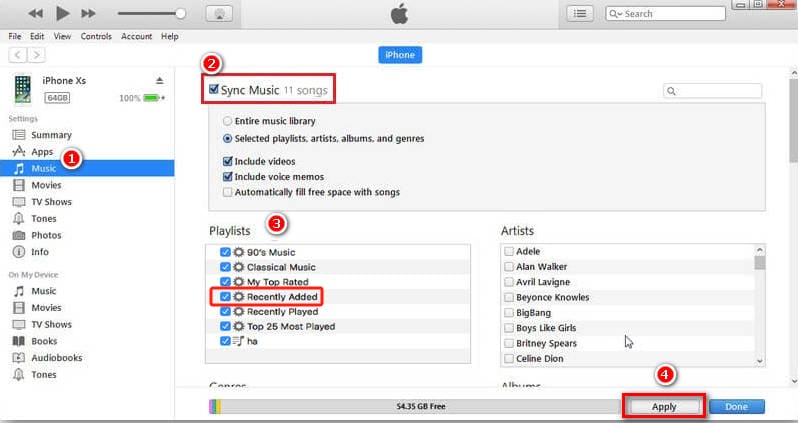
Click the Device icon in the upper-left corner of iTunes to access your iPhone's management screen.
In the left sidebar, click "Music" under the "Settings" section.
Check the box next to "Sync Music". Choose either "Entire music library" or "Selected playlists, artists, albums, and genres". Click "Apply".
For Finder (macOS Catalina and later):
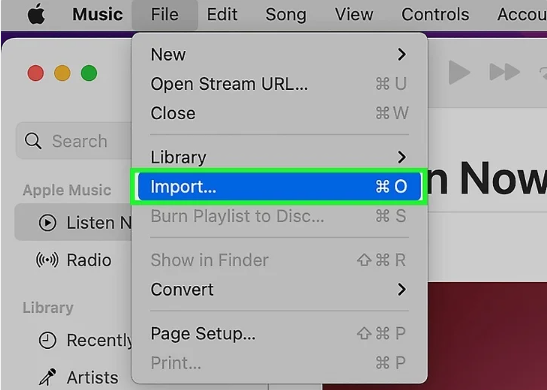
Open the Music app on your Mac and go to "File", click "Import" and manually add the downloaded SoundCloud files. Or simply drag and drop the MP3 files into the Music app window.
Connect your iPhone to your Mac using a USB cable. Tap "Trust" on your iPhone if prompted.
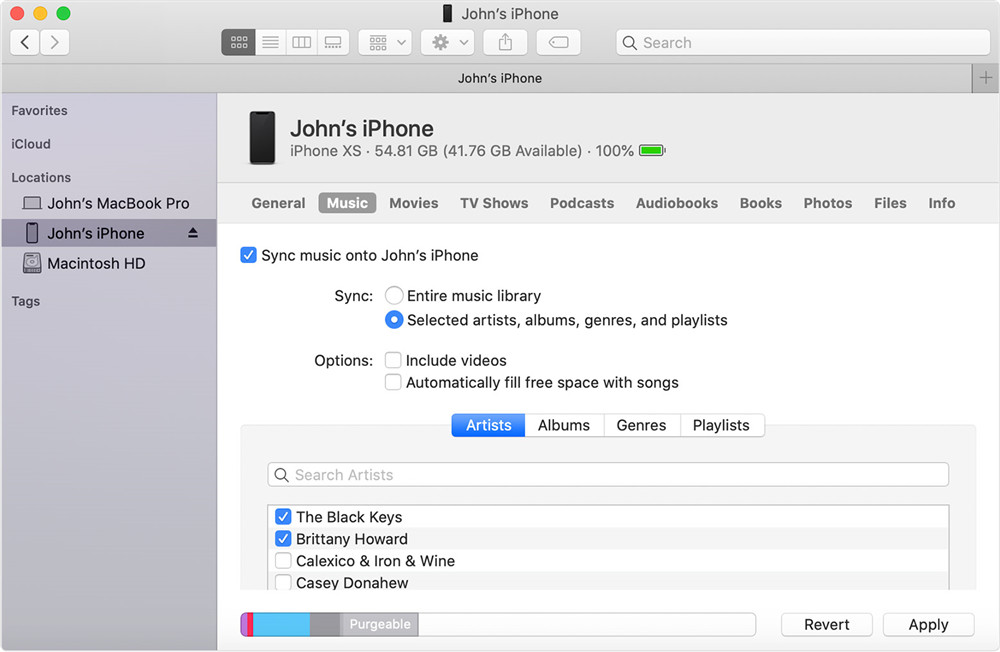
In Finder's sidebar, click your iPhone under the "Locations" section.
Click the "Music" tab at the top of the window.
Check the box next to "Sync Music" onto iPhone. Select "Entire music library" or choose specific playlists and artists. Click "Apply".
✅ Pros
● Works with a free SoundCloud account.
● Supports high-quality audio downloads.
● Safe and clean software, no ads or plug-ins.
● Suitable for playlists and large music collections.
● Allows offline playback without SoundCloud.
● Output downloads playable on any device, no app required.
❌ Cons
● Requires a computer.
● Third-party software installation is needed.
● Limited download function in free trial.
Way 4. Download Songs from SoundCloud on iPhone with Shortcut
Another convenient way to download songs from SoundCloud on iPhone is by using an iOS Shortcut. This method requires no computer, desktop software, or subscription. After installing the Shortcut, simply copy the SoundCloud song link, run the Shortcut, and follow the prompts to save the audio file to the Files app.
However, keep in mind that third-party Shortcuts may stop working when SoundCloud or iOS changes. Furthermore, most shortcuts are created by third-party developers, and their reliability varies, and you should only get shortcuts from trusted sources.
Get the Shortcut on iPhone
First, make sure the Shortcuts app is installed on your iPhone. If it is unavailable, download it from the App Store.
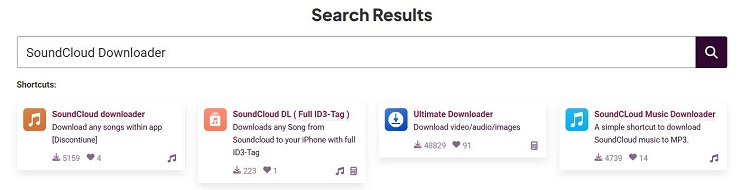
Open Safari on your iPhone and navigate to RoutineHub or another trusted shortcut repository.
Search for "SoundCloud downloader" and tap the click to install it. Tap "Add Shortcut" to save it to your iPhone.
Use the Shortcut to Download a SoundCloud Song on iPhone
Open the SoundCloud app or web player and find the track you want to download.
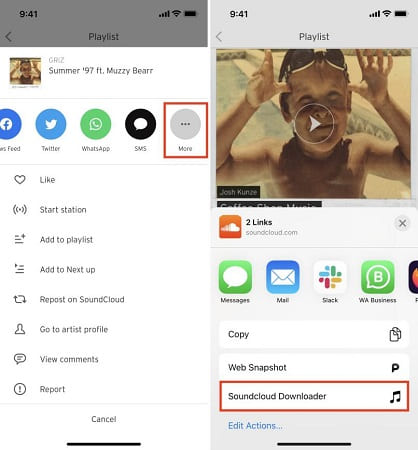
Tap the Share button and select the SoundCloud downloader shortcut from the share sheet.
When prompted, tap "Allow" and "Save to Files" to download SoundCloud music to iPhone.
Access Your Downloaded SoundCloud Songs on iPhone
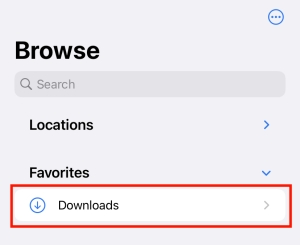
After the download completes, open the Files app on your iPhone.
Navigate to the folder where the shortcut saved the MP3 file.
You can now play the SoundCloud track offline using any music player app that supports local files.
✅ Pros
● No computer required.
● No subscription or software cost.
● Convenient for occasional downloads.
● Save SoundCloud songs directly to Files app.
❌ Cons
● Shortcuts may stop working unexpectedly.
● Download quality depends on the shortcut.
● Setup can be complicated for beginners.
● Can't download private or restricted tracks.
FAQs About Downloading SoundCloud Music to iPhone
Can I download SoundCloud music directly to my iPhone?
Yes. You can download SoundCloud music to iPhone through the official SoundCloud app if you have a Go or Go+ subscription. To saving SoundCloud songs as MP3 files to your iPhone, you can use online tools, desktop converters, or iPhone shortcuts.
Can I download songs from SoundCloud on iPhone for free?
Yes, there are free ways to download SoundCloud music on iPhone, such as online SoundCloud downloaders and shortcuts. However, free methods often come with limitations, including lower audio quality, ads, and fewer download options. For a safe and good experience, you can use a professional desktop software like UkeySoft SoundCloud Music Converter to download SoundCloud music into MP3 files to computer folder, them move the music to your iPhone.
How do I add SoundCloud songs to Apple Music?
First, you need to download and save SoundCloud songs as MP3 files using an online tool or dedicated software like UkeySoft SoundCloud Music Converter. Then, you can sync the SoundCloud MP3 files to iTunes or Music app on your PC or Mac. This way, you can sync the music to your iPhone. When finished, you can find and enjoy the SoundCloud songs in your iPhone's Apple Music library.
Conclusion
Overall, there are several ways to download music from SoundCloud to iPhone for offline listening. The SoundCloud app is the simplest option with Go/Go+ subscription, while online downloaders and iOS Shortcuts offer convenient alternatives. For more reliable and flexible downloads, UkeySoft SoundCloud Music Converter lets you save SoundCloud songs as AAC/M4A 640kbps or MP3 320kbps audios and transfer them to your iPhone, iPhone, iPod, MP3 player, USB drive, Android, and more devices for permanent offline listening.
Justin Sabrina has always had great enthusiasm for writing, programming and web development. He likes writing about software and technology, his works are featured on some tech blogs or forums like Tom's Hardware, CNET, etc.
 English
 Arabic
 Chinese (Simplified)
 Chinese (Traditional)
 Croatian
 Czech
Czech Danish
 Dutch
Dutch Estonian
 Finnish
 French
 German
 Greek
Greek Hebrew
 Hindi
Hindi Hungarian
 Indonesian
 Italian
 Japanese
 Kazakh
 Korean
 Malay
Malay Norwegian
 Polish
 Portuguese
 Romanian
 Russian
 Slovenian
 Spanish
 Swedish
 Thai
Thai Turkish
 Ukrainian
 Vietnamese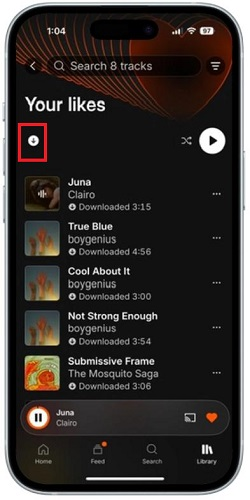








Comments are off!