To download music from SoundCloud, you can use SoundCloud's built-in download option, desktop software, mobile features, online download tools, or browser extensions. For the best quality and reliability, the professional UkeySoft SoundCloud Music Converter stands out as the better choice, especially for downloading SoundCloud tracks, playlists, and albums in high-quality 320kbps MP3 files.
SoundCloud is home to millions of tracks, from underground producers to major artists. While SoundCloud allows users to stream music for free, there are times when you may want to save tracks for offline listening, transfer SoundCloud music to USB drive for backup, or organize your favorite music collection more conveniently.
To download SoundCloud music, there are several solutions available, including official download options, desktop music converters, mobile offline features, online download tools, and browser extensions. Now, read on this article to explore 5 effective methods to download SoundCloud music to PC, Mac, iPhone, and Android, even without a SoundCloud subscription account!
Method 1. Download Music from SoundCloud to Computer Directly
The easiest way to download music from SoundCloud is to use the official download button provided by some artists. Some SoundCloud creators enable free downloads, allowing listeners to save individual tracks directly from the platform without a subscription. Next go through the brief guide to process SoundCloud music download in the official website step by step:
Note: This method is only available on computers browsers. For mobile users, please refer to Method 3 with a SoundCloud Premium account.
Visit the official SoundCloud website, and sign in to your free, Go, or Go+ account.
Search for the song you want to download and open the track page.
Not every SoundCloud track supports direct downloads. If the artist has enabled downloads, you will see a "Download file" option below the waveform or in the More menu.
Click the "Download file" option, and the track will be saved to your computer. Depending on the artist's upload settings, the downloaded file format and quality may vary.
Method 2. Download SoundCloud Music to PC/Mac in 320kbps MP3
SoundCloud has certain restrictions when it comes to offline playback and audio downloads. Free users usually cannot download most tracks, and even SoundCloud Go/Go+ users may only access offline listening inside the SoundCloud app instead of receiving permanent audio files. For users who want to keep SoundCloud songs forever and listen to SoundCloud offline without Premium, the best solution is to downloading SoundCloud to MP3. Here UkeySoft SoundCloud Music Converter comes into handy.
UkeySoft SoundCloud Music Converter is a powerfull tool that enables you to download any music from SoundCloud to computer with free account. This software has the ability to batch-download SoundCloud tracks, full playlists, albums, and artists in common MP3, M4A, FLAC, WAV, AAC, or AIFF audio formats, so that you can keep your SoundCloud downloads permanently. In addition, it is designed with an integrated SoundCloud web player, allowing you to browse music, search for tracks, and add songs directly inside the program. Even better, it supports high-quality output up to 320kbps MP3, or 640kbps AAC/M4A, delivering an excellent listening experience.
Key Features of UkeySoft SoundCloud Music Converter
Download music from SoundCloud to PC, Mac with a free and paid account.
Download SoundCloud songs, playlists, albums, and music tracks directly.
Convert SoundCloud music to MP3, WAV, FLAC, M4A, AAC, AIFF formats.
Support high-quality audio output up to 320kbps MP3, or 640kbps AAC.
Keep original ID3 tags, including song title, artist, album, and cover info.
Batch download multiple SoundCloud tracks, full albums and playlists at once.
Up to 16X ultra-fast speed to download SoundCloud music tracks.
Built-in music manager for easy organization of your music library.
Save SoundCloud songs permanently for flexible offline playback.
Watch the Video Guide: Download SoundCloud Music in 320kbps MP3s with UkeySoft
Steps to Download SoundCloud Music to MP3 on PC with UkeySoft
Open UkeySoft SoundCloud Music Converter
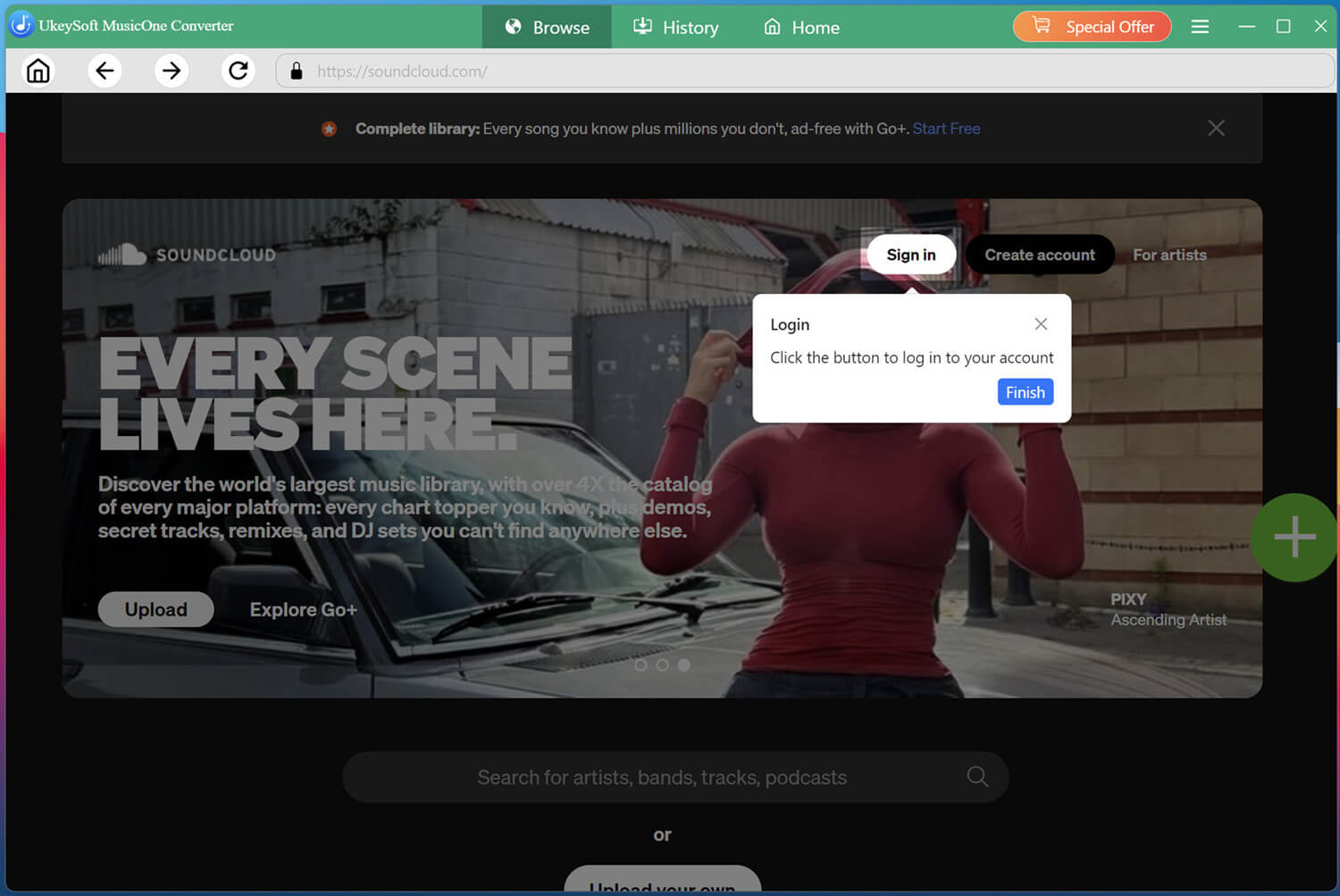
First of all, install and launch UkeySoft SoundCloud Music Converter on your computer.
Log in to your SoundCloud free or paid account. This allows you to access your personalized music library and quickly find the songs, playlists, or albums you want to download.
Adjust Output Settings
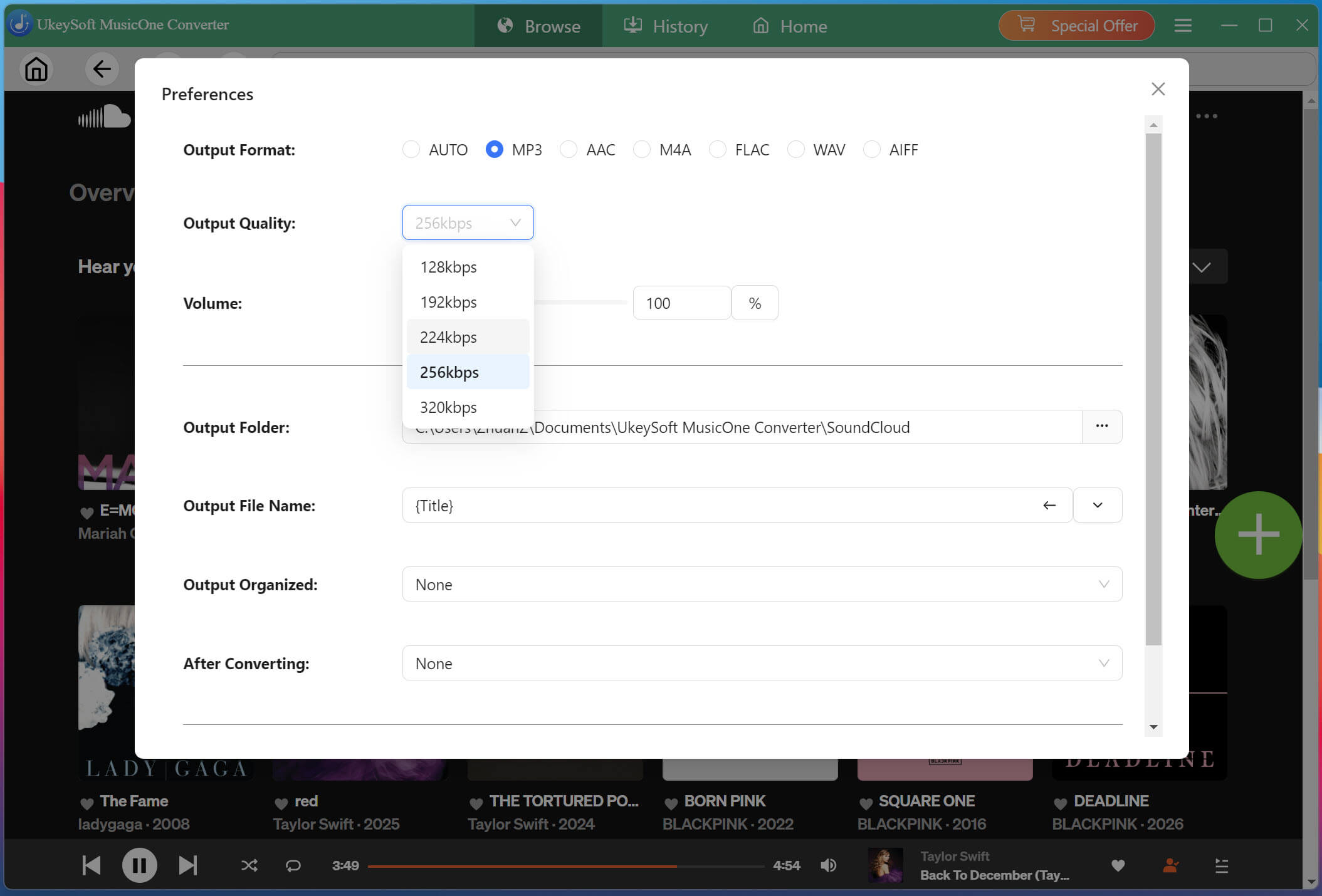
Click the Menu button in the upper-right corner and select Preferences. Here, you can customize output format, audio quality, download folder, and other settings. Select MP3 as the output format if you want to download music from SoundCloud to MP3.
Open & Add Songs, Playlists, or Albums
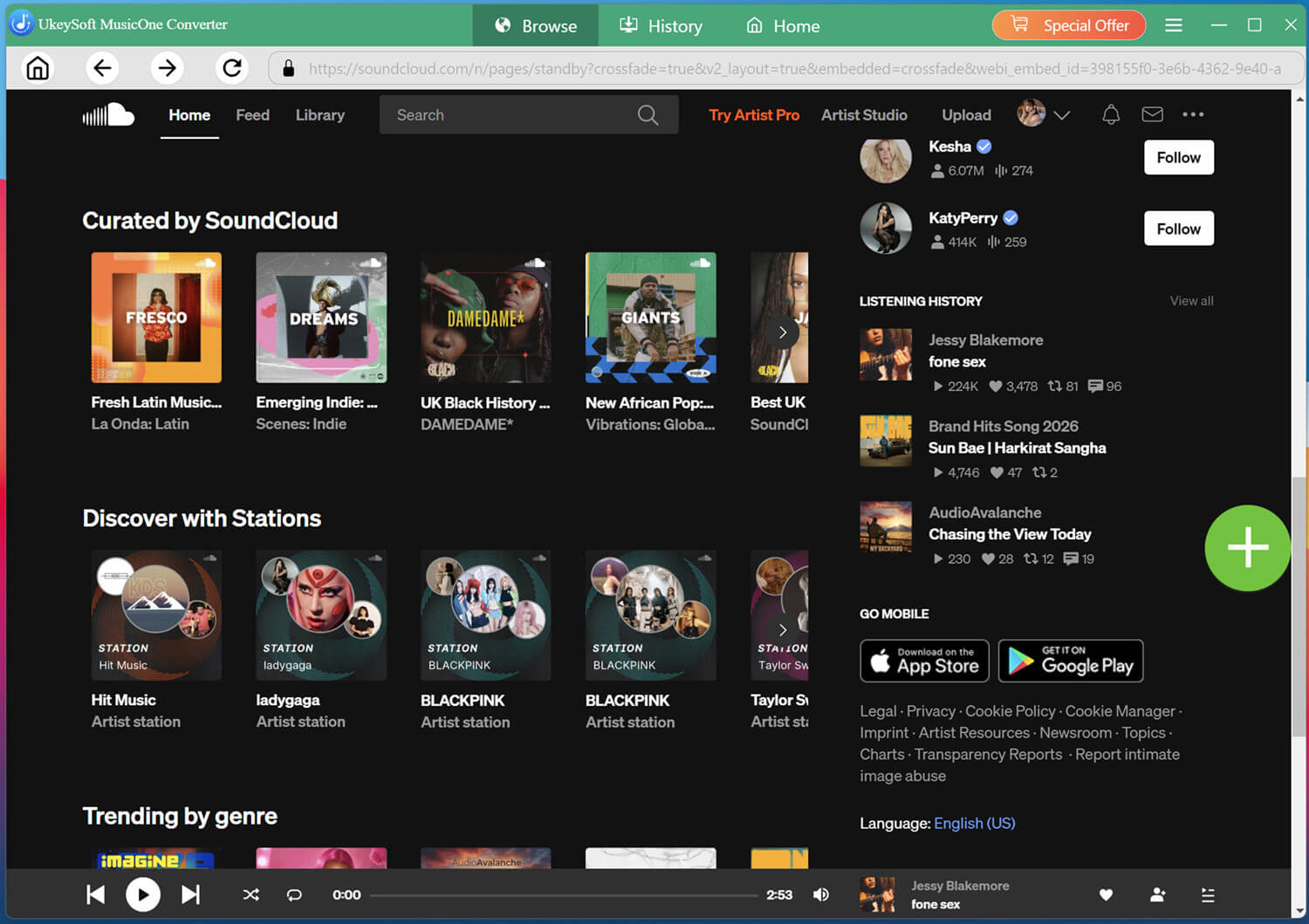
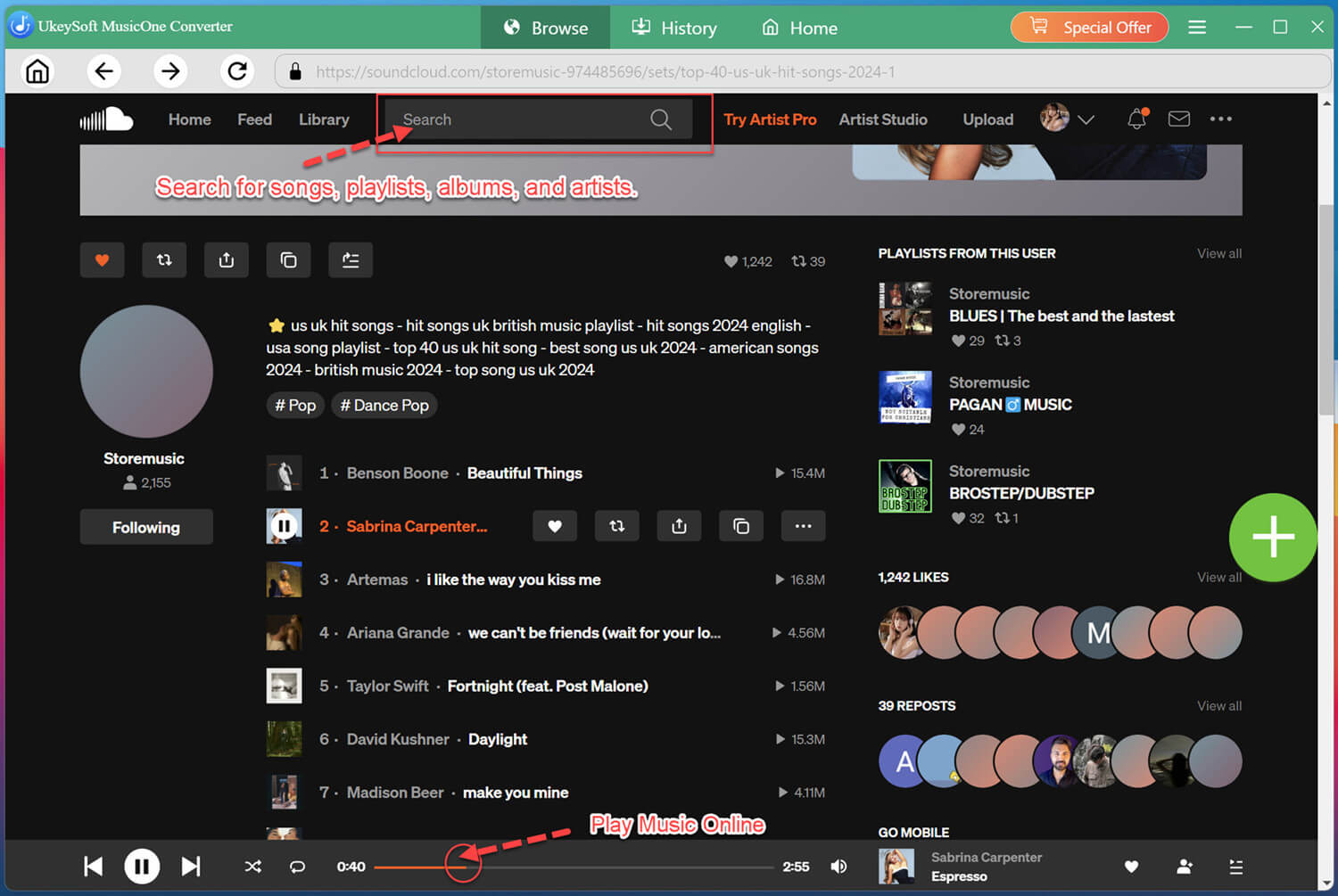
Search for your favorite music in the search box. You may enter the artist, album, song name.
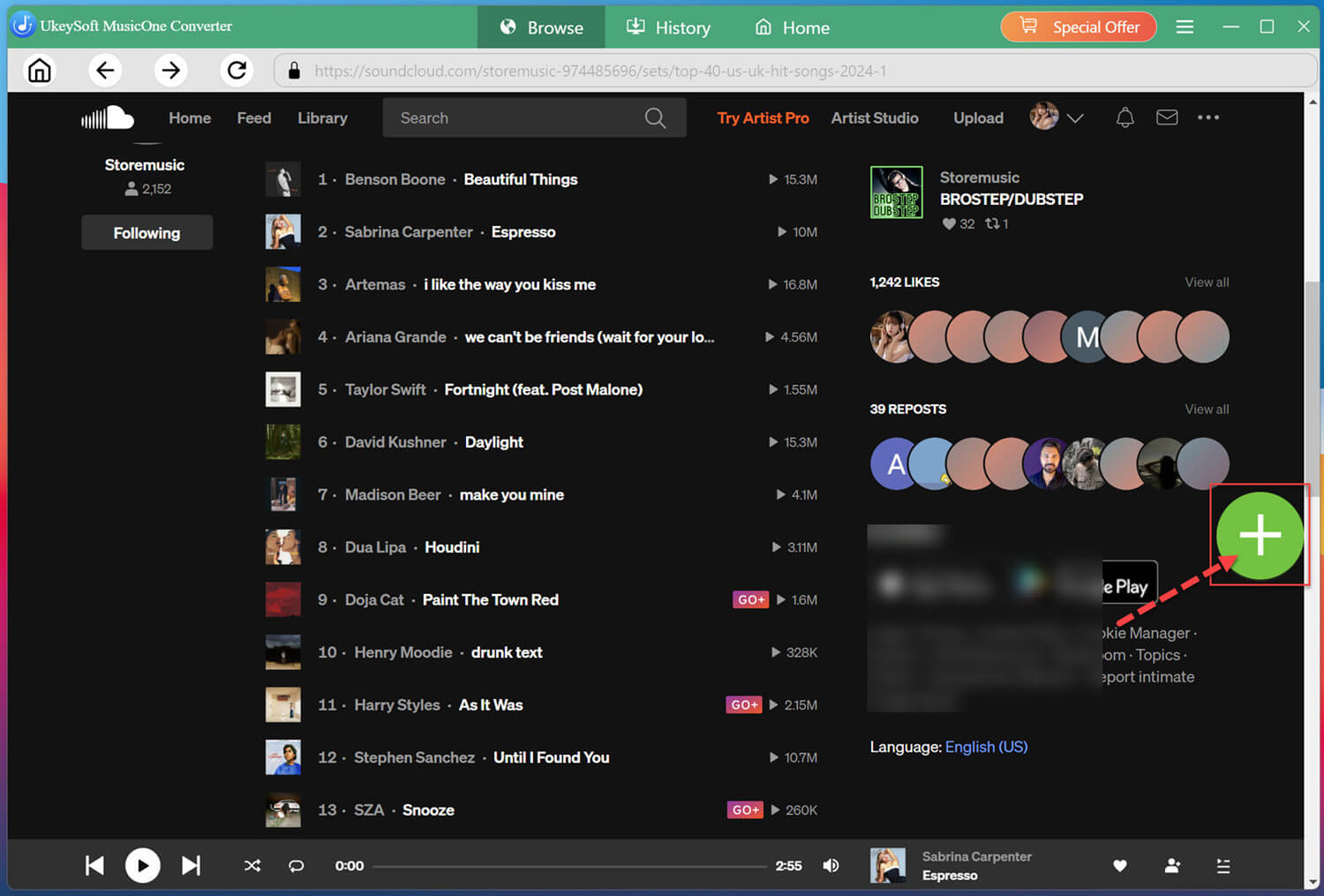
Open a track, playlist, or album page, then click the "+" button to load available songs into the download list.
Select the SoundCloud Songs
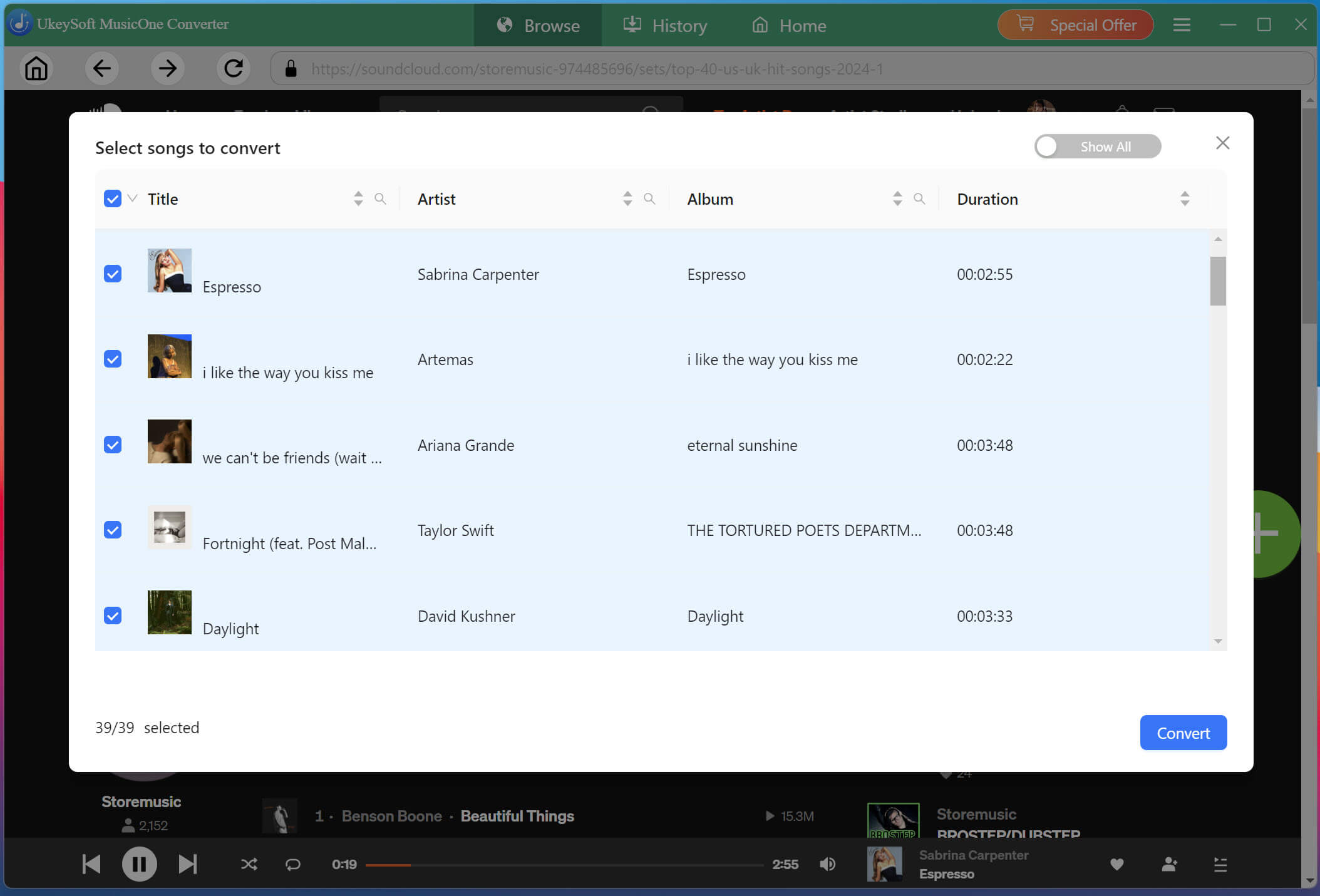
After adding music, review the song list and select the tracks you want to save. You can choose individual songs or select multiple tracks from a playlist for batch downloading.
Start Downloading SoundCloud Music on PC
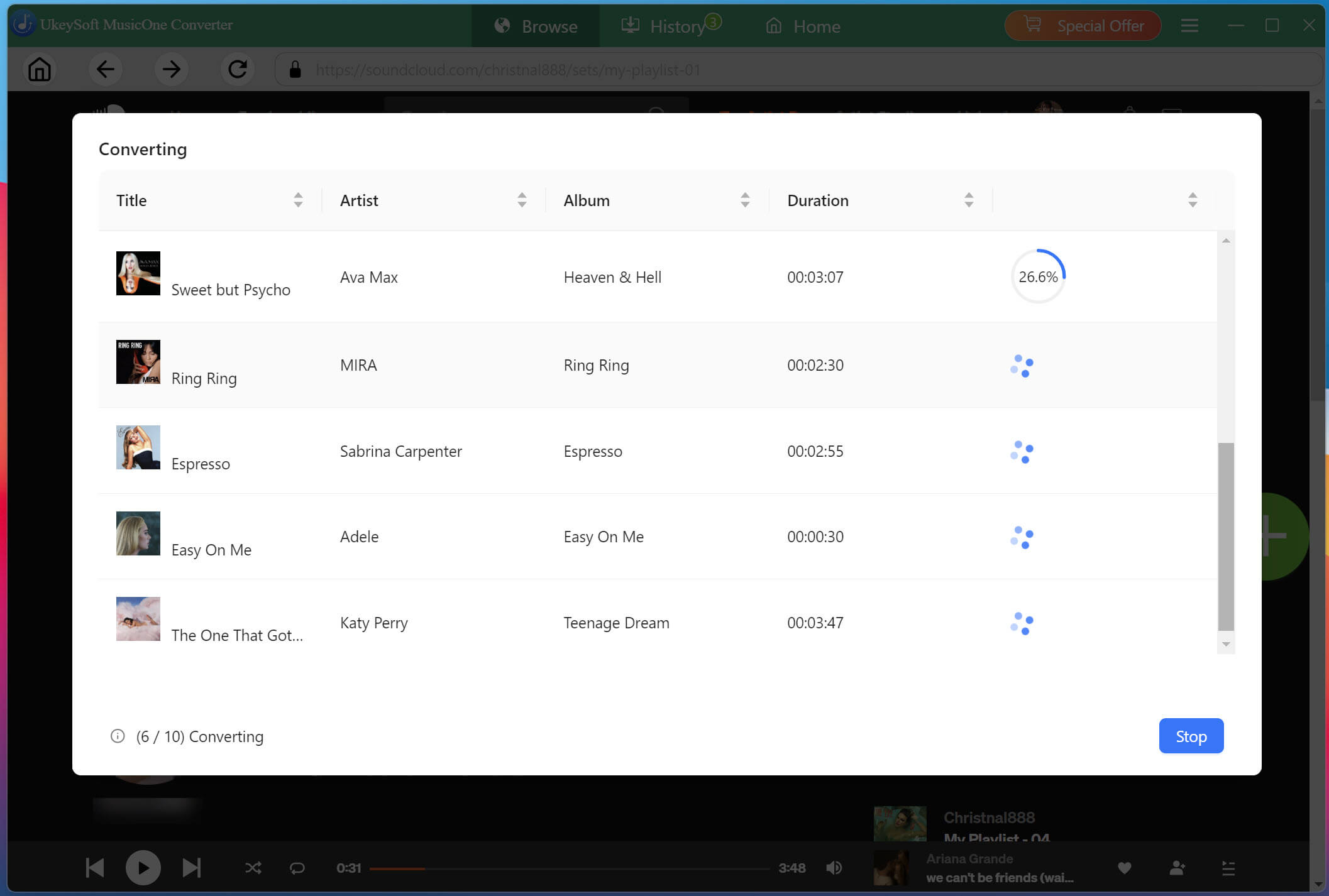
Click the Convert button to begin downloading. UkeySoft SoundCloud Music Converter will automatically process the selected tracks and convert them into MP3 or other audio format with the selected quality settings.
Find Downloaded SoundCloud Songs
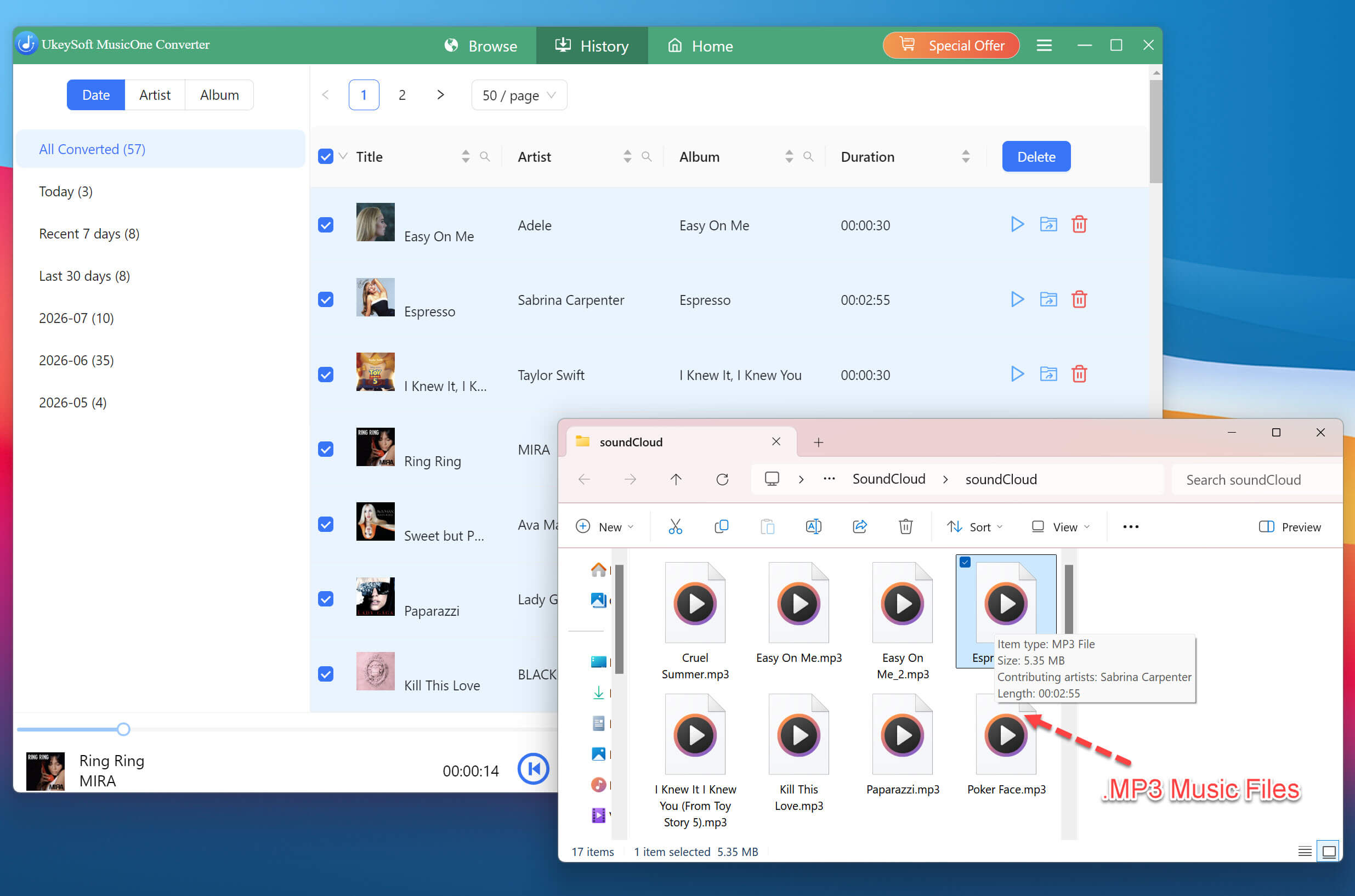
When the download process is complete, turn to the History section, hit on the Folder icon to view your downloaded files. You can now transfer these SoundCloud music tracks to your phone, USB drive, or other devices for offline listening.
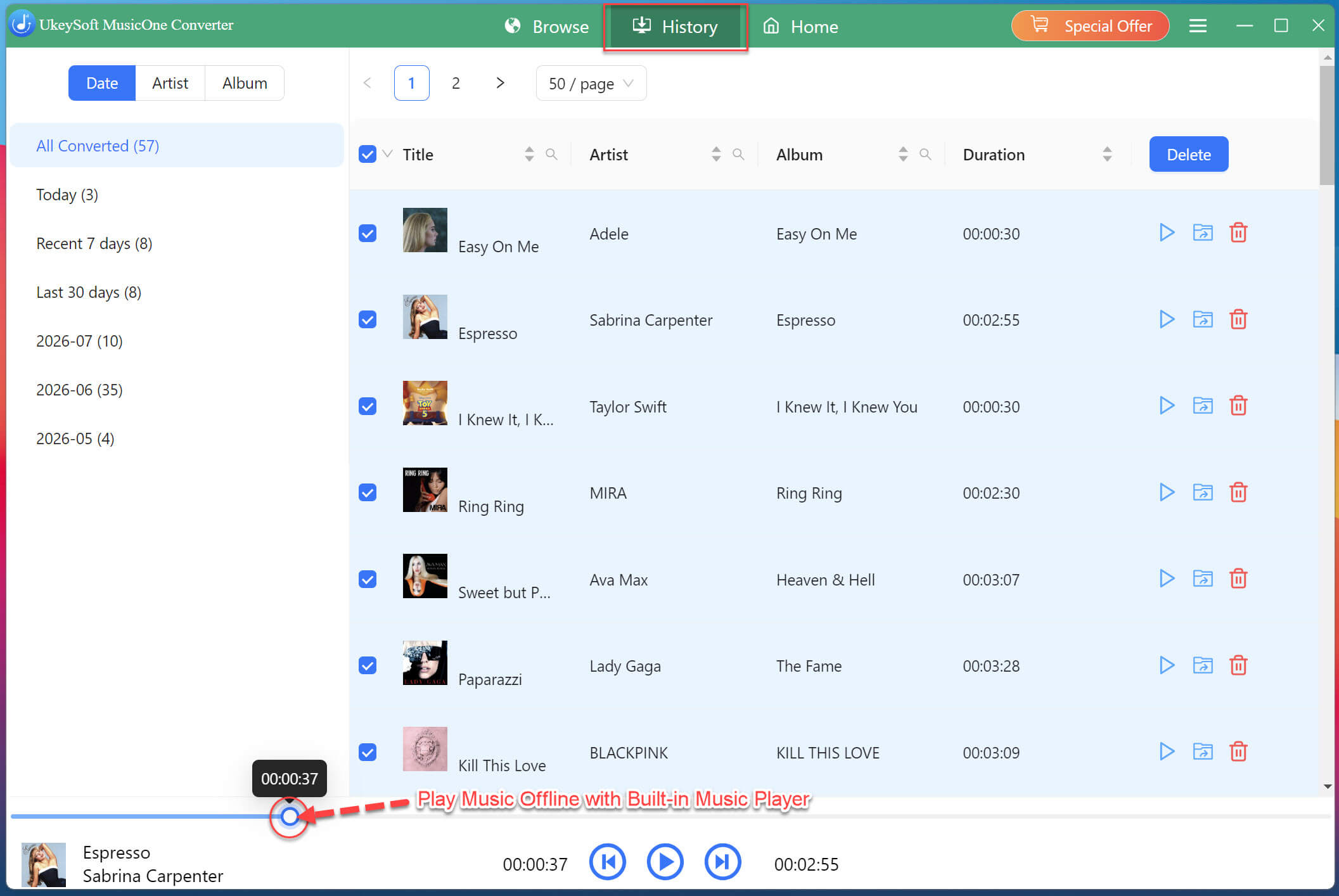
By the way, UkeySoft programs come with a built-in music player, you can directly listen to these SoundCloud songs here!
Method 3. Download SoundCloud Music to iPhone/Android (Go/Go+ Only)
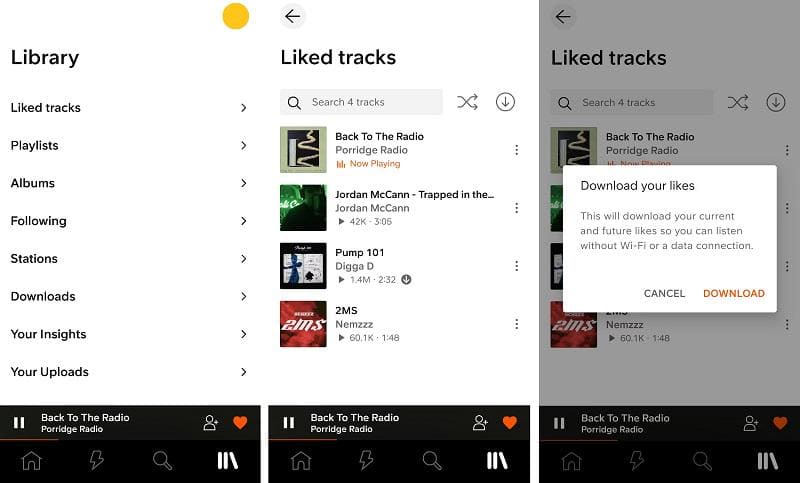
For mobile users, as the SoundCloud Music app provides a direct download function, so you can subscribe to SoundCloud Go or Go+ plan to directly download SoundCloud songs for offline listening on iPhone/Android. Keep in mind that offline downloads require storage space on your mobile device, and the downloaded songs are only available through the SoundCloud app. You cannot transfer any downloaded SoundCloud tracks to any other player or device.
Note:
If your don't have a SoundCloud subscription account, you can turn to use UkeySoft SoundCloud Music Converter to download SoundCloud songs to MP3 on your computer first, then transfer them to your mobile device for offline listening.
Install the official SoundCloud app on your iPhone or Android device. Open the app and log in with your paid account.
Open your favorite track, playlist, or album.
Tap the "Download" icon to save the content for offline playback.
Method 4. Download SoundCloud Songs for Free via Online Tool
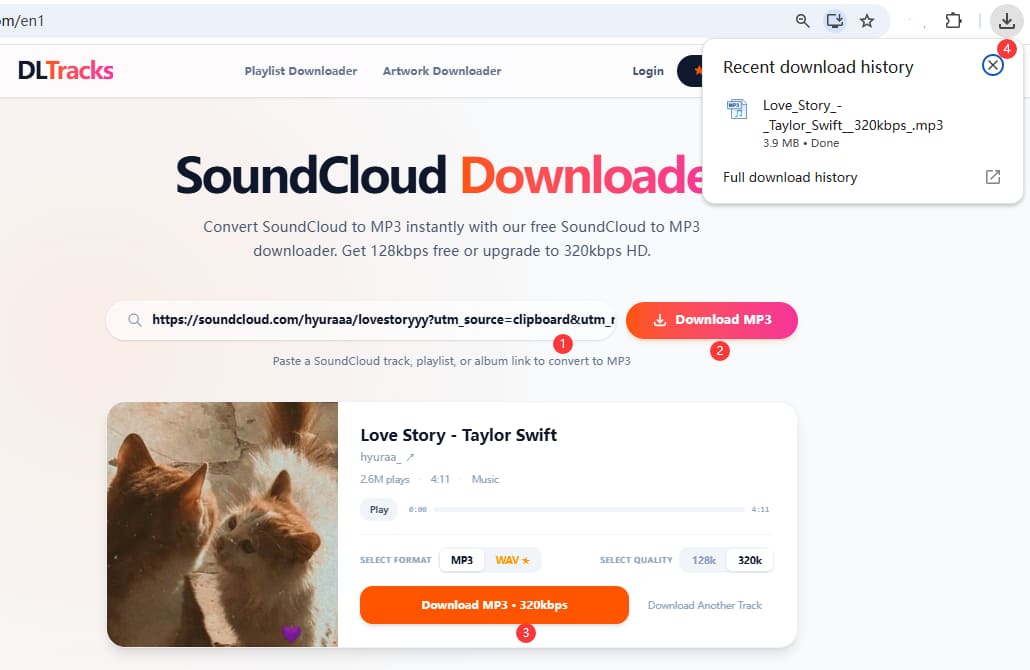
Many people are wondering if there are online SoundCloud downloaders available. Yes, Klickaud, SoundLoadMate, MusicVerter are one of them. These online tools let users easily download SoundCloud songs as MP3 simply by entering the song link, without needing to install extra app or software. Here we take the DLTracks as an example.
Visit SoundCloud website in your browser, or open the SoundCloud app on your phone.
Find the track you want to download, click "Share", and copy the song URL.
Visit the DLTracks website and paste the copied SoundCloud link into the search box.
Click "Download MP3" button, and then click "Download MP3 320kbps" option.
Once completed, the downloaded MP3 file will be saved to your browser download folder.
Heads up:
In our experience, online SoundCloud music downloaders often don't perform as well as expected. Many free download websites are filled with annoying ads or plug-ins. They only support downloading tracks one at a time and don't offer batch downloads for entire playlists or albums. Additionally, the output quality is often limited to low-quality 128kbps audio. In this case, we highly recommend using the best SoundCloud music downloaders for desktop, such as UkeySoft, which is 100% safe, ad-free and ensure efficient and lossless music downloads.
Method 5. Download Music from SoundCloud Free with Browser Extension
Browser extensions provide another simple way to download SoundCloud music for offline listening, and Soundcloud Track Downloader is the one you can rely on in 2026. When we tested it to see how it performs in downloading SoundCloud track, we found that it integrates directly into SoundCloud's interface, adding download buttons to track pages.
However, it's important to note that not every SoundCloud track can be downloaded through a browser extension. If this method doesn't work for a specific track, you can try one of the other methods mentioned above.
Run Google Chrome browser and add SoundCloud Track Downloader to the extension column.
Go to SoundCloud and find the track you want to download, start playing it.
If the extension supports the track, a download button will appear. Click it to save the SoundCloud song to your computer.
FAQs About Downloading SoundCloud Music
Can I download songs as MP3 from SoundCloud?
Yes, you can download music from SoundCloud to MP3 if the artist enables official downloads, or by using a third-party tool like UkeySoft SoundCloud Music Converter.
Is there a way to download SoundCloud on PC?
Yes. You can download SoundCloud songs on PC using official download options, online download tools, browser extensions, or desktop SoundCloud music downloader software. A desktop software usually provides more powerful features, including playlist downloads, high effiency, and higher audio quality.
Can you download music on SoundCloud without paying?
Yes, some SoundCloud songs can be downloaded for free if artists enable downloads. However, many tracks require SoundCloud Go/Go+ for offline downloads. Another option is using UkeySoft SoundCloud Music Converter to download MP3 music from SoundCloud with a free account.
Can I download songs from SoundCloud to a USB?
Yes. After you download SoundCloud music tracks as regular MP3 audio files, you can copy them to a USB drive. Simply connect your USB device, locate the downloaded MP3 files, and transfer them.
Conclusion
Now, you may have a clear understanding of how to download music from SoundCloud with the help of official features, online tools, and third-party downloaders. Afterwards, you can easily listen to your favorite SoundCloud tracks offline on your device. While each method works, they vary a lot in speed, stability, and audio quality.
In comparison, a professional desktop solution, UkeySoft SoundCloud Music Converter, offers a more stable way to download SoundCloud music to MP3 in batches while keeping consistent 320kbps quality. More importantly, it is completely safe to use, no ads, no pop-ups! Click the download button to have a free try!
Justin Sabrina has always had great enthusiasm for writing, programming and web development. He likes writing about software and technology, his works are featured on some tech blogs or forums like Tom's Hardware, CNET, etc.
 English
 Arabic
 Chinese (Simplified)
 Chinese (Traditional)
 Croatian
 Czech
Czech Danish
 Dutch
Dutch Estonian
 Finnish
 French
 German
 Greek
Greek Hebrew
 Hindi
Hindi Hungarian
 Indonesian
 Italian
 Japanese
 Kazakh
 Korean
 Malay
Malay Norwegian
 Polish
 Portuguese
 Romanian
 Russian
 Slovenian
 Spanish
 Swedish
 Thai
Thai Turkish
 Ukrainian
 Vietnamese









Comments are off!