○ Product Name:UkeySoft All-in-One Music Converter (Windows & Mac)
○ Supported Services: Spotify, Apple Music, Amazon Music, Tidal, Deezer, Pandora, YouTube Music, SoundCloud.
○ Core Function: Converts DRM-protected streaming audio into DRM-free MP3, M4A, WAV, FLAC, AAC, and AIFF at 16X conversion speed.
○ Key Innovation: Built-in multi-platform web players eliminate the need for installing external streaming desktop apps.
○ Output Quality: Preserves 100% original Hi-Fi/lossless audio quality with complete ID3 tags metadata.
UkeySoft has improved its music conversion services to give users a better and more powerful experience. Recently, UkeySoft launches All-in-One Music Converter to help you download MP3 music easily. This new tool combines eight popular music streaming platforms in one program, making music downloading faster and more convenient. With upgraded features and smoother performance, it provides a simple and efficient way to enjoy streaming music offline.
In this review, you will learn the main features of UkeySoft All-in-One Music Converter and see how it helps you download MP3 music from multiple music platforms, delivering you a premium listening experience. Now, let's get started!
Part 1. Overview of UkeySoft All-in-One Music Converter
UkeySoft All-in-One Music Converter is a multi platform music downloader that supports eight popular streaming services in one program. It provides powerful downloading features that help users download music content from popular music platforms easily and save streaming songs as local files without complicated steps. With this software, you can download music to MP3, M4A, AAC, FLAC, WAV, AIFF and enjoy your favorite tracks anytime.
UkeySoft All-in-One Music Converter now works smoothly with the web players of Spotify, Apple Music, YouTube Music, Tidal, Amazon Music, Deezer, SoundCloud, and Pandora. Simply choose your preferred music service and log in to access the full music library. Then you can download songs directly to your computer for offline playback. If you use multiple streaming platforms and want a more convenient and cost effective way to listen offline, UkeySoft All-in-One Music Converter is a great solution.
Part 2. Main Features of UkeySoft All-in-One Music Converter
"The launch of UkeySoft All-in-One Music Converter marks a major milestone for streaming music lovers. Instead of forcing users to buy and manage separate converters for Spotify, Apple Music, or Tidal, we unified all major platforms into a single, intuitive software interface powered by an accelerated 16X conversion engine. With this one-top music downloader, users can easily grab music from multiple platforms in one place. No need to switch to multiple music downloaders or streaming music apps." stated the Lead Product Manager at UkeySoft.
Now, let’s take a closer look at the main highlights of the software and the benefits it brings.
👍 Supports All Popular Music Streaming Services
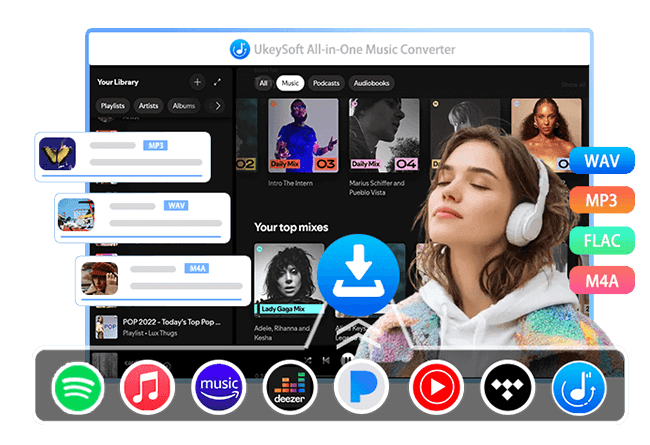
UkeySoft All-in-One Music Converter combines eight UkeySoft music converters into one platform, including Spotify, Apple Music, YouTube Music, Tidal, Amazon Music, Pandora, SoundCloud, and Deezer. Within a single program, you can choose any supported music service, log in to your account, access the full music library, and download songs or playlists directly with ease.
👍 Support Various Output Audio Formats
UkeySoft All-in-One Music Converter supports multiple audio output formats, giving users more flexibility for different devices and playback needs. You can download music to MP3, M4A, AAC, FLAC, WAV, or AIFF formats, making it easy to play your music on phones, computers, car systems, or other media players without compatibility issues.
👍 High Quality Audio Output for Offline Listening
UkeySoft All-in-One Music Converter uses advanced decoding technology to preserve excellent audio quality during the download process. It keeps the original listening experience from different platforms, whether it is Spotify's high quality audio, Apple Music lossless tracks, Amazon Music HD, or Deezer HiFi sound quality.
The software also provides customizable output settings, allowing you to adjust audio parameters and personalize your offline music experience based on your preferences.
👍 16X Faster Batch Playlist Download Speed
To improve downloading efficiency, the software supports hardware acceleration and batch downloading. It can process multiple songs or entire playlists simultaneously, with speeds up to 16 times faster, helping you save time while building your offline music collection.
👍 Stable Performance with High Success Rate
The software includes built in web players for all eight streaming services, allowing you to log in and download music directly inside the program. This design improves stability and helps achieve a higher conversion success rate compared with many other tools on the market.
👍 Built-In Web Player, Music Player and Music Manager
UkeySoft All-in-One Music Converter includes a built in web player that lets you browse, search, and play music directly inside the program without using other apps or browsers. After downloading songs, you can listen to them right away with the built in Music Player.
The software also features a Music Manager that automatically organizes downloaded songs by Artist, Album, or Date, helping you manage and find your music easily. This user-friendly design makes offline music listening more simple and convenient.
How to Use UkeySoft All-in-One Music Converter
UkeySoft All-in-One Music Converter features a clean and intuitive interface, making it easy for anyone to use its music downloading functions. Below is a brief guide to show how you can download streaming music offline with just a few clicks:
Choose a Music Streaming Service
Launch UkeySoft MusicOne Converter on your Windows or Mac computer. On the main screen, select your preferred streaming platform from the supported services, including Apple Music, Spotify, Amazon Music, Tidal, YouTube Music, Pandora, SoundCloud, and Deezer.
Log In to Your Music Account
Sign in to your music account through the built in web player. Logging in is required to search songs, stream music, and use the download feature.
After signing in, you can browse the full music library and play songs directly within the built in browser.
Set Output Format and Preferences
Before downloading, click the Preference option to adjust output settings. In the settings window, you can choose the output format such as MP3, WAV, M4A, AAC, FLAC, or AIFF. You can also customize output quality, cover quality, output folder, file naming rules, music organization method by Artist or Album, and interface language.
Add Songs or Playlists for Download
Return to the main interface and open any song, playlist, or album you want to download. You can search for music using the search bar. Once you find your desired content, open it and click the green + button on the right side to add songs to the download list.
Select Songs to Download
All songs are selected by default. You can uncheck unwanted tracks and manually choose the songs you want to download.
Start Downloading Streaming Music
Click the Convert button to begin downloading music to your computer. The software supports fast conversion speeds, allowing playlists to be processed quickly.
Access and Play Downloaded Music
After the download finishes, click the blue output folder icon to open the saved location on your computer.
UkeySoft MusicOne Converter also includes a built in Music Manager and Music Player. Open the History section to view and play downloaded songs, which are automatically organized by Date, Artist, or Album for easy management.
Part 4. UkeySoft All-in-One Music Converter Pricing Plans
Compared with UkeySoft's individual music converters, UkeySoft All-in-One Music Converter provides more affordable pricing plans while allowing users to enjoy all premium features without limits.
Currently, a single music converter such as Spotify Music Converter costs at least US$14.95 per month for one streaming service only. In comparison, UkeySoft All-in-One Music Converter is priced at US$55.95 per month and gives you access to music downloading features across multiple streaming platforms in one program. For users who use multiple music services, this makes it a more cost effective and convenient solution.
UkeySoft All-in-One Music Converter offers three subscription options:
1-month subscription: $55.95 for 1 device
1-year subscription: $129.95 for 1 device
Lifetime subscription: $159.95 for 1 device
For more details, you can visit the UkeySoft All-in-One Music Converter online store to view the latest pricing and plan information.
Conclusion
Overall, UkeySoft All-in-One-Music Converter offers a more stable, smooth, and efficient way to download music, making the whole process easier and more convenient. With this tool, you can download MP3 music easily and enjoy smooth, uninterrupted playback anytime. UkeySoft All-in-One Music Converter also offers a free trial, so you can install it and start exploring its features right away.
Chester has always had great enthusiasm for writing, programming and web development. He likes writing about software and technology, his works are featured on some tech blogs or forums like Tom's Hardware, CNET, etc.
 English
 Arabic
 Chinese (Simplified)
 Chinese (Traditional)
 Croatian
 Czech
Czech Danish
 Dutch
Dutch Estonian
 Finnish
 French
 German
 Greek
Greek Hebrew
 Hindi
Hindi Hungarian
 Indonesian
 Italian
 Japanese
 Kazakh
 Korean
 Malay
Malay Norwegian
 Polish
 Portuguese
 Romanian
 Russian
 Slovenian
 Spanish
 Swedish
 Thai
Thai Turkish
 Ukrainian
 Vietnamese







Comments are off!