By
ChesterUpdated on July 24, 2026
Summary
In this detailed comparison guide, we introduce the best 10 free online Spotify album downloaders that can convert Spotify albums to MP3. We look at each tool's main features, supported formats, ease of use, audio quality, and limitations, helping you compare them easily and choose the right option for downloading and managing Spotify albums offline.
Spotify is a popular music platform that lets you enjoy albums in the right track order, view album artwork, and explore full artist collections. However, downloading albums from Spotify has some limits. Even with a Premium account, you can only save albums for offline listening inside the app. The downloaded music is linked to your Spotify account and cannot be exported, transferred, or used as normal audio files. If your subscription ends or licensing changes, you may lose access to those downloads.
To make things easier, many Spotify album downloaders can help you save songs in common formats like MP3 while keeping album artwork and track information. Some tools even let you download full albums & playlists for free and store them on your device for flexible playback and management. In this guide, we will introduce the best 10 free online Spotify album downloaders and help you find the right one. Keep reading to learn more.
#1. UkeySoft Spotify Music Converter🔥
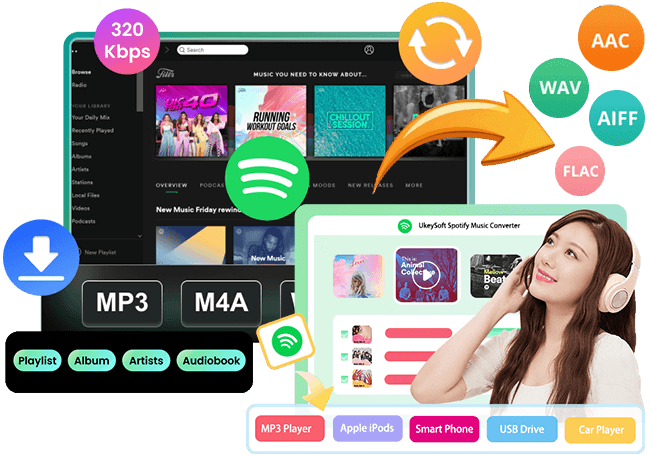
UkeySoft Spotify Music Converter is one of the reliable Spotify album downloaders designed to help users download Spotify albums and playlists to MP3 and other popular audio formats. It allows you to download full albums & playlists for free and store them as real audio files on your computer for flexible playback. During the downloading process, important metadata such as track number, release year, album artwork are kept intact. You can also add multiple albums at once for batch downloading, which helps save time. The output audio quality can reach up to 320kbps MP3 or FLAC lossless, delivering sound quality similar to Spotify streaming.
👍Main Features of UkeySoft Spotify Music Converter
- Download Spotify album and playlist without Premium.
- Convert Spotify music to MP3, M4A, AAC, FLAC, WAV, AIFF.
- Keep 100% original audio quality and ID3 tags.
- Download Spotify album at 16x faster speed in batch.
- Built-in Spotify web player, no need Spotify app.
- Keep Spotify music forever for offline playback on any device.
- Fully compatible with Windows & Mac.
If you need a tool that can convert music from multiple streaming platforms such as Spotify, Apple Music, Amazon Music, Tidal, Deezer, YouTube Music, and Pandora to MP3, UkeySoft MusicOne Converter is a great choice.
Tutorial: How to Download Spotify Album to MP3 with UkeySoft
Step 1. Open Spotify Converter and Sign in to Your Spotify Account
UkeySoft Spotify Music Converter works on both Windows and Mac computers. Download the correct version and install it on your computer. After installation, launch the program and sign in to your Spotify account.
Once logged in, you can browse, search, and play your favorite songs directly through the built in Spotify web player inside the software.
Step 2. Select MP3 as the Output Format
Click the Settings icon in the upper right corner to open the settings window. The default output format is lossless M4A. Since MP3 is supported by most devices and media players, it is recommended to choose MP3 as the output format.
Step 3. Add a Spotify Album
Use the built in Spotify web player to find and open the album you want to convert. Then click the + icon to add it to the conversion list. The program will automatically analyze the album and load all tracks into the Pending Converting list.
All songs are selected by default, but you can uncheck any tracks you do not want to download.
Step 4. Start to Convert the Spotify Album to MP3
Click the Convert button to start converting the Spotify album to MP3. The software supports up to 16X faster conversion speed to save your time.
Step 5. Find the Converted Songs
After the conversion is complete, click the blue Output Folder button to open the destination folder. You will find all converted Spotify songs saved in MP3 format.
#2. SpotDown
SpotDownload lets you export full Spotify albums as MP3 files for free. There are no download limits, and the tool offers fast processing speed. This Spotify album downloader allows you to add albums or tracks by simply copying and pasting a Spotify album link into the URL box, then clicking the download button to start.
How to Download a Spotify Album with SpotDownload
Step 1. Copy the Spotify album link and paste it into the SpotDownload input field, then click Download.
Step 2. After the server loads all songs from the album, click Download All Songs to save the entire album to your computer. You can also download individual tracks one at a time if preferred.
Pros and Cons of SpotDown
✅ Pros
Completely free to download full Spotify albums.
Fast online conversion from Spotify album to MP3.
❌ Cons
Does not support batch downloading of multiple songs at once.
Audio sources come from YouTube rather than directly from Spotify.
#3. Spotidown.app
SpotiDown Downloader allows you to convert Spotify songs, albums, and playlists into high quality MP3 files. When downloading albums or playlists, this Spotify MP3 downloader can package all tracks into a single ZIP file, making it easier to download and manage while saving storage space.
How to Download Spotify Albums with SpotiDown
Step 1. Paste the copied Spotify album link into the SpotiDown website and click Download to begin.
Step 2. Click Download Album to save the entire album as a ZIP file on your computer. Please note that a Premium upgrade is required to download all tracks in an album. Free users can download up to five songs per album, or download tracks individually by clicking Download MP3.
Note: Disable your ad blocker to download full albums or playlists successfully.
Pros and Cons of Spotidown.app
✅ Pros
Free online tool to download Spotify album tracks as MP3 files.
Supports downloading high quality album cover images.
❌ Cons
Full album batch downloads require a Premium upgrade.
#4. SpotiSongDownloader
SpotiSongDownloader is an online Spotify to MP3 tool that lets you download Spotify songs, albums, and playlists in up to 320 kbps quality with limited free access. It supports both MP3 and M4A output formats. As a web based downloader, it works on different devices, including computers and mobile phones, so you can download Spotify albums easily without installing software. Keep in mind that free album downloads use audio sourced from YouTube rather than official Spotify files.
How to Download Spotify Album with SpotiSongDownloader
Step 1. Copy the Spotify album link and paste it into the online input box on the Spotify Downloader website.
Step 2. Click Download, then choose Download ZIP or Generate Download Links, and select your preferred audio quality.
If you have an active subscription, you can download the entire album at once as a ZIP file. Without a subscription, only the first two tracks can be downloaded together as a ZIP file. You can also download songs individually if needed.
Pros and Cons of SpotiSongDownloader
✅ Pros
Download Spotify album music to MP3 directly online.
Supports batch downloading for album playlists.
❌ Cons
Not completely free to use.
Unlimited album downloads with full tags require a paid subscription.
Maximum quality is 320 kbps MP3, with no lossless FLAC option.
#5. SpotDL
SpotDL supports downloading MP3 files from various Spotify content types, including songs, playlists, albums, and artist top tracks. The downloaded tracks keep high audio quality similar to the versions streamed on Spotify. The tool provides access to a large music library with no strict download limits.
How to Download Spotify Albums to MP3 with SpotDL
Step 1. Paste the Spotify album link into the SpotDL input area and click Start.
Step 2. Click Convert next to each track to download the album songs one by one.
Pros and Cons of SpotDL
✅ Pros
Free to download Spotify album tracks individually.
Combines album downloads into one file for easier organization.
❌ Cons
Batch album downloads and higher quality options require a Premium upgrade.
Free version only supports downloading songs one at a time from an album.
#6. SpotiDownloader
SpotiDownload is an online tool that converts Spotify album tracks into MP3 files for offline listening. It is completely free to use and allows you to save all songs from an album as downloadable MP3 files. The tool supports Spotify song, playlist, album, and podcast links.
How to Download Spotify Album to MP3 with SpotiDownload
Step 1. Copy the Spotify album URL and paste it into the input box on the SpotiDownload website, then click Download.
Step 2. Select Download ZIP and wait for the server to load all tracks. Once ready, the full album will be saved to your computer.
Pros and Cons of SpotiDownloader
✅ Pros
Completely free for downloading Spotify albums in bulk.
Supports MP3 downloads up to 320 kbps quality.
❌ Cons
Can only process one Spotify album link at a time.
#7. Spotmate.online
SpotMate is not fully free for downloading Spotify albums, especially if you want lossless FLAC audio quality. However, you can still use its basic features to download Spotify albums for free. Like Sidify Music Converter, SpotMate also has an Android version, so you can install the app and download Spotify albums directly on your Android phone. To use advanced features such as batch album downloads and lossless quality downloads, you need to upgrade to the Pro version.
How to Download Spotify Albums with SpotMate
Step 1. Paste the Spotify album URL into the SpotMate online downloader and click Start.
Step 2. Choose the Premium plan if you want to download the entire album in one file. Free users can download album tracks individually.
Pros and Cons of SpotMate
✅ Pros
Free download support for Spotify songs, albums, and playlists.
Supports high quality lossless FLAC downloads.
❌ Cons
Premium upgrade required for full album downloads and FLAC lossless quality.
#8. SpotiFlyer
SpotiFlyer is an Android based Spotify downloader that lets you extract MP3 audio from Spotify albums easily. If you prefer downloading Spotify music directly on your Android phone, this app is a convenient option. It supports batch downloads from album playlists and finishes the downloading process quickly.
How to Download a Full Spotify Album with SpotiFlyer
Step 1. Copy the Spotify album link from the Spotify app and paste it into the SpotiFlyer app.
Step 2. Tap Convert for the album tracks, then tap Download again to save each song locally on your device one by one.
Pros and Cons of SpotiFlyer
✅ Pros
Free Spotify album downloader designed for Android users.
❌ Cons
Contains banner ads in the interface.
#9. Spowload
Spowload is a useful alternative Spotify album downloader when other tools do not work properly. It accepts Spotify links and converts album or playlist songs into MP3 format. This tool is especially helpful for downloading large Spotify albums with many tracks, even albums containing over 100 songs. It also keeps important ID3 tag information such as song details and metadata.
How to Download Spotify Album with Spowload
Step 1. Paste the Spotify album link into the Spowload input box and click Start.
Step 2. Click Convert next to each track, then click Download to save the songs to your device one by one.
Pros and Cons of Spowload
✅ Pros
Free tool to extract and download songs from Spotify album links.
❌ Cons
Does not support batch downloading of album tracks.
Contains ads that may redirect you to other websites.
#10. UkeySoft MusicOne Converter🔥
UkeySoft MusicOne Converter is one of the powerful Spotify album downloaders that helps you save Spotify albums and playlists in multiple audio formats, including MP3, M4A, AAC, FLAC, WAV, and AIFF. It allows you to download full albums & playlists for free and store them as local audio files for flexible playback. The software keeps complete metadata such as album artwork, track number, artist name, and album details, helping you maintain a well organized music library. With batch downloading, high quality output, and an easy to use interface, UkeySoft MusicOne Converter provides a smooth and efficient way to enjoy Spotify album music offline while preserving all important information.
👍Key Features of UkeySoft MusicOne Converter
- Download albums/playlists from various streaming platforms, inclding Spotify, Apple Music, etc.
- Convert Spotify album to MP3, M4A, AAC, FLAC, WAV, AIFF.
- Retain original audio quality and ID3 tags.
- Batch download albums/playlists at 16x speed.
- Download any music with Free and Premium account.
- Built-in music web player, music player and music manager.
- Available on Windows & Mac.
Guide: How to Download Spotify Album to MP3 with UkeySoft MusicOne Converter
Step 1. Choose a Streaming Music Service
Open UkeySoft MusicOne Converter on your Windows or Mac computer. On the main screen, select your preferred streaming platform from the supported services, including Apple Music, Spotify, Amazon Music, YouTube Music, Pandora, Deezer, and Tidal. Here, choose Spotify.
Step 2. Sign in to Your Music Account
Log in to your account using the built in web player inside the program.
After signing in, you can browse the full music library and play songs directly within the built in browser.
Step 3. Set MP3 as the Output Format
Click Preference to open the settings window. Here you can choose MP3 as the output format. You can also adjust output quality, cover quality, output folder location, and other settings.
Step 4. Add a Spotify Album
Return to the main interface and open the Spotify album you want to download. Click the green + button on the right side to add the album to the download list.
All songs are selected by default. You can uncheck tracks and select only the songs you want.
Step 5. Start to Convert the Album to MP3
Click the Convert button to start downloading and converting the selected album tracks to MP3. The program will save all chosen songs as local MP3 files on your computer.
Step 6. View Downloaded Music Files
After the conversion is finished, click the blue Output Folder icon to open the folder and access your downloaded music.
Comparison of Spotify Album Downloader
| |
Output Format
|
Output Quality
|
Batch Download
|
Download Speed
|
Keep ID3 Tags
|
compatibility
|
Price
|
Ratings
|
|
UkeySoft Spotify Music Converter
|
MP3, M4A, AAC, FLAC, WAV, and AIFF |
320kbps lossless |
Yes |
16X |
Yes |
Windows, Mac |
Monthly: $14.95
Yearly: $59.95
Lifetime: $89.95 |
***** |
|
SpotDown
|
MP3 |
224kbps |
No |
10X |
No |
All Browsers |
Free |
**** |
|
Spotidown.app
|
MP3 |
320kbps |
No |
10X |
Yes |
All Browsers |
$20 |
*** |
|
SpotiSongDownloader
|
MP3 |
320kbps |
No |
10X |
No |
All Browsers |
$29.99/$15.99/$7.99 |
*** |
|
SpotDL
|
MP3 |
320kbps |
No |
10X |
No |
All Browsers |
$5/$10/$15 |
*** |
|
SpotiDownloader
|
MP3 |
320kbps |
No |
10X |
Yes |
All Browsers |
Free |
**** |
|
Spotmate.online
|
MP3, FLAC |
320kbps |
No |
10X |
Yes |
Android, All Browsers |
$5/$10/$15 |
*** |
|
SpotiFlyer (Android)
|
MP3 |
320kbps |
Yes |
5X |
No |
Android |
Free |
*** |
|
Spowload
|
MP3 |
131kbps |
No |
5X |
No |
All Browsers |
Free |
*** |
|
UkeySoft MusicOne Converter
|
MP3, M4A, AAC, FLAC, WAV, and AIFF |
320kbps lossless |
Yes |
16X |
Yes |
Windows, Mac |
Monthly: $55.95
Yearly: $129.95
Lifetime: $159.95 |
***** |
FAQ about Downloading Albums from Spotify
Q1. Do downloaded albums come from Spotify's original source?
Some online converters get matching songs from third party platforms such as YouTube. Professional desktop tools like UkeySoft Spotify Music Converter and UkeySoft MusicOne Converter download audio directly from Spotify streams, helping keep the original sound quality and album structure.
Q2. Will the album track order stay the same after downloading?
Good quality tools automatically keep the original track order of the album. Basic online tools may arrange songs alphabetically or randomly, so you might need to reorder them manually.
Q3. Can podcasts, audiobooks, or other content be downloaded with albums?
Some advanced tools support more than just music albums, including podcasts and other Spotify content. Most online album downloaders only support music tracks.
Conclusion
Spotify album and playlist downloading is not just about saving music files. It is also about keeping everything organized and correct. A good downloader should keep albums in the right track order, save song details and album artwork, and keep the original sound quality. Many online Spotify album downloaders list can download a few songs, but they may not organize albums and playlists properly.
Reliable Spotify album downloaders like UkeySoft Spotify Music Converter and UkeySoft MusicOne Converter make it easy to download full albums & playlists for free while keeping metadata, structure, and audio quality unchanged. This helps you build a complete and well organized music library that can be played on any device.
Spotify Album Downloaders

Chester has always had great enthusiasm for writing, programming and web development. He likes writing about software and technology, his works are featured on some tech blogs or forums like Tom's Hardware, CNET, etc.
 English
 Arabic
 Chinese (Simplified)
 Chinese (Traditional)
 Croatian
 Czech
Czech Danish
 Dutch
Dutch Estonian
 Finnish
 French
 German
 Greek
Greek Hebrew
 Hindi
Hindi Hungarian
 Indonesian
 Italian
 Japanese
 Kazakh
 Korean
 Malay
Malay Norwegian
 Polish
 Portuguese
 Romanian
 Russian
 Slovenian
 Spanish
 Swedish
 Thai
Thai Turkish
 Ukrainian
 Vietnamese






Comments are off!