By
Justin SabrinaUpdated on October 15, 2026
Summary
This post offers a simple method to keep Pandora Music songs forever after unsubscribing or your free trial ends. You can download Pandora music to MP3 with a free account and keep the music on your devices permanently.
Many Pandora users wonder how to keep Pandora downloads after their subscription, or free trial ends. Perhaps you want to keep a Pandora playlist for a long road trip, save your favorite songs before switching platforms, or build a local music library that you can access without opening Pandora app.
However, the fact is: Pandora stores downloaded music in encrypted form within the Pandora app. Users need to keep paying a monthly subscription to access the downloaded music. You will be downgraded to a free plan and will only be able to listen to ad-supported streaming content. No worry. This article will teach you how to download Pandora music without subscription and keep Pandora music forever!
Tool Required: UkeySoft Pandora Music Converter
If your goal is to keep Pandora music downloads playable once your subscription expires, downloading Pandora music to MP3 is the best solution.
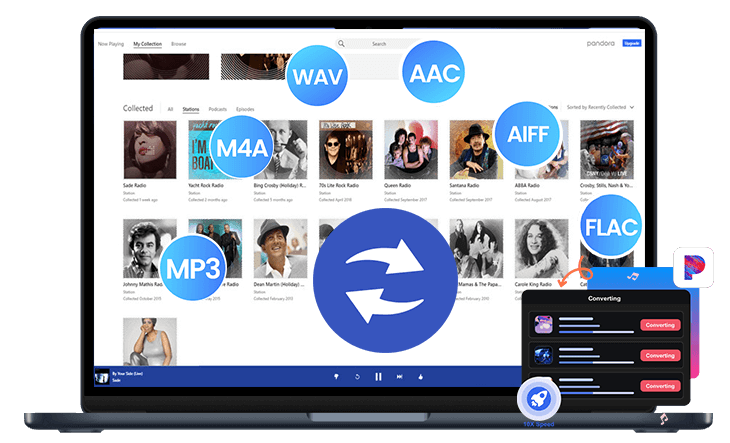
UkeySoft Pandora Music Converter is desktop software designed for Pandora Free, Plus, and Premium users. Instead of only keeping songs inside the Pandora app, UkeySoft Pandora Music Converter lets you convert Pandora tracks, albums, playlists, and stations to common MP3, M4A, AAC, FLAC, WAV, or AIFF audio formats for permanent offline backup.
It comes with a built-in Pandora web player, so you can search for songs, open playlists, and add music to the conversion list in a familiar interface. There is no need to use the Pandora App! Plus, even if the Pandora Free users can save Pandora music as MP3 files with highest 320kbps bitrate! Whether you have a Pandora subscription or not, you can still keep and enjoy your favorite tracks offline anytime, anywhere!
UkeySoft Pandora Music Converter
- Download any music content with Pandora Free, Plus, Premium accounts
- Convert Pandora songs to MP3, M4A, WAV, FLAC, AIFF, or AAC.
- Preserve audio quality up to 320kbps for superior offline listening.
- Download entire playlists and albums in batch with up to 16X speed.
- Keep ID3 tags: song title, artist, album, and artwork information.
- Browse, stream, download, play, and manage Pandora music in one tool.
- Keep Pandora music forever, transfer Pandora music to any device, app.
You can watch this video guide to download Pandora music to MP3 without subscription and keep the Pandora music forever!
How to Download Pandora Music to MP3 to Keep Forever?
Step 1. Log In to Your Pandora Account
After installing UkeySoft MusicOne Converter, launch the software and select "Pandora" from the interface.
Then your will enter the UkeySoft Pandora Music Converter. You need to log in via your free Pandora music account within the built-in web player to access the official streaming music library.
Step 2. Configure Output Settings
Click Menu and select Preferences to open the output settings. Choose MP3 for broad compatibility or select another supported format, such as FLAC, WAV, AIFF, or M4A. Adjust output quality to 320kbps, define output folder, and output file name preferences according to your needs.
Step 3. Browse and Add Pandora Music
Once logged in, search for any Pandora song directly in the web player. When you find the song, playlist, album, or station you want to convert, simply click the "+" icon on the right side to add it to the conversion queue.
Review the tracks added to the conversion list. Select individual songs or choose multiple available tracks if you want to save a larger collection.
Step 4. Start Converting Pandora Music to MP3
YAfter confirming your selections and output settings, click the "Convert" button to begin processing. UkeySoft Pandora Music Converter will convert the selected supported tracks into MP3 format at 320kbps high quality.
Step 5. Save Downloaded Pandora Music on Local Folder Forever
"History" section and click the Folder icon next to the song title. The output folder will pop up, and you can access all downloaded Pandora songs for offline playback anytime, anywhere.
UkeySoft Pandora Music Converter has a built-in music player, you can click the Play button to listen to the songs directly!
FAQs About Keeping Pandora Songs Forever
What happens to my content if I downgrade from Premium?
When you downgrade from Pandora Premium to Plus or the ad-supported plan, you will lose access to your on-demand music collection and custom playlists. However, Pandora keeps your collection and playback history on its servers, so you can access them again if you resubscribe to Premium.
Will I lose everything if I cancel my Pandora subscription?
No. Your account, stations, and saved collection are not necessarily deleted when you cancel. However, once your subscription expires, you will lose access to Premium features, including offline downloads.
Can I save Pandora music to my iPhone?
Yes. Both Pandora Plus and Premium users can download music content for offline listening directly in the Pandora app on an iPhone. But if you want to keep Pandora songs on your iPhone forever, first you need to convert Pandora songs to MP3 with UkeySoft Pandora Music Converter, then move them to your iPhone.
Conclusion
Although Pandora Premium and Plus offer the convenience of downloading music to stream offline, you will still lose your Pandora music downloads when canceling your subscription. To keep Pandora Music songs forever without Premium, the powerful tool - UkeySoft Pandora Music Converter delivers a simple solution. Using it, even Pandora Free users can download Pandora music as local MP3 audio files and then keep your Pandora songs permanently on your computers, laptops, smartphones, tablets, USB drives, MP3 players, and other devices. Download UkeySoft right now and build your offline music collection!
Keep Pandora Songs Forever

Justin Sabrina has always had great enthusiasm for writing, programming and web development. He likes writing about software and technology, his works are featured on some tech blogs or forums like Tom's Hardware, CNET, etc.
 English
 Arabic
 Chinese (Simplified)
 Chinese (Traditional)
 Croatian
 Czech
Czech Danish
 Dutch
Dutch Estonian
 Finnish
 French
 German
 Greek
Greek Hebrew
 Hindi
Hindi Hungarian
 Indonesian
 Italian
 Japanese
 Kazakh
 Korean
 Malay
Malay Norwegian
 Polish
 Portuguese
 Romanian
 Russian
 Slovenian
 Spanish
 Swedish
 Thai
Thai Turkish
 Ukrainian
 Vietnamese








Comments are off!